

Issue Management System
PROJECT SYNOPSIS
Bachelor Of Technology
Computer Science And Engineering
Submitted By
PRATIK KUMAR
May-June 2015
Institute Of Technology, GGV
Bilaspur
A CENTRAL UNVERSITY
ISSUE MANAGEMENT SYSTEM
ACKNOWLEDGEMENT
The satisfaction that accompanies that the successful completion
of the project
would not have been complete without the mention of people
whose ceaseless
cooperation made it possible, whose constant guidance and
encouragement
crown all efforts with success.
I’m grateful to my project guide Mr. Sankham Singha Roy
(Associate Manager, UshaComm)
for the guidance, inspiration and constructive
suggestions that helped me in the completion of this project.
I also take this opportunity to express a deep sense of gratitude to
my project head
Mr. Rakesh Kumar Singh
(Senior Manager, UshaComm)
for his cordial support, valuable suggestions and guidance.
PRATIK KUMAR
ISSUE MANAGEMENT SYSTEM
CONTENTS
1. Introduction
2. Software & Hardware Specifications
3. Software Develpment Life Cycle (SDLC)
4. Design
5. Data Flow Diagram
6. DataBase Design
7. Table Structure
8. Sample Implementation
9. Snapshot of Database Connection
10. For Creating new Connection to Database
from iReport
11. Jasper Report
12. JRXML
13. Snapshot for Jasper Report Page
14. Displaying Search page with docket no. in pdf
format Using Jasper i-Report
15. Displaying Search page with Reported By in pdf
format Using Jasper i-Report
16. Bibliography
PRATIK KUMAR
ISSUE MANAGEMENT SYSTEM
1. Introduction
It is especially designed to automate and streamline IT services, help desk
and customer support processes. Its also provides an integrated knowledge
base with built-in customizable search feature for instant business
intelligence features such as alerts, reports and emails.
An Issue Managment system (also issue tracking system, trouble ticket
system, support ticket, request management or incident ticket system)
is a computer software package that manages and maintains lists of
issues, as needed by an organization. Issue Management systems are
commonly used in an organization's customer support call center to
create, search, close, update, and resolve reported customer issues, or
even issues reported by that organization's other employees. A support
ticket should include vital information for the account involved and
the issue encountered. An issue Management system often also
contains a knowledge base containing information on each customer,
resolutions to common problems, and other such data. An issue
Management system is similar to a "bugtracker", and often, a software
company will sell both, and some bugtrackers are capable of being
used as an issue Management system, and vice versa. Consistent use of
an issue or bug tracking system is considered one of the "hallmarks of a
good software team".
A Docket element, within an Issue Management system, is a running
report on a particular problem, its status, and other relevant data. They are
commonly created in a help desk or call center environment and almost
always have a unique reference number, also known as a case, issue or
docket number which is used to allow the user or help staff to quickly
locate, add to or communicate the status of the user's issue or request.
These tickets are so called because of their origin as small cards within a
traditional wall mounted work planning system when this kind of support
started. Operators or staff receiving a call or query from a user would fill
out a small card with the user's details and a brief summary of the request
PRATIK KUMAR
ISSUE MANAGEMENT SYSTEM
and place it into a position (usually the last) in a column of pending slots
for an appropriate engineer, so determining the staff member who would
deal with the query and the priority of the request.
Its provides a simple, easy to use, customizable web based business
process portal that streamlines the tasks, issues and projects life cycle
management. Issues can have several aspects to them. Each issue in the
system may have an urgency value assigned to it, based on the overall
importance of that issue. Low or zero urgency issues are minor and should
be resolved as time permits. Other details of issues include the customer
experiencing the issue (whether external or internal), date of submission,
detailed descriptions of the problem being experienced, attempted
solutions or work-arounds, and other relevant information. As previously
noted, each issue maintains a history of each change.
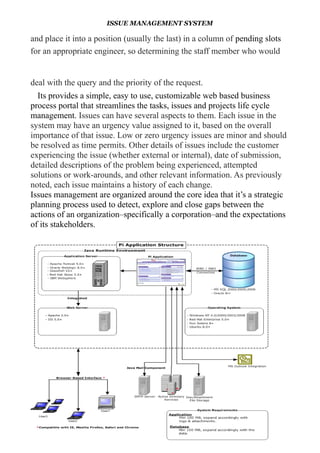
Issues management are organized around the core idea that it’s a strategic
planning process used to detect, explore and close gaps between the
actions of an organization–specifically a corporation–and the expectations
of its stakeholders.
PRATIK KUMAR
ISSUE MANAGEMENT SYSTEM
2.Software and Hardware Specifications
2.1 Hardware Specification:-
Processor : Pentium III/AMD Athlone XP
RAM : 128 MB
Hard disk : 20 GB
FDD : 1.44MB
Monitor : 14 inch
Mouse : 3 Button scroll
CD Drive : 52 X
Keyboard : 108 keys
2.2 Software Specification:-
Operating System : Windows 2000/xp /7/8
Languages : java ( JDBC, JSP, Servlet, )
Front End : HTML, CSS, JavaScript
Platform : NetBeans
Web Servers : Tomcat 7.0
Backend : Oracle10g
Browser Program : Google Chrome/Mozilla Fireworks
PRATIK KUMAR
ISSUE MANAGEMENT SYSTEM
3. Software Development Life Cycle (SDLC):-
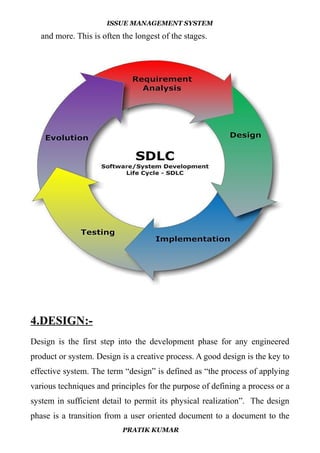
The systems development life cycle (SDLC), or software development
process in systems engineering, information systems and software
engineering, is a process of creating or altering information systems, and
the models and methodologies that people use to develop these systems. In
software engineering, the SDLC concept underpins many kinds of
software development methodologies.
A Systems Development Life Cycle (SDLC) adheres to important phases
that are essential for developers, such as planning, analysis, design, and
implementation, and are explained in the section below.It include
evaluation of present system, information gathering, feasibility study and
request approval. These stages can be characterized and divided up in
different ways, including the following:
Systems analysis, requirements definition: Defines project goals into
defined functions and operation of the intended application. Analyzes end-
user information needs.
• Systems design: Describes desired features and operations in detail,
including screen layouts, business rules, process diagrams, pseudocode
and other documentation.
• Development: The real code is written here.
• Integration and testing: Brings all the pieces together into a special
testing environment, then checks for errors, bugs and interoperability.
• Acceptance, installation, deployment: The final stage of initial
development, where the software is put into production and runs actual
business.
• Maintenance: What happens during the rest of the software's life:
changes, correction, additions, moves to a different computing platform
PRATIK KUMAR
ISSUE MANAGEMENT SYSTEM
and more. This is often the longest of the stages.
4.DESIGN:-
Design is the first step into the development phase for any engineered
product or system. Design is a creative process. A good design is the key to
effective system. The term “design” is defined as “the process of applying
various techniques and principles for the purpose of defining a process or a
system in sufficient detail to permit its physical realization”. The design
phase is a transition from a user oriented document to a document to the
PRATIK KUMAR
ISSUE MANAGEMENT SYSTEM
programmers or database personnel. System design goes through two
phases of development: Logical and Physical Design.
4.1 LOGICAL DESIGN:-
The logical flow of a system and define the boundaries of a system.
It includes the following steps:
 Reviews the current physical system – its data flows, file content,
volumes , Frequencies etc.
 Prepares output specifications – that is, determines the format,
content and Frequency of reports.
4.2 PHYSICAL DESIGN:-
Physical system produces the working systems by define the design
specifications that tell the programmers exactly what the candidate system
must do. It includes the following steps-
 Design the physical system.
 Specify input and output media.
 Design the database and specify backup procedures.
 Design physical information flow through the system and a physical
design
Design/Specification activities:
 Concept formulation.
 Problem understanding.
 High level requirements proposals.
 Feasibility study.
PRATIK KUMAR
ISSUE MANAGEMENT SYSTEM
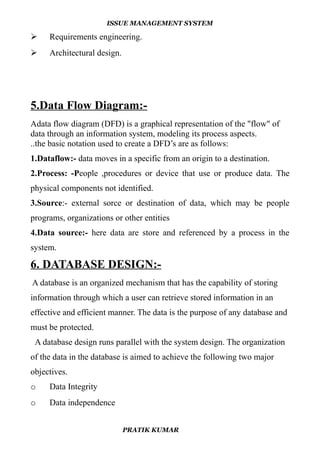
 Requirements engineering.
 Architectural design.
5.Data Flow Diagram:-
Adata flow diagram (DFD) is a graphical representation of the "flow" of
data through an information system, modeling its process aspects.
..the basic notation used to create a DFD’s are as follows:
1.Dataflow:- data moves in a specific from an origin to a destination.
2.Process: -People ,procedures or device that use or produce data. The
physical components not identified.
3.Source:- external sorce or destination of data, which may be people
programs, organizations or other entities
4.Data source:- here data are store and referenced by a process in the
system.
6. DATABASE DESIGN:-
A database is an organized mechanism that has the capability of storing
information through which a user can retrieve stored information in an
effective and efficient manner. The data is the purpose of any database and
must be protected.
A database design runs parallel with the system design. The organization
of the data in the database is aimed to achieve the following two major
objectives.
o Data Integrity
o Data independence
PRATIK KUMAR
ISSUE MANAGEMENT SYSTEM
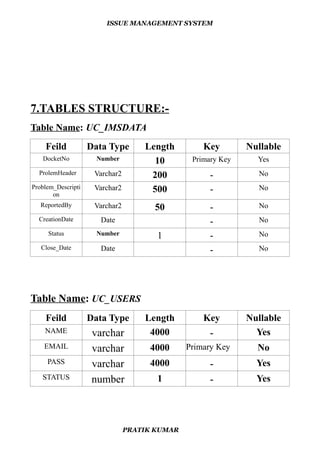
7.TABLES STRUCTURE:-
Table Name: UC_IMSDATA
Feild Data Type Length Key Nullable
DocketNo Number 10 Primary Key Yes
ProlemHeader Varchar2 200 - No
Problem_Descripti
on
Varchar2 500 - No
ReportedBy Varchar2 50 - No
CreationDate Date - No
Status Number 1 - No
Close_Date Date - No
Table Name: UC_USERS
Feild Data Type Length Key Nullable
NAME varchar 4000 - Yes
EMAIL varchar 4000 Primary Key No
PASS varchar 4000 - Yes
STATUS number 1 - Yes
PRATIK KUMAR
ISSUE MANAGEMENT SYSTEM
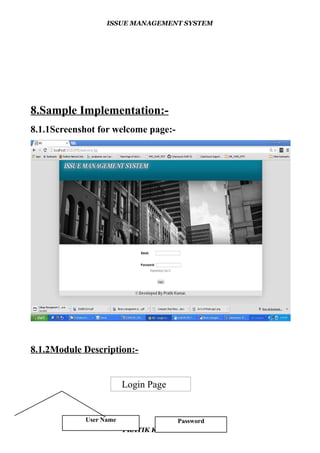
8.Sample Implementation:-
8.1.1Screenshot for welcome page:-
8.1.2Module Description:-
Login Page
PRATIK KUMAR
User Name Password
ISSUE MANAGEMENT SYSTEM
* In the Welcome page, Users enter the valid email-id's & password.
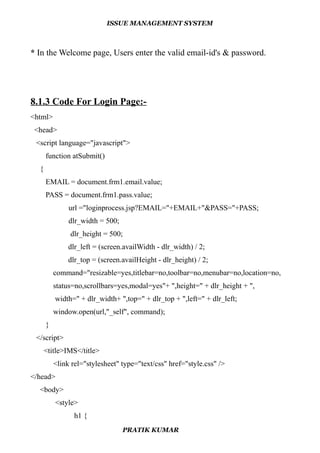
8.1.3 Code For Login Page:-
<html>
<head>
<script language="javascript">
function atSubmit()
{
EMAIL = document.frm1.email.value;
PASS = document.frm1.pass.value;
url ="loginprocess.jsp?EMAIL="+EMAIL+"&PASS="+PASS;
dlr_width = 500;
dlr_height = 500;
dlr_left = (screen.availWidth - dlr_width) / 2;
dlr_top = (screen.availHeight - dlr_height) / 2;
command="resizable=yes,titlebar=no,toolbar=no,menubar=no,location=no,
status=no,scrollbars=yes,modal=yes"+ ",height=" + dlr_height + ",
width=" + dlr_width+ ",top=" + dlr_top + ",left=" + dlr_left;
window.open(url,"_self", command);
}
</script>
<title>IMS</title>
<link rel="stylesheet" type="text/css" href="style.css" />
</head>
<body>
<style>
h1 {
PRATIK KUMAR
ISSUE MANAGEMENT SYSTEM
color: white;
text-shadow: 1px 1px 2px black, 0 0 25px linen, 0 0 5px darkblue;
}
h1 {
color: red;
text-align: center;
}
</style>
<center>
<div id="outer">
<div id="header">
<div id="logo">
<center><h1>
<a href="welcome.jsp"><strong><em><blockquote>
Issue Management System</a></blockquote></em></strong></a>
</h1></center>
</div>
</div>
<div id="banner">
<img src="images/banner.jpg" alt="" /></div>
<form action="javascript:atSubmit()" METHOD="POST" name="frm1"><br>
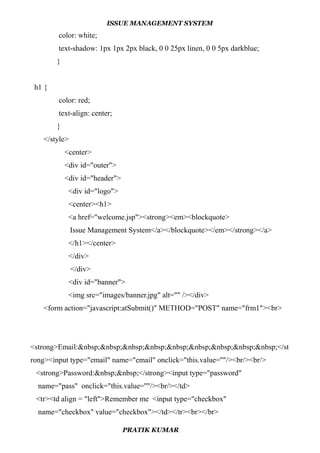
<strong>Email:&nbsp;&nbsp;&nbsp;&nbsp;&nbsp;&nbsp;&nbsp;&nbsp;&nbsp;</st
rong><input type="email" name="email" onclick="this.value=''"/><br/><br/>
<strong>Password:&nbsp;&nbsp;</strong><input type="password"
name="pass" onclick="this.value=''"/><br/></td>
<tr><td align = "left">Remember me <input type="checkbox"
name="checkbox" value="checkbox"></td></tr><br></br>
PRATIK KUMAR
ISSUE MANAGEMENT SYSTEM
<input type="submit" value="&nbsp;login&nbsp;"/>
</form>
<div id="main">
<table align="right">
<tr align="center">
<td style="color: navy;"></td></tr>
<tr><td></td></tr></table>
<div id="sidebar">
<div class="box">
<table>
<tr><td style="color:navy;"></td></tr>
</table>
</div>
</div><br class="clear" /></div>
<div class="bottom">
<p><table width="100%" border="0" cellspacing="0" cellpadding="0">
<p><jsp:include page="footer.jsp" /></p>
</table></p>
</div>
</body>
</html>
8.1.4 Code for checking of username and password information :-
<%@ page language="java" import="java.util.*" pageEncoding="ISO-8859-1"%>
<%@page import="org.omg.CORBA.PUBLIC_MEMBER"%>
<%@page import="java.sql.*"%>
<%@page import="java.util.*"%>
<%
PRATIK KUMAR
ISSUE MANAGEMENT SYSTEM
String EMAIL=request.getParameter("EMAIL");
String PASS=request.getParameter("PASS");
try{
Class.forName("oracle.jdbc.driver.OracleDriver");
Connection
con=DriverManager.getConnection("jdbc:oracle:thin:@172.16.210.52:1540:ushadb",
"infrabdb","infrabdb");
PreparedStatement ps=con.prepareStatement("select count(*) cnt from uc_users
where status = 1 and EMAIL=? and PASS=?");
ps.setString(1,EMAIL);
ps.setString(2,PASS);
ResultSet rs=ps.executeQuery();
String status=null;
while(rs.next())
{
status = rs.getString(1);
}
int numberstatus = Integer.parseInt(status.trim());
if(numberstatus == 1)
{
%>
<jsp:forward page="home.jsp"></jsp:forward>
<%
}
else{
%>
<jsp:forward page="WrongPass.jsp"></jsp:forward>
<%
PRATIK KUMAR
ISSUE MANAGEMENT SYSTEM
}
}
catch(Exception e){
e.printStackTrace();
}
%>
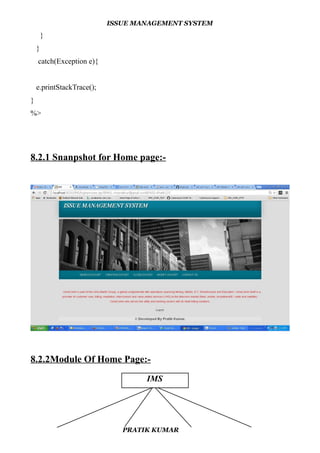
8.2.1 Snanpshot for Home page:-
8.2.2Module Of Home Page:-
PRATIK KUMAR
IMS
ISSUE MANAGEMENT SYSTEM
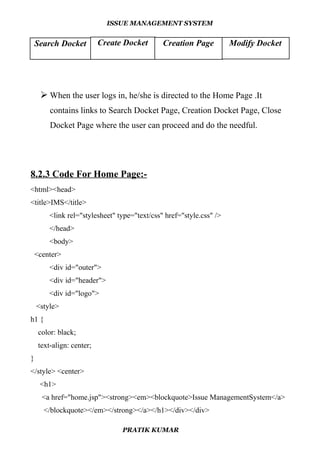
 When the user logs in, he/she is directed to the Home Page .It
contains links to Search Docket Page, Creation Docket Page, Close
Docket Page where the user can proceed and do the needful.
8.2.3 Code For Home Page:-
<html><head>
<title>IMS</title>
<link rel="stylesheet" type="text/css" href="style.css" />
</head>
<body>
<center>
<div id="outer">
<div id="header">
<div id="logo">
<style>
h1 {
color: black;
text-align: center;
}
</style> <center>
<h1>
<a href="home.jsp"><strong><em><blockquote>Issue ManagementSystem</a>
</blockquote></em></strong></a></h1></div></div>
PRATIK KUMAR
Search Docket Create Docket Creation Page Modify Docket
ISSUE MANAGEMENT SYSTEM
</div>
<div id="banner">
<img src="images/banner.jpg" alt="" />
<div id="nav"><ul>
<li class="first">
<a href="searchdocket.jsp">Search Docket</a></li>
<li> <a href="createdocket.jsp">Creation Docket</a></li>
<li><a href="closedocket.jsp">Close Docket</a></li>
<li><a href="modifydocket.jsp">Modify Docket</a></li>
<li><a href="contactus.jsp">Contact us</a></li>
&nbsp;&nbsp;&nbsp;&nbsp;&nbsp;&nbsp;&nbsp;&nbsp;&nbsp;&nbsp;&nbsp;&nb
sp;&nbsp;&nbsp;&nbsp;&nbsp;&nbsp;&nbsp;&nbsp;&nbsp;&nbsp;&nbsp;&nbsp;&
nbsp;&nbsp;&nbsp;&nbsp;&nbsp;&nbsp;&nbsp;&nbsp;&nbsp;&nbsp;&nbsp;
&nbsp;&nbsp;&nbsp;&nbsp;&nbsp;&nbsp;&nbsp;&nbsp;&nbsp;&nbsp;&nbsp;&nb
sp;&nbsp;&nbsp;&nbsp;&nbsp;&nbsp;
</ul><br class="clear" />
</div>
<div id="main">
<table align="right">
<tr align="center"><td style="color: navy;"></td></tr>
<tr><td></td></tr></table>
<div id="sidebar">
<div class="box">
<table>
<tr><td style="color:navy;"></td></tr>
</table>
</div>
</div><br class="clear" />
</div>
PRATIK KUMAR
ISSUE MANAGEMENT SYSTEM
<style>{
background-position: right;
}
</style>
</body>
<body>
<style>
p {
color: red;
text-align: center;
}
</style>
<p>&nbsp;&nbsp;&nbsp;&nbsp;UshaComm is part of the Usha Martin Group, a
global conglomerate with operations spanning Mining, Metals, ICT, Infrastructure
and Education. UshaComm itself is a provider of customer care, billing, mediation,
interconnect and value added services (VAS) to the telecoms market (fixed, mobile,
broadband/IP, cable and satellite). UshaComm also serves the utility and banking
sectors with its retail billing solutions.
</p></body>
<body>
<form method="link" action="logout.jsp">
<input type="submit" value="Logout"><br></br>
<p><jsp:include page="footer.jsp" /></p>
</html>
PRATIK KUMAR
ISSUE MANAGEMENT SYSTEM
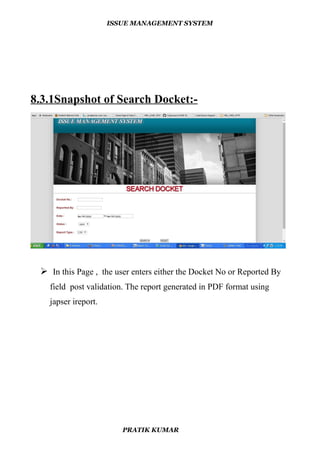
8.3.1Snapshot of Search Docket:-
 In this Page , the user enters either the Docket No or Reported By
field post validation. The report generated in PDF format using
japser ireport.
PRATIK KUMAR
ISSUE MANAGEMENT SYSTEM
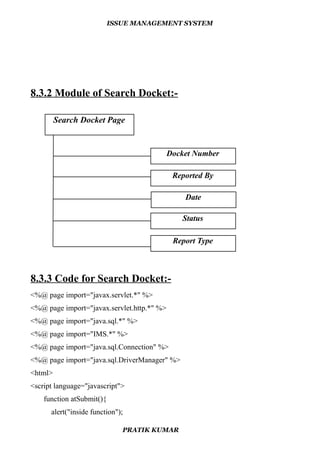
8.3.2 Module of Search Docket:-
8.3.3 Code for Search Docket:-
<%@ page import="javax.servlet.*" %>
<%@ page import="javax.servlet.http.*" %>
<%@ page import="java.sql.*" %>
<%@ page import="IMS.*" %>
<%@ page import="java.sql.Connection" %>
<%@ page import="java.sql.DriverManager" %>
<html>
<script language="javascript">
function atSubmit(){
alert("inside function");
PRATIK KUMAR
Search Docket Page
Docket Number
Reported By
Date
Status
Report Type
ISSUE MANAGEMENT SYSTEM
Docketno = document.frm1.Docketno.value;
reportedby = document.frm1.reportedby.value;
alert("DOCKETNO="+Docketno);
url="searc.jsp?DOCKETNO="+Docketno;
dlr_width = 850;
dlr_height = 600;
dlr_left = (screen.availWidth - dlr_width) / 2;
dlr_top = (screen.availHeight - dlr_height) / 2;
command="resizable=yes,titlebar=no,toolbar=no,menubar=no,location=no,
status=no,scrollbars=yes,modal=yes"+ ",height=" + dlr_height + ",width=
" + dlr_width+ ",top=" + dlr_top + ",left=" + dlr_left;
window.open(url,"_blank", command);
}
</script>
<head>
<title>IMS</title>
<link rel="stylesheet" type="text/css" href="style.css" />
</head><body><center><style>
h1 {
color: white;
text-shadow: 1px 1px 2px black, 0 0 25px linen, 0 0 5px darkblue;
}
h1 {
color: red;
text-align: center;
}
</style>
<div id="outer">
<div id="header">
PRATIK KUMAR
ISSUE MANAGEMENT SYSTEM
<div id="logo"><h1>
<a>href="home.jsp"><strong><em><blockquote>IssueManagementSystem</a>
</blockquote></em></strong></a></h1>
</div></div><div id="banner">
<img src="images/banner.jpg" alt="" /></div>
</head>
<body><div></style>
<CENTER>
<table>
<tr>
<td><strong><h1>Search Docket</h1></strong></td>
</tr> </table><hr> </p>
</body>
<body>
<table style="width:100%"><tr><td></td>
</table>
<FORM ACTION="javascript:atSubmit()" METHOD="POST" name="frm1">
<%
System.out.println("at form"); %>
<p><b>&nbsp;&nbsp;&nbsp;&nbsp;Docket No.:
&nbsp;&nbsp;&nbsp;&nbsp;&nbsp;&nbsp; </b><input type="number"
name="Docketno" onclick="this.value=''" ><br/>
<p><b>&nbsp;&nbsp;&nbsp;&nbsp;Reported By:&nbsp;&nbsp;&nbsp;
</b><input type="text" name="reportedby" onclick="this.value=''" ><br/>
<p><b>&nbsp;&nbsp;&nbsp;&nbsp;Date
:&nbsp;&nbsp;&nbsp;&nbsp;&nbsp;&nbsp;&nbsp;&nbsp;&nbsp;&nbsp;&nbsp;&n
bsp;&nbsp;&nbsp;&nbsp;&nbsp;&nbsp;</b>
<style>
p {
PRATIK KUMAR
ISSUE MANAGEMENT SYSTEM
color: brown;
text-align: left;
}
</style> <style>
p1 {
color: black;
text-align: left;
}
</style><p1>
<%
System.out.println("reported by"); %>
<body>
<p1></td> <td><input type = "date" name = "datefrom"
onclick="this.value=''"> to</td> <td><input type = "date" name = "dateto"
onclick="this.value=''"></p1> </body>
<p><b>&nbsp;&nbsp;&nbsp;&nbsp;Status:&nbsp;&nbsp;&nbsp;&nbsp;&nbsp;&nb
sp;&nbsp;&nbsp;&nbsp;&nbsp;&nbsp;&nbsp;&nbsp;&nbsp;&nbsp;
<select name="NumberChooser" >
<option value="0">open</option>
<option value="0">close</option>
</select></p>
<p><b>&nbsp;&nbsp;&nbsp;&nbsp;Report Type :&nbsp;&nbsp;&nbsp; </b>
<select name="NumberChooser" >
<option value="0">CSV</option>
<option value="0">PDF</option>
<option value="0">RTF</option>
</select> </p><p><b>
<center>
<input type="submit" name="submit"
PRATIK KUMAR
ISSUE MANAGEMENT SYSTEM
value="SEARCH"/>&nbsp;&nbsp;&nbsp;&nbsp;&nbsp;&nbsp;
&nbsp;&nbsp;&nbsp;&nbsp;&nbsp;&nbsp;<b>
<INPUT TYPE="RESET" value="RESET"> <br><br>
</FORM>
</div>
</body>
<p><jsp:include page="footer.jsp" /></p>
</html>
8.3.4 Code for Searching Docket :-
<%@ page import="java.sql.*,java.io.*,java.util.HashMap,java.text.*,java.util.Map,
java.util.Calendar"%>
<%@ page import="java.io.*,GLCare.DBManager.*,
java.util.*,
net.sf.jasperreports.engine.*,er.*,
net.sf.jasperreports.engine.design.JasperDesign.*,
net.sf.jasperreports.engine.xml.JRXmlLoader.*,
net.sf.jasperreports.engine.export.*"
%>
<%@include file="include/connection.jsp"%>
<%
String DOCKETNO = request.getParameter("DOCKETNO");
%>
<%
String path = application.getRealPath("/report");
Map params = new HashMap();
params.put("DOCKETNO",DOCKETNO);
PRATIK KUMAR
ISSUE MANAGEMENT SYSTEM
JasperPrint jasperPrint = JasperFillManager.fillReport(path + "/"+"
DOCKET REPORT.jasper", params, jasconn);
System.out.println("Report Created...");
OutputStream ouputStream = response.getOutputStream();
JRExporter exporter = null;
response.setContentType("application/pdf");
response.setHeader("Content-Disposition", "inline;
filename="DOCKET.pdf"");
exporter = new JRPdfExporter();
exporter.setParameter(JRExporterParameter.JASPER_PRINT, jasperPrint);
exporter.setParameter(JRExporterParameter.OUTPUT_STREAM,
ouputStream);
try {
exporter.exportReport();
} catch (JRException e) {
throw new ServletException(e);
}
finally {
if (ouputStream != null) {
try {
ouputStream.flush();
ouputStream.close();
}
catch (IOException ex) { } } }
%>
<html>
<body bgcolor="Yellow">
<table border="1" width="30%" height="30%">
<tr><th><font color='Red'>DOCKETNO</font></th><th><font
PRATIK KUMAR
ISSUE MANAGEMENT SYSTEM
color='Red'>REPORTEDBY</font></th></tr>
<tr><th><font color='Red'>CREATIONDATE</font></th><th><font
color='Red'>STATUS</font></th></tr>
<tr><th><font color='Red'>CLOSE_DATE</font></th>
</table>
</body>
</html>
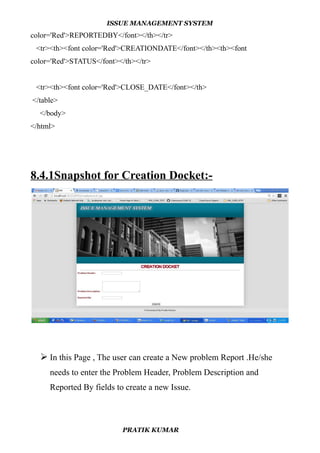
8.4.1Snapshot for Creation Docket:-
 In this Page , The user can create a New problem Report .He/she
needs to enter the Problem Header, Problem Description and
Reported By fields to create a new Issue.
PRATIK KUMAR
ISSUE MANAGEMENT SYSTEM
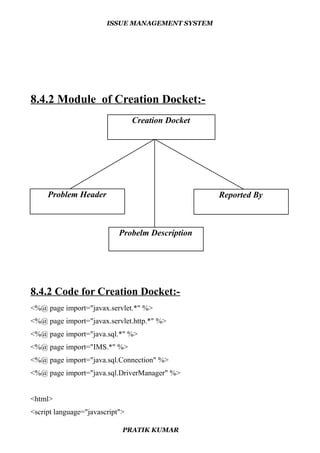
8.4.2 Module of Creation Docket:-
8.4.2 Code for Creation Docket:-
<%@ page import="javax.servlet.*" %>
<%@ page import="javax.servlet.http.*" %>
<%@ page import="java.sql.*" %>
<%@ page import="IMS.*" %>
<%@ page import="java.sql.Connection" %>
<%@ page import="java.sql.DriverManager" %>
<html>
<script language="javascript">
PRATIK KUMAR
Reported ByProblem Header
Creation Docket
Probelm Description
ISSUE MANAGEMENT SYSTEM
function atSubmit(){
problemheader = document.frm1.problemheader.value;
problem_description = document.frm1.problem_description.value;
reportedby = document.frm1.reportedby.value;
alert("PROBLEMHEADER="+problemheader+"n"+"
PROBLEMDESCRIPTION:"+problem_description+"n"+"
REPORTEDBY:"+reportedby);
url="insert.jspPROBLEMHEADER="+problemheader+"
&PROBLEMDESCRIPTION="+problem_description+"
&REPORTEDBY="+reportedby;
dlr_width = 200;
dlr_height = 200;
dlr_left = (screen.availWidth - dlr_width) / 2;
dlr_top = (screen.availHeight - dlr_height) / 2;
command="resizable=yes,titlebar=no,toolbar=no,menubar=no,location=no,
status=no,scrollbars=yes,modal=yes" + ",height=" + dlr_height + ",
width=" + dlr_width + ",top=" + dlr_top + ",left=" + dlr_left;
window.open(url,"_blank", command);
window.open("success.html");
}
</script>
<head>
<title>IMS</title>
<link rel="stylesheet" type="text/css" href="style.css" />
</head>
<body>
<center>
<style>
h1 {
PRATIK KUMAR
ISSUE MANAGEMENT SYSTEM
color: white;
text-shadow: 1px 1px 2px black, 0 0 25px linen, 0 0 5px darkblue;
}
h1 {
color: red;
text-align: center;
}
</style>
<div id="outer">
<div id="header">
<div id="logo">
<h1> <a href="home.jsp"><strong><em><blockquote>Issue Management System
</a></blockquote> </em></strong> </a> </h1></div> </div>
<div id="banner"><img src="images/banner.jpg" alt="" /></div>
</head>
<body>
<div id="nav">
<ul><li class="first">
<CENTER>
<table> <tr>
<td><strong><h1>Creation Docket</h1></strong></td>
</tr>
</table>
<hr></li>
</div></body>
<body>
<table style="width:100%">
<tr> <td></td>
</table>
PRATIK KUMAR
ISSUE MANAGEMENT SYSTEM
<form action="javascript:atSubmit()" METHOD="POST" name="frm1">
<%
System.out.println("at form"); %>
<style>
p {
color: brown;
text-align: left;
}
</style>
<br>
<ul>
<p><b>ProblemHeader:<input type="text" name = "problemheader" ></p>
<p><b>&nbsp;&nbsp;Problem Description:&nbsp;&nbsp;&nbsp; <td><textarea
name="problem_description" onclick="this.value=''" rows=5
cols=30></textarea></p><b/>
<p><b>&nbsp;&nbsp;ReportedBy:&nbsp;&nbsp;&nbsp;&nbsp;&nbsp;&nbsp;&nbs
p;&nbsp;&nbsp;&nbsp;&nbsp;&nbsp;&nbsp;&nbsp;&nbsp;&nbsp;&nbsp;&nbsp;</
b<input type="text" name="reportedby" value=" " onclick="this.value=''"><br/>
</ul><p><b><center>
<input type="SUBMIT" name="submit" value="CREATE"/>
&nbsp;&nbsp;&nbsp;&nbsp;&nbsp;&nbsp;&nbsp;&nbsp;&nbsp;&nbsp;&nbsp;<br>
</FORM>
</div>
</body>
<p><jsp:include page="footer.jsp" /></p>
</html>
PRATIK KUMAR
ISSUE MANAGEMENT SYSTEM
8.4.3 Code for Creating Docket:-
<%@ page
import="java.sql.*,java.io.*,java.util.HashMap,java.text.*,java.util.Map,java.util.Cale
ndar"%>
<%@ page import="java.io.*,GLCare.DBManager.*,java.util.*,
net.sf.jasperreports.engine.*,er.*,
net.sf.jasperreports.engine.design.JasperDesign.*,
net.sf.jasperreports.engine.xml.JRXmlLoader.*,
net.sf.jasperreports.engine.export.*"%>
<%
String PROBLEMHEADER = request.getParameter("PROBLEMHEADER");
StringPROBLEMDESCRIPTION=request.getParameter
("PROBLEMDESCRIPTION");
String REPORTEDBY = request.getParameter("REPORTEDBY");
System.out.println("PROBLEMHEADER>>"+PROBLEMHEADER);
System.out.println("PROBLEMDESCRIPTION>>"
+PROBLEMDESCRIPTION);
System.out.println("REPORTEDBY>>"+REPORTEDBY);
try
{
System.out.println("at submit");
Class.forName("oracle.jdbc.driver.OracleDriver");
Connectioncon=DriverManager.getConnection("jdbc:oracle:thin:
@172.16.210.52:1540:ushadb","infrabdb","infrabdb");
Statement stmt=con.createStatement();
PRATIK KUMAR
ISSUE MANAGEMENT SYSTEM
System.out.println("at submit");
String queryText = "insert into uc_imsdata
(docketNo, problemheader,problem_description,
reportedby,creationdate,status, close_date)
values(uc_imsdata_docketno_SQN.nextval,'"+PROBLEMHEADER+"',
'"+PROBLEMDESCRIPTION+"','"+REPORTEDBY+"',sysdate,1,sysdate)";
System.out.println(queryText);
stmt.executeUpdate(queryText);
}catch (Exception e)
{
e.printStackTrace();
}
%>
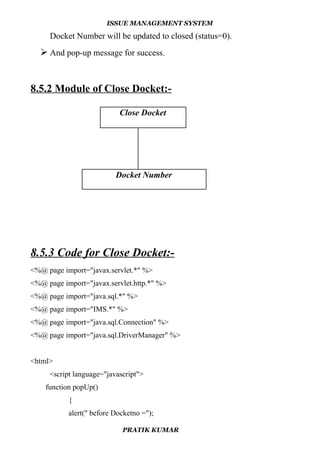
8.5.1 Snapshot for Close Docket:-
 In this page , the user enters the Docket Number field. The input
PRATIK KUMAR
ISSUE MANAGEMENT SYSTEM
Docket Number will be updated to closed (status=0).
 And pop-up message for success.
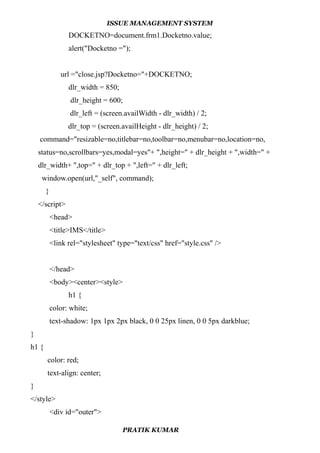
8.5.2 Module of Close Docket:-
8.5.3 Code for Close Docket:-
<%@ page import="javax.servlet.*" %>
<%@ page import="javax.servlet.http.*" %>
<%@ page import="java.sql.*" %>
<%@ page import="IMS.*" %>
<%@ page import="java.sql.Connection" %>
<%@ page import="java.sql.DriverManager" %>
<html>
<script language="javascript">
function popUp()
{
alert(" before Docketno =");
PRATIK KUMAR
Close Docket
Docket Number
ISSUE MANAGEMENT SYSTEM
DOCKETNO=document.frm1.Docketno.value;
alert("Docketno =");
url ="close.jsp?Docketno="+DOCKETNO;
dlr_width = 850;
dlr_height = 600;
dlr_left = (screen.availWidth - dlr_width) / 2;
dlr_top = (screen.availHeight - dlr_height) / 2;
command="resizable=no,titlebar=no,toolbar=no,menubar=no,location=no,
status=no,scrollbars=yes,modal=yes"+ ",height=" + dlr_height + ",width=" +
dlr_width+ ",top=" + dlr_top + ",left=" + dlr_left;
window.open(url,"_self", command);
}
</script>
<head>
<title>IMS</title>
<link rel="stylesheet" type="text/css" href="style.css" />
</head>
<body><center><style>
h1 {
color: white;
text-shadow: 1px 1px 2px black, 0 0 25px linen, 0 0 5px darkblue;
}
h1 {
color: red;
text-align: center;
}
</style>
<div id="outer">
PRATIK KUMAR
ISSUE MANAGEMENT SYSTEM
<div id="header">
<div id="logo">
<h1>
<ahref="home.jsp"><strong><em><blockquote>Issue Management
System</a></blockquote></em></strong></a></h1>
</div>
</div>
<div id="banner">
<img src="images/banner.jpg" alt="" /></div>
</head>
<body>
<div id="nav">
<ul><li class="first">
<CENTER>
<table> <tr>
<td><h1>Close Docket</h1></td>
</tr> </table><hr></li>
</div>
</body>
<body>
<table style="width:100%"> <tr>
<td></td>
</table><br>
<FORM ACTION="javascript:popUp()" METHOD="POST" name="frm1">
<b>DocketNo.:&nbsp;&nbsp;&nbsp;&nbsp;&nbsp;&nbsp;<inputtype="number"na
me="Docketno"onclick="this.value=''"><center>&nbsp;&nbsp;&nbsp;&nbsp;&nbsp
;&nbsp;&nbsp;&nbsp;&nbsp;&nbsp;&nbsp;&nbsp;&nbsp;&nbsp;&nbsp;&nbsp;&n
bsp;&nbsp;&nbsp;&nbsp;&nbsp;&nbsp;&nbsp;&nbsp;&nbsp;&nbsp;&nbsp;&nbsp;
PRATIK KUMAR
ISSUE MANAGEMENT SYSTEM
&nbsp;&nbsp;&nbsp;&nbsp;&nbsp;&nbsp;&nbsp;&nbsp;&nbsp;&nbsp;&nbsp;&nb
sp;&nbsp;&nbsp;&nbsp;&nbsp;&nbsp;&nbsp;&nbsp;&nbsp;&nbsp;&nbsp;&nbsp;&
nbsp;&nbsp;&nbsp;&nbsp;&nbsp;&nbsp;&nbsp&nbsp;&nbsp;<br><CENTER>
<input type="submit" name="submit" value="CLOSE"/>
</FORM>
<br><br>
</body> <p><jsp:include page="footer.jsp" /></p>
</html>
8.5.4 Code for Closing Docket:-
<%page import="java.sql.*,java.io.*,java.util.HashMap,java.text.*,
java.util.Map,java.util.Calendar"%>
<%@ page import="java.io.*,GLCare.DBManager.*,
java.util.*,
net.sf.jasperreports.engine.*,er.*,
net.sf.jasperreports.engine.design.JasperDesign.*,
net.sf.jasperreports.engine.xml.JRXmlLoader.*,
net.sf.jasperreports.engine.export.*"
%>
<%@include file="include/connection.jsp"%>
<%
String docketNo = request.getParameter("Docketno");
System.out.println("Docketno>>"+docketNo);
PRATIK KUMAR
ISSUE MANAGEMENT SYSTEM
try
{
System.out.println("at submit");
Class.forName("oracle.jdbc.driver.OracleDriver");
Connectioncon=DriverManager.getConnection("jdbc:oracle:thin:
@172.16.210.52:1540:ushadb","infrabdb","infrabdb");
Statement stmt=con.createStatement();
System.out.println("at submit");
String querySelect = "(select status from uc_imsdata
WHERE docketno="+docketNo+")";
tmt.executeQuery(querySelect);
ResultSet rs=stmt.executeQuery(querySelect);
String status = null;
while(rs.next())
{
status=rs.getString("STATUS");
}
System.out.println("status ="+status);
String queryText = "(UPDATE uc_imsdata SET status = 0 WHERE
status = 1 and docketNo="+docketNo+")";
System.out.println(queryText);
stmt.executeUpdate(queryText);
}catch (Exception e)
{
e.printStackTrace();
}
%>
<html><body bgcolor="sky blue">
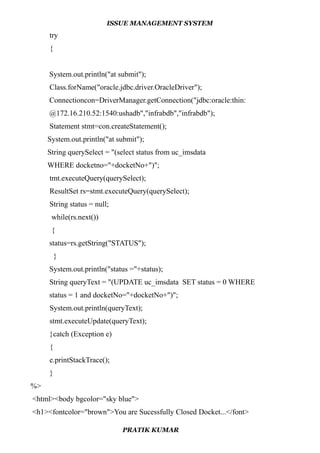
<h1><fontcolor="brown">You are Sucessfully Closed Docket...</font>
PRATIK KUMAR
ISSUE MANAGEMENT SYSTEM
</h1>
</body></html>
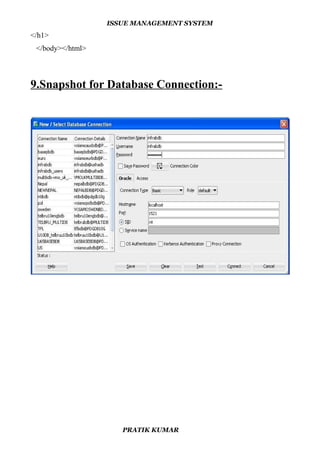
9.Snapshot for Database Connection:-
PRATIK KUMAR
ISSUE MANAGEMENT SYSTEM
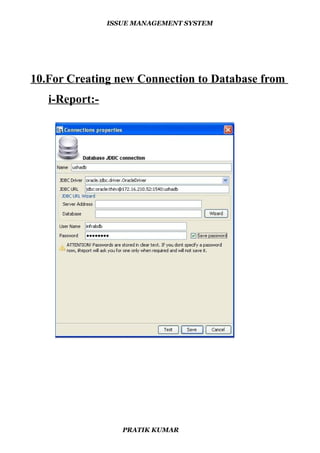
10.For Creating new Connection to Database from
i-Report:-
PRATIK KUMAR
ISSUE MANAGEMENT SYSTEM
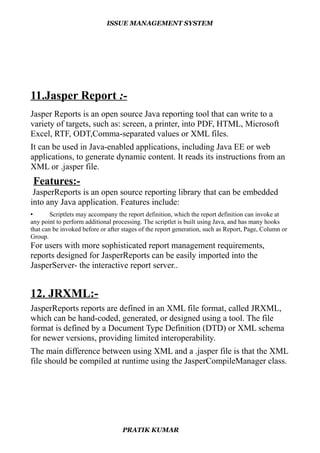
11.Jasper Report :-
Jasper Reports is an open source Java reporting tool that can write to a
variety of targets, such as: screen, a printer, into PDF, HTML, Microsoft
Excel, RTF, ODT,Comma-separated values or XML files.
It can be used in Java-enabled applications, including Java EE or web
applications, to generate dynamic content. It reads its instructions from an
XML or .jasper file.
Features:-
JasperReports is an open source reporting library that can be embedded
into any Java application. Features include:
• Scriptlets may accompany the report definition, which the report definition can invoke at
any point to perform additional processing. The scriptlet is built using Java, and has many hooks
that can be invoked before or after stages of the report generation, such as Report, Page, Column or
Group.
For users with more sophisticated report management requirements,
reports designed for JasperReports can be easily imported into the
JasperServer- the interactive report server..
12. JRXML:-
JasperReports reports are defined in an XML file format, called JRXML,
which can be hand-coded, generated, or designed using a tool. The file
format is defined by a Document Type Definition (DTD) or XML schema
for newer versions, providing limited interoperability.
The main difference between using XML and a .jasper file is that the XML
file should be compiled at runtime using the JasperCompileManager class.
PRATIK KUMAR
ISSUE MANAGEMENT SYSTEM
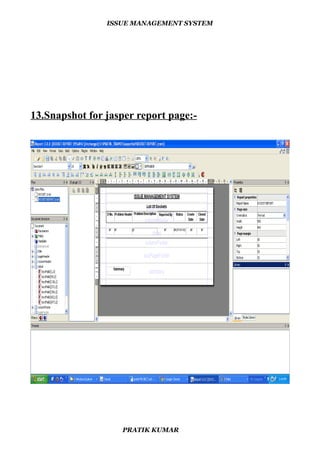
13.Snapshot for jasper report page:-
PRATIK KUMAR
ISSUE MANAGEMENT SYSTEM
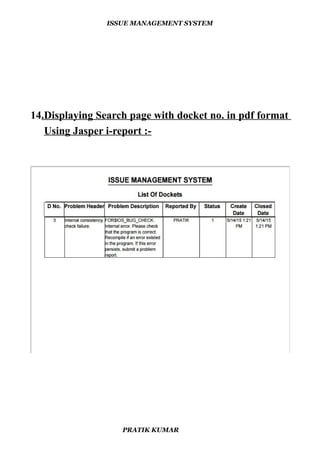
14.Displaying Search page with docket no. in pdf format
Using Jasper i-report :-
PRATIK KUMAR
ISSUE MANAGEMENT SYSTEM
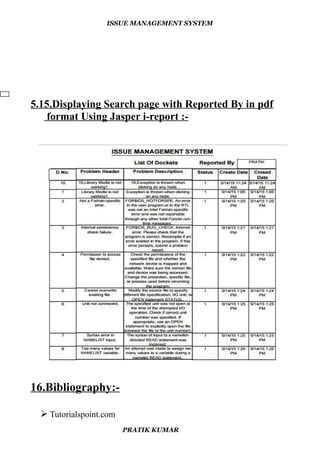
5.15.Displaying Search page with Reported By in pdf
format Using Jasper i-report :-
16.Bibliography:-
 Tutorialspoint.com
PRATIK KUMAR
ISSUE MANAGEMENT SYSTEM
 Javatpoint.com
 community.jaspersoft.com
PRATIK KUMAR

Issue Management System

  • 1.
    Issue Management System PROJECTSYNOPSIS Bachelor Of Technology Computer Science And Engineering Submitted By PRATIK KUMAR May-June 2015 Institute Of Technology, GGV Bilaspur A CENTRAL UNVERSITY
  • 2.
    ISSUE MANAGEMENT SYSTEM ACKNOWLEDGEMENT Thesatisfaction that accompanies that the successful completion of the project would not have been complete without the mention of people whose ceaseless cooperation made it possible, whose constant guidance and encouragement crown all efforts with success. I’m grateful to my project guide Mr. Sankham Singha Roy (Associate Manager, UshaComm) for the guidance, inspiration and constructive suggestions that helped me in the completion of this project. I also take this opportunity to express a deep sense of gratitude to my project head Mr. Rakesh Kumar Singh (Senior Manager, UshaComm) for his cordial support, valuable suggestions and guidance. PRATIK KUMAR
  • 3.
    ISSUE MANAGEMENT SYSTEM CONTENTS 1.Introduction 2. Software & Hardware Specifications 3. Software Develpment Life Cycle (SDLC) 4. Design 5. Data Flow Diagram 6. DataBase Design 7. Table Structure 8. Sample Implementation 9. Snapshot of Database Connection 10. For Creating new Connection to Database from iReport 11. Jasper Report 12. JRXML 13. Snapshot for Jasper Report Page 14. Displaying Search page with docket no. in pdf format Using Jasper i-Report 15. Displaying Search page with Reported By in pdf format Using Jasper i-Report 16. Bibliography PRATIK KUMAR
  • 4.
    ISSUE MANAGEMENT SYSTEM 1.Introduction It is especially designed to automate and streamline IT services, help desk and customer support processes. Its also provides an integrated knowledge base with built-in customizable search feature for instant business intelligence features such as alerts, reports and emails. An Issue Managment system (also issue tracking system, trouble ticket system, support ticket, request management or incident ticket system) is a computer software package that manages and maintains lists of issues, as needed by an organization. Issue Management systems are commonly used in an organization's customer support call center to create, search, close, update, and resolve reported customer issues, or even issues reported by that organization's other employees. A support ticket should include vital information for the account involved and the issue encountered. An issue Management system often also contains a knowledge base containing information on each customer, resolutions to common problems, and other such data. An issue Management system is similar to a "bugtracker", and often, a software company will sell both, and some bugtrackers are capable of being used as an issue Management system, and vice versa. Consistent use of an issue or bug tracking system is considered one of the "hallmarks of a good software team". A Docket element, within an Issue Management system, is a running report on a particular problem, its status, and other relevant data. They are commonly created in a help desk or call center environment and almost always have a unique reference number, also known as a case, issue or docket number which is used to allow the user or help staff to quickly locate, add to or communicate the status of the user's issue or request. These tickets are so called because of their origin as small cards within a traditional wall mounted work planning system when this kind of support started. Operators or staff receiving a call or query from a user would fill out a small card with the user's details and a brief summary of the request PRATIK KUMAR
  • 5.
    ISSUE MANAGEMENT SYSTEM andplace it into a position (usually the last) in a column of pending slots for an appropriate engineer, so determining the staff member who would deal with the query and the priority of the request. Its provides a simple, easy to use, customizable web based business process portal that streamlines the tasks, issues and projects life cycle management. Issues can have several aspects to them. Each issue in the system may have an urgency value assigned to it, based on the overall importance of that issue. Low or zero urgency issues are minor and should be resolved as time permits. Other details of issues include the customer experiencing the issue (whether external or internal), date of submission, detailed descriptions of the problem being experienced, attempted solutions or work-arounds, and other relevant information. As previously noted, each issue maintains a history of each change. Issues management are organized around the core idea that it’s a strategic planning process used to detect, explore and close gaps between the actions of an organization–specifically a corporation–and the expectations of its stakeholders. PRATIK KUMAR
  • 6.
    ISSUE MANAGEMENT SYSTEM 2.Softwareand Hardware Specifications 2.1 Hardware Specification:- Processor : Pentium III/AMD Athlone XP RAM : 128 MB Hard disk : 20 GB FDD : 1.44MB Monitor : 14 inch Mouse : 3 Button scroll CD Drive : 52 X Keyboard : 108 keys 2.2 Software Specification:- Operating System : Windows 2000/xp /7/8 Languages : java ( JDBC, JSP, Servlet, ) Front End : HTML, CSS, JavaScript Platform : NetBeans Web Servers : Tomcat 7.0 Backend : Oracle10g Browser Program : Google Chrome/Mozilla Fireworks PRATIK KUMAR
  • 7.
    ISSUE MANAGEMENT SYSTEM 3.Software Development Life Cycle (SDLC):- The systems development life cycle (SDLC), or software development process in systems engineering, information systems and software engineering, is a process of creating or altering information systems, and the models and methodologies that people use to develop these systems. In software engineering, the SDLC concept underpins many kinds of software development methodologies. A Systems Development Life Cycle (SDLC) adheres to important phases that are essential for developers, such as planning, analysis, design, and implementation, and are explained in the section below.It include evaluation of present system, information gathering, feasibility study and request approval. These stages can be characterized and divided up in different ways, including the following: Systems analysis, requirements definition: Defines project goals into defined functions and operation of the intended application. Analyzes end- user information needs. • Systems design: Describes desired features and operations in detail, including screen layouts, business rules, process diagrams, pseudocode and other documentation. • Development: The real code is written here. • Integration and testing: Brings all the pieces together into a special testing environment, then checks for errors, bugs and interoperability. • Acceptance, installation, deployment: The final stage of initial development, where the software is put into production and runs actual business. • Maintenance: What happens during the rest of the software's life: changes, correction, additions, moves to a different computing platform PRATIK KUMAR
  • 8.
    ISSUE MANAGEMENT SYSTEM andmore. This is often the longest of the stages. 4.DESIGN:- Design is the first step into the development phase for any engineered product or system. Design is a creative process. A good design is the key to effective system. The term “design” is defined as “the process of applying various techniques and principles for the purpose of defining a process or a system in sufficient detail to permit its physical realization”. The design phase is a transition from a user oriented document to a document to the PRATIK KUMAR
  • 9.
    ISSUE MANAGEMENT SYSTEM programmersor database personnel. System design goes through two phases of development: Logical and Physical Design. 4.1 LOGICAL DESIGN:- The logical flow of a system and define the boundaries of a system. It includes the following steps:  Reviews the current physical system – its data flows, file content, volumes , Frequencies etc.  Prepares output specifications – that is, determines the format, content and Frequency of reports. 4.2 PHYSICAL DESIGN:- Physical system produces the working systems by define the design specifications that tell the programmers exactly what the candidate system must do. It includes the following steps-  Design the physical system.  Specify input and output media.  Design the database and specify backup procedures.  Design physical information flow through the system and a physical design Design/Specification activities:  Concept formulation.  Problem understanding.  High level requirements proposals.  Feasibility study. PRATIK KUMAR
  • 10.
    ISSUE MANAGEMENT SYSTEM Requirements engineering.  Architectural design. 5.Data Flow Diagram:- Adata flow diagram (DFD) is a graphical representation of the "flow" of data through an information system, modeling its process aspects. ..the basic notation used to create a DFD’s are as follows: 1.Dataflow:- data moves in a specific from an origin to a destination. 2.Process: -People ,procedures or device that use or produce data. The physical components not identified. 3.Source:- external sorce or destination of data, which may be people programs, organizations or other entities 4.Data source:- here data are store and referenced by a process in the system. 6. DATABASE DESIGN:- A database is an organized mechanism that has the capability of storing information through which a user can retrieve stored information in an effective and efficient manner. The data is the purpose of any database and must be protected. A database design runs parallel with the system design. The organization of the data in the database is aimed to achieve the following two major objectives. o Data Integrity o Data independence PRATIK KUMAR
  • 11.
    ISSUE MANAGEMENT SYSTEM 7.TABLESSTRUCTURE:- Table Name: UC_IMSDATA Feild Data Type Length Key Nullable DocketNo Number 10 Primary Key Yes ProlemHeader Varchar2 200 - No Problem_Descripti on Varchar2 500 - No ReportedBy Varchar2 50 - No CreationDate Date - No Status Number 1 - No Close_Date Date - No Table Name: UC_USERS Feild Data Type Length Key Nullable NAME varchar 4000 - Yes EMAIL varchar 4000 Primary Key No PASS varchar 4000 - Yes STATUS number 1 - Yes PRATIK KUMAR
  • 12.
    ISSUE MANAGEMENT SYSTEM 8.SampleImplementation:- 8.1.1Screenshot for welcome page:- 8.1.2Module Description:- Login Page PRATIK KUMAR User Name Password
  • 13.
    ISSUE MANAGEMENT SYSTEM *In the Welcome page, Users enter the valid email-id's & password. 8.1.3 Code For Login Page:- <html> <head> <script language="javascript"> function atSubmit() { EMAIL = document.frm1.email.value; PASS = document.frm1.pass.value; url ="loginprocess.jsp?EMAIL="+EMAIL+"&PASS="+PASS; dlr_width = 500; dlr_height = 500; dlr_left = (screen.availWidth - dlr_width) / 2; dlr_top = (screen.availHeight - dlr_height) / 2; command="resizable=yes,titlebar=no,toolbar=no,menubar=no,location=no, status=no,scrollbars=yes,modal=yes"+ ",height=" + dlr_height + ", width=" + dlr_width+ ",top=" + dlr_top + ",left=" + dlr_left; window.open(url,"_self", command); } </script> <title>IMS</title> <link rel="stylesheet" type="text/css" href="style.css" /> </head> <body> <style> h1 { PRATIK KUMAR
  • 14.
    ISSUE MANAGEMENT SYSTEM color:white; text-shadow: 1px 1px 2px black, 0 0 25px linen, 0 0 5px darkblue; } h1 { color: red; text-align: center; } </style> <center> <div id="outer"> <div id="header"> <div id="logo"> <center><h1> <a href="welcome.jsp"><strong><em><blockquote> Issue Management System</a></blockquote></em></strong></a> </h1></center> </div> </div> <div id="banner"> <img src="images/banner.jpg" alt="" /></div> <form action="javascript:atSubmit()" METHOD="POST" name="frm1"><br> <strong>Email:&nbsp;&nbsp;&nbsp;&nbsp;&nbsp;&nbsp;&nbsp;&nbsp;&nbsp;</st rong><input type="email" name="email" onclick="this.value=''"/><br/><br/> <strong>Password:&nbsp;&nbsp;</strong><input type="password" name="pass" onclick="this.value=''"/><br/></td> <tr><td align = "left">Remember me <input type="checkbox" name="checkbox" value="checkbox"></td></tr><br></br> PRATIK KUMAR
  • 15.
    ISSUE MANAGEMENT SYSTEM <inputtype="submit" value="&nbsp;login&nbsp;"/> </form> <div id="main"> <table align="right"> <tr align="center"> <td style="color: navy;"></td></tr> <tr><td></td></tr></table> <div id="sidebar"> <div class="box"> <table> <tr><td style="color:navy;"></td></tr> </table> </div> </div><br class="clear" /></div> <div class="bottom"> <p><table width="100%" border="0" cellspacing="0" cellpadding="0"> <p><jsp:include page="footer.jsp" /></p> </table></p> </div> </body> </html> 8.1.4 Code for checking of username and password information :- <%@ page language="java" import="java.util.*" pageEncoding="ISO-8859-1"%> <%@page import="org.omg.CORBA.PUBLIC_MEMBER"%> <%@page import="java.sql.*"%> <%@page import="java.util.*"%> <% PRATIK KUMAR
  • 16.
    ISSUE MANAGEMENT SYSTEM StringEMAIL=request.getParameter("EMAIL"); String PASS=request.getParameter("PASS"); try{ Class.forName("oracle.jdbc.driver.OracleDriver"); Connection con=DriverManager.getConnection("jdbc:oracle:thin:@172.16.210.52:1540:ushadb", "infrabdb","infrabdb"); PreparedStatement ps=con.prepareStatement("select count(*) cnt from uc_users where status = 1 and EMAIL=? and PASS=?"); ps.setString(1,EMAIL); ps.setString(2,PASS); ResultSet rs=ps.executeQuery(); String status=null; while(rs.next()) { status = rs.getString(1); } int numberstatus = Integer.parseInt(status.trim()); if(numberstatus == 1) { %> <jsp:forward page="home.jsp"></jsp:forward> <% } else{ %> <jsp:forward page="WrongPass.jsp"></jsp:forward> <% PRATIK KUMAR
  • 17.
    ISSUE MANAGEMENT SYSTEM } } catch(Exceptione){ e.printStackTrace(); } %> 8.2.1 Snanpshot for Home page:- 8.2.2Module Of Home Page:- PRATIK KUMAR IMS
  • 18.
    ISSUE MANAGEMENT SYSTEM When the user logs in, he/she is directed to the Home Page .It contains links to Search Docket Page, Creation Docket Page, Close Docket Page where the user can proceed and do the needful. 8.2.3 Code For Home Page:- <html><head> <title>IMS</title> <link rel="stylesheet" type="text/css" href="style.css" /> </head> <body> <center> <div id="outer"> <div id="header"> <div id="logo"> <style> h1 { color: black; text-align: center; } </style> <center> <h1> <a href="home.jsp"><strong><em><blockquote>Issue ManagementSystem</a> </blockquote></em></strong></a></h1></div></div> PRATIK KUMAR Search Docket Create Docket Creation Page Modify Docket
  • 19.
    ISSUE MANAGEMENT SYSTEM </div> <divid="banner"> <img src="images/banner.jpg" alt="" /> <div id="nav"><ul> <li class="first"> <a href="searchdocket.jsp">Search Docket</a></li> <li> <a href="createdocket.jsp">Creation Docket</a></li> <li><a href="closedocket.jsp">Close Docket</a></li> <li><a href="modifydocket.jsp">Modify Docket</a></li> <li><a href="contactus.jsp">Contact us</a></li> &nbsp;&nbsp;&nbsp;&nbsp;&nbsp;&nbsp;&nbsp;&nbsp;&nbsp;&nbsp;&nbsp;&nb sp;&nbsp;&nbsp;&nbsp;&nbsp;&nbsp;&nbsp;&nbsp;&nbsp;&nbsp;&nbsp;&nbsp;& nbsp;&nbsp;&nbsp;&nbsp;&nbsp;&nbsp;&nbsp;&nbsp;&nbsp;&nbsp;&nbsp; &nbsp;&nbsp;&nbsp;&nbsp;&nbsp;&nbsp;&nbsp;&nbsp;&nbsp;&nbsp;&nbsp;&nb sp;&nbsp;&nbsp;&nbsp;&nbsp;&nbsp; </ul><br class="clear" /> </div> <div id="main"> <table align="right"> <tr align="center"><td style="color: navy;"></td></tr> <tr><td></td></tr></table> <div id="sidebar"> <div class="box"> <table> <tr><td style="color:navy;"></td></tr> </table> </div> </div><br class="clear" /> </div> PRATIK KUMAR
  • 20.
    ISSUE MANAGEMENT SYSTEM <style>{ background-position:right; } </style> </body> <body> <style> p { color: red; text-align: center; } </style> <p>&nbsp;&nbsp;&nbsp;&nbsp;UshaComm is part of the Usha Martin Group, a global conglomerate with operations spanning Mining, Metals, ICT, Infrastructure and Education. UshaComm itself is a provider of customer care, billing, mediation, interconnect and value added services (VAS) to the telecoms market (fixed, mobile, broadband/IP, cable and satellite). UshaComm also serves the utility and banking sectors with its retail billing solutions. </p></body> <body> <form method="link" action="logout.jsp"> <input type="submit" value="Logout"><br></br> <p><jsp:include page="footer.jsp" /></p> </html> PRATIK KUMAR
  • 21.
    ISSUE MANAGEMENT SYSTEM 8.3.1Snapshotof Search Docket:-  In this Page , the user enters either the Docket No or Reported By field post validation. The report generated in PDF format using japser ireport. PRATIK KUMAR
  • 22.
    ISSUE MANAGEMENT SYSTEM 8.3.2Module of Search Docket:- 8.3.3 Code for Search Docket:- <%@ page import="javax.servlet.*" %> <%@ page import="javax.servlet.http.*" %> <%@ page import="java.sql.*" %> <%@ page import="IMS.*" %> <%@ page import="java.sql.Connection" %> <%@ page import="java.sql.DriverManager" %> <html> <script language="javascript"> function atSubmit(){ alert("inside function"); PRATIK KUMAR Search Docket Page Docket Number Reported By Date Status Report Type
  • 23.
    ISSUE MANAGEMENT SYSTEM Docketno= document.frm1.Docketno.value; reportedby = document.frm1.reportedby.value; alert("DOCKETNO="+Docketno); url="searc.jsp?DOCKETNO="+Docketno; dlr_width = 850; dlr_height = 600; dlr_left = (screen.availWidth - dlr_width) / 2; dlr_top = (screen.availHeight - dlr_height) / 2; command="resizable=yes,titlebar=no,toolbar=no,menubar=no,location=no, status=no,scrollbars=yes,modal=yes"+ ",height=" + dlr_height + ",width= " + dlr_width+ ",top=" + dlr_top + ",left=" + dlr_left; window.open(url,"_blank", command); } </script> <head> <title>IMS</title> <link rel="stylesheet" type="text/css" href="style.css" /> </head><body><center><style> h1 { color: white; text-shadow: 1px 1px 2px black, 0 0 25px linen, 0 0 5px darkblue; } h1 { color: red; text-align: center; } </style> <div id="outer"> <div id="header"> PRATIK KUMAR
  • 24.
    ISSUE MANAGEMENT SYSTEM <divid="logo"><h1> <a>href="home.jsp"><strong><em><blockquote>IssueManagementSystem</a> </blockquote></em></strong></a></h1> </div></div><div id="banner"> <img src="images/banner.jpg" alt="" /></div> </head> <body><div></style> <CENTER> <table> <tr> <td><strong><h1>Search Docket</h1></strong></td> </tr> </table><hr> </p> </body> <body> <table style="width:100%"><tr><td></td> </table> <FORM ACTION="javascript:atSubmit()" METHOD="POST" name="frm1"> <% System.out.println("at form"); %> <p><b>&nbsp;&nbsp;&nbsp;&nbsp;Docket No.: &nbsp;&nbsp;&nbsp;&nbsp;&nbsp;&nbsp; </b><input type="number" name="Docketno" onclick="this.value=''" ><br/> <p><b>&nbsp;&nbsp;&nbsp;&nbsp;Reported By:&nbsp;&nbsp;&nbsp; </b><input type="text" name="reportedby" onclick="this.value=''" ><br/> <p><b>&nbsp;&nbsp;&nbsp;&nbsp;Date :&nbsp;&nbsp;&nbsp;&nbsp;&nbsp;&nbsp;&nbsp;&nbsp;&nbsp;&nbsp;&nbsp;&n bsp;&nbsp;&nbsp;&nbsp;&nbsp;&nbsp;</b> <style> p { PRATIK KUMAR
  • 25.
    ISSUE MANAGEMENT SYSTEM color:brown; text-align: left; } </style> <style> p1 { color: black; text-align: left; } </style><p1> <% System.out.println("reported by"); %> <body> <p1></td> <td><input type = "date" name = "datefrom" onclick="this.value=''"> to</td> <td><input type = "date" name = "dateto" onclick="this.value=''"></p1> </body> <p><b>&nbsp;&nbsp;&nbsp;&nbsp;Status:&nbsp;&nbsp;&nbsp;&nbsp;&nbsp;&nb sp;&nbsp;&nbsp;&nbsp;&nbsp;&nbsp;&nbsp;&nbsp;&nbsp;&nbsp; <select name="NumberChooser" > <option value="0">open</option> <option value="0">close</option> </select></p> <p><b>&nbsp;&nbsp;&nbsp;&nbsp;Report Type :&nbsp;&nbsp;&nbsp; </b> <select name="NumberChooser" > <option value="0">CSV</option> <option value="0">PDF</option> <option value="0">RTF</option> </select> </p><p><b> <center> <input type="submit" name="submit" PRATIK KUMAR
  • 26.
    ISSUE MANAGEMENT SYSTEM value="SEARCH"/>&nbsp;&nbsp;&nbsp;&nbsp;&nbsp;&nbsp; &nbsp;&nbsp;&nbsp;&nbsp;&nbsp;&nbsp;<b> <INPUTTYPE="RESET" value="RESET"> <br><br> </FORM> </div> </body> <p><jsp:include page="footer.jsp" /></p> </html> 8.3.4 Code for Searching Docket :- <%@ page import="java.sql.*,java.io.*,java.util.HashMap,java.text.*,java.util.Map, java.util.Calendar"%> <%@ page import="java.io.*,GLCare.DBManager.*, java.util.*, net.sf.jasperreports.engine.*,er.*, net.sf.jasperreports.engine.design.JasperDesign.*, net.sf.jasperreports.engine.xml.JRXmlLoader.*, net.sf.jasperreports.engine.export.*" %> <%@include file="include/connection.jsp"%> <% String DOCKETNO = request.getParameter("DOCKETNO"); %> <% String path = application.getRealPath("/report"); Map params = new HashMap(); params.put("DOCKETNO",DOCKETNO); PRATIK KUMAR
  • 27.
    ISSUE MANAGEMENT SYSTEM JasperPrintjasperPrint = JasperFillManager.fillReport(path + "/"+" DOCKET REPORT.jasper", params, jasconn); System.out.println("Report Created..."); OutputStream ouputStream = response.getOutputStream(); JRExporter exporter = null; response.setContentType("application/pdf"); response.setHeader("Content-Disposition", "inline; filename="DOCKET.pdf""); exporter = new JRPdfExporter(); exporter.setParameter(JRExporterParameter.JASPER_PRINT, jasperPrint); exporter.setParameter(JRExporterParameter.OUTPUT_STREAM, ouputStream); try { exporter.exportReport(); } catch (JRException e) { throw new ServletException(e); } finally { if (ouputStream != null) { try { ouputStream.flush(); ouputStream.close(); } catch (IOException ex) { } } } %> <html> <body bgcolor="Yellow"> <table border="1" width="30%" height="30%"> <tr><th><font color='Red'>DOCKETNO</font></th><th><font PRATIK KUMAR
  • 28.
    ISSUE MANAGEMENT SYSTEM color='Red'>REPORTEDBY</font></th></tr> <tr><th><fontcolor='Red'>CREATIONDATE</font></th><th><font color='Red'>STATUS</font></th></tr> <tr><th><font color='Red'>CLOSE_DATE</font></th> </table> </body> </html> 8.4.1Snapshot for Creation Docket:-  In this Page , The user can create a New problem Report .He/she needs to enter the Problem Header, Problem Description and Reported By fields to create a new Issue. PRATIK KUMAR
  • 29.
    ISSUE MANAGEMENT SYSTEM 8.4.2Module of Creation Docket:- 8.4.2 Code for Creation Docket:- <%@ page import="javax.servlet.*" %> <%@ page import="javax.servlet.http.*" %> <%@ page import="java.sql.*" %> <%@ page import="IMS.*" %> <%@ page import="java.sql.Connection" %> <%@ page import="java.sql.DriverManager" %> <html> <script language="javascript"> PRATIK KUMAR Reported ByProblem Header Creation Docket Probelm Description
  • 30.
    ISSUE MANAGEMENT SYSTEM functionatSubmit(){ problemheader = document.frm1.problemheader.value; problem_description = document.frm1.problem_description.value; reportedby = document.frm1.reportedby.value; alert("PROBLEMHEADER="+problemheader+"n"+" PROBLEMDESCRIPTION:"+problem_description+"n"+" REPORTEDBY:"+reportedby); url="insert.jspPROBLEMHEADER="+problemheader+" &PROBLEMDESCRIPTION="+problem_description+" &REPORTEDBY="+reportedby; dlr_width = 200; dlr_height = 200; dlr_left = (screen.availWidth - dlr_width) / 2; dlr_top = (screen.availHeight - dlr_height) / 2; command="resizable=yes,titlebar=no,toolbar=no,menubar=no,location=no, status=no,scrollbars=yes,modal=yes" + ",height=" + dlr_height + ", width=" + dlr_width + ",top=" + dlr_top + ",left=" + dlr_left; window.open(url,"_blank", command); window.open("success.html"); } </script> <head> <title>IMS</title> <link rel="stylesheet" type="text/css" href="style.css" /> </head> <body> <center> <style> h1 { PRATIK KUMAR
  • 31.
    ISSUE MANAGEMENT SYSTEM color:white; text-shadow: 1px 1px 2px black, 0 0 25px linen, 0 0 5px darkblue; } h1 { color: red; text-align: center; } </style> <div id="outer"> <div id="header"> <div id="logo"> <h1> <a href="home.jsp"><strong><em><blockquote>Issue Management System </a></blockquote> </em></strong> </a> </h1></div> </div> <div id="banner"><img src="images/banner.jpg" alt="" /></div> </head> <body> <div id="nav"> <ul><li class="first"> <CENTER> <table> <tr> <td><strong><h1>Creation Docket</h1></strong></td> </tr> </table> <hr></li> </div></body> <body> <table style="width:100%"> <tr> <td></td> </table> PRATIK KUMAR
  • 32.
    ISSUE MANAGEMENT SYSTEM <formaction="javascript:atSubmit()" METHOD="POST" name="frm1"> <% System.out.println("at form"); %> <style> p { color: brown; text-align: left; } </style> <br> <ul> <p><b>ProblemHeader:<input type="text" name = "problemheader" ></p> <p><b>&nbsp;&nbsp;Problem Description:&nbsp;&nbsp;&nbsp; <td><textarea name="problem_description" onclick="this.value=''" rows=5 cols=30></textarea></p><b/> <p><b>&nbsp;&nbsp;ReportedBy:&nbsp;&nbsp;&nbsp;&nbsp;&nbsp;&nbsp;&nbs p;&nbsp;&nbsp;&nbsp;&nbsp;&nbsp;&nbsp;&nbsp;&nbsp;&nbsp;&nbsp;&nbsp;</ b<input type="text" name="reportedby" value=" " onclick="this.value=''"><br/> </ul><p><b><center> <input type="SUBMIT" name="submit" value="CREATE"/> &nbsp;&nbsp;&nbsp;&nbsp;&nbsp;&nbsp;&nbsp;&nbsp;&nbsp;&nbsp;&nbsp;<br> </FORM> </div> </body> <p><jsp:include page="footer.jsp" /></p> </html> PRATIK KUMAR
  • 33.
    ISSUE MANAGEMENT SYSTEM 8.4.3Code for Creating Docket:- <%@ page import="java.sql.*,java.io.*,java.util.HashMap,java.text.*,java.util.Map,java.util.Cale ndar"%> <%@ page import="java.io.*,GLCare.DBManager.*,java.util.*, net.sf.jasperreports.engine.*,er.*, net.sf.jasperreports.engine.design.JasperDesign.*, net.sf.jasperreports.engine.xml.JRXmlLoader.*, net.sf.jasperreports.engine.export.*"%> <% String PROBLEMHEADER = request.getParameter("PROBLEMHEADER"); StringPROBLEMDESCRIPTION=request.getParameter ("PROBLEMDESCRIPTION"); String REPORTEDBY = request.getParameter("REPORTEDBY"); System.out.println("PROBLEMHEADER>>"+PROBLEMHEADER); System.out.println("PROBLEMDESCRIPTION>>" +PROBLEMDESCRIPTION); System.out.println("REPORTEDBY>>"+REPORTEDBY); try { System.out.println("at submit"); Class.forName("oracle.jdbc.driver.OracleDriver"); Connectioncon=DriverManager.getConnection("jdbc:oracle:thin: @172.16.210.52:1540:ushadb","infrabdb","infrabdb"); Statement stmt=con.createStatement(); PRATIK KUMAR
  • 34.
    ISSUE MANAGEMENT SYSTEM System.out.println("atsubmit"); String queryText = "insert into uc_imsdata (docketNo, problemheader,problem_description, reportedby,creationdate,status, close_date) values(uc_imsdata_docketno_SQN.nextval,'"+PROBLEMHEADER+"', '"+PROBLEMDESCRIPTION+"','"+REPORTEDBY+"',sysdate,1,sysdate)"; System.out.println(queryText); stmt.executeUpdate(queryText); }catch (Exception e) { e.printStackTrace(); } %> 8.5.1 Snapshot for Close Docket:-  In this page , the user enters the Docket Number field. The input PRATIK KUMAR
  • 35.
    ISSUE MANAGEMENT SYSTEM DocketNumber will be updated to closed (status=0).  And pop-up message for success. 8.5.2 Module of Close Docket:- 8.5.3 Code for Close Docket:- <%@ page import="javax.servlet.*" %> <%@ page import="javax.servlet.http.*" %> <%@ page import="java.sql.*" %> <%@ page import="IMS.*" %> <%@ page import="java.sql.Connection" %> <%@ page import="java.sql.DriverManager" %> <html> <script language="javascript"> function popUp() { alert(" before Docketno ="); PRATIK KUMAR Close Docket Docket Number
  • 36.
    ISSUE MANAGEMENT SYSTEM DOCKETNO=document.frm1.Docketno.value; alert("Docketno="); url ="close.jsp?Docketno="+DOCKETNO; dlr_width = 850; dlr_height = 600; dlr_left = (screen.availWidth - dlr_width) / 2; dlr_top = (screen.availHeight - dlr_height) / 2; command="resizable=no,titlebar=no,toolbar=no,menubar=no,location=no, status=no,scrollbars=yes,modal=yes"+ ",height=" + dlr_height + ",width=" + dlr_width+ ",top=" + dlr_top + ",left=" + dlr_left; window.open(url,"_self", command); } </script> <head> <title>IMS</title> <link rel="stylesheet" type="text/css" href="style.css" /> </head> <body><center><style> h1 { color: white; text-shadow: 1px 1px 2px black, 0 0 25px linen, 0 0 5px darkblue; } h1 { color: red; text-align: center; } </style> <div id="outer"> PRATIK KUMAR
  • 37.
    ISSUE MANAGEMENT SYSTEM <divid="header"> <div id="logo"> <h1> <ahref="home.jsp"><strong><em><blockquote>Issue Management System</a></blockquote></em></strong></a></h1> </div> </div> <div id="banner"> <img src="images/banner.jpg" alt="" /></div> </head> <body> <div id="nav"> <ul><li class="first"> <CENTER> <table> <tr> <td><h1>Close Docket</h1></td> </tr> </table><hr></li> </div> </body> <body> <table style="width:100%"> <tr> <td></td> </table><br> <FORM ACTION="javascript:popUp()" METHOD="POST" name="frm1"> <b>DocketNo.:&nbsp;&nbsp;&nbsp;&nbsp;&nbsp;&nbsp;<inputtype="number"na me="Docketno"onclick="this.value=''"><center>&nbsp;&nbsp;&nbsp;&nbsp;&nbsp ;&nbsp;&nbsp;&nbsp;&nbsp;&nbsp;&nbsp;&nbsp;&nbsp;&nbsp;&nbsp;&nbsp;&n bsp;&nbsp;&nbsp;&nbsp;&nbsp;&nbsp;&nbsp;&nbsp;&nbsp;&nbsp;&nbsp;&nbsp; PRATIK KUMAR
  • 38.
    ISSUE MANAGEMENT SYSTEM &nbsp;&nbsp;&nbsp;&nbsp;&nbsp;&nbsp;&nbsp;&nbsp;&nbsp;&nbsp;&nbsp;&nb sp;&nbsp;&nbsp;&nbsp;&nbsp;&nbsp;&nbsp;&nbsp;&nbsp;&nbsp;&nbsp;&nbsp;& nbsp;&nbsp;&nbsp;&nbsp;&nbsp;&nbsp;&nbsp&nbsp;&nbsp;<br><CENTER> <inputtype="submit" name="submit" value="CLOSE"/> </FORM> <br><br> </body> <p><jsp:include page="footer.jsp" /></p> </html> 8.5.4 Code for Closing Docket:- <%page import="java.sql.*,java.io.*,java.util.HashMap,java.text.*, java.util.Map,java.util.Calendar"%> <%@ page import="java.io.*,GLCare.DBManager.*, java.util.*, net.sf.jasperreports.engine.*,er.*, net.sf.jasperreports.engine.design.JasperDesign.*, net.sf.jasperreports.engine.xml.JRXmlLoader.*, net.sf.jasperreports.engine.export.*" %> <%@include file="include/connection.jsp"%> <% String docketNo = request.getParameter("Docketno"); System.out.println("Docketno>>"+docketNo); PRATIK KUMAR
  • 39.
    ISSUE MANAGEMENT SYSTEM try { System.out.println("atsubmit"); Class.forName("oracle.jdbc.driver.OracleDriver"); Connectioncon=DriverManager.getConnection("jdbc:oracle:thin: @172.16.210.52:1540:ushadb","infrabdb","infrabdb"); Statement stmt=con.createStatement(); System.out.println("at submit"); String querySelect = "(select status from uc_imsdata WHERE docketno="+docketNo+")"; tmt.executeQuery(querySelect); ResultSet rs=stmt.executeQuery(querySelect); String status = null; while(rs.next()) { status=rs.getString("STATUS"); } System.out.println("status ="+status); String queryText = "(UPDATE uc_imsdata SET status = 0 WHERE status = 1 and docketNo="+docketNo+")"; System.out.println(queryText); stmt.executeUpdate(queryText); }catch (Exception e) { e.printStackTrace(); } %> <html><body bgcolor="sky blue"> <h1><fontcolor="brown">You are Sucessfully Closed Docket...</font> PRATIK KUMAR
  • 40.
    ISSUE MANAGEMENT SYSTEM </h1> </body></html> 9.Snapshotfor Database Connection:- PRATIK KUMAR
  • 41.
    ISSUE MANAGEMENT SYSTEM 10.ForCreating new Connection to Database from i-Report:- PRATIK KUMAR
  • 42.
    ISSUE MANAGEMENT SYSTEM 11.JasperReport :- Jasper Reports is an open source Java reporting tool that can write to a variety of targets, such as: screen, a printer, into PDF, HTML, Microsoft Excel, RTF, ODT,Comma-separated values or XML files. It can be used in Java-enabled applications, including Java EE or web applications, to generate dynamic content. It reads its instructions from an XML or .jasper file. Features:- JasperReports is an open source reporting library that can be embedded into any Java application. Features include: • Scriptlets may accompany the report definition, which the report definition can invoke at any point to perform additional processing. The scriptlet is built using Java, and has many hooks that can be invoked before or after stages of the report generation, such as Report, Page, Column or Group. For users with more sophisticated report management requirements, reports designed for JasperReports can be easily imported into the JasperServer- the interactive report server.. 12. JRXML:- JasperReports reports are defined in an XML file format, called JRXML, which can be hand-coded, generated, or designed using a tool. The file format is defined by a Document Type Definition (DTD) or XML schema for newer versions, providing limited interoperability. The main difference between using XML and a .jasper file is that the XML file should be compiled at runtime using the JasperCompileManager class. PRATIK KUMAR
  • 43.
    ISSUE MANAGEMENT SYSTEM 13.Snapshotfor jasper report page:- PRATIK KUMAR
  • 44.
    ISSUE MANAGEMENT SYSTEM 14.DisplayingSearch page with docket no. in pdf format Using Jasper i-report :- PRATIK KUMAR
  • 45.
    ISSUE MANAGEMENT SYSTEM 5.15.DisplayingSearch page with Reported By in pdf format Using Jasper i-report :- 16.Bibliography:-  Tutorialspoint.com PRATIK KUMAR
  • 46.
    ISSUE MANAGEMENT SYSTEM Javatpoint.com  community.jaspersoft.com PRATIK KUMAR