 27 years experience meeting IT challenges.
Since 1988, Alpha Team Technologies has helped businesses of all
sizes become market leaders by reducing their IT costs, increasing
business productivity, and streamlining their IT operations.
 15 member team.
 No stock, no public trade. When you succeed
we succeed.
 Alpha Team whether it is providing daily onsite IT support, a
helpdesk for your employees to call, or to monitor your IT
resources, Alpha Team has the right toolset and the customer-
focused mindset to keep your business going. Integrated IT's
superior and well-certified. Professional Services team is also
there guiding you and your IT infrastructure through the ocean of
choices, so when it comes time to make a change to your IT
infrastructure, you can be rest-assured that it will only be the one
that fits your needs.
 Baseline and standardize current IT
infrastructure
 Provide IT Policies, Procedures, and Standards
 Improve current procedures to mitigate risk to
the company
 Performance and availability requirements vary
between organizations.
 Having the required personnel on staff to make sure
your network meets the required fully functional
security standards is a large time and money sink for
most organizations.
 Security at all points must be maintained — malware
can and will attack where you are vulnerable whether
via Endpoints, email, or web access.
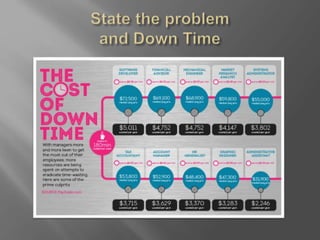
 Down Time and Money Lost
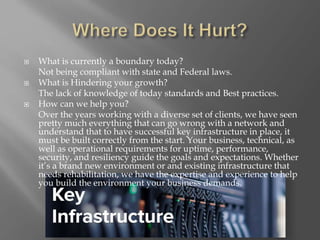
 What is currently a boundary today?
Not being compliant with state and Federal laws.
 What is Hindering your growth?
The lack of knowledge of today standards and Best practices.
 How can we help you?
Over the years working with a diverse set of clients, we have seen
pretty much everything that can go wrong with a network and
understand that to have successful key infrastructure in place, it
must be built correctly from the start. Your business, technical, as
well as operational requirements for uptime, performance,
security, and resiliency guide the goals and expectations. Whether
it’s a brand new environment or and existing infrastructure that
needs rehabilitation, we have the expertise and experience to help
you build the environment your business demands.
 Recognize challenges and needs of the business.
Keeping up with the market
Planning ahead
Cash flow and financial management
Problem solving
The right systems
Skills and attitudes
Welcoming change
 Plan, Approve then Implement.
Equipment Purchase Plan
Budget Summary by Project
Implementation Plan |Project Approval
Instruction Allocation Budget Request Form
 File and Folder based with Retention policy
based on need
 Bare Metal Backup for full system restore on
critical systems.
 Both types of backups will be uploaded to
onsite and offsite cloudberry AWS
 DRP for disasters
 Assessment of the current OS and Hardware in
place.
Upgrade XP to Windows 7 or Windows 8
(workstation and Mobile device’s)
Upgrade Windows Server 2003 to 2012
 Determine replacement requirements
Some of the current hardware will be compatible
for current upgrades and will be allocated for the
current infrastructure
 Set plan for future upgrade plan
will the hardware be compatible for future
upgrades
 Current Patching will be updated and
maintained.
 All systems will be set with scheduled outage
points for these updates to ensure they are kept
up to date.
 Employee Background Check
 Physical and Logical access controls
 Monitoring and Anti-Malware software
 Users- Policies, Standards, and Procedures.
This includes the Acceptable Use Policy for
users.
 Webroot meets Company Compliance as well
as Federal Compliance and will be able to be
installed and managed on all platforms.
 Sonicwall Firewall TZ series to block non-
essential ports and protect against know
threats.
 RDP- SSL certificate to secure data.
 VPN- High level Encryption for VPN tunnel
access
 Hosted company resources- Ensure they meet
compliances.
 What is your important data?
 Protect the important data with encryption and
Encryption methods.
 Data in transit we will be implementing Email
and VPN tunneling Encryption.
 All company travel equipment will use Dekart
for full disk Encryption and Secure File
shredding.
 How will your business be affect during an
outage?
 What will you do during an outage?
 How fast can you be back online?
 All of these will be covered to ensure you
business remains online no matter what the
circumstances.
 Purpose – Baseline and reduce IT costs
 Backups – Use of Cloudberry onsite and offsite
for Disaster recovery Plan
 Users- Monitoring of users and training as this
is the biggest security threat.
 Disaster Recovery Plan
 Minimize downtime if there is an outage event.
 Plan to implement ready for getting online as
soon as possible.
 Ensure Confidentiality, Integrity, and Access
are all maintained.
 Webroot an managed through Web console for
global management
 GPO, Agent monitor, and Standards to
centralize control
 Objective- Determine current Risks, Threats,
and Vulnerabilities.
 Permission- To what and how this test will
occur will be cleared first.
 Testing all layers of the infrastructure will
provide a more accurate map of the
vulnerabilities.
 Users will be the primary group to test.
 Identified gaps, recommended methodologies
by which to resolve them are resolved.
The domains within the IT infrastructure that
are affected will be covered.
 Some gaps include missing BCP, BIA, and
DRP.
Also missing are dedicated IPS and IDS, best
practice, antivirus, and monitoring policies.
• Identifying the hazards.
• Evaluating the associated risks.
• Controlling the risks.
• Create Standards and Procedures to mitigate
Potential risk factors
 A1-Injection – 1# Threat involves injecting data
to a trusted source.
 Cross Site Scripting – Users attack websites to
redirect other users, deface, or hijack user
sessions
 Security Misconfiguration – This is a common
threat that is easy to avoid with Risk
assessment and penetration test.
 After Risk, Threats, and Vulnerabilities have
been identified a plan to harden the network
and systems will be implemented.
 All none essential services will be disabled
unless required.
 Implement fixes or layers of defense for know
vulnerabilities
 Monitor vulnerabilities and risk areas
 Separation of duties can mitigate one employee
causing more damage.
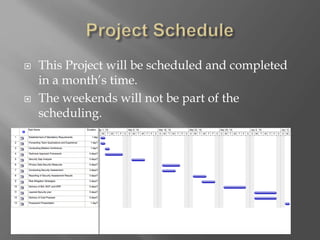
 This Project will be scheduled and completed
in a month’s time.
 The weekends will not be part of the
scheduling.
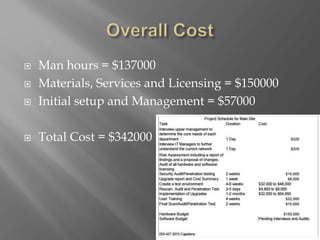
 Man hours = $137000
 Materials, Services and Licensing = $150000
 Initial setup and Management = $57000
 Total Cost = $342000

ISS CAPSTONE TEAM

  • 2.
     27 yearsexperience meeting IT challenges. Since 1988, Alpha Team Technologies has helped businesses of all sizes become market leaders by reducing their IT costs, increasing business productivity, and streamlining their IT operations.  15 member team.  No stock, no public trade. When you succeed we succeed.  Alpha Team whether it is providing daily onsite IT support, a helpdesk for your employees to call, or to monitor your IT resources, Alpha Team has the right toolset and the customer- focused mindset to keep your business going. Integrated IT's superior and well-certified. Professional Services team is also there guiding you and your IT infrastructure through the ocean of choices, so when it comes time to make a change to your IT infrastructure, you can be rest-assured that it will only be the one that fits your needs.
  • 3.
     Baseline andstandardize current IT infrastructure  Provide IT Policies, Procedures, and Standards  Improve current procedures to mitigate risk to the company
  • 4.
     Performance andavailability requirements vary between organizations.  Having the required personnel on staff to make sure your network meets the required fully functional security standards is a large time and money sink for most organizations.  Security at all points must be maintained — malware can and will attack where you are vulnerable whether via Endpoints, email, or web access.  Down Time and Money Lost
  • 6.
     What iscurrently a boundary today? Not being compliant with state and Federal laws.  What is Hindering your growth? The lack of knowledge of today standards and Best practices.  How can we help you? Over the years working with a diverse set of clients, we have seen pretty much everything that can go wrong with a network and understand that to have successful key infrastructure in place, it must be built correctly from the start. Your business, technical, as well as operational requirements for uptime, performance, security, and resiliency guide the goals and expectations. Whether it’s a brand new environment or and existing infrastructure that needs rehabilitation, we have the expertise and experience to help you build the environment your business demands.
  • 7.
     Recognize challengesand needs of the business. Keeping up with the market Planning ahead Cash flow and financial management Problem solving The right systems Skills and attitudes Welcoming change  Plan, Approve then Implement. Equipment Purchase Plan Budget Summary by Project Implementation Plan |Project Approval Instruction Allocation Budget Request Form
  • 8.
     File andFolder based with Retention policy based on need  Bare Metal Backup for full system restore on critical systems.  Both types of backups will be uploaded to onsite and offsite cloudberry AWS  DRP for disasters
  • 9.
     Assessment ofthe current OS and Hardware in place. Upgrade XP to Windows 7 or Windows 8 (workstation and Mobile device’s) Upgrade Windows Server 2003 to 2012  Determine replacement requirements Some of the current hardware will be compatible for current upgrades and will be allocated for the current infrastructure  Set plan for future upgrade plan will the hardware be compatible for future upgrades
  • 10.
     Current Patchingwill be updated and maintained.  All systems will be set with scheduled outage points for these updates to ensure they are kept up to date.
  • 11.
     Employee BackgroundCheck  Physical and Logical access controls  Monitoring and Anti-Malware software  Users- Policies, Standards, and Procedures. This includes the Acceptable Use Policy for users.
  • 12.
     Webroot meetsCompany Compliance as well as Federal Compliance and will be able to be installed and managed on all platforms.  Sonicwall Firewall TZ series to block non- essential ports and protect against know threats.
  • 13.
     RDP- SSLcertificate to secure data.  VPN- High level Encryption for VPN tunnel access  Hosted company resources- Ensure they meet compliances.
  • 14.
     What isyour important data?  Protect the important data with encryption and Encryption methods.  Data in transit we will be implementing Email and VPN tunneling Encryption.  All company travel equipment will use Dekart for full disk Encryption and Secure File shredding.
  • 15.
     How willyour business be affect during an outage?  What will you do during an outage?  How fast can you be back online?  All of these will be covered to ensure you business remains online no matter what the circumstances.
  • 16.
     Purpose –Baseline and reduce IT costs  Backups – Use of Cloudberry onsite and offsite for Disaster recovery Plan  Users- Monitoring of users and training as this is the biggest security threat.
  • 17.
     Disaster RecoveryPlan  Minimize downtime if there is an outage event.  Plan to implement ready for getting online as soon as possible.
  • 18.
     Ensure Confidentiality,Integrity, and Access are all maintained.  Webroot an managed through Web console for global management  GPO, Agent monitor, and Standards to centralize control
  • 19.
     Objective- Determinecurrent Risks, Threats, and Vulnerabilities.  Permission- To what and how this test will occur will be cleared first.  Testing all layers of the infrastructure will provide a more accurate map of the vulnerabilities.  Users will be the primary group to test.
  • 20.
     Identified gaps,recommended methodologies by which to resolve them are resolved. The domains within the IT infrastructure that are affected will be covered.  Some gaps include missing BCP, BIA, and DRP. Also missing are dedicated IPS and IDS, best practice, antivirus, and monitoring policies.
  • 21.
    • Identifying thehazards. • Evaluating the associated risks. • Controlling the risks. • Create Standards and Procedures to mitigate Potential risk factors
  • 22.
     A1-Injection –1# Threat involves injecting data to a trusted source.  Cross Site Scripting – Users attack websites to redirect other users, deface, or hijack user sessions  Security Misconfiguration – This is a common threat that is easy to avoid with Risk assessment and penetration test.
  • 23.
     After Risk,Threats, and Vulnerabilities have been identified a plan to harden the network and systems will be implemented.  All none essential services will be disabled unless required.
  • 24.
     Implement fixesor layers of defense for know vulnerabilities  Monitor vulnerabilities and risk areas  Separation of duties can mitigate one employee causing more damage.
  • 25.
     This Projectwill be scheduled and completed in a month’s time.  The weekends will not be part of the scheduling.
  • 26.
     Man hours= $137000  Materials, Services and Licensing = $150000  Initial setup and Management = $57000  Total Cost = $342000

Editor's Notes

  • #2 We are ISS CapStone Team. We are here to offer our solutions to all your IT needs. We can tackle your IT needs we do it all the time.