Creating & Expanding
 Your Identity in the
       Web 2.0

     Presentation by Iris Lika
         Clark University
            Fall 2012
     Social Media Marketing
         Prof. Frechette
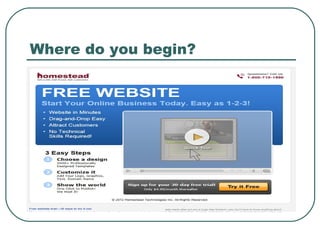
Where do you begin?
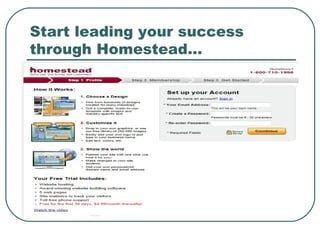
Start leading your success
through Homestead…
Benefits of your own Website
   Recognition of the individual/business in the social media

   Far cheaper and much more flexible than print advertising
   Offer convenience
   Improve credibility
   Promote your brick & mortar presence

   Two-way communicative marketing

   Growth Opportunity
When to start your own website
A  new business
 A professional (professor, PhD, doctor,
  scientist, etc.)
 A hobby/job seeker (a photographer, a
  painter, a dog walker, babysitter, etc.)
 A talent (a dancer, a singer, a make-up
  artist, an actor, a hair dresser, a writer,
  etc.)
Connecting your Website to
Social Media / “Word of Mouth”
                   Twitter - Find out what’s
                    happening, right now.
                   Facebook - Helps you
                    connect and share with
                    the people in your life.
                   Google+ - you can
                    share the right things
                    with the right people.
                    YouTube - Share your
                    videos with friends,
                    family, and the world.
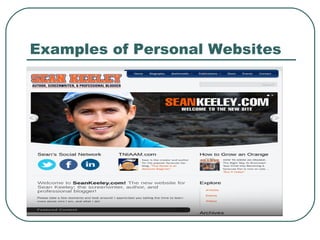
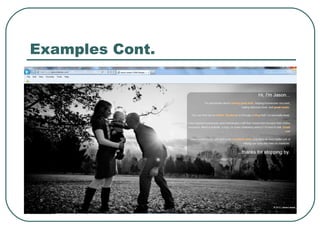
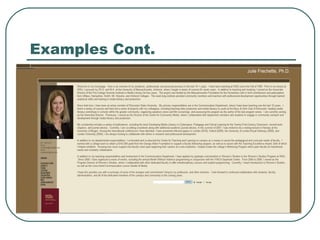
Examples of Personal Websites
 personal   website.jpg
Examples Cont.
Examples Cont.
Steps to a successful launch
 Determine  the PURPOSE of the site.
 Determine your AUDIENCE.

 Research the COMPETITION.

 Begin to gather and outline CONTENT.

 Decide what FEATURES your site will
  include.
Steps Cont.
 Design a SITE MAP. [Home, (Product
  Page of some sort), Resume/Portfolio,
  Photo Gallery, Contact Information]
 Share your DESIGN thoughts and ideas.
 Determine how frequently your site will
  need to be UPDATED.
 Choose a TIMELINE.
 Determine Your BUDGET.
Personal Website + Social Media
= Successful Groundswell
   LISTENING       Give your audience a voice to
                     be heard (Reviews,
                     suggestions, comments, etc.)
                    Respond to
   TALKING          customers/fans/audience and
                     stimulate two-way
                     conversations
   ENERGIZING      Finding the most enthusiastic
                     customers/fans & use
                     groundswell to enhance the
                     word of mouth.
   SUPPORTING      Build a support system through
                     Social Media
   EMBRACING       Keep up to date, add your latest
                     accomplishments and help
                     others come up with ideas for
                     your business
References
   http://www.webworldindex.com/articles/12-Benefits-Of-Having-A-Website.html
   http://www.jasonmlarsen.com/
   http://juliefrechette.com/
   http://www.youtube.com/watch?v=M0H5KRcpDZU
   https://twitter.com/
   https://accounts.google.com/ServiceLogin?
    service=oz&continue=https://plus.google.com/?gpsrc%3Dgplp0&hl=en
   https://www.facebook.com/
   http://www.youtube.com/watch?v=_cc3grGgE6s
   http://www.homestead.com/free-website/
   https://www.homestead.com/~site/Scripts_Signup/Signup.dll?
    CMD=CMDLoginInformationCCR
   http://billing.ninthworldcreations.com/whmcs/knowledgebase.php?
    action=displayarticle&id=1

Iris ppt

  • 1.
    Creating & Expanding Your Identity in the Web 2.0 Presentation by Iris Lika Clark University Fall 2012 Social Media Marketing Prof. Frechette
  • 2.
  • 3.
    Start leading yoursuccess through Homestead…
  • 4.
    Benefits of yourown Website  Recognition of the individual/business in the social media  Far cheaper and much more flexible than print advertising  Offer convenience  Improve credibility  Promote your brick & mortar presence  Two-way communicative marketing  Growth Opportunity
  • 5.
    When to startyour own website A new business  A professional (professor, PhD, doctor, scientist, etc.)  A hobby/job seeker (a photographer, a painter, a dog walker, babysitter, etc.)  A talent (a dancer, a singer, a make-up artist, an actor, a hair dresser, a writer, etc.)
  • 6.
    Connecting your Websiteto Social Media / “Word of Mouth”  Twitter - Find out what’s happening, right now.  Facebook - Helps you connect and share with the people in your life.  Google+ - you can share the right things with the right people.  YouTube - Share your videos with friends, family, and the world.
  • 7.
    Examples of PersonalWebsites  personal website.jpg
  • 8.
  • 9.
  • 10.
    Steps to asuccessful launch  Determine the PURPOSE of the site.  Determine your AUDIENCE.  Research the COMPETITION.  Begin to gather and outline CONTENT.  Decide what FEATURES your site will include.
  • 11.
    Steps Cont.  Designa SITE MAP. [Home, (Product Page of some sort), Resume/Portfolio, Photo Gallery, Contact Information]  Share your DESIGN thoughts and ideas.  Determine how frequently your site will need to be UPDATED.  Choose a TIMELINE.  Determine Your BUDGET.
  • 12.
    Personal Website +Social Media = Successful Groundswell  LISTENING  Give your audience a voice to be heard (Reviews, suggestions, comments, etc.)  Respond to  TALKING customers/fans/audience and stimulate two-way conversations  ENERGIZING  Finding the most enthusiastic customers/fans & use groundswell to enhance the word of mouth.  SUPPORTING  Build a support system through Social Media  EMBRACING  Keep up to date, add your latest accomplishments and help others come up with ideas for your business
  • 13.
    References  http://www.webworldindex.com/articles/12-Benefits-Of-Having-A-Website.html  http://www.jasonmlarsen.com/  http://juliefrechette.com/  http://www.youtube.com/watch?v=M0H5KRcpDZU  https://twitter.com/  https://accounts.google.com/ServiceLogin? service=oz&continue=https://plus.google.com/?gpsrc%3Dgplp0&hl=en  https://www.facebook.com/  http://www.youtube.com/watch?v=_cc3grGgE6s  http://www.homestead.com/free-website/  https://www.homestead.com/~site/Scripts_Signup/Signup.dll? CMD=CMDLoginInformationCCR  http://billing.ninthworldcreations.com/whmcs/knowledgebase.php? action=displayarticle&id=1