IPv6 for LIRs tutorial
RIPE 60
3 May 2010
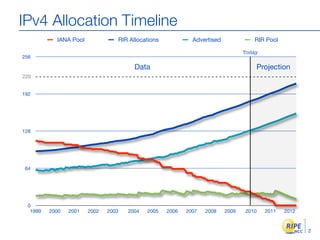
IPv4 Allocation Timeline
           IANA Pool             RIR Allocations            Advertised             RIR Pool

                                                                                Today
256

                                       Data                                         Projection
220


192


128


 64


 0
  1999   2000   2001   2002   2003   2004   2005   2006   2007   2008    2009   2010    2011   2012


                                                                                                      2
Reaching the next billion
•   Around 1.6 billion Internet users now
     -   around 25% of all people


•   Mobile phones are becoming Internet devices


•   The Internet of things


                                                  3
The Registry System
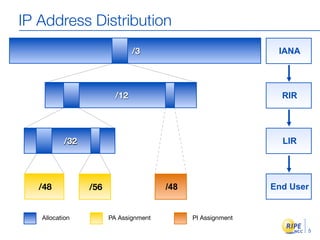
IP Address Distribution
                              /3                             IANA


                        /12                                   RIR


          /32                                                 LIR


   /48          /56                   /48                   End User


   Allocation         PA Assignment         PI Assignment

                                                                    5
Registration


               6
Conservation


               7
Aggregation


              8
IPv4?
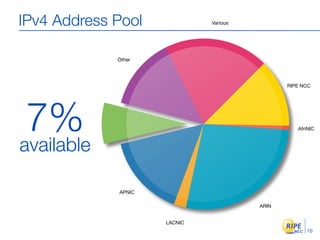
IPv4 Address Pool             Various


             Other


                                               RIPE NCC


 7%                                               AfriNIC


available

             APNIC

                                        ARIN


                     LACNIC
                                                     10
Hot IPv4 / IPv6 policy topics
•   Allocations from the last /8 (2010-02)
     - new and existing LIRs can receive only one /22
         allocation
     - only if they already have IPv6 space


                                                        11
Just implemented: Run Out Fairly (of IPv4)
•   Gradually reduced allocation / assignment periods
•   Needs for “Entire Period” of up to...
     - 12 months (January 2010)
     - 9 months (July 2010)

     - 6 months (January 2011)

     - 3 months (July 2011)


•   50% has to be used up by half-period


                                                        12
Wait and See?


                13
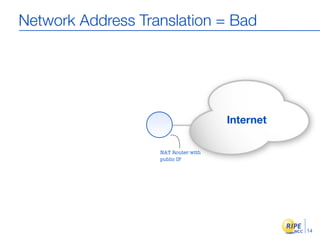
Network Address Translation = Bad


                                     Internet

                   NAT Router with
                   public IP


                                                14
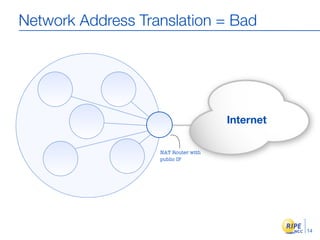
Network Address Translation = Bad


                                     Internet

                   NAT Router with
                   public IP


                                                14
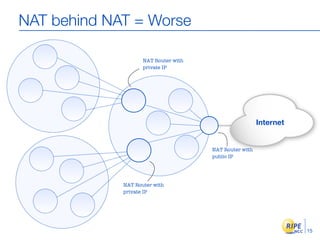
NAT behind NAT = Worse

                    NAT Router with
                    private IP


                                                        Internet


                                      NAT Router with
                                      public IP


             NAT Router with
             private IP


                                                                   15
Transition techniques
•   Dual stack
•   IP Tunneling: encapsulation
     - manual
     - automatic

         -   6to4: connect to IPv6 using your IPv4 connection
               2002:x.y.z.a::/48
         -   Teredo: through NAT. UDP encapsulation
•   Tunnel Brokers: virtual IPv6 ISPs
•   Protocol Translation

                                                                16
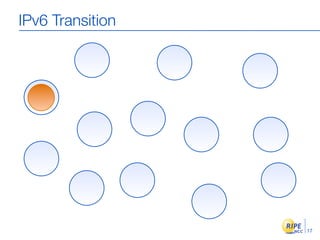
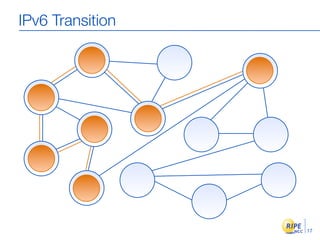
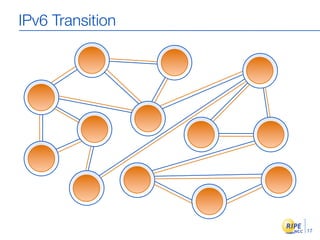
IPv6 Transition


                  17
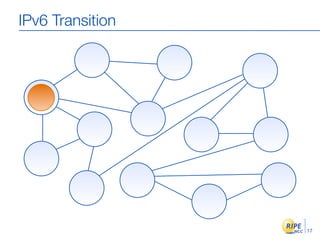
IPv6 Transition


                  17
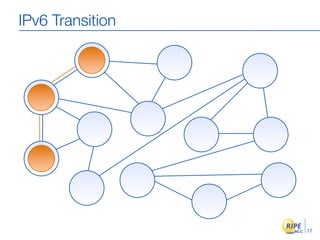
IPv6 Transition


                  17
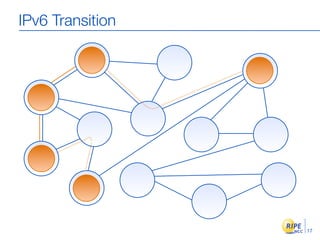
IPv6 Transition


                  17
IPv6 Transition


                  17
IPv6 Transition


                  17
IPv6 Basics
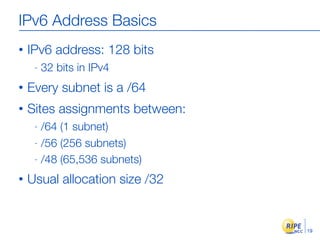
IPv6 Address Basics
•   IPv6 address: 128 bits
     -   32 bits in IPv4
•   Every subnet is a /64
•   Sites assignments between:
     - /64 (1 subnet)
     - /56 (256 subnets)

     - /48 (65,536 subnets)

•   Usual allocation size /32


                                 19
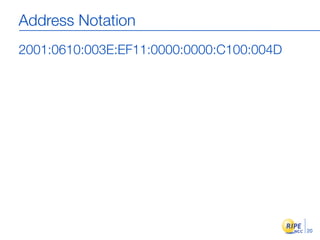
Address Notation
2001:0610:003E:EF11:0000:0000:C100:004D


                                          20
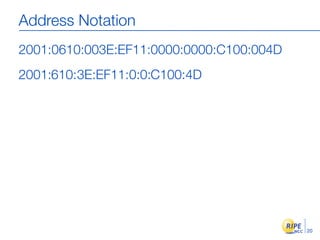
Address Notation
2001:0610:003E:EF11:0000:0000:C100:004D
2001:610:3E:EF11:0:0:C100:4D


                                          20
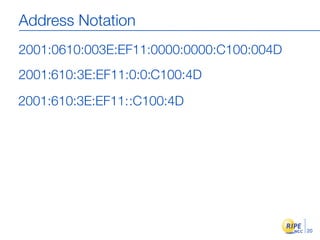
Address Notation
2001:0610:003E:EF11:0000:0000:C100:004D
2001:610:3E:EF11:0:0:C100:4D

2001:610:3E:EF11::C100:4D


                                          20
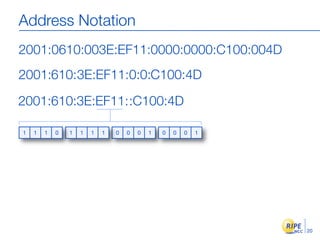
Address Notation
2001:0610:003E:EF11:0000:0000:C100:004D
2001:610:3E:EF11:0:0:C100:4D

2001:610:3E:EF11::C100:4D

1   1   1   0   1   1   1   1   0   0   0   1   0   0   0   1


                                                                20
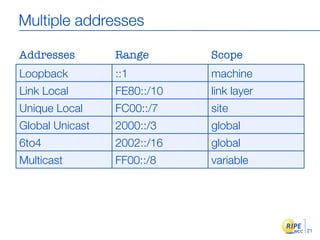
Multiple addresses

Addresses        Range       Scope
Loopback         ::1         machine
Link Local       FE80::/10   link layer
Unique Local     FC00::/7    site
Global Unicast   2000::/3    global
6to4             2002::/16   global
Multicast        FF00::/8    variable


                                          21
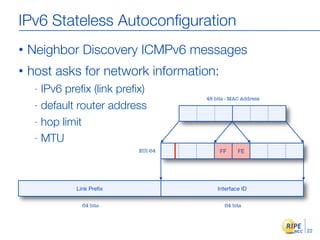
IPv6 Stateless Autoconfiguration
•   Neighbor Discovery ICMPv6 messages
•   host asks for network information:
     - IPv6 prefix (link prefix)
                                     48 bits - MAC Address
     - default router address

     - hop limit

     - MTU
                            EUI-64        FF     FE


              Link Prefix                 Interface ID

                64 bits                     64 bits


                                                             22
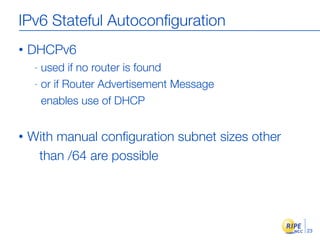
IPv6 Stateful Autoconfiguration
•   DHCPv6
     - used if no router is found
     - or if Router Advertisement Message

       enables use of DHCP


•   With manual configuration subnet sizes other
     than /64 are possible


                                                  23
“96 More Bits, No Magic”
                - Gaurab Upadhaya


                                    24
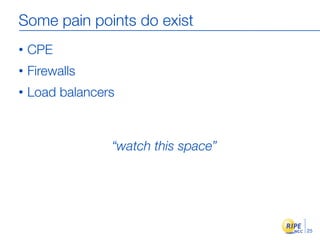
Some pain points do exist
•   CPE
•   Firewalls
•   Load balancers


                 “watch this space”


                                      25
Training from scratch is needed
•   IPv4 skills translate well to IPv6 skills
•   Concepts have not changed
     - more addresses
     - slightly different features in some parts


•   Problems are more psychological than technical!


                                                      26
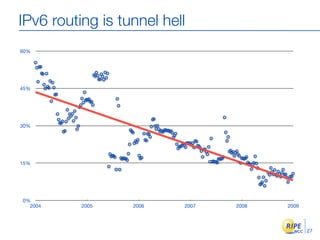
IPv6 routing is tunnel hell
60%


45%


30%


15%


0%
  2004    2005    2006    2007   2008   2009


                                               27
Getting it
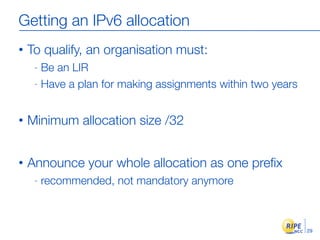
Getting an IPv6 allocation
•   To qualify, an organisation must:
     - Be an LIR
     - Have a plan for making assignments within two years


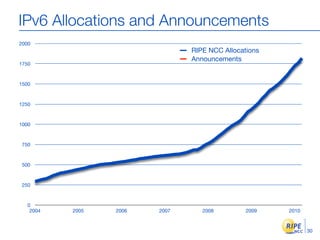
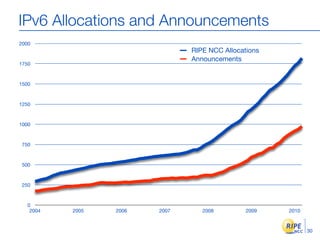
•   Minimum allocation size /32


•   Announce your whole allocation as one prefix
     -   recommended, not mandatory anymore


                                                             29
IPv6 Allocations and Announcements
2000
                               RIPE NCC Allocations
                               Announcements
1750


1500


1250


1000


 750


 500


 250


  0
   2004   2005   2006   2007      2008         2009   2010


                                                             30
IPv6 Allocations and Announcements
2000
                               RIPE NCC Allocations
                               Announcements
1750


1500


1250


1000


 750


 500


 250


  0
   2004   2005   2006   2007      2008         2009   2010


                                                             30
IPv6 Allocations and Announcements
2000
                               RIPE NCC Allocations
                               Announcements
1750


1500


1250


1000


 750


 500


 250


  0
   2004   2005   2006   2007      2008         2009   2010


                                                             30
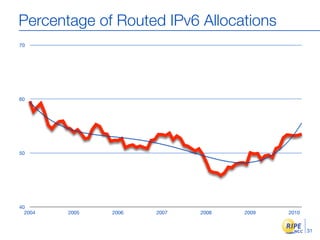
Percentage of Routed IPv6 Allocations
70


60


50


40
  2004   2005   2006   2007   2008   2009   2010


                                                   31
Percentage of Routed IPv6 Allocations
70


60


50


40
  2004   2005   2006   2007   2008   2009   2010


                                                   31
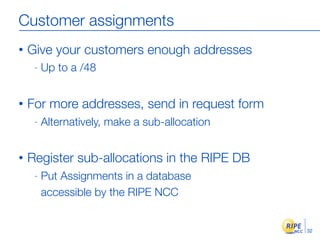
Customer assignments
•   Give your customers enough addresses
     -   Up to a /48


•   For more addresses, send in request form
     -   Alternatively, make a sub-allocation


•   Register sub-allocations in the RIPE DB
     -   Put Assignments in a database
         accessible by the RIPE NCC


                                                32
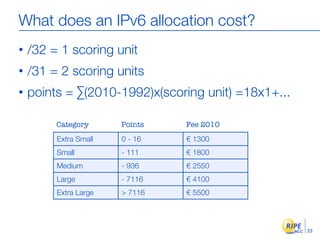
What does an IPv6 allocation cost?
•   /32 = 1 scoring unit
•   /31 = 2 scoring units
•   points = ∑(2010-1992)x(scoring unit) =18x1+...

         Category      Points   Fee 2010
         Extra Small   0 - 16   € 1300
         Small         - 111    € 1800
         Medium        - 936    € 2550
         Large         - 7116   € 4100
         Extra Large   > 7116   € 5500


                                                     33
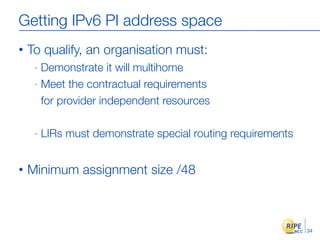
Getting IPv6 PI address space
•   To qualify, an organisation must:
     - Demonstrate it will multihome
     - Meet the contractual requirements

       for provider independent resources

     -   LIRs must demonstrate special routing requirements


•   Minimum assignment size /48


                                                              34
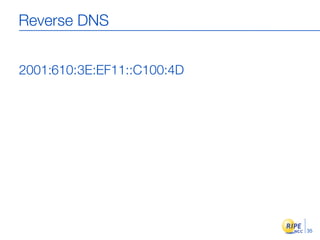
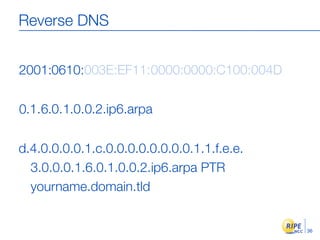
Reverse DNS


2001:610: 3E:EF11::C100:4D


                             35
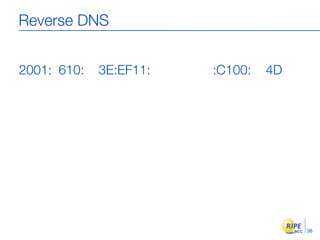
Reverse DNS


2001: 610:   3E:EF11:   :C100:   4D


                                      36
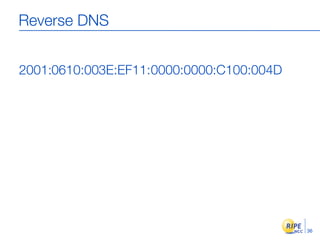
Reverse DNS


2001:0610:003E:EF11:0000:0000:C100:004D


                                          36
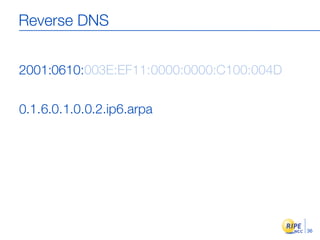
Reverse DNS


2001:0610:003E:EF11:0000:0000:C100:004D

0.1.6.0.1.0.0.2.ip6.arpa


                                          36
Reverse DNS


2001:0610:003E:EF11:0000:0000:C100:004D

0.1.6.0.1.0.0.2.ip6.arpa

d.4.0.0.0.0.1.c.0.0.0.0.0.0.0.0.1.1.f.e.e.
  3.0.0.0.1.6.0.1.0.0.2.ip6.arpa PTR
  yourname.domain.tld


                                             36
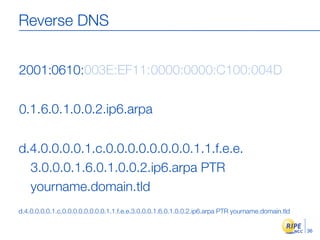
Reverse DNS


2001:0610:003E:EF11:0000:0000:C100:004D

0.1.6.0.1.0.0.2.ip6.arpa

d.4.0.0.0.0.1.c.0.0.0.0.0.0.0.0.1.1.f.e.e.
  3.0.0.0.1.6.0.1.0.0.2.ip6.arpa PTR
  yourname.domain.tld
d.4.0.0.0.0.1.c.0.0.0.0.0.0.0.0.1.1.f.e.e.3.0.0.0.1.6.0.1.0.0.2.ip6.arpa PTR yourname.domain.tld

                                                                                                   36
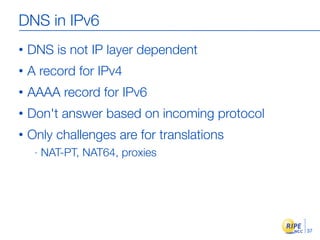
DNS in IPv6
•   DNS is not IP layer dependent
•   A record for IPv4
•   AAAA record for IPv6
•   Don't answer based on incoming protocol
•   Only challenges are for translations
     -   NAT-PT, NAT64, proxies


                                              37
Deploying
Scenario: Do Nothing
•   No problems for next few years
•   Some people won't be able to use your services
•   No extra costs
     -   until you hit the wall
•   High costs for quick implementation
•   Short planning times will mean some things go
      wrong


                                                     39
Scenario: Do It All Now!
•   Hardware may have to be changed
•   High investment in time and resources
•   No direct return
•   High costs for quick implementation
•   Short planning times will mean some things go
      wrong


                                                    40
Scenario: Act Now, Phased Approach
•   Change purchasing procedure (feature parity)
•   Check your current hardware and software
•   Plan every step and test
•   One service at a time
     - face first
     - core

     - customers

•   Prepare to be able to switch off IPv4


                                                   41
Change your face first
•   Web
•   Authoritative DNS
•   Mail servers

•   Outsiders see these services
•   Multiple mature implementations exist


                                            42
Don'ts
•   Don't separate IPv6 features from IPv4


•   Don't do everything in one go


•   Don't appoint an IPv6 specialist
     -   do you have an IPv4 specialist?


•   Don't see IPv6 as a product
     -   the Internet is the product
                                             43
Do
•   Phased approach
•   Change requirements for new hardware
•   Work outside-in, then inside-out
•   Feature parity
•   Dual stack
•   Think about possible future renumbering


                                              44
Business Case
•   IPv4 is no longer equal to “the Internet”
•   Avoiding the issue does not make it go away
•   How much are you willing to spend now to save
     money later?
•   Only IPv6 allows continued IP networking growth
•   What do you want the Internet to be like in 5
     years?


                     “IPv6, act now!”
                                                      45
The End!             Kрай             Y Diwedd
                                       Fí
                  Соңы                               Finis
                                        Liðugt
               Ende    Finvezh                      Kiнець
Konec      Kraj        Ënn     Fund

Lõpp    Beigas     Vége      Son                          Kpaj
                                     An Críoch
        ‫הסוף‬       Endir
Fine                         Sfârşit        Fin      Τέλος
       Einde
                  Конeц                Slut       Slutt
                           Pabaiga
               Amaia       Loppu     Tmiem          Koniec
  Fim

IPv6 Tutorial RIPE 60

Editor's Notes

  • #20 IP Tunneling: 1. encapsulation of IPv6 packet into IPv4 packet at tunnel entry point 2. decapsulation at tunnel exit point 3. tunnel management. Automatic tunneling: Technique where the routing infrastructure automatically determines the tunnel endpoints. The IPv4 address of the 6to4 router is embedded in the IPv6 address of the host. So if you send an IPv6 packet to the IPv6 destination host across the IPv4 network the tunnel end point IPv4 address can be read from the destination IPv6 address. ---------------- 6to4: x.y.z.a above in the slide stands for the IPv4 address of the 6to4router IPv6host=====6to4router------IPV4Internet------6to4router=====IPv6host === = ipv6 connection ----- = ipv4 connection When a node in the 6to5 network wants to communicate with a node in another 6to4 network no tunnel configuration is necessary. The tunnel entry point takes the IPv4 address of the tunnel exit point from the IPv6 address of the destination. Note that the IPv6 hosts (nodes) in the ascii art above are a special case of IPv6 hosts, they carry the IPv4 adress of their 6to4 router (x.y.z.a) within their IPv6 address. To communicate with an "real" IPv6 node in a remote IPv6 network you need a 6to4 relay router. (Manually configured). It announces the 6to4 prefix of 2002::/16 into the native IPv6 network. --------------------- Teredo is designed to make IPv6 ava ilable to hosts through one or more layers of NAT by tunneling packets over UDP. (Encapsulating IPv6 packet in a UDPpacket) 6to4 requires public addresses. Not possible with NAT. 6to4 works with NAT only if the 6to4 router is on the same box as NAT. ------------------
  • #21 Step 1: A group of AS'es Step 2: An IPv4 Network Step 3: One AS decides to do IPv6 because they feel it's a good idea for them. Step 4: Two of his peers decide that it's a good idea too. They can do native IPv6. Step 5: Two other AS's set up IPv6 too. They need tunnelling over IPv4 to establish a connectionn. Step 6: Once the AS's that the tunnel runs through also decide to do IPv6, the tunnels are no longer needed. So over time, you will see less and less tunnelling. Step 7: The ultimate goal -- everyone runs a dual stack IPv4 / IPv6 network.
  • #22 Step 1: A group of AS'es Step 2: An IPv4 Network Step 3: One AS decides to do IPv6 because they feel it's a good idea for them. Step 4: Two of his peers decide that it's a good idea too. They can do native IPv6. Step 5: Two other AS's set up IPv6 too. They need tunnelling over IPv4 to establish a connectionn. Step 6: Once the AS's that the tunnel runs through also decide to do IPv6, the tunnels are no longer needed. So over time, you will see less and less tunnelling. Step 7: The ultimate goal -- everyone runs a dual stack IPv4 / IPv6 network.
  • #23 Step 1: A group of AS'es Step 2: An IPv4 Network Step 3: One AS decides to do IPv6 because they feel it's a good idea for them. Step 4: Two of his peers decide that it's a good idea too. They can do native IPv6. Step 5: Two other AS's set up IPv6 too. They need tunnelling over IPv4 to establish a connectionn. Step 6: Once the AS's that the tunnel runs through also decide to do IPv6, the tunnels are no longer needed. So over time, you will see less and less tunnelling. Step 7: The ultimate goal -- everyone runs a dual stack IPv4 / IPv6 network.
  • #24 Step 1: A group of AS'es Step 2: An IPv4 Network Step 3: One AS decides to do IPv6 because they feel it's a good idea for them. Step 4: Two of his peers decide that it's a good idea too. They can do native IPv6. Step 5: Two other AS's set up IPv6 too. They need tunnelling over IPv4 to establish a connectionn. Step 6: Once the AS's that the tunnel runs through also decide to do IPv6, the tunnels are no longer needed. So over time, you will see less and less tunnelling. Step 7: The ultimate goal -- everyone runs a dual stack IPv4 / IPv6 network.
  • #25 Step 1: A group of AS'es Step 2: An IPv4 Network Step 3: One AS decides to do IPv6 because they feel it's a good idea for them. Step 4: Two of his peers decide that it's a good idea too. They can do native IPv6. Step 5: Two other AS's set up IPv6 too. They need tunnelling over IPv4 to establish a connectionn. Step 6: Once the AS's that the tunnel runs through also decide to do IPv6, the tunnels are no longer needed. So over time, you will see less and less tunnelling. Step 7: The ultimate goal -- everyone runs a dual stack IPv4 / IPv6 network.
  • #26 Step 1: A group of AS'es Step 2: An IPv4 Network Step 3: One AS decides to do IPv6 because they feel it's a good idea for them. Step 4: Two of his peers decide that it's a good idea too. They can do native IPv6. Step 5: Two other AS's set up IPv6 too. They need tunnelling over IPv4 to establish a connectionn. Step 6: Once the AS's that the tunnel runs through also decide to do IPv6, the tunnels are no longer needed. So over time, you will see less and less tunnelling. Step 7: The ultimate goal -- everyone runs a dual stack IPv4 / IPv6 network.
  • #27 Step 1: A group of AS'es Step 2: An IPv4 Network Step 3: One AS decides to do IPv6 because they feel it's a good idea for them. Step 4: Two of his peers decide that it's a good idea too. They can do native IPv6. Step 5: Two other AS's set up IPv6 too. They need tunnelling over IPv4 to establish a connectionn. Step 6: Once the AS's that the tunnel runs through also decide to do IPv6, the tunnels are no longer needed. So over time, you will see less and less tunnelling. Step 7: The ultimate goal -- everyone runs a dual stack IPv4 / IPv6 network.
  • #28 Step 1: A group of AS'es Step 2: An IPv4 Network Step 3: One AS decides to do IPv6 because they feel it's a good idea for them. Step 4: Two of his peers decide that it's a good idea too. They can do native IPv6. Step 5: Two other AS's set up IPv6 too. They need tunnelling over IPv4 to establish a connectionn. Step 6: Once the AS's that the tunnel runs through also decide to do IPv6, the tunnels are no longer needed. So over time, you will see less and less tunnelling. Step 7: The ultimate goal -- everyone runs a dual stack IPv4 / IPv6 network.
  • #29 Step 1: A group of AS'es Step 2: An IPv4 Network Step 3: One AS decides to do IPv6 because they feel it's a good idea for them. Step 4: Two of his peers decide that it's a good idea too. They can do native IPv6. Step 5: Two other AS's set up IPv6 too. They need tunnelling over IPv4 to establish a connectionn. Step 6: Once the AS's that the tunnel runs through also decide to do IPv6, the tunnels are no longer needed. So over time, you will see less and less tunnelling. Step 7: The ultimate goal -- everyone runs a dual stack IPv4 / IPv6 network.
  • #30 Step 1: A group of AS'es Step 2: An IPv4 Network Step 3: One AS decides to do IPv6 because they feel it's a good idea for them. Step 4: Two of his peers decide that it's a good idea too. They can do native IPv6. Step 5: Two other AS's set up IPv6 too. They need tunnelling over IPv4 to establish a connectionn. Step 6: Once the AS's that the tunnel runs through also decide to do IPv6, the tunnels are no longer needed. So over time, you will see less and less tunnelling. Step 7: The ultimate goal -- everyone runs a dual stack IPv4 / IPv6 network.
  • #31 Step 1: A group of AS'es Step 2: An IPv4 Network Step 3: One AS decides to do IPv6 because they feel it's a good idea for them. Step 4: Two of his peers decide that it's a good idea too. They can do native IPv6. Step 5: Two other AS's set up IPv6 too. They need tunnelling over IPv4 to establish a connectionn. Step 6: Once the AS's that the tunnel runs through also decide to do IPv6, the tunnels are no longer needed. So over time, you will see less and less tunnelling. Step 7: The ultimate goal -- everyone runs a dual stack IPv4 / IPv6 network.
  • #32 Step 1: A group of AS'es Step 2: An IPv4 Network Step 3: One AS decides to do IPv6 because they feel it's a good idea for them. Step 4: Two of his peers decide that it's a good idea too. They can do native IPv6. Step 5: Two other AS's set up IPv6 too. They need tunnelling over IPv4 to establish a connectionn. Step 6: Once the AS's that the tunnel runs through also decide to do IPv6, the tunnels are no longer needed. So over time, you will see less and less tunnelling. Step 7: The ultimate goal -- everyone runs a dual stack IPv4 / IPv6 network.
  • #33 Step 1: A group of AS'es Step 2: An IPv4 Network Step 3: One AS decides to do IPv6 because they feel it's a good idea for them. Step 4: Two of his peers decide that it's a good idea too. They can do native IPv6. Step 5: Two other AS's set up IPv6 too. They need tunnelling over IPv4 to establish a connectionn. Step 6: Once the AS's that the tunnel runs through also decide to do IPv6, the tunnels are no longer needed. So over time, you will see less and less tunnelling. Step 7: The ultimate goal -- everyone runs a dual stack IPv4 / IPv6 network.
  • #34 Step 1: A group of AS'es Step 2: An IPv4 Network Step 3: One AS decides to do IPv6 because they feel it's a good idea for them. Step 4: Two of his peers decide that it's a good idea too. They can do native IPv6. Step 5: Two other AS's set up IPv6 too. They need tunnelling over IPv4 to establish a connectionn. Step 6: Once the AS's that the tunnel runs through also decide to do IPv6, the tunnels are no longer needed. So over time, you will see less and less tunnelling. Step 7: The ultimate goal -- everyone runs a dual stack IPv4 / IPv6 network.
  • #35 Step 1: A group of AS'es Step 2: An IPv4 Network Step 3: One AS decides to do IPv6 because they feel it's a good idea for them. Step 4: Two of his peers decide that it's a good idea too. They can do native IPv6. Step 5: Two other AS's set up IPv6 too. They need tunnelling over IPv4 to establish a connectionn. Step 6: Once the AS's that the tunnel runs through also decide to do IPv6, the tunnels are no longer needed. So over time, you will see less and less tunnelling. Step 7: The ultimate goal -- everyone runs a dual stack IPv4 / IPv6 network.
  • #36 Step 1: A group of AS'es Step 2: An IPv4 Network Step 3: One AS decides to do IPv6 because they feel it's a good idea for them. Step 4: Two of his peers decide that it's a good idea too. They can do native IPv6. Step 5: Two other AS's set up IPv6 too. They need tunnelling over IPv4 to establish a connectionn. Step 6: Once the AS's that the tunnel runs through also decide to do IPv6, the tunnels are no longer needed. So over time, you will see less and less tunnelling. Step 7: The ultimate goal -- everyone runs a dual stack IPv4 / IPv6 network.
  • #37 Step 1: A group of AS'es Step 2: An IPv4 Network Step 3: One AS decides to do IPv6 because they feel it's a good idea for them. Step 4: Two of his peers decide that it's a good idea too. They can do native IPv6. Step 5: Two other AS's set up IPv6 too. They need tunnelling over IPv4 to establish a connectionn. Step 6: Once the AS's that the tunnel runs through also decide to do IPv6, the tunnels are no longer needed. So over time, you will see less and less tunnelling. Step 7: The ultimate goal -- everyone runs a dual stack IPv4 / IPv6 network.
  • #38 Step 1: A group of AS'es Step 2: An IPv4 Network Step 3: One AS decides to do IPv6 because they feel it's a good idea for them. Step 4: Two of his peers decide that it's a good idea too. They can do native IPv6. Step 5: Two other AS's set up IPv6 too. They need tunnelling over IPv4 to establish a connectionn. Step 6: Once the AS's that the tunnel runs through also decide to do IPv6, the tunnels are no longer needed. So over time, you will see less and less tunnelling. Step 7: The ultimate goal -- everyone runs a dual stack IPv4 / IPv6 network.
  • #40  Class wise: put on board, discuss downsides, how much can be reclaimed, how much time that buys
  • #64 Global Unicast corresponds to public IPv4 addresses. Link local corresponds to private addresses, only visible in the local segment Unique Local Addresses are routable only within a set of cooperating sites. The addresses include a 40 bit pseudorandom number in the routing prefix in order to minimise risk of conflict if sites merge or if packets are sent by mistake to the internet. Local usage but still global in scope. See also special address ranges defined for tunneling on earlier slide. See info about multicast in a later slide. -------------------------------- Anycast addresses: same address range as global unicast addresses. Each participating interface must be configured to have an anycast address. Within the region where interfaces with the same anycast address are located, each host must have a separate entry in the routing table. This means that global anycast addresses are practically unworkable as they would mean every member of the anycast group would be entered into routing tables across the whole Internet. When using anycast addresses as destination, sender has no control over which of the participating interfaces the packet will be delivered to. That is taken on the level of the routing protocol. (eg BGP) Anycast addresses assigned to IPv6 routers only. Anycast format: -lowest 7 bits: Anycast (group) ID r-est of the interface ID filled up with 1s (lower 64 bits if EUI-64 format) subnet ID (64 highest bits if EUI-64 format) just like any other global unicast address -------------------------------------------------------- Some addresses types start with the binary prefix 0000 0000 : unspecified address (all 0s) loopback address ::1 (all zeroes except the last bit=1) IPv4 addresses with IPV4 addresses embedded (see tunneling) Solicited-node multicast address: For every unicast and anycast address that is configured for a node, that node must also join a corresponding solicited-node multicast address. Why? See below (***). If you know the IP address of the destination, you need to know MAC address in order to be able to send a packet there. True for both IPv4 and IPv6. (In the IPv4 world to get the MAC address of the destination, the source send out a broadcast with an ARP request into the subnet.) *** In the IPv6 world the MAC address of an interface is found by sending a Neighbor Solicitation message (ICMPv6) to the solicited-node multicast address corresponding to the unicast address of your destination The solicited node multicast address has the format: FF02:0:0:0:0:1:FF00::/104 + the lowest 24 bits of the unicast or anycast address --------------------------------- Af the node is a router then it must be configured with these addresses in addition to those in the list in the slide above : subnet-router anycast address for the interfaces it for which it is configured as a router all-routers multicast addresses etc etc
  • #65 Solicited-node multicast address: For every unicast and anycast address that is configured for a node, that node must also join a corresponding solicited-node multicast address. Why? See below (***). If you know the IP address of the destination, you need to know MAC address in order to be able to send a packet there. True for both IPv4 and IPv6. (In the IPv4 world to get the MAC address of the destination, the source send out a broadcast with an ARP request into the subnet.) *** In the IPv6 world the MAC address of an interface is found by sending a Neighbor Solicitation message (ICMPv6) to the solicited-node multicast address corresponding to the unicast address of your destination The solicited node multicast address has the format: FF02:0:0:0:0:1:FF00::/104 + the lowest 24 bits of the unicast or anycast address --------------------------------- Af the node is a router then it must be configured with these addresses in addition to those in the list in the slide above : subnet-router anycast address for the interfaces it for which it is configured as a router all-routers multicast addresses etc etc
  • #66 Global Unicast corresponds to public IPv4 addresses. Link local corresponds to private addresses, only visible in the local segment Unique Local Addresses are routable only within a set of cooperating sites. The addresses include a 40 bit pseudorandom number in the routing prefix in order to minimise risk of conflict if sites merge or if packets are sent by mistake to the internet. Local usage but still global in scope. See also special address ranges defined for tunneling on earlier slide. See info about multicast in a later slide. -------------------------------- Anycast addresses: same address range as global unicast addresses. Each participating interface must be configured to have an anycast address. Within the region where interfaces with the same anycast address are located, each host must have a separate entry in the routing table. This means that global anycast addresses are practically unworkable as they would mean every member of the anycast group would be entered into routing tables across the whole Internet. When using anycast addresses as destination, sender has no control over which of the participating interfaces the packet will be delivered to. That is taken on the level of the routing protocol. (eg BGP) Anycast addresses assigned to IPv6 routers only. Anycast format: -lowest 7 bits: Anycast (group) ID r-est of the interface ID filled up with 1s (lower 64 bits if EUI-64 format) subnet ID (64 highest bits if EUI-64 format) just like any other global unicast address -------------------------------------------------------- Some addresses types start with the binary prefix 0000 0000 : unspecified address (all 0s) loopback address ::1 (all zeroes except the last bit=1) IPv4 addresses with IPV4 addresses embedded (see tunneling)
  • #67 Global routing prefix assigned by IANA>RIR>LIR to site subnets are usually /64 (standard), but be anything between sizes /49 and /64 is technically possible. Especially if you want to have a hierarchy of subnets like Russian dolls. Interface ID must be unique within a subnet, of course.
  • #68 Compared to IPv4 packets. IPv6 packets are processed much less along the way from source to destination. Routers have to check anc calculate less things. The IP MTU (Maximum Transmission Unit) the largest size of IP packet which may be transferred using a specific data link. It is the property of the link. Path MTU is minimum of all the MTUs along the path. The bottleneck. Fragmentation is only implemented on source and destination, not on the routers along the way. (Unlike IPv4) Because of this the source has to find out the path MTU all along the way (of all the links, hops and connections) before sending a packet to the destination. This is done by: - assuming thathe path MTU is the MTU of the first link. - if there is a lower MTU somewhere along the path to the destination the source will receive an ICMPv6 error message with information about the size of the MTU there. Then the source can adjust the size of the packets it will send down this path. If the source doesn't use path MTU discovery, then it should not send out packets larger than 1280 bytes the minimum permitted and guaranteed IPv6 MTU The defalt MTU that all links have to be able to handle in IPv6 (1280 bytes) is larger than the default MTU of IPv4 (576 bytes).
  • #69 IPv6 Header Fields: Version (4 bits): 6 in binary meaning IPv6 Traffic class (8 bits): packet priority Flow Label (20 bits): QoS to give real-time applications special service. Currently not used Payload length(16 bits): size of packet data (payload) in bytes. Next header (8 bits): specifies next encapsulated protocol Hop Limit (8 bits): After each hop this counter is decreased by one. When it reaches 0 the packet is discarded. Like TTL in IPv4.
  • #70 IPv6 Header Fields: Version (4 bits): 6 in binary meaning IPv6 Traffic class (8 bits): packet priority Flow Label (20 bits): QoS to give real-time applications special service. Currently not used Payload length(16 bits): size of packet data (payload) in bytes. Next header (8 bits): specifies next encapsulated protocol Hop Limit (8 bits): After each hop this counter is decreased by one. When it reaches 0 the packet is discarded. Like TTL in IPv4.
  • #71 The Next Header field enables modular extension of the IPv6 Header. It shows what header type follows the IPv6 Header. In the simplest case (no extra optional headers) the next header field contains the number for TCP (=6) or UDP (=17). Otherwise Next Header will contain the number of an inserted extra optional header. The optional header’s Next Header field will then point to the TCP header. You can insert more than one optional headers but they always have to come in the same order (see next slide) Note that TCP Header or the data (payload) doesn’t have a next header field. The next header field is only part of IPv6 protocol.
  • #72 This is the fixed order of the optional headers in the IPv6 packet, if more that one is used. Hop by Hop Options: options that have to be examined by all devices on the path Routing Header: methods to specify a route for the packet( used with Mobile IPv6) Fragment Header : contains parameters for packet fragmentation Authentication Headercontains information to verify authenticity of most parts of the packet (IPsec) Encapsulate Security Payloadcontains information to encrypt and authenticate the packet (IPsec) Destination Options:options that have to be examined only by the destination
  • #73 Multicast address: identifier for a group of hosts(nodes) A host can belong to several multicast groups. When a packet is sent to a multicast address it is sent to all members of that multicast group Multicast cannot be used as source address of a packet Broadcast implemented as part of Multicast in IPv6 ------------------------ Individual bits explained (not so important, just for reference) First 8 bits identifies the address as a multicast address (FF) `next 4 bits are flags 1st bit =0 reserved for future use 2nd bit: whether Rendezvous point embedded in this multicast address (0=no,1=yes). Rendezvous point=point of distribution for a specific multicast stream in a multicast network. rfc3956 3rd bit whether this multicast address embeds prefix info (0=no,1=yes) rfc3306 4th bit: indicates whether address permanently assigned. if=1 then temporary. iI=0 then permanent (=well known,permanently defined address) Values for the Scope field: 0 Reserved 1Interface-local scope 2 Link-local scope (within local segment) 3reserved 4admin-local scope 5site-local scope 6,7 unassigned 8organisation local scope 9,A,B,C,DUNASSIGNED Eglobal scope Freserved ------- Examples of well known multicast addresses: interface-local scope: FF01:0:0:0:0:0:0:1all-nodes address FF01:0:0:0:0:0:0:2all-routers address link-local scope FF02:0:0:0:0:0:0:1all-nodes address (THIS IS THE IPv6 version of what is known as Broadcast message in IPv4) FF02:0:0:0:0:0:0:2all-routers address FF02:0:0:0:0:0:1:2all DHCP agents site-local scope FF05:0:0:0:0:0:0:2all-routers address FF05:0:0:0:0:0:1:3all DHCP servers -----------------------------------
  • #74 A mechanism for an IPv6 host to generate an address (from its MAC address) without need of an external DHCP server. The Global Unicast address of the host constructed automatically from = Link address (address prefix of the network received from local router via a Router Announcement (RA, an ICMPv6 message) + Interface Identifier (EUI-64 address calculated from the MAC address) The Interface ID is the is calculated by: 1)inserting these 2bytes: FFFE between the 4th and the 5th byte of the MAC address, 2) and then flipping the 2nd bit of the 6th byte: if it’s 0 setting it to 1. This will always be the case since that bit is a 0 in MAC addresses. ---- ICMPv6 (Internet Control Message Protocol v6) is part of IPv6 protocol It is much more powerful and extensive than ICMPv4. (Amongst other functions it takes over the job that ARP did in IPV6) Neighbor Discovery protocol consist of 5 ICMPv6 messages: Router Solicitation (RS) / Router Advertisement (RA) messages Neighbor Solicitation/ Neighbor Advertisement ICMP Redirect message -------- The example here is a Global Unicast Address, but other types of addresses can also be configure using "Stateless Autoconfiguration" -------- Only routers have to be manually configured.
  • #75 Stateless Autoconfiguration: IPv6 host address can be uniquely identified. If this is a concern IPv6 Privacy Extensions to Stateless Autoconf address can be used . The Privacy Extension periodically generates a (pseudo) random interface ID (ie host portion of the address) ------ How? Pseudo random: stores history of each previous generated address uses MD5 hashing to generate new address checks if result conflicts with reserved addresses or already assigned addresses
  • #76 If no router is found, the host cannot receive the network information it needs in order to ‘statefully autoconfigure’ itself .(Because no Router Announcement messages)
  • #77 protection services offered by IPSec include: - Encryption of user data for privacy. - Authentication of the integrity of a message to ensure that it is not changed en route. - Protection against certain types of security attacks, such as replay attacks. - The ability for devices to negotiate the security algorithms and keys required to meet their security needs. - Two security modes, tunnel and transport, to meet different network needs. IPsec provides security s at the IP layer for other TCP/IP protocols and applications to use. IPSec provides the tools that devices on a TCP/IP network can use to communicate securely. When two devices want to communicate securely, they set up a secure path between themselves that can cross many insecure areas. FTo achieve this they must cary out the following tasks: -they must agree on the security protocols to use, so that they can understand each other. -they must agree on a the kind of encryption algorithm to encrypt data. -they must exchange keys to encode and decode data ---- To do all this these 2 core protocols are used to do the actual encoding/decoding: (they are incorporated in IPv6 notice the 2 Optional Extension Headers with the same name) CORE COMPONENTS 1) IPsec Authentication Header (AH) authentication of originator of message, authentication of integrity of data(ie not changed en route), protection against replay attacks NO confidentiality and privacy. data not encrypted 2) Encapsulating Security Payload (ESP) confidentiality and privacy . data encrypted in addition to the same functions as AH SUPPORT COMPONENTS -Encryption/Hashing Algorithms: MD5 or SHA-1 -Security Policies and Associations and Management Methods -Key Exchange Framework and Mechanism --- MODES 1)Transport mode: only data processed and protected. IP header not. IP header -- IPsec Headers (AH/ESP) -- Payload Data 1)Tunnel mode: IP header and data processed and protected. new IP header added in front. new IP header -- IPsec Headers (AH/ESP) -- Old IP Header -- Payload Data ----------- Two DB set up on every device participating in IPsec: 1)Security Policies DB: storing Security Policies, rules describing how to process different packet received by the device (process by IPsec or not?If yes, how exactly?) 2)Security Associations DB: storing SEcurity Associations that describe the particular connection to other devices (ie between all combinations of different devices. Individual contracts between specific devices.
  • #93 RPSLng -- new generation -- is described in the RFC 4012: http://tools.ietf.org/html/rfc4012 Examples of aut-num objects: as1853 (ACOnet) & AS8596 (Hotze). About routing: filtering recommendations for BGP routing by Gert Doering (v6) http://www.space.net/~gert/RIPE/ipv6-filters.html IPv6 Team Cumry Bogons: Packet & Route Filter Recommendations for xSP: http://www.cymru.com/Bogons/v6top.html De-aggregation guidelines (in progress!) http://www.ripe.net/ripe/maillists/archives/routing-wg/2009/msg00120.html Global v6 routing table size: http://bgp.potaroo.net/v6/as2.0/ Ghost Route Hunter project by SixXS: http://www.sixxs.net/tools/grh/peering/ "This tool allows you to see easily which prefixes you are missing in your network and where you might want to improve IPv6 Transit. It also provide the community with a look into the quality of your network and ability to have a shot of debugging when something looks wrong. " & Ghost Route Hunter : IPv6 DFP visibility These pages show the visibility of Default Free Prefixes (DFP's) as delegated by the RIR's. http://www.sixxs.net/tools/grh/dfp/
  • #139 to show that there really isn't that much to it, do, from terminal: dig ns ripe.net this should show the names of the nameservers, along with some A and AAAA records, so you can show nothing much is different
  • #152 - Registering routes and filtering based on it will prevent accidental leaks and route hijacking

  • #153 A “resource certificate” is an electronic document which proves that its holder has been officially assigned or allocated a particular resource. Currently, this association is only reflected in an RIR Database, like the RIPE Database.
  • #154 A “resource certificate” is an electronic document which proves that its holder has been officially assigned or allocated a particular resource. Currently, this association is only reflected in an RIR Database, like the RIPE Database.
  • #155 Mention the caveat: - All information contained is certified as correct at the time of issuing the certificate
  • #156 A digital certificate contains: - The public key provided by the resource holder when the certificate was issued - Resources covered by the certificate - Digital identification of the issuing registry (either the RIPE NCC or an LIR)
  • #157 - Resource Certification uses Public Key Infrastructure (PKI) principles. This is a set of hardware, software, people, policies, and procedures needed to create, manage, distribute, use, store, and revoke digital certificates. Proof of holdership formally: - An authoritative statement of an allocation's registration in the RIPE NCC's resource registry Possible applications: - Secure routing - Certificates can be used to create Route Origination Authorisations (ROAs), which may be used to increase the security the routing system - Resource transfers - Resource certification may be used to help establish trust and legitimacy in transfer transactions
  • #158 The vault is the Certificate Authority, “an entity that issues digital certificates for use by other parties”, in this case the RIRs issuing certificates over Internet Resources
  • #159 There is no convenient and automatic way to make sure that a certain Autonomous System (AS) is authorised to announce or originate a specific prefix. More specifically, there is no way to confirm that the prefix is really in use, and the legitimate holder of the prefix authorises a specific AS to announce that prefix. By using a ROA, Certification will allow for prefix holder checking to be automated in a dependable, transparent and standardized way. A ROA states: 1. Allow this AS Number to originate 2. IP prefixes as mentioned here 3. because legitimate HOLDER of IP resources said so
  • #160 This is what it means in real life
  • #161 This is what it means in real life
  • #162 This is what it means in real life
  • #163 This is what it means in real life
  • #164 - In the LIR Portal, you can log in as Admin, and enable certification for users of their choice - After that, the user can log in and access the Certification system