

Dancing with
websockets
Dancer


• You’ve heard about it

• It’s simple, powerful,
  flexible
This talk
      • Not an hello world

      • real life example

      • unusual web app

      • unusual technologies

      • goal: show easiness
The background
At $company,

• Many Perl products

• Lot of modules + deps

• Come from CPAN
But,

• CPAN = moving target

• need to stay stable

• local CPAN mirror

• but we need to catch up,
  sometimes
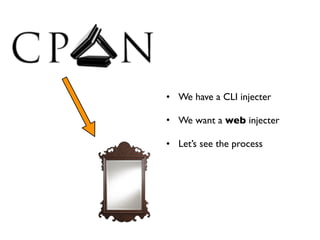
• We have a CLI injecter

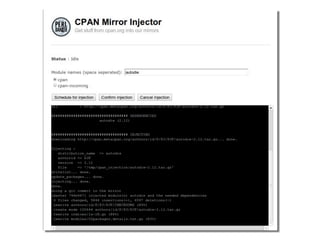
• We want a web injecter

• Let’s see the process
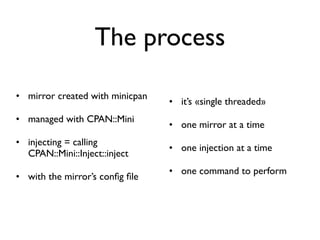
The process

• mirror created with minicpan
                                 • it’s «single threaded»
• managed with CPAN::Mini
                                 • one mirror at a time
• injecting = calling
                                 • one injection at a time
  CPAN::Mini::Inject::inject
                                 • one command to perform
• with the mirror’s config file
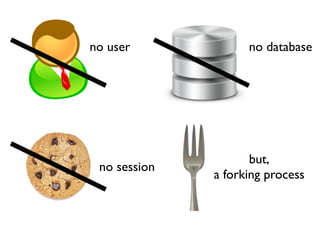
no user             no database


                     but,
 no session
              a forking process
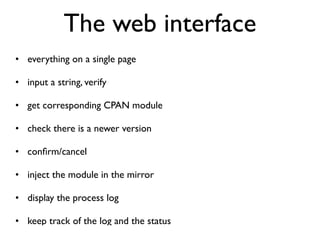
The web interface
• everything on a single page

• input a string, verify

• get corresponding CPAN module

• check there is a newer version

• confirm/cancel

• inject the module in the mirror

• display the process log

• keep track of the log and the status
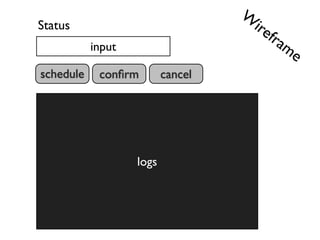
W
Status                              ire
                                       fra
           input                          me
schedule    confirm        cancel


                   logs
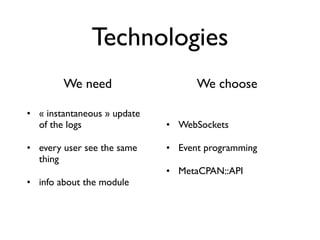
Technologies
        We need                    We choose

• « instantaneous » update
  of the logs                • WebSockets

• every user see the same    • Event programming
  thing
                             • MetaCPAN::API
• info about the module
Dancer in one sentence
• « Dancer allows you to easily create web applications where you
  can associate http routes to code, which usually end up sending
  back data via a template engine »

• dancer -a plop creates a new application

• templating system:

  • a layout, with a [% content %] placeholder

  • views, template page, that are injected as content
WebSocket
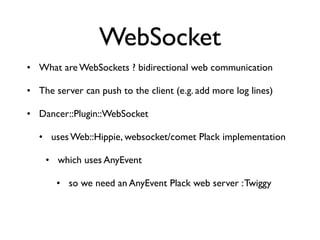
• What are WebSockets ? bidirectional web communication

• The server can push to the client (e.g. add more log lines)

• Dancer::Plugin::WebSocket

   • uses Web::Hippie, websocket/comet Plack implementation

    • which uses AnyEvent

       • so we need an AnyEvent Plack web server : Twiggy
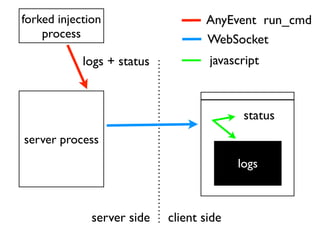
forked injection                   AnyEvent run_cmd
    process                        WebSocket
            logs + status           javascript


                                           status
server process
                                          logs


              server side   client side
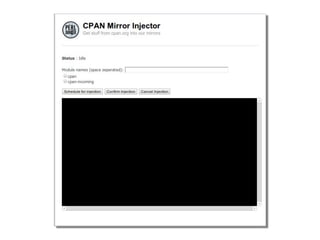
Show me the GUI
Show me the code
bin/app.pl                                            config.yml
     use Dancer;                    layout: "main"
     use My::Mirror::Injector;      template: "template_toolkit"
     dance;                         engines:
                                      template_toolkit:
                                        encoding: 'utf8'
views/layouts/main.tt                   start_tag: '[%'
<html>                                  end_tag:   '%]'
<head>
<title>My cool Injector</title>
<script src="...">jquery</script>
</head>
<body>
[% content %]
</body>
</html>
                                                   launch.sh
                     plackup -s Twiggy ./bin/app.pl    -p 5005
views/index.tt
<b>Status</b> : <span id="status">
    <span id="status_text">[% status %]</span>
</span>

<form action="/" method="post">
 Module names (space seperated):
    <input type="text" name="module_name"
                       value="[% module_name %]">
    <br/>
    <input type="submit" name="schedule" value="Schedule">
    <input type="submit" name="confirm" value="Confirm">
    <input type="submit" name="cancel"    value="Cancel">
</form>

<pre>
    <div id="injection_log">[% log %]</div>
</pre>

                 then some javascript...
setup the websocket, handle logs


   var socket = new WebSocket(
       "ws://[% server_host %]:[% server_port %]/_hippie/ws"
   );

   socket.onmessage = function(e) {
       var data = JSON.parse(e.data);
       if (data.msg) {
           $('#injection_log').append(data.msg);
       }
   };

   function send_msg(message) {
       socket.send(JSON.stringify({ msg: message }));
   }
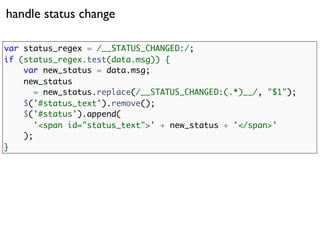
handle status change

var status_regex = /__STATUS_CHANGED:/;
if (status_regex.test(data.msg)) {
    var new_status = data.msg;
    new_status
       = new_status.replace(/__STATUS_CHANGED:(.*)__/, "$1");
    $('#status_text').remove();
    $('#status').append(
       '<span id="status_text">' + new_status + '</span>'
    );
}
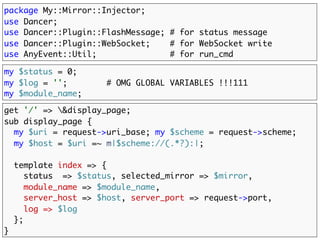
package My::Mirror::Injector;
use Dancer;
use Dancer::Plugin::FlashMessage; # for status message
use Dancer::Plugin::WebSocket;    # for WebSocket write
use AnyEvent::Util;               # for run_cmd

my $status = 0;
my $log = '';        # OMG GLOBAL VARIABLES !!!111
my $module_name;

get '/' => &display_page;
sub display_page {
  my $uri = request->uri_base; my $scheme = request->scheme;
  my $host = $uri =~ m|$scheme://(.*?):|;
  template index => {
     status      => $status,
     module_name => $module_name,
     server_host => $host,
     server_port => request->port,
     log => $log
  };
}
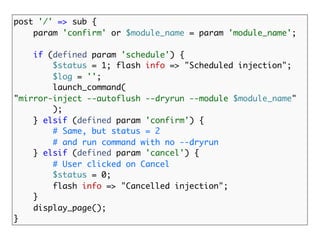
post '/' => sub {
    param 'confirm' or $module_name = param 'module_name';

    if (defined param 'schedule') {
        $status = 1; flash info => "Scheduled injection";
        $log = '';
        launch_command(
"mirror-inject --autoflush --dryrun --module $module_name"
        );
    } elsif (defined param 'confirm') {
        # Same, but status = 2
        # and run command with no --dryrun
    } elsif (defined param 'cancel') {
        # User clicked on Cancel
        $status = 0;
        flash info => "Cancelled injection";
    }
    display_page();
}
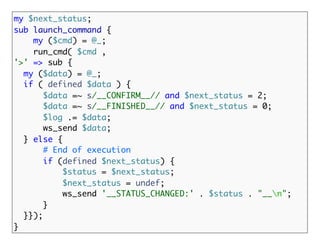
my $next_status;
sub launch_command {
    my ($cmd) = @_;
    run_cmd( $cmd ,
'>' => sub {
  my ($data) = @_;
  if ( defined $data ) {
       $data =~ s/__CONFIRM__// and $next_status = 2;
       $data =~ s/__FINISHED__// and $next_status = 0;
       $log .= $data;
       ws_send $data;
  } else {
       # End of execution
       if (defined $next_status) {
           $status = $next_status;
           $next_status = undef;
           ws_send '__STATUS_CHANGED:' . $status . "__n";
       }
  }});
}
Show me the video
Dancing with websocket

Dancing with websocket

  • 1.
  • 2.
    Dancer • You’ve heardabout it • It’s simple, powerful, flexible
  • 3.
    This talk • Not an hello world • real life example • unusual web app • unusual technologies • goal: show easiness
  • 4.
  • 5.
    At $company, • ManyPerl products • Lot of modules + deps • Come from CPAN
  • 6.
    But, • CPAN =moving target • need to stay stable • local CPAN mirror • but we need to catch up, sometimes
  • 7.
    • We havea CLI injecter • We want a web injecter • Let’s see the process
  • 8.
    The process • mirrorcreated with minicpan • it’s «single threaded» • managed with CPAN::Mini • one mirror at a time • injecting = calling • one injection at a time CPAN::Mini::Inject::inject • one command to perform • with the mirror’s config file
  • 9.
    no user no database but, no session a forking process
  • 10.
    The web interface •everything on a single page • input a string, verify • get corresponding CPAN module • check there is a newer version • confirm/cancel • inject the module in the mirror • display the process log • keep track of the log and the status
  • 11.
    W Status ire fra input me schedule confirm cancel logs
  • 12.
    Technologies We need We choose • « instantaneous » update of the logs • WebSockets • every user see the same • Event programming thing • MetaCPAN::API • info about the module
  • 13.
    Dancer in onesentence • « Dancer allows you to easily create web applications where you can associate http routes to code, which usually end up sending back data via a template engine » • dancer -a plop creates a new application • templating system: • a layout, with a [% content %] placeholder • views, template page, that are injected as content
  • 14.
    WebSocket • What areWebSockets ? bidirectional web communication • The server can push to the client (e.g. add more log lines) • Dancer::Plugin::WebSocket • uses Web::Hippie, websocket/comet Plack implementation • which uses AnyEvent • so we need an AnyEvent Plack web server : Twiggy
  • 15.
    forked injection AnyEvent run_cmd process WebSocket logs + status javascript status server process logs server side client side
  • 16.
  • 19.
  • 20.
    bin/app.pl config.yml use Dancer; layout: "main" use My::Mirror::Injector; template: "template_toolkit" dance; engines: template_toolkit: encoding: 'utf8' views/layouts/main.tt start_tag: '[%' <html> end_tag: '%]' <head> <title>My cool Injector</title> <script src="...">jquery</script> </head> <body> [% content %] </body> </html> launch.sh plackup -s Twiggy ./bin/app.pl -p 5005
  • 21.
    views/index.tt <b>Status</b> : <spanid="status"> <span id="status_text">[% status %]</span> </span> <form action="/" method="post"> Module names (space seperated): <input type="text" name="module_name" value="[% module_name %]"> <br/> <input type="submit" name="schedule" value="Schedule"> <input type="submit" name="confirm" value="Confirm"> <input type="submit" name="cancel" value="Cancel"> </form> <pre> <div id="injection_log">[% log %]</div> </pre> then some javascript...
  • 22.
    setup the websocket,handle logs var socket = new WebSocket( "ws://[% server_host %]:[% server_port %]/_hippie/ws" ); socket.onmessage = function(e) { var data = JSON.parse(e.data); if (data.msg) { $('#injection_log').append(data.msg); } }; function send_msg(message) { socket.send(JSON.stringify({ msg: message })); }
  • 23.
    handle status change varstatus_regex = /__STATUS_CHANGED:/; if (status_regex.test(data.msg)) { var new_status = data.msg; new_status = new_status.replace(/__STATUS_CHANGED:(.*)__/, "$1"); $('#status_text').remove(); $('#status').append( '<span id="status_text">' + new_status + '</span>' ); }
  • 24.
    package My::Mirror::Injector; use Dancer; useDancer::Plugin::FlashMessage; # for status message use Dancer::Plugin::WebSocket; # for WebSocket write use AnyEvent::Util; # for run_cmd my $status = 0; my $log = ''; # OMG GLOBAL VARIABLES !!!111 my $module_name; get '/' => &display_page; sub display_page { my $uri = request->uri_base; my $scheme = request->scheme; my $host = $uri =~ m|$scheme://(.*?):|; template index => { status => $status, module_name => $module_name, server_host => $host, server_port => request->port, log => $log }; }
  • 25.
    post '/' =>sub { param 'confirm' or $module_name = param 'module_name'; if (defined param 'schedule') { $status = 1; flash info => "Scheduled injection"; $log = ''; launch_command( "mirror-inject --autoflush --dryrun --module $module_name" ); } elsif (defined param 'confirm') { # Same, but status = 2 # and run command with no --dryrun } elsif (defined param 'cancel') { # User clicked on Cancel $status = 0; flash info => "Cancelled injection"; } display_page(); }
  • 26.
    my $next_status; sub launch_command{ my ($cmd) = @_; run_cmd( $cmd , '>' => sub { my ($data) = @_; if ( defined $data ) { $data =~ s/__CONFIRM__// and $next_status = 2; $data =~ s/__FINISHED__// and $next_status = 0; $log .= $data; ws_send $data; } else { # End of execution if (defined $next_status) { $status = $next_status; $next_status = undef; ws_send '__STATUS_CHANGED:' . $status . "__n"; } }}); }
  • 27.