An Introduction
    Amy Carter
     April 2012
What is UDL?

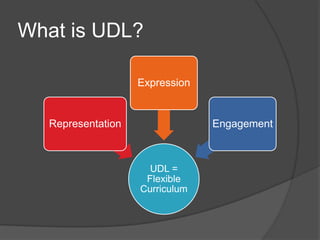
                   Expression


  Representation                Engagement


                     UDL =
                    Flexible
                   Curriculum
Multiple means of
representation
 Provide   options for
   perception
   language & symbols
   comprehension
Multiple means of
expression
 Provide   options for
  physical action
  expressive skills & fluency
  executive functions
Multiple means of engagement

 Provide   options for
  recruiting interest
  sustaining effort & persistence
  self-regulation
Students with learning
disabilities need support with


  Visualization   Reading    Collaboration
       &            &              &
  Organization    Writing   Communication
Visualization & Organization
   Planning
   Brainstorming
   Outlining
   Remembering
Reading & Writing
   Annotating
   Reading
   Comprehending
   Drafting
   Revising
Collaboration & Communication
   Sharing comments
   Participating
   Managing time and
    tasks
Visualization & Organization
   Concept mapping
   Flowcharting
   Brainstorming
   Graphic Organizers
   Task/Time
    Management
Reading & Writing
   Annotating books
   Annotating pdf files
   Word look-up
   Text-to-speech
   Dictation software
   Word prediction
Communication & Collaboration
   Learning
    Management
    Systems
   Project/Task
    Management
   Participation
   Feedback
References
 CAST (2008). Universal design for
  learning guidelines version 1.0.
  Wakefield, MA
 Images from Apple’s App Store and
  Microsoft’s Clip Art – used for
  educational purposes only in this
  PowerPoint

iPads and UDL

Editor's Notes

  • #4 UDL centers around the curriculum. It is a design philosophy that presupposes that the curriculum contains barriers to learning and that teachers can reduce those barriers for all students by representing material in multiple ways, offering multiple ways for students to show what they have learned, and provide options for engaging students in meaningful learning.
  • #5 Teachers can provide students with multiple means of representation by providing options for perception, language and symbols, and comprehension. Options for perception include customizing the way information is displayed and providing alternatives for auditory and visual information. Providing options for language and symbols means to clarify task-specific vocabulary so that the “language” or educational jargon of learning doesn’t inhibit students’ understanding of operations, concepts, and strategies. Providing options for comprehension means activating background knowledge, highlighting crucial features or relationships, and guiding and supporting information processing, memory, and transfer.
  • #6 Teachers can provide students with multiple means of expression by providing variety in the way students show what they know. Students need options for physical action, the way they physically respond and navigate the learning and the way that they access tools and assistive technologies. Students need variety in the ways that they use media and tools for communication, writing, and problem solving. Additionally, they need guided practice using those tools to express learning. Students also need options for goal-setting, planning, strategy, and management of their learning.
  • #7 Teachers can engage students in the learning process by recruiting their interest – offering options for individual choice and autonomy, relevance, value, and authenticity, and reducing threats and distractions. Teaches can sustain effort and persistence in a task by helping students understand clear learning goals and objectives, varying the levels of challenge and support, fostering collaboration and communication, and increasing mastery-oriented feedback. Teachers can provide options for self regulation by guiding students to set goals, providing scaffolding for skills and strategies, and helping students self-assess and reflect in order to understand the evaluative process.
  • #9 When thinking about the barriers to learning for students with learning disabilities, teachers must consider how to support students in three strategic areas: visualization & organization, reading & writing, and collaboration & communication.
  • #10 Supporting visualization and organization means helping students plan, brainstorm, outline, and even remember tasks. Students with learning disabilities may struggle with these so much that they give up before even beginning a task.
  • #11 Supporting reading means helping students annotate, read, and comprehend texts. This may mean helping them find assistive resources like audio books to help with reading fluency and comprehension. Supporting writing means helping students draft and revise material that is hard for them to get out of their heads and onto the page.
  • #12 Supporting collaboration and communication means helping students find ways in to the conversation. Students with learning disabilities may feel so overwhelmed that they may be paralyzed from sharing comments or participating in class. They may not be able to communicate needs for help with time and task management.
  • #14 There are many iPad apps to support visualization and organization in the way of concept mapping, flowcharting, brainstorming, offering graphic organizer templates, and helping with task and time management.
  • #15 There are many iPad apps to support reading and writing in the way of annotating books and pdf files, looking up unfamiliar words, text-to-speech for both reading and writing assignments, dictation, and word-prediction.
  • #16 There are many iPad apps to support communication and collaboration in the way of learning management systems, project and task management tools, participation tools, and feedback tools.