Server Log Forensics
Presented By
Psycho_Coder
Digital Evidence Analyst
Today’s Discussion
Topics
 What are logs?
 Who creates logs?
 Basic Terminology
 Server Logs
 Server Classification
 Uncovering the Web Server Logs
 Uncovering FTP Server Logs
 Analyzing Server Logs
What are logs ?
• A file that lists actions that have
occurred. For example, Web
servers maintain log files listing
every request made to the server.
With log file analysis tools, it's
possible to get a good idea of
where visitors are coming from,
how often they return, and how
they navigate through a site.
Who create logs?
• Most Operating Systems stores
logs for user actions and events.
• All heavy software’s from
professional vendors create logs for
their software that was installed in a
digital system.
• Logs on Windows are store in
Registry, %appdata% etc.
• Logs on Linux is stored in /var/log
Basic Terminology
• Server: A server is both a running instance of
some software capable of accepting requests
from clients, and the computer such a server
runs on.
• Web Server: It is an information technology that
processes requests via HTTP, the basic
network protocol used to distribute information
on the World Wide Web. The primary function of
a web server is to store, process and deliver
web pages to clients.
Basic Terminology
(contd.)
• FTP: The File Transfer Protocol (FTP)
is a standard network protocol used to
transfer computer files from one host to
another host over a TCP-based
network, such as the Internet. FTP is
built on a client-server architecture and
uses separate control and data
connections between the client and the
server.
Server Logs
• A server log is a log file (or several files)
automatically created and maintained by a server
consisting of a list of activities it performed.
Example: a web server log which maintains a
history of page requests.
• These files are usually not accessible to general
Internet users, only to the webmaster or other
administrative person.
• Log data often grouped into different files based on
the log type. Example :- Access Log, error log,
referrer log etc.
Server Classification
• Different Servers do different work.
• Some types :-
– Telnet Server
– FTP Server
– HTTP Server
– Web Server
Uncovering the Web Server
Logs
• A Web Server logs all request (GET/POST)
• methods into files with URLs and other information.
• From the url’s a users motives can be decrypted.
Example :-
URL :- http://example.com/product?id='+UNION+SELECT+1,2,3,4+
The above tells the forensic investigator that an attempt is
being made to perform SQL Injection. Now along with this
we will also be able get IP and there by try further to track
the IP Location and ISP.
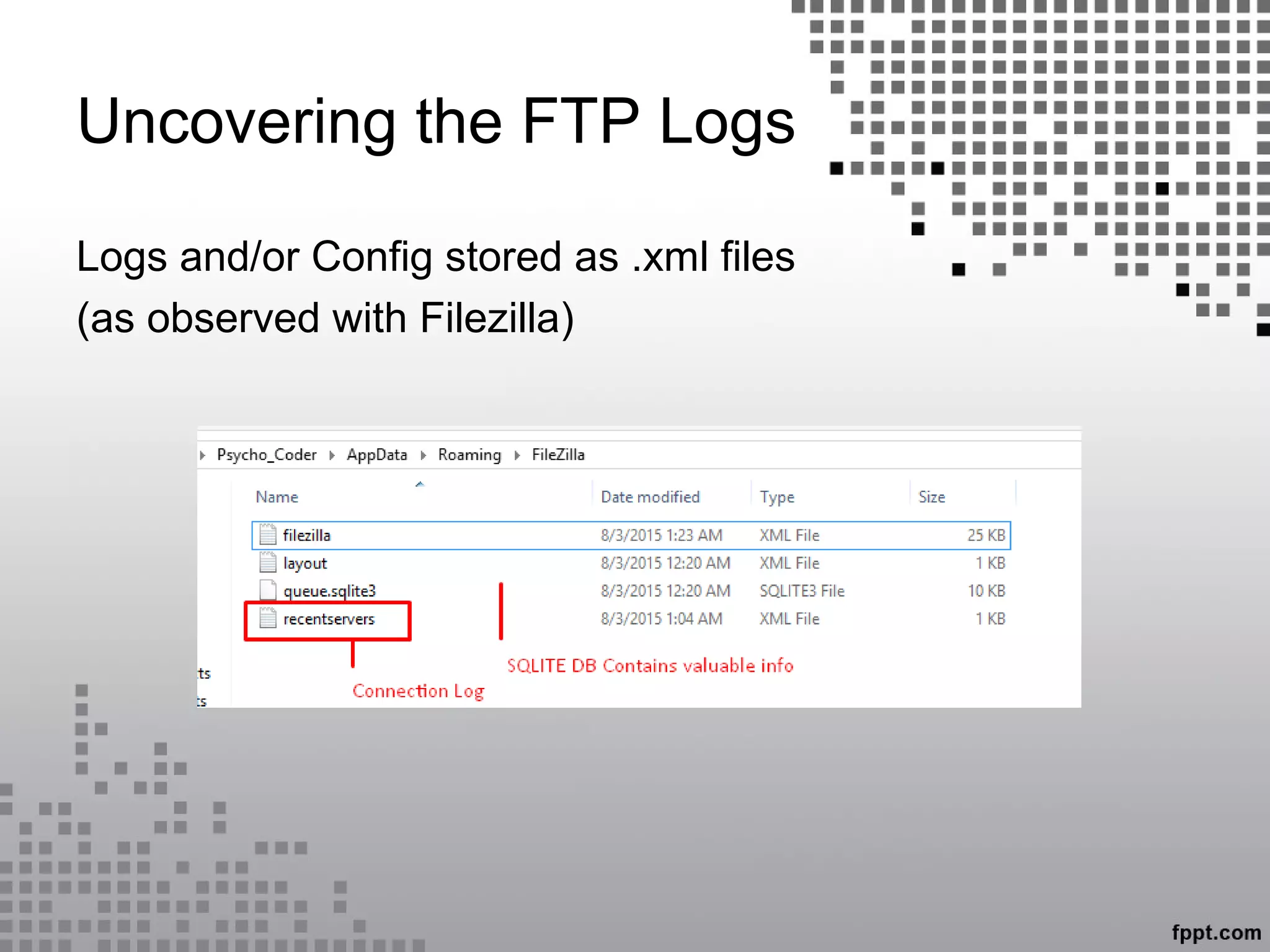
Uncovering the FTP Logs
Logs and/or Config stored as .xml files
(as observed with Filezilla)
Uncovering the FTP Logs
(contd.)
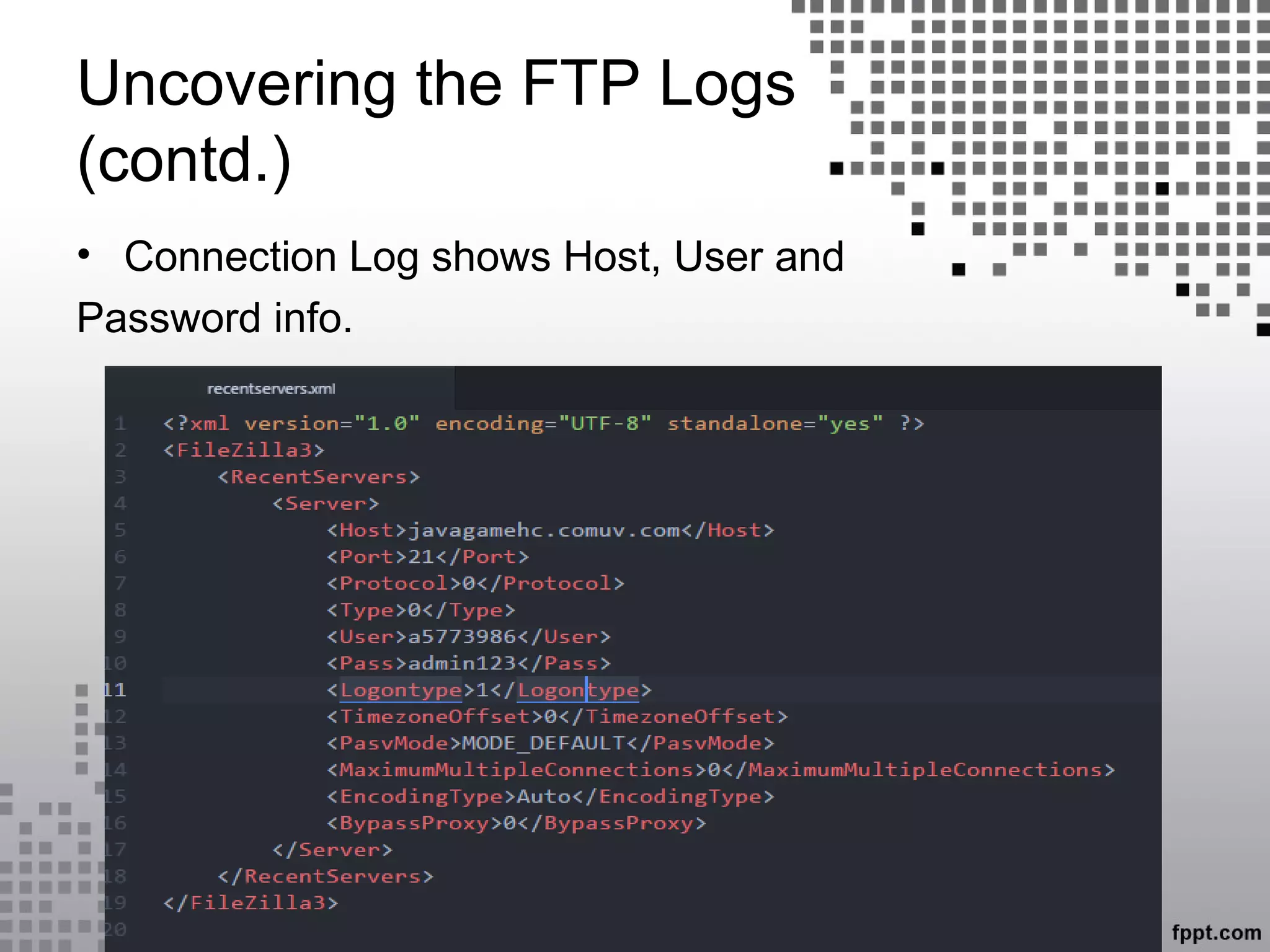
• Connection Log shows Host, User and
Password info.
Analyzing Server Logs
• Knowing the log format
– Logs save data in a particular format.
– Log format can be configured.
– Example: Log4j, Slf4j
• Properly handling the log files and preserve the
log metadata
• Building scripts (Perl, Python, Shell) to automate
analysis and search utilities like grep to find
spicy info.
QUESTIONS ?
THANK YOU

Investigating server logs

  • 1.
    Server Log Forensics PresentedBy Psycho_Coder Digital Evidence Analyst
  • 2.
    Today’s Discussion Topics  Whatare logs?  Who creates logs?  Basic Terminology  Server Logs  Server Classification  Uncovering the Web Server Logs  Uncovering FTP Server Logs  Analyzing Server Logs
  • 3.
    What are logs? • A file that lists actions that have occurred. For example, Web servers maintain log files listing every request made to the server. With log file analysis tools, it's possible to get a good idea of where visitors are coming from, how often they return, and how they navigate through a site.
  • 4.
    Who create logs? •Most Operating Systems stores logs for user actions and events. • All heavy software’s from professional vendors create logs for their software that was installed in a digital system. • Logs on Windows are store in Registry, %appdata% etc. • Logs on Linux is stored in /var/log
  • 5.
    Basic Terminology • Server:A server is both a running instance of some software capable of accepting requests from clients, and the computer such a server runs on. • Web Server: It is an information technology that processes requests via HTTP, the basic network protocol used to distribute information on the World Wide Web. The primary function of a web server is to store, process and deliver web pages to clients.
  • 6.
    Basic Terminology (contd.) • FTP:The File Transfer Protocol (FTP) is a standard network protocol used to transfer computer files from one host to another host over a TCP-based network, such as the Internet. FTP is built on a client-server architecture and uses separate control and data connections between the client and the server.
  • 7.
    Server Logs • Aserver log is a log file (or several files) automatically created and maintained by a server consisting of a list of activities it performed. Example: a web server log which maintains a history of page requests. • These files are usually not accessible to general Internet users, only to the webmaster or other administrative person. • Log data often grouped into different files based on the log type. Example :- Access Log, error log, referrer log etc.
  • 8.
    Server Classification • DifferentServers do different work. • Some types :- – Telnet Server – FTP Server – HTTP Server – Web Server
  • 9.
    Uncovering the WebServer Logs • A Web Server logs all request (GET/POST) • methods into files with URLs and other information. • From the url’s a users motives can be decrypted. Example :- URL :- http://example.com/product?id='+UNION+SELECT+1,2,3,4+ The above tells the forensic investigator that an attempt is being made to perform SQL Injection. Now along with this we will also be able get IP and there by try further to track the IP Location and ISP.
  • 10.
    Uncovering the FTPLogs Logs and/or Config stored as .xml files (as observed with Filezilla)
  • 11.
    Uncovering the FTPLogs (contd.) • Connection Log shows Host, User and Password info.
  • 12.
    Analyzing Server Logs •Knowing the log format – Logs save data in a particular format. – Log format can be configured. – Example: Log4j, Slf4j • Properly handling the log files and preserve the log metadata • Building scripts (Perl, Python, Shell) to automate analysis and search utilities like grep to find spicy info.
  • 13.
  • 14.