Data Science with R
Unit II: Introduction to R & Programming Structures
M. Narasimha Raju
Dept. of Computer Science & Engineering
Shri Vishnu Engineering College for Women (A),
R- Software (Open Source - Free Download)
⚫R 4.0.5 for Windows
⚫https://cran.r-project.org/bin/windows/base/
⚫RStudio Desktop 1.4.1106
⚫https://www.rstudio.com/products/rstudio/download/
2
Online Compilers
⚫https://replit.com/languages/rlang
⚫https://www.mycompiler.io/new/r
⚫https://onecompiler.com/r
⚫https://www.onlinegdb.com/online_r_interpreter
3
R- Overview
⚫R is a programming language and software environment for
statistical analysis, graphics representation and reporting.
⚫R was created by Ross Ihaka and Robert Gentleman at the
University of Auckland, New Zealand, and is currently developed
by the R Development Core Team.
⚫R made its first appearance in 1993.
⚫The core of R is an interpreted computer language which allows
branching and looping as well as modular programming using
functions. R allows integration with the procedures written in the
C, C++, .Net, Python or FORTRAN languages for efficiency.
⚫R is freely available under the GNU General Public License, and
pre-compiled binary versions are provided for various operating
systems like Linux, Windows and Mac.
4
Features of R
⚫R is a well-developed, simple and effective programming language
which includes conditionals, loops, user defined recursive functions and
input and output facilities.
⚫R has an effective data handling and storage facility,
⚫R provides a suite of operators for calculations on arrays, lists, vectors
and matrices.
⚫R provides a large, coherent and integrated collection of tools for data
analysis.
⚫R provides graphical facilities for data analysis and display either
directly at the computer or printing at the papers.
5
Introduction to R
⚫R is a free open source software package that is increasingly finding use in business
analytics and is rapidly becoming the industry standard
⚫ Industry giants like Microsoft and IBM are funding heavily
⚫R can be defined as below:-
⚫ Programming language for graphics and statistical computations
⚫ Object-oriented: data/information stored as objects, operations on objects
⚫ Available freely under the GNU public license
⚫ Used in data mining and statistical analysis
⚫ Included time series analysis, linear and nonlinear modeling among others
⚫ Very active community and package contributions
⚫ Very little programming language knowledge necessary
⚫ Can be downloaded from http://www.r-project.org/
⚫ Latest Version:- R-3.6.0 for Windows (32/64 bit)
R-Studio
⚫Advantages
⚫ It can run on any operating system
⚫ It integrates seamlessly with Big Data systems like Hadoop, map-reduce
⚫ Provides excellent graphical outputs
⚫ It has a small core and thousands of contributed projects
⚫ One can easily migrated to commercially supported software like SPSS
⚫R-Studio
⚫ R Studio is an IDE for R with advanced and more user-friendly GUI.
⚫ R is the substrate on which we can mount various features using PACKAGES like RCMDR-
R
⚫ Commander or R-Studio.
⚫ R was started by Bell Laboratories as “S” for Fortran Library.
⚫ Latest version:- RStudio 1.2.1335 - Windows 7+ (64-bit)
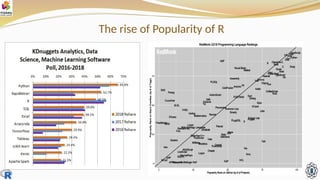
The rise of Popularity of R
R-Basic
⚫R Command Prompt
⚫ $ R
⚫ > myString <- "Hello, World!"
⚫ > print ( myString)
⚫ [1] “Hello, World!”
⚫R Script File
⚫ # My first program in R Programming
⚫ myString <- "Hello, World!"
⚫ print ( myString)
⚫ Save the above code in a file test.R and
execute
⚫Comments
⚫# My first program in R
Programming
⚫# No multi-line comments at a
time
9
Data type of the R-object
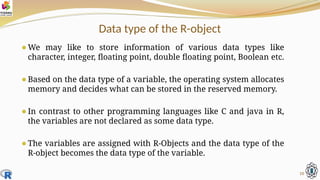
⚫We may like to store information of various data types like
character, integer, floating point, double floating point, Boolean etc.
⚫Based on the data type of a variable, the operating system allocates
memory and decides what can be stored in the reserved memory.
⚫In contrast to other programming languages like C and java in R,
the variables are not declared as some data type.
⚫The variables are assigned with R-Objects and the data type of the
R-object becomes the data type of the variable.
10
Data type of the R-object
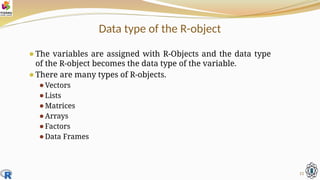
⚫The variables are assigned with R-Objects and the data type
of the R-object becomes the data type of the variable.
⚫There are many types of R-objects.
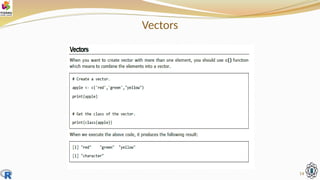
⚫Vectors
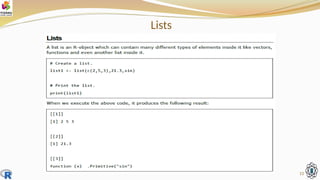
⚫Lists
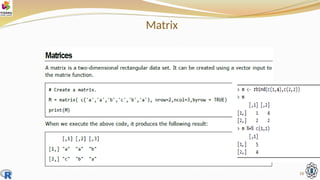
⚫Matrices
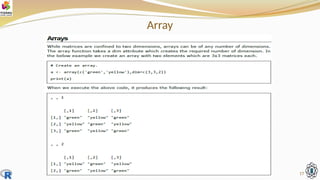
⚫Arrays
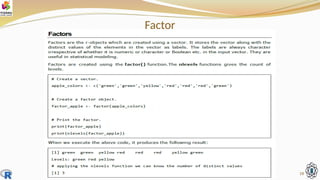
⚫Factors
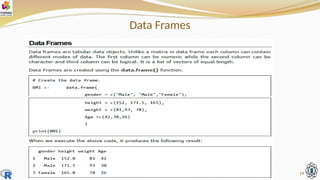
⚫Data Frames
11
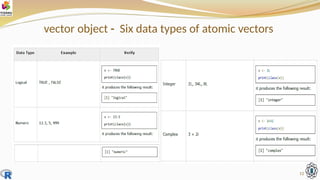
vector object - Six data types of atomic vectors
12
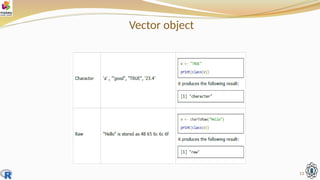
Vector object
13
Vectors
14
Lists
15
Matrix
16
Array
17
Factor
18
Data Frames
19
How to Run R
⚫R is an extremely versatile open source programming language for
statistics and data science.
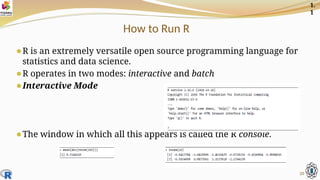
⚫R operates in two modes: interactive and batch
⚫Interactive Mode
⚫The window in which all this appears is called the R console.
20
1.
1
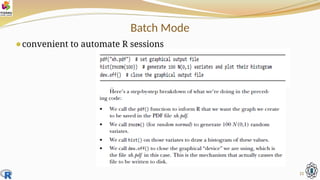
Batch Mode
⚫convenient to automate R sessions
21
A First R Session
⚫The standard assignment
operator in R is <-.
⚫We can also use =, but this is
discouraged, as it does not
work in some special situations.
⚫The c stands for concatenate.
⚫> q <- c(x,x,8)
⚫sets q to (1,2,4,1,2,4,8)
⚫> x
[1] 1 2 4
⚫> x[3]
[1] 4
⚫index or subscript R vectors
are indexed starting from 1,
not 0
⚫> x <- c(1,2,4)
⚫> x[2:3]
[1] 2 4
22
1.
2
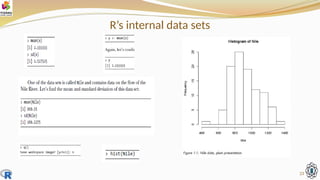
R’s internal data sets
23
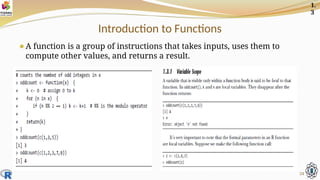
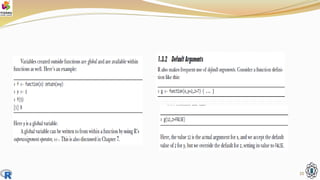
Introduction to Functions
⚫A function is a group of instructions that takes inputs, uses them to
compute other values, and returns a result.
24
1.
3
25
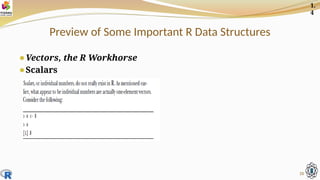
Preview of Some Important R Data Structures
⚫Vectors, the R Workhorse
⚫Scalars
26
1.
4
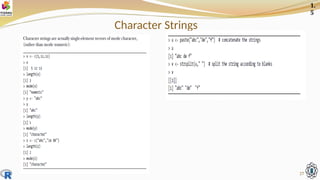
Character Strings
27
1.
5
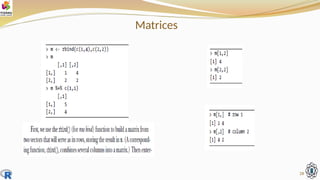
Matrices
28
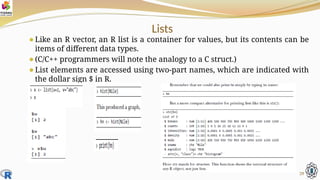
Lists
⚫Like an R vector, an R list is a container for values, but its contents can be
items of different data types.
⚫(C/C++ programmers will note the analogy to a C struct.)
⚫List elements are accessed using two-part names, which are indicated with
the dollar sign $ in R.
29
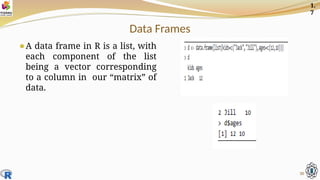
Data Frames
⚫A data frame in R is a list, with
each component of the list
being a vector corresponding
to a column in our “matrix” of
data.
30
1.
7
Classes
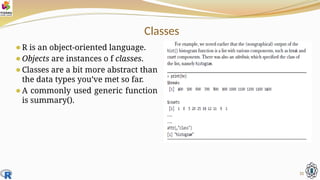
⚫R is an object-oriented language.
⚫Objects are instances o f classes.
⚫Classes are a bit more abstract than
the data types you’ve met so far.
⚫A commonly used generic function
is summary().
31
Getting Help
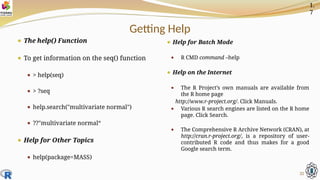
⚫ The help() Function
⚫ To get information on the seq() function
⚫ > help(seq)
⚫ > ?seq
⚫ help.search("multivariate normal")
⚫ ??"multivariate normal“
⚫ Help for Other Topics
⚫ help(package=MASS)
⚫ Help for Batch Mode
⚫ R CMD command –help
⚫ Help on the Internet
⚫ The R Project’s own manuals are available from
the R home page
http://www.r-project.org/. Click Manuals.
⚫ Various R search engines are listed on the R home
page. Click Search.
⚫ The Comprehensive R Archive Network (CRAN), at
http://cran.r-project.org/, is a repository of user-
contributed R code and thus makes for a good
Google search term.
32
1.
7
Datasets & Variables
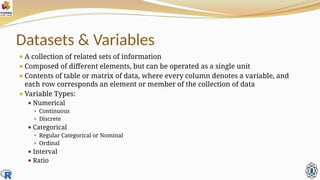
⚫A collection of related sets of information
⚫Composed of different elements, but can be operated as a single unit
⚫Contents of table or matrix of data, where every column denotes a variable, and
each row corresponds an element or member of the collection of data
⚫Variable Types:
⚫ Numerical
⚫ Continuous
⚫ Discrete
⚫ Categorical
⚫ Regular Categorical or Nominal
⚫ Ordinal
⚫ Interval
⚫ Ratio
Numerical Data
⚫Observations can take any value in a set of real numbers
⚫Can add, subtract, take averages
Example:
⚫Discrete - Numerical values with jumps; can take only certain
number of values (finite or countably infinite)
⚫Ex:- No. of items bought at a market, Population counts, Census
⚫Continuous - Opposite of discrete; infinite possible values
⚫Ex:- Height, Weight, Time, Government spending, Fluid
measurements (milk, water)
Categorical Data
⚫ Observations that form categories
⚫ CANNOT add, subtract, take averages
⚫ NOMINAL or Regular Categorical - One or more categories, no order
⚫ Nominal scales are used for labeling variables, with out any quantitative values. We
cannot tell one value is better than other
⚫ Example:- What is your gender:- m-male, f-female
⚫ Example:- What is your hair color:- 1. black, 2. brown, 3.white, 4.gray, 5.other
⚫ ORDINAL - Levels have a natural order
⚫ With ordinal scales, it is the order of the values is what's important and significant, but the
difference between each one is not really known
⚫ Example:- How do you feel today:-
1.very unhappy 2.unhappy 3.ok 4.happy 5. very happy
⚫ Example:- How satisfied are you with our service?
1.very satisfied 2. some what satisfied 3.neutral 4.somwwhat unsatisfied 5.very unsatisfied
Interval
⚫Interval scaled are numerical scale in which we know not only the
order, but also the exact distance between the values
⚫Example:- A+ grade: 91-100, A grade: 81-90, B+ grade: 71-80, B grade: 61-
70, C-grade:51-60, Fail: <60
⚫ Celsius Temp Example:- the difference between 60 and 50 degree is a
measurable 10 degree, as is the difference between 80 and 70 degrees
⚫RATIO
⚫Ratio scales tell us about the order or the exact value between units
⚫Example:- a device provides two examples of ratio scales (height and
weight)
Data Science with R
Unit I: Introduction to R & Programming Structures
M. Narasimha Raju
Dept. of Computer Science & Engineering
Shri Vishnu Engineering College for Women (A),
Thank
You

Data science with R Unit - II Part-1.pptx

  • 1.
    Data Science withR Unit II: Introduction to R & Programming Structures M. Narasimha Raju Dept. of Computer Science & Engineering Shri Vishnu Engineering College for Women (A),
  • 2.
    R- Software (OpenSource - Free Download) ⚫R 4.0.5 for Windows ⚫https://cran.r-project.org/bin/windows/base/ ⚫RStudio Desktop 1.4.1106 ⚫https://www.rstudio.com/products/rstudio/download/ 2
  • 3.
  • 4.
    R- Overview ⚫R isa programming language and software environment for statistical analysis, graphics representation and reporting. ⚫R was created by Ross Ihaka and Robert Gentleman at the University of Auckland, New Zealand, and is currently developed by the R Development Core Team. ⚫R made its first appearance in 1993. ⚫The core of R is an interpreted computer language which allows branching and looping as well as modular programming using functions. R allows integration with the procedures written in the C, C++, .Net, Python or FORTRAN languages for efficiency. ⚫R is freely available under the GNU General Public License, and pre-compiled binary versions are provided for various operating systems like Linux, Windows and Mac. 4
  • 5.
    Features of R ⚫Ris a well-developed, simple and effective programming language which includes conditionals, loops, user defined recursive functions and input and output facilities. ⚫R has an effective data handling and storage facility, ⚫R provides a suite of operators for calculations on arrays, lists, vectors and matrices. ⚫R provides a large, coherent and integrated collection of tools for data analysis. ⚫R provides graphical facilities for data analysis and display either directly at the computer or printing at the papers. 5
  • 6.
    Introduction to R ⚫Ris a free open source software package that is increasingly finding use in business analytics and is rapidly becoming the industry standard ⚫ Industry giants like Microsoft and IBM are funding heavily ⚫R can be defined as below:- ⚫ Programming language for graphics and statistical computations ⚫ Object-oriented: data/information stored as objects, operations on objects ⚫ Available freely under the GNU public license ⚫ Used in data mining and statistical analysis ⚫ Included time series analysis, linear and nonlinear modeling among others ⚫ Very active community and package contributions ⚫ Very little programming language knowledge necessary ⚫ Can be downloaded from http://www.r-project.org/ ⚫ Latest Version:- R-3.6.0 for Windows (32/64 bit)
  • 7.
    R-Studio ⚫Advantages ⚫ It canrun on any operating system ⚫ It integrates seamlessly with Big Data systems like Hadoop, map-reduce ⚫ Provides excellent graphical outputs ⚫ It has a small core and thousands of contributed projects ⚫ One can easily migrated to commercially supported software like SPSS ⚫R-Studio ⚫ R Studio is an IDE for R with advanced and more user-friendly GUI. ⚫ R is the substrate on which we can mount various features using PACKAGES like RCMDR- R ⚫ Commander or R-Studio. ⚫ R was started by Bell Laboratories as “S” for Fortran Library. ⚫ Latest version:- RStudio 1.2.1335 - Windows 7+ (64-bit)
  • 8.
    The rise ofPopularity of R
  • 9.
    R-Basic ⚫R Command Prompt ⚫$ R ⚫ > myString <- "Hello, World!" ⚫ > print ( myString) ⚫ [1] “Hello, World!” ⚫R Script File ⚫ # My first program in R Programming ⚫ myString <- "Hello, World!" ⚫ print ( myString) ⚫ Save the above code in a file test.R and execute ⚫Comments ⚫# My first program in R Programming ⚫# No multi-line comments at a time 9
  • 10.
    Data type ofthe R-object ⚫We may like to store information of various data types like character, integer, floating point, double floating point, Boolean etc. ⚫Based on the data type of a variable, the operating system allocates memory and decides what can be stored in the reserved memory. ⚫In contrast to other programming languages like C and java in R, the variables are not declared as some data type. ⚫The variables are assigned with R-Objects and the data type of the R-object becomes the data type of the variable. 10
  • 11.
    Data type ofthe R-object ⚫The variables are assigned with R-Objects and the data type of the R-object becomes the data type of the variable. ⚫There are many types of R-objects. ⚫Vectors ⚫Lists ⚫Matrices ⚫Arrays ⚫Factors ⚫Data Frames 11
  • 12.
    vector object -Six data types of atomic vectors 12
  • 13.
  • 14.
  • 15.
  • 16.
  • 17.
  • 18.
  • 19.
  • 20.
    How to RunR ⚫R is an extremely versatile open source programming language for statistics and data science. ⚫R operates in two modes: interactive and batch ⚫Interactive Mode ⚫The window in which all this appears is called the R console. 20 1. 1
  • 21.
    Batch Mode ⚫convenient toautomate R sessions 21
  • 22.
    A First RSession ⚫The standard assignment operator in R is <-. ⚫We can also use =, but this is discouraged, as it does not work in some special situations. ⚫The c stands for concatenate. ⚫> q <- c(x,x,8) ⚫sets q to (1,2,4,1,2,4,8) ⚫> x [1] 1 2 4 ⚫> x[3] [1] 4 ⚫index or subscript R vectors are indexed starting from 1, not 0 ⚫> x <- c(1,2,4) ⚫> x[2:3] [1] 2 4 22 1. 2
  • 23.
  • 24.
    Introduction to Functions ⚫Afunction is a group of instructions that takes inputs, uses them to compute other values, and returns a result. 24 1. 3
  • 25.
  • 26.
    Preview of SomeImportant R Data Structures ⚫Vectors, the R Workhorse ⚫Scalars 26 1. 4
  • 27.
  • 28.
  • 29.
    Lists ⚫Like an Rvector, an R list is a container for values, but its contents can be items of different data types. ⚫(C/C++ programmers will note the analogy to a C struct.) ⚫List elements are accessed using two-part names, which are indicated with the dollar sign $ in R. 29
  • 30.
    Data Frames ⚫A dataframe in R is a list, with each component of the list being a vector corresponding to a column in our “matrix” of data. 30 1. 7
  • 31.
    Classes ⚫R is anobject-oriented language. ⚫Objects are instances o f classes. ⚫Classes are a bit more abstract than the data types you’ve met so far. ⚫A commonly used generic function is summary(). 31
  • 32.
    Getting Help ⚫ Thehelp() Function ⚫ To get information on the seq() function ⚫ > help(seq) ⚫ > ?seq ⚫ help.search("multivariate normal") ⚫ ??"multivariate normal“ ⚫ Help for Other Topics ⚫ help(package=MASS) ⚫ Help for Batch Mode ⚫ R CMD command –help ⚫ Help on the Internet ⚫ The R Project’s own manuals are available from the R home page http://www.r-project.org/. Click Manuals. ⚫ Various R search engines are listed on the R home page. Click Search. ⚫ The Comprehensive R Archive Network (CRAN), at http://cran.r-project.org/, is a repository of user- contributed R code and thus makes for a good Google search term. 32 1. 7
  • 33.
    Datasets & Variables ⚫Acollection of related sets of information ⚫Composed of different elements, but can be operated as a single unit ⚫Contents of table or matrix of data, where every column denotes a variable, and each row corresponds an element or member of the collection of data ⚫Variable Types: ⚫ Numerical ⚫ Continuous ⚫ Discrete ⚫ Categorical ⚫ Regular Categorical or Nominal ⚫ Ordinal ⚫ Interval ⚫ Ratio
  • 34.
    Numerical Data ⚫Observations cantake any value in a set of real numbers ⚫Can add, subtract, take averages Example: ⚫Discrete - Numerical values with jumps; can take only certain number of values (finite or countably infinite) ⚫Ex:- No. of items bought at a market, Population counts, Census ⚫Continuous - Opposite of discrete; infinite possible values ⚫Ex:- Height, Weight, Time, Government spending, Fluid measurements (milk, water)
  • 35.
    Categorical Data ⚫ Observationsthat form categories ⚫ CANNOT add, subtract, take averages ⚫ NOMINAL or Regular Categorical - One or more categories, no order ⚫ Nominal scales are used for labeling variables, with out any quantitative values. We cannot tell one value is better than other ⚫ Example:- What is your gender:- m-male, f-female ⚫ Example:- What is your hair color:- 1. black, 2. brown, 3.white, 4.gray, 5.other ⚫ ORDINAL - Levels have a natural order ⚫ With ordinal scales, it is the order of the values is what's important and significant, but the difference between each one is not really known ⚫ Example:- How do you feel today:- 1.very unhappy 2.unhappy 3.ok 4.happy 5. very happy ⚫ Example:- How satisfied are you with our service? 1.very satisfied 2. some what satisfied 3.neutral 4.somwwhat unsatisfied 5.very unsatisfied
  • 36.
    Interval ⚫Interval scaled arenumerical scale in which we know not only the order, but also the exact distance between the values ⚫Example:- A+ grade: 91-100, A grade: 81-90, B+ grade: 71-80, B grade: 61- 70, C-grade:51-60, Fail: <60 ⚫ Celsius Temp Example:- the difference between 60 and 50 degree is a measurable 10 degree, as is the difference between 80 and 70 degrees ⚫RATIO ⚫Ratio scales tell us about the order or the exact value between units ⚫Example:- a device provides two examples of ratio scales (height and weight)
  • 37.
    Data Science withR Unit I: Introduction to R & Programming Structures M. Narasimha Raju Dept. of Computer Science & Engineering Shri Vishnu Engineering College for Women (A), Thank You