Online Training on SharePoint 2007Check Training Details @Training DetailsMoss Expertshttp://manish-sharepoint.blogspot.com/
SharePoint Object Model, Web Services, Features and SolutionsMoss Expertshttp://manish-sharepoint.blogspot.com/
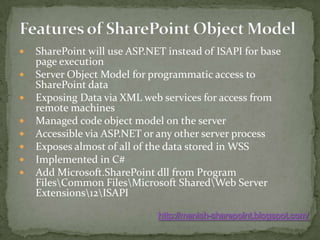
Features of SharePoint Object ModelSharePoint will use ASP.NET instead of ISAPI for base page executionServer Object Model for programmatic access to SharePoint dataExposing Data via XML web services for access from remote machinesManaged code object model on the serverAccessible via ASP.NET or any other server processExposes almost of all of the data stored in WSSImplemented in C#Add Microsoft.SharePointdll from Program Files\Common Files\Microsoft Shared\Web Server Extensions\12\ISAPIhttp://manish-sharepoint.blogspot.com/
SharePoint Object ModelIt gives us full access to SharePointOnly available on the serverhttp://manish-sharepoint.blogspot.com/
Examples of what can be done with the Object Model:Add, edit, delete, and retrieve data from SharePoint Lists Create new lists and set list metadata (e.g. the fields in a list) Set web properties Work with documents in document libraries. Perform administrative tasks such as creating webs, adding users, creating roles, etc. Pretty much any functionality in the UI can be automated through the OM!http://manish-sharepoint.blogspot.com/
Object Model Hierarchyhttp://manish-sharepoint.blogspot.com/
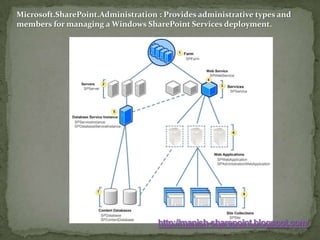
Microsoft.SharePoint.Administration : Provides administrative types and members for managing a Windows SharePoint Services deployment. http://manish-sharepoint.blogspot.com/
The SPFarm object is the highest object within the Windows SharePoint Services object model hierarchy. The Servers property gets a collection representing all the servers in the deployment, and the Services property gets a collection representing all the services.Each SPServer object represents a physical server computer. The ServiceInstances property provides access to the set of individual service instances that run on the individual computer.An SPWebService object provides access to configuration settings for a specific logical service or application. The WebApplications property gets the collection of Web applications that run the service.An SPDatabaseServiceInstance object represents a single instance of a database service running on the server computer.Each SPWebApplication object represents a load-balanced Web application based in Internet Information Services (IIS). The SPWebApplication object provides access to credentials and other server farm wide application settings. The Sites property gets the collection of site collections within the Web application, and the ContentDatabases property collection of content databases used in the Web application. An SPContentDatabase object inherits from the SPDatabase class and represents a database that contains user data for a SharePoint Web application. An SPSiteCollection object represents the collection of site collections within the Web application. http://manish-sharepoint.blogspot.com/
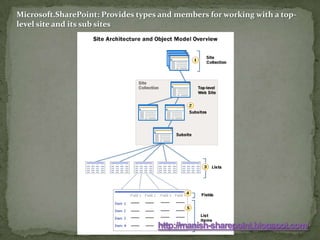
Microsoft.SharePoint: Provides types and members for working with a top-level site and its sub siteshttp://manish-sharepoint.blogspot.com/
Each SPSite object, represents a set of logically related SPWeb objects. Such a set is commonly called a "site collectionEach site collection includes any number of SPWeb objects, and each object has members that can be used to manage a site, including its template and theme, as well as to access files and folders on the site. Each SPList object has members that are used to manage the list or access items in the list. The GetItems method can be used to perform queries that return specific items. The Fields property returns an SPFieldCollection object that represents all the fields, or columns, in the list, and the Items property returns an SPListItemCollection object that represents all the items, or rows, in the list.Each SPField object has members that contain settings for the field.Each SPListItem object represents a single row in the list.http://manish-sharepoint.blogspot.com/
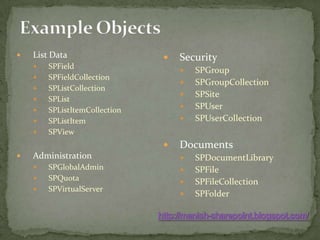
Example ObjectsSecuritySPGroupSPGroupCollectionSPSiteSPUserSPUserCollectionDocumentsSPDocumentLibrarySPFileSPFileCollectionSPFolderList DataSPFieldSPFieldCollectionSPListCollectionSPListSPListItemCollectionSPListItemSPViewAdministrationSPGlobalAdminSPQuotaSPVirtualServerhttp://manish-sharepoint.blogspot.com/
Accessing Data in a MOSS ListGet a SPList or SPDocumentLibrary object.SPListmylist = web.Lists[“Events”];You can then call the .Items property to get all of the items:SPListItemCollection items = mylist.Items;If you only want a subset of the items, call the GetItems method and pass a SPQuery objectSPListItemCollection items = mylist.GetItems(query);http://manish-sharepoint.blogspot.com/
Full Example	SPWeb web = SPControl.GetContextWeb(Context);	SPList tasks = web.Lists["Tasks"];	SPListItemCollection items=tasks.Items;	foreach(SPListItem item in items)	{	output.Write(item["Title"].ToString() + item["Status"].ToString() + "<br>");	}http://manish-sharepoint.blogspot.com/
Code Example -- Enumerate sites and listsSPSitemySite = SPContext.Current.Site;SPWebCollectionsubSites = mySite.AllWebs;for (inti=0;i<subSites.Count;i++){SPListCollection lists = subSites[i].Lists;    for (int j=0;j<lists.Count;j++)    {Response.Write(SPEncode.HtmlEncode(subSites[i].Title)             + " :: " + SPEncode.HtmlEncode(lists[j].Title) + "<BR>");    }}http://manish-sharepoint.blogspot.com/
SharePoint Web ServicesSharePoint have web services APIs for accessing content.  The web services layer is built on top of the server OM.Web Services are available remotelyAllows manipulation of Lists, Webs, Views, List Items, etc.Functionality will be similar to server object model.   Not all OM functionality availablehttp://manish-sharepoint.blogspot.com/
Getting Started With Web ServicesCreate a Windows ApplicationIn Visual Studio, choose ‘Add Web Reference’Enter http://<server>/_vti_bin/lists.asmxto access the lists web serviceOther services include:UserGroups.asmx – users and groupsWebs.asmx – Web informationViews.asmx – View informationSubscription.asmx – Subscriptionshttp://manish-sharepoint.blogspot.com/
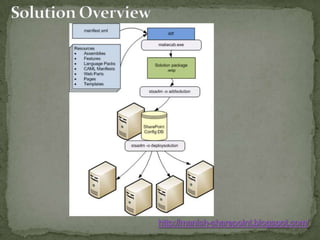
FeatureEssentially a chunk of code
Features make it easier to activate or deactivate functionality.
Provide scope for deployment.
 All the functionality has been grouped as bunch of features in SharePoint.http://manish-sharepoint.blogspot.com/
FeatureDemo
Activate Feature

Share Point Object Model

  • 1.
    Online Training onSharePoint 2007Check Training Details @Training DetailsMoss Expertshttp://manish-sharepoint.blogspot.com/
  • 2.
    SharePoint Object Model,Web Services, Features and SolutionsMoss Expertshttp://manish-sharepoint.blogspot.com/
  • 3.
    Features of SharePointObject ModelSharePoint will use ASP.NET instead of ISAPI for base page executionServer Object Model for programmatic access to SharePoint dataExposing Data via XML web services for access from remote machinesManaged code object model on the serverAccessible via ASP.NET or any other server processExposes almost of all of the data stored in WSSImplemented in C#Add Microsoft.SharePointdll from Program Files\Common Files\Microsoft Shared\Web Server Extensions\12\ISAPIhttp://manish-sharepoint.blogspot.com/
  • 4.
    SharePoint Object ModelItgives us full access to SharePointOnly available on the serverhttp://manish-sharepoint.blogspot.com/
  • 5.
    Examples of whatcan be done with the Object Model:Add, edit, delete, and retrieve data from SharePoint Lists Create new lists and set list metadata (e.g. the fields in a list) Set web properties Work with documents in document libraries. Perform administrative tasks such as creating webs, adding users, creating roles, etc. Pretty much any functionality in the UI can be automated through the OM!http://manish-sharepoint.blogspot.com/
  • 6.
  • 7.
    Microsoft.SharePoint.Administration : Providesadministrative types and members for managing a Windows SharePoint Services deployment. http://manish-sharepoint.blogspot.com/
  • 8.
    The SPFarm objectis the highest object within the Windows SharePoint Services object model hierarchy. The Servers property gets a collection representing all the servers in the deployment, and the Services property gets a collection representing all the services.Each SPServer object represents a physical server computer. The ServiceInstances property provides access to the set of individual service instances that run on the individual computer.An SPWebService object provides access to configuration settings for a specific logical service or application. The WebApplications property gets the collection of Web applications that run the service.An SPDatabaseServiceInstance object represents a single instance of a database service running on the server computer.Each SPWebApplication object represents a load-balanced Web application based in Internet Information Services (IIS). The SPWebApplication object provides access to credentials and other server farm wide application settings. The Sites property gets the collection of site collections within the Web application, and the ContentDatabases property collection of content databases used in the Web application. An SPContentDatabase object inherits from the SPDatabase class and represents a database that contains user data for a SharePoint Web application. An SPSiteCollection object represents the collection of site collections within the Web application. http://manish-sharepoint.blogspot.com/
  • 9.
    Microsoft.SharePoint: Provides typesand members for working with a top-level site and its sub siteshttp://manish-sharepoint.blogspot.com/
  • 10.
    Each SPSite object,represents a set of logically related SPWeb objects. Such a set is commonly called a "site collectionEach site collection includes any number of SPWeb objects, and each object has members that can be used to manage a site, including its template and theme, as well as to access files and folders on the site. Each SPList object has members that are used to manage the list or access items in the list. The GetItems method can be used to perform queries that return specific items. The Fields property returns an SPFieldCollection object that represents all the fields, or columns, in the list, and the Items property returns an SPListItemCollection object that represents all the items, or rows, in the list.Each SPField object has members that contain settings for the field.Each SPListItem object represents a single row in the list.http://manish-sharepoint.blogspot.com/
  • 11.
  • 12.
    Accessing Data ina MOSS ListGet a SPList or SPDocumentLibrary object.SPListmylist = web.Lists[“Events”];You can then call the .Items property to get all of the items:SPListItemCollection items = mylist.Items;If you only want a subset of the items, call the GetItems method and pass a SPQuery objectSPListItemCollection items = mylist.GetItems(query);http://manish-sharepoint.blogspot.com/
  • 13.
    Full Example SPWeb web= SPControl.GetContextWeb(Context); SPList tasks = web.Lists["Tasks"]; SPListItemCollection items=tasks.Items; foreach(SPListItem item in items) { output.Write(item["Title"].ToString() + item["Status"].ToString() + "<br>"); }http://manish-sharepoint.blogspot.com/
  • 14.
    Code Example --Enumerate sites and listsSPSitemySite = SPContext.Current.Site;SPWebCollectionsubSites = mySite.AllWebs;for (inti=0;i<subSites.Count;i++){SPListCollection lists = subSites[i].Lists; for (int j=0;j<lists.Count;j++) {Response.Write(SPEncode.HtmlEncode(subSites[i].Title) + " :: " + SPEncode.HtmlEncode(lists[j].Title) + "<BR>"); }}http://manish-sharepoint.blogspot.com/
  • 15.
    SharePoint Web ServicesSharePointhave web services APIs for accessing content. The web services layer is built on top of the server OM.Web Services are available remotelyAllows manipulation of Lists, Webs, Views, List Items, etc.Functionality will be similar to server object model. Not all OM functionality availablehttp://manish-sharepoint.blogspot.com/
  • 16.
    Getting Started WithWeb ServicesCreate a Windows ApplicationIn Visual Studio, choose ‘Add Web Reference’Enter http://<server>/_vti_bin/lists.asmxto access the lists web serviceOther services include:UserGroups.asmx – users and groupsWebs.asmx – Web informationViews.asmx – View informationSubscription.asmx – Subscriptionshttp://manish-sharepoint.blogspot.com/
  • 17.
  • 18.
    Features make iteasier to activate or deactivate functionality.
  • 19.
  • 20.
    All thefunctionality has been grouped as bunch of features in SharePoint.http://manish-sharepoint.blogspot.com/
  • 21.
  • 22.