


Introduction to Typescript
Typescript 101
Code Camp Sponsor Slide HERE
Agenda
• Why TypeScript?
• Development Environment
• Demos:
• Basics
• Classes
• External Libraries
• Debugging
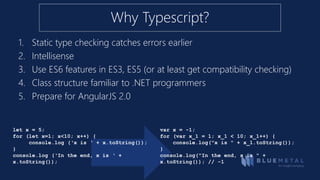
Why Typescript?
1. Static type checking catches errors earlier
2. Intellisense
3. Use ES6 features in ES3, ES5 (or at least get compatibility checking)
4. Class structure familiar to .NET programmers
5. Prepare for AngularJS 2.0
let x = 5;
for (let x=1; x<10; x++) {
console.log (‘x is ‘ + x.toString());
}
console.log (‘In the end, x is ‘ +
x.toString());
var x = -1;
for (var x_1 = 1; x_1 < 10; x_1++) {
console.log("x is " + x_1.toString());
}
console.log("In the end, x is " +
x.toString()); // -1
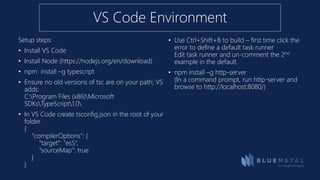
Setup steps:
• Install VS Code
• Install Node (https://nodejs.org/en/download)
• npm install –g typescript
• Ensure no old versions of tsc are on your path; VS
adds:
C:Program Files (x86)Microsoft
SDKsTypeScript1.0
• In VS Code create tsconfig.json in the root of your
folder
{
"compilerOptions": {
"target": "es5“,
"sourceMap": true
}
}
• Use Ctrl+Shift+B to build – first time click the
error to define a default task runner
Edit task runner and un-comment the 2nd
example in the default
• npm install –g http-server
(In a command prompt, run http-server and
browse to http://localhost:8080/)
VS Code Environment
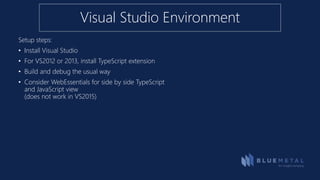
Setup steps:
• Install Visual Studio
• For VS2012 or 2013, install TypeScript extension
• Build and debug the usual way
• Consider WebEssentials for side by side TypeScript
and JavaScript view
(does not work in VS2015)
Visual Studio Environment
demo
Code Walk-through
• Basics
• Type Annotations
• Classes
• External Libraries
Resources
TypeScript Playground
• http://bit.ly/TSPlayground
TypeScript this
• http://bit.ly/TypeScriptThis
Code Samples
• http://bit.ly/LearnTypeScript
An Insight company
Thank you.

Typescript 101 introduction

  • 1.
  • 2.
  • 3.
    Agenda • Why TypeScript? •Development Environment • Demos: • Basics • Classes • External Libraries • Debugging
  • 4.
    Why Typescript? 1. Statictype checking catches errors earlier 2. Intellisense 3. Use ES6 features in ES3, ES5 (or at least get compatibility checking) 4. Class structure familiar to .NET programmers 5. Prepare for AngularJS 2.0 let x = 5; for (let x=1; x<10; x++) { console.log (‘x is ‘ + x.toString()); } console.log (‘In the end, x is ‘ + x.toString()); var x = -1; for (var x_1 = 1; x_1 < 10; x_1++) { console.log("x is " + x_1.toString()); } console.log("In the end, x is " + x.toString()); // -1
  • 5.
    Setup steps: • InstallVS Code • Install Node (https://nodejs.org/en/download) • npm install –g typescript • Ensure no old versions of tsc are on your path; VS adds: C:Program Files (x86)Microsoft SDKsTypeScript1.0 • In VS Code create tsconfig.json in the root of your folder { "compilerOptions": { "target": "es5“, "sourceMap": true } } • Use Ctrl+Shift+B to build – first time click the error to define a default task runner Edit task runner and un-comment the 2nd example in the default • npm install –g http-server (In a command prompt, run http-server and browse to http://localhost:8080/) VS Code Environment
  • 6.
    Setup steps: • InstallVisual Studio • For VS2012 or 2013, install TypeScript extension • Build and debug the usual way • Consider WebEssentials for side by side TypeScript and JavaScript view (does not work in VS2015) Visual Studio Environment
  • 7.
    demo Code Walk-through • Basics •Type Annotations • Classes • External Libraries
  • 8.
    Resources TypeScript Playground • http://bit.ly/TSPlayground TypeScriptthis • http://bit.ly/TypeScriptThis Code Samples • http://bit.ly/LearnTypeScript
  • 9.

Editor's Notes

  • #2 TypeScript is becoming a popular language for developing complex solutions that target JavaScript. In this brief introduction you'll learn how to add strong types, classes and interfaces to what you already know about JavaScript, and how to compile and deploy your solutions. You'll also get a look at TypeScript declaration files, which let you access existing JavaScript libraries such as jQuery and Angular. Join in to learn how to make your solutions more robust with TypeScript.