Agenda
Troubleshooting
Checklist
Securely
handling API
Keys
•Azure Cognitive
Services
•Azure Function Proxy
•“Easy auth”
Registering
and coding a
Single Page
Application
•Simple
JavaScript/jQuery calls
MS Graph API
•TypeScript and React
calls MS Graph API
Azure AD
Concepts
•Version confusion
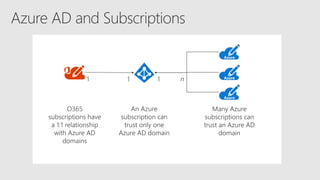
•Subscription confusion
•Terminology confusion
•Permission confusion
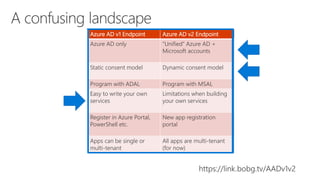
Azure ACS Azure AD v1 Endpoint Azure AD v2 Endpoint Azure AD B2C
Federation with “social”
accounts (Google,
Facebook, Microsoft, etc)
Azure AD only “Unified” Azure AD +
Microsoft accounts
Federation with “social”
accounts (Google,
Facebook, Microsoft, etc)
Static consent model Static consent model Dynamic consent model Static consent, admins
only
Program with ADAL Program with MSAL Program with MSAL
Deprecated – will be
turned off November
2018*
Easy to write your own
services
Limitations when building
your own services
Highly scalable
Highly customizable
No “on behalf of” flow
Register in Azure Service
Bus (or in SharePoint for
add-ins and S2S)
Register in Azure Portal,
PowerShell etc.
New app registration
portal
Azure Portal B2C
Apps can be single or
multi-tenant
All apps are multi-tenant
(for now)
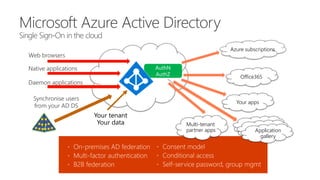
 On-premises AD federation
 Multi-factor authentication
 B2B federation
Azure subscriptions
Office365
Your apps
Multi-tenant
partner apps
Daemon applications
Web browsers
Native applications
Application
gallery
Synchronise users
from your AD DS
 Consent model
 Conditional access
 Self-service password, group mgmt
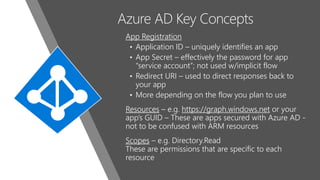
Azure AD Key Concepts
App Registration
• Application ID – uniquely identifies an app
• App Secret – effectively the password for app
“service account”; not used w/implicit flow
• Redirect URI – used to direct responses back to
your app
• More depending on the flow you plan to use
Resources – e.g. https://graph.windows.net or your
app’s GUID – These are apps secured with Azure AD -
not to be confused with ARM resources
Scopes – e.g. Directory.Read
These are permissions that are specific to each
resource
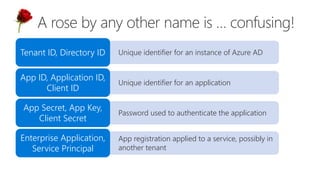
• Unique identifier for an instance of Azure ADTenant ID, Directory ID
• Unique identifier for an application
App ID, Application ID,
Client ID
• Password used to authenticate the application
App Secret, App Key,
Client Secret
• App registration applied to a service, possibly in
another tenant
Enterprise Application,
Service Principal
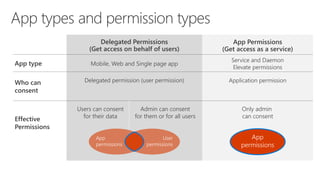
App type
Who can
consent
Effective
Permissions
Delegated Permissions
(Get access on behalf of users)
App Permissions
(Get access as a service)
Mobile, Web and Single page app
Service and Daemon
Elevate permissions
Users can consent
for their data
Admin can consent
for them or for all users
Only admin
can consent
App
permissions
User
permissions
App
permissions
Application permissionDelegated permission (user permission)
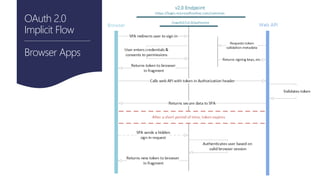
OAuth 2.0
When calling from Use this flow Permission
Browser  Web service Implicit Flow User
 Web service  Web service On-Behalf-Of Flow User
Daemon or Web Service  Web
Service
Client Credentials Flow App
Native application  Web Service Authorization Code Flow
(client obtains auth code then access
token; SSO scenarios; client does not
handle user passwords)
or
User Credentials Flow
(client passes username and password)
User
OAuth 2.0
Implicit Flow
Browser Apps
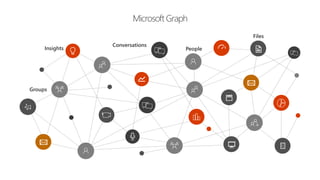
Microsoft Graph
Groups
People
Conversations
Files
Insights
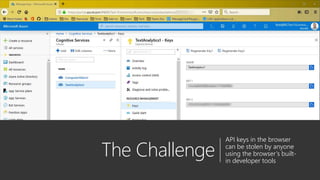
The Challenge
API keys in the browser
can be stolen by anyone
using the browser’s built-
in developer tools
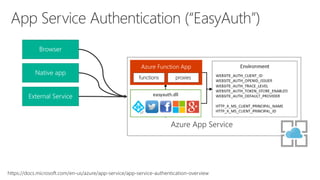
Azure Function Proxies
• Light-weight API management
• Change URL, manipulate request and
response
• Inherits the configuration of your Function
App – including “EasyAuth”
functions proxies
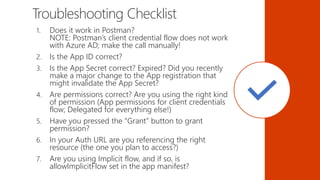
Troubleshooting Checklist
1. Does it work in Postman?
NOTE: Postman’s client credential flow does not work
with Azure AD; make the call manually!
2. Is the App ID correct?
3. Is the App Secret correct? Expired? Did you recently
make a major change to the App registration that
might invalidate the App Secret?
4. Are permissions correct? Are you using the right kind
of permission (App permissions for client credentials
flow; Delegated for everything else!)
5. Have you pressed the “Grant” button to grant
permission?
6. In your Auth URL are you referencing the right
resource (the one you plan to access?)
7. Are you using Implicit flow, and if so, is
allowImplicitFlow set in the app manifest?
Resources Sample code
https://link.bobg.tv/ImplicitFlow
 “30 Days Graph” with article
explaining sample code
https://link.bobg.tv/30DaysGraph
 Azure AD Documentation
https://link.bobg.tv/AAD-Docs
 Microsoft Graph Explorer
https://link.bobg.tv/MSGraphExplorer
 Extending SharePoint with ADAL
and MS Graph API (Julie Turner)
https://link.bobg.tv/SPADAL
 Call MS Graph API tutorial (SPA)
https://link.bobg.tv/JSMSAL
Azure AD for browser-based application developers

Azure AD for browser-based application developers

  • 2.
    Agenda Troubleshooting Checklist Securely handling API Keys •Azure Cognitive Services •AzureFunction Proxy •“Easy auth” Registering and coding a Single Page Application •Simple JavaScript/jQuery calls MS Graph API •TypeScript and React calls MS Graph API Azure AD Concepts •Version confusion •Subscription confusion •Terminology confusion •Permission confusion
  • 3.
    Azure ACS AzureAD v1 Endpoint Azure AD v2 Endpoint Azure AD B2C Federation with “social” accounts (Google, Facebook, Microsoft, etc) Azure AD only “Unified” Azure AD + Microsoft accounts Federation with “social” accounts (Google, Facebook, Microsoft, etc) Static consent model Static consent model Dynamic consent model Static consent, admins only Program with ADAL Program with MSAL Program with MSAL Deprecated – will be turned off November 2018* Easy to write your own services Limitations when building your own services Highly scalable Highly customizable No “on behalf of” flow Register in Azure Service Bus (or in SharePoint for add-ins and S2S) Register in Azure Portal, PowerShell etc. New app registration portal Azure Portal B2C Apps can be single or multi-tenant All apps are multi-tenant (for now)
  • 4.
     On-premises ADfederation  Multi-factor authentication  B2B federation Azure subscriptions Office365 Your apps Multi-tenant partner apps Daemon applications Web browsers Native applications Application gallery Synchronise users from your AD DS  Consent model  Conditional access  Self-service password, group mgmt
  • 5.
    Azure AD KeyConcepts App Registration • Application ID – uniquely identifies an app • App Secret – effectively the password for app “service account”; not used w/implicit flow • Redirect URI – used to direct responses back to your app • More depending on the flow you plan to use Resources – e.g. https://graph.windows.net or your app’s GUID – These are apps secured with Azure AD - not to be confused with ARM resources Scopes – e.g. Directory.Read These are permissions that are specific to each resource
  • 7.
    • Unique identifierfor an instance of Azure ADTenant ID, Directory ID • Unique identifier for an application App ID, Application ID, Client ID • Password used to authenticate the application App Secret, App Key, Client Secret • App registration applied to a service, possibly in another tenant Enterprise Application, Service Principal
  • 9.
    App type Who can consent Effective Permissions DelegatedPermissions (Get access on behalf of users) App Permissions (Get access as a service) Mobile, Web and Single page app Service and Daemon Elevate permissions Users can consent for their data Admin can consent for them or for all users Only admin can consent App permissions User permissions App permissions Application permissionDelegated permission (user permission)
  • 10.
    OAuth 2.0 When callingfrom Use this flow Permission Browser  Web service Implicit Flow User  Web service  Web service On-Behalf-Of Flow User Daemon or Web Service  Web Service Client Credentials Flow App Native application  Web Service Authorization Code Flow (client obtains auth code then access token; SSO scenarios; client does not handle user passwords) or User Credentials Flow (client passes username and password) User
  • 11.
  • 12.
  • 14.
    The Challenge API keysin the browser can be stolen by anyone using the browser’s built- in developer tools
  • 15.
    Azure Function Proxies •Light-weight API management • Change URL, manipulate request and response • Inherits the configuration of your Function App – including “EasyAuth”
  • 16.
  • 18.
    Troubleshooting Checklist 1. Doesit work in Postman? NOTE: Postman’s client credential flow does not work with Azure AD; make the call manually! 2. Is the App ID correct? 3. Is the App Secret correct? Expired? Did you recently make a major change to the App registration that might invalidate the App Secret? 4. Are permissions correct? Are you using the right kind of permission (App permissions for client credentials flow; Delegated for everything else!) 5. Have you pressed the “Grant” button to grant permission? 6. In your Auth URL are you referencing the right resource (the one you plan to access?) 7. Are you using Implicit flow, and if so, is allowImplicitFlow set in the app manifest?
  • 19.
    Resources Sample code https://link.bobg.tv/ImplicitFlow “30 Days Graph” with article explaining sample code https://link.bobg.tv/30DaysGraph  Azure AD Documentation https://link.bobg.tv/AAD-Docs  Microsoft Graph Explorer https://link.bobg.tv/MSGraphExplorer  Extending SharePoint with ADAL and MS Graph API (Julie Turner) https://link.bobg.tv/SPADAL  Call MS Graph API tutorial (SPA) https://link.bobg.tv/JSMSAL

Editor's Notes

  • #2 You can build amazing user experiences with modern web technology, but to make it useful you almost always need to call web services. Many of these services, such as the Microsoft Graph and custom Web APIs, require an Azure AD access token. That sounds easy, but it's often very confusing to developers who are new to it. Other web services need only an API key, which is easily stolen by anyone who knows how to use the browser's developer tools. In this session you'll learn the essentials for using Azure AD from your browser-based code. You'll learn about the different Azure AD endpoints - a point of confusion for sure - and when to use them. Then for each one, you'll learn how to register your client application and how to get that all important access token. As a bonus, you'll learn how to create your own Azure AD secured services and use an Azure Function Proxy to hide API keys for other services so they use Azure AD instead of an easily copied key value. Don't miss this quick, practical session that will get you consuming Azure AD web services in no time! DEMO SETUP: - VS Code - http-server - chrome – localhost:8080 - firefox – Azure portal - Postman
  • #4 “There is nothing permanent except change” – Heraclitus
  • #8 “The beginning of wisdom is the definition of terms” – Plato “A rose by any other name would smell as sweet” – Shakespeare
  • #11 Microsoft Build 2017
  • #12 Most useful in SharePoint: - Implicit flow on web pages - Client credentials flow for background jobs or elevating privileges in a web service
  • #14 Microsoft graph began with people in the directory. People, groups, and relationships (e.g. a manager, a group member) Then content like files Then conversations in Skype 4 Biz, email, teams, online meetings; even conversations in Word comments Then insights gathered by learning from all that information
  • #15 Demo the site V1 and V2 registrations – show: - permissions - implicit flow - reply URLs Code walk-through
  • #19 Postman - Show API key Azure portal - function app - Show proxy - Show easy auth Postman - Show AAD auth