

Mark Rackley
mrackley@paitgroup.com
Customizing SharePoint Using the Column Formatter
(and view formatter… shhhh... I snuck this in…)
Thank you #SPSTC
sponsors!
© 2015 PAIT Group
Mark Rackley / Partner & CSO
• 20+ years software architecture and
development experience
• Office 365 MVP, SharePoint Junkie since 2007
• Event Organizer (www.collabsummit.org)
• Blogger, Writer, Speaker
• Podcaster (www.techsplaining.net)
@mrackley - www.MarkRackley.net - www.PAITGroup.com
© 2015 PAIT Group
The North American Collaboration Summit
Save 33% with Discount Code “SPSTC”
•50+ Speakers including
MVP’s from all over the
world
•70+ Sessions
•Optional 3rd day of full
day workshops
•Non-Profit event with
registrations starting at
$150
Agenda
• What is the Column Formatter?
• Column Formatter Basic Usage
• Column Formatter Essentials
• What’s this view formatter??
• Demos, Demos, Demos
What is the Column
Formatter
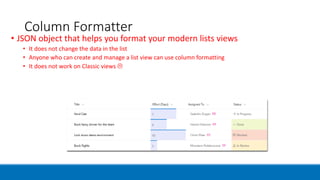
Column Formatter
• JSON object that helps you format your modern lists views
• It does not change the data in the list
• Anyone who can create and manage a list view can use column formatting
• It does not work on Classic views 
Column Formatter
• JSON object that helps you format your modern lists views
• It does not change the data in the list
• Anyone who can create and manage a list view can use column formatting
• It does not work on Classic views 
Column Formatter
• JSON object that helps you format your modern lists views
• It does not change the data in the list
• Anyone who can create and manage a list view can use column formatting
• It does not work on Classic views 
Benefits of the Column Formatter
Customize list views without having to be a developer
(Okay…. Fine… maybe you do need to be a developer.. I mean.. I know they say you don’t
need to be one, but have you ever seen a JSON object? How are non-devs support to
understand that? Maybe IIT Pros? But end users are going to struggle… good thing there is
cut and paste…)
Modern replacement for Calculated Fields
Modern replacement for many uses of the DataViewWebPart
Can deploy them in Site Designs
Column Formatter in Site Design
< Column Formatter Goes Here >
Column Formatter Capabilities
Apply Custom Formatting
Apply conditional formatting
Create clickable actions
Create simple data visualizations
Create a button to launch a Flow
Column Formatter vs SPFx Field Customizer
Field type Column formatting Field Customizer
Conditional formatting based on item values and
value ranges
Supported Supported
Action links Support for static hyperlinks that do not launch
script
Support for any hyperlink, including those that
invoke custom script
Data visualizations Support for simple visualizations that can be
expressed using HTML and CSS
Support for arbitrary data visualizations
Column Formatter
• Accessing the Column Formatter
• FROM LIST VIEW
Column Formatter
• Accessing the Column Formatter
• FROM LIST SETTINGS
Column Formatter Basic
Usage
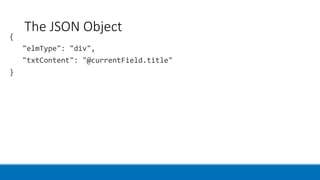
The JSON Object
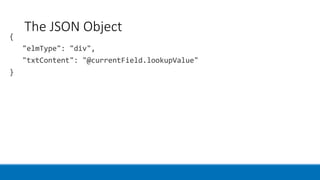
The JSON Object
The JSON Object
The JSON Object
The JSON Object
The JSON Object
The JSON Object
"style": {
"font-weight": "bold"
}
The JSON Object
"attributes": {
"class": "sp-field-severity--warning"
}
The JSON Object
"elmType": "a",
"target": "_blank",
"href": "https://www.bing.com"
The JSON Object
"target": "_blank",
"href": {
"operator": "+",
"operands": [
"https://www.bing.com/search?q=",
"@currentField"
]
Column Formatter
Essentials
Supported Elements (elmType)
div
span
a
img
svg
path
button
Supported Field Types
Single line of text
Number
Choice
Person or Group
Yes/No
Hyperlink
Picture
Date/Time
Lookup
Title (in Lists)
Unsupported Field Types
Managed Metadata
Filename (in Document
Libraries)
Calculated
Retention Label
Predefined Classes
sp-field-customFormatBackground
sp-field-severity--good
sp-field-severity--low
sp-field-severity--warning
sp-field-severity--severeWarning
sp-field-severity--blocked
sp-field-dataBars
sp-field-trending--up
sp-field-trending--down
sp-field-quickAction
Column formatting schema
Operators
Operators
Operators
children
Optional property that specifies child elements of the element specified by
“elmType”
Array of element objects
Property is ignored if the element has the “txtContent” property
children
For more information
Chris Kent’s Column Formatter
https://github.com/SharePoint/sp-dev-
solutions/tree/master/solutions/ColumnFormatter
Docs.Microsoft.com
https://docs.microsoft.com/en-us/sharepoint/dev/declarative-customization/column-formatting
Icons
https://developer.microsoft.com/en-us/fabric#/styles/icons
View Formatting
https://docs.microsoft.com/en-us/sharepoint/dev/declarative-customization/view-formatting
Samples
https://github.com/SharePoint/sp-dev-list-formatting
Demos, Demos, Demos
thank you
questions?
WWW.MARKRACKLEY.NET@MRACKLEY
http://www.paitgroup.com
http://www.markrackley.net
mrackley@paitgroup.com
@mrackley

Column Formatter in SharePoint Online