8 July, 2016
An Introduction to
Relational Databases
Dr Meriel Patrick
Pamela Stanworth
STRUCTURING DATA
8 July, 2016
Page 2
Digital Humanities Summer School -
An Introduction to Relational Databases
Structuring data
 We all structure the information we work with
 So we can find what we need, when we need it
 To facilitate evaluation, comparison, and analysis
 Choosing the right structure is important
8 July, 2016
Page 3
Digital Humanities Summer School -
An Introduction to Relational Databases
Our research could be enhanced by having better
ways of storing information, because the way I
store my thoughts makes a difference to how I
use them when progressing in my thinking.
Philosophy research fellow
The structure you select influences…
 The kinds of information you collect
 How it’s possible to interrogate your data
 The extent to which you
can take advantage of
your computer’s
data-handling abilities
 How easy it is to share
data with others
8 July, 2016
Page 4
Digital Humanities Summer School -
An Introduction to Relational Databases
Options for structuring and analysing data
Tabular data
 Spreadsheets
 Microsoft Excel
 Google Sheets
 OpenOffice Calc
 Relational databases
 Microsoft Access
 FileMaker Pro
 MySQL
 PostgreSQL
Non-tabular data
 Document-orientated
databases
 Includes XML databases
 RDF triplestores
 Linked data on the Web
 Qualitative data analysis
packages
 NVivo
 ATLAS.ti
8 July, 2016
Page 5
Digital Humanities Summer School -
An Introduction to Relational Databases
When to use a relational database
 Your data can be organised in tabular form
 E.g. information about things that share common properties
 You are interested in multiple types of entity
 And the relationships between them
 Entities may be concrete or more abstract
 You want to identify instances of things that meet
certain criteria
 You want to be able to present one dataset in
multiple different ways
 Query results can be exported and used elsewhere
8 July, 2016
Page 6
Digital Humanities Summer School -
An Introduction to Relational Databases
Benefits of relational databases
 More accurate representation of complex data
 And helps avoid duplication of information
 Permits flexible querying
 Wider range of questions possible than with a spreadsheet
 Useful if you’re unsure which questions you’ll want to ask
 Suitable for collaborative use
 Multiple people can access and use the same database
 Can encourage (or enforce) consistency in data entry
 Technology has been around for several decades
 Widely supported and well understood
8 July, 2016
Page 7
Digital Humanities Summer School -
An Introduction to Relational Databases
AN EXAMPLE
8 July, 2016
Page 8
Digital Humanities Summer School -
An Introduction to Relational Databases
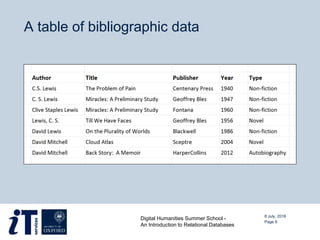
A table of bibliographic data
8 July, 2016
Page 9
Digital Humanities Summer School -
An Introduction to Relational Databases
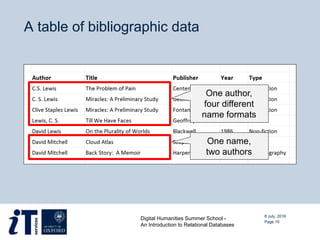
A table of bibliographic data
8 July, 2016
Page 10
Digital Humanities Summer School -
An Introduction to Relational Databases
One author,
four different
name formats
One name,
two authors
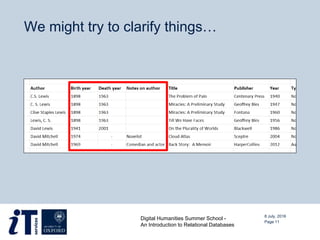
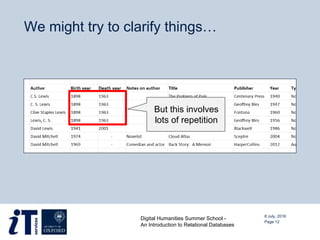
We might try to clarify things…
8 July, 2016
Page 11
Digital Humanities Summer School -
An Introduction to Relational Databases
We might try to clarify things…
8 July, 2016
Page 12
Digital Humanities Summer School -
An Introduction to Relational Databases
But this involves
lots of repetition
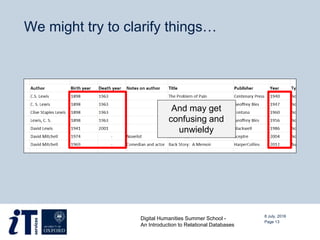
We might try to clarify things…
8 July, 2016
Page 13
Digital Humanities Summer School -
An Introduction to Relational Databases
And may get
confusing and
unwieldy
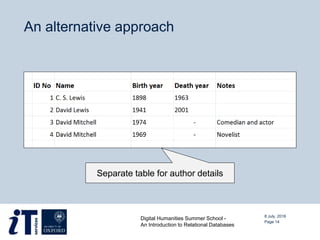
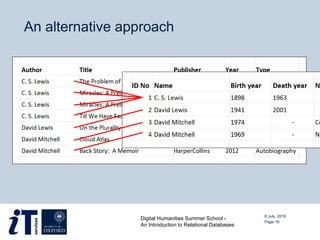
An alternative approach
8 July, 2016
Page 14
Digital Humanities Summer School -
An Introduction to Relational Databases
Separate table for author details
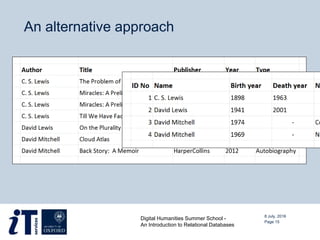
An alternative approach
8 July, 2016
Page 15
Digital Humanities Summer School -
An Introduction to Relational Databases
An alternative approach
8 July, 2016
Page 16
Digital Humanities Summer School -
An Introduction to Relational Databases
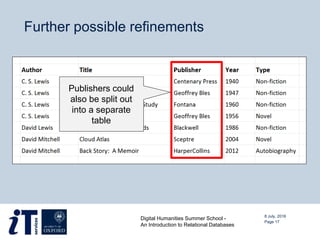
Further possible refinements
8 July, 2016
Page 17
Digital Humanities Summer School -
An Introduction to Relational Databases
Publishers could
also be split out
into a separate
table
Further possible refinements
8 July, 2016
Page 18
Digital Humanities Summer School -
An Introduction to Relational Databases
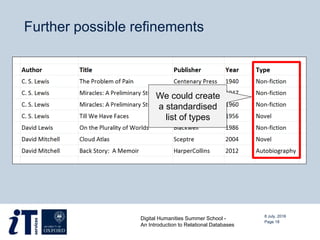
We could create
a standardised
list of types
Further possible refinements
8 July, 2016
Page 19
Digital Humanities Summer School -
An Introduction to Relational Databases
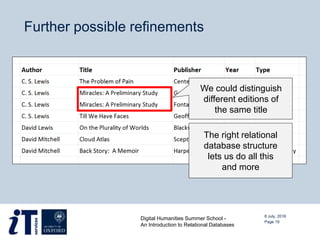
We could distinguish
different editions of
the same title
The right relational
database structure
lets us do all this
and more
DESIGNING A DATABASE
8 July, 2016
Page 20
Digital Humanities Summer School -
An Introduction to Relational Databases
8 July, 2016
Page 21
Digital Humanities Summer School -
An Introduction to Relational Databases
Database terms
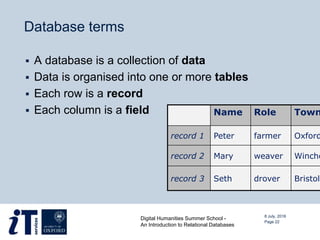
 A database is a collection of data
 Data is organised into one or more tables
 Each row is a record
 Each column is a field Name Role Town
record 1 Peter farmer Oxford
record 2 Mary weaver Winche
record 3 Seth drover Bristol
8 July, 2016
Page 22
Digital Humanities Summer School -
An Introduction to Relational Databases
Decide on the fields
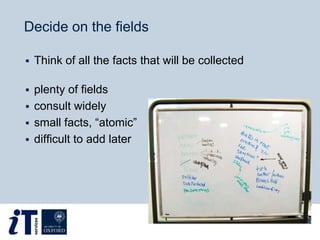
 Think of all the facts that will be collected
 plenty of fields
 consult widely
 small facts, “atomic”
 difficult to add later
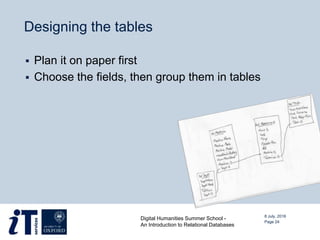
Designing the tables
 Plan it on paper first
 Choose the fields, then group them in tables
8 July, 2016
Page 24
Digital Humanities Summer School -
An Introduction to Relational Databases
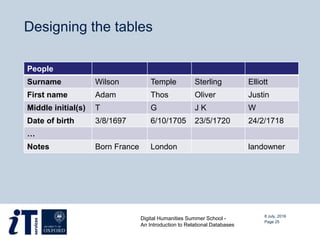
Designing the tables
8 July, 2016
Page 25
Digital Humanities Summer School -
An Introduction to Relational Databases
People
Surname Wilson Temple Sterling Elliott
First name Adam Thos Oliver Justin
Middle initial(s) T G J K W
Date of birth 3/8/1697 6/10/1705 23/5/1720 24/2/1718
…
Notes Born France London landowner
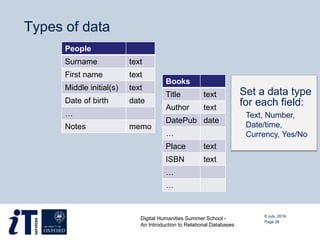
Types of data
Set a data type
for each field:
Text, Number,
Date/time,
Currency, Yes/No
People
Surname text
First name text
Middle initial(s) text
Date of birth date
…
Notes memo
Books
Title text
Author text
DatePub date
…
Place text
ISBN text
…
…
8 July, 2016
Page 26
Digital Humanities Summer School -
An Introduction to Relational Databases
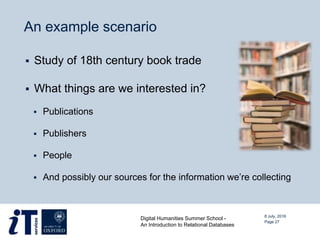
An example scenario
 Study of 18th century book trade
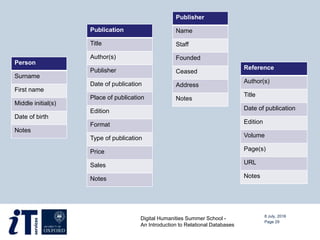
 What things are we interested in?
 Publications
 Publishers
 People
 And possibly our sources for the information we’re collecting
8 July, 2016
Page 27
Digital Humanities Summer School -
An Introduction to Relational Databases
An example scenario
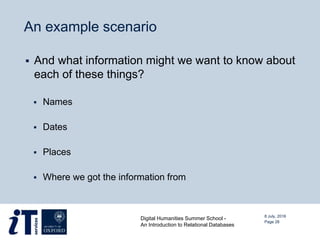
 And what information might we want to know about
each of these things?
 Names
 Dates
 Places
 Where we got the information from
8 July, 2016
Page 28
Digital Humanities Summer School -
An Introduction to Relational Databases
8 July, 2016
Digital Humanities Summer School -
An Introduction to Relational Databases
Page 29
Person
Surname
First name
Middle initial(s)
Date of birth
Notes
Publication
Title
Author(s)
Publisher
Date of publication
Place of publication
Edition
Format
Type of publication
Price
Sales
Notes
Publisher
Name
Staff
Founded
Ceased
Address
Notes
Reference
Author(s)
Title
Date of publication
Edition
Volume
Page(s)
URL
Notes
JOINS BETWEEN TABLES
8 July, 2016
Page 30
Digital Humanities Summer School -
An Introduction to Relational Databases
Primary key
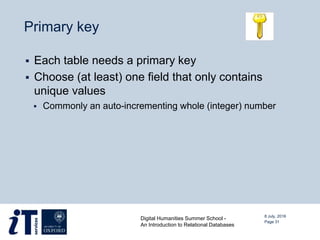
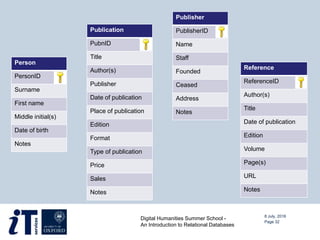
 Each table needs a primary key
 Choose (at least) one field that only contains
unique values
 Commonly an auto-incrementing whole (integer) number
8 July, 2016
Page 31
Digital Humanities Summer School -
An Introduction to Relational Databases
8 July, 2016
Digital Humanities Summer School -
An Introduction to Relational Databases
Page 32
Person
PersonID
Surname
First name
Middle initial(s)
Date of birth
Notes
Publication
PubnID
Title
Author(s)
Publisher
Date of publication
Place of publication
Edition
Format
Type of publication
Price
Sales
Notes
Publisher
PublisherID
Name
Staff
Founded
Ceased
Address
Notes
Reference
ReferenceID
Author(s)
Title
Date of publication
Edition
Volume
Page(s)
URL
Notes
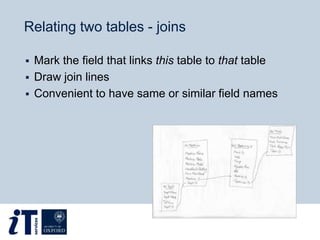
Relating two tables - joins
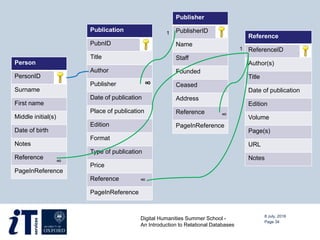
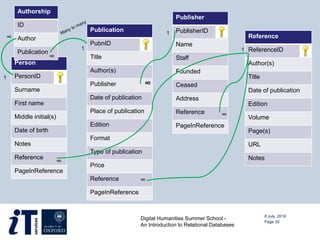
 Mark the field that links this table to that table
 Draw join lines
 Convenient to have same or similar field names
Person
PersonID
Surname
First name
Middle initial(s)
Date of birth
Notes
Reference
PageInReference
Publication
PubnID
Title
Author
Publisher
Date of publication
Place of publication
Edition
Format
Type of publication
Price
Reference
PageInReference
Publisher
PublisherID
Name
Staff
Founded
Ceased
Address
Reference
PageInReference
Reference
ReferenceID
Author(s)
Title
Date of publication
Edition
Volume
Page(s)
URL
Notes
8 July, 2016
Digital Humanities Summer School -
An Introduction to Relational Databases
Page 34
1
∞
1
∞
∞
∞
Publication
PubnID
Title
Author(s)
Publisher
Date of publication
Place of publication
Edition
Format
Type of publication
Price
Reference
PageInReference
8 July, 2016
Digital Humanities Summer School -
An Introduction to Relational Databases
Page 35
∞
1
1
Person
PersonID
Surname
First name
Middle initial(s)
Date of birth
Notes
Reference
PageInReference
Publisher
PublisherID
Name
Staff
Founded
Ceased
Address
Reference
PageInReference
Reference
ReferenceID
Author(s)
Title
Date of publication
Edition
Volume
Page(s)
URL
Notes
1
∞
1
∞
∞
∞
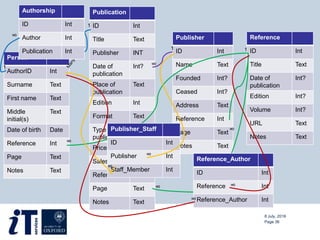
Authorship
ID
Author
Publication
∞
Publication
ID Int
Title Text
Publisher INT
Date of
publication
Int?
Place of
publication
Text
Edition Int
Format Text
Type of
publication
Text
Price Dec?
Sales Int?
Reference Int
Page Text
Notes Text
8 July, 2016
Page 36
Person
AuthorID Int
Surname Text
First name Text
Middle
initial(s)
Text
Date of birth Date
Reference Int
Page Text
Notes Text
Publisher
ID Int
Name Text
Founded Int?
Ceased Int?
Address Text
Reference Int
Page Text
Notes Text
Reference
ID Int
Title Text
Date of
publication
Int?
Edition Int?
Volume Int?
URL Text
Notes Text
1
∞
?
1
∞
∞
∞
Publisher_Staff
ID Int
Publisher Int
Staff_Member Int
Reference_Author
ID Int
Reference Int
Reference_Author Int
∞
∞
1
1
∞
∞
∞
∞
Authorship
ID Int
Author Int
Publication Int
A USER-FRIENDLY DATABASE
8 July, 2016
Page 37
Digital Humanities Summer School -
An Introduction to Relational Databases
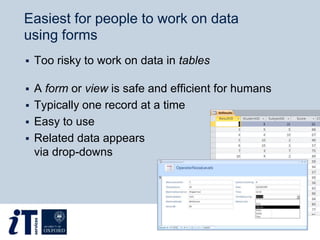
Easiest for people to work on data
using forms
 Too risky to work on data in tables
 A form or view is safe and efficient for humans
 Typically one record at a time
 Easy to use
 Related data appears
via drop-downs
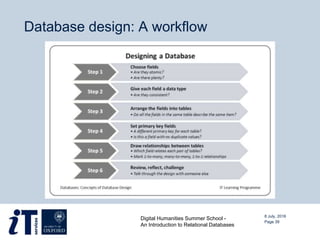
Database design: A workflow
8 July, 2016
Page 39
Digital Humanities Summer School -
An Introduction to Relational Databases
WHAT NEXT?
8 July, 2016
Page 40
Digital Humanities Summer School -
An Introduction to Relational Databases
Once you’ve created your database…
 Ask questions by constructing queries
 Find the records that meet certain criteria
 Search, sort, count, and filter data
 Perform basic mathematical and statistical operations
 Export data for other types of analysis
 Share your results with others
 Some packages produce nicely formatted
reports
8 July, 2016
Page 41
Digital Humanities Summer School -
An Introduction to Relational Databases
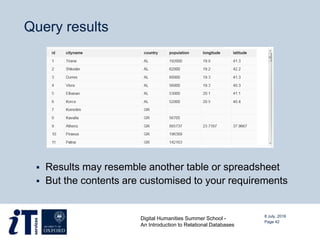
Query results
 Results may resemble another table or spreadsheet
 But the contents are customised to your requirements
Page 42
Digital Humanities Summer School -
An Introduction to Relational Databases
8 July, 2016
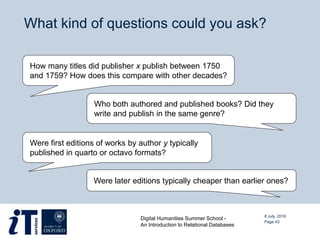
What kind of questions could you ask?
8 July, 2016
Page 43
Digital Humanities Summer School -
An Introduction to Relational Databases
How many titles did publisher x publish between 1750
and 1759? How does this compare with other decades?
Who both authored and published books? Did they
write and publish in the same genre?
Were first editions of works by author y typically
published in quarto or octavo formats?
Were later editions typically cheaper than earlier ones?
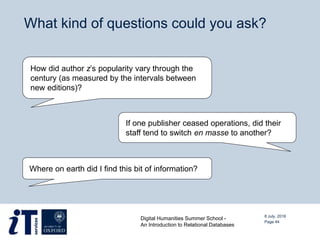
What kind of questions could you ask?
8 July, 2016
Page 44
Digital Humanities Summer School -
An Introduction to Relational Databases
How did author z’s popularity vary through the
century (as measured by the intervals between
new editions)?
If one publisher ceased operations, did their
staff tend to switch en masse to another?
Where on earth did I find this bit of information?
Database challenges in the humanities
 Patchy or incomplete data
 Be aware of the difference between 0 and null
 Interpreted and uncertain information
 Fields can indicate the degree of certainty of a
particular ‘fact’ – e.g. definite, probable, or possible
 Inconsistent or changing terminology
 Alternative spellings, different forms of address,
name changes
 May help to have controlled vocabulary tables
8 July, 2016
Page 45
Digital Humanities Summer School -
An Introduction to Relational Databases
Database challenges in the humanities
 Varying degrees of accuracy
 Often an issue with historical dates
 May help to split elements of a date into separate
fields
 Fuzziness vs. queryableness
 There’s often a trade off
 A format such as ‘c. 310 BCE’ may be more accurate
 But much harder to search and sort
8 July, 2016
Page 46
Digital Humanities Summer School -
An Introduction to Relational Databases
NOW YOU TRY IT …
8 July, 2016
Page 47
Digital Humanities Summer School -
An Introduction to Relational Databases
Your exercise today…
 Draft a structure for a relational database recording
information about membership of gentlemen’s
clubs in Victorian London
 Think about the fields, tables, and relationships
you’d need
 You have a collection of evidence about which
clubs people belonged to, and when
 However, the information is patchy and not always
consistent
8 July, 2016
Digital Humanities Summer School -
An Introduction to Relational Databases
Page 48
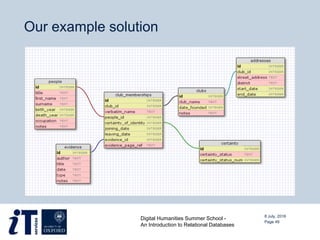
Our example solution
8 July, 2016
Digital Humanities Summer School -
An Introduction to Relational Databases
Page 49
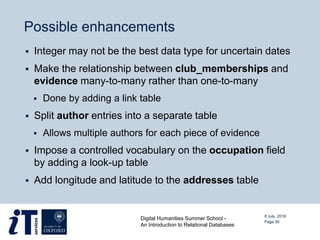
Possible enhancements
 Integer may not be the best data type for uncertain dates
 Make the relationship between club_memberships and
evidence many-to-many rather than one-to-many
 Done by adding a link table
 Split author entries into a separate table
 Allows multiple authors for each piece of evidence
 Impose a controlled vocabulary on the occupation field
by adding a look-up table
 Add longitude and latitude to the addresses table
8 July, 2016
Digital Humanities Summer School -
An Introduction to Relational Databases
Page 50
Questions?
8 July, 2016
Page 51
Digital Humanities Summer School -
An Introduction to Relational Databases

Introduction to Relational Databases

  • 1.
    8 July, 2016 AnIntroduction to Relational Databases Dr Meriel Patrick Pamela Stanworth
  • 2.
    STRUCTURING DATA 8 July,2016 Page 2 Digital Humanities Summer School - An Introduction to Relational Databases
  • 3.
    Structuring data  Weall structure the information we work with  So we can find what we need, when we need it  To facilitate evaluation, comparison, and analysis  Choosing the right structure is important 8 July, 2016 Page 3 Digital Humanities Summer School - An Introduction to Relational Databases Our research could be enhanced by having better ways of storing information, because the way I store my thoughts makes a difference to how I use them when progressing in my thinking. Philosophy research fellow
  • 4.
    The structure youselect influences…  The kinds of information you collect  How it’s possible to interrogate your data  The extent to which you can take advantage of your computer’s data-handling abilities  How easy it is to share data with others 8 July, 2016 Page 4 Digital Humanities Summer School - An Introduction to Relational Databases
  • 5.
    Options for structuringand analysing data Tabular data  Spreadsheets  Microsoft Excel  Google Sheets  OpenOffice Calc  Relational databases  Microsoft Access  FileMaker Pro  MySQL  PostgreSQL Non-tabular data  Document-orientated databases  Includes XML databases  RDF triplestores  Linked data on the Web  Qualitative data analysis packages  NVivo  ATLAS.ti 8 July, 2016 Page 5 Digital Humanities Summer School - An Introduction to Relational Databases
  • 6.
    When to usea relational database  Your data can be organised in tabular form  E.g. information about things that share common properties  You are interested in multiple types of entity  And the relationships between them  Entities may be concrete or more abstract  You want to identify instances of things that meet certain criteria  You want to be able to present one dataset in multiple different ways  Query results can be exported and used elsewhere 8 July, 2016 Page 6 Digital Humanities Summer School - An Introduction to Relational Databases
  • 7.
    Benefits of relationaldatabases  More accurate representation of complex data  And helps avoid duplication of information  Permits flexible querying  Wider range of questions possible than with a spreadsheet  Useful if you’re unsure which questions you’ll want to ask  Suitable for collaborative use  Multiple people can access and use the same database  Can encourage (or enforce) consistency in data entry  Technology has been around for several decades  Widely supported and well understood 8 July, 2016 Page 7 Digital Humanities Summer School - An Introduction to Relational Databases
  • 8.
    AN EXAMPLE 8 July,2016 Page 8 Digital Humanities Summer School - An Introduction to Relational Databases
  • 9.
    A table ofbibliographic data 8 July, 2016 Page 9 Digital Humanities Summer School - An Introduction to Relational Databases
  • 10.
    A table ofbibliographic data 8 July, 2016 Page 10 Digital Humanities Summer School - An Introduction to Relational Databases One author, four different name formats One name, two authors
  • 11.
    We might tryto clarify things… 8 July, 2016 Page 11 Digital Humanities Summer School - An Introduction to Relational Databases
  • 12.
    We might tryto clarify things… 8 July, 2016 Page 12 Digital Humanities Summer School - An Introduction to Relational Databases But this involves lots of repetition
  • 13.
    We might tryto clarify things… 8 July, 2016 Page 13 Digital Humanities Summer School - An Introduction to Relational Databases And may get confusing and unwieldy
  • 14.
    An alternative approach 8July, 2016 Page 14 Digital Humanities Summer School - An Introduction to Relational Databases Separate table for author details
  • 15.
    An alternative approach 8July, 2016 Page 15 Digital Humanities Summer School - An Introduction to Relational Databases
  • 16.
    An alternative approach 8July, 2016 Page 16 Digital Humanities Summer School - An Introduction to Relational Databases
  • 17.
    Further possible refinements 8July, 2016 Page 17 Digital Humanities Summer School - An Introduction to Relational Databases Publishers could also be split out into a separate table
  • 18.
    Further possible refinements 8July, 2016 Page 18 Digital Humanities Summer School - An Introduction to Relational Databases We could create a standardised list of types
  • 19.
    Further possible refinements 8July, 2016 Page 19 Digital Humanities Summer School - An Introduction to Relational Databases We could distinguish different editions of the same title The right relational database structure lets us do all this and more
  • 20.
    DESIGNING A DATABASE 8July, 2016 Page 20 Digital Humanities Summer School - An Introduction to Relational Databases
  • 21.
    8 July, 2016 Page21 Digital Humanities Summer School - An Introduction to Relational Databases
  • 22.
    Database terms  Adatabase is a collection of data  Data is organised into one or more tables  Each row is a record  Each column is a field Name Role Town record 1 Peter farmer Oxford record 2 Mary weaver Winche record 3 Seth drover Bristol 8 July, 2016 Page 22 Digital Humanities Summer School - An Introduction to Relational Databases
  • 23.
    Decide on thefields  Think of all the facts that will be collected  plenty of fields  consult widely  small facts, “atomic”  difficult to add later
  • 24.
    Designing the tables Plan it on paper first  Choose the fields, then group them in tables 8 July, 2016 Page 24 Digital Humanities Summer School - An Introduction to Relational Databases
  • 25.
    Designing the tables 8July, 2016 Page 25 Digital Humanities Summer School - An Introduction to Relational Databases People Surname Wilson Temple Sterling Elliott First name Adam Thos Oliver Justin Middle initial(s) T G J K W Date of birth 3/8/1697 6/10/1705 23/5/1720 24/2/1718 … Notes Born France London landowner
  • 26.
    Types of data Seta data type for each field: Text, Number, Date/time, Currency, Yes/No People Surname text First name text Middle initial(s) text Date of birth date … Notes memo Books Title text Author text DatePub date … Place text ISBN text … … 8 July, 2016 Page 26 Digital Humanities Summer School - An Introduction to Relational Databases
  • 27.
    An example scenario Study of 18th century book trade  What things are we interested in?  Publications  Publishers  People  And possibly our sources for the information we’re collecting 8 July, 2016 Page 27 Digital Humanities Summer School - An Introduction to Relational Databases
  • 28.
    An example scenario And what information might we want to know about each of these things?  Names  Dates  Places  Where we got the information from 8 July, 2016 Page 28 Digital Humanities Summer School - An Introduction to Relational Databases
  • 29.
    8 July, 2016 DigitalHumanities Summer School - An Introduction to Relational Databases Page 29 Person Surname First name Middle initial(s) Date of birth Notes Publication Title Author(s) Publisher Date of publication Place of publication Edition Format Type of publication Price Sales Notes Publisher Name Staff Founded Ceased Address Notes Reference Author(s) Title Date of publication Edition Volume Page(s) URL Notes
  • 30.
    JOINS BETWEEN TABLES 8July, 2016 Page 30 Digital Humanities Summer School - An Introduction to Relational Databases
  • 31.
    Primary key  Eachtable needs a primary key  Choose (at least) one field that only contains unique values  Commonly an auto-incrementing whole (integer) number 8 July, 2016 Page 31 Digital Humanities Summer School - An Introduction to Relational Databases
  • 32.
    8 July, 2016 DigitalHumanities Summer School - An Introduction to Relational Databases Page 32 Person PersonID Surname First name Middle initial(s) Date of birth Notes Publication PubnID Title Author(s) Publisher Date of publication Place of publication Edition Format Type of publication Price Sales Notes Publisher PublisherID Name Staff Founded Ceased Address Notes Reference ReferenceID Author(s) Title Date of publication Edition Volume Page(s) URL Notes
  • 33.
    Relating two tables- joins  Mark the field that links this table to that table  Draw join lines  Convenient to have same or similar field names
  • 34.
    Person PersonID Surname First name Middle initial(s) Dateof birth Notes Reference PageInReference Publication PubnID Title Author Publisher Date of publication Place of publication Edition Format Type of publication Price Reference PageInReference Publisher PublisherID Name Staff Founded Ceased Address Reference PageInReference Reference ReferenceID Author(s) Title Date of publication Edition Volume Page(s) URL Notes 8 July, 2016 Digital Humanities Summer School - An Introduction to Relational Databases Page 34 1 ∞ 1 ∞ ∞ ∞
  • 35.
    Publication PubnID Title Author(s) Publisher Date of publication Placeof publication Edition Format Type of publication Price Reference PageInReference 8 July, 2016 Digital Humanities Summer School - An Introduction to Relational Databases Page 35 ∞ 1 1 Person PersonID Surname First name Middle initial(s) Date of birth Notes Reference PageInReference Publisher PublisherID Name Staff Founded Ceased Address Reference PageInReference Reference ReferenceID Author(s) Title Date of publication Edition Volume Page(s) URL Notes 1 ∞ 1 ∞ ∞ ∞ Authorship ID Author Publication ∞
  • 36.
    Publication ID Int Title Text PublisherINT Date of publication Int? Place of publication Text Edition Int Format Text Type of publication Text Price Dec? Sales Int? Reference Int Page Text Notes Text 8 July, 2016 Page 36 Person AuthorID Int Surname Text First name Text Middle initial(s) Text Date of birth Date Reference Int Page Text Notes Text Publisher ID Int Name Text Founded Int? Ceased Int? Address Text Reference Int Page Text Notes Text Reference ID Int Title Text Date of publication Int? Edition Int? Volume Int? URL Text Notes Text 1 ∞ ? 1 ∞ ∞ ∞ Publisher_Staff ID Int Publisher Int Staff_Member Int Reference_Author ID Int Reference Int Reference_Author Int ∞ ∞ 1 1 ∞ ∞ ∞ ∞ Authorship ID Int Author Int Publication Int
  • 37.
    A USER-FRIENDLY DATABASE 8July, 2016 Page 37 Digital Humanities Summer School - An Introduction to Relational Databases
  • 38.
    Easiest for peopleto work on data using forms  Too risky to work on data in tables  A form or view is safe and efficient for humans  Typically one record at a time  Easy to use  Related data appears via drop-downs
  • 39.
    Database design: Aworkflow 8 July, 2016 Page 39 Digital Humanities Summer School - An Introduction to Relational Databases
  • 40.
    WHAT NEXT? 8 July,2016 Page 40 Digital Humanities Summer School - An Introduction to Relational Databases
  • 41.
    Once you’ve createdyour database…  Ask questions by constructing queries  Find the records that meet certain criteria  Search, sort, count, and filter data  Perform basic mathematical and statistical operations  Export data for other types of analysis  Share your results with others  Some packages produce nicely formatted reports 8 July, 2016 Page 41 Digital Humanities Summer School - An Introduction to Relational Databases
  • 42.
    Query results  Resultsmay resemble another table or spreadsheet  But the contents are customised to your requirements Page 42 Digital Humanities Summer School - An Introduction to Relational Databases 8 July, 2016
  • 43.
    What kind ofquestions could you ask? 8 July, 2016 Page 43 Digital Humanities Summer School - An Introduction to Relational Databases How many titles did publisher x publish between 1750 and 1759? How does this compare with other decades? Who both authored and published books? Did they write and publish in the same genre? Were first editions of works by author y typically published in quarto or octavo formats? Were later editions typically cheaper than earlier ones?
  • 44.
    What kind ofquestions could you ask? 8 July, 2016 Page 44 Digital Humanities Summer School - An Introduction to Relational Databases How did author z’s popularity vary through the century (as measured by the intervals between new editions)? If one publisher ceased operations, did their staff tend to switch en masse to another? Where on earth did I find this bit of information?
  • 45.
    Database challenges inthe humanities  Patchy or incomplete data  Be aware of the difference between 0 and null  Interpreted and uncertain information  Fields can indicate the degree of certainty of a particular ‘fact’ – e.g. definite, probable, or possible  Inconsistent or changing terminology  Alternative spellings, different forms of address, name changes  May help to have controlled vocabulary tables 8 July, 2016 Page 45 Digital Humanities Summer School - An Introduction to Relational Databases
  • 46.
    Database challenges inthe humanities  Varying degrees of accuracy  Often an issue with historical dates  May help to split elements of a date into separate fields  Fuzziness vs. queryableness  There’s often a trade off  A format such as ‘c. 310 BCE’ may be more accurate  But much harder to search and sort 8 July, 2016 Page 46 Digital Humanities Summer School - An Introduction to Relational Databases
  • 47.
    NOW YOU TRYIT … 8 July, 2016 Page 47 Digital Humanities Summer School - An Introduction to Relational Databases
  • 48.
    Your exercise today… Draft a structure for a relational database recording information about membership of gentlemen’s clubs in Victorian London  Think about the fields, tables, and relationships you’d need  You have a collection of evidence about which clubs people belonged to, and when  However, the information is patchy and not always consistent 8 July, 2016 Digital Humanities Summer School - An Introduction to Relational Databases Page 48
  • 49.
    Our example solution 8July, 2016 Digital Humanities Summer School - An Introduction to Relational Databases Page 49
  • 50.
    Possible enhancements  Integermay not be the best data type for uncertain dates  Make the relationship between club_memberships and evidence many-to-many rather than one-to-many  Done by adding a link table  Split author entries into a separate table  Allows multiple authors for each piece of evidence  Impose a controlled vocabulary on the occupation field by adding a look-up table  Add longitude and latitude to the addresses table 8 July, 2016 Digital Humanities Summer School - An Introduction to Relational Databases Page 50
  • 51.
    Questions? 8 July, 2016 Page51 Digital Humanities Summer School - An Introduction to Relational Databases