CSC141- Introduction to Computer
Programming
By: Jebran Javid JJ
•“Introduction to Computer Programming” aims to familiarize the
students with the fundamental concepts of computer and
computer programming.
•The students will learn basic concept of IT, fundamental concepts
of programming by developing and executing programs in C .
•The course will be focused mostly on structured programming
and will be completed with the introduction to Object oriented
programming.
CSC141 Introduction to Computer Programming 2
CSC141- Introduction to Computer Programming
Course Objective
Demo Sessions
•Each registered student should have Access to the computer
having DEV C++ installed on it.
•Students will be demonstrated to setup DEV C++ environment
at their home or resource centers.
•At the end of the class lessons, almost all the concepts
discussed in the lectures will be demonstrated in the DEV C++
environment.
•A student must practice each lesson by him/her self and apply
theoretical knowledge gained in the lessons hands on in the
DEV C++ environment.
CSC141 Introduction to Computer
Programming
3
Delivery
•32 lectures including hands on demonstrations
•4 Quizzes
•4 Assignment
•2 Lab Assignments
•2 Sessionals
•Terminal Examination
•Practice:
• Exercises, Quizzes, Assignments
CSC141 Introduction to Computer
Programming
4
Fundamentals of Computer Concepts
CSC141 Introduction to Computer
Programming
5
Computer
A computer is a programmable, multiuse machine that accepts
data, ( raw facts and figures) and process ,or manipulates, it into
information.
“processed data on a computer is called information”
CSC141 Introduction to Computer
Programming
6
Information
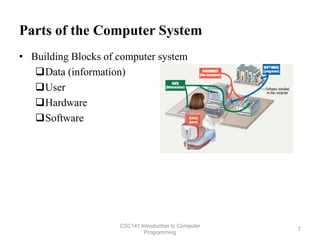
Parts of the Computer System
• Building Blocks of computer system
Data (information)
User
Hardware
Software
CSC141 Introduction to Computer
Programming
7
Parts of the Computer System
 Data
 Pieces of facts
 Computer organize and present information
 Users
 People operating the computer
 Computer working for the people
 Users are most important part of the computers
 Tell the computer what to do
CSC141 Introduction to Computer
Programming
8
HARDWARE
 Physical Components of the Computer.
 TANGIBLE (can be touched)
CSC141 Introduction to Computer
Programming
9
 SOFTWARE
 Step-by-step instructions to perform the task.
 Also called a program
 INTANGIBLE (cannot be touched)
 Programs and software interchangeable terms
Components of Computer
INPUT DEVICES
OUTPUT DEVICES
CPU
MEMORY
STORAGE DEVICES
CSC141 Introduction to Computer
Programming
10
Major components of a Computer
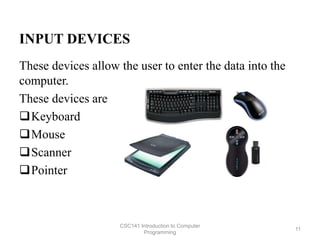
INPUT DEVICES
These devices allow the user to enter the data into the
computer.
These devices are
Keyboard
Mouse
Scanner
Pointer
CSC141 Introduction to Computer
Programming
11
OUTPUT DEVICES
Consist of devices that translate information processed
by the computer into human understandable format.
These devices are
Printer
Monitor
Speaker
CSC141 Introduction to Computer
Programming
12
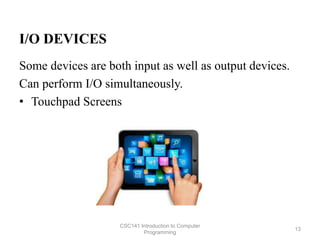
I/O DEVICES
Some devices are both input as well as output devices.
Can perform I/O simultaneously.
• Touchpad Screens
CSC141 Introduction to Computer
Programming
13
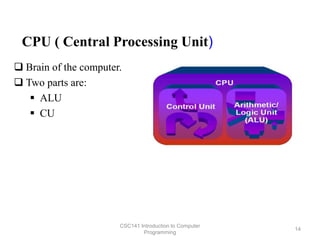
CPU ( Central Processing Unit)
 Brain of the computer.
 Two parts are:
 ALU
 CU
CSC141 Introduction to Computer
Programming
14
CONTROL UNIT (CU)
 Directs and coordinates flow of data through
the CPU and to and from other devices
 Traffic cop
 CPU’s Instruction set is built into the Control
unit called Commands that a CPU can
execute
CSC141 Introduction to Computer
Programming
15
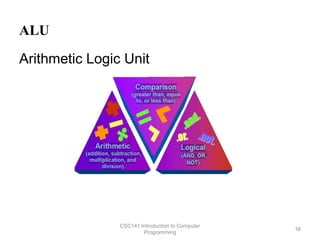
ALU
Arithmetic Logic Unit
CSC141 Introduction to Computer
Programming
16
HARDWARE MEMORY
Two categories of Memory
 Volatile Memory
Loses its contents when the computer's power is turned
off
 Non-volatile Memory
Does not lose its contents when the computer’s power is
turned off
CSC141 Introduction to Computer
Programming
17
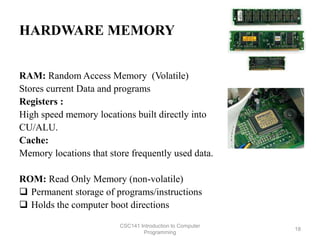
HARDWARE MEMORY
RAM: Random Access Memory (Volatile)
Stores current Data and programs
Registers :
High speed memory locations built directly into
CU/ALU.
Cache:
Memory locations that store frequently used data.
ROM: Read Only Memory (non-volatile)
 Permanent storage of programs/instructions
 Holds the computer boot directions
CSC141 Introduction to Computer
Programming
18
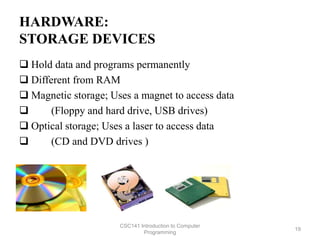
HARDWARE:
STORAGE DEVICES
 Hold data and programs permanently
 Different from RAM
 Magnetic storage; Uses a magnet to access data
 (Floppy and hard drive, USB drives)
 Optical storage; Uses a laser to access data
 (CD and DVD drives )
CSC141 Introduction to Computer
Programming
19
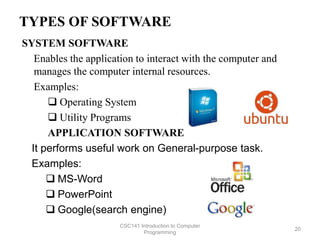
TYPES OF SOFTWARE
SYSTEM SOFTWARE
Enables the application to interact with the computer and
manages the computer internal resources.
Examples:
 Operating System
 Utility Programs
APPLICATION SOFTWARE
It performs useful work on General-purpose task.
Examples:
 MS-Word
 PowerPoint
 Google(search engine)
CSC141 Introduction to Computer
Programming
20
Operating system
 The operating system (OS) is the most important program that
runs on a computer. Every general purpose computer must
have an operating system to run other programs
and applications.
CSC141 Introduction to Computer
Programming
21
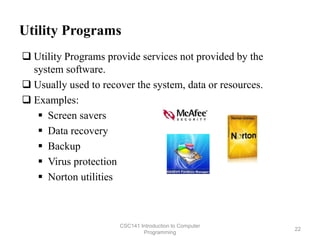
Utility Programs
 Utility Programs provide services not provided by the
system software.
 Usually used to recover the system, data or resources.
 Examples:
 Screen savers
 Data recovery
 Backup
 Virus protection
 Norton utilities
CSC141 Introduction to Computer
Programming
22
How CPU works?
Four basic operations:
1. Fetch: obtain a program instruction or data item from
memory.
2. Decode: translate the instruction into commands.
3. Execute: carry out the command.
4. Store: write the result into the memory
CSC141 Introduction to Computer
Programming
23
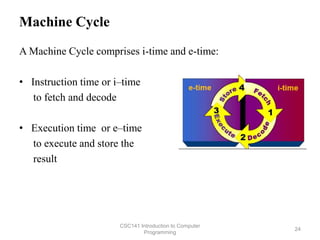
Machine Cycle
A Machine Cycle comprises i-time and e-time:
• Instruction time or i–time
to fetch and decode
• Execution time or e–time
to execute and store the
result
CSC141 Introduction to Computer
Programming
24
Types of Computers
 Supercomputers
 Mainframes
 Personal Computers
 Microcontrollers
CSC141 Introduction to Computer
Programming
25
Supercomputer
• Most powerful computers
• Physically largest in size
• Hundreds of thousands of processors that can process huge
amounts of data
• Perform over 1 quadrillion calculations per second. e.g. IBM
ASCI White, Cray
• Ideal for handling large and highly complex problems that
require extreme calculating power
CSC141 Introduction to Computer
Programming
26
Mainframe
• Mainly used by large organizations for critical
applications, typically bulk data processing
– Banks, Airlines, Insurance Companies
• Measured in millions of integer operations per
second (MIPS)
• Vary in size from small, to medium, to large,
depending on their use.
• Normally Dumb Terminals are connected to these
main frames. Processing is done by Main Frames.
• Dumb terminals only have keyboard, monitors.
CSC141 Introduction to Computer
Programming
27
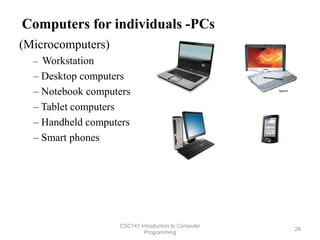
Computers for individuals -PCs
(Microcomputers)
– Workstation
– Desktop computers
– Notebook computers
– Tablet computers
– Handheld computers
– Smart phones
CSC141 Introduction to Computer
Programming
28
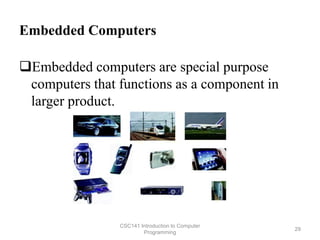
Embedded Computers
Embedded computers are special purpose
computers that functions as a component in
larger product.
CSC141 Introduction to Computer
Programming
29
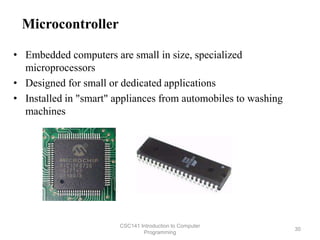
Microcontroller
• Embedded computers are small in size, specialized
microprocessors
• Designed for small or dedicated applications
• Installed in "smart" appliances from automobiles to washing
machines
CSC141 Introduction to Computer
Programming
30
1. What is the difference between data and Information?
2. What is the difference between volatile and non-volatile
memory?
3. Memory is used for?
4. What does computer do in i-time and e-time?
5. How CPU synchronizes with its other components?
6. Name a device which is both input and output?
7. Give few examples of utility software.
8. Name at least two operating systems (OS).
9. What is the use of embedded systems?
10.What is Information Technology?
CSC141 Introduction to Computer
Programming
31
Practice Quiz

Introduction To Programming

  • 1.
    CSC141- Introduction toComputer Programming By: Jebran Javid JJ
  • 2.
    •“Introduction to ComputerProgramming” aims to familiarize the students with the fundamental concepts of computer and computer programming. •The students will learn basic concept of IT, fundamental concepts of programming by developing and executing programs in C . •The course will be focused mostly on structured programming and will be completed with the introduction to Object oriented programming. CSC141 Introduction to Computer Programming 2 CSC141- Introduction to Computer Programming Course Objective
  • 3.
    Demo Sessions •Each registeredstudent should have Access to the computer having DEV C++ installed on it. •Students will be demonstrated to setup DEV C++ environment at their home or resource centers. •At the end of the class lessons, almost all the concepts discussed in the lectures will be demonstrated in the DEV C++ environment. •A student must practice each lesson by him/her self and apply theoretical knowledge gained in the lessons hands on in the DEV C++ environment. CSC141 Introduction to Computer Programming 3
  • 4.
    Delivery •32 lectures includinghands on demonstrations •4 Quizzes •4 Assignment •2 Lab Assignments •2 Sessionals •Terminal Examination •Practice: • Exercises, Quizzes, Assignments CSC141 Introduction to Computer Programming 4
  • 5.
    Fundamentals of ComputerConcepts CSC141 Introduction to Computer Programming 5
  • 6.
    Computer A computer isa programmable, multiuse machine that accepts data, ( raw facts and figures) and process ,or manipulates, it into information. “processed data on a computer is called information” CSC141 Introduction to Computer Programming 6 Information
  • 7.
    Parts of theComputer System • Building Blocks of computer system Data (information) User Hardware Software CSC141 Introduction to Computer Programming 7
  • 8.
    Parts of theComputer System  Data  Pieces of facts  Computer organize and present information  Users  People operating the computer  Computer working for the people  Users are most important part of the computers  Tell the computer what to do CSC141 Introduction to Computer Programming 8
  • 9.
    HARDWARE  Physical Componentsof the Computer.  TANGIBLE (can be touched) CSC141 Introduction to Computer Programming 9  SOFTWARE  Step-by-step instructions to perform the task.  Also called a program  INTANGIBLE (cannot be touched)  Programs and software interchangeable terms
  • 10.
    Components of Computer INPUTDEVICES OUTPUT DEVICES CPU MEMORY STORAGE DEVICES CSC141 Introduction to Computer Programming 10 Major components of a Computer
  • 11.
    INPUT DEVICES These devicesallow the user to enter the data into the computer. These devices are Keyboard Mouse Scanner Pointer CSC141 Introduction to Computer Programming 11
  • 12.
    OUTPUT DEVICES Consist ofdevices that translate information processed by the computer into human understandable format. These devices are Printer Monitor Speaker CSC141 Introduction to Computer Programming 12
  • 13.
    I/O DEVICES Some devicesare both input as well as output devices. Can perform I/O simultaneously. • Touchpad Screens CSC141 Introduction to Computer Programming 13
  • 14.
    CPU ( CentralProcessing Unit)  Brain of the computer.  Two parts are:  ALU  CU CSC141 Introduction to Computer Programming 14
  • 15.
    CONTROL UNIT (CU) Directs and coordinates flow of data through the CPU and to and from other devices  Traffic cop  CPU’s Instruction set is built into the Control unit called Commands that a CPU can execute CSC141 Introduction to Computer Programming 15
  • 16.
    ALU Arithmetic Logic Unit CSC141Introduction to Computer Programming 16
  • 17.
    HARDWARE MEMORY Two categoriesof Memory  Volatile Memory Loses its contents when the computer's power is turned off  Non-volatile Memory Does not lose its contents when the computer’s power is turned off CSC141 Introduction to Computer Programming 17
  • 18.
    HARDWARE MEMORY RAM: RandomAccess Memory (Volatile) Stores current Data and programs Registers : High speed memory locations built directly into CU/ALU. Cache: Memory locations that store frequently used data. ROM: Read Only Memory (non-volatile)  Permanent storage of programs/instructions  Holds the computer boot directions CSC141 Introduction to Computer Programming 18
  • 19.
    HARDWARE: STORAGE DEVICES  Holddata and programs permanently  Different from RAM  Magnetic storage; Uses a magnet to access data  (Floppy and hard drive, USB drives)  Optical storage; Uses a laser to access data  (CD and DVD drives ) CSC141 Introduction to Computer Programming 19
  • 20.
    TYPES OF SOFTWARE SYSTEMSOFTWARE Enables the application to interact with the computer and manages the computer internal resources. Examples:  Operating System  Utility Programs APPLICATION SOFTWARE It performs useful work on General-purpose task. Examples:  MS-Word  PowerPoint  Google(search engine) CSC141 Introduction to Computer Programming 20
  • 21.
    Operating system  Theoperating system (OS) is the most important program that runs on a computer. Every general purpose computer must have an operating system to run other programs and applications. CSC141 Introduction to Computer Programming 21
  • 22.
    Utility Programs  UtilityPrograms provide services not provided by the system software.  Usually used to recover the system, data or resources.  Examples:  Screen savers  Data recovery  Backup  Virus protection  Norton utilities CSC141 Introduction to Computer Programming 22
  • 23.
    How CPU works? Fourbasic operations: 1. Fetch: obtain a program instruction or data item from memory. 2. Decode: translate the instruction into commands. 3. Execute: carry out the command. 4. Store: write the result into the memory CSC141 Introduction to Computer Programming 23
  • 24.
    Machine Cycle A MachineCycle comprises i-time and e-time: • Instruction time or i–time to fetch and decode • Execution time or e–time to execute and store the result CSC141 Introduction to Computer Programming 24
  • 25.
    Types of Computers Supercomputers  Mainframes  Personal Computers  Microcontrollers CSC141 Introduction to Computer Programming 25
  • 26.
    Supercomputer • Most powerfulcomputers • Physically largest in size • Hundreds of thousands of processors that can process huge amounts of data • Perform over 1 quadrillion calculations per second. e.g. IBM ASCI White, Cray • Ideal for handling large and highly complex problems that require extreme calculating power CSC141 Introduction to Computer Programming 26
  • 27.
    Mainframe • Mainly usedby large organizations for critical applications, typically bulk data processing – Banks, Airlines, Insurance Companies • Measured in millions of integer operations per second (MIPS) • Vary in size from small, to medium, to large, depending on their use. • Normally Dumb Terminals are connected to these main frames. Processing is done by Main Frames. • Dumb terminals only have keyboard, monitors. CSC141 Introduction to Computer Programming 27
  • 28.
    Computers for individuals-PCs (Microcomputers) – Workstation – Desktop computers – Notebook computers – Tablet computers – Handheld computers – Smart phones CSC141 Introduction to Computer Programming 28
  • 29.
    Embedded Computers Embedded computersare special purpose computers that functions as a component in larger product. CSC141 Introduction to Computer Programming 29
  • 30.
    Microcontroller • Embedded computersare small in size, specialized microprocessors • Designed for small or dedicated applications • Installed in "smart" appliances from automobiles to washing machines CSC141 Introduction to Computer Programming 30
  • 31.
    1. What isthe difference between data and Information? 2. What is the difference between volatile and non-volatile memory? 3. Memory is used for? 4. What does computer do in i-time and e-time? 5. How CPU synchronizes with its other components? 6. Name a device which is both input and output? 7. Give few examples of utility software. 8. Name at least two operating systems (OS). 9. What is the use of embedded systems? 10.What is Information Technology? CSC141 Introduction to Computer Programming 31 Practice Quiz

Editor's Notes

  • #9 Teaching tip A good exercise to relate the importance of making data meaningful is to list some random numbers on the board. Then ask what they mean. Without a title, the numbers have no meaning. Once a title is presented, the numbers make sense.