SOFTWAR
E
INTRODUCTION TO
Software is the collection of instructions
that enable the user to interact with a
computer, its hardware or perform tasks.
In other words, it is the set of instructions
that tells the computer how to respond to
the users of computers and control the
hardware.
WHAT IS A SOFTWARE
• System Software
It is the set of instructions that controls and
coordinate how the computer operates and
allocates hardware resources. Types:
• Operating System
• System Utilities
• Device Drivers
TYPES OF SOFTWARE
An operating system is a software program
that loads automatically and controls just
about everything on your computer.
Operating System (OS) controls the
computer’s hardware, runs Computer
programs and also organize files.
The OS also enable us to start up the PC
OPERATING SYSTEM SOFTWARE
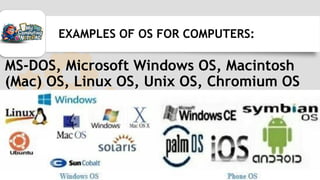
MS-DOS, Microsoft Windows OS, Macintosh
(Mac) OS, Linux OS, Unix OS, Chromium OS
EXAMPLES OF OS FOR COMPUTERS:
Utility Software is system software designed
to help analyze, configure, optimize or
maintain the computer, its devices or its
software.
Examples of Utility software include:
Antivirus Software, Backup Software, Data
Compression Software, etc.
UTILITY SOFTWARE
A device driver is software that enables
the operating system to communicate with
the hardware components of the computer.
It links devices to the operating system.
If a computer lack drivers to a particular
hardware component, the device will not
function on the computer.
DEVICE DRIVERS
• Application Software
Application software is the software /
program / set of instructions that is used by
the user to perform specific tasks or
operations on the computer
Application software is mostly and simply
called application.
TYPES OF SOFTWARE
• Word Processing Programs e.g. MS-Word
• Browsers e.g. Firefox, Chrome, Internet
Explorer, Opera, etc.
• Games e.g. Zuma, Mortal Combat, etc.
• Media players e.g. VLC Etc.
Other applications include Desktop Telegram,
WhatsApp, Photoshop and more…
EXAMPLES OF APPLICATION SOFTWARE
• Application software enables users to perform
a specific task in our everyday activities.
• To facilitate communications: For
communication among people through the
internet.
• It is used for keeping records by storing the
file for future use.
IMPORTANCE OF APPLICATION SOFTWARE
• Application software is used for
accounting purposes
• To assist with graphics and multimedia
projects.
• To support household activities, for
personal business, or for education
• For advertisement on radio and television.
IMPORTANCE OF APPLICATION SOFTWARE
Hardware and software are mutually dependent
on each other. Both of them must work together
to make a computer produce a useful output.
Software cannot be utilized without supporting
hardware.
Thus, if hardware is the 'heart' of a computer
system, then software is its 'soul'.
KEYNOTES
`
WHAT HAVE YOU LEARNT?
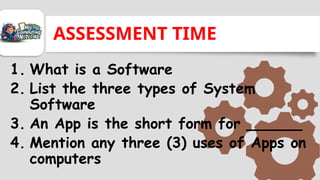
ASSESSMENT TIME
1. What is a Software
2. List the three types of System
Software
3. An App is the short form for ______
4. Mention any three (3) uses of Apps on
computers

Introduction to Software - Types & Examples

  • 1.
  • 2.
    Software is thecollection of instructions that enable the user to interact with a computer, its hardware or perform tasks. In other words, it is the set of instructions that tells the computer how to respond to the users of computers and control the hardware. WHAT IS A SOFTWARE
  • 3.
    • System Software Itis the set of instructions that controls and coordinate how the computer operates and allocates hardware resources. Types: • Operating System • System Utilities • Device Drivers TYPES OF SOFTWARE
  • 4.
    An operating systemis a software program that loads automatically and controls just about everything on your computer. Operating System (OS) controls the computer’s hardware, runs Computer programs and also organize files. The OS also enable us to start up the PC OPERATING SYSTEM SOFTWARE
  • 5.
    MS-DOS, Microsoft WindowsOS, Macintosh (Mac) OS, Linux OS, Unix OS, Chromium OS EXAMPLES OF OS FOR COMPUTERS:
  • 6.
    Utility Software issystem software designed to help analyze, configure, optimize or maintain the computer, its devices or its software. Examples of Utility software include: Antivirus Software, Backup Software, Data Compression Software, etc. UTILITY SOFTWARE
  • 7.
    A device driveris software that enables the operating system to communicate with the hardware components of the computer. It links devices to the operating system. If a computer lack drivers to a particular hardware component, the device will not function on the computer. DEVICE DRIVERS
  • 8.
    • Application Software Applicationsoftware is the software / program / set of instructions that is used by the user to perform specific tasks or operations on the computer Application software is mostly and simply called application. TYPES OF SOFTWARE
  • 9.
    • Word ProcessingPrograms e.g. MS-Word • Browsers e.g. Firefox, Chrome, Internet Explorer, Opera, etc. • Games e.g. Zuma, Mortal Combat, etc. • Media players e.g. VLC Etc. Other applications include Desktop Telegram, WhatsApp, Photoshop and more… EXAMPLES OF APPLICATION SOFTWARE
  • 10.
    • Application softwareenables users to perform a specific task in our everyday activities. • To facilitate communications: For communication among people through the internet. • It is used for keeping records by storing the file for future use. IMPORTANCE OF APPLICATION SOFTWARE
  • 11.
    • Application softwareis used for accounting purposes • To assist with graphics and multimedia projects. • To support household activities, for personal business, or for education • For advertisement on radio and television. IMPORTANCE OF APPLICATION SOFTWARE
  • 12.
    Hardware and softwareare mutually dependent on each other. Both of them must work together to make a computer produce a useful output. Software cannot be utilized without supporting hardware. Thus, if hardware is the 'heart' of a computer system, then software is its 'soul'. KEYNOTES `
  • 13.
  • 14.
    ASSESSMENT TIME 1. Whatis a Software 2. List the three types of System Software 3. An App is the short form for ______ 4. Mention any three (3) uses of Apps on computers

Editor's Notes

  • #3 Operating system software controls the basic input and output devices. For communication among people through the internet. The operating system helps us to start or boot our computer.
  • #5  MS- DOS is a text-based operating system that stands for Microsoft Disk Operating System. It was one of the earliest PC operating systems that displayed boring lines of text on the screen instead of icons and pictures. You performed tasks in MS-DOS by typing text commands.
  • #6 Here’re what a Utility Software does: Viewing files Compressing files Diagnosing problems Scanning disks Defragmenting disks Uninstalling software Backing up files and disks Checking for viruses Displaying screen savers
  • #8 Application software are use to perform specific tasks such as creating a document, spreadsheet, sending emails, playing games etc.
  • #9 Application software are use to perform specific tasks such as creating a document, spreadsheet, sending emails, playing games etc.
  • #10 Application software are use to perform specific tasks such as creating a document, spreadsheet, sending emails, playing games etc.
  • #11 Application software are use to perform specific tasks such as creating a document, spreadsheet, sending emails, playing games etc.
  • #12 Application software are use to perform specific tasks such as creating a document, spreadsheet, sending emails, playing games etc.