Maven 2.0Maven 2.0
IntroductionIntroduction
Before ANTBefore ANT
 Earlier tool used for build was "make"Earlier tool used for build was "make"
 The syntax used to be very crypticThe syntax used to be very cryptic
 Maintenance of many make filesMaintenance of many make files
ANTANT
 ANT is cross platformANT is cross platform
 ANT is java basedANT is java based
 ANT replaces the make file's difficultANT replaces the make file's difficult
syntax with more standardized XMLsyntax with more standardized XML
Tasks of a configurationTasks of a configuration
and build managerand build manager
 Copy, CleanCopy, Clean
 Compile, JarCompile, Jar
 Jar class filesJar class files
 Generate the java docGenerate the java doc
 Test and DeployTest and Deploy
Disadvantages of ANTDisadvantages of ANT
 Generally you have a template with whichGenerally you have a template with which
you begin with for a new projectyou begin with for a new project
 Ant does not provide convenient ways ofAnt does not provide convenient ways of
reuse of code. Most of the targets or buildreuse of code. Most of the targets or build
scripts look similar, but one has to resortscripts look similar, but one has to resort
to copy paste to reuse the same code.to copy paste to reuse the same code.
 Creating custom tasks is a workaround,Creating custom tasks is a workaround,
but then it becomes an extra activity tobut then it becomes an extra activity to
write and maintain custom tags in ANTwrite and maintain custom tags in ANT
Disadvantages of ANTDisadvantages of ANT
 The size of the script grows as the numberThe size of the script grows as the number
of tasks executed increase and one has toof tasks executed increase and one has to
write all this and maintain these complexwrite all this and maintain these complex
ANT scriptsANT scripts
 Logic and looping structures are notLogic and looping structures are not
supported and one has to use custom buildsupported and one has to use custom build
tasks for the same. These custom taskstasks for the same. These custom tasks
might not be reusable across projects. If youmight not be reusable across projects. If you
intend to do that, then one will have to put inintend to do that, then one will have to put in
lot of effort to write such tasks. Generallylot of effort to write such tasks. Generally
you end up with numerous and redundantyou end up with numerous and redundant
task in each project.task in each project.
MAVENMAVEN
Maven is a high-level, projectMaven is a high-level, project
management, build and deploymentmanagement, build and deployment
tool from the Apache project that addstool from the Apache project that adds
a layer of abstraction above Ant.a layer of abstraction above Ant.
Tasks Maven can doTasks Maven can do
 Compile your code.Compile your code.
 Create Java doc documentation.Create Java doc documentation.
 Run unit tests.Run unit tests.
 Run source code metrics and analysis.Run source code metrics and analysis.
 Create a report detailing violations of yourCreate a report detailing violations of your
team's coding standards.team's coding standards.
 Create a report of the most recent CVSCreate a report of the most recent CVS
commits.commits.
 Create a report of the CVS activity, pivoted byCreate a report of the CVS activity, pivoted by
file and developer.file and developer.
Maven AdvantagesMaven Advantages
 Supports common build related tasksSupports common build related tasks
 Most of the generic tasks have already beenMost of the generic tasks have already been
shipped with maven.shipped with maven.
 Most of the task have to be written manuallyMost of the task have to be written manually
in case of ant. Maven is standardized. Itsin case of ant. Maven is standardized. Its
basically based on POM. POM is the waybasically based on POM. POM is the way
one indicates the directory structure toone indicates the directory structure to
maven. Once this is done one can executemaven. Once this is done one can execute
most of the inbuilt maven goals (equivalentmost of the inbuilt maven goals (equivalent
of ant targets).of ant targets).
Maven AdvantagesMaven Advantages
 Tasks like Compile, Copy, Clean, Jar, JavaTasks like Compile, Copy, Clean, Jar, Java
doc ,Test, Deploy can be executed usingdoc ,Test, Deploy can be executed using
maven without writing even a single line ofmaven without writing even a single line of
script.script.
 Produces lot of technical information to trackProduces lot of technical information to track
the state of the projectthe state of the project
 All the ant tasks are available from insideAll the ant tasks are available from inside
your Maven projectyour Maven project
Maven GoalsMaven Goals
 mvn cleanmvn clean
 mvn compilemvn compile
 mvn packagemvn package
 mvn testmvn test
 mvn site:generatemvn site:generate
 mvn eclipse:eclipsemvn eclipse:eclipse
POMPOM
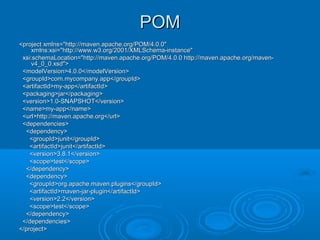
Its a XML file. Describes project directory structure,Its a XML file. Describes project directory structure,
project dependencies like jar files. Its a kind ofproject dependencies like jar files. Its a kind of
metadata. Once the project is described using POM,metadata. Once the project is described using POM,
any of the maven tasks can be invoked. Theany of the maven tasks can be invoked. The
pom.xml file is the core of a project's configuration inpom.xml file is the core of a project's configuration in
Maven. It is a single configuration file that containsMaven. It is a single configuration file that contains
the majority of information required to build a projectthe majority of information required to build a project
in just the way you want. The POM is huge and canin just the way you want. The POM is huge and can
be daunting in its complexity, but it is not necessarybe daunting in its complexity, but it is not necessary
to understand all of the intricacies just yet to use itto understand all of the intricacies just yet to use it
effectively.effectively.
POMPOM
<project xmlns="http://maven.apache.org/POM/4.0.0"<project xmlns="http://maven.apache.org/POM/4.0.0"
xmlns:xsi="http://www.w3.org/2001/XMLSchema-instance"xmlns:xsi="http://www.w3.org/2001/XMLSchema-instance"
xsi:schemaLocation="http://maven.apache.org/POM/4.0.0 http://maven.apache.org/maven-xsi:schemaLocation="http://maven.apache.org/POM/4.0.0 http://maven.apache.org/maven-
v4_0_0.xsd">v4_0_0.xsd">
<modelVersion>4.0.0</modelVersion><modelVersion>4.0.0</modelVersion>
<groupId>com.mycompany.app</groupId><groupId>com.mycompany.app</groupId>
<artifactId>my-app</artifactId><artifactId>my-app</artifactId>
<packaging>jar</packaging><packaging>jar</packaging>
<version>1.0-SNAPSHOT</version><version>1.0-SNAPSHOT</version>
<name>my-app</name><name>my-app</name>
<url>http://maven.apache.org</url><url>http://maven.apache.org</url>
<dependencies><dependencies>
<dependency><dependency>
<groupId>junit</groupId><groupId>junit</groupId>
<artifactId>junit</artifactId><artifactId>junit</artifactId>
<version>3.8.1</version><version>3.8.1</version>
<scope>test</scope><scope>test</scope>
</dependency></dependency>
<dependency><dependency>
<groupId>org.apache.maven.plugins</groupId><groupId>org.apache.maven.plugins</groupId>
<artifactId>maven-jar-plugin</artifactId><artifactId>maven-jar-plugin</artifactId>
<version>2.2</version><version>2.2</version>
<scope>test</scope><scope>test</scope>
</dependency></dependency>
</dependencies></dependencies>
</project></project>
Standard Directory StructureStandard Directory Structure
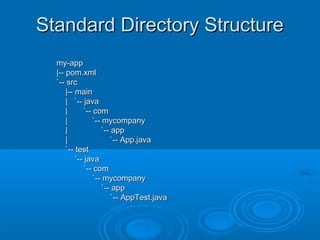
By using the standard conventions theBy using the standard conventions the
POM becomes very small and youPOM becomes very small and you
haven't had to tell Maven explicitlyhaven't had to tell Maven explicitly
where any of your sources are orwhere any of your sources are or
where the output should go. Bywhere the output should go. By
following the standard Mavenfollowing the standard Maven
conventions you can get a lot doneconventions you can get a lot done
with very little effortwith very little effort
Standard Directory StructureStandard Directory Structure
my-appmy-app
|-- pom.xml|-- pom.xml
`-- src`-- src
|-- main|-- main
| `-- java| `-- java
| `-- com| `-- com
| `-- mycompany| `-- mycompany
| `-- app| `-- app
| `-- App.java| `-- App.java
`-- test`-- test
`-- java`-- java
`-- com`-- com
`-- mycompany`-- mycompany
`-- app`-- app
`-- AppTest.java`-- AppTest.java
Unit Testing SupportUnit Testing Support
Maven makes it easy for theMaven makes it easy for the
programmer to build his test cases andprogrammer to build his test cases and
execute them. The support for testexecute them. The support for test
cases is build into the maven and onlycases is build into the maven and only
thing programmer has to do is put thething programmer has to do is put the
test classes in the appropriate directorytest classes in the appropriate directory
Protecting Your ResourcesProtecting Your Resources
Class files are usually loaded from the classpath.Class files are usually loaded from the classpath.
Non-class files (resources) can be loaded from theNon-class files (resources) can be loaded from the
classpath as well, using the various getResourceclasspath as well, using the various getResource
methods. If you want to keep these resources frommethods. If you want to keep these resources from
getting wiped out every time you invoke the cleangetting wiped out every time you invoke the clean
goal, you need to store resources outside of thegoal, you need to store resources outside of the
classes directory and copy them into the classesclasses directory and copy them into the classes
directory as part of the build process. Maven has adirectory as part of the build process. Maven has a
goal for this purpose called jar-resources. It doesn'tgoal for this purpose called jar-resources. It doesn't
jar anything, it just copies resources to thejar anything, it just copies resources to the
target/classes directory. Maven automatically callstarget/classes directory. Maven automatically calls
the jar-resources goal when you run the jar goal.the jar-resources goal when you run the jar goal.
Protecting Your ResourcesProtecting Your Resources
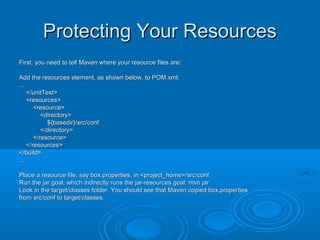
First, you need to tell Maven where your resource files are:First, you need to tell Maven where your resource files are:
Add the resources element, as shown below, to POM.xml:Add the resources element, as shown below, to POM.xml:
......
</unitTest></unitTest>
<resources><resources>
<resource><resource>
<directory><directory>
${basedir}/src/conf${basedir}/src/conf
</directory></directory>
</resource></resource>
</resources></resources>
</build></build>
......
Place a resource file, say box.properties, in <project_home>/src/conf.Place a resource file, say box.properties, in <project_home>/src/conf.
Run the jar goal, which indirectly runs the jar-resources goal: mvn jarRun the jar goal, which indirectly runs the jar-resources goal: mvn jar
Look in the target/classes folder. You should see that Maven copied box.propertiesLook in the target/classes folder. You should see that Maven copied box.properties
from src/conf to target/classes.from src/conf to target/classes.
DependenciesDependencies
The dependencies section of the pom.xmlThe dependencies section of the pom.xml
lists all of the external dependencies thatlists all of the external dependencies that
our project needs in order to build (whetherour project needs in order to build (whether
it needs that dependency at compile time,it needs that dependency at compile time,
test time, run time, or whatever)test time, run time, or whatever)
scope : compile , test , and runtimescope : compile , test , and runtime
DependenciesDependencies
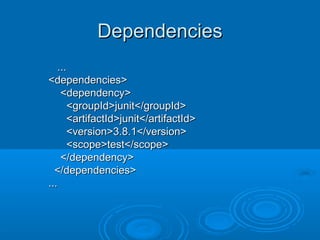
......
<dependencies><dependencies>
<dependency><dependency>
<groupId>junit</groupId><groupId>junit</groupId>
<artifactId>junit</artifactId><artifactId>junit</artifactId>
<version>3.8.1</version><version>3.8.1</version>
<scope>test</scope><scope>test</scope>
</dependency></dependency>
</dependencies></dependencies>
......
Repository FeatureRepository Feature
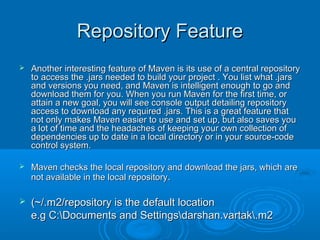
 Another interesting feature of Maven is its use of a central repositoryAnother interesting feature of Maven is its use of a central repository
to access the .jars needed to build your project . You list what .jarsto access the .jars needed to build your project . You list what .jars
and versions you need, and Maven is intelligent enough to go andand versions you need, and Maven is intelligent enough to go and
download them for you. When you run Maven for the first time, ordownload them for you. When you run Maven for the first time, or
attain a new goal, you will see console output detailing repositoryattain a new goal, you will see console output detailing repository
access to download any required .jars. This is a great feature thataccess to download any required .jars. This is a great feature that
not only makes Maven easier to use and set up, but also saves younot only makes Maven easier to use and set up, but also saves you
a lot of time and the headaches of keeping your own collection ofa lot of time and the headaches of keeping your own collection of
dependencies up to date in a local directory or in your source-codedependencies up to date in a local directory or in your source-code
control system.control system.
 Maven checks the local repository and download the jars, which areMaven checks the local repository and download the jars, which are
not available in the local repositorynot available in the local repository..
 (~/.m2/repository is the default location(~/.m2/repository is the default location
e.g C:Documents and Settingsdarshan.vartak.m2e.g C:Documents and Settingsdarshan.vartak.m2
InternationalizationInternationalization
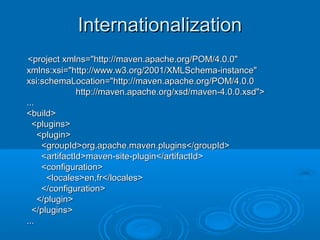
<project xmlns="http://maven.apache.org/POM/4.0.0"<project xmlns="http://maven.apache.org/POM/4.0.0"
xmlns:xsi="http://www.w3.org/2001/XMLSchema-instance"xmlns:xsi="http://www.w3.org/2001/XMLSchema-instance"
xsi:schemaLocation="http://maven.apache.org/POM/4.0.0xsi:schemaLocation="http://maven.apache.org/POM/4.0.0
http://maven.apache.org/xsd/maven-4.0.0.xsd">http://maven.apache.org/xsd/maven-4.0.0.xsd">
......
<build><build>
<plugins><plugins>
<plugin><plugin>
<groupId>org.apache.maven.plugins</groupId><groupId>org.apache.maven.plugins</groupId>
<artifactId>maven-site-plugin</artifactId><artifactId>maven-site-plugin</artifactId>
<configuration><configuration>
<locales>en,fr</locales><locales>en,fr</locales>
</configuration></configuration>
</plugin></plugin>
</plugins></plugins>
......
Maven TermsMaven Terms
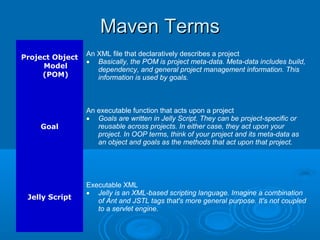
Project Object
Model
(POM)
An XML file that declaratively describes a project
• Basically, the POM is project meta-data. Meta-data includes build,
dependency, and general project management information. This
information is used by goals.
Goal
An executable function that acts upon a project
• Goals are written in Jelly Script. They can be project-specific or
reusable across projects. In either case, they act upon your
project. In OOP terms, think of your project and its meta-data as
an object and goals as the methods that act upon that project.
Jelly Script
Executable XML
• Jelly is an XML-based scripting language. Imagine a combination
of Ant and JSTL tags that's more general purpose. It's not coupled
to a servlet engine.
Maven TermsMaven Terms
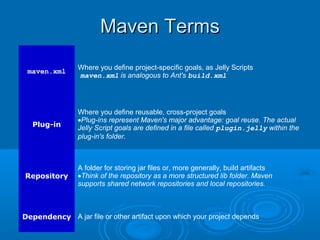
maven.xml
Where you define project-specific goals, as Jelly Scripts
maven.xml is analogous to Ant's build.xml
Plug-in
Where you define reusable, cross-project goals
•Plug-ins represent Maven's major advantage: goal reuse. The actual
Jelly Script goals are defined in a file called plugin.jelly within the
plug-in's folder.
Repository
A folder for storing jar files or, more generally, build artifacts
•Think of the repository as a more structured lib folder. Maven
supports shared network repositories and local repositories.
Dependency A jar file or other artifact upon which your project depends

Maven

  • 1.
  • 2.
    Before ANTBefore ANT Earlier tool used for build was "make"Earlier tool used for build was "make"  The syntax used to be very crypticThe syntax used to be very cryptic  Maintenance of many make filesMaintenance of many make files
  • 3.
    ANTANT  ANT iscross platformANT is cross platform  ANT is java basedANT is java based  ANT replaces the make file's difficultANT replaces the make file's difficult syntax with more standardized XMLsyntax with more standardized XML
  • 4.
    Tasks of aconfigurationTasks of a configuration and build managerand build manager  Copy, CleanCopy, Clean  Compile, JarCompile, Jar  Jar class filesJar class files  Generate the java docGenerate the java doc  Test and DeployTest and Deploy
  • 5.
    Disadvantages of ANTDisadvantagesof ANT  Generally you have a template with whichGenerally you have a template with which you begin with for a new projectyou begin with for a new project  Ant does not provide convenient ways ofAnt does not provide convenient ways of reuse of code. Most of the targets or buildreuse of code. Most of the targets or build scripts look similar, but one has to resortscripts look similar, but one has to resort to copy paste to reuse the same code.to copy paste to reuse the same code.  Creating custom tasks is a workaround,Creating custom tasks is a workaround, but then it becomes an extra activity tobut then it becomes an extra activity to write and maintain custom tags in ANTwrite and maintain custom tags in ANT
  • 6.
    Disadvantages of ANTDisadvantagesof ANT  The size of the script grows as the numberThe size of the script grows as the number of tasks executed increase and one has toof tasks executed increase and one has to write all this and maintain these complexwrite all this and maintain these complex ANT scriptsANT scripts  Logic and looping structures are notLogic and looping structures are not supported and one has to use custom buildsupported and one has to use custom build tasks for the same. These custom taskstasks for the same. These custom tasks might not be reusable across projects. If youmight not be reusable across projects. If you intend to do that, then one will have to put inintend to do that, then one will have to put in lot of effort to write such tasks. Generallylot of effort to write such tasks. Generally you end up with numerous and redundantyou end up with numerous and redundant task in each project.task in each project.
  • 7.
    MAVENMAVEN Maven is ahigh-level, projectMaven is a high-level, project management, build and deploymentmanagement, build and deployment tool from the Apache project that addstool from the Apache project that adds a layer of abstraction above Ant.a layer of abstraction above Ant.
  • 8.
    Tasks Maven candoTasks Maven can do  Compile your code.Compile your code.  Create Java doc documentation.Create Java doc documentation.  Run unit tests.Run unit tests.  Run source code metrics and analysis.Run source code metrics and analysis.  Create a report detailing violations of yourCreate a report detailing violations of your team's coding standards.team's coding standards.  Create a report of the most recent CVSCreate a report of the most recent CVS commits.commits.  Create a report of the CVS activity, pivoted byCreate a report of the CVS activity, pivoted by file and developer.file and developer.
  • 9.
    Maven AdvantagesMaven Advantages Supports common build related tasksSupports common build related tasks  Most of the generic tasks have already beenMost of the generic tasks have already been shipped with maven.shipped with maven.  Most of the task have to be written manuallyMost of the task have to be written manually in case of ant. Maven is standardized. Itsin case of ant. Maven is standardized. Its basically based on POM. POM is the waybasically based on POM. POM is the way one indicates the directory structure toone indicates the directory structure to maven. Once this is done one can executemaven. Once this is done one can execute most of the inbuilt maven goals (equivalentmost of the inbuilt maven goals (equivalent of ant targets).of ant targets).
  • 10.
    Maven AdvantagesMaven Advantages Tasks like Compile, Copy, Clean, Jar, JavaTasks like Compile, Copy, Clean, Jar, Java doc ,Test, Deploy can be executed usingdoc ,Test, Deploy can be executed using maven without writing even a single line ofmaven without writing even a single line of script.script.  Produces lot of technical information to trackProduces lot of technical information to track the state of the projectthe state of the project  All the ant tasks are available from insideAll the ant tasks are available from inside your Maven projectyour Maven project
  • 11.
    Maven GoalsMaven Goals mvn cleanmvn clean  mvn compilemvn compile  mvn packagemvn package  mvn testmvn test  mvn site:generatemvn site:generate  mvn eclipse:eclipsemvn eclipse:eclipse
  • 12.
    POMPOM Its a XMLfile. Describes project directory structure,Its a XML file. Describes project directory structure, project dependencies like jar files. Its a kind ofproject dependencies like jar files. Its a kind of metadata. Once the project is described using POM,metadata. Once the project is described using POM, any of the maven tasks can be invoked. Theany of the maven tasks can be invoked. The pom.xml file is the core of a project's configuration inpom.xml file is the core of a project's configuration in Maven. It is a single configuration file that containsMaven. It is a single configuration file that contains the majority of information required to build a projectthe majority of information required to build a project in just the way you want. The POM is huge and canin just the way you want. The POM is huge and can be daunting in its complexity, but it is not necessarybe daunting in its complexity, but it is not necessary to understand all of the intricacies just yet to use itto understand all of the intricacies just yet to use it effectively.effectively.
  • 13.
    POMPOM <project xmlns="http://maven.apache.org/POM/4.0.0"<project xmlns="http://maven.apache.org/POM/4.0.0" xmlns:xsi="http://www.w3.org/2001/XMLSchema-instance"xmlns:xsi="http://www.w3.org/2001/XMLSchema-instance" xsi:schemaLocation="http://maven.apache.org/POM/4.0.0http://maven.apache.org/maven-xsi:schemaLocation="http://maven.apache.org/POM/4.0.0 http://maven.apache.org/maven- v4_0_0.xsd">v4_0_0.xsd"> <modelVersion>4.0.0</modelVersion><modelVersion>4.0.0</modelVersion> <groupId>com.mycompany.app</groupId><groupId>com.mycompany.app</groupId> <artifactId>my-app</artifactId><artifactId>my-app</artifactId> <packaging>jar</packaging><packaging>jar</packaging> <version>1.0-SNAPSHOT</version><version>1.0-SNAPSHOT</version> <name>my-app</name><name>my-app</name> <url>http://maven.apache.org</url><url>http://maven.apache.org</url> <dependencies><dependencies> <dependency><dependency> <groupId>junit</groupId><groupId>junit</groupId> <artifactId>junit</artifactId><artifactId>junit</artifactId> <version>3.8.1</version><version>3.8.1</version> <scope>test</scope><scope>test</scope> </dependency></dependency> <dependency><dependency> <groupId>org.apache.maven.plugins</groupId><groupId>org.apache.maven.plugins</groupId> <artifactId>maven-jar-plugin</artifactId><artifactId>maven-jar-plugin</artifactId> <version>2.2</version><version>2.2</version> <scope>test</scope><scope>test</scope> </dependency></dependency> </dependencies></dependencies> </project></project>
  • 14.
    Standard Directory StructureStandardDirectory Structure By using the standard conventions theBy using the standard conventions the POM becomes very small and youPOM becomes very small and you haven't had to tell Maven explicitlyhaven't had to tell Maven explicitly where any of your sources are orwhere any of your sources are or where the output should go. Bywhere the output should go. By following the standard Mavenfollowing the standard Maven conventions you can get a lot doneconventions you can get a lot done with very little effortwith very little effort
  • 15.
    Standard Directory StructureStandardDirectory Structure my-appmy-app |-- pom.xml|-- pom.xml `-- src`-- src |-- main|-- main | `-- java| `-- java | `-- com| `-- com | `-- mycompany| `-- mycompany | `-- app| `-- app | `-- App.java| `-- App.java `-- test`-- test `-- java`-- java `-- com`-- com `-- mycompany`-- mycompany `-- app`-- app `-- AppTest.java`-- AppTest.java
  • 16.
    Unit Testing SupportUnitTesting Support Maven makes it easy for theMaven makes it easy for the programmer to build his test cases andprogrammer to build his test cases and execute them. The support for testexecute them. The support for test cases is build into the maven and onlycases is build into the maven and only thing programmer has to do is put thething programmer has to do is put the test classes in the appropriate directorytest classes in the appropriate directory
  • 17.
    Protecting Your ResourcesProtectingYour Resources Class files are usually loaded from the classpath.Class files are usually loaded from the classpath. Non-class files (resources) can be loaded from theNon-class files (resources) can be loaded from the classpath as well, using the various getResourceclasspath as well, using the various getResource methods. If you want to keep these resources frommethods. If you want to keep these resources from getting wiped out every time you invoke the cleangetting wiped out every time you invoke the clean goal, you need to store resources outside of thegoal, you need to store resources outside of the classes directory and copy them into the classesclasses directory and copy them into the classes directory as part of the build process. Maven has adirectory as part of the build process. Maven has a goal for this purpose called jar-resources. It doesn'tgoal for this purpose called jar-resources. It doesn't jar anything, it just copies resources to thejar anything, it just copies resources to the target/classes directory. Maven automatically callstarget/classes directory. Maven automatically calls the jar-resources goal when you run the jar goal.the jar-resources goal when you run the jar goal.
  • 18.
    Protecting Your ResourcesProtectingYour Resources First, you need to tell Maven where your resource files are:First, you need to tell Maven where your resource files are: Add the resources element, as shown below, to POM.xml:Add the resources element, as shown below, to POM.xml: ...... </unitTest></unitTest> <resources><resources> <resource><resource> <directory><directory> ${basedir}/src/conf${basedir}/src/conf </directory></directory> </resource></resource> </resources></resources> </build></build> ...... Place a resource file, say box.properties, in <project_home>/src/conf.Place a resource file, say box.properties, in <project_home>/src/conf. Run the jar goal, which indirectly runs the jar-resources goal: mvn jarRun the jar goal, which indirectly runs the jar-resources goal: mvn jar Look in the target/classes folder. You should see that Maven copied box.propertiesLook in the target/classes folder. You should see that Maven copied box.properties from src/conf to target/classes.from src/conf to target/classes.
  • 19.
    DependenciesDependencies The dependencies sectionof the pom.xmlThe dependencies section of the pom.xml lists all of the external dependencies thatlists all of the external dependencies that our project needs in order to build (whetherour project needs in order to build (whether it needs that dependency at compile time,it needs that dependency at compile time, test time, run time, or whatever)test time, run time, or whatever) scope : compile , test , and runtimescope : compile , test , and runtime
  • 20.
  • 21.
    Repository FeatureRepository Feature Another interesting feature of Maven is its use of a central repositoryAnother interesting feature of Maven is its use of a central repository to access the .jars needed to build your project . You list what .jarsto access the .jars needed to build your project . You list what .jars and versions you need, and Maven is intelligent enough to go andand versions you need, and Maven is intelligent enough to go and download them for you. When you run Maven for the first time, ordownload them for you. When you run Maven for the first time, or attain a new goal, you will see console output detailing repositoryattain a new goal, you will see console output detailing repository access to download any required .jars. This is a great feature thataccess to download any required .jars. This is a great feature that not only makes Maven easier to use and set up, but also saves younot only makes Maven easier to use and set up, but also saves you a lot of time and the headaches of keeping your own collection ofa lot of time and the headaches of keeping your own collection of dependencies up to date in a local directory or in your source-codedependencies up to date in a local directory or in your source-code control system.control system.  Maven checks the local repository and download the jars, which areMaven checks the local repository and download the jars, which are not available in the local repositorynot available in the local repository..  (~/.m2/repository is the default location(~/.m2/repository is the default location e.g C:Documents and Settingsdarshan.vartak.m2e.g C:Documents and Settingsdarshan.vartak.m2
  • 22.
    InternationalizationInternationalization <project xmlns="http://maven.apache.org/POM/4.0.0"<project xmlns="http://maven.apache.org/POM/4.0.0" xmlns:xsi="http://www.w3.org/2001/XMLSchema-instance"xmlns:xsi="http://www.w3.org/2001/XMLSchema-instance" xsi:schemaLocation="http://maven.apache.org/POM/4.0.0xsi:schemaLocation="http://maven.apache.org/POM/4.0.0 http://maven.apache.org/xsd/maven-4.0.0.xsd">http://maven.apache.org/xsd/maven-4.0.0.xsd"> ...... <build><build> <plugins><plugins> <plugin><plugin> <groupId>org.apache.maven.plugins</groupId><groupId>org.apache.maven.plugins</groupId> <artifactId>maven-site-plugin</artifactId><artifactId>maven-site-plugin</artifactId> <configuration><configuration> <locales>en,fr</locales><locales>en,fr</locales> </configuration></configuration> </plugin></plugin> </plugins></plugins> ......
  • 23.
    Maven TermsMaven Terms ProjectObject Model (POM) An XML file that declaratively describes a project • Basically, the POM is project meta-data. Meta-data includes build, dependency, and general project management information. This information is used by goals. Goal An executable function that acts upon a project • Goals are written in Jelly Script. They can be project-specific or reusable across projects. In either case, they act upon your project. In OOP terms, think of your project and its meta-data as an object and goals as the methods that act upon that project. Jelly Script Executable XML • Jelly is an XML-based scripting language. Imagine a combination of Ant and JSTL tags that's more general purpose. It's not coupled to a servlet engine.
  • 24.
    Maven TermsMaven Terms maven.xml Whereyou define project-specific goals, as Jelly Scripts maven.xml is analogous to Ant's build.xml Plug-in Where you define reusable, cross-project goals •Plug-ins represent Maven's major advantage: goal reuse. The actual Jelly Script goals are defined in a file called plugin.jelly within the plug-in's folder. Repository A folder for storing jar files or, more generally, build artifacts •Think of the repository as a more structured lib folder. Maven supports shared network repositories and local repositories. Dependency A jar file or other artifact upon which your project depends