Introduction to Integration
Outline
Definition
Terminology
Protocols
Integration – The Problem
Integration – The Goals
Integration – The Strategy
Integration – Architecture
Integration
Integration combines the technologies and processes
that enable custom-built and/or packaged business
applications to exchange business-level information in
formats and contexts that each understand
Application integration is necessary whenever a new
application is purchased, enhanced, or developed.
Integration is more than middleware programming –
the middleware platform is an enabler
Integration is complex and technical – setting it up
requires cooperation between several application
teams, several types of skills, lots of patience and
coordination
Integration - Definitions
Definition: “Integration” means making
independently designed systems work together.
Application-to-Application (A2A)
Business-to-Business (B2B)
Business-to-Consumer (B2C)
Other: mobile devices, video and cellular phones, digital
set-top boxes, electronic books and game consoles.
Integration Terminology
Common terms - A2A, B2B, EAI, MOM, XML,
Request/Reply, asynchronous, etc.
Examples of integration
Different modules of same application (Oracle CRM,
Oracle Financials)
Siebel with Oracle or SAP - Applications
WAP or voice technologies with applications
Business to Business or Trading Partners
Integration Methods
Integration methods
Point-to-point
Message oriented middleware
Middleware platforms
Integration Methods
Integration methods
Point-to-point
Point-to-point
One application talks to another directly
Most prevalent & it works for most
Serves specific business need
Not enterprise wide
Maintenance nightmare
Not scalable
Integration Methods
Integration methods
Point-to-point
Message oriented middleware
Message oriented middleware
Use a messaging infrastructure for message transport
Application logic resides in applications
Guarantees delivery
No problems if one application is down
But,
Integration essentially point-to-point
Integration Methods
Integration methods
Point-to-point
Message oriented middleware
Middleware platforms
Platform Middleware
Application Adapters
Data Transformation
Delivery guarantees
Usage of standard messages
Centralized management of integration
Process management
System monitoring
Enterprise wide
But,
Not an out-of-box solution
Still have a lot of work to do to make it all work
What does Middleware provide?
Middleware provides the framework and gets you
 Guaranteed delivery
 Higher transaction volumes
 Near real time messaging
 Decoupled applications
 Multiple applications sharing same information
 Transformation infrastructure
 Connectivity to application APIs
 Monitoring of the integration, maybe resend failed messages
 Workflow integration – integrated applications behave like a single
entity
 Ability to add more applications that need to share same
information
Integration Protocols
File level integration
Database level integration
Application level integration
Business process integration
Integration Protocols
File level integration
File level integration
Exchange files between applications
Used to integrate legacy & other applications
Used mostly in batch mode, not real time
Disadvantages
Not very secure
Files may get corrupted
They may get lost
Dependent on the system infrastructure
Integration Protocols
File level integration
Database level integration
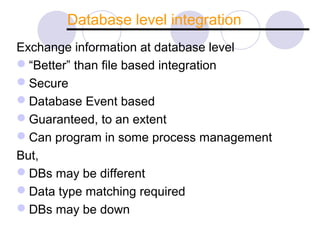
Database level integration
Exchange information at database level
“Better” than file based integration
Secure
Database Event based
Guaranteed, to an extent
Can program in some process management
But,
DBs may be different
Data type matching required
DBs may be down
Integration Protocols
File level integration
Database level integration
Application level integration
Application level integration
Applications exchange information
Use the application infrastructure
APIs available for integration – applications
manage a lot of the logic
E.g., TIBCO calling BAPI to interface with SAP
Integration Protocols
File level integration
Database level integration
Application level integration
Business process integration
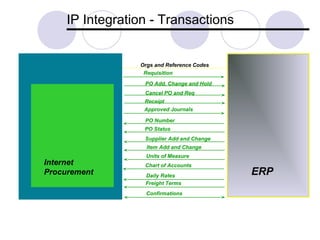
IP Integration - Transactions
ERP
Orgs and Reference Codes
Internet
Procurement
PO Add, Change and Hold
Requisition
Receipt
Approved Journals
PO Status
PO Number
Cancel PO and Req
Supplier Add and Change
Item Add and Change
Units of Measure
Chart of Accounts
Daily Rates
Freight Terms
Confirmations
Integration – The Problem
Enterprise Resource Planning (ERP) suites purchased to
replace multiple legacy systems. Issues still remained:
Didn’t replace all legacy apps
Difficult/Expensive to implement & maintain
Do not fulfill all functions of the enterprise, hence the
need for other applications
Need for Integration
 Differences in data definitions among applications
 Complexity of the programming environment
 Sequencing of data and processing (in other words the Business
Logic)
 Difficulties with sharing code among applications
 Security
 The need to provide information from integrated applications to better
serve customers
 Reduce the lag time in processing business requirements
 Thereby reducing cost and improving productivity
 Hence the pressure to make applications work together is intense
 As businesses leverage the Web and attempt the transition to
becoming “e-businesses,” the need to collaborate across
organizational boundaries has emerged as paramount
Integration – The Problem
Application Integration Spaghetti:
When enterprises have undocumented, complex, high-
maintenance integration paths. And each connection is
LOCALLY rather than GLOBALLY optimized
difficult to modify or reuse
uses batch file transfer (some non-automated)
data may be re-keyed
Integration Spaghetti
Integration - Goals
To reduce the development effort needed to
document and code interfaces between systems
To reduce redundancy in the integration
middleware
To shorten the time it takes to add or change
applications and their connections with other
applications.
Integration – the goal
Integration – The Strategy
 Successful integration strategies require three
things (besides budget )
 a central integration team
 an evolving enterprise integration architecture
 a shared technical infrastructure
Integration - Architecture
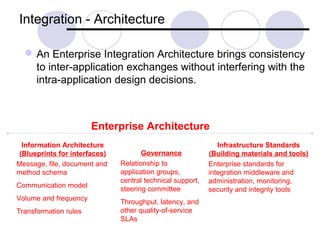
An Enterprise Integration Architecture brings consistency
to inter-application exchanges without interfering with the
intra-application design decisions.
Enterprise Architecture
Information Architecture
(Blueprints for interfaces)
Message, file, document and
method schema
Communication model
Volume and frequency
Transformation rules
Governance
Relationship to
application groups,
central technical support,
steering committee
Throughput, latency, and
other quality-of-service
SLAs
Infrastructure Standards
(Building materials and tools)
Enterprise standards for
integration middleware and
administration, monitoring,
security and integrity tools
Integration - Architecture
Decision Framework: The integration
infrastructure offloads functions from the
application programs and simplifies application
development and maintenance by supplying
middleware-based “intelligent network” services.
It may include
Basic communication facilities
An integration broker
Business process managers
Business activity monitors
Integration Architectures
Questions?

Introduction to integration

  • 1.
  • 2.
    Outline Definition Terminology Protocols Integration – TheProblem Integration – The Goals Integration – The Strategy Integration – Architecture
  • 3.
    Integration Integration combines thetechnologies and processes that enable custom-built and/or packaged business applications to exchange business-level information in formats and contexts that each understand Application integration is necessary whenever a new application is purchased, enhanced, or developed. Integration is more than middleware programming – the middleware platform is an enabler Integration is complex and technical – setting it up requires cooperation between several application teams, several types of skills, lots of patience and coordination
  • 4.
    Integration - Definitions Definition:“Integration” means making independently designed systems work together. Application-to-Application (A2A) Business-to-Business (B2B) Business-to-Consumer (B2C) Other: mobile devices, video and cellular phones, digital set-top boxes, electronic books and game consoles.
  • 5.
    Integration Terminology Common terms- A2A, B2B, EAI, MOM, XML, Request/Reply, asynchronous, etc. Examples of integration Different modules of same application (Oracle CRM, Oracle Financials) Siebel with Oracle or SAP - Applications WAP or voice technologies with applications Business to Business or Trading Partners
  • 6.
  • 7.
  • 8.
    Point-to-point One application talksto another directly Most prevalent & it works for most Serves specific business need Not enterprise wide Maintenance nightmare Not scalable
  • 9.
  • 10.
    Message oriented middleware Usea messaging infrastructure for message transport Application logic resides in applications Guarantees delivery No problems if one application is down But, Integration essentially point-to-point
  • 11.
  • 12.
    Platform Middleware Application Adapters DataTransformation Delivery guarantees Usage of standard messages Centralized management of integration Process management System monitoring Enterprise wide But, Not an out-of-box solution Still have a lot of work to do to make it all work
  • 13.
    What does Middlewareprovide? Middleware provides the framework and gets you  Guaranteed delivery  Higher transaction volumes  Near real time messaging  Decoupled applications  Multiple applications sharing same information  Transformation infrastructure  Connectivity to application APIs  Monitoring of the integration, maybe resend failed messages  Workflow integration – integrated applications behave like a single entity  Ability to add more applications that need to share same information
  • 14.
    Integration Protocols File levelintegration Database level integration Application level integration Business process integration
  • 15.
  • 16.
    File level integration Exchangefiles between applications Used to integrate legacy & other applications Used mostly in batch mode, not real time Disadvantages Not very secure Files may get corrupted They may get lost Dependent on the system infrastructure
  • 17.
    Integration Protocols File levelintegration Database level integration
  • 18.
    Database level integration Exchangeinformation at database level “Better” than file based integration Secure Database Event based Guaranteed, to an extent Can program in some process management But, DBs may be different Data type matching required DBs may be down
  • 19.
    Integration Protocols File levelintegration Database level integration Application level integration
  • 20.
    Application level integration Applicationsexchange information Use the application infrastructure APIs available for integration – applications manage a lot of the logic E.g., TIBCO calling BAPI to interface with SAP
  • 21.
    Integration Protocols File levelintegration Database level integration Application level integration Business process integration
  • 22.
    IP Integration -Transactions ERP Orgs and Reference Codes Internet Procurement PO Add, Change and Hold Requisition Receipt Approved Journals PO Status PO Number Cancel PO and Req Supplier Add and Change Item Add and Change Units of Measure Chart of Accounts Daily Rates Freight Terms Confirmations
  • 23.
    Integration – TheProblem Enterprise Resource Planning (ERP) suites purchased to replace multiple legacy systems. Issues still remained: Didn’t replace all legacy apps Difficult/Expensive to implement & maintain Do not fulfill all functions of the enterprise, hence the need for other applications
  • 24.
    Need for Integration Differences in data definitions among applications  Complexity of the programming environment  Sequencing of data and processing (in other words the Business Logic)  Difficulties with sharing code among applications  Security  The need to provide information from integrated applications to better serve customers  Reduce the lag time in processing business requirements  Thereby reducing cost and improving productivity  Hence the pressure to make applications work together is intense  As businesses leverage the Web and attempt the transition to becoming “e-businesses,” the need to collaborate across organizational boundaries has emerged as paramount
  • 25.
    Integration – TheProblem Application Integration Spaghetti: When enterprises have undocumented, complex, high- maintenance integration paths. And each connection is LOCALLY rather than GLOBALLY optimized difficult to modify or reuse uses batch file transfer (some non-automated) data may be re-keyed
  • 26.
  • 27.
    Integration - Goals Toreduce the development effort needed to document and code interfaces between systems To reduce redundancy in the integration middleware To shorten the time it takes to add or change applications and their connections with other applications.
  • 28.
  • 29.
    Integration – TheStrategy  Successful integration strategies require three things (besides budget )  a central integration team  an evolving enterprise integration architecture  a shared technical infrastructure
  • 30.
    Integration - Architecture AnEnterprise Integration Architecture brings consistency to inter-application exchanges without interfering with the intra-application design decisions. Enterprise Architecture Information Architecture (Blueprints for interfaces) Message, file, document and method schema Communication model Volume and frequency Transformation rules Governance Relationship to application groups, central technical support, steering committee Throughput, latency, and other quality-of-service SLAs Infrastructure Standards (Building materials and tools) Enterprise standards for integration middleware and administration, monitoring, security and integrity tools
  • 31.
    Integration - Architecture DecisionFramework: The integration infrastructure offloads functions from the application programs and simplifies application development and maintenance by supplying middleware-based “intelligent network” services. It may include Basic communication facilities An integration broker Business process managers Business activity monitors
  • 32.
  • 33.

Editor's Notes

  • #23 We deliver 32 Transactions in the integration. Several masterfiles like organizations will have to be manual synchronized. See the OIP Interconnect User and Implementation manual for a better description of this. From Oracle to Third Party Purchase Order and Requisition, to support requisitioning only in Oracle Internet Procurement and Sourcing in Third Party, or both requisitioning and sourcing in Oracle(1) Purchase Order Change and Hold , to accommodate changes in PO’s such as adding lines changing quantities. When a Purchase Order is changed and it’s status changes to “Requires Reapproval” a message is sent to Sap to put the PO on hold so that it cannot be received against while it is being changed. (2) Receipts, to support desktop receiving in Oracle. Also Returns and Adjustments . (3) Approved Journals, to support transfer of general ledger transactions to the Third Pary Ledger (1) From Third Party to Oracle PO Number, when a requisition line is placed on a PO in SAP the PO’s number is returned in a message and placed in the Requisitions Descriptive Flexfleild. (1) PO Status, to make available for inquiry the Invoice and Payment information for Purchase Orders (1) Chart of Account, to support Oracle’s Dynamic Insertion feature which allows you to dynamically create General Ledger Account numbers (1) Master Data, including Supplier add and change, Freight Terms, Daily Exchange Rates, Item Add and Change, Units of Measure and Conversions (10)
  • #32 • Basic communication facilities (e.g., message-oriented middleware [MOM], file transfer services, screen scrapers and database gateways) to move the bytes from one program or database to another. • An integration broker provides at least two key functions: 1) transformation, to translate message or file contents, including both syntactic “conversion” and semantic “transformation;” and 2) intelligent routing (e.g., content-based routing and publish-and-subscribe). • Business process managers (e.g., workflow services) coordinate, route and “remember” each step in the life cycle of each instance of a business process (e.g., each order or each stock trade). • Business activity monitors analyze the history of business events from a message warehouse or real-time operational data store to track the accuracy, effectiveness, quality and security of interrelated business activities.
  • #33 Message-centric integration may be configured as a “bus,” hub-and-spoke or a hybrid. A bus implies a common transport service (e.g., the same MOM) across all participants, so this kind of integration middleware suite either includes its own MOM or it specifies the use of third-party MOM. By contrast, a hub does not require the same communication middleware on each node. The spokes may connect to the applications through dissimilar protocols, such as an API, a file, a DBMS, a screen scraper or a messaging system.