Oracle Applications R12
Oracle Apps Financial Functional
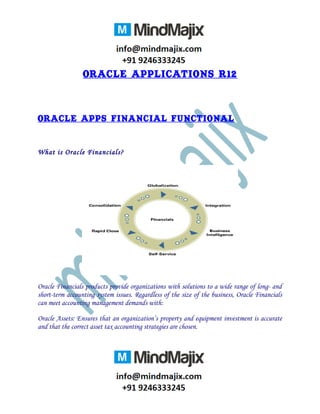
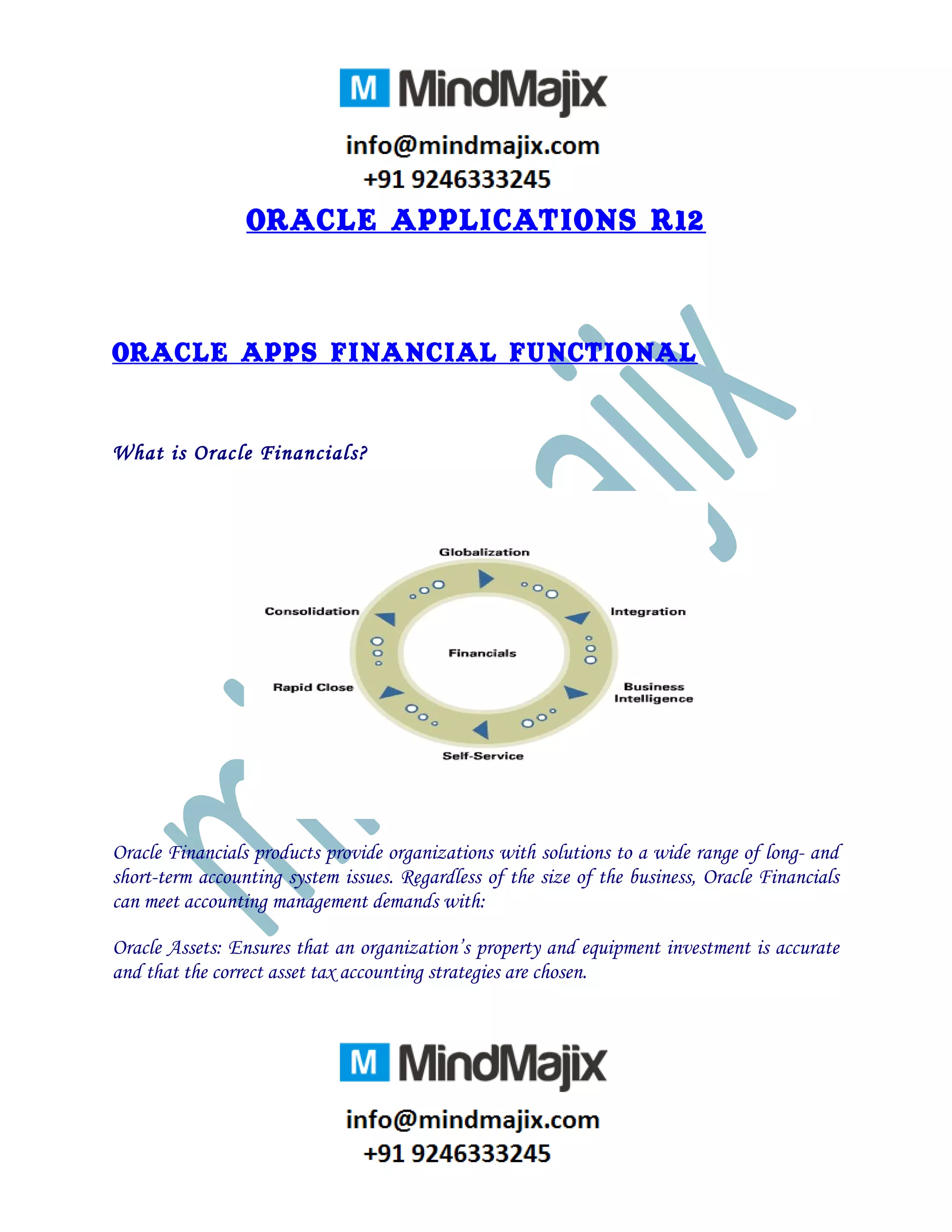
What is Oracle Financials?
Oracle Financials products provide organizations with solutions to a wide range of long- and
short-term accounting system issues. Regardless of the size of the business, Oracle Financials
can meet accounting management demands with:
Oracle Assets: Ensures that an organization’s property and equipment investment is accurate
and that the correct asset tax accounting strategies are chosen.
Oracle General Ledger: Offers a complete solution to journal entry, budgeting, allocations,
consolidation, and financial reporting needs.
Oracle Inventory: Helps an organization make better inventory decisions by minimizing stock
and maximizing cash flow.
Oracle Order Management: Provides organizations with a sophisticated order entry system for
managing customer commitments.
Oracle Payables: Lets an organization process more invoices with fewer staff members and
tighter controls. Helps save money through maximum discounts, bank float, and prevention of
duplicate payment.
Oracle Purchasing: Improves buying power, helps negotiate bigger discounts, eliminates paper
flow, increases financial controls, and increases productivity.
Software/Hardware Configuration
Operating System: Linux/windows 2003
Software : R 12.1.1 Version E Business Suite Financials
Database : Oracle 11.0.7
Hard Disk : Min 320 GB
Ram : Min 2GB (for personal oracle)
Min 1.5GB (for client-server)
Course Details
ORACLE APPLICATIONS Technical R12
ERP Concepts
 What is ERP?
 WHY is ERP?
 ERP Vendors.
 About Oracle Application & SAP.
About Oracle Application Projects
 Types of Project
 Implementation Projects.
 Up Gradation Projects.
 Supporting Project.
 Rollout Project
Oracle Application Positions Hierarchies.
 Functional Consultant & Roles .
 Technical Consultant & Roles.
 Techno- Functional Consultant & Roles.
 Oracle Application DBA & Roles
Oracle Applications 11i/R12 Architecture
 Three Tier Architecture Components.
 Oracle Application 11i/R12 File system .
System Administration and Application Object Library (AOL)
 Defining an Applications User and Assigning the Responsibilities.
 Understanding AOL and its Components
 Using AD_DD Package to register Database Component in AOL.
 Registering Custom Concurrent Programs based on Reports, Sql scripts, PL/SQL
Stored Procedures.
 Registering a Custom Reports in Oracle Application with or without parameters.
 Profile Option in Oracle Applications.
AIM Documentation Preparation.
 MD 70,MD120,CV 60,TE20
Reports 6i/10g in Oracle Applications
 Introduction and Usage of USER_EXITS.
 Developing a Report from scratch as per Client Requirement.
 Developing a Reports based on MD 50 Document (Reports in GL, AP, PO, INV).
 Multi-Org & MOAC Concepts in Oracle Application 11i/R12
 Customization of Oracle Standard Reports.
Flex fields and Value Sets.
 Flex Fields and Types of Flexfeilds
 Value Sets and Types of Value Sets.
 Usage of $FLEX and $PROFILE.
Oracle Application Interface
 Inbound Interface
 About Interface and Scenarios.
 Interface Tables and Error Tables
 Sql * Loader
 Standard Gl Interface and Po Requisition.
 Writing Validation Programs
 Outbound Interface
Conversions
 Difference between Conversion / Interface/ Data Migration.
 Conversion Approach.
 Interface Table Approach (OIT).
 API’s Approach.
 Direct Insertions
 Conversion Package Standards.
 Set Defaults, Validation Procedure, Loading Procedure and Error Report.
 Item Conversion and Vendor Conversion based on CV 40 Document.
 Customer Conversion using API Approach.
 Lot Number Conversion Using API Approach.
Data Migration/Data Extractions
 Extracting data from source Instance to Repository Instance.
Functional Concepts.
 Procure To Pay Life Cycles
 Order to Cash Cycles.
 FA To General Ledger Cycles.
 Technical Data Flow from Front End to Back End.
SLAM
 About Sub Ledger Accounting (SLA).
 TCA in R11i and R12i
 Banks, Suppliers
 Tables in R12i and R11i
 General Ledger in R11i and R12i. with tables.
 About Multi-Org Access Control.
 MOAC Reports.
XML Publisher.
 Difference between XML Publisher Report and Oracle Reports 6i/10g/11g.
 About XML Publisher Report and Template Builder.
 Creation of New Report in XML Publisher
 Registration of XML Publisher Reports in Oracle Applications.
 Template features
 Conditional Formatting.
 Sub Template
 IF Condition
 IF THEN ELSE condition
Oracle Discoverer 10g
Discoverer Administrations.
 Introduction of Discoverer.
 Discoverer VS Reports.
 Creation of EUL
 Defining a New Business Area .
 Creation of Folders & Custom Folders.
 Creations of Items.
 Creation of pages.
 Registration of Functions.
Discoverer Desktop
 Work Book Creation
 Creation of Work Sheet
 Work Book Registration in apps
 Calculations, Defining totals and Sub totals.
 Defining Parameters.
 Multiple Parameters.
 Grouping The Records, Edit Sheet , Invoking functions
 Joining Conditions with Tables in Discoverer.
 Exception
 Worksheet Generation
Oracle Apps Forms
Work Discoverer Desktop
 Form registration
 Template.fmb
 Appstand.fmb
 Form development using templates
 Form customization concepts
 Form Registration Process
 Custom.Pll
 Using function Zoom_available( )
 Using procedure Event( )
Real Time Live Project
• Implementation Methodology and Supporting Process
 Real Time Reports/Interface/conversion/Customization
• SQL and PLSQL Performance Methodology
• Covering Oracle Financials +Oracle India Localization Financials
• 100% Placement assistance
• Mock Interviews and FAQ’s
• Resume Preparation
• Real Time helps after getting job.

Best Oracle r12 technical online training institute

  • 1.
    Oracle Applications R12 OracleApps Financial Functional What is Oracle Financials? Oracle Financials products provide organizations with solutions to a wide range of long- and short-term accounting system issues. Regardless of the size of the business, Oracle Financials can meet accounting management demands with: Oracle Assets: Ensures that an organization’s property and equipment investment is accurate and that the correct asset tax accounting strategies are chosen.
  • 2.
    Oracle General Ledger:Offers a complete solution to journal entry, budgeting, allocations, consolidation, and financial reporting needs. Oracle Inventory: Helps an organization make better inventory decisions by minimizing stock and maximizing cash flow. Oracle Order Management: Provides organizations with a sophisticated order entry system for managing customer commitments. Oracle Payables: Lets an organization process more invoices with fewer staff members and tighter controls. Helps save money through maximum discounts, bank float, and prevention of duplicate payment. Oracle Purchasing: Improves buying power, helps negotiate bigger discounts, eliminates paper flow, increases financial controls, and increases productivity. Software/Hardware Configuration Operating System: Linux/windows 2003 Software : R 12.1.1 Version E Business Suite Financials Database : Oracle 11.0.7 Hard Disk : Min 320 GB Ram : Min 2GB (for personal oracle) Min 1.5GB (for client-server)
  • 3.
    Course Details ORACLE APPLICATIONSTechnical R12 ERP Concepts  What is ERP?  WHY is ERP?  ERP Vendors.  About Oracle Application & SAP. About Oracle Application Projects  Types of Project  Implementation Projects.  Up Gradation Projects.  Supporting Project.  Rollout Project Oracle Application Positions Hierarchies.  Functional Consultant & Roles .  Technical Consultant & Roles.  Techno- Functional Consultant & Roles.  Oracle Application DBA & Roles Oracle Applications 11i/R12 Architecture  Three Tier Architecture Components.  Oracle Application 11i/R12 File system . System Administration and Application Object Library (AOL)  Defining an Applications User and Assigning the Responsibilities.  Understanding AOL and its Components  Using AD_DD Package to register Database Component in AOL.  Registering Custom Concurrent Programs based on Reports, Sql scripts, PL/SQL Stored Procedures.  Registering a Custom Reports in Oracle Application with or without parameters.  Profile Option in Oracle Applications. AIM Documentation Preparation.
  • 4.
     MD 70,MD120,CV60,TE20 Reports 6i/10g in Oracle Applications  Introduction and Usage of USER_EXITS.  Developing a Report from scratch as per Client Requirement.  Developing a Reports based on MD 50 Document (Reports in GL, AP, PO, INV).  Multi-Org & MOAC Concepts in Oracle Application 11i/R12  Customization of Oracle Standard Reports. Flex fields and Value Sets.  Flex Fields and Types of Flexfeilds  Value Sets and Types of Value Sets.  Usage of $FLEX and $PROFILE. Oracle Application Interface  Inbound Interface  About Interface and Scenarios.  Interface Tables and Error Tables  Sql * Loader  Standard Gl Interface and Po Requisition.  Writing Validation Programs  Outbound Interface Conversions  Difference between Conversion / Interface/ Data Migration.  Conversion Approach.  Interface Table Approach (OIT).  API’s Approach.  Direct Insertions  Conversion Package Standards.  Set Defaults, Validation Procedure, Loading Procedure and Error Report.  Item Conversion and Vendor Conversion based on CV 40 Document.  Customer Conversion using API Approach.  Lot Number Conversion Using API Approach. Data Migration/Data Extractions
  • 5.
     Extracting datafrom source Instance to Repository Instance. Functional Concepts.  Procure To Pay Life Cycles  Order to Cash Cycles.  FA To General Ledger Cycles.  Technical Data Flow from Front End to Back End. SLAM  About Sub Ledger Accounting (SLA).  TCA in R11i and R12i  Banks, Suppliers  Tables in R12i and R11i  General Ledger in R11i and R12i. with tables.  About Multi-Org Access Control.  MOAC Reports. XML Publisher.  Difference between XML Publisher Report and Oracle Reports 6i/10g/11g.  About XML Publisher Report and Template Builder.  Creation of New Report in XML Publisher  Registration of XML Publisher Reports in Oracle Applications.  Template features  Conditional Formatting.  Sub Template  IF Condition  IF THEN ELSE condition Oracle Discoverer 10g Discoverer Administrations.  Introduction of Discoverer.  Discoverer VS Reports.  Creation of EUL  Defining a New Business Area .  Creation of Folders & Custom Folders.  Creations of Items.  Creation of pages.  Registration of Functions.
  • 6.
    Discoverer Desktop  WorkBook Creation  Creation of Work Sheet  Work Book Registration in apps  Calculations, Defining totals and Sub totals.  Defining Parameters.  Multiple Parameters.  Grouping The Records, Edit Sheet , Invoking functions  Joining Conditions with Tables in Discoverer.  Exception  Worksheet Generation Oracle Apps Forms Work Discoverer Desktop  Form registration  Template.fmb  Appstand.fmb  Form development using templates  Form customization concepts  Form Registration Process  Custom.Pll  Using function Zoom_available( )  Using procedure Event( ) Real Time Live Project • Implementation Methodology and Supporting Process
  • 7.
     Real TimeReports/Interface/conversion/Customization • SQL and PLSQL Performance Methodology • Covering Oracle Financials +Oracle India Localization Financials • 100% Placement assistance • Mock Interviews and FAQ’s • Resume Preparation • Real Time helps after getting job.