Build with all of
Google Cloud
Wesley Chun
Developer Advocate, Google
Adjunct CS Faculty, Foothill College
G Suite Dev Show
goo.gl/JpBQ40
About the speaker
● Developer Advocate, Google Cloud
● Mission: enable current and future developers to be successful using
Google Cloud and other Google developer tools, APIs, and platforms
● Videos: host of the G Suite Dev Show on YouTube
● Blogs: developers.googleblog.com &
gsuite-developers.googleblog.com
● Twitters: @wescpy, @GCPcloud, @GoogleDevs, @GSuiteDevs
● Background
● Software engineer & architect for 20+ years
● One of the original Yahoo!Mail engineers
● Author of bestselling "Core Python" books (corepython.com)
● Teacher and technical instructor since 1983 (all ages)
● Fellow of the Python Software Foundation
● AB Mathematics & CMP Music, UC Berkeley; MSCS UC Santa Barbara
Agenda and Why
● Not enough cloud computing in engineering curriculum
● Need to prep next-generation cloud-ready workforce
● Introduction to cloud computing
● Introduction to Google Cloud
● Run your code on Google Cloud serverless
● Build with all of Google Cloud (inspiration)
● Resources and summary
Cloud computing overview
All you need to know about the cloud1
What is Cloud Computing?
spar
Google Compute Engine, Google Cloud Storage
AWS EC2 & S3; Rackspace; Joyent
Cloud service levels/"pillars"
SaaS
Software as a Service
PaaS
Platform as a Service
IaaS
Infrastructure as a Service
Google BigQuery, Cloud SQL,
Cloud Datastore, NL, Vision, Pub/Sub
AWS Kinesis, RDS; Windows Azure SQL Database
Google Apps Script, App Maker
Salesforce1/force.com
G Suite (Google Apps)
Yahoo!Mail, Hotmail, Salesforce, Netsuite
Google App Engine, Cloud Functions
Heroku, Cloud Foundry, Engine Yard, AWS Lambda
Google Compute Engine, Google Cloud Storage
AWS EC2 & S3; Rackspace; Joyent
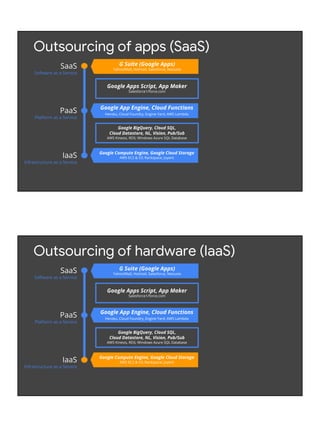
Outsourcing of apps (SaaS)
SaaS
Software as a Service
PaaS
Platform as a Service
IaaS
Infrastructure as a Service
Google BigQuery, Cloud SQL,
Cloud Datastore, NL, Vision, Pub/Sub
AWS Kinesis, RDS; Windows Azure SQL Database
Google Apps Script, App Maker
Salesforce1/force.com
Google App Engine, Cloud Functions
Heroku, Cloud Foundry, Engine Yard, AWS Lambda
G Suite (Google Apps)
Yahoo!Mail, Hotmail, Salesforce, Netsuite
Google Compute Engine, Google Cloud Storage
AWS EC2 & S3; Rackspace; Joyent
Outsourcing of hardware (IaaS)
SaaS
Software as a Service
PaaS
Platform as a Service
IaaS
Infrastructure as a Service
Google BigQuery, Cloud SQL,
Cloud Datastore, NL, Vision, Pub/Sub
AWS Kinesis, RDS; Windows Azure SQL Database
Google Apps Script, App Maker
Salesforce1/force.com
G Suite (Google Apps)
Yahoo!Mail, Hotmail, Salesforce, Netsuite
Google App Engine, Cloud Functions
Heroku, Cloud Foundry, Engine Yard, AWS Lambda
Google Compute Engine, Google Cloud Storage
AWS EC2 & S3; Rackspace; Joyent
Outsourcing of logic-hosting (PaaS)
SaaS
Software as a Service
PaaS
Platform as a Service
IaaS
Infrastructure as a Service
Google BigQuery, Cloud SQL,
Cloud Datastore, NL, Vision, Pub/Sub
AWS Kinesis, RDS; Windows Azure SQL Database
Google Apps Script, App Maker
Salesforce1/force.com
G Suite (Google Apps)
Yahoo!Mail, Hotmail, Salesforce, Netsuite
Google App Engine, Cloud Functions
Heroku, Cloud Foundry, Engine Yard, AWS Lambda
Google Compute Engine, Google Cloud Storage
AWS EC2 & S3; Rackspace; Joyent
IaaS/PaaS gray area (DataB/S/P-aaS?)
SaaS
Software as a Service
PaaS
Platform as a Service
IaaS
Infrastructure as a Service
Google Apps Script, App Maker
Salesforce1/force.com
G Suite (Google Apps)
Yahoo!Mail, Hotmail, Salesforce, Netsuite
Google App Engine, Cloud Functions
Heroku, Cloud Foundry, Engine Yard, AWS Lambda
Google BigQuery, Cloud SQL,
Cloud Datastore, NL, Vision, Pub/Sub
AWS Kinesis, RDS; Windows Azure SQL Database
Google Compute Engine, Google Cloud Storage
AWS EC2 & S3; Rackspace; Joyent
SaaS/PaaS gray area
SaaS
Software as a Service
PaaS
Platform as a Service
IaaS
Infrastructure as a Service
Google BigQuery, Cloud SQL,
Cloud Datastore, NL, Vision, Pub/Sub
AWS Kinesis, RDS; Windows Azure SQL Database
G Suite (Google Apps)
Yahoo!Mail, Hotmail, Salesforce, Netsuite
Google App Engine, Cloud Functions
Heroku, Cloud Foundry, Engine Yard, AWS Lambda
Google Apps Script, App Maker
Salesforce1/force.com
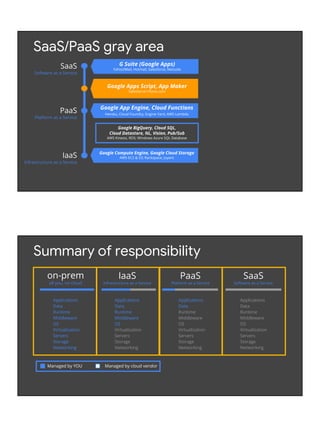
Summary of responsibility
SaaS
Software as a Service
Applications
Data
Runtime
Middleware
OS
Virtualization
Servers
Storage
Networking
Applications
Data
Runtime
Middleware
OS
Virtualization
Servers
Storage
Networking
IaaS
Infrastructure as a Service
Applications
Data
Runtime
Middleware
OS
Virtualization
Servers
Storage
Networking
PaaS
Platform as a Service
Managed by YOU Managed by cloud vendor
Applications
Data
Runtime
Middleware
OS
Virtualization
Servers
Storage
Networking
on-prem
all you, no cloud
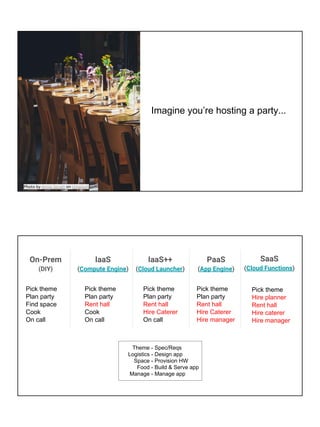
Imagine you’re hosting a party...
Photo by Annie Spratt on Unsplash
On-Prem
(DIY)
IaaS
(Compute Engine)
PaaS
(App Engine)
SaaS
(Cloud Functions)
Pick theme
Plan party
Find space
Cook
On call
Pick theme
Plan party
Rent hall
Cook
On call
Pick theme
Plan party
Rent hall
Hire Caterer
Hire manager
Pick theme
Hire planner
Rent hall
Hire caterer
Hire manager
Theme -
Logistics -
Space -
Food -
Manage -
Spec/Reqs
Design app
Provision HW
Build & Serve app
Manage app
IaaS++
(Cloud Launcher)
Pick theme
Plan party
Rent hall
Hire Caterer
On call
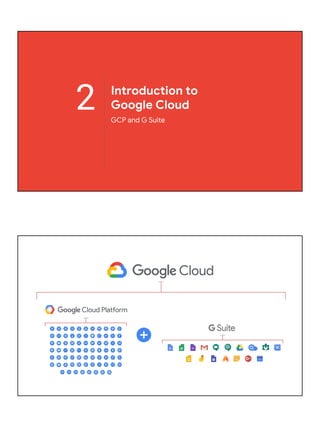
2 Introduction to
Google Cloud
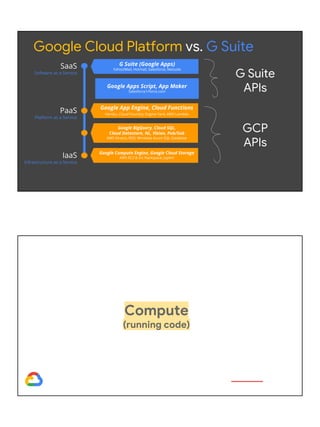
GCP and G Suite
Google Compute Engine, Google Cloud Storage
AWS EC2 & S3; Rackspace; Joyent
SaaS
Software as a Service
PaaS
Platform as a Service
IaaS
Infrastructure as a Service
Google Apps Script, App Maker
Salesforce1/force.com
G Suite (Google Apps)
Yahoo!Mail, Hotmail, Salesforce, Netsuite
Google App Engine, Cloud Functions
Heroku, Cloud Foundry, Engine Yard, AWS Lambda
Google BigQuery, Cloud SQL,
Cloud Datastore, NL, Vision, Pub/Sub
AWS Kinesis, RDS; Windows Azure SQL Database
Google Cloud Platform vs. G Suite
G Suite
APIs
GCP
APIs
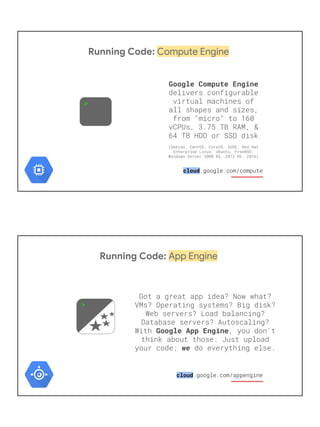
Compute
(running code)
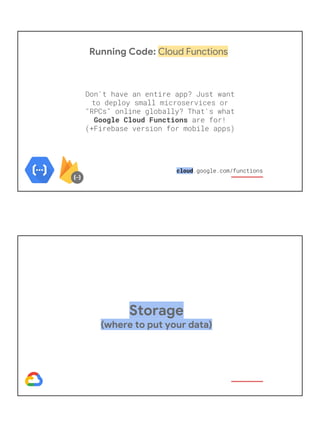
Running Code: Compute Engine
>
Google Compute Engine
cloud
Running Code: App Engine
Google App Engine
we
>
cloud
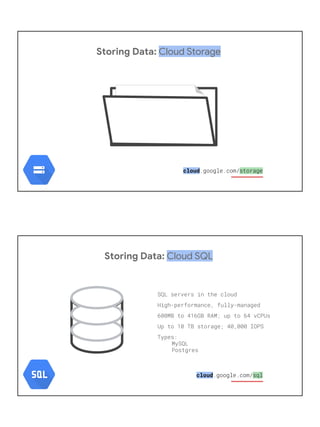
Running Code: Cloud Functions
Google Cloud Functions
cloud
Storage
(where to put your data)
Storing Data: Cloud Storage
cloud
Storing Data: Cloud SQL
cloud
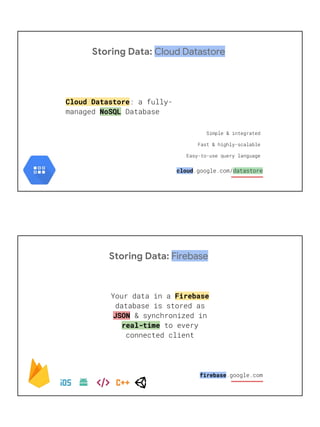
Storing Data: Cloud Datastore
Cloud Datastore
NoSQL
cloud
Storing Data: Firebase
Firebase
JSON
real-time
firebase
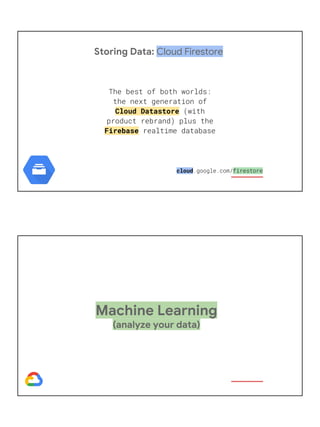
Storing Data: Cloud Firestore
Cloud Datastore
Firebase
cloud
Machine Learning
(analyze your data)
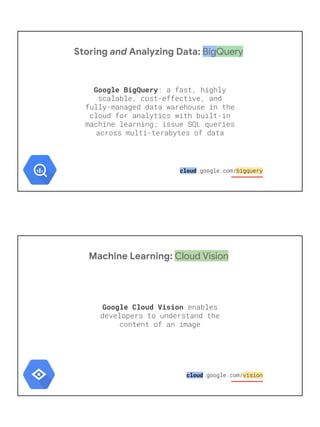
Storing and Analyzing Data: BigQuery
Google BigQuery
cloud
Machine Learning: Cloud Vision
Google Cloud Vision
cloud
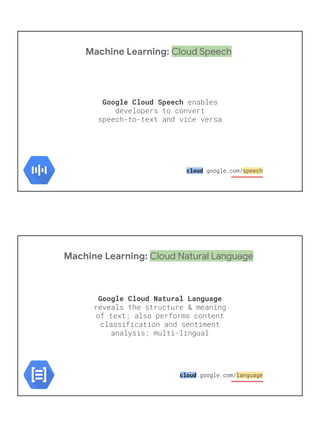
Machine Learning: Cloud Speech
Google Cloud Speech
cloud
Machine Learning: Cloud Natural Language
Google Cloud Natural Language
cloud
Machine Learning: Cloud Video Intelligence
Google Cloud Video Intelligence
cloud
Machine Learning: AutoML
AutoML:
cloud
G Suite
(collaborate & communicate)
G Suite: Gmail
Gmail API
read &
send messages labels
search manage settings
developers
G Suite: Google Drive
Drive API read
write permissions/sharing
import/export
developers
G Suite: Google Calendar
Calendar API
access modify create
events
developers
G Suite: Google Sheets
Sheets API
developers
G Suite: Google Slides
Slide API
create
manage
developers
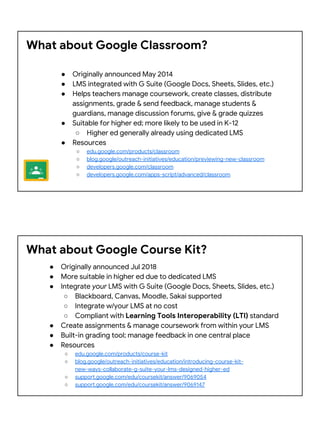
What about Google Classroom?
● Originally announced May 2014
● LMS integrated with G Suite (Google Docs, Sheets, Slides, etc.)
● Helps teachers manage coursework, create classes, distribute
assignments, grade & send feedback, manage students &
guardians, manage discussion forums, give & grade quizzes
● Suitable for higher ed; more likely to be used in K-12
○ Higher ed generally already using dedicated LMS
● Resources
○ edu.google.com/products/classroom
○ blog.google/outreach-initiatives/education/previewing-new-classroom
○ developers.google.com/classroom
○ developers.google.com/apps-script/advanced/classroom
What about Google Course Kit?
● Originally announced Jul 2018
● More suitable in higher ed due to dedicated LMS
● Integrate your LMS with G Suite (Google Docs, Sheets, Slides, etc.)
○ Blackboard, Canvas, Moodle, Sakai supported
○ Integrate w/your LMS at no cost
○ Compliant with Learning Tools Interoperability (LTI) standard
● Create assignments & manage coursework from within your LMS
● Built-in grading tool; manage feedback in one central place
● Resources
○ edu.google.com/products/course-kit
○ blog.google/outreach-initiatives/education/introducing-course-kit-
new-ways-collaborate-g-suite-your-lms-designed-higher-ed
○ support.google.com/edu/coursekit/answer/9069054
○ support.google.com/edu/coursekit/answer/9069147
REST API examples
Short Python code snippets using GCP & G Suite APIs
API key (public data) vs. OAuth2 access (private data)
List (first 100) files/folders in Google Drive
from __future__ import print_function
from apiclient import discovery
from httplib2 import Http
from oauth2client import file, client, tools
SCOPES = 'https://www.googleapis.com/auth/drive.readonly.metadata'
store = file.Storage('storage.json')
creds = store.get()
if not creds or creds.invalid:
flow = client.flow_from_clientsecrets('client_secret.json', SCOPES)
creds = tools.run_flow(flow, store)
DRIVE = discovery.build('drive', 'v3', http=creds.authorize(Http()))
files = DRIVE.files().list().execute().get('files', [])
for f in files:
print(f['name'], f['mimeType'])
Listing your files
goo.gl/ZIgf8k
Back up your file archives
Write your own or see github.com/gsuitedevs/drive-zipextractor (JS)
Automate photo albums
OR
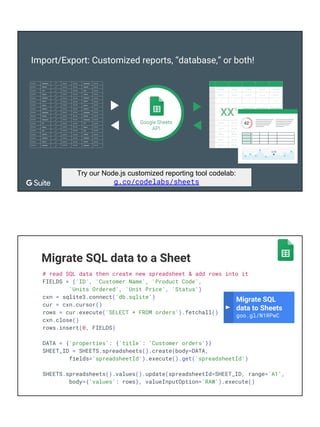
Import/Export: Customized reports, “database,” or both!
Try our Node.js customized reporting tool codelab:
g.co/codelabs/sheets
Migrate SQL data to a Sheet
# read SQL data then create new spreadsheet & add rows into it
FIELDS = ('ID', 'Customer Name', 'Product Code',
'Units Ordered', 'Unit Price', 'Status')
cxn = sqlite3.connect('db.sqlite')
cur = cxn.cursor()
rows = cur.execute('SELECT * FROM orders').fetchall()
cxn.close()
rows.insert(0, FIELDS)
DATA = {'properties': {'title': 'Customer orders'}}
SHEET_ID = SHEETS.spreadsheets().create(body=DATA,
fields='spreadsheetId').execute().get('spreadsheetId')
SHEETS.spreadsheets().values().update(spreadsheetId=SHEET_ID, range='A1',
body={'values': rows}, valueInputOption='RAW').execute()
Migrate SQL
data to Sheets
goo.gl/N1RPwC
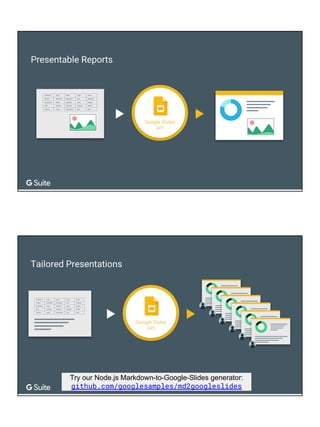
Try our Node.js Markdown-to-Google-Slides generator:
github.com/googlesamples/md2googleslides
Replace text & images from template deck
requests = [
# (global) search-and-replace text
{'replaceAllText': {
'findText': '{{TITLE}}',
'replaceText': 'Hello World!',
}},
# replace text-based image placeholders (global)
{'replaceAllShapesWithImage': {
'imageUrl': IMG_URL, # link to product logo
'replaceMethod': 'CENTER_INSIDE',
'containsText': {'text': '{{LOGO}}'},
}},
]
SLIDES.presentations().batchUpdate(body={'requests': requests},
presentationId=DECK_ID, fields='').execute()
Replacing text
and images
goo.gl/o6EFwk
Display Gmail threads (& # of messages)
# get all "busy" mail threads & display (non-blank) Subject lines
threads = GMAIL.users().threads().list(userId='me',
fields='threads').execute().get('threads', [])
for thread in threads:
tdata = GMAIL.users().threads().get(userId='me', id=thread['id'],
format='metadata', metadataHeaders=['subject'],
fields='messages/payload/headers(name,value)').execute()
if 'messages' not in tdata:
continue
if len(tdata['messages']) > 10:
msg = tdata['messages'][0]['payload']
subject = ''
for header in msg['headers']:
if header['name'] == 'Subject':
subject = header['value']
break
if subject:
print('%2d message(s) in thread: %s' % (
len(tdata['messages']), subject))
Gmail threads
goo.gl/pFYUQ2
Create events in Calendar
# define event data, then create event
TIMEZONE = 'America/Los_Angeles'
EVENT = {
'summary': 'Dinner with friends',
'start': {'dateTime': '2017-06-14T19:00:00', 'timeZone': TIMEZONE},
'end': {'dateTime': '2017-06-14T22:00:00', 'timeZone': TIMEZONE},
'attendees': [
{'email': 'friend1@example.com'},
{'email': 'friend2@example.com'},
],
}
GCAL.events().insert(calendarId='primary', body=EVENT,
sendNotifications=True, fields='').execute()
Modifying and
recurring events
goo.gl/J2XkXc
Creating events
goo.gl/KuYMiq
Global search & replace from template doc
requests = [
# (global) search-and-replace text
{'replaceAllText': {
'containsText': {'text': '{{TITLE}}'},
'replaceText': 'Hello World!',
}},
]
DOCS.documents().batchUpdate(body={'requests': requests},
name='documents/'+DOC_ID, fields='').execute()
[simple API/API key sample]
Search YouTube for videos
from __future__ import print_function
from apiclient import discovery
from settings import API_KEY
QUERY = 'python -snake'
trim = lambda x, ct: ('%s%s' % (x[:ct],
'...' if len(x)>ct else '')).ljust(ct+3)
print('n** Searching for %r videos...' % QUERY)
YOUTUBE = discovery.build('youtube', 'v3', developerKey=API_KEY)
res = YOUTUBE.search().list(q=QUERY, type='video',
part='id,snippet').execute().get('items', [])
for item in res:
print('http://youtu.be/%st%s' % (
trim(item['id']['videoId'], 24),
trim(item['snippet']['title'], 48)))
BigQuery: querying Shakespeare words
TITLE = "The top 10 most common words in all of Shakespeare's works"
QUERY = '''
SELECT LOWER(word) AS word, sum(word_count) AS count
FROM [bigquery-public-data:samples.shakespeare]
GROUP BY word ORDER BY count DESC LIMIT 10
'''
rsp = BQ.query(body={'query': QUERY}, projectId=PROJ_ID).execute()
print('n*** Results for %r:n' % TITLE)
for col in rsp['schema']['fields']: # HEADERS
print(col['name'].upper(), end='t')
print()
for row in rsp['rows']: # DATA
for col in row['f']:
print(col['v'], end='t')
print()
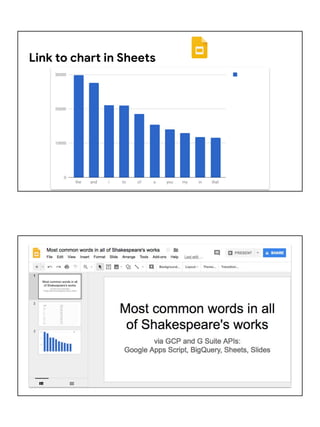
Top 10 most common Shakespeare words
$ python3 bq_shake.py
*** Results for "The most common words in all of Shakespeare's works":
WORD COUNT
the 29801
and 27529
i 21029
to 20957
of 18514
a 15370
you 14010
my 12936
in 11722
that 11519
[simple API/API key sample]
Simple sentiment & classification analysis
text = '''
Google, headquartered in Mountain View, unveiled the new Android
phone at the Consumer Electronics Show. Sundar Pichai said in
his keynote that users love their new Android phones.'''
data = {'type': 'PLAIN_TEXT', 'content': text}
NL = discovery.build('language', 'v1', developerKey=API_KEY)
sentiment = NL.documents().analyzeSentiment(
body={'document': data}).execute().get('documentSentiment')
print('TEXT:', text)
print('nSENTIMENT: score (%s), magnitude (%s)' % (
sentiment['score'], sentiment['magnitude']))
print('nCATEGORIES:')
categories = NL.documents().classifyText(
body={'document': data}).execute().get('categories')
for c in categories:
print ('* %s (%s)' % (c['name'][1:], c['confidence']))
PY
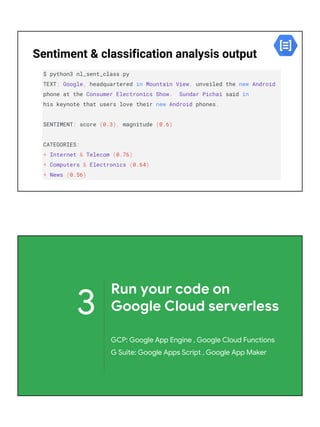
Sentiment & classification analysis output
$ python3 nl_sent_class.py
TEXT: Google, headquartered in Mountain View, unveiled the new Android
phone at the Consumer Electronics Show. Sundar Pichai said in
his keynote that users love their new Android phones.
SENTIMENT: score (0.3), magnitude (0.6)
CATEGORIES:
* Internet & Telecom (0.76)
* Computers & Electronics (0.64)
* News (0.56)
3
Run your code on
Google Cloud serverless
GCP: Google App Engine , Google Cloud Functions
G Suite: Google Apps Script , Google App Maker
Serverless: what & why
● What is serverless?
○ Misnomer: of course there's a server somewhere
○ You just don't have to worry about it!
○ Forbes (May 2018): Serverless... [helps] developers focus on writing code without having to
worry about infrastructure... servers (physical & virtual) completely abstracted away from the
user. [Developers] ... focused on solving business problems (e.g., faster app deployment)
● Why serverless?
○ Fastest growing segment of cloud... per 2 analysts*:
■ $1.9B (2016) and $4.25B (2018) ⇒ $7.7B (2021) and $14.93B (2023)
○ Unless focused on DevOps... VMs, networking, load balancing, web servers,
database servers, frontends/proxies, etc. less relevant for app-builders
○ What if you go viral? Autoscaling: your new best friend
○ What if you don't? Code not running? You're not paying. (No VMs to shutdown.)
* in USD; source: MarketsandMarkets™ & CB Insights (Aug 2018)
Google Compute Engine, Google Cloud Storage
AWS EC2 & S3; Rackspace; Joyent
SaaS
Software as a Service
PaaS
Platform as a Service
IaaS
Infrastructure as a Service
G Suite (Google Apps)
Yahoo!Mail, Hotmail, Salesforce, Netsuite
Google App Engine, Cloud Functions
Heroku, Cloud Foundry, Engine Yard, AWS Lambda
Google BigQuery, Cloud SQL,
Cloud Datastore, NL, Vision, Pub/Sub
AWS Kinesis, RDS; Windows Azure SQL Database
Serverless: PaaS-y compute/processing
Google Apps Script, App Maker
Salesforce1/force.com
Google App Engine
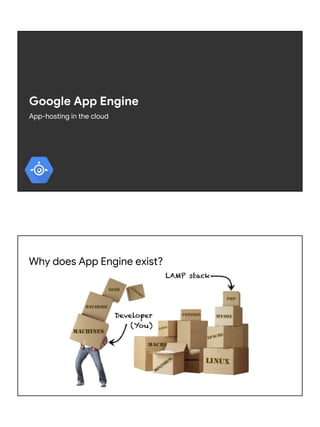
App-hosting in the cloud
Why does App Engine exist?
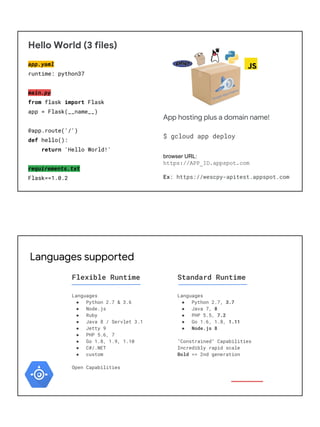
Hello World (3 files)
app.yaml
runtime: python37
main.py
from flask import Flask
app = Flask(__name__)
@app.route('/')
def hello():
return 'Hello World!'
requirements.txt
Flask==1.0.2
App hosting plus a domain name!
$ gcloud app deploy
browser URL:
https://APP_ID.appspot.com
Ex: https://wescpy-apitest.appspot.com
Languages supported
Languages
● Python 2.7 & 3.6
● Node.js
● Ruby
● Java 8 / Servlet 3.1
● Jetty 9
● PHP 5.6, 7
● Go 1.8, 1.9, 1.10
● C#/.NET
● custom
Open Capabilities
Flexible Runtime
Languages
● Python 2.7, 3.7
● Java 7, 8
● PHP 5.5, 7.2
● Go 1.6, 1.8, 1.11
● Node.js 8
"Constrained" Capabilities
Incredibly rapid scale
Bold == 2nd generation
Standard Runtime
Google Cloud Functions
Function-hosting in the cloud
"Hello World" Python Cloud Function
main.py
def hello_world(request):
return 'Hello World!'
$ gcloud functions deploy hello --runtime python37 --trigger-http
cmd-line (curl):
curl -X POST https://[GCP_REGION]-[PROJECT_ID].cloudfunctions.net/hello 
-H "Content-Type:application/json" --data '{"value": "123"}'
browser URL:
http://[GCP_REGION]-[PROJECT_ID].cloudfunctions.net/hello?value=123
Ex: https://us-central1-myproject-ccsc.cloudfunctions.net/hello
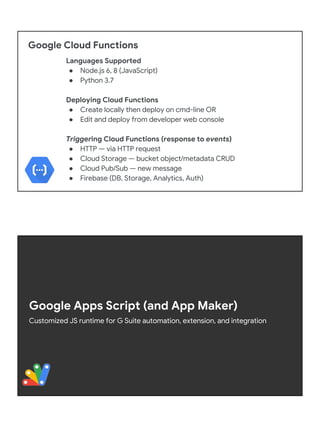
Google Cloud Functions
Languages Supported
● Node.js 6, 8 (JavaScript)
● Python 3.7
Deploying Cloud Functions
● Create locally then deploy on cmd-line OR
● Edit and deploy from developer web console
Triggering Cloud Functions (response to events)
● HTTP — via HTTP request
● Cloud Storage — bucket object/metadata CRUD
● Cloud Pub/Sub — new message
● Firebase (DB, Storage, Analytics, Auth)
Google Apps Script (and App Maker)
Customized JS runtime for G Suite automation, extension, and integration
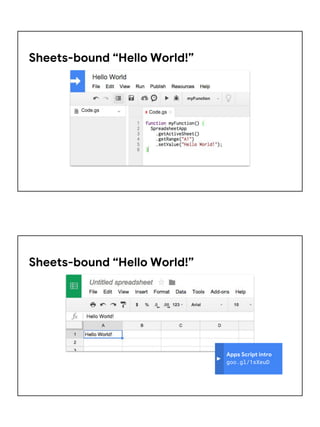
Sheets-bound “Hello World!”
Apps Script intro
goo.gl/1sXeuD
Sheets-bound “Hello World!”
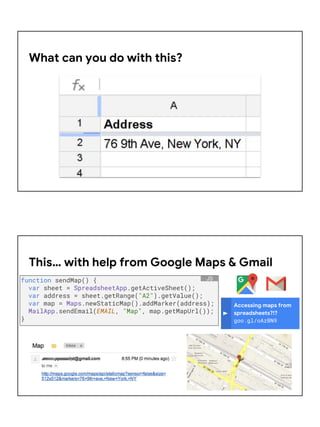
What can you do with this?
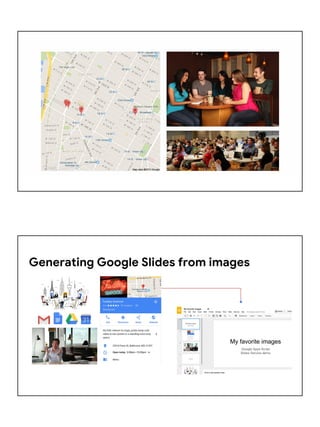
Accessing maps from
spreadsheets?!?
goo.gl/oAzBN9
This… with help from Google Maps & Gmail
function sendMap() {
var sheet = SpreadsheetApp.getActiveSheet();
var address = sheet.getRange("A2").getValue();
var map = Maps.newStaticMap().addMarker(address);
MailApp.sendEmail(EMAIL, "Map", map.getMapUrl());
}
JS
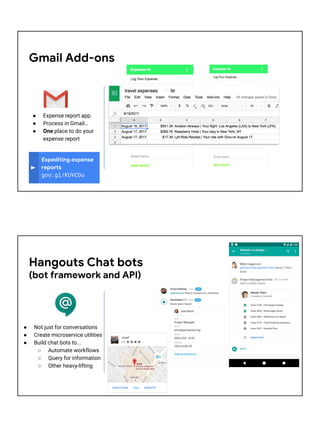
Generating Google Slides from images
var NAME = "My favorite images";
var deck = SlidesApp.getActivePresentation();
function addImageSlide(link, index) {
var slide = deck.appendSlide(SlidesApp.PredefinedLayout.BLANK);
var image = slide.insertImage(link);
}
function main() {
var images = [
"http://www.google.com/services/images/phone-animation-results_2x.png",
"http://www.google.com/services/images/section-work-card-img_2x.jpg",
"http://gsuite.google.com/img/icons/product-lockup.png",
"http://gsuite.google.com/img/home-hero_2x.jpg",
];
var [title, subtitle] = deck.getSlides()[0].getPageElements();
title.asShape().getText().setText(NAME);
subtitle.asShape().getText().setText("Google Apps ScriptnSlides Service demo");
images.forEach(addImageSlide);
}
Introducing
Slides Add-ons
goo.gl/sYL5AM
Generating Google Slides from images
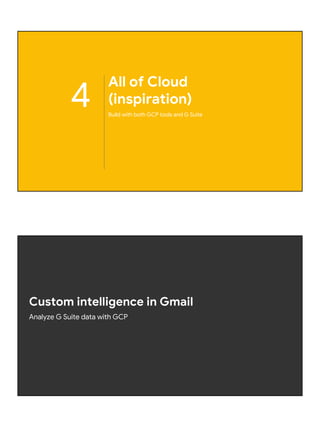
Gmail
Add-ons
● Expense reports
● Can't we do them
without leaving Gmail?
● On Web AND mobile?
● Expense report app
● Process in Gmail…
● One place to do your
expense report
Gmail Add-ons
Expediting expense
reports
goo.gl/KUVCDu
● Not just for conversations
● Create microservice utilities
● Build chat bots to...
○ Automate workflows
○ Query for information
○ Other heavy-lifting
Hangouts Chat bots
(bot framework and API)
function onMessage(e) {
return createMessage(e.user.displayName, 0);
}
function onCardClick(e) {
// Create a new vote card when 'NEW' button is clicked.
if (e.action.actionMethodName === 'newvote') {
return createMessage(e.user.displayName, 0);
}
// Updates the card in-place when '+1' or '-1' button is clicked.
var voteCount = +e.action.parameters[0].value;
e.action.actionMethodName === 'upvote' ? ++voteCount : --voteCount;
return createMessage(e.user.displayName, voteCount, true);
}
Simple vote bot
Hangouts Chat bots
goo.gl/jt3FqK
● Low-code assistive
development
environment
● Go from idea to app
in minutes
● Drag-n-drop
app building
● Generates Apps
Script code
Google App Maker
developers.google.com/appmaker
4
All of Cloud
(inspiration)
Build with both GCP tools and G Suite
Custom intelligence in Gmail
Analyze G Suite data with GCP
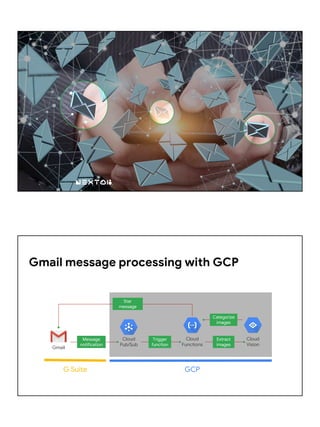
Gmail message processing with GCP
Gmail
Cloud
Pub/Sub
Cloud
Functions
Cloud
Vision
G Suite GCP
Star
message
Message
notification
Trigger
function
Extract
images
Categorize
images
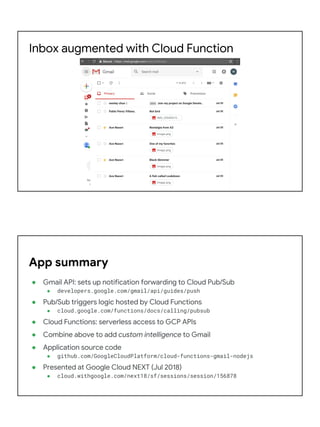
Inbox augmented with Cloud Function
● Gmail API: sets up notification forwarding to Cloud Pub/Sub
● developers.google.com/gmail/api/guides/push
● Pub/Sub triggers logic hosted by Cloud Functions
● cloud.google.com/functions/docs/calling/pubsub
● Cloud Functions: serverless access to GCP APIs
● Combine above to add custom intelligence to Gmail
● Application source code
● github.com/GoogleCloudPlatform/cloud-functions-gmail-nodejs
● Presented at Google Cloud NEXT (Jul 2018)
● cloud.withgoogle.com/next18/sf/sessions/session/156878
App summary
Big data analysis to slide presentation
Access GCP tools from G Suite
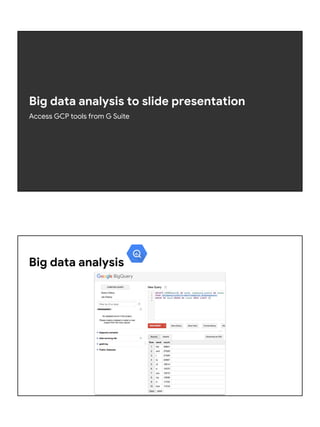
Big data analysis
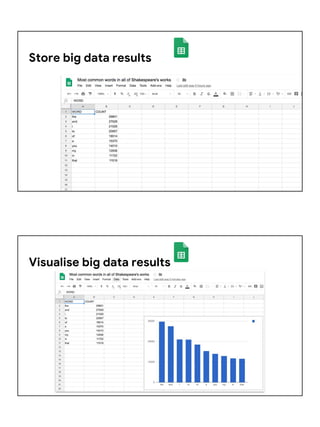
Store big data results
Visualise big data results
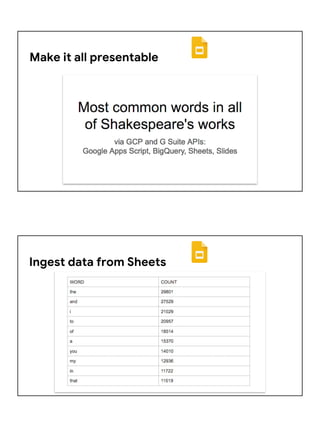
Make it all presentable
Ingest data from Sheets
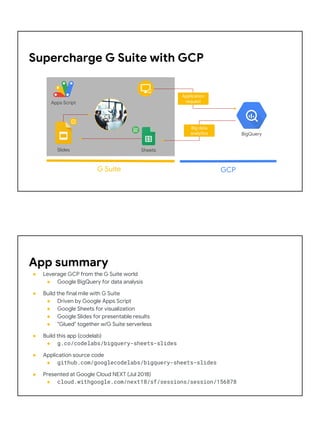
Link to chart in Sheets
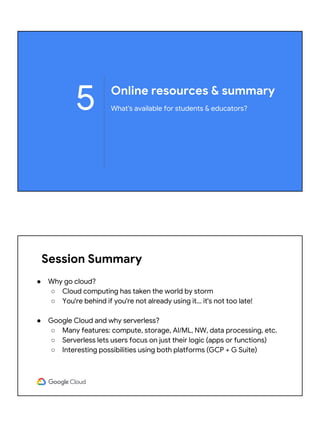
Supercharge G Suite with GCP
G Suite GCP
BigQuery
Apps Script
Slides Sheets
Application
request
Big data
analytics
App summary
● Leverage GCP from the G Suite world
● Google BigQuery for data analysis
● Build the final mile with G Suite
● Driven by Google Apps Script
● Google Sheets for visualization
● Google Slides for presentable results
● "Glued" together w/G Suite serverless
● Build this app (codelab)
● g.co/codelabs/bigquery-sheets-slides
● Application source code
● github.com/googlecodelabs/bigquery-sheets-slides
● Presented at Google Cloud NEXT (Jul 2018)
● cloud.withgoogle.com/next18/sf/sessions/session/156878
Online resources & summary
What's available for students & educators?5
Session Summary
● Why go cloud?
○ Cloud computing has taken the world by storm
○ You're behind if you're not already using it… it's not too late!
● Google Cloud and why serverless?
○ Many features: compute, storage, AI/ML, NW, data processing, etc.
○ Serverless lets users focus on just their logic (apps or functions)
○ Interesting possibilities using both platforms (GCP + G Suite)
References
● G Suite and Google Apps Script documentation
○ developers.google.com/gsuite
○ developers.google.com/apps-script
● GCP docs source code (i.e., App Engine & Cloud Functions quickstarts)
○ github.com/GoogleCloudPlatform/python-docs-samples
○ github.com/GoogleCloudPlatform/nodejs-docs-samples
● Inspirational demo apps' resources
○ cloud.withgoogle.com/next18/sf/sessions/session/156878
○ cloud.google.com/blog/products/application-development/
adding-custom-intelligence-to-gmail-with-serverless-on-gcp
○ bit.ly/2OcptaG
Learning resources
● Codelabs: self-paced hands-on tutorials
○ Google codelabs: need a Gmail account, always free
■ g.co/codelabs/cloud
○ Qwiklabs codelabs: don't need a Gmail acct; typically not free
■ google.qwiklabs.com
■ Individuals can request 200 more credits; 5000 credits for use in courses
● Official GCP docs: cloud.google.com
○ Recommended: Getting Started, Cloud Console, Cloud Shell, Cloud SDK, GCP
Free Tier (need a credit card), Community
● YouTube video series: youtube.com/GoogleCloud
○ Recommended: Cloud Minute shorts & Cloud NEXT videos
○ G Suite Dev Show: goo.gl/JpBQ40
Resources for Universities
● Education grant program
○ Teaching grants
■ $50USD for students
■ $100USD for faculty & TAs for courses
■ You'll barely use any of it… key: no need to give Google a credit card
○ Research grants
■ Larger amounts, granted for longer period of time
○ Turnaround time: 5-7 business days
● Teacher center
○ teachercenter.withgoogle.com/gcp
○ Apply here for education grants
○ Apply here for Qwiklabs credits
Thank you! Questions?
Wesley Chun
wescpy@gmail.com
@wescpy

Build with all of Google Cloud

  • 1.
    Build with allof Google Cloud Wesley Chun Developer Advocate, Google Adjunct CS Faculty, Foothill College G Suite Dev Show goo.gl/JpBQ40 About the speaker ● Developer Advocate, Google Cloud ● Mission: enable current and future developers to be successful using Google Cloud and other Google developer tools, APIs, and platforms ● Videos: host of the G Suite Dev Show on YouTube ● Blogs: developers.googleblog.com & gsuite-developers.googleblog.com ● Twitters: @wescpy, @GCPcloud, @GoogleDevs, @GSuiteDevs ● Background ● Software engineer & architect for 20+ years ● One of the original Yahoo!Mail engineers ● Author of bestselling "Core Python" books (corepython.com) ● Teacher and technical instructor since 1983 (all ages) ● Fellow of the Python Software Foundation ● AB Mathematics & CMP Music, UC Berkeley; MSCS UC Santa Barbara
  • 2.
    Agenda and Why ●Not enough cloud computing in engineering curriculum ● Need to prep next-generation cloud-ready workforce ● Introduction to cloud computing ● Introduction to Google Cloud ● Run your code on Google Cloud serverless ● Build with all of Google Cloud (inspiration) ● Resources and summary Cloud computing overview All you need to know about the cloud1
  • 3.
    What is CloudComputing? spar Google Compute Engine, Google Cloud Storage AWS EC2 & S3; Rackspace; Joyent Cloud service levels/"pillars" SaaS Software as a Service PaaS Platform as a Service IaaS Infrastructure as a Service Google BigQuery, Cloud SQL, Cloud Datastore, NL, Vision, Pub/Sub AWS Kinesis, RDS; Windows Azure SQL Database Google Apps Script, App Maker Salesforce1/force.com G Suite (Google Apps) Yahoo!Mail, Hotmail, Salesforce, Netsuite Google App Engine, Cloud Functions Heroku, Cloud Foundry, Engine Yard, AWS Lambda
  • 4.
    Google Compute Engine,Google Cloud Storage AWS EC2 & S3; Rackspace; Joyent Outsourcing of apps (SaaS) SaaS Software as a Service PaaS Platform as a Service IaaS Infrastructure as a Service Google BigQuery, Cloud SQL, Cloud Datastore, NL, Vision, Pub/Sub AWS Kinesis, RDS; Windows Azure SQL Database Google Apps Script, App Maker Salesforce1/force.com Google App Engine, Cloud Functions Heroku, Cloud Foundry, Engine Yard, AWS Lambda G Suite (Google Apps) Yahoo!Mail, Hotmail, Salesforce, Netsuite Google Compute Engine, Google Cloud Storage AWS EC2 & S3; Rackspace; Joyent Outsourcing of hardware (IaaS) SaaS Software as a Service PaaS Platform as a Service IaaS Infrastructure as a Service Google BigQuery, Cloud SQL, Cloud Datastore, NL, Vision, Pub/Sub AWS Kinesis, RDS; Windows Azure SQL Database Google Apps Script, App Maker Salesforce1/force.com G Suite (Google Apps) Yahoo!Mail, Hotmail, Salesforce, Netsuite Google App Engine, Cloud Functions Heroku, Cloud Foundry, Engine Yard, AWS Lambda
  • 5.
    Google Compute Engine,Google Cloud Storage AWS EC2 & S3; Rackspace; Joyent Outsourcing of logic-hosting (PaaS) SaaS Software as a Service PaaS Platform as a Service IaaS Infrastructure as a Service Google BigQuery, Cloud SQL, Cloud Datastore, NL, Vision, Pub/Sub AWS Kinesis, RDS; Windows Azure SQL Database Google Apps Script, App Maker Salesforce1/force.com G Suite (Google Apps) Yahoo!Mail, Hotmail, Salesforce, Netsuite Google App Engine, Cloud Functions Heroku, Cloud Foundry, Engine Yard, AWS Lambda Google Compute Engine, Google Cloud Storage AWS EC2 & S3; Rackspace; Joyent IaaS/PaaS gray area (DataB/S/P-aaS?) SaaS Software as a Service PaaS Platform as a Service IaaS Infrastructure as a Service Google Apps Script, App Maker Salesforce1/force.com G Suite (Google Apps) Yahoo!Mail, Hotmail, Salesforce, Netsuite Google App Engine, Cloud Functions Heroku, Cloud Foundry, Engine Yard, AWS Lambda Google BigQuery, Cloud SQL, Cloud Datastore, NL, Vision, Pub/Sub AWS Kinesis, RDS; Windows Azure SQL Database
  • 6.
    Google Compute Engine,Google Cloud Storage AWS EC2 & S3; Rackspace; Joyent SaaS/PaaS gray area SaaS Software as a Service PaaS Platform as a Service IaaS Infrastructure as a Service Google BigQuery, Cloud SQL, Cloud Datastore, NL, Vision, Pub/Sub AWS Kinesis, RDS; Windows Azure SQL Database G Suite (Google Apps) Yahoo!Mail, Hotmail, Salesforce, Netsuite Google App Engine, Cloud Functions Heroku, Cloud Foundry, Engine Yard, AWS Lambda Google Apps Script, App Maker Salesforce1/force.com Summary of responsibility SaaS Software as a Service Applications Data Runtime Middleware OS Virtualization Servers Storage Networking Applications Data Runtime Middleware OS Virtualization Servers Storage Networking IaaS Infrastructure as a Service Applications Data Runtime Middleware OS Virtualization Servers Storage Networking PaaS Platform as a Service Managed by YOU Managed by cloud vendor Applications Data Runtime Middleware OS Virtualization Servers Storage Networking on-prem all you, no cloud
  • 7.
    Imagine you’re hostinga party... Photo by Annie Spratt on Unsplash On-Prem (DIY) IaaS (Compute Engine) PaaS (App Engine) SaaS (Cloud Functions) Pick theme Plan party Find space Cook On call Pick theme Plan party Rent hall Cook On call Pick theme Plan party Rent hall Hire Caterer Hire manager Pick theme Hire planner Rent hall Hire caterer Hire manager Theme - Logistics - Space - Food - Manage - Spec/Reqs Design app Provision HW Build & Serve app Manage app IaaS++ (Cloud Launcher) Pick theme Plan party Rent hall Hire Caterer On call
  • 8.
    2 Introduction to GoogleCloud GCP and G Suite
  • 9.
    Google Compute Engine,Google Cloud Storage AWS EC2 & S3; Rackspace; Joyent SaaS Software as a Service PaaS Platform as a Service IaaS Infrastructure as a Service Google Apps Script, App Maker Salesforce1/force.com G Suite (Google Apps) Yahoo!Mail, Hotmail, Salesforce, Netsuite Google App Engine, Cloud Functions Heroku, Cloud Foundry, Engine Yard, AWS Lambda Google BigQuery, Cloud SQL, Cloud Datastore, NL, Vision, Pub/Sub AWS Kinesis, RDS; Windows Azure SQL Database Google Cloud Platform vs. G Suite G Suite APIs GCP APIs Compute (running code)
  • 10.
    Running Code: ComputeEngine > Google Compute Engine cloud Running Code: App Engine Google App Engine we > cloud
  • 11.
    Running Code: CloudFunctions Google Cloud Functions cloud Storage (where to put your data)
  • 12.
    Storing Data: CloudStorage cloud Storing Data: Cloud SQL cloud
  • 13.
    Storing Data: CloudDatastore Cloud Datastore NoSQL cloud Storing Data: Firebase Firebase JSON real-time firebase
  • 14.
    Storing Data: CloudFirestore Cloud Datastore Firebase cloud Machine Learning (analyze your data)
  • 15.
    Storing and AnalyzingData: BigQuery Google BigQuery cloud Machine Learning: Cloud Vision Google Cloud Vision cloud
  • 16.
    Machine Learning: CloudSpeech Google Cloud Speech cloud Machine Learning: Cloud Natural Language Google Cloud Natural Language cloud
  • 17.
    Machine Learning: CloudVideo Intelligence Google Cloud Video Intelligence cloud Machine Learning: AutoML AutoML: cloud
  • 18.
    G Suite (collaborate &communicate) G Suite: Gmail Gmail API read & send messages labels search manage settings developers
  • 19.
    G Suite: GoogleDrive Drive API read write permissions/sharing import/export developers G Suite: Google Calendar Calendar API access modify create events developers
  • 20.
    G Suite: GoogleSheets Sheets API developers G Suite: Google Slides Slide API create manage developers
  • 21.
    What about GoogleClassroom? ● Originally announced May 2014 ● LMS integrated with G Suite (Google Docs, Sheets, Slides, etc.) ● Helps teachers manage coursework, create classes, distribute assignments, grade & send feedback, manage students & guardians, manage discussion forums, give & grade quizzes ● Suitable for higher ed; more likely to be used in K-12 ○ Higher ed generally already using dedicated LMS ● Resources ○ edu.google.com/products/classroom ○ blog.google/outreach-initiatives/education/previewing-new-classroom ○ developers.google.com/classroom ○ developers.google.com/apps-script/advanced/classroom What about Google Course Kit? ● Originally announced Jul 2018 ● More suitable in higher ed due to dedicated LMS ● Integrate your LMS with G Suite (Google Docs, Sheets, Slides, etc.) ○ Blackboard, Canvas, Moodle, Sakai supported ○ Integrate w/your LMS at no cost ○ Compliant with Learning Tools Interoperability (LTI) standard ● Create assignments & manage coursework from within your LMS ● Built-in grading tool; manage feedback in one central place ● Resources ○ edu.google.com/products/course-kit ○ blog.google/outreach-initiatives/education/introducing-course-kit- new-ways-collaborate-g-suite-your-lms-designed-higher-ed ○ support.google.com/edu/coursekit/answer/9069054 ○ support.google.com/edu/coursekit/answer/9069147
  • 22.
    REST API examples ShortPython code snippets using GCP & G Suite APIs API key (public data) vs. OAuth2 access (private data) List (first 100) files/folders in Google Drive from __future__ import print_function from apiclient import discovery from httplib2 import Http from oauth2client import file, client, tools SCOPES = 'https://www.googleapis.com/auth/drive.readonly.metadata' store = file.Storage('storage.json') creds = store.get() if not creds or creds.invalid: flow = client.flow_from_clientsecrets('client_secret.json', SCOPES) creds = tools.run_flow(flow, store) DRIVE = discovery.build('drive', 'v3', http=creds.authorize(Http())) files = DRIVE.files().list().execute().get('files', []) for f in files: print(f['name'], f['mimeType']) Listing your files goo.gl/ZIgf8k
  • 23.
    Back up yourfile archives Write your own or see github.com/gsuitedevs/drive-zipextractor (JS) Automate photo albums OR
  • 24.
    Import/Export: Customized reports,“database,” or both! Try our Node.js customized reporting tool codelab: g.co/codelabs/sheets Migrate SQL data to a Sheet # read SQL data then create new spreadsheet & add rows into it FIELDS = ('ID', 'Customer Name', 'Product Code', 'Units Ordered', 'Unit Price', 'Status') cxn = sqlite3.connect('db.sqlite') cur = cxn.cursor() rows = cur.execute('SELECT * FROM orders').fetchall() cxn.close() rows.insert(0, FIELDS) DATA = {'properties': {'title': 'Customer orders'}} SHEET_ID = SHEETS.spreadsheets().create(body=DATA, fields='spreadsheetId').execute().get('spreadsheetId') SHEETS.spreadsheets().values().update(spreadsheetId=SHEET_ID, range='A1', body={'values': rows}, valueInputOption='RAW').execute() Migrate SQL data to Sheets goo.gl/N1RPwC
  • 25.
    Try our Node.jsMarkdown-to-Google-Slides generator: github.com/googlesamples/md2googleslides
  • 26.
    Replace text &images from template deck requests = [ # (global) search-and-replace text {'replaceAllText': { 'findText': '{{TITLE}}', 'replaceText': 'Hello World!', }}, # replace text-based image placeholders (global) {'replaceAllShapesWithImage': { 'imageUrl': IMG_URL, # link to product logo 'replaceMethod': 'CENTER_INSIDE', 'containsText': {'text': '{{LOGO}}'}, }}, ] SLIDES.presentations().batchUpdate(body={'requests': requests}, presentationId=DECK_ID, fields='').execute() Replacing text and images goo.gl/o6EFwk Display Gmail threads (& # of messages) # get all "busy" mail threads & display (non-blank) Subject lines threads = GMAIL.users().threads().list(userId='me', fields='threads').execute().get('threads', []) for thread in threads: tdata = GMAIL.users().threads().get(userId='me', id=thread['id'], format='metadata', metadataHeaders=['subject'], fields='messages/payload/headers(name,value)').execute() if 'messages' not in tdata: continue if len(tdata['messages']) > 10: msg = tdata['messages'][0]['payload'] subject = '' for header in msg['headers']: if header['name'] == 'Subject': subject = header['value'] break if subject: print('%2d message(s) in thread: %s' % ( len(tdata['messages']), subject)) Gmail threads goo.gl/pFYUQ2
  • 27.
    Create events inCalendar # define event data, then create event TIMEZONE = 'America/Los_Angeles' EVENT = { 'summary': 'Dinner with friends', 'start': {'dateTime': '2017-06-14T19:00:00', 'timeZone': TIMEZONE}, 'end': {'dateTime': '2017-06-14T22:00:00', 'timeZone': TIMEZONE}, 'attendees': [ {'email': 'friend1@example.com'}, {'email': 'friend2@example.com'}, ], } GCAL.events().insert(calendarId='primary', body=EVENT, sendNotifications=True, fields='').execute() Modifying and recurring events goo.gl/J2XkXc Creating events goo.gl/KuYMiq Global search & replace from template doc requests = [ # (global) search-and-replace text {'replaceAllText': { 'containsText': {'text': '{{TITLE}}'}, 'replaceText': 'Hello World!', }}, ] DOCS.documents().batchUpdate(body={'requests': requests}, name='documents/'+DOC_ID, fields='').execute()
  • 28.
    [simple API/API keysample] Search YouTube for videos from __future__ import print_function from apiclient import discovery from settings import API_KEY QUERY = 'python -snake' trim = lambda x, ct: ('%s%s' % (x[:ct], '...' if len(x)>ct else '')).ljust(ct+3) print('n** Searching for %r videos...' % QUERY) YOUTUBE = discovery.build('youtube', 'v3', developerKey=API_KEY) res = YOUTUBE.search().list(q=QUERY, type='video', part='id,snippet').execute().get('items', []) for item in res: print('http://youtu.be/%st%s' % ( trim(item['id']['videoId'], 24), trim(item['snippet']['title'], 48))) BigQuery: querying Shakespeare words TITLE = "The top 10 most common words in all of Shakespeare's works" QUERY = ''' SELECT LOWER(word) AS word, sum(word_count) AS count FROM [bigquery-public-data:samples.shakespeare] GROUP BY word ORDER BY count DESC LIMIT 10 ''' rsp = BQ.query(body={'query': QUERY}, projectId=PROJ_ID).execute() print('n*** Results for %r:n' % TITLE) for col in rsp['schema']['fields']: # HEADERS print(col['name'].upper(), end='t') print() for row in rsp['rows']: # DATA for col in row['f']: print(col['v'], end='t') print()
  • 29.
    Top 10 mostcommon Shakespeare words $ python3 bq_shake.py *** Results for "The most common words in all of Shakespeare's works": WORD COUNT the 29801 and 27529 i 21029 to 20957 of 18514 a 15370 you 14010 my 12936 in 11722 that 11519 [simple API/API key sample] Simple sentiment & classification analysis text = ''' Google, headquartered in Mountain View, unveiled the new Android phone at the Consumer Electronics Show. Sundar Pichai said in his keynote that users love their new Android phones.''' data = {'type': 'PLAIN_TEXT', 'content': text} NL = discovery.build('language', 'v1', developerKey=API_KEY) sentiment = NL.documents().analyzeSentiment( body={'document': data}).execute().get('documentSentiment') print('TEXT:', text) print('nSENTIMENT: score (%s), magnitude (%s)' % ( sentiment['score'], sentiment['magnitude'])) print('nCATEGORIES:') categories = NL.documents().classifyText( body={'document': data}).execute().get('categories') for c in categories: print ('* %s (%s)' % (c['name'][1:], c['confidence'])) PY
  • 30.
    Sentiment & classificationanalysis output $ python3 nl_sent_class.py TEXT: Google, headquartered in Mountain View, unveiled the new Android phone at the Consumer Electronics Show. Sundar Pichai said in his keynote that users love their new Android phones. SENTIMENT: score (0.3), magnitude (0.6) CATEGORIES: * Internet & Telecom (0.76) * Computers & Electronics (0.64) * News (0.56) 3 Run your code on Google Cloud serverless GCP: Google App Engine , Google Cloud Functions G Suite: Google Apps Script , Google App Maker
  • 31.
    Serverless: what &why ● What is serverless? ○ Misnomer: of course there's a server somewhere ○ You just don't have to worry about it! ○ Forbes (May 2018): Serverless... [helps] developers focus on writing code without having to worry about infrastructure... servers (physical & virtual) completely abstracted away from the user. [Developers] ... focused on solving business problems (e.g., faster app deployment) ● Why serverless? ○ Fastest growing segment of cloud... per 2 analysts*: ■ $1.9B (2016) and $4.25B (2018) ⇒ $7.7B (2021) and $14.93B (2023) ○ Unless focused on DevOps... VMs, networking, load balancing, web servers, database servers, frontends/proxies, etc. less relevant for app-builders ○ What if you go viral? Autoscaling: your new best friend ○ What if you don't? Code not running? You're not paying. (No VMs to shutdown.) * in USD; source: MarketsandMarkets™ & CB Insights (Aug 2018) Google Compute Engine, Google Cloud Storage AWS EC2 & S3; Rackspace; Joyent SaaS Software as a Service PaaS Platform as a Service IaaS Infrastructure as a Service G Suite (Google Apps) Yahoo!Mail, Hotmail, Salesforce, Netsuite Google App Engine, Cloud Functions Heroku, Cloud Foundry, Engine Yard, AWS Lambda Google BigQuery, Cloud SQL, Cloud Datastore, NL, Vision, Pub/Sub AWS Kinesis, RDS; Windows Azure SQL Database Serverless: PaaS-y compute/processing Google Apps Script, App Maker Salesforce1/force.com
  • 32.
    Google App Engine App-hostingin the cloud Why does App Engine exist?
  • 33.
    Hello World (3files) app.yaml runtime: python37 main.py from flask import Flask app = Flask(__name__) @app.route('/') def hello(): return 'Hello World!' requirements.txt Flask==1.0.2 App hosting plus a domain name! $ gcloud app deploy browser URL: https://APP_ID.appspot.com Ex: https://wescpy-apitest.appspot.com Languages supported Languages ● Python 2.7 & 3.6 ● Node.js ● Ruby ● Java 8 / Servlet 3.1 ● Jetty 9 ● PHP 5.6, 7 ● Go 1.8, 1.9, 1.10 ● C#/.NET ● custom Open Capabilities Flexible Runtime Languages ● Python 2.7, 3.7 ● Java 7, 8 ● PHP 5.5, 7.2 ● Go 1.6, 1.8, 1.11 ● Node.js 8 "Constrained" Capabilities Incredibly rapid scale Bold == 2nd generation Standard Runtime
  • 34.
    Google Cloud Functions Function-hostingin the cloud "Hello World" Python Cloud Function main.py def hello_world(request): return 'Hello World!' $ gcloud functions deploy hello --runtime python37 --trigger-http cmd-line (curl): curl -X POST https://[GCP_REGION]-[PROJECT_ID].cloudfunctions.net/hello -H "Content-Type:application/json" --data '{"value": "123"}' browser URL: http://[GCP_REGION]-[PROJECT_ID].cloudfunctions.net/hello?value=123 Ex: https://us-central1-myproject-ccsc.cloudfunctions.net/hello
  • 35.
    Google Cloud Functions LanguagesSupported ● Node.js 6, 8 (JavaScript) ● Python 3.7 Deploying Cloud Functions ● Create locally then deploy on cmd-line OR ● Edit and deploy from developer web console Triggering Cloud Functions (response to events) ● HTTP — via HTTP request ● Cloud Storage — bucket object/metadata CRUD ● Cloud Pub/Sub — new message ● Firebase (DB, Storage, Analytics, Auth) Google Apps Script (and App Maker) Customized JS runtime for G Suite automation, extension, and integration
  • 36.
    Sheets-bound “Hello World!” AppsScript intro goo.gl/1sXeuD Sheets-bound “Hello World!”
  • 37.
    What can youdo with this? Accessing maps from spreadsheets?!? goo.gl/oAzBN9 This… with help from Google Maps & Gmail function sendMap() { var sheet = SpreadsheetApp.getActiveSheet(); var address = sheet.getRange("A2").getValue(); var map = Maps.newStaticMap().addMarker(address); MailApp.sendEmail(EMAIL, "Map", map.getMapUrl()); } JS
  • 38.
  • 39.
    var NAME ="My favorite images"; var deck = SlidesApp.getActivePresentation(); function addImageSlide(link, index) { var slide = deck.appendSlide(SlidesApp.PredefinedLayout.BLANK); var image = slide.insertImage(link); } function main() { var images = [ "http://www.google.com/services/images/phone-animation-results_2x.png", "http://www.google.com/services/images/section-work-card-img_2x.jpg", "http://gsuite.google.com/img/icons/product-lockup.png", "http://gsuite.google.com/img/home-hero_2x.jpg", ]; var [title, subtitle] = deck.getSlides()[0].getPageElements(); title.asShape().getText().setText(NAME); subtitle.asShape().getText().setText("Google Apps ScriptnSlides Service demo"); images.forEach(addImageSlide); } Introducing Slides Add-ons goo.gl/sYL5AM Generating Google Slides from images Gmail Add-ons ● Expense reports ● Can't we do them without leaving Gmail? ● On Web AND mobile?
  • 40.
    ● Expense reportapp ● Process in Gmail… ● One place to do your expense report Gmail Add-ons Expediting expense reports goo.gl/KUVCDu ● Not just for conversations ● Create microservice utilities ● Build chat bots to... ○ Automate workflows ○ Query for information ○ Other heavy-lifting Hangouts Chat bots (bot framework and API)
  • 41.
    function onMessage(e) { returncreateMessage(e.user.displayName, 0); } function onCardClick(e) { // Create a new vote card when 'NEW' button is clicked. if (e.action.actionMethodName === 'newvote') { return createMessage(e.user.displayName, 0); } // Updates the card in-place when '+1' or '-1' button is clicked. var voteCount = +e.action.parameters[0].value; e.action.actionMethodName === 'upvote' ? ++voteCount : --voteCount; return createMessage(e.user.displayName, voteCount, true); } Simple vote bot Hangouts Chat bots goo.gl/jt3FqK ● Low-code assistive development environment ● Go from idea to app in minutes ● Drag-n-drop app building ● Generates Apps Script code Google App Maker developers.google.com/appmaker
  • 42.
    4 All of Cloud (inspiration) Buildwith both GCP tools and G Suite Custom intelligence in Gmail Analyze G Suite data with GCP
  • 43.
    Gmail message processingwith GCP Gmail Cloud Pub/Sub Cloud Functions Cloud Vision G Suite GCP Star message Message notification Trigger function Extract images Categorize images
  • 44.
    Inbox augmented withCloud Function ● Gmail API: sets up notification forwarding to Cloud Pub/Sub ● developers.google.com/gmail/api/guides/push ● Pub/Sub triggers logic hosted by Cloud Functions ● cloud.google.com/functions/docs/calling/pubsub ● Cloud Functions: serverless access to GCP APIs ● Combine above to add custom intelligence to Gmail ● Application source code ● github.com/GoogleCloudPlatform/cloud-functions-gmail-nodejs ● Presented at Google Cloud NEXT (Jul 2018) ● cloud.withgoogle.com/next18/sf/sessions/session/156878 App summary
  • 45.
    Big data analysisto slide presentation Access GCP tools from G Suite Big data analysis
  • 47.
    Store big dataresults Visualise big data results
  • 48.
    Make it allpresentable Ingest data from Sheets
  • 49.
    Link to chartin Sheets
  • 50.
    Supercharge G Suitewith GCP G Suite GCP BigQuery Apps Script Slides Sheets Application request Big data analytics App summary ● Leverage GCP from the G Suite world ● Google BigQuery for data analysis ● Build the final mile with G Suite ● Driven by Google Apps Script ● Google Sheets for visualization ● Google Slides for presentable results ● "Glued" together w/G Suite serverless ● Build this app (codelab) ● g.co/codelabs/bigquery-sheets-slides ● Application source code ● github.com/googlecodelabs/bigquery-sheets-slides ● Presented at Google Cloud NEXT (Jul 2018) ● cloud.withgoogle.com/next18/sf/sessions/session/156878
  • 51.
    Online resources &summary What's available for students & educators?5 Session Summary ● Why go cloud? ○ Cloud computing has taken the world by storm ○ You're behind if you're not already using it… it's not too late! ● Google Cloud and why serverless? ○ Many features: compute, storage, AI/ML, NW, data processing, etc. ○ Serverless lets users focus on just their logic (apps or functions) ○ Interesting possibilities using both platforms (GCP + G Suite)
  • 52.
    References ● G Suiteand Google Apps Script documentation ○ developers.google.com/gsuite ○ developers.google.com/apps-script ● GCP docs source code (i.e., App Engine & Cloud Functions quickstarts) ○ github.com/GoogleCloudPlatform/python-docs-samples ○ github.com/GoogleCloudPlatform/nodejs-docs-samples ● Inspirational demo apps' resources ○ cloud.withgoogle.com/next18/sf/sessions/session/156878 ○ cloud.google.com/blog/products/application-development/ adding-custom-intelligence-to-gmail-with-serverless-on-gcp ○ bit.ly/2OcptaG Learning resources ● Codelabs: self-paced hands-on tutorials ○ Google codelabs: need a Gmail account, always free ■ g.co/codelabs/cloud ○ Qwiklabs codelabs: don't need a Gmail acct; typically not free ■ google.qwiklabs.com ■ Individuals can request 200 more credits; 5000 credits for use in courses ● Official GCP docs: cloud.google.com ○ Recommended: Getting Started, Cloud Console, Cloud Shell, Cloud SDK, GCP Free Tier (need a credit card), Community ● YouTube video series: youtube.com/GoogleCloud ○ Recommended: Cloud Minute shorts & Cloud NEXT videos ○ G Suite Dev Show: goo.gl/JpBQ40
  • 53.
    Resources for Universities ●Education grant program ○ Teaching grants ■ $50USD for students ■ $100USD for faculty & TAs for courses ■ You'll barely use any of it… key: no need to give Google a credit card ○ Research grants ■ Larger amounts, granted for longer period of time ○ Turnaround time: 5-7 business days ● Teacher center ○ teachercenter.withgoogle.com/gcp ○ Apply here for education grants ○ Apply here for Qwiklabs credits Thank you! Questions? Wesley Chun wescpy@gmail.com @wescpy