Facebook	
  for	
  Real	
  
Estate	
  Professionals	
  
Facebook	


•  Facebook	
  captures	
  1	
  in	
  every	
  11	
  internet	
  visits	
  in	
  the	
  US	
  
•  57%	
  of	
  all	
  American	
  adults	
  use	
  facebook	
  
•  66%	
  visit	
  daily	
  
•  The	
  average	
  visit	
  to	
  Facebook	
  is	
  18	
  minutes	
  
•  20%	
  of	
  users	
  earn	
  over	
  $100k	
  per	
  year	
  
•  There	
  are	
  1.3	
  billion	
  users	
  
•  73%	
  earn	
  over	
  $75,000	
  per	
  year	
  
*Pew	
  Report	
  tracking	
  April/May	
  2013	
  
Who’s	
  Doing	
  it	
  Right?	
  
Steve	
  Goldschmidt	
   •  Diverse	
  posting	
  strategy	
  
•  Shares	
  family	
  stories	
  
•  Shares	
  Real	
  estate	
  
content	
  organically	
  
without	
  pushing	
  a	
  sale	
  
message	
  
Michael	
  Meier	
   •  Diverse	
  posting	
  strategy	
  
•  Shares	
  family	
  stories	
  
•  Shares	
  Real	
  estate	
  
content	
  organically	
  
without	
  pushing	
  a	
  sale	
  
message	
  
Kelly	
  Robinson	
  –	
  Town	
  Residential	
  
•  Diverse	
  posting	
  strategy	
  
•  Shares	
  family	
  and	
  friend	
  
stories	
  
•  Shares	
  Real	
  estate	
  content	
  
organically	
  without	
  pushing	
  
a	
  sale	
  message	
  
•  Uses	
  professional	
  headshot	
  
•  Optimizes	
  the	
  Cover	
  photo	
  
with	
  accomplishments	
  
Claudia	
  Saez-­‐Fromm	
  
•  Diverse	
  posting	
  strategy	
  
•  Shares	
  family	
  and	
  friend	
  
stories	
  
•  Shares	
  Real	
  estate	
  content	
  
organically	
  without	
  pushing	
  
a	
  sale	
  message	
  
•  Promotes	
  her	
  other	
  
marketing	
  materials	
  online	
  
Setting	
  up	
  your	
  profile	
  
Setting	
  up	
  your	
  Profile	
  
Setting	
  up	
  your	
  Profile	
  
How	
  do	
  I	
  Navigate	
  facebook?	
  
Leverage	
  your	
  personal	
  relationships	
  on	
  social	
  media	


Use	
  your	
  Personal	
  Facebook	
  profile	
  
•  Allow	
  people	
  to	
  Follow	
  your	
  public	
  updates	
  
•  Don’t	
  be	
  afraid	
  to	
  send	
  a	
  friend	
  request	
  to	
  a	
  client	
  with	
  whom	
  you	
  
have	
  a	
  good	
  rapport	


Anatomy	
  of	
  Facebook	
  
Newsfeed	
  	
  
Main	
  Page:	
  	
  
Anatomy	
  of	
  Facebook	
  
Navigation	
  
Main	
  Page:	
  	
  
Anatomy	
  of	
  Facebook	
  
Friend	
  Lists	
  
Main	
  Page:	
  	
  
Anatomy	
  of	
  Facebook	
  
Main	
  Page:	
  	
  
Ads	
  
Anatomy	
  of	
  Facebook	
  
Main	
  Page:	
  	
  
The	
  Ticker:	


Content	
  in	
  Real	
  Time	
  
live	
  stories	
  like	
  status	
  updates,	
  
friendships,	
  photos,	
  videos,	
  links,	
  
likes	
  and	
  comments.	
  These	
  updates	
  
expand	
  and	
  allow	
  you	
  to	
  Like,	
  
Comment	
  and	
  Share	
  directly	
  from	
  
the	
  Ticker.	
  	
  
Anatomy	
  of	
  Facebook	
  
TIMELINE	
  
Timeline	
   Year	
  
COVER	
  PHOTO	
  
Privacy	
  Settings	
  
Setting	
  up	
  your	
  privacy	
  settings	
  
•  Privacy	
  Shortcuts	
  
•  Privacy	
  Settings	
  in	
  the	
  
Gear	
  
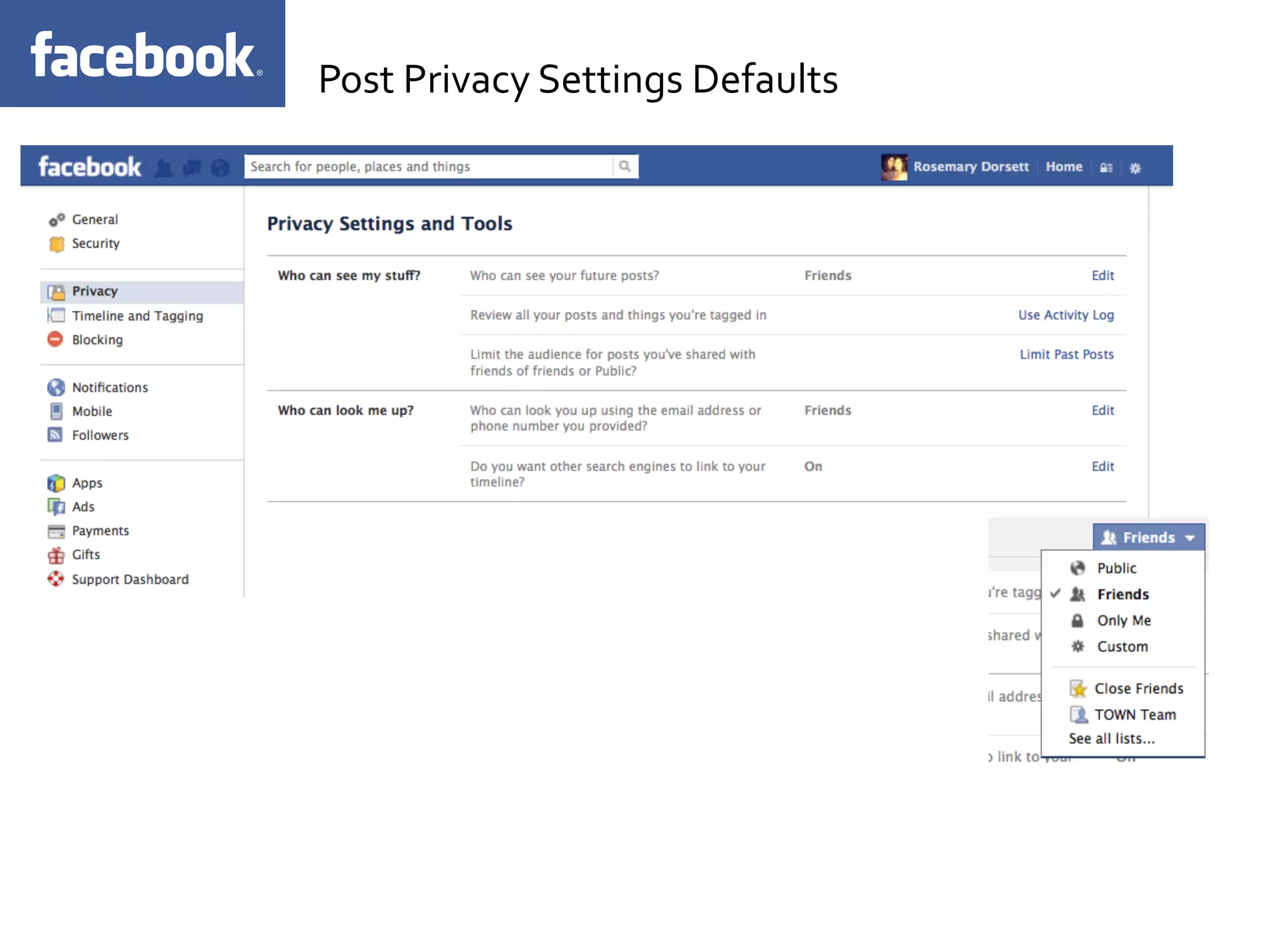
Post	
  Privacy	
  Settings	
  Defaults	
  
Post	
  Privacy	
  on	
  Posting	
  Basis	
  
You	
  can	
  change	
  who	
  sees	
  
your	
  posts	
  on	
  each	
  
individual	
  update	
  you	
  
make	
  
Combine	
  or	
  exclude	
  
networks,	
  lists,	
  and	
  people	
  
with	
  the	
  custom	
  option.	
  
Test	
  your	
  settings	
  
Use	
  the	
  View	
  As	
  functionality	
  to	
  see	
  your	
  
Facebook	
  through	
  the	
  eyes	
  of	
  your	
  friends	


Enable	
  the	
  Follow	
  feature:	


•  Click	
  	
  in	
  the	
  top-­‐right	
  of	
  your	
  screen	
  
•  Select	
  Account	
  Settings	
  
•  Click	
  Followers	
  on	
  the	
  left	
  side	
  
•  Check	
  the	
  box	
  next	
  to	
  Allow	
  Followers	


*Followers	
  will	
  see	
  posts	
  made	
  to	
  your	
  Public	
  audience	


Action	
  Items	
  
Start	
  listing	
  your	
  friends:	


•  Click	
  the	
  Home	
  link	
  (along	
  the	
  top-­‐right	
  of	
  every	
  Facebook	
  
page)	
  
•  Find	
  the	
  list	
  you	
  want	
  to	
  edit	
  in	
  the	
  left	
  column,	
  or	
  click	
  the	
  
More	
  link	
  next	
  to	
  Friends	
  
•  Select	
  the	
  list	
  you	
  want	
  to	
  edit	
  or	
  click	
  Create	
  a	
  List	


Action	
  Items	


Start	
  listing	
  your	
  friends:	


•  Search	
  for	
  your	
  friends	
  in	
  the	
  
search	
  bar	
  at	
  the	
  top	
  of	
  the	
  
page,	
  or	
  add	
  people	
  from	
  the	
  
List	
  Suggestions	
  on	
  the	
  right	


•  Search	
  for	
  your	
  friends	
  in	
  the	
  
search	
  bar	
  at	
  the	
  top	
  of	
  the	
  
page,	
  or	
  add	
  people	
  from	
  the	
  
List	
  Suggestions	
  on	
  the	
  right	


Action	
  Items	


Enable	
  email	
  and	
  Mobile	
  Notifications	
  
•  Real	
  Estate	
  can	
  be	
  a	
  fast	
  moving	
  industry,	
  don’t	
  slack	
  with	
  
your	
  replies	
  to	
  clients	
  and	
  friends	
  on	
  Social	
  Media	
  
•  Periodically	
  check	
  your	
  feed	
  and	
  comment	
  on	
  your	
  friends/
clients	
  posts	


Action	
  Items	
  
Facebook	
  Recap:	


Use	
  Your	
  Personal	
  Profile	
  
•  	
  (Exceptions	
  for	
  those	
  who	
  already	
  have	
  large	
  followings	
  on	
  
their	
  business	
  page.	
  )	


Enable	
  the	
  Follow	
  Feature	


Begin	
  Grouping	
  your	
  friends	


Today:	
  Post	
  a	
  photo	
  of	
  you	
  and	
  your	
  family/friends	
  in	
  NYC	
  
Marketing	
  your	
  listings	
  on	
  facebook	
  
Promote	
  your	
  listings	
  
1.	
  Connect	
  with	
  prospects	
  	
  
2.	
  Communicate,	
  educate	
  and	
  engage	
  –	
  	
  
3.	
  AdverDse	
  –	
  AdverDsing	
  in	
  Facebook	
  is	
  a	
  great	
  help	
  in	
  increasing	
  the	
  lisDngs..	
  
4.	
  Integrate	
  markeDng	
  plan	
  –	
  IntegraDng	
  markeDng	
  plan	
  in	
  your	
  Facebook	
  Page	
  is	
  one	
  way	
  of	
  building	
  
your	
  reputaDon.	
  
5.	
  Create	
  professional	
  image	
  –	
  It	
  is	
  important	
  to	
  ensure	
  making	
  your	
  page	
  more	
  aKracDve..	
  
6.	
  Be	
  responsive	
  –	
  As	
  you	
  want	
  to	
  a4ract	
  more	
  clients	
  and	
  increase	
  lis9ngs,	
  you	
  should	
  ensure	
  
responding	
  back	
  to	
  your	
  clients.	
  
7.	
  Be	
  creaDve	
  –	
  If	
  you	
  want	
  to	
  obtain	
  lisDngs,	
  you	
  should	
  employ	
  unique	
  pracDces	
  in	
  promoDng	
  your	
  
business.	
  PosDng	
  entertaining	
  videos	
  is	
  a	
  great	
  help	
  as	
  long	
  as	
  it	
  can	
  grab	
  the	
  aKenDon	
  of	
  potenDal	
  
clients.	
  
8.	
  Stand	
  out	
  –	
  As	
  you	
  engage	
  in	
  real	
  estate,	
  you	
  should	
  ensure	
  to	
  stand	
  out	
  in	
  promoDng	
  your	
  
business.	
  See	
  to	
  it	
  that	
  potenDal	
  clients	
  should	
  remember	
  you	
  so	
  that	
  you	
  can	
  turn	
  them	
  into	
  
customers.	
  
9.	
  Be	
  supporDve	
  –	
  While	
  you	
  want	
  to	
  increase	
  lisDngs	
  and	
  obtain	
  clients,	
  you	
  should	
  also	
  be	
  
supporDve	
  to	
  them.	
  As	
  much	
  as	
  possible,	
  you	
  should	
  foresee	
  their	
  needs	
  and	
  offer	
  advice	
  if	
  needed.	
  
10.	
  Go	
  beyond	
  –	
  In	
  showcasing	
  a	
  property	
  in	
  your	
  Facebook	
  page,	
  you	
  should	
  provide	
  links	
  aside	
  from	
  
the	
  related	
  informaDon.	
  Being	
  parDcular	
  with	
  the	
  details	
  will	
  increase	
  your	
  credibility.	


Promote	
  your	
  listings	
  
Facebook	
  Recap:	


Use	
  Your	
  Personal	
  Profile	
  
•  	
  (Exceptions	
  for	
  those	
  who	
  already	
  have	
  large	
  followings	
  on	
  
their	
  business	
  page.	
  )	


Enable	
  the	
  Follow	
  Feature	


Begin	
  Grouping	
  your	
  friends	


Today:	


  Post	
  a	
  photo	
  of	
  you	
  and	
  your	
  family/friends	
  in	
  NYC	
  
	
  Post	
  a	
  listing	
  with	
  a	
  photo	


Introduction to Facebook for Real Estate Professionals

  • 1.
    Facebook  for  Real   Estate  Professionals  
  • 2.
    Facebook       •  Facebook  captures  1  in  every  11  internet  visits  in  the  US   •  57%  of  all  American  adults  use  facebook   •  66%  visit  daily   •  The  average  visit  to  Facebook  is  18  minutes   •  20%  of  users  earn  over  $100k  per  year   •  There  are  1.3  billion  users   •  73%  earn  over  $75,000  per  year   *Pew  Report  tracking  April/May  2013  
  • 3.
  • 4.
    Steve  Goldschmidt  •  Diverse  posting  strategy   •  Shares  family  stories   •  Shares  Real  estate   content  organically   without  pushing  a  sale   message  
  • 5.
    Michael  Meier  •  Diverse  posting  strategy   •  Shares  family  stories   •  Shares  Real  estate   content  organically   without  pushing  a  sale   message  
  • 6.
    Kelly  Robinson  –  Town  Residential   •  Diverse  posting  strategy   •  Shares  family  and  friend   stories   •  Shares  Real  estate  content   organically  without  pushing   a  sale  message   •  Uses  professional  headshot   •  Optimizes  the  Cover  photo   with  accomplishments  
  • 7.
    Claudia  Saez-­‐Fromm   • Diverse  posting  strategy   •  Shares  family  and  friend   stories   •  Shares  Real  estate  content   organically  without  pushing   a  sale  message   •  Promotes  her  other   marketing  materials  online  
  • 8.
    Setting  up  your  profile  
  • 9.
    Setting  up  your  Profile  
  • 10.
    Setting  up  your  Profile  
  • 11.
    How  do  I  Navigate  facebook?  
  • 12.
    Leverage  your  personal  relationships  on  social  media     Use  your  Personal  Facebook  profile   •  Allow  people  to  Follow  your  public  updates   •  Don’t  be  afraid  to  send  a  friend  request  to  a  client  with  whom  you   have  a  good  rapport          
  • 13.
    Anatomy  of  Facebook   Newsfeed     Main  Page:    
  • 14.
    Anatomy  of  Facebook   Navigation   Main  Page:    
  • 15.
    Anatomy  of  Facebook   Friend  Lists   Main  Page:    
  • 16.
    Anatomy  of  Facebook   Main  Page:     Ads  
  • 17.
    Anatomy  of  Facebook   Main  Page:     The  Ticker:       Content  in  Real  Time   live  stories  like  status  updates,   friendships,  photos,  videos,  links,   likes  and  comments.  These  updates   expand  and  allow  you  to  Like,   Comment  and  Share  directly  from   the  Ticker.    
  • 18.
    Anatomy  of  Facebook   TIMELINE   Timeline   Year   COVER  PHOTO  
  • 19.
  • 20.
    Setting  up  your  privacy  settings   •  Privacy  Shortcuts   •  Privacy  Settings  in  the   Gear  
  • 21.
  • 22.
    Post  Privacy  on  Posting  Basis   You  can  change  who  sees   your  posts  on  each   individual  update  you   make   Combine  or  exclude   networks,  lists,  and  people   with  the  custom  option.  
  • 23.
    Test  your  settings   Use  the  View  As  functionality  to  see  your   Facebook  through  the  eyes  of  your  friends    
  • 24.
        Enable  the  Follow  feature:     •  Click    in  the  top-­‐right  of  your  screen   •  Select  Account  Settings   •  Click  Followers  on  the  left  side   •  Check  the  box  next  to  Allow  Followers     *Followers  will  see  posts  made  to  your  Public  audience     Action  Items  
  • 25.
    Start  listing  your  friends:     •  Click  the  Home  link  (along  the  top-­‐right  of  every  Facebook   page)   •  Find  the  list  you  want  to  edit  in  the  left  column,  or  click  the   More  link  next  to  Friends   •  Select  the  list  you  want  to  edit  or  click  Create  a  List     Action  Items  
  • 26.
        Start  listing  your  friends:     •  Search  for  your  friends  in  the   search  bar  at  the  top  of  the   page,  or  add  people  from  the   List  Suggestions  on  the  right     •  Search  for  your  friends  in  the   search  bar  at  the  top  of  the   page,  or  add  people  from  the   List  Suggestions  on  the  right     Action  Items  
  • 27.
              Enable  email  and  Mobile  Notifications   •  Real  Estate  can  be  a  fast  moving  industry,  don’t  slack  with   your  replies  to  clients  and  friends  on  Social  Media   •  Periodically  check  your  feed  and  comment  on  your  friends/ clients  posts       Action  Items  
  • 28.
    Facebook  Recap:       Use  Your  Personal  Profile   •   (Exceptions  for  those  who  already  have  large  followings  on   their  business  page.  )     Enable  the  Follow  Feature     Begin  Grouping  your  friends     Today:  Post  a  photo  of  you  and  your  family/friends  in  NYC  
  • 29.
    Marketing  your  listings  on  facebook  
  • 30.
    Promote  your  listings   1.  Connect  with  prospects     2.  Communicate,  educate  and  engage  –     3.  AdverDse  –  AdverDsing  in  Facebook  is  a  great  help  in  increasing  the  lisDngs..   4.  Integrate  markeDng  plan  –  IntegraDng  markeDng  plan  in  your  Facebook  Page  is  one  way  of  building   your  reputaDon.   5.  Create  professional  image  –  It  is  important  to  ensure  making  your  page  more  aKracDve..   6.  Be  responsive  –  As  you  want  to  a4ract  more  clients  and  increase  lis9ngs,  you  should  ensure   responding  back  to  your  clients.   7.  Be  creaDve  –  If  you  want  to  obtain  lisDngs,  you  should  employ  unique  pracDces  in  promoDng  your   business.  PosDng  entertaining  videos  is  a  great  help  as  long  as  it  can  grab  the  aKenDon  of  potenDal   clients.   8.  Stand  out  –  As  you  engage  in  real  estate,  you  should  ensure  to  stand  out  in  promoDng  your   business.  See  to  it  that  potenDal  clients  should  remember  you  so  that  you  can  turn  them  into   customers.   9.  Be  supporDve  –  While  you  want  to  increase  lisDngs  and  obtain  clients,  you  should  also  be   supporDve  to  them.  As  much  as  possible,  you  should  foresee  their  needs  and  offer  advice  if  needed.   10.  Go  beyond  –  In  showcasing  a  property  in  your  Facebook  page,  you  should  provide  links  aside  from   the  related  informaDon.  Being  parDcular  with  the  details  will  increase  your  credibility.    
  • 31.
  • 32.
    Facebook  Recap:       Use  Your  Personal  Profile   •   (Exceptions  for  those  who  already  have  large  followings  on   their  business  page.  )     Enable  the  Follow  Feature     Begin  Grouping  your  friends     Today:      Post  a  photo  of  you  and  your  family/friends  in  NYC    Post  a  listing  with  a  photo