Introduction to E-Resources
Learning Objectives
• Introduction to the LRC
• What is an e-resource?
• Why do you need to use e-resources?
• How to find academic e-resources
• How to evaluate academic e-resources
Your Learning Resource Centre (LRC)
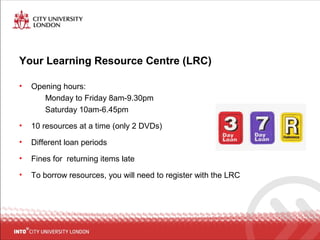
• Opening hours:
Monday to Friday 8am-9.30pm
Saturday 10am-6.45pm
• 10 resources at a time (only 2 DVDs)
• Different loan periods
• Fines for returning items late
• To borrow resources, you will need to register with the LRC
LRC Rules
We have 3 rules:
1. We are a silent study library, if you want to talk use the group work area
outside of the LRC
2. No eating or drinking (unless water)
3. Turn mobile devices onto silent, and take calls outside the LRC
Resources at INTO
• Books
• Journals
• Newspapers
• DVDs
• LRC catalogue http://intocity.lrc@into.uk.com
• Access to academic e-resources
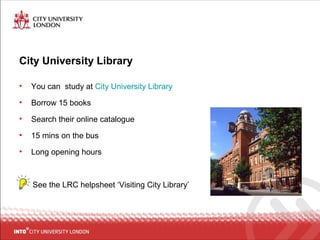
City University Library
• You can study at City University Library
• Borrow 15 books
• Search their online catalogue
• 15 mins on the bus
• Long opening hours
See the LRC helpsheet ‘Visiting City Library’
What is an e-resource?
• Sources of information that are stored on the Internet
• Examples:
– E-books
– E-journals
What is a journal?
A journal is a collection of articles containing reports of current research.
They are focused on a particular subject, e.g. Journal of Marketing or
Harvard Business Review, and they are published regularly e.g. weekly,
monthly or yearly.
Why use e-resources?
• Up-to-date information
• Available 24/7
• Convenient - search hundreds of sources in one go
• Many are peer-reviewed
• You will be expected to use e-resources in your assignments
What is peer-review?
When an article has been evaluated and reviewed by other experts and
academics to make sure it is of a good academic standard.
Where do you find e-resources?
• Academic e-resources are very expensive
• You can’t access them for free on the Internet
• City University subscribes to them and you access them through the City
University Library website
Task 1: Use CityLibrary Search to find an e-book
• Go to the City Uni library catalogue http://www.city.ac.uk/library
• Search for an e-book related to your subject area
• Refine the ‘Content Type’ to ‘Book/e-book’
• ‘Refine your Search’ to ‘Full text online’
• Open an e-book
Task 2: Use CityLibrary Search to find a newspaper
article
• Search for a newspaper article related to your subject area
• Refine the ‘Content Type’ to ‘Newspaper Article’
• ‘Refine your Search’ to ‘Full text online’
• Open a newspaper article
Task 3: Find an e-journal
• Go to the City Uni library catalogue
• Click on ‘Get help for my subject’’
• Click ‘Go to E-Journals A-Z list’ on the right of the screen
• Search for Harvard Business Review
• Open the journal and find the latest available edition
Task 3: Find a specific journal article
• Click ‘Go to E-Journals A-Z list’
• Search for ‘New Scientist’
• Select one of the databases that holds New Scientist
• Search for the article title ‘The cutter’s art’
Task 4: Find your library subject guide
• Go to the City Uni library catalogue http://www.city.ac.uk/library
• Click on ‘Get help for my subject’
• Select your subject area from the list of ‘Library Guides’
• Choose your subject(s) and bookmark/favourite them
Task 5: Search a database
• Go to the City Uni library home page
• Click on ‘Databases A-Z’
• Search for one of the databases recommended in your subject guide
• Find an article related to your subject area and open it
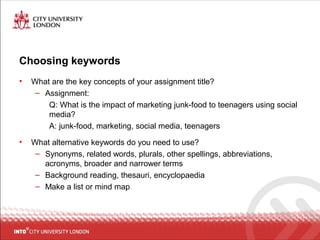
Choosing keywords
• What are the key concepts of your assignment title?
– Assignment:
Q: What is the impact of marketing junk-food to teenagers using social
media?
A: junk-food, marketing, social media, teenagers
• What alternative keywords do you need to use?
– Synonyms, related words, plurals, other spellings, abbreviations,
acronyms, broader and narrower terms
– Background reading, thesauri, encyclopaedia
– Make a list or mind map
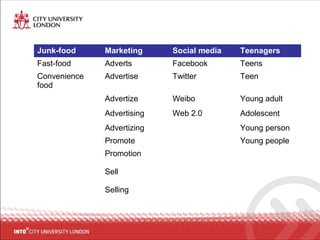
Junk-food Marketing Social media Teenagers
Fast-food Adverts Facebook Teens
Convenience
food
Advertise Twitter Teen
Advertize Weibo Young adult
Advertising Web 2.0 Adolescent
Advertizing Young person
Promote Young people
Promotion
Sell
Selling
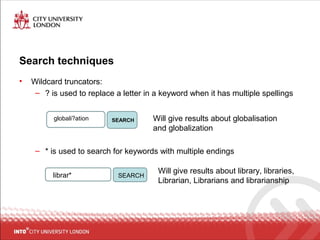
Search techniques
• Wildcard truncators:
– ? is used to replace a letter in a keyword when it has multiple spellings
– * is used to search for keywords with multiple endings
globali?ation SEARCH Will give results about globalisation
and globalization
librar* SEARCH
Will give results about library, libraries,
Librarian, Librarians and librarianship
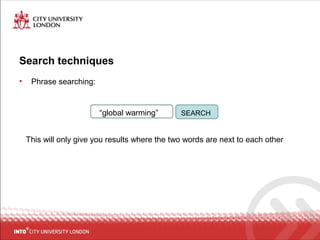
Search techniques
• Phrase searching:
This will only give you results where the two words are next to each other
“global warming” SEARCH
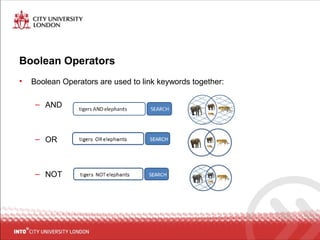
Boolean Operators
• Boolean Operators are used to link keywords together:
– AND
– OR
– NOT
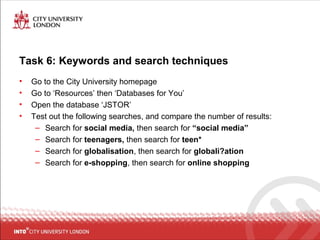
Task 6: Keywords and search techniques
• Go to the City University homepage
• Go to ‘Resources’ then ‘Databases for You’
• Open the database ‘JSTOR’
• Test out the following searches, and compare the number of results:
– Search for social media, then search for “social media”
– Search for teenagers, then search for teen*
– Search for globalisation, then search for globali?ation
– Search for e-shopping, then search for online shopping
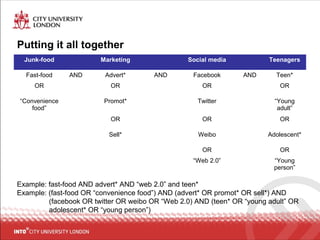
Putting it all together
Junk-food Marketing Social media Teenagers
Fast-food AND Advert* AND Facebook AND Teen*
OR OR OR OR
“Convenience
food”
Promot* Twitter “Young
adult”
OR OR OR
Sell* Weibo Adolescent*
OR OR
“Web 2.0” “Young
person”
Example: fast-food AND advert* AND “web 2.0” and teen*
Example: (fast-food OR “convenience food”) AND (advert* OR promot* OR sell*) AND
(facebook OR twitter OR weibo OR “Web 2.0) AND (teen* OR “young adult” OR
adolescent* OR “young person”)
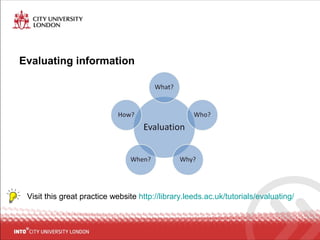
Evaluating information
Visit this great practice website http://library.leeds.ac.uk/tutorials/evaluating/
Evaluating information
Visit this great practice website http://library.leeds.ac.uk/tutorials/evaluating/
WHAT?
Relevance
Evaluating information
Visit this great practice website http://library.leeds.ac.uk/tutorials/evaluating/
WHO?
Authority
Evaluating information
Visit this great practice website http://library.leeds.ac.uk/tutorials/evaluating/
WHEN?
Currency
Evaluating information
Visit this great practice website http://library.leeds.ac.uk/tutorials/evaluating/
WHY?
Purpose &
objectivity
Evaluating information
Visit this great practice website http://library.leeds.ac.uk/tutorials/evaluating/
HOW?
Presentation
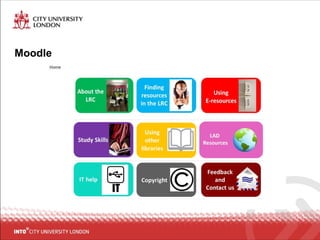
Moodle
Skills Passport
• Develop your library and research skills
• Online tutorials and training sessions:
– Introduction to e-resources
– Search techniques
– Source evaluation
– Practical referencing
– Using specialist subject databases
• Complete four modules to receive a Skills Passport certificate
• Benefit your CV and UCAS application
• Online tutorials and further information on Skills Passport Moodle site
Help!
• Book a 1-2-1 or small group session with LRC Staff
• You can find further information and helpsheets on the LRC Moodle Page
• You can find helpsheets in the LRC
• You can contact the LRC staff to ask questions in person or by e-mail at
intocitylrc.into.uk.com

Introduction to e resources city update

  • 1.
  • 2.
    Learning Objectives • Introductionto the LRC • What is an e-resource? • Why do you need to use e-resources? • How to find academic e-resources • How to evaluate academic e-resources
  • 3.
    Your Learning ResourceCentre (LRC) • Opening hours: Monday to Friday 8am-9.30pm Saturday 10am-6.45pm • 10 resources at a time (only 2 DVDs) • Different loan periods • Fines for returning items late • To borrow resources, you will need to register with the LRC
  • 4.
    LRC Rules We have3 rules: 1. We are a silent study library, if you want to talk use the group work area outside of the LRC 2. No eating or drinking (unless water) 3. Turn mobile devices onto silent, and take calls outside the LRC
  • 5.
    Resources at INTO •Books • Journals • Newspapers • DVDs • LRC catalogue http://intocity.lrc@into.uk.com • Access to academic e-resources
  • 6.
    City University Library •You can study at City University Library • Borrow 15 books • Search their online catalogue • 15 mins on the bus • Long opening hours See the LRC helpsheet ‘Visiting City Library’
  • 7.
    What is ane-resource? • Sources of information that are stored on the Internet • Examples: – E-books – E-journals What is a journal? A journal is a collection of articles containing reports of current research. They are focused on a particular subject, e.g. Journal of Marketing or Harvard Business Review, and they are published regularly e.g. weekly, monthly or yearly.
  • 8.
    Why use e-resources? •Up-to-date information • Available 24/7 • Convenient - search hundreds of sources in one go • Many are peer-reviewed • You will be expected to use e-resources in your assignments What is peer-review? When an article has been evaluated and reviewed by other experts and academics to make sure it is of a good academic standard.
  • 9.
    Where do youfind e-resources? • Academic e-resources are very expensive • You can’t access them for free on the Internet • City University subscribes to them and you access them through the City University Library website
  • 10.
    Task 1: UseCityLibrary Search to find an e-book • Go to the City Uni library catalogue http://www.city.ac.uk/library • Search for an e-book related to your subject area • Refine the ‘Content Type’ to ‘Book/e-book’ • ‘Refine your Search’ to ‘Full text online’ • Open an e-book
  • 11.
    Task 2: UseCityLibrary Search to find a newspaper article • Search for a newspaper article related to your subject area • Refine the ‘Content Type’ to ‘Newspaper Article’ • ‘Refine your Search’ to ‘Full text online’ • Open a newspaper article
  • 12.
    Task 3: Findan e-journal • Go to the City Uni library catalogue • Click on ‘Get help for my subject’’ • Click ‘Go to E-Journals A-Z list’ on the right of the screen • Search for Harvard Business Review • Open the journal and find the latest available edition
  • 13.
    Task 3: Finda specific journal article • Click ‘Go to E-Journals A-Z list’ • Search for ‘New Scientist’ • Select one of the databases that holds New Scientist • Search for the article title ‘The cutter’s art’
  • 14.
    Task 4: Findyour library subject guide • Go to the City Uni library catalogue http://www.city.ac.uk/library • Click on ‘Get help for my subject’ • Select your subject area from the list of ‘Library Guides’ • Choose your subject(s) and bookmark/favourite them
  • 15.
    Task 5: Searcha database • Go to the City Uni library home page • Click on ‘Databases A-Z’ • Search for one of the databases recommended in your subject guide • Find an article related to your subject area and open it
  • 16.
    Choosing keywords • Whatare the key concepts of your assignment title? – Assignment: Q: What is the impact of marketing junk-food to teenagers using social media? A: junk-food, marketing, social media, teenagers • What alternative keywords do you need to use? – Synonyms, related words, plurals, other spellings, abbreviations, acronyms, broader and narrower terms – Background reading, thesauri, encyclopaedia – Make a list or mind map
  • 17.
    Junk-food Marketing Socialmedia Teenagers Fast-food Adverts Facebook Teens Convenience food Advertise Twitter Teen Advertize Weibo Young adult Advertising Web 2.0 Adolescent Advertizing Young person Promote Young people Promotion Sell Selling
  • 18.
    Search techniques • Wildcardtruncators: – ? is used to replace a letter in a keyword when it has multiple spellings – * is used to search for keywords with multiple endings globali?ation SEARCH Will give results about globalisation and globalization librar* SEARCH Will give results about library, libraries, Librarian, Librarians and librarianship
  • 19.
    Search techniques • Phrasesearching: This will only give you results where the two words are next to each other “global warming” SEARCH
  • 20.
    Boolean Operators • BooleanOperators are used to link keywords together: – AND – OR – NOT
  • 21.
    Task 6: Keywordsand search techniques • Go to the City University homepage • Go to ‘Resources’ then ‘Databases for You’ • Open the database ‘JSTOR’ • Test out the following searches, and compare the number of results: – Search for social media, then search for “social media” – Search for teenagers, then search for teen* – Search for globalisation, then search for globali?ation – Search for e-shopping, then search for online shopping
  • 22.
    Putting it alltogether Junk-food Marketing Social media Teenagers Fast-food AND Advert* AND Facebook AND Teen* OR OR OR OR “Convenience food” Promot* Twitter “Young adult” OR OR OR Sell* Weibo Adolescent* OR OR “Web 2.0” “Young person” Example: fast-food AND advert* AND “web 2.0” and teen* Example: (fast-food OR “convenience food”) AND (advert* OR promot* OR sell*) AND (facebook OR twitter OR weibo OR “Web 2.0) AND (teen* OR “young adult” OR adolescent* OR “young person”)
  • 23.
    Evaluating information Visit thisgreat practice website http://library.leeds.ac.uk/tutorials/evaluating/
  • 24.
    Evaluating information Visit thisgreat practice website http://library.leeds.ac.uk/tutorials/evaluating/ WHAT? Relevance
  • 25.
    Evaluating information Visit thisgreat practice website http://library.leeds.ac.uk/tutorials/evaluating/ WHO? Authority
  • 26.
    Evaluating information Visit thisgreat practice website http://library.leeds.ac.uk/tutorials/evaluating/ WHEN? Currency
  • 27.
    Evaluating information Visit thisgreat practice website http://library.leeds.ac.uk/tutorials/evaluating/ WHY? Purpose & objectivity
  • 28.
    Evaluating information Visit thisgreat practice website http://library.leeds.ac.uk/tutorials/evaluating/ HOW? Presentation
  • 29.
  • 30.
    Skills Passport • Developyour library and research skills • Online tutorials and training sessions: – Introduction to e-resources – Search techniques – Source evaluation – Practical referencing – Using specialist subject databases • Complete four modules to receive a Skills Passport certificate • Benefit your CV and UCAS application • Online tutorials and further information on Skills Passport Moodle site
  • 31.
    Help! • Book a1-2-1 or small group session with LRC Staff • You can find further information and helpsheets on the LRC Moodle Page • You can find helpsheets in the LRC • You can contact the LRC staff to ask questions in person or by e-mail at intocitylrc.into.uk.com