COMPUTER
APPLICATION IN
PHARMACY
COMPUTER
APPLICATION IN
PHARMACY
B.PHARMA 1ST YEAR
{2ND SEMESTER}
TOPIC :- SYLLABUS
UNIT 1 – LESSON 1 :- Concept of
Information System & Software
Presented By
Radha {Student}
B. Pharma - 2nd Semester
B. Pharma 1st year 2nd Semester
Subject code – BP205T
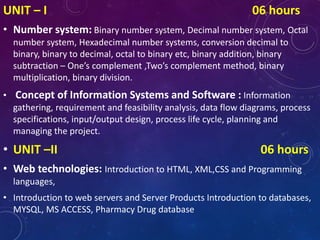
UNIT – I 06 hours
• Number system: Binary number system, Decimal number system, Octal
number system, Hexadecimal number systems, conversion decimal to
binary, binary to decimal, octal to binary etc, binary addition, binary
subtraction – One’s complement ,Two’s complement method, binary
multiplication, binary division.
• Concept of Information Systems and Software : Information
gathering, requirement and feasibility analysis, data flow diagrams, process
specifications, input/output design, process life cycle, planning and
managing the project.
• UNIT –II 06 hours
• Web technologies: Introduction to HTML, XML,CSS and Programming
languages,
• Introduction to web servers and Server Products Introduction to databases,
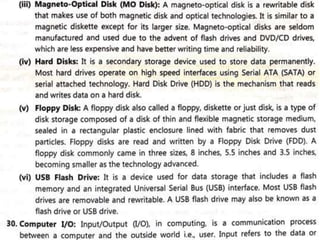
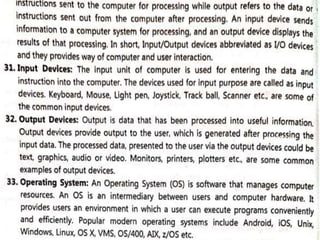
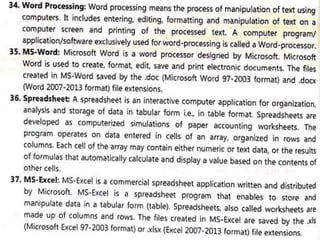
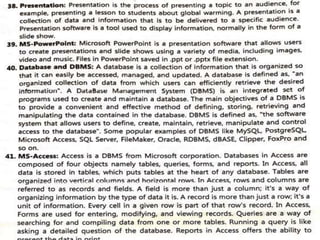
MYSQL, MS ACCESS, Pharmacy Drug database
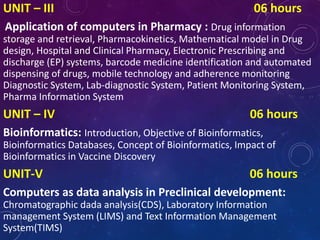
UNIT – III 06 hours
Application of computers in Pharmacy : Drug information
storage and retrieval, Pharmacokinetics, Mathematical model in Drug
design, Hospital and Clinical Pharmacy, Electronic Prescribing and
discharge (EP) systems, barcode medicine identification and automated
dispensing of drugs, mobile technology and adherence monitoring
Diagnostic System, Lab-diagnostic System, Patient Monitoring System,
Pharma Information System
UNIT – IV 06 hours
Bioinformatics: Introduction, Objective of Bioinformatics,
Bioinformatics Databases, Concept of Bioinformatics, Impact of
Bioinformatics in Vaccine Discovery
UNIT-V 06 hours
Computers as data analysis in Preclinical development:
Chromatographic dada analysis(CDS), Laboratory Information
management System (LIMS) and Text Information Management
System(TIMS)
UNIT 1 :- LESSON 1
CONCEPT OF INFORMATION
SYSTEM & SOFTWARE
• Computer 👉 It is a machine that can
store & process information
• The term Computer is derived from the
word “Compute” Means to calculate.
• A computer is an electronic machine that
accept data (Input) from the user,
processes the data by performing
calculations & operations on it
(processing), & generates the desired
results (Output).
• It is defined as an electronic devices that
performs a given task on basis of given
instructions.
PART OF
COMPUTER
Input Devices
1. Mouse
2. Keyboard
3. Webcam
4. Microphone
5. Scanner
6. Joysticks
7. Light Pen
8. Gamepad
9. Digital Camera
10.Bar code reader
Output Devices
1. Monitor
2. Printer
3. Projector
4. Speaker
5. Headphone
6. Plotter
7. Video card
1. Keyboard 👉
It is a hardware device with keys with alphabets and numbers on it.
It is used to take alphanumeric input.
It is the most commonly used input device.
2. Mouse 👉
It is a hardware device that takes input by clicking on keys on the surface
of the mouse.
The mouse is a pointing device that points to icons on the screen to
select them
3. Microphone 👉
It takes sound as a form of input and can convert it to a digital or
electrical form.
4. Joystick 👉
It is usually used to play games.
It has a stick that is inclined to angle to control movement in video
games.
5. Light Pen 👉
It is a hardware device that takes input by clicking on keys on the surface
of the mouse.
The mouse is a pointing device that points to icons on the screen to
select them.
6. Scanner 👉
It used to scan images, text, or documents to convert into digital form.
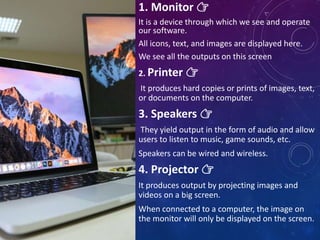
1. Monitor 👉
It is a device through which we see and operate
our software.
All icons, text, and images are displayed here.
We see all the outputs on this screen
2. Printer 👉
It produces hard copies or prints of images, text,
or documents on the computer.
3. Speakers 👉
They yield output in the form of audio and allow
users to listen to music, game sounds, etc.
Speakers can be wired and wireless.
4. Projector 👉
It produces output by projecting images and
videos on a big screen.
When connected to a computer, the image on
the monitor will only be displayed on the screen.
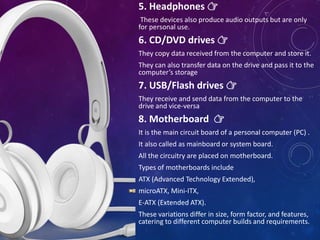
5. Headphones 👉
These devices also produce audio outputs but are only
for personal use.
6. CD/DVD drives 👉
They copy data received from the computer and store it.
They can also transfer data on the drive and pass it to the
computer’s storage
7. USB/Flash drives 👉
They receive and send data from the computer to the
drive and vice-versa
8. Motherboard 👉
It is the main circuit board of a personal computer (PC) .
It also called as mainboard or system board.
All the circuitry are placed on motherboard.
Types of motherboards include
ATX (Advanced Technology Extended),
microATX, Mini-ITX,
E-ATX (Extended ATX).
These variations differ in size, form factor, and features,
catering to different computer builds and requirements.
9. Unit of Computer Memory 👉
Units of computer memory measurement are
used to quantify the amount of data that can be
stored or processed by a computer system. The
basic units include bits, bytes, kilobytes,
megabytes, gigabytes, terabytes, petabytes,
exabytes, and even zettabytes.
i. Bit (Binary Digit) :- It is the basic unit of
memory. It is the smallest unit of
information on a machine & a single bit can
hold only 1 of 2 values i.e., 0 or 1. It is
represented by a lower case b.
ii. Byte :- A unit of 8 bits is called as byte. It is
able to contain any binary number between
00000000 & 11111111. It is represented by
an upper case b.
iii. Kilobytes (KB) :- In decimal system, kilo
stands for 1000 but in binary system, kilo
refers to 1024. Therefore, a kilobyte is equal
to 1024 bytes but it is often used loosely as a
synonym for 1000 bytes.
iv. Megabyte (MB) :- It comprises 1024 kilobytes
or 10,48,576 bytes. However since this number is
hard to remember a MB can be thought of
million byte. MB is the standard unit
measurement for RAM.
v. Gigabyte (GB) :- A GB consists of 1024 MB
(1,073,741.524 bytes). It is standard unit of
measurement for hard disk.
vi. Terabytes (TB) :- The term TB refers to 1024
GB of memory. TB memory is usually associated
with super computer only.
vii. Petabyte (PB):- Around 1 quadrillion bytes
are utilized in massive data centres and cloud
storage.
viii.Exabyte (EB):- Equal to 1 quintillion bytes,
typically found in enterprise-level storage
solutions.
ix. Zettabyte (ZB):- Representing 1 sextillion
bytes, this unit is crucial for measuring vast
amounts of data in the modern digital age.
10. Types Computer 👉
There are 3 types of computer
1. Analog computer
2. Digital computer
3. Hybrid computer
Analog :- A computing machine that works on
the principle of measuring, in which the
measurement obtained are translated into
desired data (information) is called as analog
computoer.
They are used for scientific & engineering
purposes.
Slides rule, Antikythera mechanism, astrolabe,
differential analyzer, deltar, kerrison predictor are
the example of analog computer.
Digital :- A Computer that operates with
information, numerical or otherwise represented
in digital form (0's an 1's) is called as digital
computer.
Digital computer process data including text,
sound, graphics & video into a digital value in 0's
& 1's .
The desktop PC at home, banks, offices etc., are
the example of digital computer.
Hybrid :- Those computer which employ both the
features of analog & digital computer are called
as Hybrid computer.
EAI 180, HPLC & EAI 185 are the example of
hybrid computer.
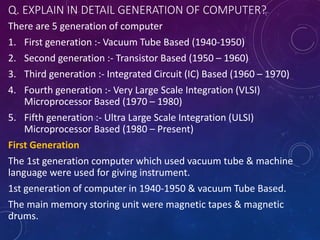
Q. EXPLAIN IN DETAIL GENERATION OF COMPUTER?
There are 5 generation of computer
1. First generation :- Vacuum Tube Based (1940-1950)
2. Second generation :- Transistor Based (1950 – 1960)
3. Third generation :- Integrated Circuit (IC) Based (1960 – 1970)
4. Fourth generation :- Very Large Scale Integration (VLSI)
Microprocessor Based (1970 – 1980)
5. Fifth generation :- Ultra Large Scale Integration (ULSI)
Microprocessor Based (1980 – Present)
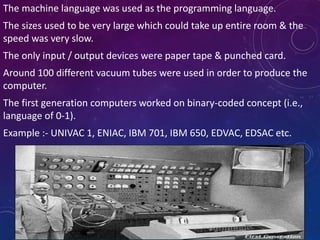
First Generation
The 1st generation computer which used vacuum tube & machine
language were used for giving instrument.
1st generation of computer in 1940-1950 & vacuum Tube Based.
The main memory storing unit were magnetic tapes & magnetic
drums.
The machine language was used as the programming language.
The sizes used to be very large which could take up entire room & the
speed was very slow.
The only input / output devices were paper tape & punched card.
Around 100 different vacuum tubes were used in order to produce the
computer.
The first generation computers worked on binary-coded concept (i.e.,
language of 0-1).
Example :- UNIVAC 1, ENIAC, IBM 701, IBM 650, EDVAC, EDSAC etc.
Second Generation
The 2nd generation of computer introduced the use of transistors which
replaced vacuum tubes.
The period 1950 to 1960 is roughly considered as the period of Second
Generation of Computers.
The second generation computers were developed by using transistor
technology
Transistor were highly reliable & require less power & faster than tubes.
The size were smaller as compared to those of the first generation.
They used to consume low power & generate less heat.
There was an improvement in speed.
High level language such as fortran, cobal, basic etc.
Example :- IBM-1400, IBM-7000 series Honey well 200, CDC 3600,
UNIVAC 1100 etc.
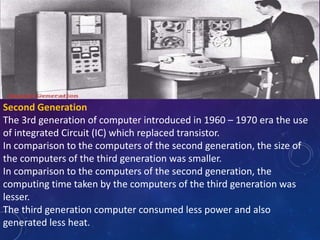
Second Generation
The 3rd generation of computer introduced in 1960 – 1970 era the use
of integrated Circuit (IC) which replaced transistor.
In comparison to the computers of the second generation, the size of
the computers of the third generation was smaller.
In comparison to the computers of the second generation, the
computing time taken by the computers of the third generation was
lesser.
The third generation computer consumed less power and also
generated less heat.
In comparison to the computers of the second generation, the size of
the computers of the third generation was smaller.
In comparison to the computers of the second generation, the
computing time taken by the computers of the third generation was
lesser.
The third generation computer consumed less power and also
generated less heat.
The maintenance cost of the computers in the third generation was also
low.
The computer system of the computers of the third generation was
easier for commercial use.
ICs allowed for the placement of processing power.
The size were smaller & efficient & the computer were called as mini
computer.
High level language such as Basic, Cobal, Pascal were used as the
programming level.
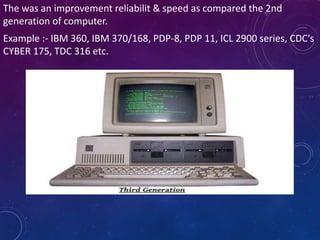
The was an improvement reliabilit & speed as compared the 2nd
generation of computer.
Example :- IBM 360, IBM 370/168, PDP-8, PDP 11, ICL 2900 series, CDC's
CYBER 175, TDC 316 etc.
Fourth Generation
The period 1970 to 1980 is roughly considered as the fourth generation
of computers.
The fourth generation computers were developed by using
microprocessor technology.
By coming to fourth generation, computer became very small in size, it
became portable.
The machine of fourth generation started generating very low amount
of heat.
It is much faster and accuracy became more reliable.
The production cost reduced to very low in comparison to the previous
generation.
It became available for the common people as well.
When 1000 of transistor are attached to single microchip it is called VLSI
{Vert Large Scale Integration}
Semi conductor memory storage unit such as RAM, ROM etc. Was introduced.
RAM – Random Access Memory
• Temporarily stores the program & data.
• Content are lost when the computer is shut down
• There are 2 types of RAM
1. SRAM – Static RAM
2. DRAM – Dynamic RAM
ROM – Read Only Memory
• Permanently stores the data & Program.
• Content are retained even after shutting down the computer.
• There are 4 types of ROM
1. MROM – Masked ROM
2. PROM – Programmable ROM
3. EPROM - Erasable & Programmable ROM
4. EEPROM - Electrically Erasable & Programmable ROM
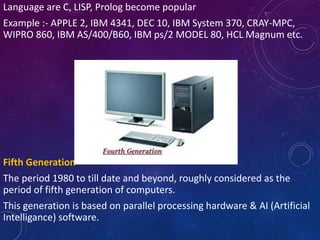
Language are C, LISP, Prolog become popular
Example :- APPLE 2, IBM 4341, DEC 10, IBM System 370, CRAY-MPC,
WIPRO 860, IBM AS/400/B60, IBM ps/2 MODEL 80, HCL Magnum etc.
Fifth Generation
The period 1980 to till date and beyond, roughly considered as the
period of fifth generation of computers.
This generation is based on parallel processing hardware & AI (Artificial
Intelligance) software.
The 5th generation of computer understand the natural human
language.
The 5th generation the VSLI technology became Ultra Large Scale
Integration (ULSI) technology, resulting in production of microprocessor
Chips Having 10 million electronic components.
The speed are really fast & the size are also small.
The computers of the fifth generation had high capability and large
memory capacity.
Working with computers of this generation was fast and multiple tasks
could be performed simultaneously.
Some of the popular advanced technologies of the fifth generation
include Artificial intelligence, Quantum computation, Nanotechnology,
Parallel processing, etc.
High level language such as C++, Java, Net. Etc.
Example :- laptop, Desktop, tablet, Smartphone. Notepad, ULtra book &
chrome book etc.
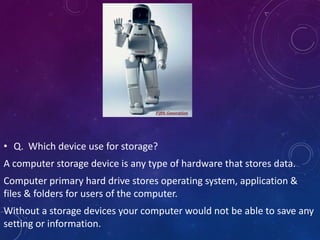
• Q. Which device use for storage?
A computer storage device is any type of hardware that stores data.
Computer primary hard drive stores operating system, application &
files & folders for users of the computer.
Without a storage devices your computer would not be able to save any
setting or information.
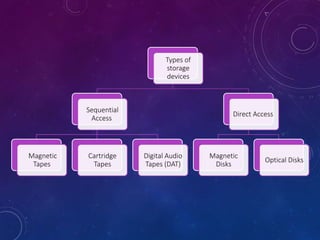
Types of
storage
devices
Sequential
Access
Magnetic
Tapes
Cartridge
Tapes
Digital Audio
Tapes (DAT)
Direct Access
Magnetic
Disks
Optical Disks
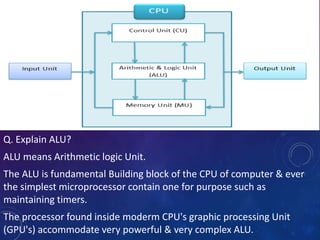
Q. Explain ALU?
ALU means Arithmetic logic Unit.
The ALU is fundamental Building block of the CPU of computer & ever
the simplest microprocessor contain one for purpose such as
maintaining timers.
The processor found inside moderm CPU's graphic processing Unit
(GPU's) accommodate very powerful & very complex ALU.
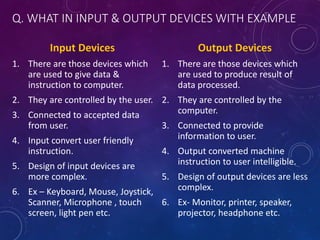
Q. WHAT IN INPUT & OUTPUT DEVICES WITH EXAMPLE
Input Devices
1. There are those devices which
are used to give data &
instruction to computer.
2. They are controlled by the user.
3. Connected to accepted data
from user.
4. Input convert user friendly
instruction.
5. Design of input devices are
more complex.
6. Ex – Keyboard, Mouse, Joystick,
Scanner, Microphone , touch
screen, light pen etc.
Output Devices
1. There are those devices which
are used to produce result of
data processed.
2. They are controlled by the
computer.
3. Connected to provide
information to user.
4. Output converted machine
instruction to user intelligible.
5. Design of output devices are less
complex.
6. Ex- Monitor, printer, speaker,
projector, headphone etc.
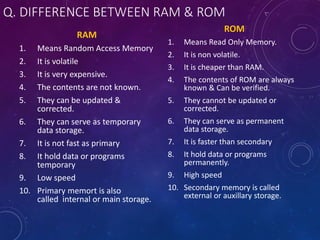
Q. DIFFERENCE BETWEEN RAM & ROM
RAM
1. Means Random Access Memory
2. It is volatile
3. It is very expensive.
4. The contents are not known.
5. They can be updated &
corrected.
6. They can serve as temporary
data storage.
7. It is not fast as primary
8. It hold data or programs
temporary
9. Low speed
10. Primary memort is also
called internal or main storage.
ROM
1. Means Read Only Memory.
2. It is non volatile.
3. It is cheaper than RAM.
4. The contents of ROM are always
known & Can be verified.
5. They cannot be updated or
corrected.
6. They can serve as permanent
data storage.
7. It is faster than secondary
8. It hold data or programs
permanently.
9. High speed
10. Secondary memory is called
external or auxillary storage.
Introduction of computer Unit 1- Computer Application in pharmacy

Introduction of computer Unit 1- Computer Application in pharmacy

  • 1.
    COMPUTER APPLICATION IN PHARMACY COMPUTER APPLICATION IN PHARMACY B.PHARMA1ST YEAR {2ND SEMESTER} TOPIC :- SYLLABUS UNIT 1 – LESSON 1 :- Concept of Information System & Software Presented By Radha {Student} B. Pharma - 2nd Semester B. Pharma 1st year 2nd Semester Subject code – BP205T
  • 2.
    UNIT – I06 hours • Number system: Binary number system, Decimal number system, Octal number system, Hexadecimal number systems, conversion decimal to binary, binary to decimal, octal to binary etc, binary addition, binary subtraction – One’s complement ,Two’s complement method, binary multiplication, binary division. • Concept of Information Systems and Software : Information gathering, requirement and feasibility analysis, data flow diagrams, process specifications, input/output design, process life cycle, planning and managing the project. • UNIT –II 06 hours • Web technologies: Introduction to HTML, XML,CSS and Programming languages, • Introduction to web servers and Server Products Introduction to databases, MYSQL, MS ACCESS, Pharmacy Drug database
  • 3.
    UNIT – III06 hours Application of computers in Pharmacy : Drug information storage and retrieval, Pharmacokinetics, Mathematical model in Drug design, Hospital and Clinical Pharmacy, Electronic Prescribing and discharge (EP) systems, barcode medicine identification and automated dispensing of drugs, mobile technology and adherence monitoring Diagnostic System, Lab-diagnostic System, Patient Monitoring System, Pharma Information System UNIT – IV 06 hours Bioinformatics: Introduction, Objective of Bioinformatics, Bioinformatics Databases, Concept of Bioinformatics, Impact of Bioinformatics in Vaccine Discovery UNIT-V 06 hours Computers as data analysis in Preclinical development: Chromatographic dada analysis(CDS), Laboratory Information management System (LIMS) and Text Information Management System(TIMS)
  • 4.
    UNIT 1 :-LESSON 1 CONCEPT OF INFORMATION SYSTEM & SOFTWARE • Computer 👉 It is a machine that can store & process information • The term Computer is derived from the word “Compute” Means to calculate. • A computer is an electronic machine that accept data (Input) from the user, processes the data by performing calculations & operations on it (processing), & generates the desired results (Output). • It is defined as an electronic devices that performs a given task on basis of given instructions.
  • 5.
    PART OF COMPUTER Input Devices 1.Mouse 2. Keyboard 3. Webcam 4. Microphone 5. Scanner 6. Joysticks 7. Light Pen 8. Gamepad 9. Digital Camera 10.Bar code reader Output Devices 1. Monitor 2. Printer 3. Projector 4. Speaker 5. Headphone 6. Plotter 7. Video card
  • 6.
    1. Keyboard 👉 Itis a hardware device with keys with alphabets and numbers on it. It is used to take alphanumeric input. It is the most commonly used input device. 2. Mouse 👉 It is a hardware device that takes input by clicking on keys on the surface of the mouse. The mouse is a pointing device that points to icons on the screen to select them 3. Microphone 👉 It takes sound as a form of input and can convert it to a digital or electrical form.
  • 7.
    4. Joystick 👉 Itis usually used to play games. It has a stick that is inclined to angle to control movement in video games. 5. Light Pen 👉 It is a hardware device that takes input by clicking on keys on the surface of the mouse. The mouse is a pointing device that points to icons on the screen to select them. 6. Scanner 👉 It used to scan images, text, or documents to convert into digital form.
  • 8.
    1. Monitor 👉 Itis a device through which we see and operate our software. All icons, text, and images are displayed here. We see all the outputs on this screen 2. Printer 👉 It produces hard copies or prints of images, text, or documents on the computer. 3. Speakers 👉 They yield output in the form of audio and allow users to listen to music, game sounds, etc. Speakers can be wired and wireless. 4. Projector 👉 It produces output by projecting images and videos on a big screen. When connected to a computer, the image on the monitor will only be displayed on the screen.
  • 9.
    5. Headphones 👉 Thesedevices also produce audio outputs but are only for personal use. 6. CD/DVD drives 👉 They copy data received from the computer and store it. They can also transfer data on the drive and pass it to the computer’s storage 7. USB/Flash drives 👉 They receive and send data from the computer to the drive and vice-versa 8. Motherboard 👉 It is the main circuit board of a personal computer (PC) . It also called as mainboard or system board. All the circuitry are placed on motherboard. Types of motherboards include ATX (Advanced Technology Extended), microATX, Mini-ITX, E-ATX (Extended ATX). These variations differ in size, form factor, and features, catering to different computer builds and requirements.
  • 10.
    9. Unit ofComputer Memory 👉 Units of computer memory measurement are used to quantify the amount of data that can be stored or processed by a computer system. The basic units include bits, bytes, kilobytes, megabytes, gigabytes, terabytes, petabytes, exabytes, and even zettabytes. i. Bit (Binary Digit) :- It is the basic unit of memory. It is the smallest unit of information on a machine & a single bit can hold only 1 of 2 values i.e., 0 or 1. It is represented by a lower case b. ii. Byte :- A unit of 8 bits is called as byte. It is able to contain any binary number between 00000000 & 11111111. It is represented by an upper case b. iii. Kilobytes (KB) :- In decimal system, kilo stands for 1000 but in binary system, kilo refers to 1024. Therefore, a kilobyte is equal to 1024 bytes but it is often used loosely as a synonym for 1000 bytes.
  • 11.
    iv. Megabyte (MB):- It comprises 1024 kilobytes or 10,48,576 bytes. However since this number is hard to remember a MB can be thought of million byte. MB is the standard unit measurement for RAM. v. Gigabyte (GB) :- A GB consists of 1024 MB (1,073,741.524 bytes). It is standard unit of measurement for hard disk. vi. Terabytes (TB) :- The term TB refers to 1024 GB of memory. TB memory is usually associated with super computer only. vii. Petabyte (PB):- Around 1 quadrillion bytes are utilized in massive data centres and cloud storage. viii.Exabyte (EB):- Equal to 1 quintillion bytes, typically found in enterprise-level storage solutions. ix. Zettabyte (ZB):- Representing 1 sextillion bytes, this unit is crucial for measuring vast amounts of data in the modern digital age.
  • 12.
    10. Types Computer👉 There are 3 types of computer 1. Analog computer 2. Digital computer 3. Hybrid computer Analog :- A computing machine that works on the principle of measuring, in which the measurement obtained are translated into desired data (information) is called as analog computoer. They are used for scientific & engineering purposes. Slides rule, Antikythera mechanism, astrolabe, differential analyzer, deltar, kerrison predictor are the example of analog computer. Digital :- A Computer that operates with information, numerical or otherwise represented in digital form (0's an 1's) is called as digital computer. Digital computer process data including text, sound, graphics & video into a digital value in 0's & 1's .
  • 13.
    The desktop PCat home, banks, offices etc., are the example of digital computer. Hybrid :- Those computer which employ both the features of analog & digital computer are called as Hybrid computer. EAI 180, HPLC & EAI 185 are the example of hybrid computer.
  • 26.
    Q. EXPLAIN INDETAIL GENERATION OF COMPUTER? There are 5 generation of computer 1. First generation :- Vacuum Tube Based (1940-1950) 2. Second generation :- Transistor Based (1950 – 1960) 3. Third generation :- Integrated Circuit (IC) Based (1960 – 1970) 4. Fourth generation :- Very Large Scale Integration (VLSI) Microprocessor Based (1970 – 1980) 5. Fifth generation :- Ultra Large Scale Integration (ULSI) Microprocessor Based (1980 – Present) First Generation The 1st generation computer which used vacuum tube & machine language were used for giving instrument. 1st generation of computer in 1940-1950 & vacuum Tube Based. The main memory storing unit were magnetic tapes & magnetic drums.
  • 27.
    The machine languagewas used as the programming language. The sizes used to be very large which could take up entire room & the speed was very slow. The only input / output devices were paper tape & punched card. Around 100 different vacuum tubes were used in order to produce the computer. The first generation computers worked on binary-coded concept (i.e., language of 0-1). Example :- UNIVAC 1, ENIAC, IBM 701, IBM 650, EDVAC, EDSAC etc.
  • 28.
    Second Generation The 2ndgeneration of computer introduced the use of transistors which replaced vacuum tubes. The period 1950 to 1960 is roughly considered as the period of Second Generation of Computers. The second generation computers were developed by using transistor technology Transistor were highly reliable & require less power & faster than tubes. The size were smaller as compared to those of the first generation. They used to consume low power & generate less heat. There was an improvement in speed. High level language such as fortran, cobal, basic etc. Example :- IBM-1400, IBM-7000 series Honey well 200, CDC 3600, UNIVAC 1100 etc.
  • 29.
    Second Generation The 3rdgeneration of computer introduced in 1960 – 1970 era the use of integrated Circuit (IC) which replaced transistor. In comparison to the computers of the second generation, the size of the computers of the third generation was smaller. In comparison to the computers of the second generation, the computing time taken by the computers of the third generation was lesser. The third generation computer consumed less power and also generated less heat.
  • 30.
    In comparison tothe computers of the second generation, the size of the computers of the third generation was smaller. In comparison to the computers of the second generation, the computing time taken by the computers of the third generation was lesser. The third generation computer consumed less power and also generated less heat. The maintenance cost of the computers in the third generation was also low. The computer system of the computers of the third generation was easier for commercial use. ICs allowed for the placement of processing power. The size were smaller & efficient & the computer were called as mini computer. High level language such as Basic, Cobal, Pascal were used as the programming level.
  • 31.
    The was animprovement reliabilit & speed as compared the 2nd generation of computer. Example :- IBM 360, IBM 370/168, PDP-8, PDP 11, ICL 2900 series, CDC's CYBER 175, TDC 316 etc.
  • 32.
    Fourth Generation The period1970 to 1980 is roughly considered as the fourth generation of computers. The fourth generation computers were developed by using microprocessor technology. By coming to fourth generation, computer became very small in size, it became portable. The machine of fourth generation started generating very low amount of heat. It is much faster and accuracy became more reliable. The production cost reduced to very low in comparison to the previous generation. It became available for the common people as well. When 1000 of transistor are attached to single microchip it is called VLSI {Vert Large Scale Integration}
  • 33.
    Semi conductor memorystorage unit such as RAM, ROM etc. Was introduced. RAM – Random Access Memory • Temporarily stores the program & data. • Content are lost when the computer is shut down • There are 2 types of RAM 1. SRAM – Static RAM 2. DRAM – Dynamic RAM ROM – Read Only Memory • Permanently stores the data & Program. • Content are retained even after shutting down the computer. • There are 4 types of ROM 1. MROM – Masked ROM 2. PROM – Programmable ROM 3. EPROM - Erasable & Programmable ROM 4. EEPROM - Electrically Erasable & Programmable ROM
  • 34.
    Language are C,LISP, Prolog become popular Example :- APPLE 2, IBM 4341, DEC 10, IBM System 370, CRAY-MPC, WIPRO 860, IBM AS/400/B60, IBM ps/2 MODEL 80, HCL Magnum etc. Fifth Generation The period 1980 to till date and beyond, roughly considered as the period of fifth generation of computers. This generation is based on parallel processing hardware & AI (Artificial Intelligance) software.
  • 35.
    The 5th generationof computer understand the natural human language. The 5th generation the VSLI technology became Ultra Large Scale Integration (ULSI) technology, resulting in production of microprocessor Chips Having 10 million electronic components. The speed are really fast & the size are also small. The computers of the fifth generation had high capability and large memory capacity. Working with computers of this generation was fast and multiple tasks could be performed simultaneously. Some of the popular advanced technologies of the fifth generation include Artificial intelligence, Quantum computation, Nanotechnology, Parallel processing, etc. High level language such as C++, Java, Net. Etc. Example :- laptop, Desktop, tablet, Smartphone. Notepad, ULtra book & chrome book etc.
  • 36.
    • Q. Whichdevice use for storage? A computer storage device is any type of hardware that stores data. Computer primary hard drive stores operating system, application & files & folders for users of the computer. Without a storage devices your computer would not be able to save any setting or information.
  • 37.
  • 38.
    Q. Explain ALU? ALUmeans Arithmetic logic Unit. The ALU is fundamental Building block of the CPU of computer & ever the simplest microprocessor contain one for purpose such as maintaining timers. The processor found inside moderm CPU's graphic processing Unit (GPU's) accommodate very powerful & very complex ALU.
  • 39.
    Q. WHAT ININPUT & OUTPUT DEVICES WITH EXAMPLE Input Devices 1. There are those devices which are used to give data & instruction to computer. 2. They are controlled by the user. 3. Connected to accepted data from user. 4. Input convert user friendly instruction. 5. Design of input devices are more complex. 6. Ex – Keyboard, Mouse, Joystick, Scanner, Microphone , touch screen, light pen etc. Output Devices 1. There are those devices which are used to produce result of data processed. 2. They are controlled by the computer. 3. Connected to provide information to user. 4. Output converted machine instruction to user intelligible. 5. Design of output devices are less complex. 6. Ex- Monitor, printer, speaker, projector, headphone etc.
  • 40.
    Q. DIFFERENCE BETWEENRAM & ROM RAM 1. Means Random Access Memory 2. It is volatile 3. It is very expensive. 4. The contents are not known. 5. They can be updated & corrected. 6. They can serve as temporary data storage. 7. It is not fast as primary 8. It hold data or programs temporary 9. Low speed 10. Primary memort is also called internal or main storage. ROM 1. Means Read Only Memory. 2. It is non volatile. 3. It is cheaper than RAM. 4. The contents of ROM are always known & Can be verified. 5. They cannot be updated or corrected. 6. They can serve as permanent data storage. 7. It is faster than secondary 8. It hold data or programs permanently. 9. High speed 10. Secondary memory is called external or auxillary storage.

Editor's Notes

  • #5 Computer 👉 It is a machine that can store & process information The term Computer is derived from the word “Compute” Means to calculate. A computer is an electronic machine that accept data (Input) from the user, processes the data by performing calculations & operations on it (processing), & generates the desired results (Output). It is defined as an electronic devices that performs a given task on basis of given instructions.
  • #13 Computer
  • #14 Computer