fli@telenav.cnMAVEN
PrefaceDo you ever begin a new project from scratch?What’s you do before your first line code?Do you maintain the build script in your Team?Which kinds of tool do you use (make, ant, ivy,  maven, mercury,…)
OutlineKey conceptBasic UsageDemo20% usageAnt vs Maven
Key concept
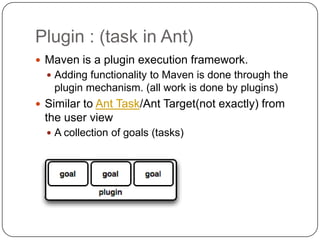
Plugin : (task in Ant)Maven is a plugin execution framework. Adding functionality to Maven is done through the plugin mechanism. (all work is done by plugins)Similar to Ant Task/Ant Target(not exactly) from the user view A collection of goals (tasks)
Plugin
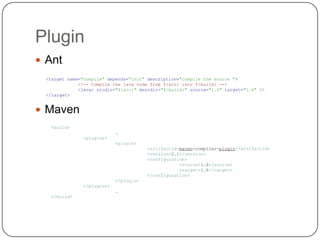
PluginAntMaven<targetname="compile"depends="init"description="compile the source "><!-- Compile the java code from ${src} into ${build} --><javacsrcdir="${src}"destdir="${build}"source="1.6"target="1.6"/></target><build>…<plugins><plugin><artifactId>maven-compiler-plugin</artifactId><version>2.1</version><configuration><source>1.6</source><target>1.6</target></configuration></plugin></plugins>…</build>
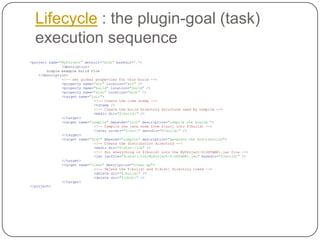
Lifecycle : the plugin-goal (task) execution sequence<projectname="MyProject"default="dist"basedir="."><description>        simple example build file</description><!-- set global properties for this build --><propertyname="src"location="src"/><propertyname="build"location="build"/><propertyname="dist"location="dist"/><targetname="init"><!-- Create the time stamp --><tstamp/><!-- Create the build directory structure used by compile --><mkdirdir="${build}"/></target><targetname="compile"depends="init"description="compile the source "><!-- Compile the java code from ${src} into ${build} --><javacsrcdir="${src}"destdir="${build}"/></target><targetname="dist"depends="compile"description="generate the distribution"><!-- Create the distribution directory --><mkdirdir="${dist}/lib"/><!-- Put everything in ${build} into the MyProject-${DSTAMP}.jar file --><jarjarfile="${dist}/lib/MyProject-${DSTAMP}.jar"basedir="${build}"/></target><targetname="clean"description="clean up"><!-- Delete the ${build} and ${dist} directory trees --><deletedir="${build}"/><deletedir="${dist}"/></target></project>
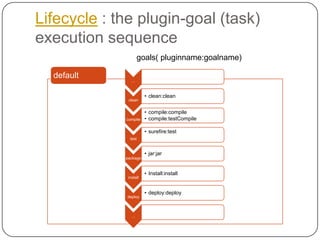
Lifecycle : the plugin-goal (task) execution sequencegoals( pluginname:goalname)default
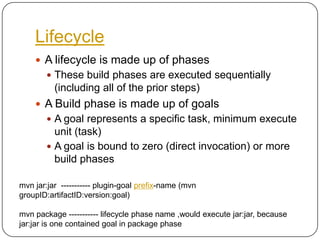
LifecycleA lifecycle is made up of phasesThese build phases are executed sequentially (including all of the prior steps)A Build phase is made up of goalsA goal represents a specific task, minimum execute unit (task)A goal is bound to zero (direct invocation) or more build phasesmvn jar:jar  ----------- plugin-goal prefix-name (mvngroupID:artifactID:version:goal)mvn package ----------- lifecycle phase name ,would execute jar:jar, because jar:jar is one contained goal in package phase
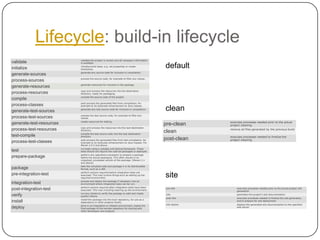
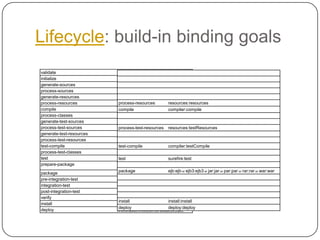
Lifecycle: build-in lifecycledefaultcleansite
Lifecycle: build-in binding goals
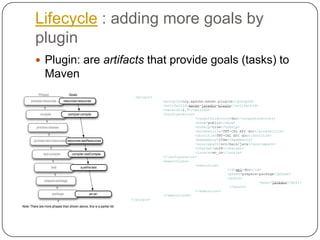
Lifecycle : adding more goals by pluginPlugin: are artifacts that provide goals (tasks) to Maven  <plugin><groupId>org.apache.maven.plugins</groupId><artifactId>maven-javadoc-plugin</artifactId><version>2.7</version><configuration><outputDirectory>doc</outputDirectory><show>public</show><nohelp>true</nohelp><windowtitle>TNT-CAL API doc</windowtitle><doctitle>TNT-CAL API doc</doctitle><maxmemory>256m</maxmemory><sourcepath>src/main/java</sourcepath><charset>utf8</charset><locale>en_us</locale></configuration><executions><execution><id>api-doc</id><phase>prepare-package</phase><goals><goal>javadoc</goal></goals></execution></executions></plugin>
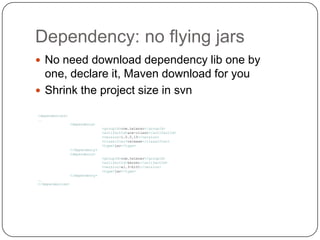
Dependency: no flying jarsNo need download dependency lib one by one, declare it, Maven download for youShrink the project size in svn<dependencies>…<dependency><groupId>com.telenav</groupId><artifactId>ace-client</artifactId><version>1.0.0.15</version><classifier>release</classifier><type>jar</type></dependency><dependency><groupId>com.telenav</groupId><artifactId>kernel</artifactId><version>a1.3-b101</version><type>jar</type></dependency>…</dependencies>
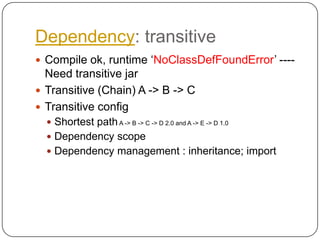
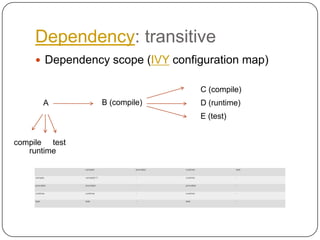
Dependency: transitiveCompile ok, runtime ‘NoClassDefFoundError’ ---- Need transitive jarTransitive (Chain) A -> B -> CTransitive configShortest path A -> B -> C -> D 2.0 and A -> E -> D 1.0Dependency scopeDependency management : inheritance; import
Dependency: transitiveDependency scope (IVY configuration map)C (compile)B (compile)AD (runtime)E (test)compiletestruntime
ProfileDifferent build configuration for different target environmentsDifferent OSDifferent deploy environmentActivation -P CLI optionBased on environment variables…Maven will execute the steps in the profile in addition to the normal steps
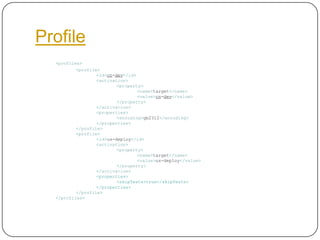
Profile<profiles><profile><id>cn-dev</id><activation><property><name>target</name><value>cn-dev</value></property></activation><properties><encoding>gb2312</encoding></properties></profile><profile><id>us-deploy</id><activation><property><name>target</name><value>us-deploy</value></property></activation>			<properties>				<skipTests>true</skipTests>			</properties></profile></profiles>
Basic Usage
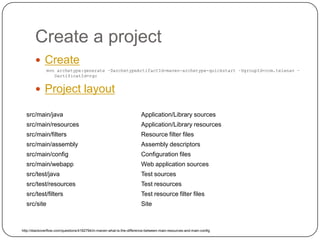
Create a projectCreatemvn archetype:generate –DarchetypeArtifactId=maven-archetype-quickstart –DgroupId=com.telenav –DartificatId=rgcProject layouthttp://stackoverflow.com/questions/4182794/in-maven-what-is-the-difference-between-main-resources-and-main-config
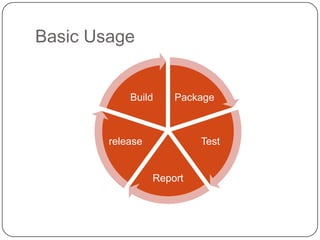
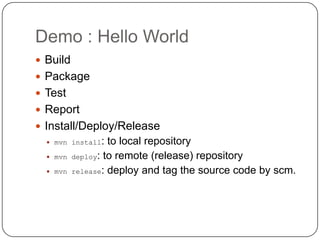
Demo : Hello WorldBuildPackageTestReportInstall/Deploy/Releasemvn install: to local repositorymvndeploy: to remote (release) repositorymvn release: deploy and tag the source code by scm.
20% usageEclipse pluginPropertiesRepositoryInheritance & Multiply-moduleWrite a maven-plugin
Eclipse-plugin m2eclipsehttp://m2eclipse.sonatype.org/installing-m2eclipse.htmlAdd-dependency (search)Add-plugin
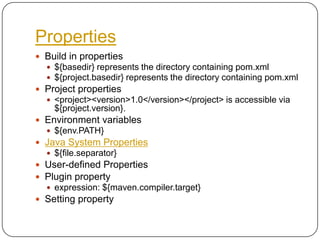
PropertiesBuild in properties${basedir} represents the directory containing pom.xml${project.basedir} represents the directory containing pom.xmlProject properties<project><version>1.0</version></project> is accessible via ${project.version}.Environment variables${env.PATH}Java System Properties${file.separator}User-defined PropertiesPlugin propertyexpression: ${maven.compiler.target}Setting property
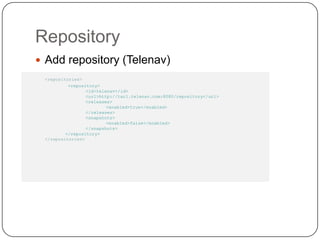
RepositoryAdd repository (Telenav)<repositories> <repository>			<id>telenav</id>			<url>http://tar1.telenav.com:8080/repository</url>			<releases>				<enabled>true</enabled>			</releases>			<snapshots>				<enabled>false</enabled>			</snapshots>		</repository> </repositories>mvn install:install-file -Dfile=<path-to-file> -DgroupId=<group-id> -DartifactId=<artifact-id> -Dversion=<version> -Dpackaging=<packaging> -DgeneratePom=true
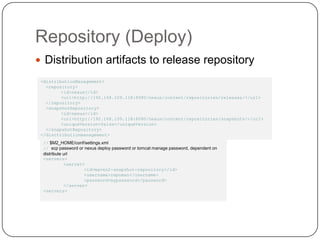
Repository (Deploy)Distribution artifacts to release repository<distributionManagement> <repository><id>nexus</id>	<url>http://192.168.109.118:8080/nexus/content/repositories/releases/</url> </repository>  <snapshotRepository>	<id>nexus</id>	<url>http://192.168.109.118:8080/nexus/content/repositories/snapshots/</url>	<uniqueVersion>false</uniqueVersion>  </snapshotRepository></disctributionmanagement>// $M2_HOME/conf/settings.xml// scp password or nexus deploy password or tomcat manage password, dependent on distribute url<servers>	<server>		<id>maven2-snapshot-repository</id>		<username>repoman</username>		<password>mypassword</password>	</server><servers>
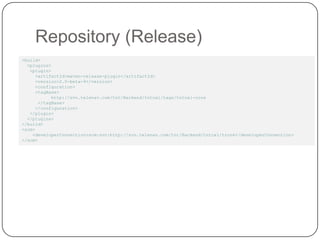
Repository (Release)<build>  <plugins>   <plugin>     <artifactId>maven-release-plugin</artifactId>     <version>2.0-beta-9</version>     <configuration>     <tagBase>           http://svn.telenav.com/tnt/Backend/tntcal/tags/tntcal-core</tagBase>     </configuration>   </plugin>  </plugins></build><scm>    <developerConnection>scm:svn:http://svn.telenav.com/tnt/Backend/tntcal/trunk</developerConnection></scm>
RepositoryDependent on not published jar ?mvninstall:install-fileSystem scope (systemPath)File Repository
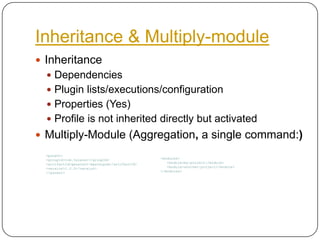
Inheritance & Multiply-moduleInheritanceDependenciesPlugin lists/executions/configurationProperties (Yes)Profile is not inherited directly but activatedMultiply-Module (Aggregation, a single command:)<parent><groupId>com.telenav</groupId><artifactId>geoalert-masterpom</artifactId><version>1.0.0</version></parent><modules>    <module>my-project</module>       <module>another-project</module> </modules>
Maven-PluginExtends AbstractMojoProject Definition<packaging>maven-plugin</packaging>Parameters : inject by Maven (IOC)Annotation    /*  extra files/folders to classpath     * @parameter     */protected File[]extraClassPathItems;<configuration><extraClassPathItems><extraClassPathItem>src/main/webapp</extraClassPathItem></extraClassPathItems></configuration>               /**	 * Location of class files	 *	 * @parameter expression="${project.build.outputDrectory}"	 * @required	 */private File outputDirectory;
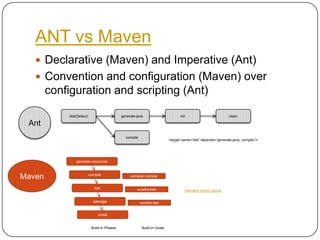
ANT vs MavenDeclarative (Maven) and Imperative (Ant)Convention and configuration (Maven) over configuration and scripting (Ant)Antdist(Defaut)generate-javainitcleancompile<target name=“dist” depends=“generate-java, compile”/>generate-resourcesMavencompilecompiler:compiletestsurefire:testStandard project layoutpakcagesurefire:testinstallBuild-in PhasesBuild-in Goals
Ant vs MavenMavenGood for ModularizationDependency managementNot easy for beginner to understandBugs and issues are hard to track (understand the conventions)Sometimes are slowAntEasy to learn – No so many abstraction
ReferenceReferencehttp://www.sonatype.com/books/mvnref-book/reference/public-book.htmlhttp://maven.apache.org/guides/introduction/introduction-to-the-lifecycle.htmlDeploy use Mavenhttp://jlorenzen.blogspot.com/2007/09/how-to-effectively-use-snapshot.htmlhttp://java.dzone.com/articles/getting-started-nexus-mavenRelease use Mavenhttp://jlorenzen.blogspot.com/2007/09/how-to-create-release-using-maven2.htmlhttp://maven.apache.org/guides/mini/guide-releasing.html

Maven

  • 1.
  • 2.
    PrefaceDo you everbegin a new project from scratch?What’s you do before your first line code?Do you maintain the build script in your Team?Which kinds of tool do you use (make, ant, ivy, maven, mercury,…)
  • 3.
  • 4.
  • 5.
    Plugin : (taskin Ant)Maven is a plugin execution framework. Adding functionality to Maven is done through the plugin mechanism. (all work is done by plugins)Similar to Ant Task/Ant Target(not exactly) from the user view A collection of goals (tasks)
  • 6.
  • 7.
    PluginAntMaven<targetname="compile"depends="init"description="compile the source"><!-- Compile the java code from ${src} into ${build} --><javacsrcdir="${src}"destdir="${build}"source="1.6"target="1.6"/></target><build>…<plugins><plugin><artifactId>maven-compiler-plugin</artifactId><version>2.1</version><configuration><source>1.6</source><target>1.6</target></configuration></plugin></plugins>…</build>
  • 8.
    Lifecycle : theplugin-goal (task) execution sequence<projectname="MyProject"default="dist"basedir="."><description> simple example build file</description><!-- set global properties for this build --><propertyname="src"location="src"/><propertyname="build"location="build"/><propertyname="dist"location="dist"/><targetname="init"><!-- Create the time stamp --><tstamp/><!-- Create the build directory structure used by compile --><mkdirdir="${build}"/></target><targetname="compile"depends="init"description="compile the source "><!-- Compile the java code from ${src} into ${build} --><javacsrcdir="${src}"destdir="${build}"/></target><targetname="dist"depends="compile"description="generate the distribution"><!-- Create the distribution directory --><mkdirdir="${dist}/lib"/><!-- Put everything in ${build} into the MyProject-${DSTAMP}.jar file --><jarjarfile="${dist}/lib/MyProject-${DSTAMP}.jar"basedir="${build}"/></target><targetname="clean"description="clean up"><!-- Delete the ${build} and ${dist} directory trees --><deletedir="${build}"/><deletedir="${dist}"/></target></project>
  • 9.
    Lifecycle : theplugin-goal (task) execution sequencegoals( pluginname:goalname)default
  • 10.
    LifecycleA lifecycle ismade up of phasesThese build phases are executed sequentially (including all of the prior steps)A Build phase is made up of goalsA goal represents a specific task, minimum execute unit (task)A goal is bound to zero (direct invocation) or more build phasesmvn jar:jar ----------- plugin-goal prefix-name (mvngroupID:artifactID:version:goal)mvn package ----------- lifecycle phase name ,would execute jar:jar, because jar:jar is one contained goal in package phase
  • 11.
  • 12.
  • 13.
    Lifecycle : addingmore goals by pluginPlugin: are artifacts that provide goals (tasks) to Maven <plugin><groupId>org.apache.maven.plugins</groupId><artifactId>maven-javadoc-plugin</artifactId><version>2.7</version><configuration><outputDirectory>doc</outputDirectory><show>public</show><nohelp>true</nohelp><windowtitle>TNT-CAL API doc</windowtitle><doctitle>TNT-CAL API doc</doctitle><maxmemory>256m</maxmemory><sourcepath>src/main/java</sourcepath><charset>utf8</charset><locale>en_us</locale></configuration><executions><execution><id>api-doc</id><phase>prepare-package</phase><goals><goal>javadoc</goal></goals></execution></executions></plugin>
  • 14.
    Dependency: no flyingjarsNo need download dependency lib one by one, declare it, Maven download for youShrink the project size in svn<dependencies>…<dependency><groupId>com.telenav</groupId><artifactId>ace-client</artifactId><version>1.0.0.15</version><classifier>release</classifier><type>jar</type></dependency><dependency><groupId>com.telenav</groupId><artifactId>kernel</artifactId><version>a1.3-b101</version><type>jar</type></dependency>…</dependencies>
  • 15.
    Dependency: transitiveCompile ok,runtime ‘NoClassDefFoundError’ ---- Need transitive jarTransitive (Chain) A -> B -> CTransitive configShortest path A -> B -> C -> D 2.0 and A -> E -> D 1.0Dependency scopeDependency management : inheritance; import
  • 16.
    Dependency: transitiveDependency scope(IVY configuration map)C (compile)B (compile)AD (runtime)E (test)compiletestruntime
  • 17.
    ProfileDifferent build configurationfor different target environmentsDifferent OSDifferent deploy environmentActivation -P CLI optionBased on environment variables…Maven will execute the steps in the profile in addition to the normal steps
  • 18.
  • 19.
  • 20.
    Create a projectCreatemvnarchetype:generate –DarchetypeArtifactId=maven-archetype-quickstart –DgroupId=com.telenav –DartificatId=rgcProject layouthttp://stackoverflow.com/questions/4182794/in-maven-what-is-the-difference-between-main-resources-and-main-config
  • 21.
    Demo : HelloWorldBuildPackageTestReportInstall/Deploy/Releasemvn install: to local repositorymvndeploy: to remote (release) repositorymvn release: deploy and tag the source code by scm.
  • 22.
    20% usageEclipse pluginPropertiesRepositoryInheritance& Multiply-moduleWrite a maven-plugin
  • 23.
  • 24.
    PropertiesBuild in properties${basedir}represents the directory containing pom.xml${project.basedir} represents the directory containing pom.xmlProject properties<project><version>1.0</version></project> is accessible via ${project.version}.Environment variables${env.PATH}Java System Properties${file.separator}User-defined PropertiesPlugin propertyexpression: ${maven.compiler.target}Setting property
  • 25.
    RepositoryAdd repository (Telenav)<repositories><repository> <id>telenav</id> <url>http://tar1.telenav.com:8080/repository</url> <releases> <enabled>true</enabled> </releases> <snapshots> <enabled>false</enabled> </snapshots> </repository> </repositories>mvn install:install-file -Dfile=<path-to-file> -DgroupId=<group-id> -DartifactId=<artifact-id> -Dversion=<version> -Dpackaging=<packaging> -DgeneratePom=true
  • 26.
    Repository (Deploy)Distribution artifactsto release repository<distributionManagement> <repository><id>nexus</id> <url>http://192.168.109.118:8080/nexus/content/repositories/releases/</url> </repository> <snapshotRepository> <id>nexus</id> <url>http://192.168.109.118:8080/nexus/content/repositories/snapshots/</url> <uniqueVersion>false</uniqueVersion> </snapshotRepository></disctributionmanagement>// $M2_HOME/conf/settings.xml// scp password or nexus deploy password or tomcat manage password, dependent on distribute url<servers> <server> <id>maven2-snapshot-repository</id> <username>repoman</username> <password>mypassword</password> </server><servers>
  • 27.
    Repository (Release)<build> <plugins> <plugin> <artifactId>maven-release-plugin</artifactId> <version>2.0-beta-9</version> <configuration> <tagBase> http://svn.telenav.com/tnt/Backend/tntcal/tags/tntcal-core</tagBase> </configuration> </plugin> </plugins></build><scm> <developerConnection>scm:svn:http://svn.telenav.com/tnt/Backend/tntcal/trunk</developerConnection></scm>
  • 28.
    RepositoryDependent on notpublished jar ?mvninstall:install-fileSystem scope (systemPath)File Repository
  • 29.
    Inheritance & Multiply-moduleInheritanceDependenciesPluginlists/executions/configurationProperties (Yes)Profile is not inherited directly but activatedMultiply-Module (Aggregation, a single command:)<parent><groupId>com.telenav</groupId><artifactId>geoalert-masterpom</artifactId><version>1.0.0</version></parent><modules> <module>my-project</module> <module>another-project</module> </modules>
  • 30.
    Maven-PluginExtends AbstractMojoProject Definition<packaging>maven-plugin</packaging>Parameters: inject by Maven (IOC)Annotation /* extra files/folders to classpath * @parameter */protected File[]extraClassPathItems;<configuration><extraClassPathItems><extraClassPathItem>src/main/webapp</extraClassPathItem></extraClassPathItems></configuration> /** * Location of class files * * @parameter expression="${project.build.outputDrectory}" * @required */private File outputDirectory;
  • 31.
    ANT vs MavenDeclarative(Maven) and Imperative (Ant)Convention and configuration (Maven) over configuration and scripting (Ant)Antdist(Defaut)generate-javainitcleancompile<target name=“dist” depends=“generate-java, compile”/>generate-resourcesMavencompilecompiler:compiletestsurefire:testStandard project layoutpakcagesurefire:testinstallBuild-in PhasesBuild-in Goals
  • 32.
    Ant vs MavenMavenGoodfor ModularizationDependency managementNot easy for beginner to understandBugs and issues are hard to track (understand the conventions)Sometimes are slowAntEasy to learn – No so many abstraction
  • 33.

Editor's Notes

  • #21 mvncompilemvn packagemvn testmvneclipse:elipse