HTML
HTML Versions

• HTML 2.0 (1995)
• HTML 3.2 (1997)
• HTML 4.0 (1997)
• HTML 4.01 (1999 Happiness!)
XML?
• XHTML 1.0 (2000)
 • stricter syntax
 • self closing tags
 • validation
• XHTML 1.1 (2001)
 • no spec difference
 • MUST be served as XML
 • ...yellow screen of death!
Yellow Screen of
     Death!
XHTML 2

• Good spec from theoretical point of view
• Non practical because of... err... XML :(
• Too idealistic
• Stricter syntax
• ...never took off
<tags>
• Two kinds of tags
 • with semantic meaning (
       <p>, <h1>, <h2>..., <strong>
   )

 • without semantic meaning (
       <span>, <div>, <hr>, <br>
   )
Semantic Markup
       Example
<h1>Data Tutashkhia</h1>
<p>
 <strong>Data Tutashkhia</strong> was a
 <em>Georgian</em> hero.
</p>
<p>
 But <em>Russian</em>
 <abbr title="Federal Bureau of Investigation">
  FBI
 </abbr> killed him
</p>
Non Semantic
         Counterpart
<div class="heading">Data Tutashkhia</div>
<div class="paragraph">
 <span class="bold">Data Tutashkhia</span> was a
 <span class="italic">Georgian</span> hero.
</div>
<div class="paragraph">
 But <span class="italic">Russian</span>
 <span class="abbreviation">
  FBI
 </span> killed him
</div>
HTML 5


What is it?
Now days it has two
  actual meanings
• HTML 5 as a markup language; and
• Umbrella term that consolidates:
 • HTML 5
 • CSS 3
 • New Browser APIs like(
        geo location, local storage etc...
    )

 • Anything else...
HTML 5 Goals

• Backwards compatibility
• Liberalism
• Interoperability
• Avoid needles complexity(Simplicity)
<!DOCTYPE ...> who cares?
         validators? browsers?


<!DOCTYPE html PUBLIC "-//W3C//DTD XHTML 1.0 Transitional//EN"
 "http://www.w3.org/TR/xhtml1/DTD/xhtml1-transitional.dtd">

<html>
<head>
 <title>Hello!</title>
</head>

<body></body>

</html>
<!DOCTYPE html> is enough!
      but... but where is version?


<!DOCTYPE html>

<html>
<head>
 <title>Hello!</title>
</head>

<body></body>

</html>
<meta... />


<!DOCTYPE html PUBLIC "-//W3C//DTD XHTML 1.0 Transitional//EN"
 "http://www.w3.org/TR/xhtml1/DTD/xhtml1-transitional.dtd">
<html>
<head>
 <title>Hello!</title>
 <meta http-equiv="content-type"
  content="text/html; charset=UTF-8" />
</head>

<body></body>

</html>
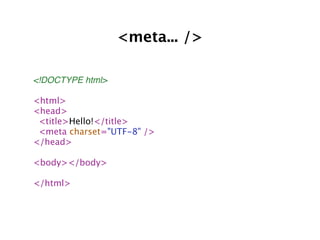
<meta... />

<!DOCTYPE html>

<html>
<head>
 <title>Hello!</title>
 <meta charset="UTF-8" />
</head>

<body></body>

</html>
Support Existing
   Content


<img src="/path/to/image.png" />

<img src="/path/to/image.png">

<IMG src="/path/to/image.png" />

<IMG src=/path/to/image.png>
Support Existing Content?
    But isn’t it ugly?

• Existing HTML code doesn’t really
  matters

• Coding style matters
• Just write simple and clean code
• Browsers really know how to deal
  with ugly markup
Solve Real Problems
(X)HTML
<h2><a href="/path/to/my/page">Hello!</a></h2>
<p>
 <a href="/path/to/my/page">Hello This is Description!</a>
</p>


HTML 5
<a href="/path/to/my/page">
 <h2>Hello!</h2>
 <p>Hello This is Description!</p>
</a>
Solve Real Problems
    more semantic tags


section            header
article             footer
aside              details
nav                 figure
New <tags> in action
<section>
 <header>Stream of News</header>

 <section>

  <article>
   <h1>Article title!</h1>
   <p>Something interesting about NASA...</p>
  </article>

  <article>
   <h1>Another article title!</h1>
   <p>Another interesting story about Apple</p>
  </article>

 </section>

 <footer>© CNN.com</footer>
</section>
Same but with old <tags>
<div class="stream-of-news">
 <div class="header">Stream of News</div>

 <div class="news-list">

  <div class="article">
   <h1>Article title!</h1>
   <p>Something interesting about NASA...</p>
  </div>

  <div class="article">
   <h1>Article title!</h1>
   <p>Something interesting about NASA...</p>
  </div>
 </div>

 <div class="footer">© CNN.com</div>
</div>
Questions?
Thank you!

Intro to-html5

  • 1.
  • 2.
    HTML Versions • HTML2.0 (1995) • HTML 3.2 (1997) • HTML 4.0 (1997) • HTML 4.01 (1999 Happiness!)
  • 3.
    XML? • XHTML 1.0(2000) • stricter syntax • self closing tags • validation • XHTML 1.1 (2001) • no spec difference • MUST be served as XML • ...yellow screen of death!
  • 4.
  • 5.
    XHTML 2 • Goodspec from theoretical point of view • Non practical because of... err... XML :( • Too idealistic • Stricter syntax • ...never took off
  • 6.
    <tags> • Two kindsof tags • with semantic meaning ( <p>, <h1>, <h2>..., <strong> ) • without semantic meaning ( <span>, <div>, <hr>, <br> )
  • 7.
    Semantic Markup Example <h1>Data Tutashkhia</h1> <p> <strong>Data Tutashkhia</strong> was a <em>Georgian</em> hero. </p> <p> But <em>Russian</em> <abbr title="Federal Bureau of Investigation"> FBI </abbr> killed him </p>
  • 8.
    Non Semantic Counterpart <div class="heading">Data Tutashkhia</div> <div class="paragraph"> <span class="bold">Data Tutashkhia</span> was a <span class="italic">Georgian</span> hero. </div> <div class="paragraph"> But <span class="italic">Russian</span> <span class="abbreviation"> FBI </span> killed him </div>
  • 9.
  • 10.
    Now days ithas two actual meanings • HTML 5 as a markup language; and • Umbrella term that consolidates: • HTML 5 • CSS 3 • New Browser APIs like( geo location, local storage etc... ) • Anything else...
  • 11.
    HTML 5 Goals •Backwards compatibility • Liberalism • Interoperability • Avoid needles complexity(Simplicity)
  • 12.
    <!DOCTYPE ...> whocares? validators? browsers? <!DOCTYPE html PUBLIC "-//W3C//DTD XHTML 1.0 Transitional//EN" "http://www.w3.org/TR/xhtml1/DTD/xhtml1-transitional.dtd"> <html> <head> <title>Hello!</title> </head> <body></body> </html>
  • 13.
    <!DOCTYPE html> isenough! but... but where is version? <!DOCTYPE html> <html> <head> <title>Hello!</title> </head> <body></body> </html>
  • 14.
    <meta... /> <!DOCTYPE htmlPUBLIC "-//W3C//DTD XHTML 1.0 Transitional//EN" "http://www.w3.org/TR/xhtml1/DTD/xhtml1-transitional.dtd"> <html> <head> <title>Hello!</title> <meta http-equiv="content-type" content="text/html; charset=UTF-8" /> </head> <body></body> </html>
  • 15.
    <meta... /> <!DOCTYPE html> <html> <head> <title>Hello!</title> <meta charset="UTF-8" /> </head> <body></body> </html>
  • 16.
    Support Existing Content <img src="/path/to/image.png" /> <img src="/path/to/image.png"> <IMG src="/path/to/image.png" /> <IMG src=/path/to/image.png>
  • 17.
    Support Existing Content? But isn’t it ugly? • Existing HTML code doesn’t really matters • Coding style matters • Just write simple and clean code • Browsers really know how to deal with ugly markup
  • 18.
    Solve Real Problems (X)HTML <h2><ahref="/path/to/my/page">Hello!</a></h2> <p> <a href="/path/to/my/page">Hello This is Description!</a> </p> HTML 5 <a href="/path/to/my/page"> <h2>Hello!</h2> <p>Hello This is Description!</p> </a>
  • 19.
    Solve Real Problems more semantic tags section header article footer aside details nav figure
  • 20.
    New <tags> inaction <section> <header>Stream of News</header> <section> <article> <h1>Article title!</h1> <p>Something interesting about NASA...</p> </article> <article> <h1>Another article title!</h1> <p>Another interesting story about Apple</p> </article> </section> <footer>© CNN.com</footer> </section>
  • 21.
    Same but withold <tags> <div class="stream-of-news"> <div class="header">Stream of News</div> <div class="news-list"> <div class="article"> <h1>Article title!</h1> <p>Something interesting about NASA...</p> </div> <div class="article"> <h1>Article title!</h1> <p>Something interesting about NASA...</p> </div> </div> <div class="footer">© CNN.com</div> </div>
  • 22.
  • 23.