
Intro to Lightning for Admins
London May 21, 2015
Matthew Morris
Software Architect & Director
Speaker
@matmorris
Safe Harbor
Safe harbor statement under the Private Securities Litigation Reform Act of 1995:
This presentation may contain forward-looking statements that involve risks, uncertainties, and assumptions. If any such
uncertainties materialize or if any of the assumptions proves incorrect, the results of salesforce.com, inc. could differ
materially from the results expressed or implied by the forward-looking statements we make. All statements other than
statements of historical fact could be deemed forward-looking, including any projections of product or service availability,
subscriber growth, earnings, revenues, or other financial items and any statements regarding strategies or plans of
management for future operations, statements of belief, any statements concerning new, planned, or upgraded services or
technology developments and customer contracts or use of our services.
The risks and uncertainties referred to above include – but are not limited to – risks associated with developing and
delivering new functionality for our service, new products and services, our new business model, our past operating losses,
possible fluctuations in our operating results and rate of growth, interruptions or delays in our Web hosting, breach of our
security measures, the outcome of intellectual property and other litigation, risks associated with possible mergers and
acquisitions, the immature market in which we operate, our relatively limited operating history, our ability to expand, retain,
and motivate our employees and manage our growth, new releases of our service and successful customer deployment, our
limited history reselling non-salesforce.com products, and utilization and selling to larger enterprise customers. Further
information on potential factors that could affect the financial results of salesforce.com, inc. is included in our annual report
on Form 10-Q for the most recent fiscal quarter ended July 31, 2012. This documents and others containing important
disclosures are available on the SEC Filings section of the Investor Information section of our Web site.
Any unreleased services or features referenced in this or other presentations, press releases or public statements are not
currently available and may not be delivered on time or at all. Customers who purchase our services should make the
purchase decisions based upon features that are currently available. Salesforce.com, inc. assumes no obligation and does
not intend to update these forward-looking statements.
“Lightning Fast” Agenda
• What are the challenges in creating business applications in 2015?
• The Salesforce1 Lightning family, who are they?
• How YOU can learn and use Lightning technologies, today*
*When you get home
The Challenge for you, the AwesomeAdmin
• Multiple databases & sources, not just Salesforce data
• Complex business process, which change over time
• What we build needs to work on ANY device (this year and next…)
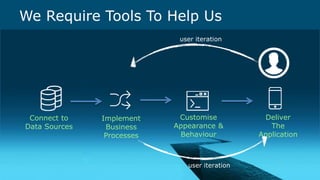
We Require Tools To Help Us
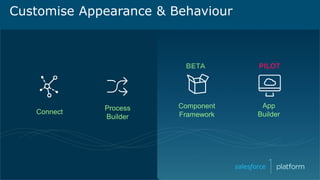
Customise
Appearance &
Behaviour
Connect to
Data Sources
Implement
Business
Processes
Deliver
The
Application
user iteration
user iteration
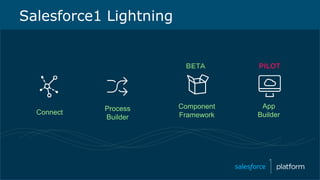
Salesforce1 Lightning
Connect
Process
Builder
App
Builder
Component
Framework
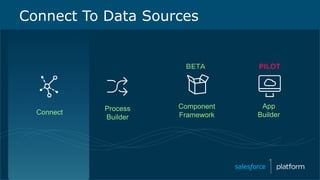
Connect
Process
Builder
App
Builder
Component
Framework
Connect To Data Sources
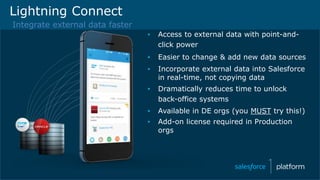
Lightning Connect
▪ Access to external data with point-and-
click power
▪ Easier to change & add new data sources
▪ Incorporate external data into Salesforce
in real-time, not copying data
▪ Dramatically reduces time to unlock
back-office systems
▪ Available in DE orgs (you MUST try this!)
▪ Add-on license required in Production
orgs
Integrate external data faster
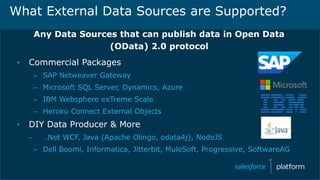
What External Data Sources are Supported?
Any Data Sources that can publish data in Open Data
(OData) 2.0 protocol
▪ Commercial Packages
– SAP Netweaver Gateway
– Microsoft SQL Server, Dynamics, Azure
– IBM Websphere exTreme Scale
– Heroku Connect External Objects
▪ DIY Data Producer & More
– .Net WCF, Java (Apache Olingo, odata4j), NodeJS
– Dell Boomi, Informatica, Jitterbit, MuleSoft, Progressive, SoftwareAG
External Objects Work Like Custom Objects
✓ Tabs
✓ List Views
✓ Detail Pages
✓ Chatter Feeds
✓ Visualforce pages with standard or custom controllers
✓ Apex SObject types
✓ REST/SOAP API access
✓ SOQL and SOSL queries from Apex or API
✓ Available on Salesforce1 Mobile Platform
External Objects Work Like Custom Objects
✗ Formula and Roll-up Summary Fields
✗ Triggers, Workflow, Approvals, Process
✗ Validation Rules
✗ Field History Tracking
✗ Notes, Attachments
Lightning Connect Roadmap
▪ Read-only access is GA in Spring ‘15
▪ Pilot in Spring ’15
– Read/write capability
– Real-time cross-org access
– Apex Connector library to develop custom connectors
▪ FUTURE*
▪ OData 4.0
– Support for triggers
▪ Custom Reports for External Objects
* Safe Harbor
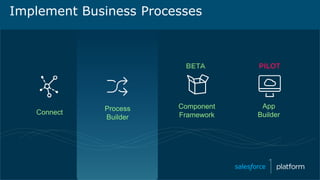
Connect
Process
Builder
App
Builder
Component
Framework
Implement Business Processes
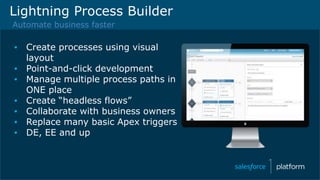
Lightning Process Builder
Automate business faster
▪ Create processes using visual
layout
▪ Point-and-click development
▪ Manage multiple process paths in
ONE place
▪ Create “headless flows”
▪ Collaborate with business owners
▪ Replace many basic Apex triggers
▪ DE, EE and up
Process Builder is next generation workflow
✓ Create a record (related OR unrelated)
✓ Update fields on ANY related record
✓ Launch a trigger-ready Flow
✓ Send an email
✓ Post to Chatter
✓ Submit for approval (or trigger existing approval process)
✓ Execute Apex Code
Check your event guide!
In depth Process Builder sessions
1:30pm: Mike Gill & Chris Edwards
“Get Admin Super Powers with Process Builder and Flow”
3:30pm : Jodi Wagner
“Increasing User Adoption using Lightning Process Builder”
Connect
Process
Builder
App
Builder
Component
Framework
Customise Appearance & Behaviour
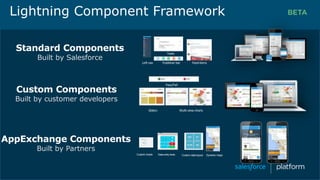
Standard Components
Built by Salesforce
Custom charts Data entry tools Custom data layout Dynamic maps
Left nav Publisher bar Feeditems
Tasks
Sliders Multi-view charts
Pass/Fail
Custom Components
Built by customer developers
AppExchange Components
Built by Partners
Lightning Component Framework
Lightning Components, the “Devs” will build ‘em
• …and AwesomeAdmins will put them to work in Lightning Apps!
• Today, think only about the Salesforce1 user interface
• Salesforce are working on the bigger picture*
*You guessed it : Safe Harbour
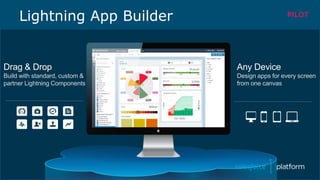
Lightning App Builder
Drag & Drop
Build with standard, custom &
partner Lightning Components
Any Device
Design apps for every screen
from one canvas
Want To Take App Builder For A Test Drive?
http://bit.ly/lightning-org
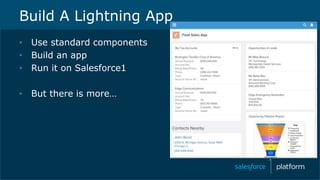
Build A Lightning App
• Use standard components
• Build an app
• Run it on Salesforce1
• But there is more…
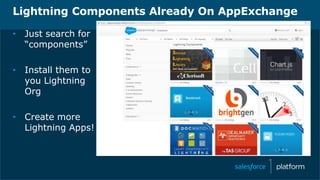
Lightning Components Already On AppExchange
• Just search for
“components”
• Install them to
you Lightning
Org
• Create more
Lightning Apps!
Use Your Lightning Org To Try Everything!
• Process Builder
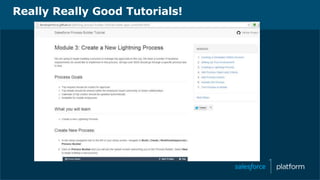
• bit.ly/process_lightning_tutorial (start at Module 3)
• Components
• bit.ly/lightning-components-tutorial (start at Module 2)
• Connect
• bit.ly/lightning-connect-tutorial (start at Module 2 Step 6)
• App Builder
• http://bit.ly/app_builder_lightning (start at Module 3)
Really Really Good Tutorials!
Keep On Learning
http://developer.salesforce.com/trailhead
Session >>> 3pm Gillian Madill “Blaze Your Own Trail with Trailhead”
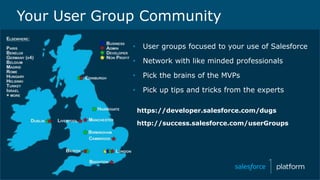
• User groups focused to your use of Salesforce
• Network with like minded professionals
• Pick the brains of the MVPs
• Pick up tips and tricks from the experts
https://developer.salesforce.com/dugs
http://success.salesforce.com/userGroups
Your User Group Community
Thank you
Lightning Org : http://bit.ly/lightning-org
• Process Builder
• bit.ly/process_lightning_tutorial (start at Module 3)
• Components
• bit.ly/lightning-components-tutorial (start at Module 2)
• Connect
• bit.ly/lightning-connect-tutorial (start at Module 2 Step 6)
• App Builder
• http://bit.ly/app_builder_lightning (start at Module 3)
• I will tweet these links @matmorris

Intro to Salesforce Lightning for Admins

  • 1.
    Intro to Lightningfor Admins London May 21, 2015
  • 2.
    Matthew Morris Software Architect& Director Speaker @matmorris
  • 3.
    Safe Harbor Safe harborstatement under the Private Securities Litigation Reform Act of 1995: This presentation may contain forward-looking statements that involve risks, uncertainties, and assumptions. If any such uncertainties materialize or if any of the assumptions proves incorrect, the results of salesforce.com, inc. could differ materially from the results expressed or implied by the forward-looking statements we make. All statements other than statements of historical fact could be deemed forward-looking, including any projections of product or service availability, subscriber growth, earnings, revenues, or other financial items and any statements regarding strategies or plans of management for future operations, statements of belief, any statements concerning new, planned, or upgraded services or technology developments and customer contracts or use of our services. The risks and uncertainties referred to above include – but are not limited to – risks associated with developing and delivering new functionality for our service, new products and services, our new business model, our past operating losses, possible fluctuations in our operating results and rate of growth, interruptions or delays in our Web hosting, breach of our security measures, the outcome of intellectual property and other litigation, risks associated with possible mergers and acquisitions, the immature market in which we operate, our relatively limited operating history, our ability to expand, retain, and motivate our employees and manage our growth, new releases of our service and successful customer deployment, our limited history reselling non-salesforce.com products, and utilization and selling to larger enterprise customers. Further information on potential factors that could affect the financial results of salesforce.com, inc. is included in our annual report on Form 10-Q for the most recent fiscal quarter ended July 31, 2012. This documents and others containing important disclosures are available on the SEC Filings section of the Investor Information section of our Web site. Any unreleased services or features referenced in this or other presentations, press releases or public statements are not currently available and may not be delivered on time or at all. Customers who purchase our services should make the purchase decisions based upon features that are currently available. Salesforce.com, inc. assumes no obligation and does not intend to update these forward-looking statements.
  • 4.
    “Lightning Fast” Agenda •What are the challenges in creating business applications in 2015? • The Salesforce1 Lightning family, who are they? • How YOU can learn and use Lightning technologies, today* *When you get home
  • 5.
    The Challenge foryou, the AwesomeAdmin • Multiple databases & sources, not just Salesforce data • Complex business process, which change over time • What we build needs to work on ANY device (this year and next…)
  • 6.
    We Require ToolsTo Help Us Customise Appearance & Behaviour Connect to Data Sources Implement Business Processes Deliver The Application user iteration user iteration
  • 7.
  • 8.
  • 9.
    Lightning Connect ▪ Accessto external data with point-and- click power ▪ Easier to change & add new data sources ▪ Incorporate external data into Salesforce in real-time, not copying data ▪ Dramatically reduces time to unlock back-office systems ▪ Available in DE orgs (you MUST try this!) ▪ Add-on license required in Production orgs Integrate external data faster
  • 10.
    What External DataSources are Supported? Any Data Sources that can publish data in Open Data (OData) 2.0 protocol ▪ Commercial Packages – SAP Netweaver Gateway – Microsoft SQL Server, Dynamics, Azure – IBM Websphere exTreme Scale – Heroku Connect External Objects ▪ DIY Data Producer & More – .Net WCF, Java (Apache Olingo, odata4j), NodeJS – Dell Boomi, Informatica, Jitterbit, MuleSoft, Progressive, SoftwareAG
  • 11.
    External Objects WorkLike Custom Objects ✓ Tabs ✓ List Views ✓ Detail Pages ✓ Chatter Feeds ✓ Visualforce pages with standard or custom controllers ✓ Apex SObject types ✓ REST/SOAP API access ✓ SOQL and SOSL queries from Apex or API ✓ Available on Salesforce1 Mobile Platform
  • 12.
    External Objects WorkLike Custom Objects ✗ Formula and Roll-up Summary Fields ✗ Triggers, Workflow, Approvals, Process ✗ Validation Rules ✗ Field History Tracking ✗ Notes, Attachments
  • 13.
    Lightning Connect Roadmap ▪Read-only access is GA in Spring ‘15 ▪ Pilot in Spring ’15 – Read/write capability – Real-time cross-org access – Apex Connector library to develop custom connectors ▪ FUTURE* ▪ OData 4.0 – Support for triggers ▪ Custom Reports for External Objects * Safe Harbor
  • 14.
  • 15.
    Lightning Process Builder Automatebusiness faster ▪ Create processes using visual layout ▪ Point-and-click development ▪ Manage multiple process paths in ONE place ▪ Create “headless flows” ▪ Collaborate with business owners ▪ Replace many basic Apex triggers ▪ DE, EE and up
  • 16.
    Process Builder isnext generation workflow ✓ Create a record (related OR unrelated) ✓ Update fields on ANY related record ✓ Launch a trigger-ready Flow ✓ Send an email ✓ Post to Chatter ✓ Submit for approval (or trigger existing approval process) ✓ Execute Apex Code
  • 17.
    Check your eventguide! In depth Process Builder sessions 1:30pm: Mike Gill & Chris Edwards “Get Admin Super Powers with Process Builder and Flow” 3:30pm : Jodi Wagner “Increasing User Adoption using Lightning Process Builder”
  • 18.
  • 19.
    Standard Components Built bySalesforce Custom charts Data entry tools Custom data layout Dynamic maps Left nav Publisher bar Feeditems Tasks Sliders Multi-view charts Pass/Fail Custom Components Built by customer developers AppExchange Components Built by Partners Lightning Component Framework
  • 20.
    Lightning Components, the“Devs” will build ‘em • …and AwesomeAdmins will put them to work in Lightning Apps! • Today, think only about the Salesforce1 user interface • Salesforce are working on the bigger picture* *You guessed it : Safe Harbour
  • 21.
    Lightning App Builder Drag& Drop Build with standard, custom & partner Lightning Components Any Device Design apps for every screen from one canvas
  • 22.
    Want To TakeApp Builder For A Test Drive? http://bit.ly/lightning-org
  • 23.
    Build A LightningApp • Use standard components • Build an app • Run it on Salesforce1 • But there is more…
  • 24.
    Lightning Components AlreadyOn AppExchange • Just search for “components” • Install them to you Lightning Org • Create more Lightning Apps!
  • 25.
    Use Your LightningOrg To Try Everything! • Process Builder • bit.ly/process_lightning_tutorial (start at Module 3) • Components • bit.ly/lightning-components-tutorial (start at Module 2) • Connect • bit.ly/lightning-connect-tutorial (start at Module 2 Step 6) • App Builder • http://bit.ly/app_builder_lightning (start at Module 3)
  • 26.
  • 27.
    Keep On Learning http://developer.salesforce.com/trailhead Session>>> 3pm Gillian Madill “Blaze Your Own Trail with Trailhead”
  • 28.
    • User groupsfocused to your use of Salesforce • Network with like minded professionals • Pick the brains of the MVPs • Pick up tips and tricks from the experts https://developer.salesforce.com/dugs http://success.salesforce.com/userGroups Your User Group Community
  • 29.
  • 30.
    Lightning Org :http://bit.ly/lightning-org • Process Builder • bit.ly/process_lightning_tutorial (start at Module 3) • Components • bit.ly/lightning-components-tutorial (start at Module 2) • Connect • bit.ly/lightning-connect-tutorial (start at Module 2 Step 6) • App Builder • http://bit.ly/app_builder_lightning (start at Module 3) • I will tweet these links @matmorris