Prima ConfigurazionePrima Configurazione
www.pgtraining.com - info@pgtraining.com
AgendaAgenda
● Messa in rete della prima installazione di postgresql
● Prima configurazione del files postgresql.conf
● Prima configurazione del file pg_hba.conf
www.pgtraining.com - info@pgtraining.com
AgendaAgenda
● Messa in rete della prima installazione di postgresql
● Prima configurazione del files postgresql.conf
● Prima configurazione del file pg_hba.conf
www.pgtraining.com - info@pgtraining.com
AgendaAgenda
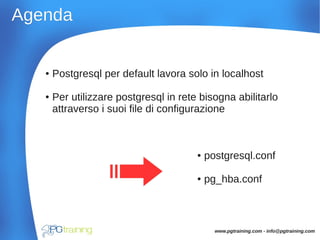
● Postgresql per default lavora solo in localhost
● Per utilizzare postgresql in rete bisogna abilitarlo
attraverso i suoi file di configurazione
● postgresql.conf
● pg_hba.conf
www.pgtraining.com - info@pgtraining.com
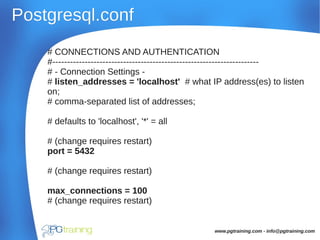
Postgresql.confPostgresql.conf
# CONNECTIONS AND AUTHENTICATION
#----------------------------------------------------------------------
# - Connection Settings -
# listen_addresses = 'localhost' # what IP address(es) to listen
on;
# comma-separated list of addresses;
# defaults to 'localhost', '*' = all
# (change requires restart)
port = 5432
# (change requires restart)
max_connections = 100
# (change requires restart)
www.pgtraining.com - info@pgtraining.com
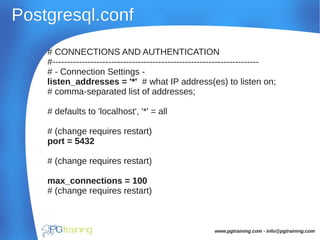
Postgresql.confPostgresql.conf
# CONNECTIONS AND AUTHENTICATION
#----------------------------------------------------------------------
# - Connection Settings -
listen_addresses = '*' # what IP address(es) to listen on;
# comma-separated list of addresses;
# defaults to 'localhost', '*' = all
# (change requires restart)
port = 5432
# (change requires restart)
max_connections = 100
# (change requires restart)
www.pgtraining.com - info@pgtraining.com
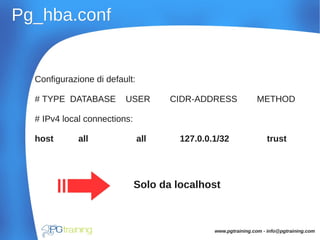
Pg_hba.confPg_hba.conf
Configurazione di default:
# TYPE DATABASE USER CIDR-ADDRESS METHOD
# IPv4 local connections:
host all all 127.0.0.1/32 trust
Solo da localhost
www.pgtraining.com - info@pgtraining.com
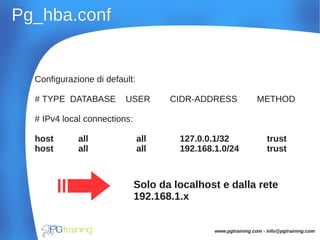
Pg_hba.confPg_hba.conf
Configurazione di default:
# TYPE DATABASE USER CIDR-ADDRESS METHOD
# IPv4 local connections:
host all all 127.0.0.1/32 trust
host all all 192.168.1.0/24 trust
Solo da localhost e dalla rete
192.168.1.x
www.pgtraining.com - info@pgtraining.com
ConclusioneConclusione
● Messa in rete della prima installazione di postgresql
● Prima configurazione del files postgresql.conf
● Prima configurazione del file pg_hba.conf
www.pgtraining.com - info@pgtraining.com
All'opera !!!

Messa in rete

  • 1.
  • 2.
    AgendaAgenda ● Messa inrete della prima installazione di postgresql ● Prima configurazione del files postgresql.conf ● Prima configurazione del file pg_hba.conf www.pgtraining.com - info@pgtraining.com
  • 3.
    AgendaAgenda ● Messa inrete della prima installazione di postgresql ● Prima configurazione del files postgresql.conf ● Prima configurazione del file pg_hba.conf www.pgtraining.com - info@pgtraining.com
  • 4.
    AgendaAgenda ● Postgresql perdefault lavora solo in localhost ● Per utilizzare postgresql in rete bisogna abilitarlo attraverso i suoi file di configurazione ● postgresql.conf ● pg_hba.conf www.pgtraining.com - info@pgtraining.com
  • 5.
    Postgresql.confPostgresql.conf # CONNECTIONS ANDAUTHENTICATION #---------------------------------------------------------------------- # - Connection Settings - # listen_addresses = 'localhost' # what IP address(es) to listen on; # comma-separated list of addresses; # defaults to 'localhost', '*' = all # (change requires restart) port = 5432 # (change requires restart) max_connections = 100 # (change requires restart) www.pgtraining.com - info@pgtraining.com
  • 6.
    Postgresql.confPostgresql.conf # CONNECTIONS ANDAUTHENTICATION #---------------------------------------------------------------------- # - Connection Settings - listen_addresses = '*' # what IP address(es) to listen on; # comma-separated list of addresses; # defaults to 'localhost', '*' = all # (change requires restart) port = 5432 # (change requires restart) max_connections = 100 # (change requires restart) www.pgtraining.com - info@pgtraining.com
  • 7.
    Pg_hba.confPg_hba.conf Configurazione di default: #TYPE DATABASE USER CIDR-ADDRESS METHOD # IPv4 local connections: host all all 127.0.0.1/32 trust Solo da localhost www.pgtraining.com - info@pgtraining.com
  • 8.
    Pg_hba.confPg_hba.conf Configurazione di default: #TYPE DATABASE USER CIDR-ADDRESS METHOD # IPv4 local connections: host all all 127.0.0.1/32 trust host all all 192.168.1.0/24 trust Solo da localhost e dalla rete 192.168.1.x www.pgtraining.com - info@pgtraining.com
  • 9.
    ConclusioneConclusione ● Messa inrete della prima installazione di postgresql ● Prima configurazione del files postgresql.conf ● Prima configurazione del file pg_hba.conf www.pgtraining.com - info@pgtraining.com All'opera !!!