An Introduction To Software
Development Using C++
Class #6:
Introduction To
Classes, Objects, &
Strings
Local Variables
• We have been declaring all of a program’s variables in its main function.
• Variables declared in a function definition’s body are known as local variables and
can be used only from the line of their declaration in the function to closing right

brace (}) of the block in which they’re declared.
• A local variable must be declared before it can be used in a function.
• A local variable cannot be accessed outside the function in which it’s declared.
When a function terminates, the values of its local variables are lost.
Image Credit: deniseleeyohn.com
Class Attributes
• A class normally consists of one or more member functions that manipulate the
attributes that belong to a particular object of the class.
• Attributes are represented as variables in a class definition. Such variables are
called data members and are declared inside a class definition but outside the
bodies of the class’s member-function definitions.
• Each object of a class maintains its own copy of its attributes in memory. These
attributes exist throughout the life of the object.
• The example in this section demonstrates a GradeBook class that contains a
courseName data member to represent a particular GradeBook object’s
course name.
Image Credit: colleendilen.com
Our Next Program
• In our next example, the program maintains the course name as a data member so
that it can be used or modified at any time during a program’s execution.
• The class contains member functions setCourseName, getCourseName and
displayMessage. Member function setCourseName stores a course name in a
GradeBook data member.
• Member function getCourseName obtains the course name from that data
member.
• Member function displayMessage—which now specifies no parameters — still
displays a welcome message that includes the course name.
• However, as you’ll see, the function now obtains the course name by calling
another function in the same class—getCourseName.
Image Credit: www.illustrationsource.com
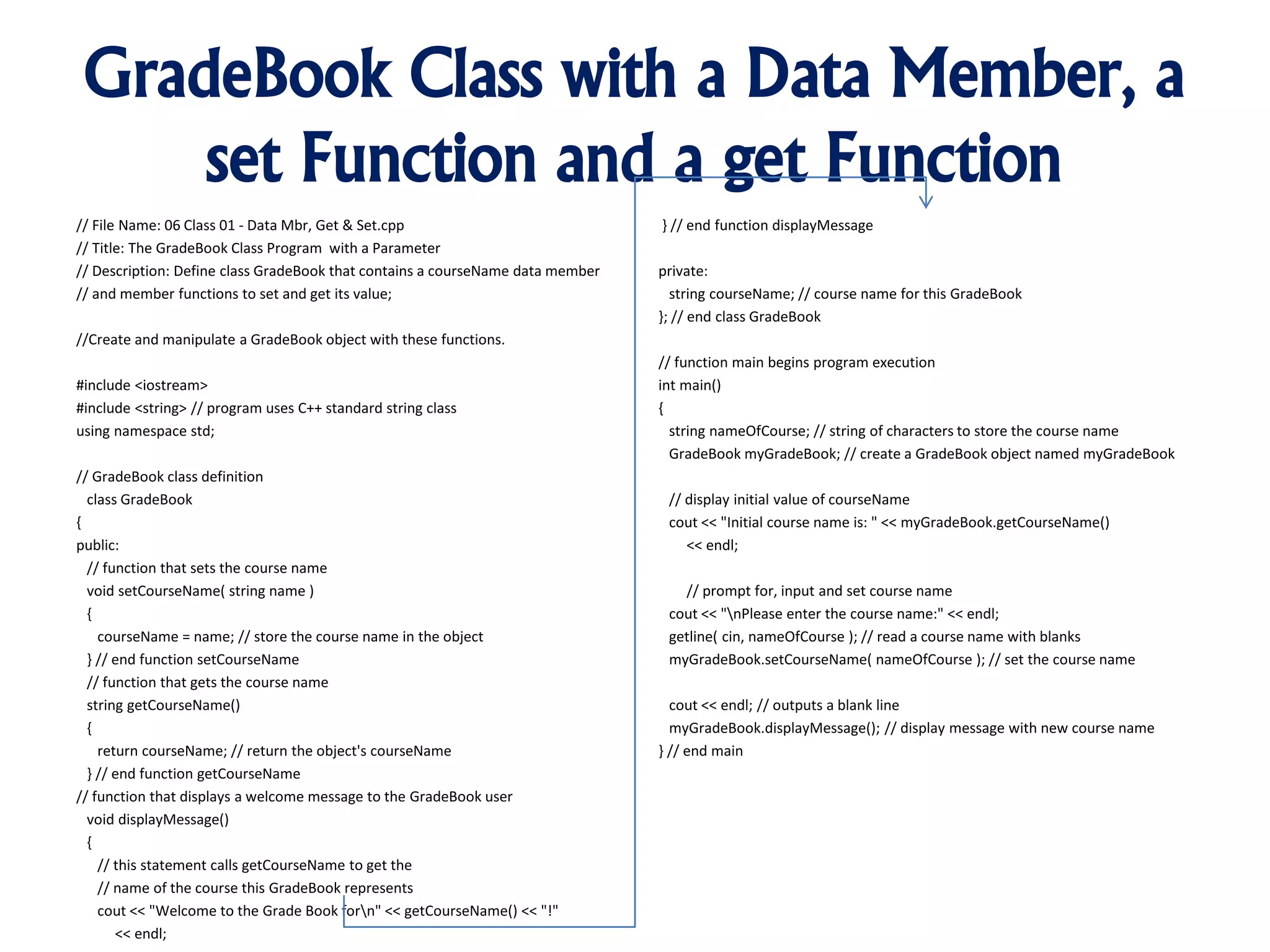
GradeBook Class with a Data Member, a
set Function and a get Function
// File Name: 06 Class 01 - Data Mbr, Get & Set.cpp
// Title: The GradeBook Class Program with a Parameter
// Description: Define class GradeBook that contains a courseName data member
// and member functions to set and get its value;
//Create and manipulate a GradeBook object with these functions.
#include <iostream>
#include <string> // program uses C++ standard string class
using namespace std;
// GradeBook class definition
class GradeBook
{
public:
// function that sets the course name
void setCourseName( string name )
{
courseName = name; // store the course name in the object
} // end function setCourseName
// function that gets the course name
string getCourseName()
{
return courseName; // return the object's courseName
} // end function getCourseName
// function that displays a welcome message to the GradeBook user
void displayMessage()
{
// this statement calls getCourseName to get the
// name of the course this GradeBook represents
cout << "Welcome to the Grade Book forn" << getCourseName() << "!"
<< endl;
} // end function displayMessage
private:
string courseName; // course name for this GradeBook
}; // end class GradeBook
// function main begins program execution
int main()
{
string nameOfCourse; // string of characters to store the course name
GradeBook myGradeBook; // create a GradeBook object named myGradeBook
// display initial value of courseName
cout << "Initial course name is: " << myGradeBook.getCourseName()
<< endl;
// prompt for, input and set course name
cout << "nPlease enter the course name:" << endl;
getline( cin, nameOfCourse ); // read a course name with blanks
myGradeBook.setCourseName( nameOfCourse ); // set the course name
cout << endl; // outputs a blank line
myGradeBook.displayMessage(); // display message with new course name
} // end main
Run The Program!
Image Credit: globe-views.com
Why Keep Making Changes?
• A typical instructor teaches multiple courses, each with its own course name.
• The program declares that courseName is a variable of type string. Because the
variable is declared in the class definition but outside the bodies of the class’s
member-function definitions, the variable is a data member.
• Every instance (i.e., object) of class GradeBook contains one copy of each of the
class’s data members—if there are two GradeBook objects, each has its own copy
of courseName (one per object)
• A benefit of making courseName a data member is that all the member functions
of the class can manipulate any data members that appear in the class definition
(in this case, courseName).
Image Credit: www.joshuanhook.com
Access Specifiers:
public and private
• Most data-member declarations appear after the private access specifier. Variables or
functions declared after access specifier private are accessible only to member functions of
the class for which they’re declared.
• Thus, data member courseName can be used only in member functions setCourseName,
getCourseName and displayMessage of class GradeBook.
• The default access for class members is private so all members after the class header and
before the first access specifier (if there are any) are private. The access specifiers public and
private may be repeated, but this is unnecessary and can be confusing.
• Declaring data members with access specifier private is known as data hiding.
• When a program creates a GradeBook object, data member courseName is encapsulated
(hidden) in the object and can be accessed only by member functions of the object’s class. In
class GradeBook, member functions setCourseName and getCourseName manipulate the
data member courseName directly.
Image Credit: engagor.com
Software Engineering Tips!
• An attempt by a function, which is not a member of a
particular class to access a private member of that class
is a compilation error.
Image Credit: www.crosstest.com , searchengineland.com , www.gograph.com
• Make the data members of a class private and the member
functions of the class public. This facilitates debugging
because problems with data manipulations are localized to
the class’s member functions.
• Generally, data members should be declared private and
member functions should be declared public.
Member Functions
setCourseName
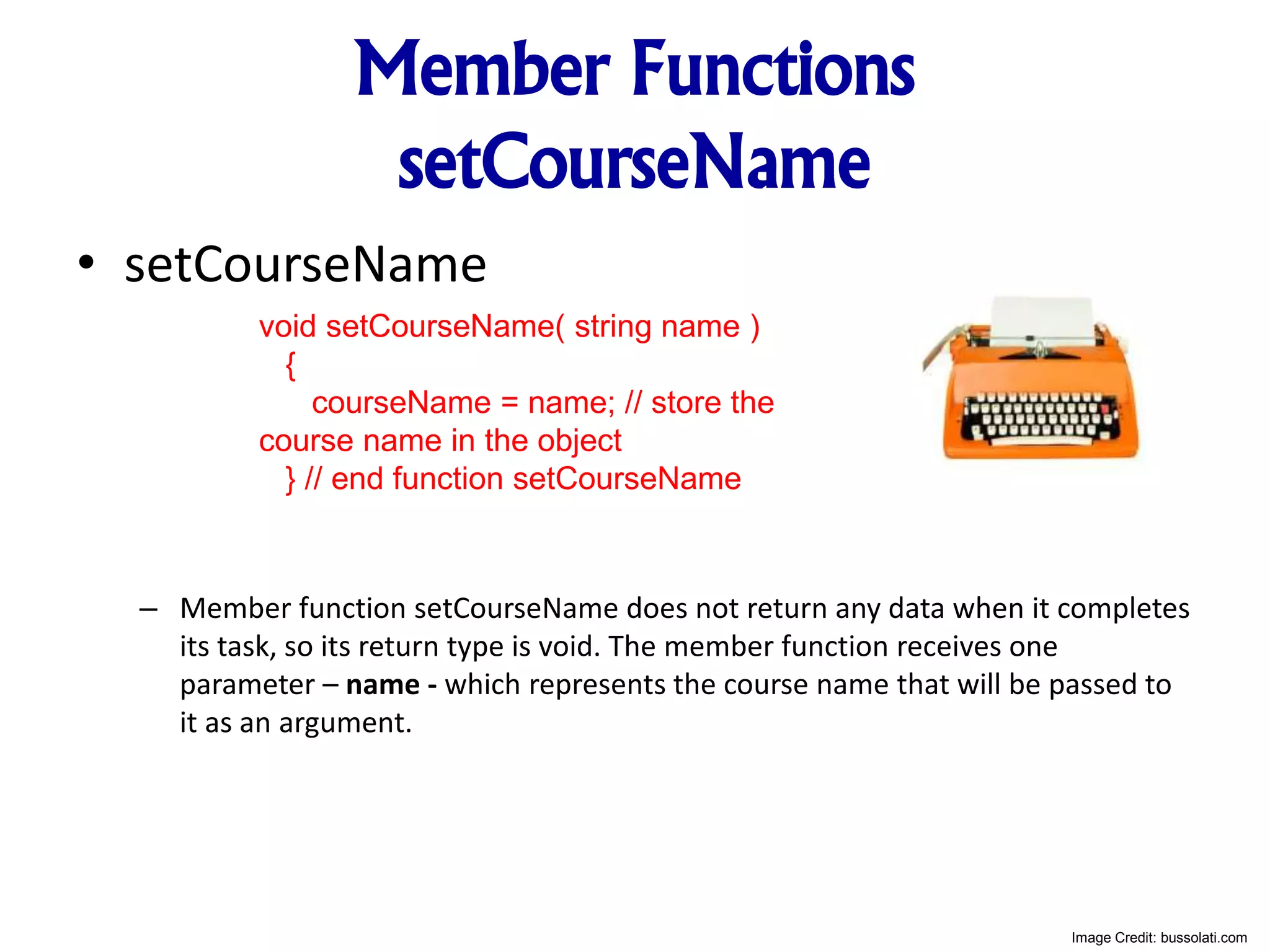
• setCourseName
– Member function setCourseName does not return any data when it completes
its task, so its return type is void. The member function receives one
parameter – name - which represents the course name that will be passed to
it as an argument.
void setCourseName( string name )
{
courseName = name; // store the
course name in the object
} // end function setCourseName
Image Credit: bussolati.com
Member Functions
getCourseName
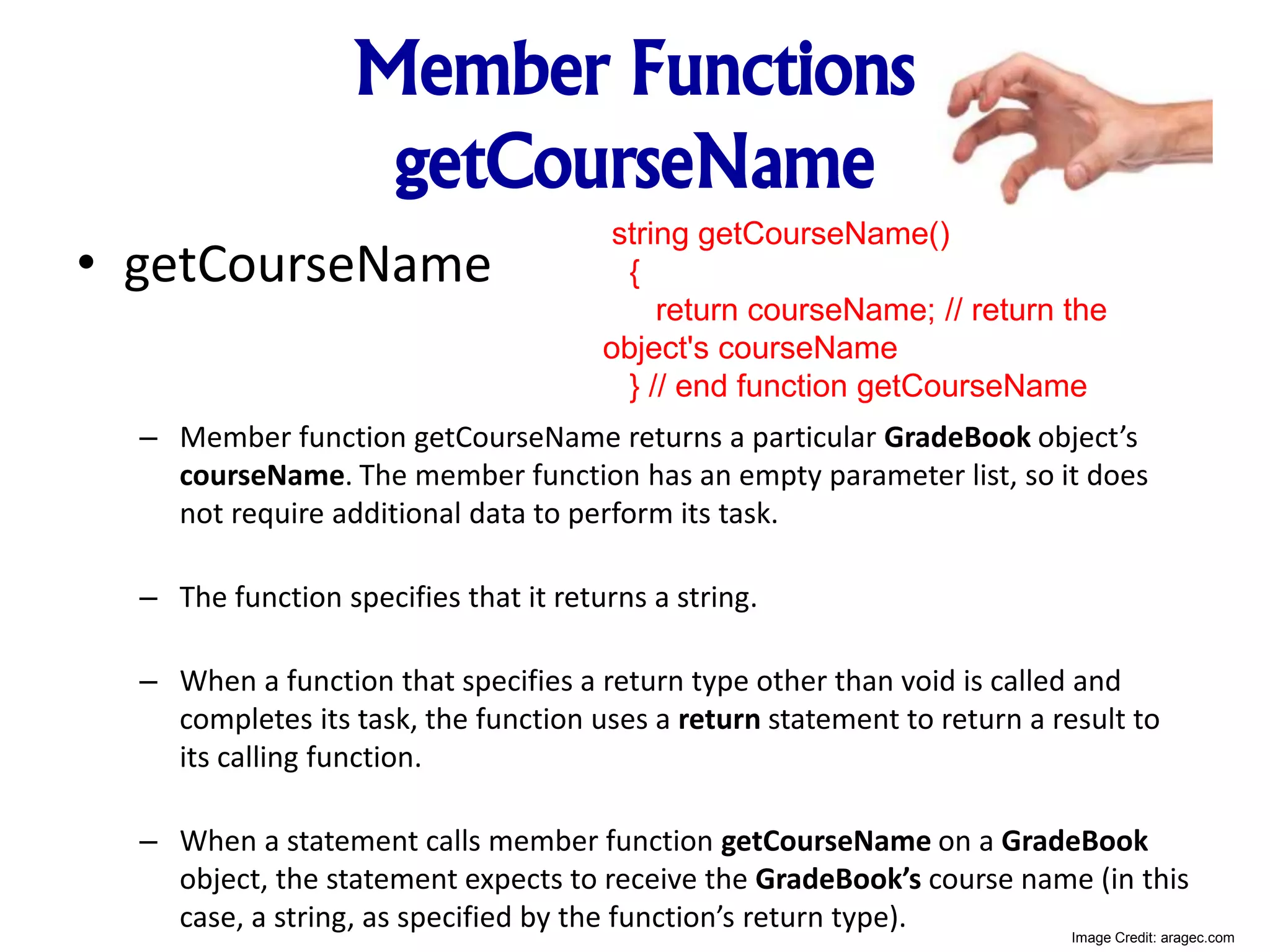
• getCourseName
– Member function getCourseName returns a particular GradeBook object’s
courseName. The member function has an empty parameter list, so it does
not require additional data to perform its task.
– The function specifies that it returns a string.
– When a function that specifies a return type other than void is called and
completes its task, the function uses a return statement to return a result to
its calling function.
– When a statement calls member function getCourseName on a GradeBook
object, the statement expects to receive the GradeBook’s course name (in this
case, a string, as specified by the function’s return type).
string getCourseName()
{
return courseName; // return the
object's courseName
} // end function getCourseName
Image Credit: aragec.com
Key Point
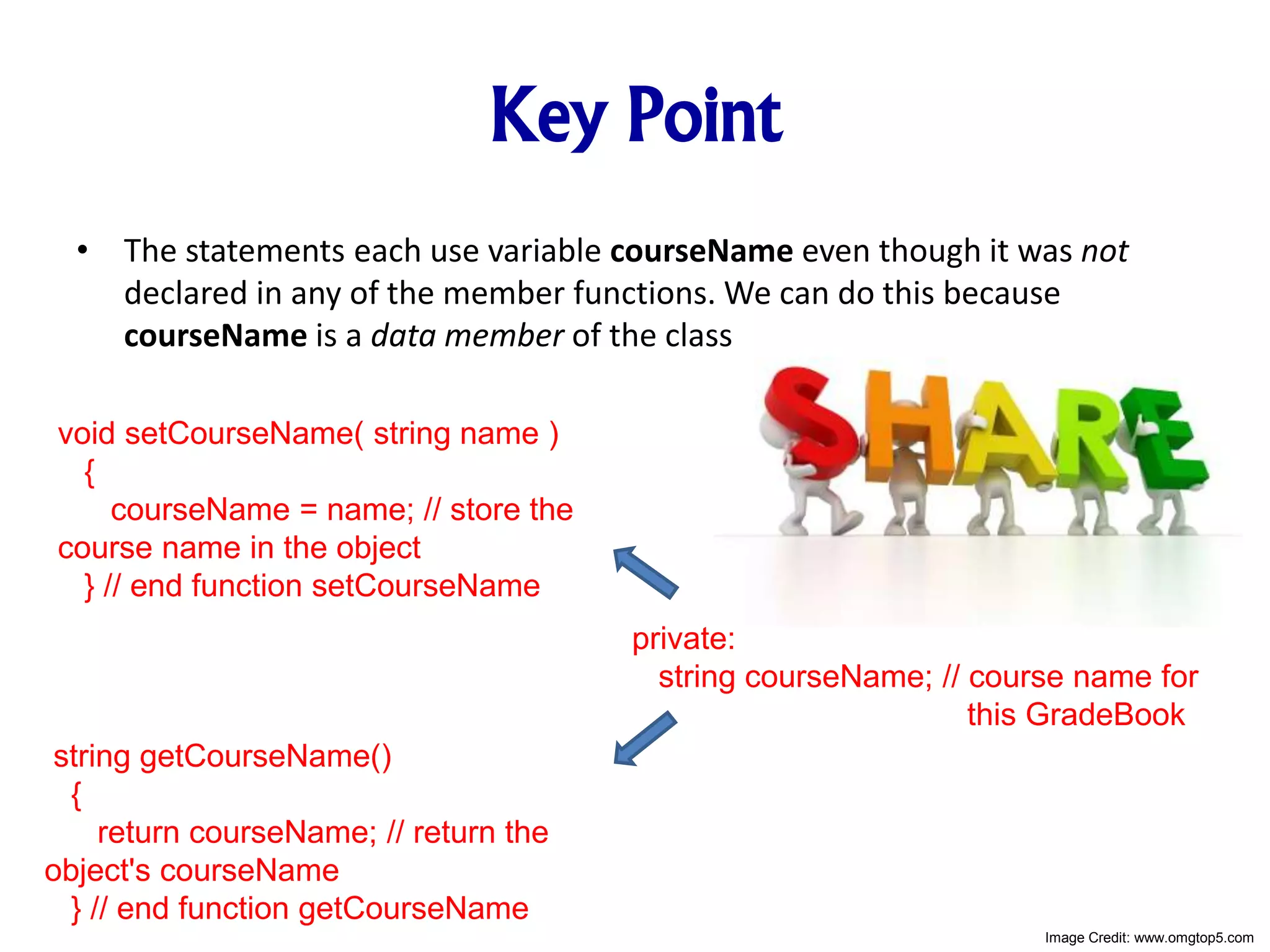
• The statements each use variable courseName even though it was not
declared in any of the member functions. We can do this because
courseName is a data member of the class
private:
string courseName; // course name for
this GradeBook
void setCourseName( string name )
{
courseName = name; // store the
course name in the object
} // end function setCourseName
string getCourseName()
{
return courseName; // return the
object's courseName
} // end function getCourseName
Image Credit: www.omgtop5.com
Member Function displayMessage
• displayMessage
– Member function
displayMessage does not return
any data when it completes its
task, so its return type is void.
– The function does not receive
parameters, so its parameter list
is empty. It outputs a welcome
message that includes the value
of data member courseName.
– It calls member function
getCourseName to obtain the
value of courseName.
void displayMessage()
{
// this statement calls getCourseName
to get the
// name of the course this GradeBook
represents
cout << "Welcome to the Grade Book
forn" << getCourseName() << "!"
<< endl;
} // end function displayMessage
private:
Image Credit: mikebonem.com
Software Engineering with
Set and Get Functions
• A class’s private data members can be manipulated only by member functions of
that class. So a client of an object—that is, any statement that calls the object’s
member functions from outside the object—calls the class’s public member
functions to request the class’s services for particular objects of the class.
• This is why the statements in function main call member functions
setCourseName, getCourseName and displayMessage on a GradeBook object.
• Classes often provide public member functions to allow clients of the class to set
(i.e., assign values to) or get (i.e., obtain the values of) private data members.
• These member function names need not begin with set or get, but this naming
convention is common. In this example, the member function that sets
the courseName data member is called setCourseName, and the member function
that gets the value of the courseName data member is called getCourseName.
Image Credit: www.enisa.europa.eu
Data Hiding
• Recall that declaring data members with access specifier private enforces data
hiding.
• Providing public set and get functions allows clients of a class to access the hidden
data, but only indirectly. The client knows that it’s attempting to modify or obtain
an object’s data, but the client does not know how the object performs these
operations.
• In some cases, a class may internally represent a piece of data one way, but expose
that data to clients in a different way.
Image Credit: www.techrangeela.com
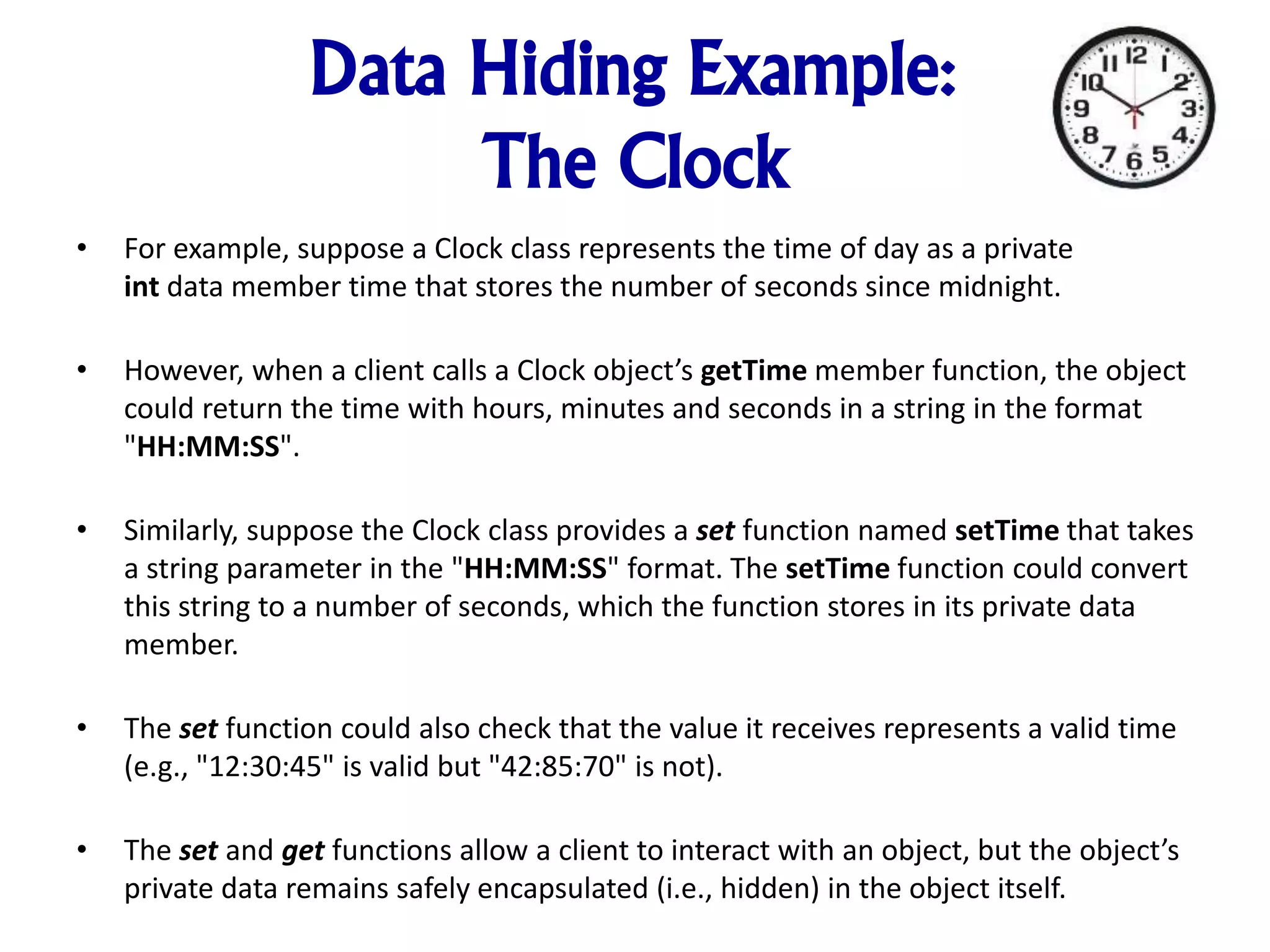
Data Hiding Example:
The Clock
• For example, suppose a Clock class represents the time of day as a private
int data member time that stores the number of seconds since midnight.
• However, when a client calls a Clock object’s getTime member function, the object
could return the time with hours, minutes and seconds in a string in the format
"HH:MM:SS".
• Similarly, suppose the Clock class provides a set function named setTime that takes
a string parameter in the "HH:MM:SS" format. The setTime function could convert
this string to a number of seconds, which the function stores in its private data
member.
• The set function could also check that the value it receives represents a valid time
(e.g., "12:30:45" is valid but "42:85:70" is not).
• The set and get functions allow a client to interact with an object, but the object’s
private data remains safely encapsulated (i.e., hidden) in the object itself.
Ok, But Why Did We Do
It The Way That We Did It?
• The set and get functions of a class also should be used by other member
functions within the class to manipulate the class’s private data, although these
member functions can access the private data directly.
• In our program, member functions setCourseName and getCourseName are public
member functions, so they’re accessible to clients of the class, as well as to the
class itself.
• Member function displayMessage calls member function getCourseName to
obtain the value of data member courseName for display purposes, even
though displayMessage can access courseName directly—accessing a data
member via its get function creates a better, more robust class (i.e., a class that’s
easier to maintain and less likely to malfunction).
• If we decide to change the data member courseName in some way,
the displayMessage definition will not require modification—only the bodies of
the get and set functions that directly manipulate the data member will need to
change. Image Credit: genius.com
Ok, But Why Did We Do
It The Way That We Did It?
• For example, suppose we want to represent the course name as two separate data
members—courseNumber (e.g., “COP2272") and courseTitle (e.g., "Introduction
to C++ Programming").
• Member function displayMessage can still issue a single call to member function
getCourseName to obtain the full course name to display as part of the welcome
message.
• In this case, getCourseName would need to build and return a string containing
the courseNumber followed by the courseTitle. Member function displayMessage
could continue to display the complete course title “COP2272 Introduction to C++
Programming.”
Image Credit: digitalhumanlibrary.com
Software Engineering Tips!
Image Credit: www.gograph.com, simpledeveloper.com
• Always try to localize the effects of changes to a class’s data
members by accessing and manipulating the data members
through their get and set functions
• Always try to localize the effects of changes to a class’s data
members by accessing and manipulating the data members
through their get and set functions
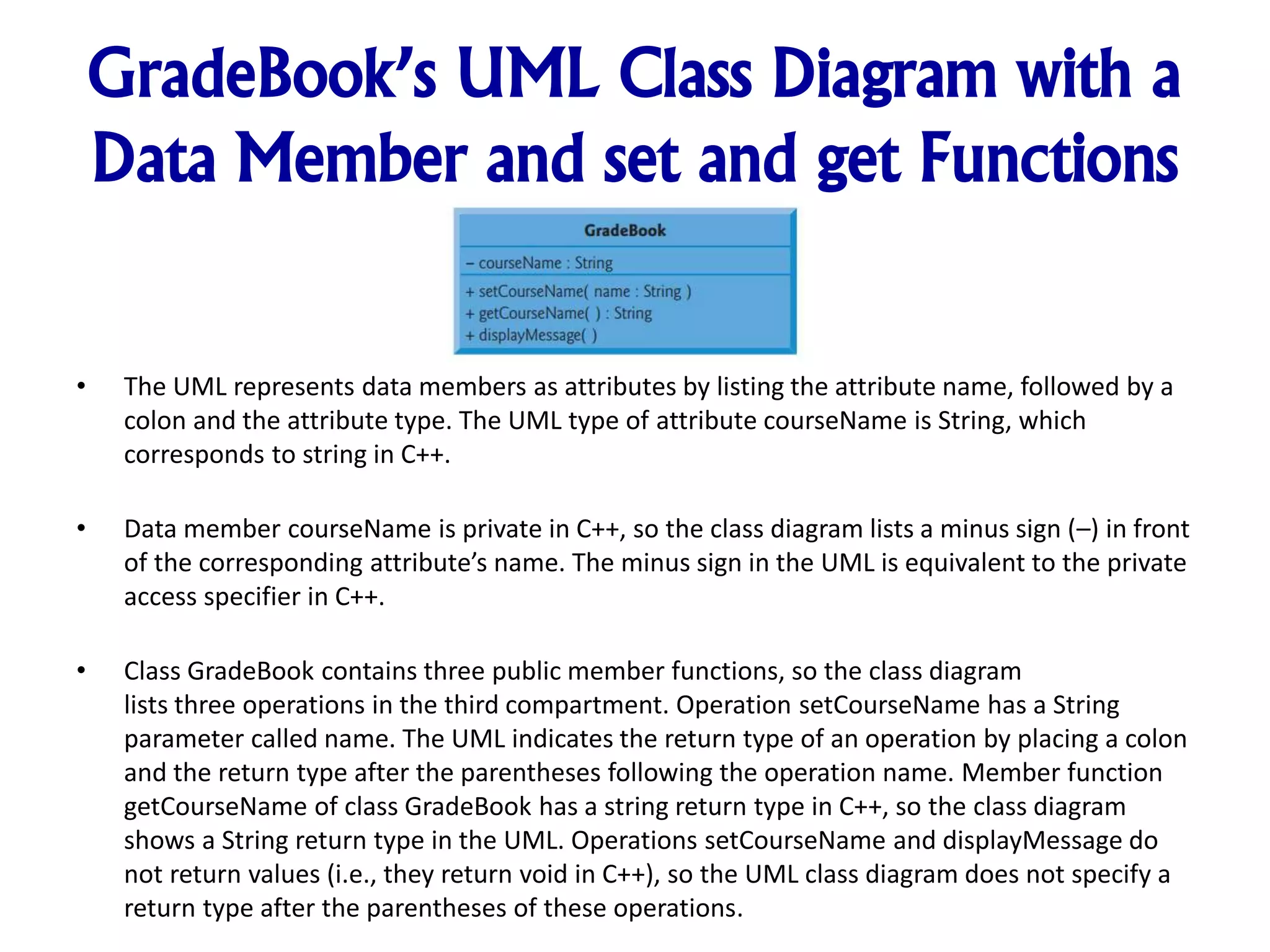
GradeBook’s UML Class Diagram with a
Data Member and set and get Functions
• The UML represents data members as attributes by listing the attribute name, followed by a
colon and the attribute type. The UML type of attribute courseName is String, which
corresponds to string in C++.
• Data member courseName is private in C++, so the class diagram lists a minus sign (–) in front
of the corresponding attribute’s name. The minus sign in the UML is equivalent to the private
access specifier in C++.
• Class GradeBook contains three public member functions, so the class diagram
lists three operations in the third compartment. Operation setCourseName has a String
parameter called name. The UML indicates the return type of an operation by placing a colon
and the return type after the parentheses following the operation name. Member function
getCourseName of class GradeBook has a string return type in C++, so the class diagram
shows a String return type in the UML. Operations setCourseName and displayMessage do
not return values (i.e., they return void in C++), so the UML class diagram does not specify a
return type after the parentheses of these operations.
Initializing Objects with Constructors
• When an object of class GradeBook is created, its data member courseName is
initialized to the empty string by default.
• What if you want to provide a course name when you create a GradeBook object?
• Each class you declare can provide a constructor that can be used to initialize an
object of the class when the object is created. A constructor is a special member
function that must be defined with the same name as the class, so that the
compiler can distinguish it from the class’s other member
functions.
• An important difference between constructors and other functions is that
constructors cannot return values, so they cannot specify a return type (not even
void).
• Normally, constructors are declared public.
Image Credit: forums.autodesk.com
Initializing Objects with Constructors
• C++ requires a constructor call for each object that’s created, which helps ensure
that each object is initialized properly before it’s used in a program.
• The constructor call occurs implicitly when the object is created. If a class does not
explicitly include a constructor, the compiler provides a default constructor—that
is, a constructor with no parameters.
• For example, when we create a GradeBook object, the default constructor is
called. The default constructor provided by the compiler creates a GradeBook
object without giving any initial values to the object’s fundamental type data
members.
Image Credit: www.itcuties.com
Our Next Program
• In this example code, we specify a course name for a
GradeBook object when the object is created.
• In this case, the argument "CS101 Introduction to C++
Programming" is passed to the GradeBook object’s
constructor and used to initialize the courseName.
• The code defines a modified GradeBook class containing a
constructor with a string parameter that receives the initial
course name.
Image Credit: www.blog.thefearlessfactor.com
Initializing Objects with Constructors
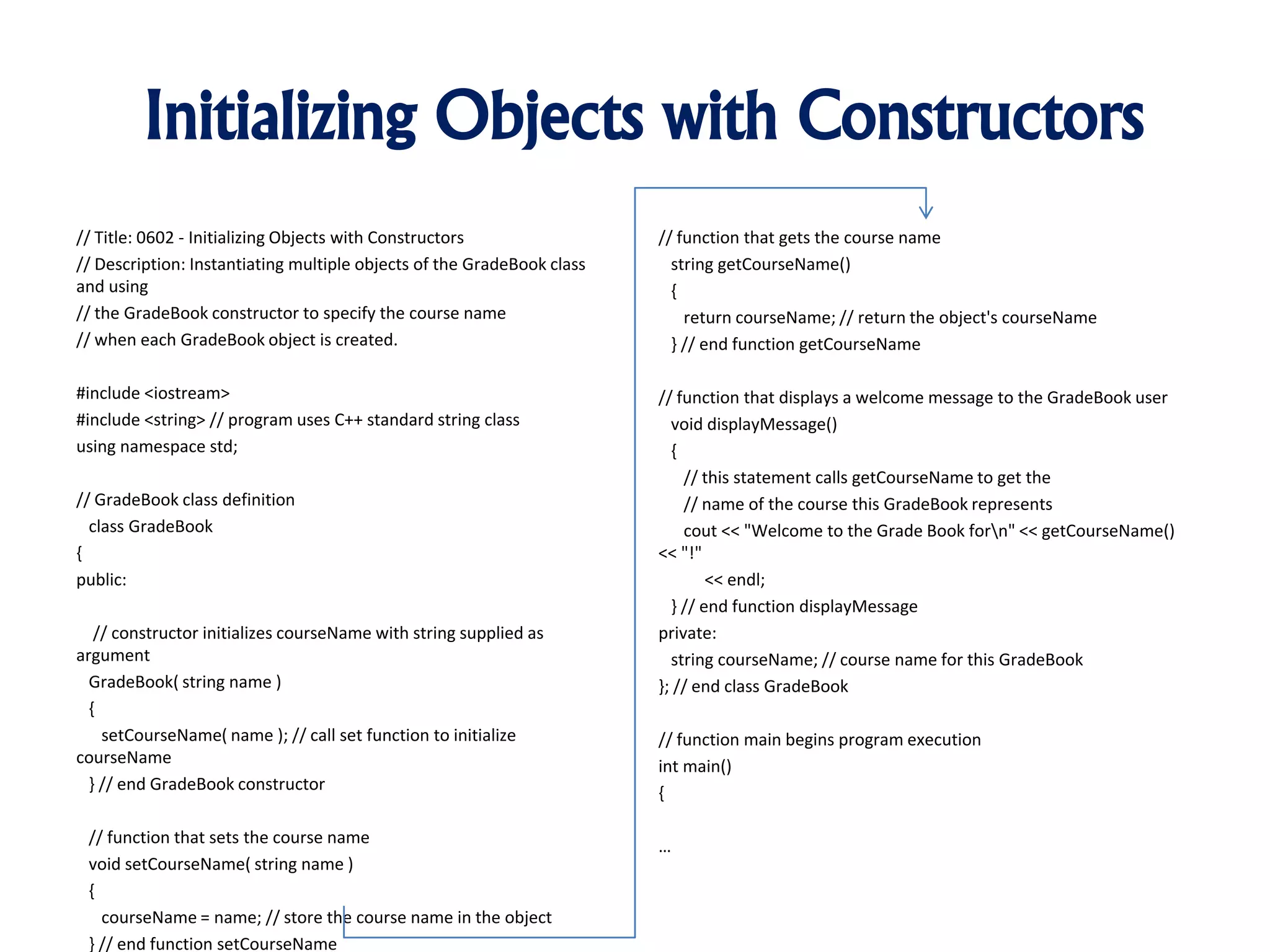
// Title: 0602 - Initializing Objects with Constructors
// Description: Instantiating multiple objects of the GradeBook class
and using
// the GradeBook constructor to specify the course name
// when each GradeBook object is created.
#include <iostream>
#include <string> // program uses C++ standard string class
using namespace std;
// GradeBook class definition
class GradeBook
{
public:
// constructor initializes courseName with string supplied as
argument
GradeBook( string name )
{
setCourseName( name ); // call set function to initialize
courseName
} // end GradeBook constructor
// function that sets the course name
void setCourseName( string name )
{
courseName = name; // store the course name in the object
} // end function setCourseName
// function that gets the course name
string getCourseName()
{
return courseName; // return the object's courseName
} // end function getCourseName
// function that displays a welcome message to the GradeBook user
void displayMessage()
{
// this statement calls getCourseName to get the
// name of the course this GradeBook represents
cout << "Welcome to the Grade Book forn" << getCourseName()
<< "!"
<< endl;
} // end function displayMessage
private:
string courseName; // course name for this GradeBook
}; // end class GradeBook
// function main begins program execution
int main()
{
…
Defining a Constructor
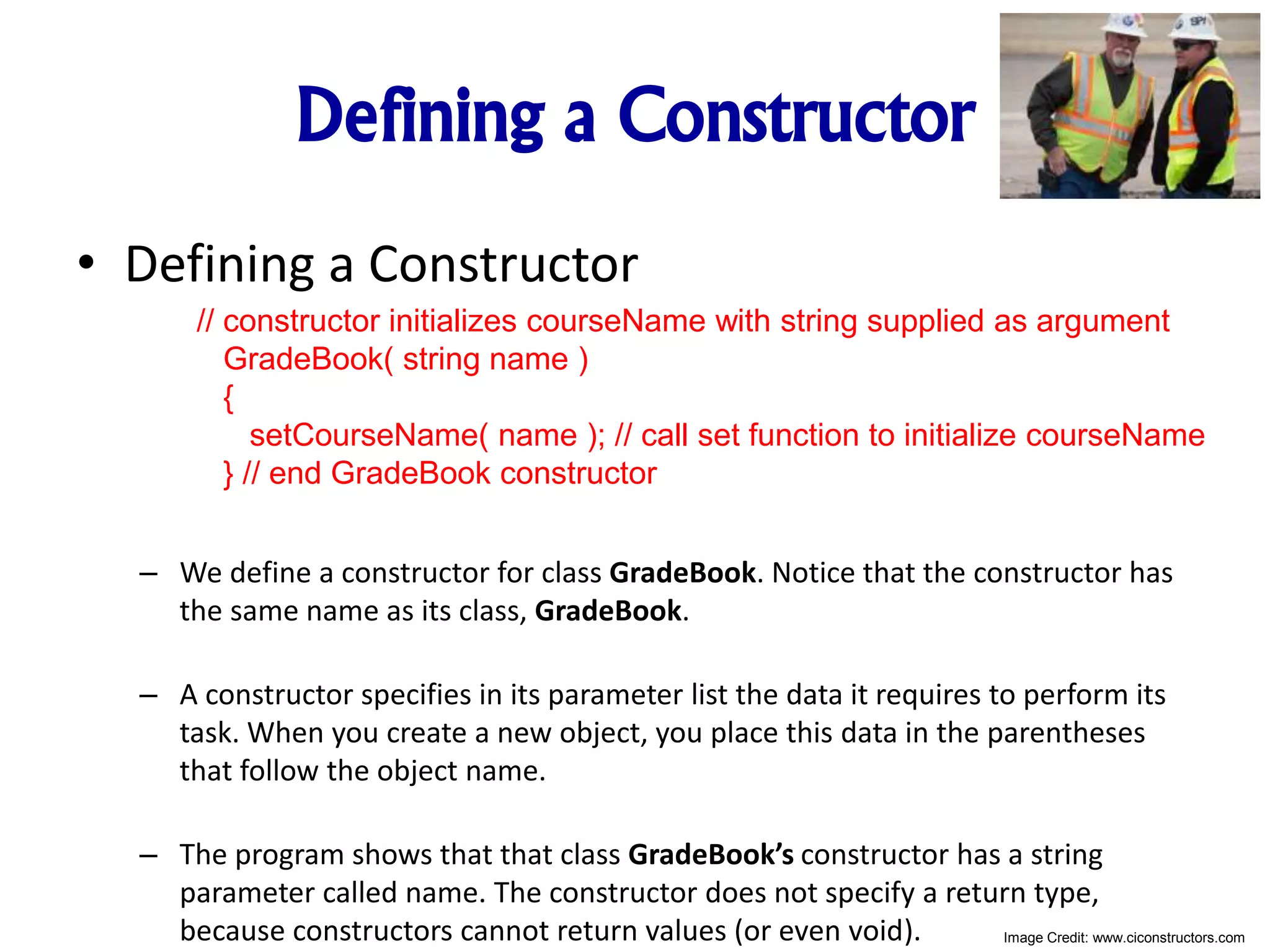
• Defining a Constructor
– We define a constructor for class GradeBook. Notice that the constructor has
the same name as its class, GradeBook.
– A constructor specifies in its parameter list the data it requires to perform its
task. When you create a new object, you place this data in the parentheses
that follow the object name.
– The program shows that that class GradeBook’s constructor has a string
parameter called name. The constructor does not specify a return type,
because constructors cannot return values (or even void).
// constructor initializes courseName with string supplied as argument
GradeBook( string name )
{
setCourseName( name ); // call set function to initialize courseName
} // end GradeBook constructor
Image Credit: www.ciconstructors.com
Defining a Constructor
– The call to setCourseName in the constructor’s body passes the constructor’s
parameter name to member function setCourseName, which simply assigns
the value of its parameter to data member courseName.
– You might be wondering why we make the call to setCourseName — the
constructor certainly could perform the assignment courseName = name.
– Later we’ll modify setCourseName to perform validation. At that point the
benefits of calling setCourseName from the constructor will become clear.
– Both the constructor and the setCourseName function use a parameter called
name. You can use the same parameter names in different functions because
the parameters are local to each function; they do not interfere with one
another.
Image Credit: www.thebluebook.com
What We Covered Today
1. We discussed the difference between a local
variable of a member function and a data
member of a class. We also showed how to
use a constructor to specify initial values for
an object’s data members.
2. You learned how to separate the interface of
a class from its implementation to promote
good software engineering.
3. We presented a diagram that shows the files
that class-implementation programmers and
client-code programmers need to compile
the code they write.
Image Credit: http://www.tswdj.com/blog/2011/05/17/the-grooms-checklist/
What We’ll Be Covering Next Time
1. How to define a class and
use it to create an object.
2. How to implement a class’s
behaviors as member
functions.
3. How to implement a class’s
attributes as data
members.
Image Credit: http://merchantblog.thefind.com/2011/01/merchant-newsletter/resolve-to-take-advantage-of-these-5-e-commerce-trends/attachment/crystal-ball-fullsize/
An Introduction To Software
Development Using C++
Class #6:
Revisiting the
Checkbook Problem
What’s In Your C++ Toolbox?
cout / cin #include if Math Class String getline
Homework #1:
The Four-Way Stoplight Problem
• Smallville is planning on installing the town’s
first four-way stoplight
• You have been hired to program the stoplight
control system.
• Your project is due on
Tuesday, 09/22/2015
Image Credit: www.zoomvillage.com
Today’s In-Class C++
Programming Assignment
• Write a program that reads
in five integers and
determines and prints the
largest and the smallest
integers in the group.
• Use only the programming
techniques we have
covered so far.
Image Credit: www.illustrationsource.com
Answer To Today’s Challenge
// In-Class Exercise #3 - Largest & Smallest
#include <iostream>
using std::cout;
using std::endl;
using std::cin;
int main()
{
int num1, num2, num3, num4, num5, largest, smallest;
cout << "Enter five integers: ";
cin >> num1 >> num2 >> num3 >> num4 >> num5;
largest = num1;
smallest = num1;
if ( num1 > largest )
largest = num1;
if ( num2 > largest )
largest = num2;
if ( num3 > largest )
largest = num3;
if ( num4 > largest )
largest = num4;
if ( num5 > largest )
largest = num5;
if ( num1 < smallest )
smallest = num1;
if ( num2 < smallest )
smallest = num2;
if ( num3 < smallest )
smallest = num3;
if ( num4 < smallest )
smallest = num4;
if ( num5 < smallest )
smallest = num5;
cout << "Largest is " << largest
<< "nSmallest is " << smallest << endl;
return 0;
} Image Credit: www.pagluu.com
Today’s Programming Challenge:
The Checkbook, Part II
• Modify your checkbook program from last class.
• Create two checkbooks. Give each checkbook a name: “Tim” and “Becky” using
constructors.
• In the checkbook, store the current balance as a delta from $500 which is the
bank’s minimum balance for a checking account.
• Display a warning message if the account goes below the minimum balance.
• Deposit $700 in Tim’s account.
• Print the amount currently available in both accounts.
• Deposit $1,500 in Becky’s account.
• Print the amount currently available in both accounts.
• Withdraw $200 from Tim’s account
• Print the amount currently available in both accounts.
• Withdraw $1,000 from Becky’s account
• Print the amount currently available in both accounts.
What We Covered Today
1. Created a program to
read in 5 integers.
2. Picked out the largest
3. Picked out the smallest
4. Printed our answers.
5. Revisited our checkbook
program
Image Credit: http://www.tswdj.com/blog/2011/05/17/the-grooms-checklist/
What We’ll Be Covering Next Time
1. UML 2.0
Class Diagrams
Image Credit: http://merchantblog.thefind.com/2011/01/merchant-newsletter/resolve-to-take-advantage-of-these-5-e-commerce-trends/attachment/crystal-ball-fullsize/

Intro To C++ - Class 06 - Introduction To Classes, Objects, & Strings, Part II

  • 1.
    An Introduction ToSoftware Development Using C++ Class #6: Introduction To Classes, Objects, & Strings
  • 2.
    Local Variables • Wehave been declaring all of a program’s variables in its main function. • Variables declared in a function definition’s body are known as local variables and can be used only from the line of their declaration in the function to closing right brace (}) of the block in which they’re declared. • A local variable must be declared before it can be used in a function. • A local variable cannot be accessed outside the function in which it’s declared. When a function terminates, the values of its local variables are lost. Image Credit: deniseleeyohn.com
  • 3.
    Class Attributes • Aclass normally consists of one or more member functions that manipulate the attributes that belong to a particular object of the class. • Attributes are represented as variables in a class definition. Such variables are called data members and are declared inside a class definition but outside the bodies of the class’s member-function definitions. • Each object of a class maintains its own copy of its attributes in memory. These attributes exist throughout the life of the object. • The example in this section demonstrates a GradeBook class that contains a courseName data member to represent a particular GradeBook object’s course name. Image Credit: colleendilen.com
  • 4.
    Our Next Program •In our next example, the program maintains the course name as a data member so that it can be used or modified at any time during a program’s execution. • The class contains member functions setCourseName, getCourseName and displayMessage. Member function setCourseName stores a course name in a GradeBook data member. • Member function getCourseName obtains the course name from that data member. • Member function displayMessage—which now specifies no parameters — still displays a welcome message that includes the course name. • However, as you’ll see, the function now obtains the course name by calling another function in the same class—getCourseName. Image Credit: www.illustrationsource.com
  • 5.
    GradeBook Class witha Data Member, a set Function and a get Function // File Name: 06 Class 01 - Data Mbr, Get & Set.cpp // Title: The GradeBook Class Program with a Parameter // Description: Define class GradeBook that contains a courseName data member // and member functions to set and get its value; //Create and manipulate a GradeBook object with these functions. #include <iostream> #include <string> // program uses C++ standard string class using namespace std; // GradeBook class definition class GradeBook { public: // function that sets the course name void setCourseName( string name ) { courseName = name; // store the course name in the object } // end function setCourseName // function that gets the course name string getCourseName() { return courseName; // return the object's courseName } // end function getCourseName // function that displays a welcome message to the GradeBook user void displayMessage() { // this statement calls getCourseName to get the // name of the course this GradeBook represents cout << "Welcome to the Grade Book forn" << getCourseName() << "!" << endl; } // end function displayMessage private: string courseName; // course name for this GradeBook }; // end class GradeBook // function main begins program execution int main() { string nameOfCourse; // string of characters to store the course name GradeBook myGradeBook; // create a GradeBook object named myGradeBook // display initial value of courseName cout << "Initial course name is: " << myGradeBook.getCourseName() << endl; // prompt for, input and set course name cout << "nPlease enter the course name:" << endl; getline( cin, nameOfCourse ); // read a course name with blanks myGradeBook.setCourseName( nameOfCourse ); // set the course name cout << endl; // outputs a blank line myGradeBook.displayMessage(); // display message with new course name } // end main
  • 6.
    Run The Program! ImageCredit: globe-views.com
  • 7.
    Why Keep MakingChanges? • A typical instructor teaches multiple courses, each with its own course name. • The program declares that courseName is a variable of type string. Because the variable is declared in the class definition but outside the bodies of the class’s member-function definitions, the variable is a data member. • Every instance (i.e., object) of class GradeBook contains one copy of each of the class’s data members—if there are two GradeBook objects, each has its own copy of courseName (one per object) • A benefit of making courseName a data member is that all the member functions of the class can manipulate any data members that appear in the class definition (in this case, courseName). Image Credit: www.joshuanhook.com
  • 8.
    Access Specifiers: public andprivate • Most data-member declarations appear after the private access specifier. Variables or functions declared after access specifier private are accessible only to member functions of the class for which they’re declared. • Thus, data member courseName can be used only in member functions setCourseName, getCourseName and displayMessage of class GradeBook. • The default access for class members is private so all members after the class header and before the first access specifier (if there are any) are private. The access specifiers public and private may be repeated, but this is unnecessary and can be confusing. • Declaring data members with access specifier private is known as data hiding. • When a program creates a GradeBook object, data member courseName is encapsulated (hidden) in the object and can be accessed only by member functions of the object’s class. In class GradeBook, member functions setCourseName and getCourseName manipulate the data member courseName directly. Image Credit: engagor.com
  • 9.
    Software Engineering Tips! •An attempt by a function, which is not a member of a particular class to access a private member of that class is a compilation error. Image Credit: www.crosstest.com , searchengineland.com , www.gograph.com • Make the data members of a class private and the member functions of the class public. This facilitates debugging because problems with data manipulations are localized to the class’s member functions. • Generally, data members should be declared private and member functions should be declared public.
  • 10.
    Member Functions setCourseName • setCourseName –Member function setCourseName does not return any data when it completes its task, so its return type is void. The member function receives one parameter – name - which represents the course name that will be passed to it as an argument. void setCourseName( string name ) { courseName = name; // store the course name in the object } // end function setCourseName Image Credit: bussolati.com
  • 11.
    Member Functions getCourseName • getCourseName –Member function getCourseName returns a particular GradeBook object’s courseName. The member function has an empty parameter list, so it does not require additional data to perform its task. – The function specifies that it returns a string. – When a function that specifies a return type other than void is called and completes its task, the function uses a return statement to return a result to its calling function. – When a statement calls member function getCourseName on a GradeBook object, the statement expects to receive the GradeBook’s course name (in this case, a string, as specified by the function’s return type). string getCourseName() { return courseName; // return the object's courseName } // end function getCourseName Image Credit: aragec.com
  • 12.
    Key Point • Thestatements each use variable courseName even though it was not declared in any of the member functions. We can do this because courseName is a data member of the class private: string courseName; // course name for this GradeBook void setCourseName( string name ) { courseName = name; // store the course name in the object } // end function setCourseName string getCourseName() { return courseName; // return the object's courseName } // end function getCourseName Image Credit: www.omgtop5.com
  • 13.
    Member Function displayMessage •displayMessage – Member function displayMessage does not return any data when it completes its task, so its return type is void. – The function does not receive parameters, so its parameter list is empty. It outputs a welcome message that includes the value of data member courseName. – It calls member function getCourseName to obtain the value of courseName. void displayMessage() { // this statement calls getCourseName to get the // name of the course this GradeBook represents cout << "Welcome to the Grade Book forn" << getCourseName() << "!" << endl; } // end function displayMessage private: Image Credit: mikebonem.com
  • 14.
    Software Engineering with Setand Get Functions • A class’s private data members can be manipulated only by member functions of that class. So a client of an object—that is, any statement that calls the object’s member functions from outside the object—calls the class’s public member functions to request the class’s services for particular objects of the class. • This is why the statements in function main call member functions setCourseName, getCourseName and displayMessage on a GradeBook object. • Classes often provide public member functions to allow clients of the class to set (i.e., assign values to) or get (i.e., obtain the values of) private data members. • These member function names need not begin with set or get, but this naming convention is common. In this example, the member function that sets the courseName data member is called setCourseName, and the member function that gets the value of the courseName data member is called getCourseName. Image Credit: www.enisa.europa.eu
  • 15.
    Data Hiding • Recallthat declaring data members with access specifier private enforces data hiding. • Providing public set and get functions allows clients of a class to access the hidden data, but only indirectly. The client knows that it’s attempting to modify or obtain an object’s data, but the client does not know how the object performs these operations. • In some cases, a class may internally represent a piece of data one way, but expose that data to clients in a different way. Image Credit: www.techrangeela.com
  • 16.
    Data Hiding Example: TheClock • For example, suppose a Clock class represents the time of day as a private int data member time that stores the number of seconds since midnight. • However, when a client calls a Clock object’s getTime member function, the object could return the time with hours, minutes and seconds in a string in the format "HH:MM:SS". • Similarly, suppose the Clock class provides a set function named setTime that takes a string parameter in the "HH:MM:SS" format. The setTime function could convert this string to a number of seconds, which the function stores in its private data member. • The set function could also check that the value it receives represents a valid time (e.g., "12:30:45" is valid but "42:85:70" is not). • The set and get functions allow a client to interact with an object, but the object’s private data remains safely encapsulated (i.e., hidden) in the object itself.
  • 17.
    Ok, But WhyDid We Do It The Way That We Did It? • The set and get functions of a class also should be used by other member functions within the class to manipulate the class’s private data, although these member functions can access the private data directly. • In our program, member functions setCourseName and getCourseName are public member functions, so they’re accessible to clients of the class, as well as to the class itself. • Member function displayMessage calls member function getCourseName to obtain the value of data member courseName for display purposes, even though displayMessage can access courseName directly—accessing a data member via its get function creates a better, more robust class (i.e., a class that’s easier to maintain and less likely to malfunction). • If we decide to change the data member courseName in some way, the displayMessage definition will not require modification—only the bodies of the get and set functions that directly manipulate the data member will need to change. Image Credit: genius.com
  • 18.
    Ok, But WhyDid We Do It The Way That We Did It? • For example, suppose we want to represent the course name as two separate data members—courseNumber (e.g., “COP2272") and courseTitle (e.g., "Introduction to C++ Programming"). • Member function displayMessage can still issue a single call to member function getCourseName to obtain the full course name to display as part of the welcome message. • In this case, getCourseName would need to build and return a string containing the courseNumber followed by the courseTitle. Member function displayMessage could continue to display the complete course title “COP2272 Introduction to C++ Programming.” Image Credit: digitalhumanlibrary.com
  • 19.
    Software Engineering Tips! ImageCredit: www.gograph.com, simpledeveloper.com • Always try to localize the effects of changes to a class’s data members by accessing and manipulating the data members through their get and set functions • Always try to localize the effects of changes to a class’s data members by accessing and manipulating the data members through their get and set functions
  • 20.
    GradeBook’s UML ClassDiagram with a Data Member and set and get Functions • The UML represents data members as attributes by listing the attribute name, followed by a colon and the attribute type. The UML type of attribute courseName is String, which corresponds to string in C++. • Data member courseName is private in C++, so the class diagram lists a minus sign (–) in front of the corresponding attribute’s name. The minus sign in the UML is equivalent to the private access specifier in C++. • Class GradeBook contains three public member functions, so the class diagram lists three operations in the third compartment. Operation setCourseName has a String parameter called name. The UML indicates the return type of an operation by placing a colon and the return type after the parentheses following the operation name. Member function getCourseName of class GradeBook has a string return type in C++, so the class diagram shows a String return type in the UML. Operations setCourseName and displayMessage do not return values (i.e., they return void in C++), so the UML class diagram does not specify a return type after the parentheses of these operations.
  • 21.
    Initializing Objects withConstructors • When an object of class GradeBook is created, its data member courseName is initialized to the empty string by default. • What if you want to provide a course name when you create a GradeBook object? • Each class you declare can provide a constructor that can be used to initialize an object of the class when the object is created. A constructor is a special member function that must be defined with the same name as the class, so that the compiler can distinguish it from the class’s other member functions. • An important difference between constructors and other functions is that constructors cannot return values, so they cannot specify a return type (not even void). • Normally, constructors are declared public. Image Credit: forums.autodesk.com
  • 22.
    Initializing Objects withConstructors • C++ requires a constructor call for each object that’s created, which helps ensure that each object is initialized properly before it’s used in a program. • The constructor call occurs implicitly when the object is created. If a class does not explicitly include a constructor, the compiler provides a default constructor—that is, a constructor with no parameters. • For example, when we create a GradeBook object, the default constructor is called. The default constructor provided by the compiler creates a GradeBook object without giving any initial values to the object’s fundamental type data members. Image Credit: www.itcuties.com
  • 23.
    Our Next Program •In this example code, we specify a course name for a GradeBook object when the object is created. • In this case, the argument "CS101 Introduction to C++ Programming" is passed to the GradeBook object’s constructor and used to initialize the courseName. • The code defines a modified GradeBook class containing a constructor with a string parameter that receives the initial course name. Image Credit: www.blog.thefearlessfactor.com
  • 24.
    Initializing Objects withConstructors // Title: 0602 - Initializing Objects with Constructors // Description: Instantiating multiple objects of the GradeBook class and using // the GradeBook constructor to specify the course name // when each GradeBook object is created. #include <iostream> #include <string> // program uses C++ standard string class using namespace std; // GradeBook class definition class GradeBook { public: // constructor initializes courseName with string supplied as argument GradeBook( string name ) { setCourseName( name ); // call set function to initialize courseName } // end GradeBook constructor // function that sets the course name void setCourseName( string name ) { courseName = name; // store the course name in the object } // end function setCourseName // function that gets the course name string getCourseName() { return courseName; // return the object's courseName } // end function getCourseName // function that displays a welcome message to the GradeBook user void displayMessage() { // this statement calls getCourseName to get the // name of the course this GradeBook represents cout << "Welcome to the Grade Book forn" << getCourseName() << "!" << endl; } // end function displayMessage private: string courseName; // course name for this GradeBook }; // end class GradeBook // function main begins program execution int main() { …
  • 25.
    Defining a Constructor •Defining a Constructor – We define a constructor for class GradeBook. Notice that the constructor has the same name as its class, GradeBook. – A constructor specifies in its parameter list the data it requires to perform its task. When you create a new object, you place this data in the parentheses that follow the object name. – The program shows that that class GradeBook’s constructor has a string parameter called name. The constructor does not specify a return type, because constructors cannot return values (or even void). // constructor initializes courseName with string supplied as argument GradeBook( string name ) { setCourseName( name ); // call set function to initialize courseName } // end GradeBook constructor Image Credit: www.ciconstructors.com
  • 26.
    Defining a Constructor –The call to setCourseName in the constructor’s body passes the constructor’s parameter name to member function setCourseName, which simply assigns the value of its parameter to data member courseName. – You might be wondering why we make the call to setCourseName — the constructor certainly could perform the assignment courseName = name. – Later we’ll modify setCourseName to perform validation. At that point the benefits of calling setCourseName from the constructor will become clear. – Both the constructor and the setCourseName function use a parameter called name. You can use the same parameter names in different functions because the parameters are local to each function; they do not interfere with one another. Image Credit: www.thebluebook.com
  • 27.
    What We CoveredToday 1. We discussed the difference between a local variable of a member function and a data member of a class. We also showed how to use a constructor to specify initial values for an object’s data members. 2. You learned how to separate the interface of a class from its implementation to promote good software engineering. 3. We presented a diagram that shows the files that class-implementation programmers and client-code programmers need to compile the code they write. Image Credit: http://www.tswdj.com/blog/2011/05/17/the-grooms-checklist/
  • 28.
    What We’ll BeCovering Next Time 1. How to define a class and use it to create an object. 2. How to implement a class’s behaviors as member functions. 3. How to implement a class’s attributes as data members. Image Credit: http://merchantblog.thefind.com/2011/01/merchant-newsletter/resolve-to-take-advantage-of-these-5-e-commerce-trends/attachment/crystal-ball-fullsize/
  • 29.
    An Introduction ToSoftware Development Using C++ Class #6: Revisiting the Checkbook Problem
  • 30.
    What’s In YourC++ Toolbox? cout / cin #include if Math Class String getline
  • 31.
    Homework #1: The Four-WayStoplight Problem • Smallville is planning on installing the town’s first four-way stoplight • You have been hired to program the stoplight control system. • Your project is due on Tuesday, 09/22/2015 Image Credit: www.zoomvillage.com
  • 32.
    Today’s In-Class C++ ProgrammingAssignment • Write a program that reads in five integers and determines and prints the largest and the smallest integers in the group. • Use only the programming techniques we have covered so far. Image Credit: www.illustrationsource.com
  • 33.
    Answer To Today’sChallenge // In-Class Exercise #3 - Largest & Smallest #include <iostream> using std::cout; using std::endl; using std::cin; int main() { int num1, num2, num3, num4, num5, largest, smallest; cout << "Enter five integers: "; cin >> num1 >> num2 >> num3 >> num4 >> num5; largest = num1; smallest = num1; if ( num1 > largest ) largest = num1; if ( num2 > largest ) largest = num2; if ( num3 > largest ) largest = num3; if ( num4 > largest ) largest = num4; if ( num5 > largest ) largest = num5; if ( num1 < smallest ) smallest = num1; if ( num2 < smallest ) smallest = num2; if ( num3 < smallest ) smallest = num3; if ( num4 < smallest ) smallest = num4; if ( num5 < smallest ) smallest = num5; cout << "Largest is " << largest << "nSmallest is " << smallest << endl; return 0; } Image Credit: www.pagluu.com
  • 34.
    Today’s Programming Challenge: TheCheckbook, Part II • Modify your checkbook program from last class. • Create two checkbooks. Give each checkbook a name: “Tim” and “Becky” using constructors. • In the checkbook, store the current balance as a delta from $500 which is the bank’s minimum balance for a checking account. • Display a warning message if the account goes below the minimum balance. • Deposit $700 in Tim’s account. • Print the amount currently available in both accounts. • Deposit $1,500 in Becky’s account. • Print the amount currently available in both accounts. • Withdraw $200 from Tim’s account • Print the amount currently available in both accounts. • Withdraw $1,000 from Becky’s account • Print the amount currently available in both accounts.
  • 35.
    What We CoveredToday 1. Created a program to read in 5 integers. 2. Picked out the largest 3. Picked out the smallest 4. Printed our answers. 5. Revisited our checkbook program Image Credit: http://www.tswdj.com/blog/2011/05/17/the-grooms-checklist/
  • 36.
    What We’ll BeCovering Next Time 1. UML 2.0 Class Diagrams Image Credit: http://merchantblog.thefind.com/2011/01/merchant-newsletter/resolve-to-take-advantage-of-these-5-e-commerce-trends/attachment/crystal-ball-fullsize/

Editor's Notes

  • #2 New name for the class I know what this means Technical professionals are who get hired This means much more than just having a narrow vertical knowledge of some subject area. It means that you know how to produce an outcome that I value. I’m willing to pay you to do that.
  • #30 New name for the class I know what this means Technical professionals are who get hired This means much more than just having a narrow vertical knowledge of some subject area. It means that you know how to produce an outcome that I value. I’m willing to pay you to do that.