Natalie Wyrick


Internet Safety
       A
Parent’s Guide
E-pal Assignment

We are beginning an assignment that will require
your child to have an e-pal. We will be doing this
with another class at another school over the
internet. Before we start we want parents to be a
little more informed about internet safety. We
designed this powerpoint to give you more
information about internet safety so you can
prepare yourself and your student for the project at
hand. Thanks so much for your cooperation.
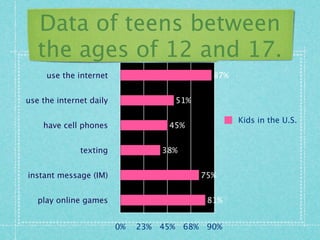
Data of teens between
   the ages of 12 and 17.
     use the internet                              87%


use the internet daily                    51%

                                                         Kids in the U.S.
    have cell phones                 45%


              texting               38%


instant message (IM)                             75%


   play online games                              81%


                         0%   23%   45%    68%    90%
Online Victimization of Youth
               (2008):

    1 in 7 children (13%) received sexual
     solicitation or were approached with in
     the last year.
    1 in 3 (34%) had an unwanted exposure to
     pictures of naked people or people having
     sex.
    1 in 11 (9%) was threatened or harassed.
    1 in 25 (4%) received an “aggressive”
     sexual solicitation.
    › A solicitor who: asked to meet them
What should Parents
            do?
1.       Learn everything you can about
         computers, the internet and related
         technology.
     ›     Develop and maintain proficiency through use
     ›     Ask children to demonstrate.
2.       Communicate with your children.
     ›     Take time to discuss concerns; agree on
           ground rules.
     ›     Understand their needs.
     ›     Set reasonable expectations.
3.       Place the computer in a “well-trafficked”
4. Ensure that they do
    not divulge detailed
    personal information
    when completing
    “profiles” and
    minimize
    dissemination.
5. Keep ALL accounts in
    your name.
6. Know your child’s
    password(s) and
    screen name(s).
7. Consider use of computer internet
   management Software:
   › Age-based access levels- allows for carious
     levels of access for different family members
   › Filtering and Blocking (incoming and
     outgoing)
   › Time Restrictions
   › Activity Logs- Parents can view logs that list
     web sites visited, blocked, and chat
     sessions…software can even capture screen
     shots and email messages to you if a rule is
     violated
Blogs, IM, Chat Rooms, Email:
         What is reasonable?

 Under 8: Children should not be
  using IM, chat room, or blogs
  (period). Email should be restricted
  to only approved senders.
 8-10: If you add IM or chat make
  sure only pre-approved senders can
  send to your child. NO blogs!
 10-12: Give them more privacy, as
  long as it is with people you trust.
   13-15: Respect their privacy even more. Give
    them more leeway regarding IM, e-mail, chat, and
    blogs. But check and account for everyone, in real
    life, on their buddy lists. NO friends of friends!
   16 and over: Parental involvement becomes
    difficult at best-if good judgment and
    communication have not been firmly established
    by now… all beats are off!
     › If they have earned your trust, give it to them!
     › If not, unplug the computer and take away
        their cell phone and interactive gaming
QUESTIONS
   If you have Information that the
    Internet or a computer is being used
    to victimized a child, contact the
    NYS ICAC Task Force at:
              1-800-474-KIDS
        nysicac@troopers.state.ny.us
10 Tips to Share with Your
            Teen
Internet Survival Tips for Kids and Teens

Never give any personal information to anyone you meet online. That means first or last names,
phone numbers (they can be used to track down you home), passwords, birth dates or years, or
credit card information.

Never meet up with anyone you don't already know. Don't tell anyone your schedule; don't say
where you'll be hanging out. No party announcements. People are often not who they say they
are. It's true: 1 in 5 kids will be sexually solicited online.

Don't fill out any "fun" questionnaires that are forwarded to you, even if they're from your
friends. Remember, you're in a world where everything can get forwarded. All those personal
things about you could land in the hands of someone who could use them to harm you.

Don't send pictures of other people. Forwarding an embarrassing picture of someone else is a
form of Make sure you know everyone on your buddy list. If you haven't met the people face-to-
face, they may not be who they pretend to be. Also, Instant Messaging strangers is an invasion
of their privacy.

How would you like it if someone did that to you?
You do not have to answer emails or IMs from people you don't know. As a matter of
fact, you shouldn't. Who knows who they are? Even if they say they're "David's friend,"
David could be a lucky guess. "Kids" you meet in chat rooms may actually be creepy
adults.

There's no such thing as "private" on the Internet. You may think so, but it's not true.
People can find anything they want — and keep what you post — forever.

Be careful about posting pictures of yourself (if you must, don't post sexy ones or ones
showing behavior you wouldn't want your mom, teacher, boss, or potential college
advisor to see). Just because an older sibling has posted snaps on a site doesn't make it a
smart or a safe idea. Pictures with identifiers like where you go to school can be
shopping lists for online predators and other creeps.

Don't download content without your parents' permission. Many sites have spyware that
will damage your computer. Other sites have really inappropriate content. Your parents
can check your computer's URL history, so you can't hide where you've been.

Never share your password with anyone but your parents.
Resources
 http://kidshealth.org/parent/
  positive/family/net_safety.html
 http://www.fbi.gov/publications/
  pguide/
 http://www.commonsense.com/
  internet-safety-tips/tips-for-
  kids.php

Internet Safety For Parents

  • 1.
  • 2.
    E-pal Assignment We arebeginning an assignment that will require your child to have an e-pal. We will be doing this with another class at another school over the internet. Before we start we want parents to be a little more informed about internet safety. We designed this powerpoint to give you more information about internet safety so you can prepare yourself and your student for the project at hand. Thanks so much for your cooperation.
  • 3.
    Data of teensbetween the ages of 12 and 17. use the internet 87% use the internet daily 51% Kids in the U.S. have cell phones 45% texting 38% instant message (IM) 75% play online games 81% 0% 23% 45% 68% 90%
  • 4.
    Online Victimization ofYouth (2008):  1 in 7 children (13%) received sexual solicitation or were approached with in the last year.  1 in 3 (34%) had an unwanted exposure to pictures of naked people or people having sex.  1 in 11 (9%) was threatened or harassed.  1 in 25 (4%) received an “aggressive” sexual solicitation. › A solicitor who: asked to meet them
  • 5.
    What should Parents do? 1. Learn everything you can about computers, the internet and related technology. › Develop and maintain proficiency through use › Ask children to demonstrate. 2. Communicate with your children. › Take time to discuss concerns; agree on ground rules. › Understand their needs. › Set reasonable expectations. 3. Place the computer in a “well-trafficked”
  • 6.
    4. Ensure thatthey do not divulge detailed personal information when completing “profiles” and minimize dissemination. 5. Keep ALL accounts in your name. 6. Know your child’s password(s) and screen name(s).
  • 7.
    7. Consider useof computer internet management Software: › Age-based access levels- allows for carious levels of access for different family members › Filtering and Blocking (incoming and outgoing) › Time Restrictions › Activity Logs- Parents can view logs that list web sites visited, blocked, and chat sessions…software can even capture screen shots and email messages to you if a rule is violated
  • 8.
    Blogs, IM, ChatRooms, Email: What is reasonable?  Under 8: Children should not be using IM, chat room, or blogs (period). Email should be restricted to only approved senders.  8-10: If you add IM or chat make sure only pre-approved senders can send to your child. NO blogs!  10-12: Give them more privacy, as long as it is with people you trust.
  • 9.
    13-15: Respect their privacy even more. Give them more leeway regarding IM, e-mail, chat, and blogs. But check and account for everyone, in real life, on their buddy lists. NO friends of friends!  16 and over: Parental involvement becomes difficult at best-if good judgment and communication have not been firmly established by now… all beats are off! › If they have earned your trust, give it to them! › If not, unplug the computer and take away their cell phone and interactive gaming
  • 10.
    QUESTIONS  If you have Information that the Internet or a computer is being used to victimized a child, contact the NYS ICAC Task Force at: 1-800-474-KIDS nysicac@troopers.state.ny.us
  • 11.
    10 Tips toShare with Your Teen Internet Survival Tips for Kids and Teens Never give any personal information to anyone you meet online. That means first or last names, phone numbers (they can be used to track down you home), passwords, birth dates or years, or credit card information. Never meet up with anyone you don't already know. Don't tell anyone your schedule; don't say where you'll be hanging out. No party announcements. People are often not who they say they are. It's true: 1 in 5 kids will be sexually solicited online. Don't fill out any "fun" questionnaires that are forwarded to you, even if they're from your friends. Remember, you're in a world where everything can get forwarded. All those personal things about you could land in the hands of someone who could use them to harm you. Don't send pictures of other people. Forwarding an embarrassing picture of someone else is a form of Make sure you know everyone on your buddy list. If you haven't met the people face-to- face, they may not be who they pretend to be. Also, Instant Messaging strangers is an invasion of their privacy. How would you like it if someone did that to you?
  • 12.
    You do nothave to answer emails or IMs from people you don't know. As a matter of fact, you shouldn't. Who knows who they are? Even if they say they're "David's friend," David could be a lucky guess. "Kids" you meet in chat rooms may actually be creepy adults. There's no such thing as "private" on the Internet. You may think so, but it's not true. People can find anything they want — and keep what you post — forever. Be careful about posting pictures of yourself (if you must, don't post sexy ones or ones showing behavior you wouldn't want your mom, teacher, boss, or potential college advisor to see). Just because an older sibling has posted snaps on a site doesn't make it a smart or a safe idea. Pictures with identifiers like where you go to school can be shopping lists for online predators and other creeps. Don't download content without your parents' permission. Many sites have spyware that will damage your computer. Other sites have really inappropriate content. Your parents can check your computer's URL history, so you can't hide where you've been. Never share your password with anyone but your parents.
  • 13.
    Resources  http://kidshealth.org/parent/ positive/family/net_safety.html  http://www.fbi.gov/publications/ pguide/  http://www.commonsense.com/ internet-safety-tips/tips-for- kids.php