The new OSGi LogService 1.4
and integrating with SLF4J
BJ Hargrave, IBM
Log Service
• An OSGi specification for logging
• Introduced in Release 1 in 2000 as an OSGi logging API
• Many other OSGi spec require logging to the Log Service, for example DS
• Pre-whiteboard; pre-log4j/slf4j
• Versions 1.1, 1.2 and 1.3 only made fairly minor updates
• Version 1.4 is a MAJOR update to the API inspired by SLF4J.
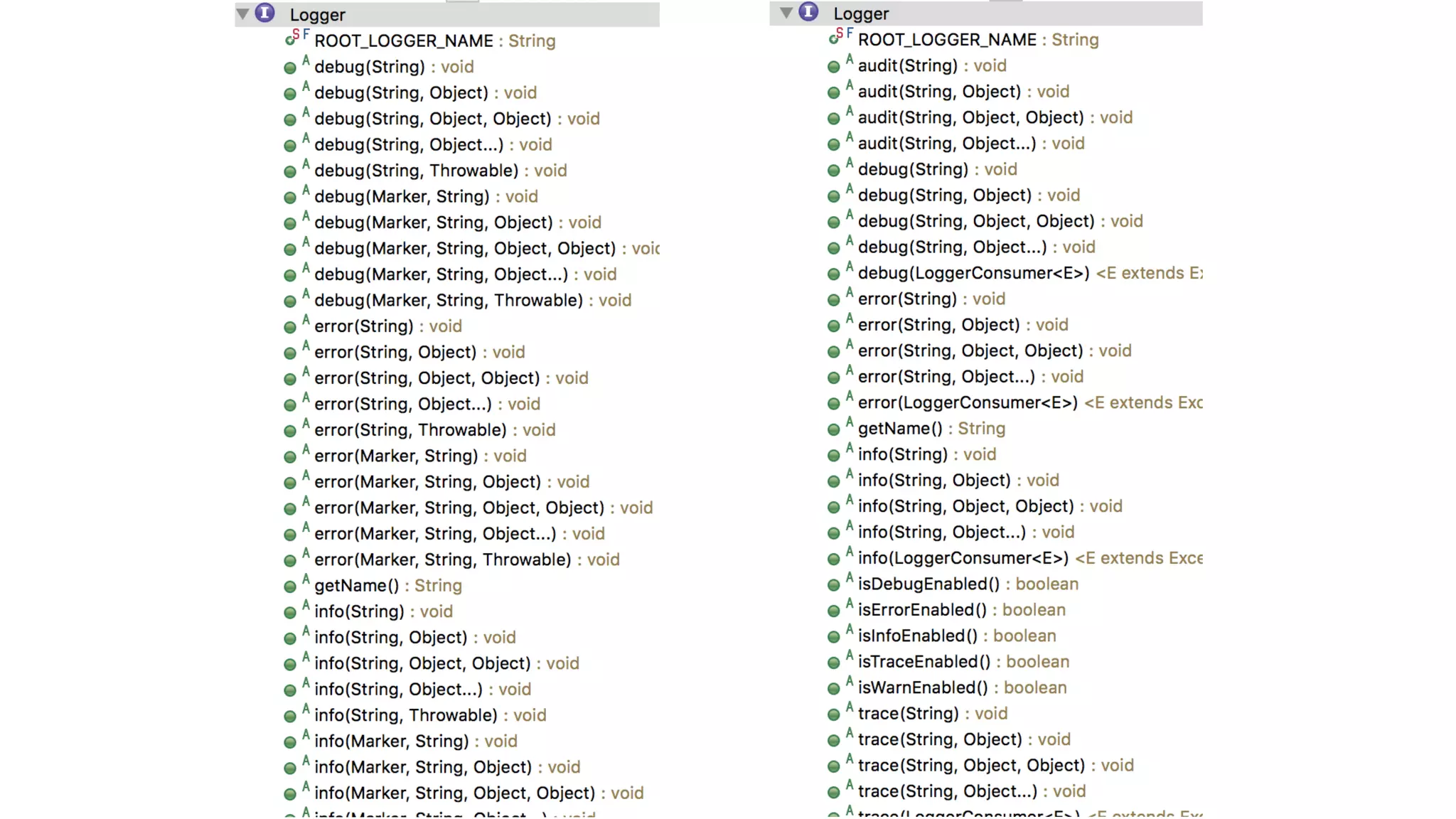
Logger
• An interface that allows a bundle to log information, including a message, a
level, an exception, and a ServiceReference object
• Named, typically the name of the class which will log to it
• Associated with the bundle which creates the Logger
• Provides log level specific methods to avoid message formatting work if the log
level is not in effect
• ‘{}’ message placeholders as well as support for java.util.Formatter
placeholders: %s, %d, …
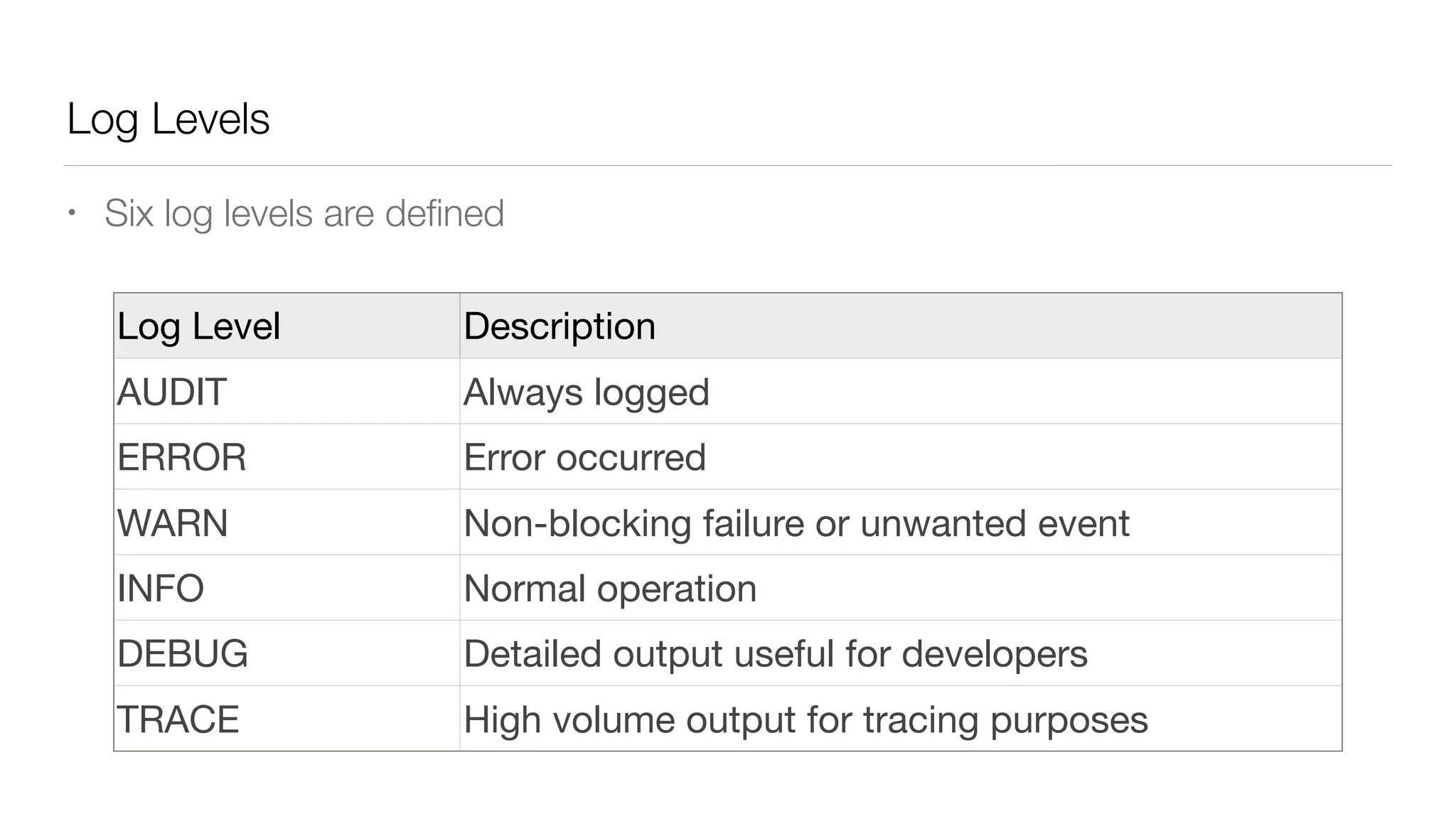
Log Levels
• Six log levels are defined
Log Level Description
AUDIT Always logged
ERROR Error occurred
WARN Non-blocking failure or unwanted event
INFO Normal operation
DEBUG Detailed output useful for developers
TRACE High volume output for tracing purposes
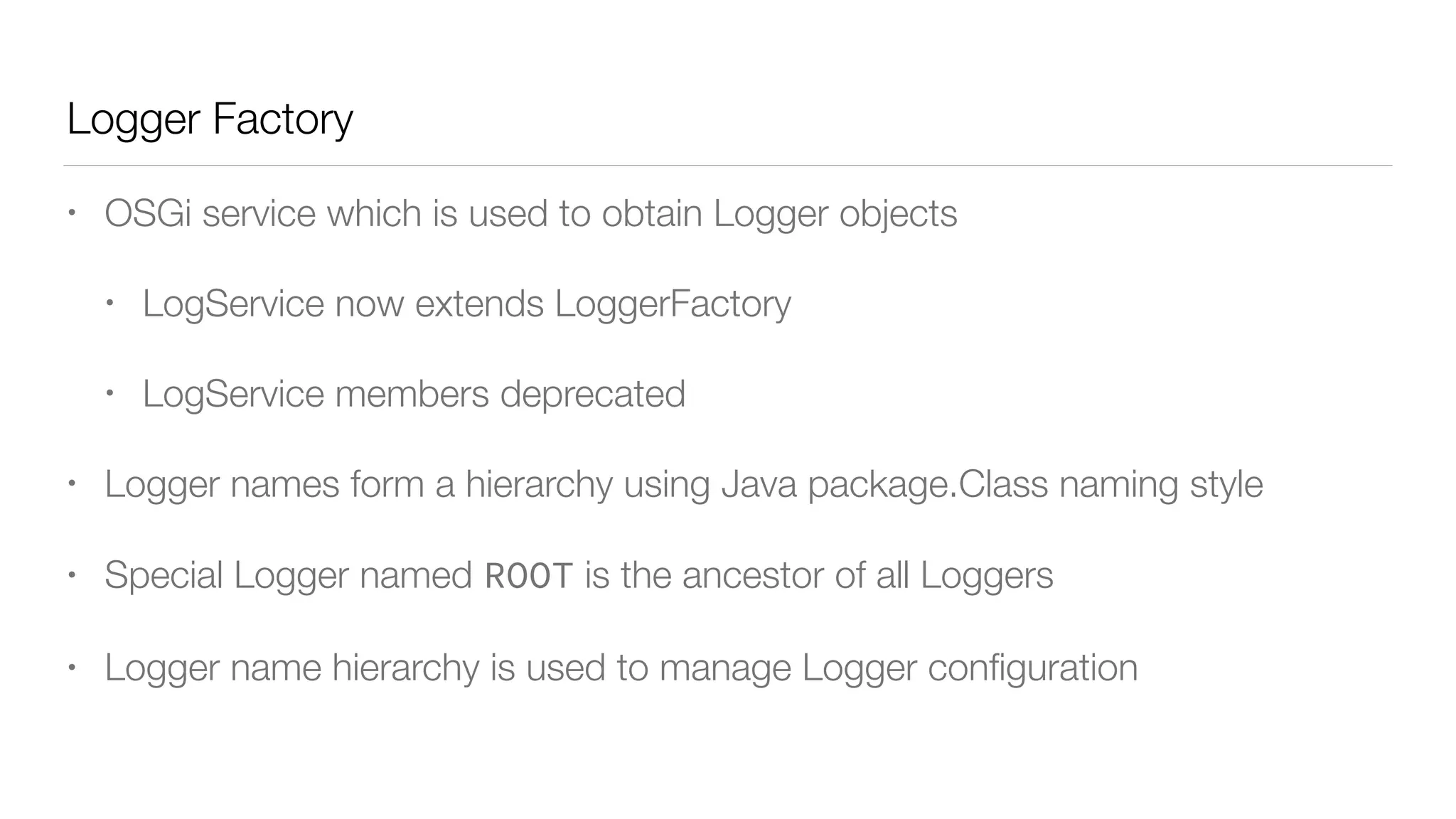
Logger Factory
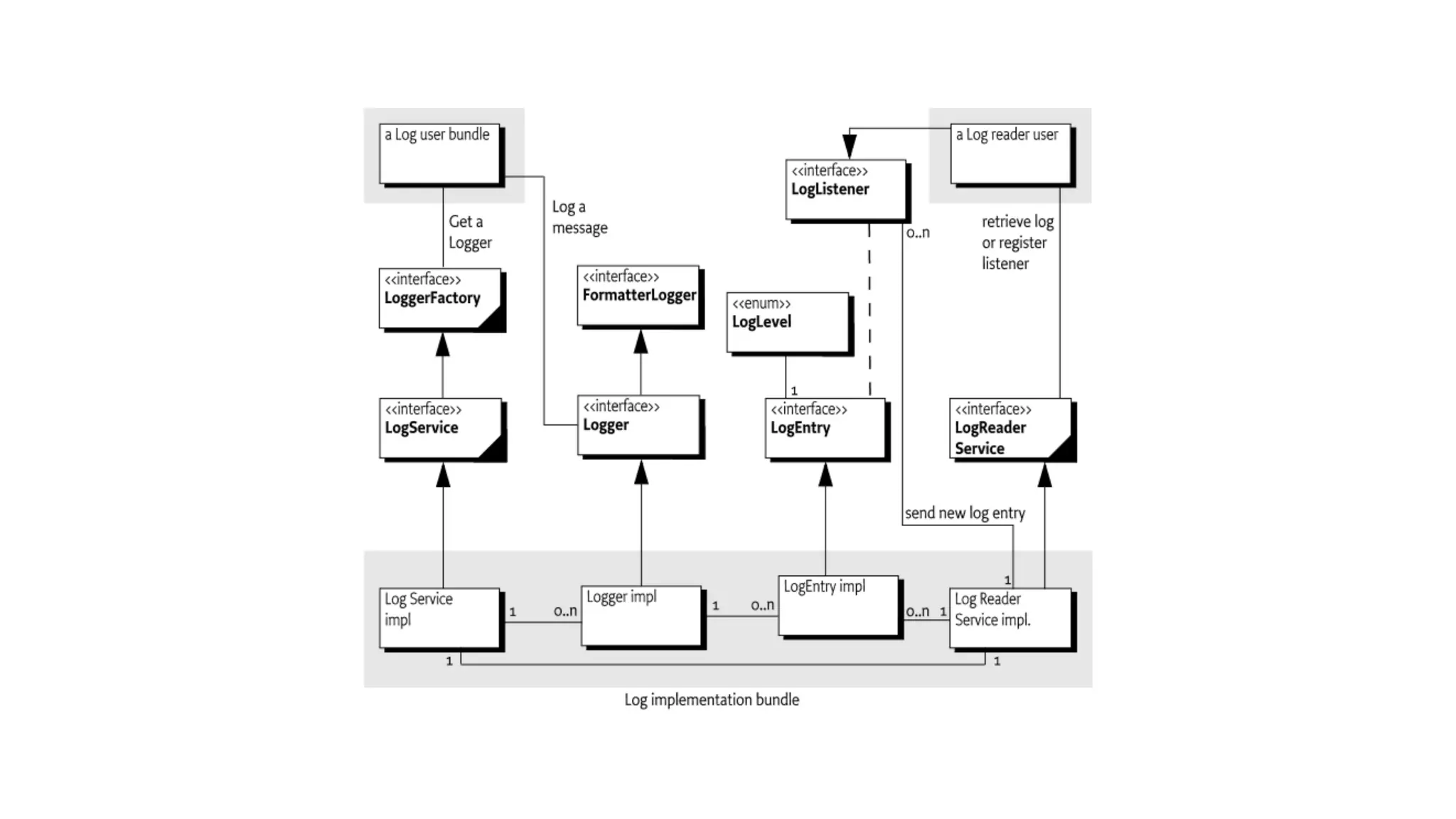
• OSGi service which is used to obtain Logger objects
• LogService now extends LoggerFactory
• LogService members deprecated
• Logger names form a hierarchy using Java package.Class naming style
• Special Logger named ROOT is the ancestor of all Loggers
• Logger name hierarchy is used to manage Logger configuration
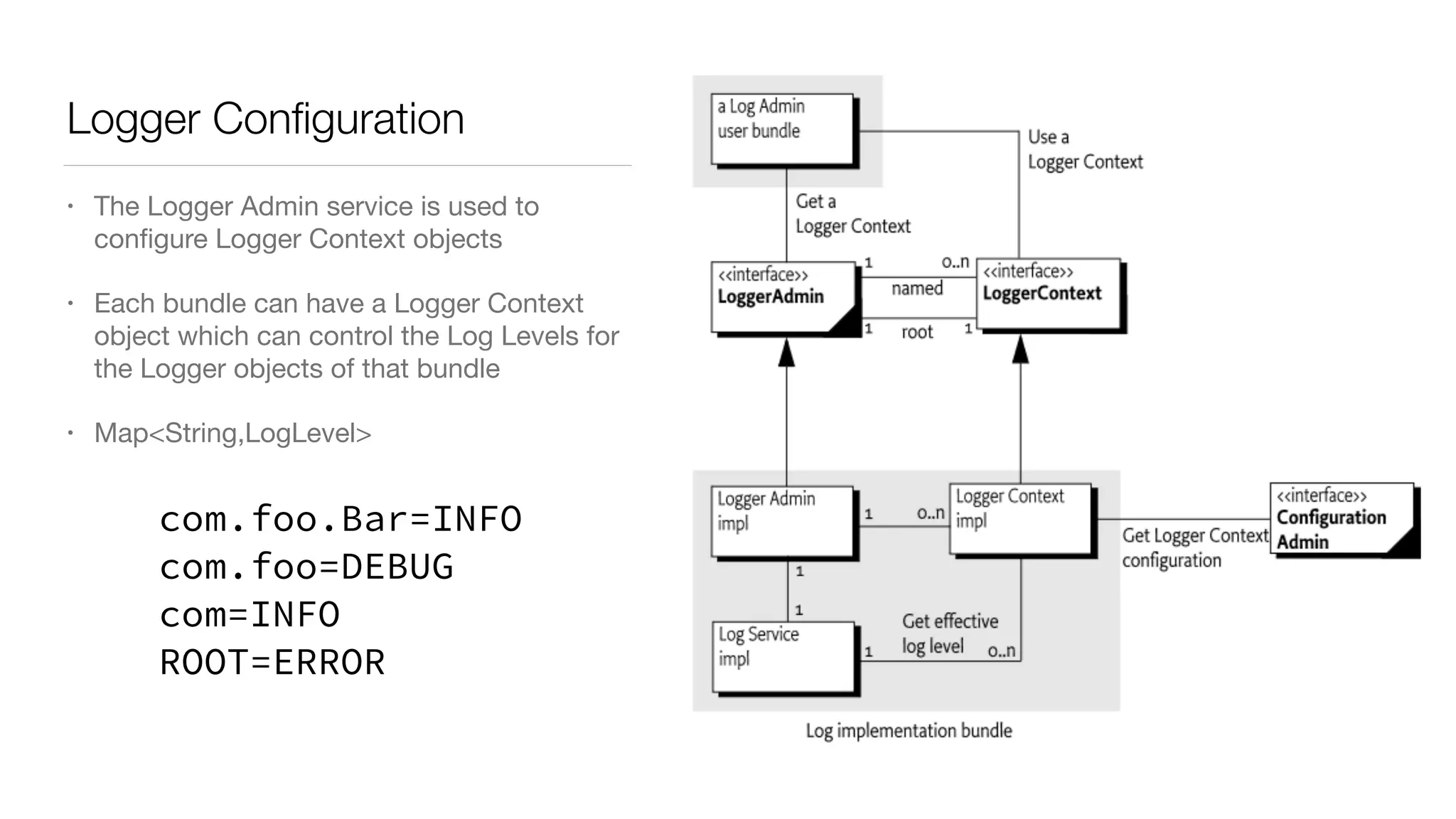
Logger Configuration
• The Logger Admin service is used to
configure Logger Context objects

• Each bundle can have a Logger Context
object which can control the Log Levels for
the Logger objects of that bundle

• Map<String,LogLevel>
com.foo.Bar=INFO
com.foo=DEBUG
com=INFO
ROOT=ERROR
Logger Configuration
• There is also an unnamed “root” Logger Context from which all named Logger
Contexts inherit configuration
• Most people will just need to configure this Logger Context
• Configuration Admin can be used to configure LoggerContexts using PIDs starting
with “org.osgi.service.log.admin”
• PID “org.osgi.service.log.admin” configures the “root” Logger Context
• PID “org.osgi.service.log.admin|<bundle-symbolic-name>”
configures the Logger Context for the bundle
Where does logged information go?
• The OSGi Log Service specification does not say anything about writing
logged information to the console, files, etc.
• This would be done by using the Log Reader Service or the new Log Stream
Provider service
• So the Log Service specification is “broker” between bundles wanting to log
and bundles wanting to consume the logged information
• Such a consuming bundle can be thought of like Appenders in other logging
back ends such as Logback
Log Stream Provider
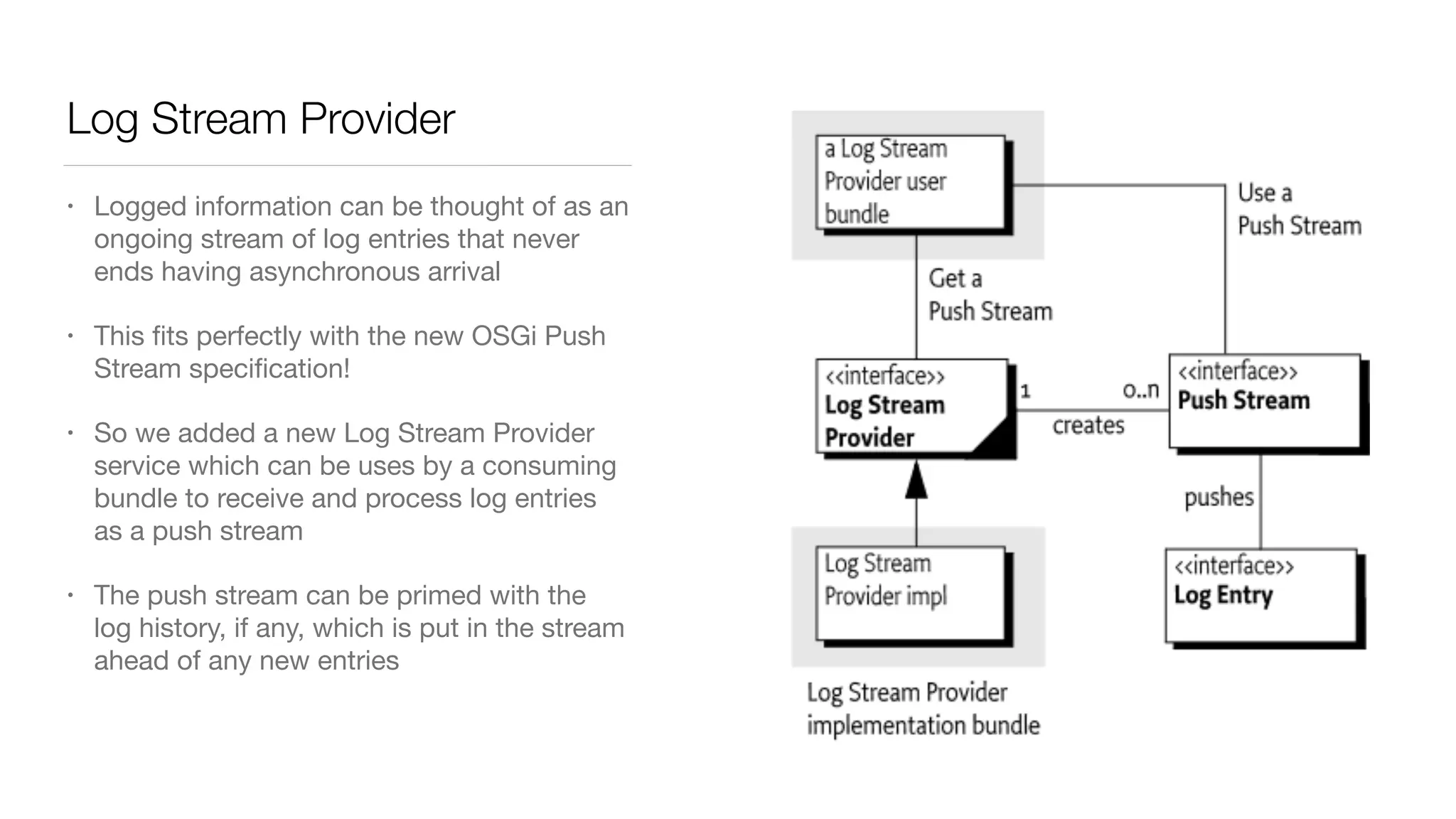
• Logged information can be thought of as an
ongoing stream of log entries that never
ends having asynchronous arrival

• This fits perfectly with the new OSGi Push
Stream specification!

• So we added a new Log Stream Provider
service which can be uses by a consuming
bundle to receive and process log entries
as a push stream

• The push stream can be primed with the
log history, if any, which is put in the stream
ahead of any new entries
Log Reader Service still remains
• Even though the design of the Log Reader Service predates the advent of the
whiteboard pattern, it remains supported in the specification
• Existing code may use it
• This also allows the Log Stream Provider implementation to be separate from
the Log Service implementation
• Which is handy for Equinox which implements the Log Service specification
in the framework and was not quite ready to require Java 8 (which Push
Stream requires)
Log Entry expanded to hold new information
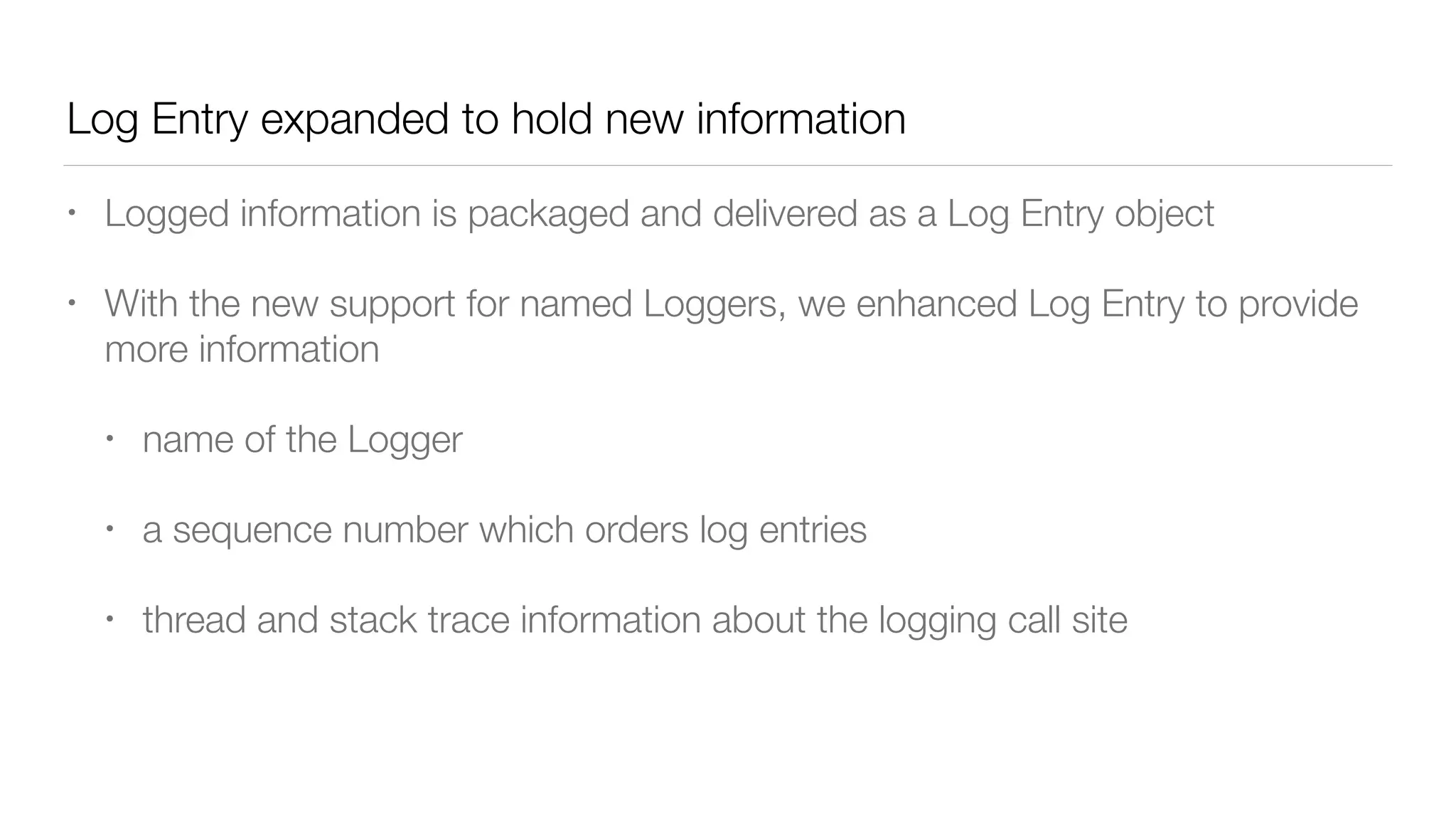
• Logged information is packaged and delivered as a Log Entry object
• With the new support for named Loggers, we enhanced Log Entry to provide
more information
• name of the Logger
• a sequence number which orders log entries
• thread and stack trace information about the logging call site
Declarative Services support for using Loggers
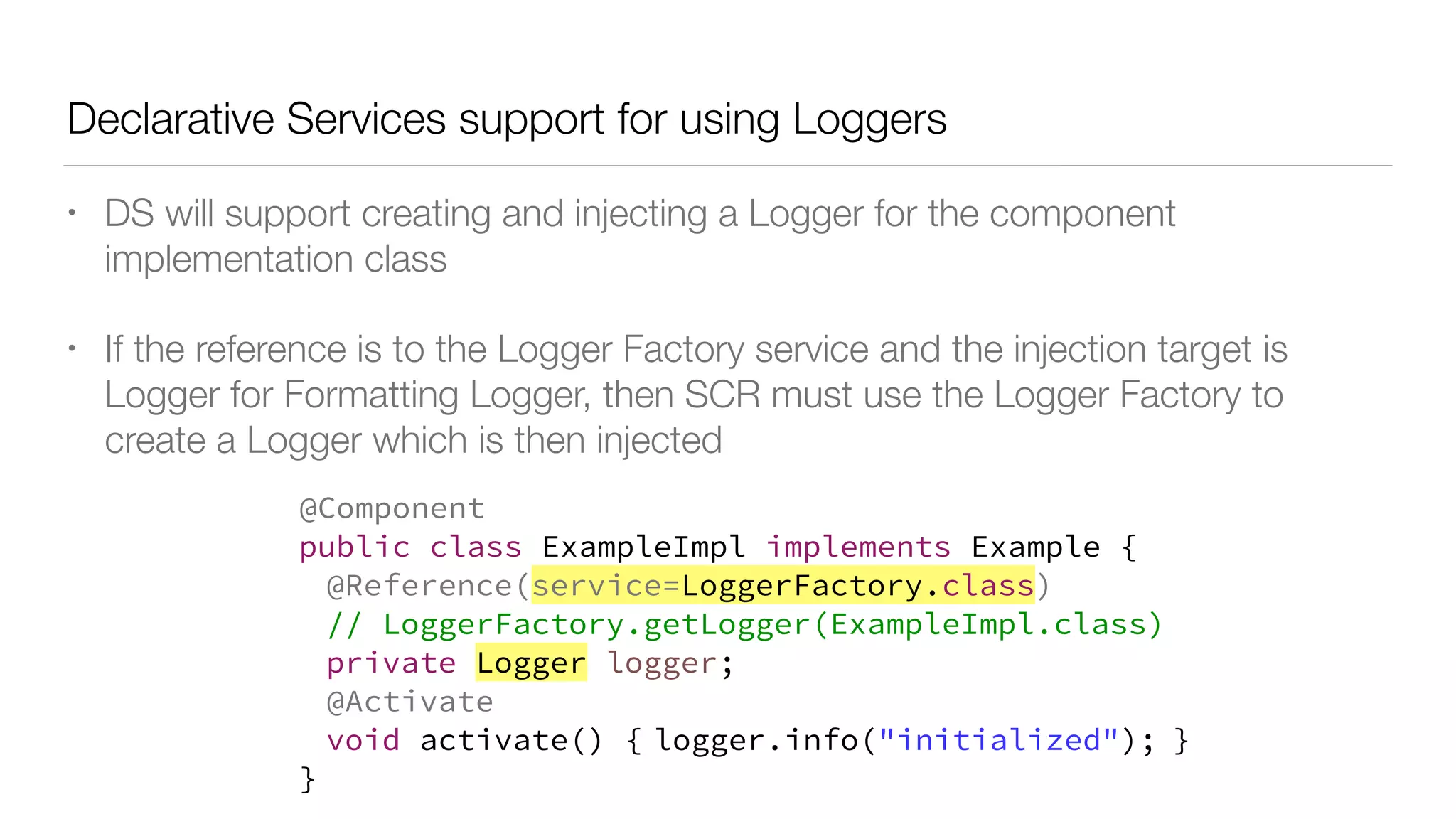
• DS will support creating and injecting a Logger for the component
implementation class
• If the reference is to the Logger Factory service and the injection target is
Logger for Formatting Logger, then SCR must use the Logger Factory to
create a Logger which is then injected
@Component
public class ExampleImpl implements Example {
@Reference(service=LoggerFactory.class)
// LoggerFactory.getLogger(ExampleImpl.class)
private Logger logger;
@Activate
void activate() { logger.info("initialized"); }
}
But lots of projects use SLF4J?
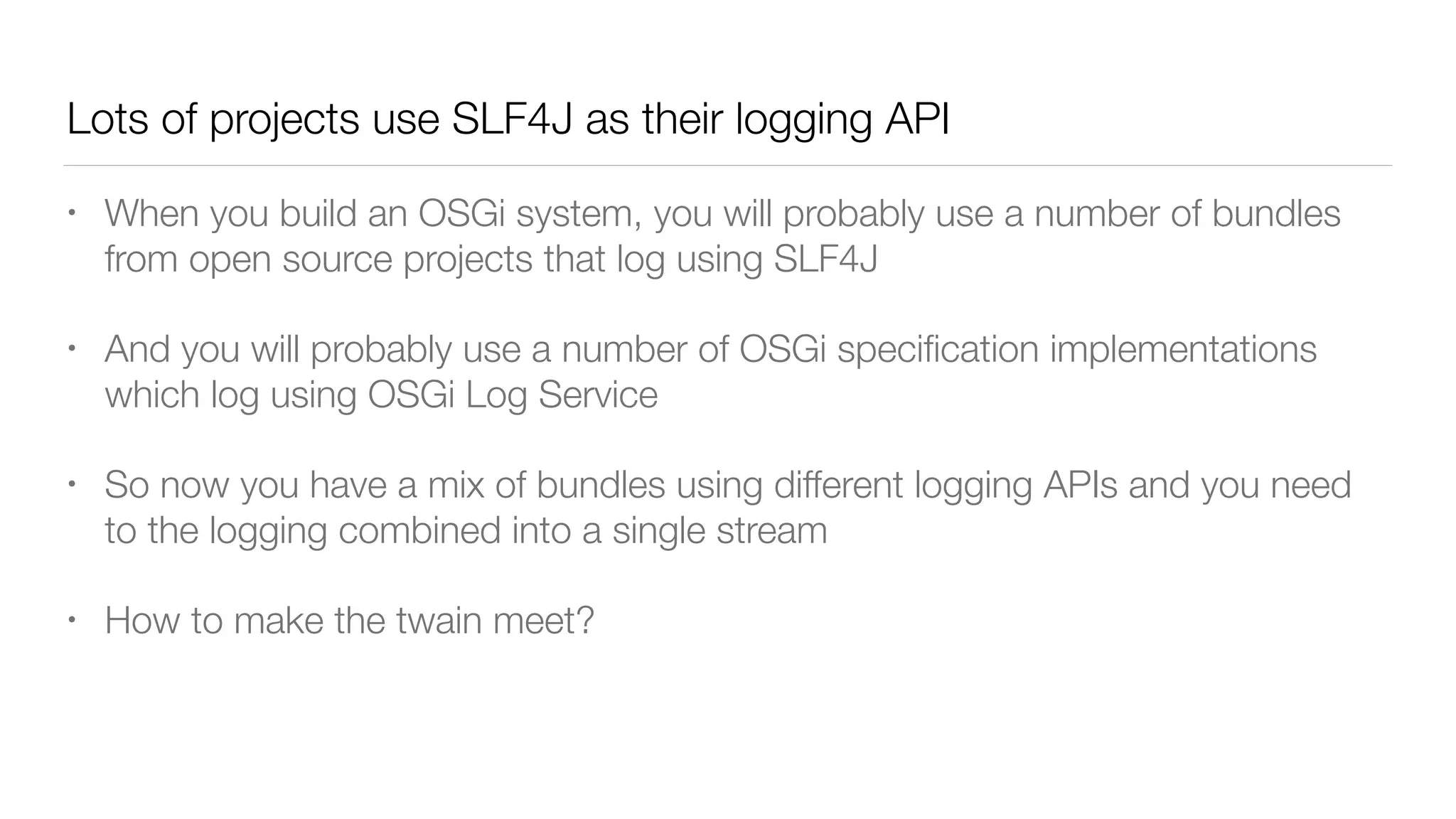
Lots of projects use SLF4J as their logging API
• When you build an OSGi system, you will probably use a number of bundles
from open source projects that log using SLF4J
• And you will probably use a number of OSGi specification implementations
which log using OSGi Log Service
• So now you have a mix of bundles using different logging APIs and you need
to the logging combined into a single stream
• How to make the twain meet?
Choices
• We can either send the information logged to the OSGi Log Service to the
SLF4J logging backend (e.g. Logback)
• This means all the logged information is controlled by SLF4J logging
backend configuration
• Or we can send the information logged to the SLF4J API to the OSGi Log
Service
• This means all the logged information is controlled by the Logger
configuration in the Logger Admin service
slf4j.osgi
• SLF4J implementation which maps using the SLF4J API, which is a static API,
onto the OSGi Log Service
• CODE!
osgi.logback
• Component which consumes Log Entries and sends them to the Logback
backend
• CODE!
osgi.logback
• See the Apache Felix Logback project for a more capable implementation of
this choice
• http://felix.apache.org/documentation/subprojects/apache-felix-logback.html
Some notes…
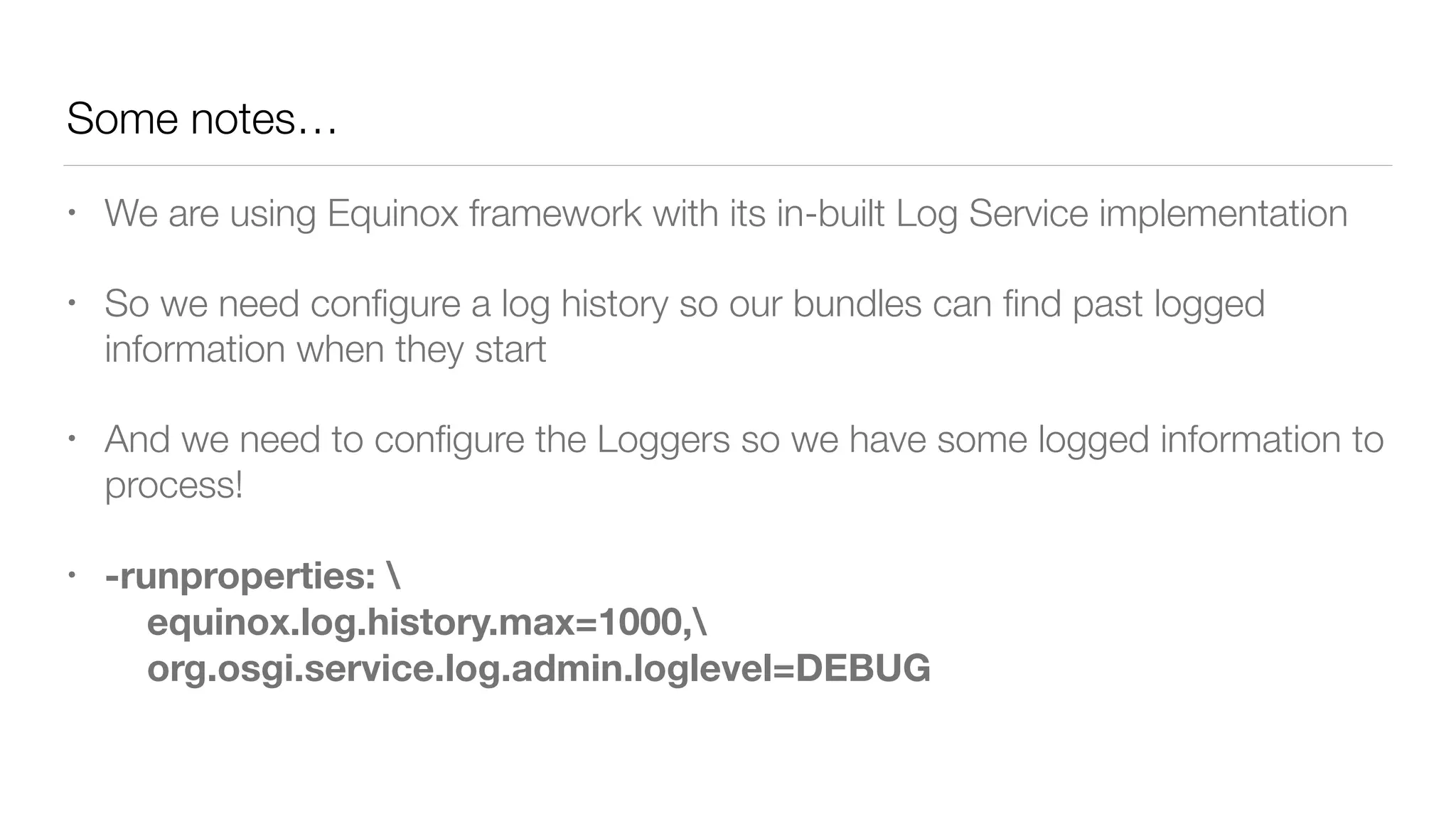
• We are using Equinox framework with its in-built Log Service implementation
• So we need configure a log history so our bundles can find past logged
information when they start
• And we need to configure the Loggers so we have some logged information to
process!
• -runproperties: 

equinox.log.history.max=1000,

org.osgi.service.log.admin.loglevel=DEBUG
Thanks!
Evaluate the Sessions
-1 0 +1
Sign in and vote at eclipsecon.org

Integrating SLF4J and the new OSGi LogService 1.4 - BJ Hargrave (IBM)

  • 1.
    The new OSGiLogService 1.4 and integrating with SLF4J BJ Hargrave, IBM
  • 2.
    Log Service • AnOSGi specification for logging • Introduced in Release 1 in 2000 as an OSGi logging API • Many other OSGi spec require logging to the Log Service, for example DS • Pre-whiteboard; pre-log4j/slf4j • Versions 1.1, 1.2 and 1.3 only made fairly minor updates • Version 1.4 is a MAJOR update to the API inspired by SLF4J.
  • 4.
    Logger • An interfacethat allows a bundle to log information, including a message, a level, an exception, and a ServiceReference object • Named, typically the name of the class which will log to it • Associated with the bundle which creates the Logger • Provides log level specific methods to avoid message formatting work if the log level is not in effect • ‘{}’ message placeholders as well as support for java.util.Formatter placeholders: %s, %d, …
  • 6.
    Log Levels • Sixlog levels are defined Log Level Description AUDIT Always logged ERROR Error occurred WARN Non-blocking failure or unwanted event INFO Normal operation DEBUG Detailed output useful for developers TRACE High volume output for tracing purposes
  • 7.
    Logger Factory • OSGiservice which is used to obtain Logger objects • LogService now extends LoggerFactory • LogService members deprecated • Logger names form a hierarchy using Java package.Class naming style • Special Logger named ROOT is the ancestor of all Loggers • Logger name hierarchy is used to manage Logger configuration
  • 8.
    Logger Configuration • TheLogger Admin service is used to configure Logger Context objects • Each bundle can have a Logger Context object which can control the Log Levels for the Logger objects of that bundle • Map<String,LogLevel> com.foo.Bar=INFO com.foo=DEBUG com=INFO ROOT=ERROR
  • 9.
    Logger Configuration • Thereis also an unnamed “root” Logger Context from which all named Logger Contexts inherit configuration • Most people will just need to configure this Logger Context • Configuration Admin can be used to configure LoggerContexts using PIDs starting with “org.osgi.service.log.admin” • PID “org.osgi.service.log.admin” configures the “root” Logger Context • PID “org.osgi.service.log.admin|<bundle-symbolic-name>” configures the Logger Context for the bundle
  • 10.
    Where does loggedinformation go? • The OSGi Log Service specification does not say anything about writing logged information to the console, files, etc. • This would be done by using the Log Reader Service or the new Log Stream Provider service • So the Log Service specification is “broker” between bundles wanting to log and bundles wanting to consume the logged information • Such a consuming bundle can be thought of like Appenders in other logging back ends such as Logback
  • 11.
    Log Stream Provider •Logged information can be thought of as an ongoing stream of log entries that never ends having asynchronous arrival • This fits perfectly with the new OSGi Push Stream specification! • So we added a new Log Stream Provider service which can be uses by a consuming bundle to receive and process log entries as a push stream • The push stream can be primed with the log history, if any, which is put in the stream ahead of any new entries
  • 12.
    Log Reader Servicestill remains • Even though the design of the Log Reader Service predates the advent of the whiteboard pattern, it remains supported in the specification • Existing code may use it • This also allows the Log Stream Provider implementation to be separate from the Log Service implementation • Which is handy for Equinox which implements the Log Service specification in the framework and was not quite ready to require Java 8 (which Push Stream requires)
  • 13.
    Log Entry expandedto hold new information • Logged information is packaged and delivered as a Log Entry object • With the new support for named Loggers, we enhanced Log Entry to provide more information • name of the Logger • a sequence number which orders log entries • thread and stack trace information about the logging call site
  • 14.
    Declarative Services supportfor using Loggers • DS will support creating and injecting a Logger for the component implementation class • If the reference is to the Logger Factory service and the injection target is Logger for Formatting Logger, then SCR must use the Logger Factory to create a Logger which is then injected @Component public class ExampleImpl implements Example { @Reference(service=LoggerFactory.class) // LoggerFactory.getLogger(ExampleImpl.class) private Logger logger; @Activate void activate() { logger.info("initialized"); } }
  • 15.
    But lots ofprojects use SLF4J?
  • 16.
    Lots of projectsuse SLF4J as their logging API • When you build an OSGi system, you will probably use a number of bundles from open source projects that log using SLF4J • And you will probably use a number of OSGi specification implementations which log using OSGi Log Service • So now you have a mix of bundles using different logging APIs and you need to the logging combined into a single stream • How to make the twain meet?
  • 17.
    Choices • We caneither send the information logged to the OSGi Log Service to the SLF4J logging backend (e.g. Logback) • This means all the logged information is controlled by SLF4J logging backend configuration • Or we can send the information logged to the SLF4J API to the OSGi Log Service • This means all the logged information is controlled by the Logger configuration in the Logger Admin service
  • 18.
    slf4j.osgi • SLF4J implementationwhich maps using the SLF4J API, which is a static API, onto the OSGi Log Service • CODE!
  • 19.
    osgi.logback • Component whichconsumes Log Entries and sends them to the Logback backend • CODE!
  • 20.
    osgi.logback • See theApache Felix Logback project for a more capable implementation of this choice • http://felix.apache.org/documentation/subprojects/apache-felix-logback.html
  • 21.
    Some notes… • Weare using Equinox framework with its in-built Log Service implementation • So we need configure a log history so our bundles can find past logged information when they start • And we need to configure the Loggers so we have some logged information to process! • -runproperties: 
 equinox.log.history.max=1000,
 org.osgi.service.log.admin.loglevel=DEBUG
  • 22.
  • 23.
    Evaluate the Sessions -10 +1 Sign in and vote at eclipsecon.org