Slf4j+Logback Presentation
Contents
 1.Logging

 2.Introduction to slf4j logging API

 3.Logback vs. Log4j

 4.About Logback

 5.Logback Architecture

 6.Components of Logback

 7.Configuration of Logback

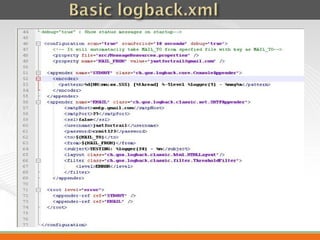
 8.Basic logback.xml

 9.Convenience with logback

 10.Conventions with logback

 11.Links
  Logging as we all know is a way of recording events at an appropriate output
   store.
  Based on convenience we can get the output at the console, file, database or
   email.
  The process is capable of stating the flow of execution and can even be helpful
   to locate
the error points in an application.
Introduction to slf4j logging API.
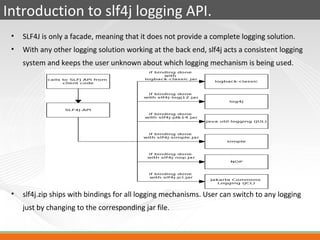
 •   SLF4J is only a facade, meaning that it does not provide a complete logging solution.
 •   With any other logging solution working at the back end, slf4j acts a consistent logging
     system and keeps the user unknown about which logging mechanism is being used.


 •   slf4j.zip ships with bindings for all logging mechanisms. User can switch to any logging
     just by changing to the corresponding jar file.
Logback vs Log4j
                    Log4j                                        Logback
 Can be directly implemented in                Logback natively speaks slf4j i.e, it exposes
 applications.                                 it’s API via slf4j.


 Log4j can be configured using xml file as     Logback can be configured in a xml file and
 well as properties file.                      groovy. There are online application to
                                               convert an existing log4j.properties to a
                                               logback.xml file.


 Once log4j is implemented at the code level   Logback project can be shifted to any other
 Its becomes difficult to move to any other    logging mechanism easily only by removing
 logging mechanism.                            logback.jar and placing the other required
                                               slf4j binding.
About Logback
 •   Logback is intended as a successor to the popular log4j project.
 •   It is no revolution but evolution, as the author of logback Sébastien Pennec says.
 •   It edges log4j as log4j is merely developer’s logging system to trace the execution
     of a program whereas logback is even capable of generating server side logs when
     a use accesses a webpage on the server.
 •   Logback exposes it’s API via slf4j and can be easily replaced by any other logging
     mechanism depending upon the use case scenario.
 •   In some situations it has even been upto 10 times efficient than log4j.
Architecture of logback
                              Logback in its current release is divided
                              into three modules.
                          •   Logback-core : It lays the ground work
                              for the other two modules. Acts as the
                              super class to some of the classes in the
                              other modules.
                          •   Logback-classic : Logback classic
                              extends the core module and internally
                              implements slf4j so that the user can
                              readily switch back and fourth between
                              various other logging mechanisms.
                          •   Logback -access : Logback –access
                              integrates with Servlet containers to
                              provide HTTP-access log functionality.
                          •   Slf4j acts as the interface to various
                              other logging mechanisms.
Components of Logback.
 The main components of logback are as follows.
 •   Appender
 •   Encoder
 •   Layout
 •   Filter
 •   Logging Levels
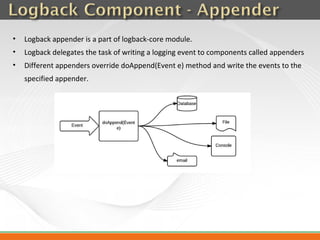
•   Logback appender is a part of logback-core module.
•   Logback delegates the task of writing a logging event to components called appenders
•   Different appenders override doAppend(Event e) method and write the events to the
    specified appender.
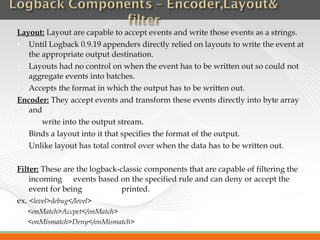
Layout: Layout are capable to accept events and write those events as a strings.
  Until Logback 0.9.19 appenders directly relied on layouts to write the event at
   the appropriate output destination.
  Layouts had no control on when the event has to be written out so could not
   aggregate events into batches.
  Accepts the format in which the output has to be written out.
Encoder: They accept events and transform these events directly into byte array
   and
       write into the output stream.
  Binds a layout into it that specifies the format of the output.
  Unlike layout has total control over when the data has to be written out.

Filter: These are the logback-classic components that are capable of filtering the
    incoming events based on the specified rule and can deny or accept the
    event for being            printed.
ex. <level>debug</level>
   <onMatch>Accpet</onMatch>
   <onMismatch>Deny</onMismatch>
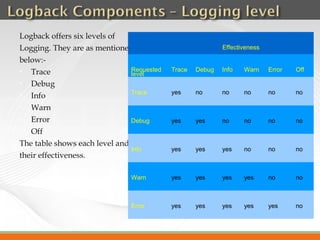
Logback offers six levels of
Logging. They are as mentioned                             Effectiveness

below:-
  Trace                       Requested   Trace   Debug   Info   Warn     Error   Off
                               level
  Debug
                               Trace       yes     no      no     no       no      no
  Info
  Warn
  Error                       Debug       yes     yes     no     no       no      no
  Off
The table shows each level and
                               Info        yes     yes     yes    no       no      no
their effectiveness.

                               Warn        yes     yes     yes    yes      no      no


                               Error       yes     yes     yes    yes      yes     no
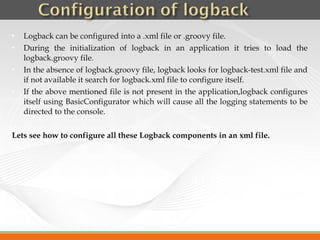
   Logback can be configured into a .xml file or .groovy file.
   During the initialization of logback in an application it tries to load the
    logback.groovy file.
   In the absence of logback.groovy file, logback looks for logback-test.xml file and
    if not available it search for logback.xml file to configure itself.
   If the above mentioned file is not present in the application,logback configures
    itself using BasicConfigurator which will cause all the logging statements to be
    directed to the console.

Lets see how to configure all these Logback components in an xml file.
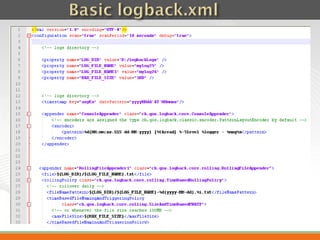
Given below are some sample logback.xml files highlighting the use of
   appender,encoder,pattern,Logging levels and logger.
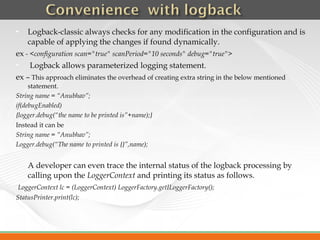
   Logback-classic always checks for any modification in the configuration and is
    capable of applying the changes if found dynamically.
ex - <configuration scan="true" scanPeriod="10 seconds" debug="true">
    Logback allows parameterized logging statement.
ex – This approach eliminates the overhead of creating extra string in the below mentioned
     statement.
String name = “Anubhav”;
if(debugEnabled)
{logger.debug(“the name to be printed is”+name);}
Instead it can be
String name = “Anubhav”;
Logger.debug(“The name to printed is {}”,name);

   A developer can even trace the internal status of the logback processing by
    calling upon the LoggerContext and printing its status as follows.
LoggerContext lc = (LoggerContext) LoggerFactory.getILoggerFactory();
StatusPrinter.print(lc);
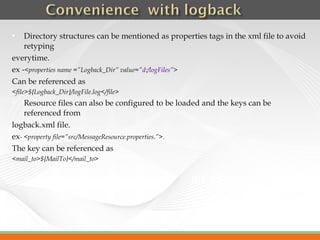
   Directory structures can be mentioned as properties tags in the xml file to avoid
    retyping
everytime.
ex -<properties name =”Logback_Dir” value=”d:/logFiles”>
Can be referenced as
<file>${Logback_Dir}/logFile.log</file>
   Resource files can also be configured to be loaded and the keys can be
    referenced from
logback.xml file.
ex- <property file=”src/MessageResource.properties.”>.
The key can be referenced as
<mail_to>${MailTo}</mail_to>
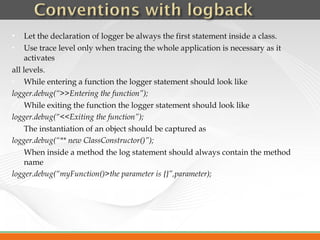
    Let the declaration of logger be always the first statement inside a class.
    Use trace level only when tracing the whole application is necessary as it
     activates
all levels.
    While entering a function the logger statement should look like
logger.debug(“>>Entering the function”);
    While exiting the function the logger statement should look like
logger.debug(“<<Exiting the function”);
    The instantiation of an object should be captured as
logger.debug(“** new ClassConstructor()”);
    When inside a method the log statement should always contain the method
     name
logger.debug(“myFunction()>the parameter is {}”,parameter);

    Use appropriate tool to shift log4j configured project to slf4j.
ex- slt4j migrator. it will replace appropriate import lines and logger declarations.

    Place slf4j.jar,logback-core.jar and logback-classic.jar in the classpath.

    Use the following tool to convert log4j.properties to logback.xml and deploy the
    xml file.
Link - http://logback.qos.ch/translator/
                                      Shift Complete
   http://logback.qos.ch/
   http://logback.qos.ch/documentation.html
   http://logback.qos.ch/manual/index.html
   http://logback.qos.ch/manual/appenders.html
   http://logback.qos.ch/manual/encoders.html
   http://logback.qos.ch/manual/layouts.html
   http://logback.qos.ch/manual/filters.html
   https://wiki.base22.com/display/btg/Java+Logging+Standards+and+Guideli
    nes
Thank You

Logback

  • 1.
  • 2.
    Contents 1.Logging 2.Introductionto slf4j logging API 3.Logback vs. Log4j 4.About Logback 5.Logback Architecture 6.Components of Logback 7.Configuration of Logback 8.Basic logback.xml 9.Convenience with logback 10.Conventions with logback 11.Links
  • 3.
     Loggingas we all know is a way of recording events at an appropriate output store.  Based on convenience we can get the output at the console, file, database or email.  The process is capable of stating the flow of execution and can even be helpful to locate the error points in an application.
  • 4.
    Introduction to slf4jlogging API. • SLF4J is only a facade, meaning that it does not provide a complete logging solution. • With any other logging solution working at the back end, slf4j acts a consistent logging system and keeps the user unknown about which logging mechanism is being used. • slf4j.zip ships with bindings for all logging mechanisms. User can switch to any logging just by changing to the corresponding jar file.
  • 5.
    Logback vs Log4j Log4j Logback Can be directly implemented in Logback natively speaks slf4j i.e, it exposes applications. it’s API via slf4j. Log4j can be configured using xml file as Logback can be configured in a xml file and well as properties file. groovy. There are online application to convert an existing log4j.properties to a logback.xml file. Once log4j is implemented at the code level Logback project can be shifted to any other Its becomes difficult to move to any other logging mechanism easily only by removing logging mechanism. logback.jar and placing the other required slf4j binding.
  • 6.
    About Logback • Logback is intended as a successor to the popular log4j project. • It is no revolution but evolution, as the author of logback Sébastien Pennec says. • It edges log4j as log4j is merely developer’s logging system to trace the execution of a program whereas logback is even capable of generating server side logs when a use accesses a webpage on the server. • Logback exposes it’s API via slf4j and can be easily replaced by any other logging mechanism depending upon the use case scenario. • In some situations it has even been upto 10 times efficient than log4j.
  • 7.
    Architecture of logback Logback in its current release is divided into three modules. • Logback-core : It lays the ground work for the other two modules. Acts as the super class to some of the classes in the other modules. • Logback-classic : Logback classic extends the core module and internally implements slf4j so that the user can readily switch back and fourth between various other logging mechanisms. • Logback -access : Logback –access integrates with Servlet containers to provide HTTP-access log functionality. • Slf4j acts as the interface to various other logging mechanisms.
  • 8.
    Components of Logback. The main components of logback are as follows. • Appender • Encoder • Layout • Filter • Logging Levels
  • 9.
    Logback appender is a part of logback-core module. • Logback delegates the task of writing a logging event to components called appenders • Different appenders override doAppend(Event e) method and write the events to the specified appender.
  • 10.
    Layout: Layout arecapable to accept events and write those events as a strings.  Until Logback 0.9.19 appenders directly relied on layouts to write the event at the appropriate output destination.  Layouts had no control on when the event has to be written out so could not aggregate events into batches.  Accepts the format in which the output has to be written out. Encoder: They accept events and transform these events directly into byte array and write into the output stream.  Binds a layout into it that specifies the format of the output.  Unlike layout has total control over when the data has to be written out. Filter: These are the logback-classic components that are capable of filtering the incoming events based on the specified rule and can deny or accept the event for being printed. ex. <level>debug</level> <onMatch>Accpet</onMatch> <onMismatch>Deny</onMismatch>
  • 11.
    Logback offers sixlevels of Logging. They are as mentioned Effectiveness below:-  Trace Requested Trace Debug Info Warn Error Off level  Debug Trace yes no no no no no  Info  Warn  Error Debug yes yes no no no no  Off The table shows each level and Info yes yes yes no no no their effectiveness. Warn yes yes yes yes no no Error yes yes yes yes yes no
  • 12.
    Logback can be configured into a .xml file or .groovy file.  During the initialization of logback in an application it tries to load the logback.groovy file.  In the absence of logback.groovy file, logback looks for logback-test.xml file and if not available it search for logback.xml file to configure itself.  If the above mentioned file is not present in the application,logback configures itself using BasicConfigurator which will cause all the logging statements to be directed to the console. Lets see how to configure all these Logback components in an xml file.
  • 13.
    Given below aresome sample logback.xml files highlighting the use of appender,encoder,pattern,Logging levels and logger.
  • 16.
    Logback-classic always checks for any modification in the configuration and is capable of applying the changes if found dynamically. ex - <configuration scan="true" scanPeriod="10 seconds" debug="true">  Logback allows parameterized logging statement. ex – This approach eliminates the overhead of creating extra string in the below mentioned statement. String name = “Anubhav”; if(debugEnabled) {logger.debug(“the name to be printed is”+name);} Instead it can be String name = “Anubhav”; Logger.debug(“The name to printed is {}”,name);  A developer can even trace the internal status of the logback processing by calling upon the LoggerContext and printing its status as follows. LoggerContext lc = (LoggerContext) LoggerFactory.getILoggerFactory(); StatusPrinter.print(lc);
  • 17.
    Directory structures can be mentioned as properties tags in the xml file to avoid retyping everytime. ex -<properties name =”Logback_Dir” value=”d:/logFiles”> Can be referenced as <file>${Logback_Dir}/logFile.log</file>  Resource files can also be configured to be loaded and the keys can be referenced from logback.xml file. ex- <property file=”src/MessageResource.properties.”>. The key can be referenced as <mail_to>${MailTo}</mail_to>
  • 18.
    Let the declaration of logger be always the first statement inside a class.  Use trace level only when tracing the whole application is necessary as it activates all levels.  While entering a function the logger statement should look like logger.debug(“>>Entering the function”);  While exiting the function the logger statement should look like logger.debug(“<<Exiting the function”);  The instantiation of an object should be captured as logger.debug(“** new ClassConstructor()”);  When inside a method the log statement should always contain the method name logger.debug(“myFunction()>the parameter is {}”,parameter);
  • 19.
    Use appropriate tool to shift log4j configured project to slf4j. ex- slt4j migrator. it will replace appropriate import lines and logger declarations.  Place slf4j.jar,logback-core.jar and logback-classic.jar in the classpath.  Use the following tool to convert log4j.properties to logback.xml and deploy the xml file. Link - http://logback.qos.ch/translator/ Shift Complete
  • 20.
    http://logback.qos.ch/  http://logback.qos.ch/documentation.html  http://logback.qos.ch/manual/index.html  http://logback.qos.ch/manual/appenders.html  http://logback.qos.ch/manual/encoders.html  http://logback.qos.ch/manual/layouts.html  http://logback.qos.ch/manual/filters.html  https://wiki.base22.com/display/btg/Java+Logging+Standards+and+Guideli nes
  • 21.