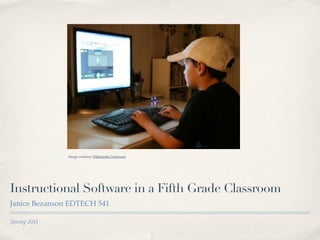
Image courtesy Wikimedia Commons


Instructional Software in a Fifth Grade Classroom
Janice Bezanson EDTECH 541

Spring 2011
Relative Advantage

The term Relative Advantage was coined by Everett Rogers and refers to “the degree to
which the new method or resources has advantages over the old one” (Doering & Roblyer,
2010, p. 429). Effective instructional software has the potential to provide learners
experiences that they would never have in a traditional brick and mortar classroom.

Engaged learning does not happen by chance. “It requires architectural engineering by
the instructor” (Conrad & Donaldson, 2004, p. 13). Determining the relative advantage of
educational software is a large part of the “architectural engineering” needed by today’s
classroom teacher.
Image courtesy of Wikimedia Commons

                                      Today’s software can be used for:
                                          Drill and Practice
                                          Tutorials
                                          Simulations
                                          Education Games
                                          Applications
Drill & Practice
Drill and practice software allows students to work out problems and gain immediate
feedback on correctness. Although sometimes called “drill & kill” this type of software
has advantages in today’s elementary classrooms. This software can take the place of
paper-pencil exercises and help learners prepare for tests. It is essential that the feedback
is quick and effective. Some of the areas that may benefit from drill and practice software
are:
      Math facts
      Typing skills
      Vocabulary
      Countries, states and capitals
(Doering & Roblyer, 2010, p. 77 - 81)

Drill & Practice Websites
Fact Monster -This site allows learners to use math flash cards and progress at their
own pace.
Kids Geo.com -This is a great site for learners to master states and capitals.
Tutorials
Tutorial software presents an entire instructional unit. This type of software would
include drill & practice components. The benefits include immediate feedback and it
offers instruction that can stand on its own. For it to be effective it should offer:
      Extensive interactivity
      Thorough user control
      Appropriate pedagogy
      Adequate answer judging and feedback
      Appropriate graphics
      Adequate record keeping
(Doering & Roblyer, 2010, p. 84 - 86)


 Tutorial Web Site
 Chem 4Kids! - This site offers a great instructional unit on chemistry.
Simulations

Simulations allow students to work through hypothetical problem situations and enables
them to see the impact of their actions. Simulations allow students to be involved in
complex processes while staying safe. For a simulation to be effective it should have
good documentation that explains system characteristics and uses as well as system
accuracy (Doering & Roblyer, 2010, p. 89).


Simulation Website
The Learning Company - This site offers links to both The Oregon Trail and Where in the
World is Carmen Sandiego? Both of these simulations offer young learners an imaginary
experience where they can see the impact of their decisions.
Educational Games
Educational Games can motivate learners to spend additional time on subjects. They offer
opportunities for content learning while having fun. These games challenge students to
compete and win. In order to be effective they must have:
  Appealing formats and activities
  Instructional value
  Minimal Violence

Educational games should be used appropriately and involve all students. They can be
used effectively to teach students how to work in cooperative groups (Doering & Roblyer,
2010, p. 93).

Educational Game Websites
ABC Ya! - This website offers a wide variety of educational games that are geared for fifth
graders.

Just Kid Games - A site with educational games to help teach kids about math, science,
reading and the environment.
Applications
Software applications are designed to support tasks that are useful to a computer user
(Doering & Roblyer, 2010, p. 76). Applications used to be thought of as spreadsheets, word
processors and power point presentations. The world of technology has seen a boon in the
development of software applications. Many are useful in today’s classrooms.

Application Websites

Jing - This application allows students and teachers a unique way of collaborating.

Google Earth for Educators - This site has tutorials and tips on how to use google earth
applications in the classroom.

Google Apps - This link discusses google applications appropriate for use in K-12
classrooms.

Mac Apps - This link discusses Mac applications appropriate for use in K-12 classrooms.
Instructional Uses

Instructional uses of software don’t always fit neatly into just one category. There is often
overlap. Many offer opportunities for skill practice and exploration. Some offer
constructivist approaches to learning while others offer direct instruction.

It is important to determine the Relative Advantage of software to ensure that successful
learning is taking place in today’s twenty-first century classrooms.

The websites listed below can assist teachers in determining the relative advantage of
software.

Children’s Educational Softwares
Learning Point Associates
Super Kids
Resources

 ✤   References

     Conrad, R. M., & Donaldson, J. A. (2010). Engaging the online learner, San Francisco: John Wiley & Sons, Inc.
     Doering, A. H., & Roblyer, M. D. (2010). Integrating educational technology into teaching (5th ed.), United States of America:
     Pearson Education Inc.


 ✤   Images

     Wikimedia Commons

Instructional software 541

  • 1.
    Image courtesy WikimediaCommons Instructional Software in a Fifth Grade Classroom Janice Bezanson EDTECH 541 Spring 2011
  • 2.
    Relative Advantage The termRelative Advantage was coined by Everett Rogers and refers to “the degree to which the new method or resources has advantages over the old one” (Doering & Roblyer, 2010, p. 429). Effective instructional software has the potential to provide learners experiences that they would never have in a traditional brick and mortar classroom. Engaged learning does not happen by chance. “It requires architectural engineering by the instructor” (Conrad & Donaldson, 2004, p. 13). Determining the relative advantage of educational software is a large part of the “architectural engineering” needed by today’s classroom teacher.
  • 3.
    Image courtesy ofWikimedia Commons Today’s software can be used for: Drill and Practice Tutorials Simulations Education Games Applications
  • 4.
    Drill & Practice Drilland practice software allows students to work out problems and gain immediate feedback on correctness. Although sometimes called “drill & kill” this type of software has advantages in today’s elementary classrooms. This software can take the place of paper-pencil exercises and help learners prepare for tests. It is essential that the feedback is quick and effective. Some of the areas that may benefit from drill and practice software are: Math facts Typing skills Vocabulary Countries, states and capitals (Doering & Roblyer, 2010, p. 77 - 81) Drill & Practice Websites Fact Monster -This site allows learners to use math flash cards and progress at their own pace. Kids Geo.com -This is a great site for learners to master states and capitals.
  • 5.
    Tutorials Tutorial software presentsan entire instructional unit. This type of software would include drill & practice components. The benefits include immediate feedback and it offers instruction that can stand on its own. For it to be effective it should offer: Extensive interactivity Thorough user control Appropriate pedagogy Adequate answer judging and feedback Appropriate graphics Adequate record keeping (Doering & Roblyer, 2010, p. 84 - 86) Tutorial Web Site Chem 4Kids! - This site offers a great instructional unit on chemistry.
  • 6.
    Simulations Simulations allow studentsto work through hypothetical problem situations and enables them to see the impact of their actions. Simulations allow students to be involved in complex processes while staying safe. For a simulation to be effective it should have good documentation that explains system characteristics and uses as well as system accuracy (Doering & Roblyer, 2010, p. 89). Simulation Website The Learning Company - This site offers links to both The Oregon Trail and Where in the World is Carmen Sandiego? Both of these simulations offer young learners an imaginary experience where they can see the impact of their decisions.
  • 7.
    Educational Games Educational Gamescan motivate learners to spend additional time on subjects. They offer opportunities for content learning while having fun. These games challenge students to compete and win. In order to be effective they must have: Appealing formats and activities Instructional value Minimal Violence Educational games should be used appropriately and involve all students. They can be used effectively to teach students how to work in cooperative groups (Doering & Roblyer, 2010, p. 93). Educational Game Websites ABC Ya! - This website offers a wide variety of educational games that are geared for fifth graders. Just Kid Games - A site with educational games to help teach kids about math, science, reading and the environment.
  • 8.
    Applications Software applications aredesigned to support tasks that are useful to a computer user (Doering & Roblyer, 2010, p. 76). Applications used to be thought of as spreadsheets, word processors and power point presentations. The world of technology has seen a boon in the development of software applications. Many are useful in today’s classrooms. Application Websites Jing - This application allows students and teachers a unique way of collaborating. Google Earth for Educators - This site has tutorials and tips on how to use google earth applications in the classroom. Google Apps - This link discusses google applications appropriate for use in K-12 classrooms. Mac Apps - This link discusses Mac applications appropriate for use in K-12 classrooms.
  • 9.
    Instructional Uses Instructional usesof software don’t always fit neatly into just one category. There is often overlap. Many offer opportunities for skill practice and exploration. Some offer constructivist approaches to learning while others offer direct instruction. It is important to determine the Relative Advantage of software to ensure that successful learning is taking place in today’s twenty-first century classrooms. The websites listed below can assist teachers in determining the relative advantage of software. Children’s Educational Softwares Learning Point Associates Super Kids
  • 10.
    Resources ✤ References Conrad, R. M., & Donaldson, J. A. (2010). Engaging the online learner, San Francisco: John Wiley & Sons, Inc. Doering, A. H., & Roblyer, M. D. (2010). Integrating educational technology into teaching (5th ed.), United States of America: Pearson Education Inc. ✤ Images Wikimedia Commons

Editor's Notes