Andrés Felipe López Cadavid
Alexis Betancourt
ten – four
academic educational institution
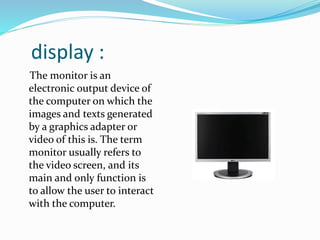
display :
The monitor is an
electronic output device of
the computer on which the
images and texts generated
by a graphics adapter or
video of this is. The term
monitor usually refers to
the video screen, and its
main and only function is
to allow the user to interact
with the computer.
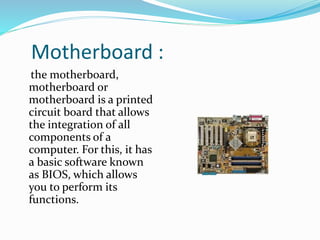
Motherboard :
the motherboard,
motherboard or
motherboard is a printed
circuit board that allows
the integration of all
components of a
computer. For this, it has
a basic software known
as BIOS, which allows
you to perform its
functions.
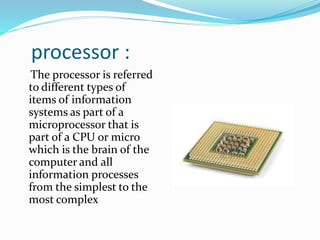
processor :
The processor is referred
to different types of
items of information
systems as part of a
microprocessor that is
part of a CPU or micro
which is the brain of the
computer and all
information processes
from the simplest to the
most complex
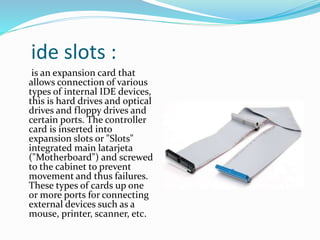
ide slots :
is an expansion card that
allows connection of various
types of internal IDE devices,
this is hard drives and optical
drives and floppy drives and
certain ports. The controller
card is inserted into
expansion slots or "Slots"
integrated main latarjeta
("Motherboard") and screwed
to the cabinet to prevent
movement and thus failures.
These types of cards up one
or more ports for connecting
external devices such as a
mouse, printer, scanner, etc.
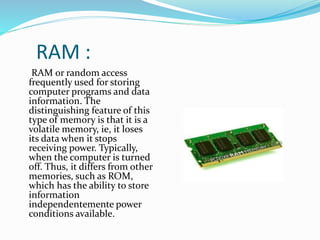
RAM :
RAM or random access
frequently used for storing
computer programs and data
information. The
distinguishing feature of this
type of memory is that it is a
volatile memory, ie, it loses
its data when it stops
receiving power. Typically,
when the computer is turned
off. Thus, it differs from other
memories, such as ROM,
which has the ability to store
information
independentemente power
conditions available.
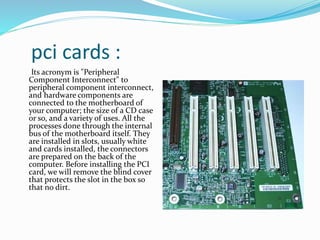
pci cards :
Its acronym is "Peripheral
Component Interconnect" to
peripheral component interconnect,
and hardware components are
connected to the motherboard of
your computer; the size of a CD case
or so, and a variety of uses. All the
processes done through the internal
bus of the motherboard itself. They
are installed in slots, usually white
and cards installed, the connectors
are prepared on the back of the
computer. Before installing the PCI
card, we will remove the blind cover
that protects the slot in the box so
that no dirt.
power supply :
in desktop PCs, the
aforementioned source of power is
located at the rear of the cabinet
and is complemented by a fan that
prevents the device from
overheating.
The power, therefore, can be
described as a source of electrical
type is able to transmit electrical
current by the generation of a
potential difference across its
terminals. It is developed based on
an ideal source, a concept
contemplated by circuit theory for
describing and understanding the
behavior of electronic parts and real
circuits.
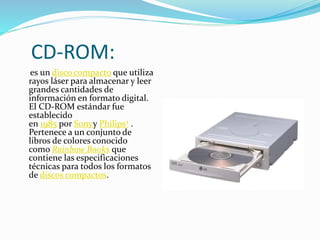
CD-ROM:
es un disco compacto que utiliza
rayos láser para almacenar y leer
grandes cantidades de
información en formato digital.
El CD-ROM estándar fue
establecido
en 1985 por Sonyy Philips2 .
Pertenece a un conjunto de
libros de colores conocido
como Rainbow Books que
contiene las especificaciones
técnicas para todos los formatos
de discos compactos.
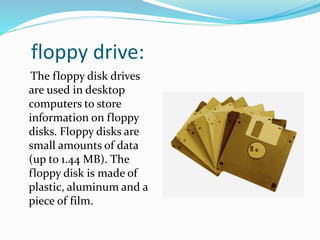
floppy drive:
The floppy disk drives
are used in desktop
computers to store
information on floppy
disks. Floppy disks are
small amounts of data
(up to 1.44 MB). The
floppy disk is made of
plastic, aluminum and a
piece of film.
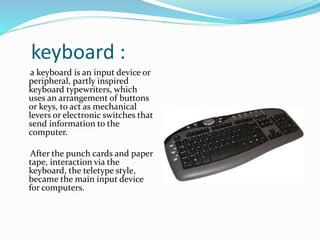
keyboard :
a keyboard is an input device or
peripheral, partly inspired
keyboard typewriters, which
uses an arrangement of buttons
or keys, to act as mechanical
levers or electronic switches that
send information to the
computer.
After the punch cards and paper
tape, interaction via the
keyboard, the teletype style,
became the main input device
for computers.
mouse :
It is a pointing device used to
facilitate handling of a graphical
environment on a computer. It is
usually made of plastic, and is used
with one hand. Detects relative
movement in two dimensions by the
flat surface on which it rests, usually
reflected by a pointer, or cursor
arrow on the monitor. The mouse
can be connected to a wired (PS / 2
ports and USB) or wireless (wireless
communication or wireless, through
a USB adapter connects to the
computer and it sends the signal to
the mouse, can also be through
connectivity bluetooth or infrared).

Ingles sena do

  • 1.
    Andrés Felipe LópezCadavid Alexis Betancourt ten – four academic educational institution
  • 2.
    display : The monitoris an electronic output device of the computer on which the images and texts generated by a graphics adapter or video of this is. The term monitor usually refers to the video screen, and its main and only function is to allow the user to interact with the computer.
  • 3.
    Motherboard : the motherboard, motherboardor motherboard is a printed circuit board that allows the integration of all components of a computer. For this, it has a basic software known as BIOS, which allows you to perform its functions.
  • 4.
    processor : The processoris referred to different types of items of information systems as part of a microprocessor that is part of a CPU or micro which is the brain of the computer and all information processes from the simplest to the most complex
  • 5.
    ide slots : isan expansion card that allows connection of various types of internal IDE devices, this is hard drives and optical drives and floppy drives and certain ports. The controller card is inserted into expansion slots or "Slots" integrated main latarjeta ("Motherboard") and screwed to the cabinet to prevent movement and thus failures. These types of cards up one or more ports for connecting external devices such as a mouse, printer, scanner, etc.
  • 6.
    RAM : RAM orrandom access frequently used for storing computer programs and data information. The distinguishing feature of this type of memory is that it is a volatile memory, ie, it loses its data when it stops receiving power. Typically, when the computer is turned off. Thus, it differs from other memories, such as ROM, which has the ability to store information independentemente power conditions available.
  • 7.
    pci cards : Itsacronym is "Peripheral Component Interconnect" to peripheral component interconnect, and hardware components are connected to the motherboard of your computer; the size of a CD case or so, and a variety of uses. All the processes done through the internal bus of the motherboard itself. They are installed in slots, usually white and cards installed, the connectors are prepared on the back of the computer. Before installing the PCI card, we will remove the blind cover that protects the slot in the box so that no dirt.
  • 8.
    power supply : indesktop PCs, the aforementioned source of power is located at the rear of the cabinet and is complemented by a fan that prevents the device from overheating. The power, therefore, can be described as a source of electrical type is able to transmit electrical current by the generation of a potential difference across its terminals. It is developed based on an ideal source, a concept contemplated by circuit theory for describing and understanding the behavior of electronic parts and real circuits.
  • 9.
    CD-ROM: es un discocompacto que utiliza rayos láser para almacenar y leer grandes cantidades de información en formato digital. El CD-ROM estándar fue establecido en 1985 por Sonyy Philips2 . Pertenece a un conjunto de libros de colores conocido como Rainbow Books que contiene las especificaciones técnicas para todos los formatos de discos compactos.
  • 10.
    floppy drive: The floppydisk drives are used in desktop computers to store information on floppy disks. Floppy disks are small amounts of data (up to 1.44 MB). The floppy disk is made of plastic, aluminum and a piece of film.
  • 11.
    keyboard : a keyboardis an input device or peripheral, partly inspired keyboard typewriters, which uses an arrangement of buttons or keys, to act as mechanical levers or electronic switches that send information to the computer. After the punch cards and paper tape, interaction via the keyboard, the teletype style, became the main input device for computers.
  • 12.
    mouse : It isa pointing device used to facilitate handling of a graphical environment on a computer. It is usually made of plastic, and is used with one hand. Detects relative movement in two dimensions by the flat surface on which it rests, usually reflected by a pointer, or cursor arrow on the monitor. The mouse can be connected to a wired (PS / 2 ports and USB) or wireless (wireless communication or wireless, through a USB adapter connects to the computer and it sends the signal to the mouse, can also be through connectivity bluetooth or infrared).