Presented by
Avinash.D
SNIST
15315A0430
Information Security
&
Ethical Hacking
Overview
APPLICATION -ATTACK –TYPES
 ARP Spoofing
 Botnet
 Cache Poisoning
 Computer Worm
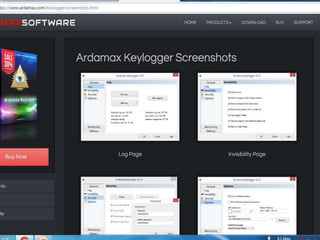
 Keylogger
 Malware
 Man in the Middle Attack
 Rootkit
 Spoofing Attack
 Spyware
What is ARP Spoofing ?
ARP spoofing is a type of attack in which a malicious
actor sends falsified ARP (Address Resolution
Protocol) messages over a local area network. This
results in the linking of an attacker’s MAC address
with the IP address of a legitimate computer or server
on the network. Once the attacker’s MAC address is
connected to an authentic IP address, the attacker will
begin receiving any data that is intended for that IP
address. ARP spoofing can enable malicious parties
to intercept, modify or even stop data in-transit. ARP
spoofing attacks can only occur on local area
networks that utilize the Address Resolution Protocol.
Types of ARP Spoofing
 Denial-of-service attacks: DoS attacks often
leverage ARP spoofing to link multiple IP
addresses with a single target’s MAC address. As
a result, traffic that is intended for many different
IP addresses will be redirected to the target’s
MAC address, overloading the target with traffic.
 Session hijacking: Session hijacking attacks can
use ARP spoofing to steal session IDs, granting
attackers access to private systems and data.
 Man-in-the-middle attacks: MITM attacks can rely
on ARP spoofing to intercept and modify traffic
between victims.
ARP spoofing detection, prevention
and protection
 Packet filtering
 Avoid trust relationships
 Use ARP spoofing detection software
 Use cryptographic network protocols
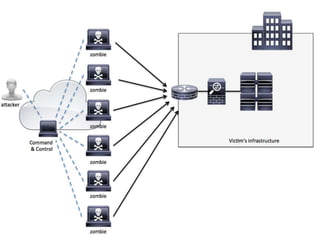
What is a BotNet ?
A botnet is a network of compromised computers
under the control of a malicious actor. Each
individual device in a botnet is referred to as a
bot. A bot is formed when a computer gets
infected with malware that enables third-party
control. Bots are also known as “zombie
computers” due to their ability to operate under
remote direction without their owners’ knowledge.
The attackers that control botnets are referred to
as “bot herders” or “bot masters.”
BotNet example
Zeus is a Trojan horse for Windows that was
created to steal bank information using botnets.
First discovered in 2007, Zeus spread through
email, downloads, and online messaging to users
across the globe. Zeus botnets used millions of
zombie computers to execute keystroke logging
and form grabbing attacks that targeted bank
data, account logins, and private user data. The
information gathered by Zeus botnets has been
used in thousands of cases of online identity
theft, credit card theft, and more.
Botnet detection detection and
prevention
They can be detected by:
 IRC traffic (botnets and bot masters use IRC for
communications)
 Connection attempts with known C&C servers
 Multiple machines on a network making identical DNS
requests
 High outgoing SMTP traffic (as a result of sending
spam)
 Unexpected popups (as a result of clickfraud activity)
 Slow computing/high CPU usage
 Spikes in traffic, especially Port 6667 (used for IRC),
Port 25 (used in email spamming), and Port 1080
(used by proxy servers)
 Outbound messages (email, social media, instant
messages, etc) that weren’t sent by the user
 Problems with Internet access
What is cache poisoning ?
 Cache poisoning is a type of attack in which corrupt
data is inserted into the cache database of the
Domain Name System (DNS) name server. The
Domain Name System is a system that associates
domain names with IP addresses. Devices that
connect to the internet or other private networks rely
on the DNS for resolving URLs, email addresses and
other human-readable domain names into their
corresponding IP addresses. In a DNS cache
poisoning attack, a malicious party sends forged
responses from an imposter DNS in order to reroute a
domain name to a new IP address. This new IP
address is almost always for a server that is
controlled by the attacker. DNS cache poisoning
attacks are often used to spread computer worms and
other malware . More sophisticated uses for DNS
cache poisoning include man-in-the-middle attacks
and denial-of-service attacks.
Cache poisoning prevention
In order to further prevent cache poisoning attacks,
IT teams
should configure their DNS name servers to:
 Limit recursive queries.
 Store only data related to the requested domain.
 Restrict query responses to only provide
information about the requested domain.
Computer worm
Often called Malicious software
SYMPTOMS:
 Users should be familiar with the symptoms of a computer worm so that
they can quickly recognize infections and begin the process of computer
worm removal. Here are some of the typical symptoms of a computer
worm:
 Slow computer performance
 Freezing/crashing
 Programs opening and running automatically
 Irregular web browser performance
 Unusual computer behavior (messages, images, sounds, etc)
 Firewall warnings
 Missing/modified files
 Appearance of strange/unintended desktop files or icons
 Operating system errors and system error messages
 Emails sent to contacts without the user’s knowledge
What is a Keylogger ?
 Keyloggers or keystroke loggers are software
programs or hardware devices that track the
activities (keys pressed) of a keyboard.
Keyloggers are a form of spyware where users
are unaware their actions are being tracked.
Keyloggers can be used for a variety of purposes;
hackers may use them to maliciously gain access
to your private information, while employers might
use them to monitor employee activities. Some
keyloggers can also capture your screen at
random intervals; these are known as screen
recorders. Keylogger software typically stores
your keystrokes in a small file, which is either
accessed later or automatically emailed to the
person monitoring your actions.
Functionality: Keylogger
Remote- access software keyloggers can allow access to locally recorded data from
a remote location. This communication can happen by using one of the following
methods:
 Uploading the data to a website, database or FTP server.
 Periodically emailing data to a predefined email address.
 Wirelessly transmitting data through an attached hardware system.
 Software enabling remote login to your local machine.
 Additional features that some software keyloggers come with can capture
additional information without requiring any keyboard key presses as input. They
include:
 Clipboard logging – Anything that can be copied to the clipboard is captured.
 Screen logging – Randomly timed screenshots of your computer screen are
logged.
 Control text capture – The Windows API allows for programs to request the text
value of some controls, meaning that your password may be captured even if
behind a password mask (the asterisks you see when you type your password
into a form).
 Activity tracking – Recording of which folders, programs and windows are
opened and also possibly screenshots of each.
 Recording of search engine queries, instant message conversations, FTP
downloads along with any other internet activities.
Detection and removal:
 There are a variety of ways to detect a keylogger, though
none are a catchall, so if you have reason to suspect your
computer has a keylogger, we recommend trying a variety
of these tactics:
 Begin by running your antivirus, which can often detect a
keylogger on your system.
 Run a program like Spybot Search and Destroy or
MalwareBytes to check for certain types.
 Check your task list by pressing ctrl+alt+del in Windows.
Examine the tasks running, and if you are unfamiliar with
any of them, look them up on a search engine.
 Scan your hard disk for the most recent files stored. Look
at the contents of any files that update often, as they might
be logs.
 Use your system configuration utility to view which
programs are loaded at computer start-up. You can access
this list by typing “msconfig” into the run box.
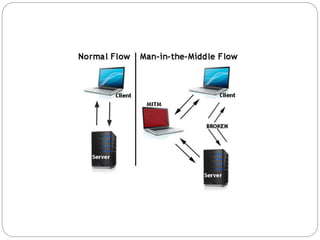
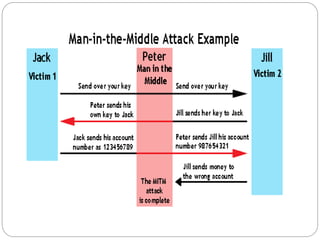
What is MITM ?
 Man-in-the-middle is a type of eavesdropping
attack that occurs when a malicious actor inserts
himself as a relay/proxy into a communication
session between people or systems.
 A MITM attack exploits the real-time processing of
transactions, conversations or transfer of other
data.
 Man-in-the-middle attacks allow attackers to
intercept, send and receive data never meant to
be for them without either outside party knowing
until it is too late.
What is a Rootkit ?
 A rootkit is a clandestine computer program designed
to provide continued privileged access to a computer
while actively hiding its presence. The term rootkit is a
connection of the two words "root" and "kit." Originally,
a rootkit was a collection of tools that enabled
administrator-level access to a computer or network.
Root refers to the Admin account on Unix and Linux
systems, and kit refers to the software components
that implement the tool. Today rootkits are generally
associated with malware – such as Trojans, worms,
viruses – that conceal their existence and actions
from users and other system processes.
Functionality and Detection
What Can a Rootkit Do?
 A rootkit allows someone to maintain command and control
over a computer without the computer user/owner knowing
about it. Once a rootkit has been installed, the controller of
the rootkit has the ability to remotely execute files and
change system configurations on the host machine. A
rootkit on an infected computer can also access log files
and spy on the legitimate computer owner’s usage.
Rootkit Detection
 It is difficult to detect rootkits. There are no commercial
products available that can find and remove all known and
unknown rootkits. There are various ways to look for a
rootkit on an infected machine. Detection methods include
behavioral-based methods (e.g., looking for strange
behavior on a computer system), signature scanning and
memory dump analysis. Often, the only option to remove a
rootkit is to completely rebuild the compromised system.
Well-known Rootkit examples
 Lane Davis and Steven Dake - wrote the earliest known rootkit in
the early 1990s.
 NTRootkit – one of the first malicious rootkits targeted at
Windows OS.
 HackerDefender – this early Trojan altered/augmented the OS at
a very low level of functions calls.
 Machiavelli - the first rootkit targeting Mac OS X appeared in
2009. This rootkit creates hidden system calls and kernel
threads.
 Greek wiretapping – in 2004/05, intruders installed a rootkit that
targeted Ericsson's AXE PBX.
 Zeus, first identified in July 2007, is a Trojan horse that steals
banking information by man-in-the-browser keystroke logging
and form grabbing.
 Stuxnet - the first known rootkit for industrial control systems
 Flame - a computer malware discovered in 2012 that attacks
computers running Windows OS. It can record audio,
screenshots, keyboard activity and network traffic.
Spyware
 Spyware is any software that installs itself on your
computer and starts covertly monitoring your
online behavior without your knowledge or
permission. Spyware is a kind of malware that
secretly gathers information about a person or
organization and relays this data to other parties.
In some cases, these may be advertisers or
marketing data firms, which is why spyware is
sometimes referred to as “adware.” It is installed
without user consent by methods such as a drive-
by download, a trojan included with a legitimate
program or a deceptive pop-up window
Signs of spyware
 Signs of a spyware infection can include
unwanted behaviors and degradation of system
performance. It can eat up CPU capacity, disk
usage and network traffic. Stability issues such as
applications freezing, failure to boot, difficulty
connecting to the internet and system crashes
are also common.
Information security & EthicalHacking

Information security & EthicalHacking

  • 1.
  • 2.
    Overview APPLICATION -ATTACK –TYPES ARP Spoofing  Botnet  Cache Poisoning  Computer Worm  Keylogger  Malware  Man in the Middle Attack  Rootkit  Spoofing Attack  Spyware
  • 3.
    What is ARPSpoofing ? ARP spoofing is a type of attack in which a malicious actor sends falsified ARP (Address Resolution Protocol) messages over a local area network. This results in the linking of an attacker’s MAC address with the IP address of a legitimate computer or server on the network. Once the attacker’s MAC address is connected to an authentic IP address, the attacker will begin receiving any data that is intended for that IP address. ARP spoofing can enable malicious parties to intercept, modify or even stop data in-transit. ARP spoofing attacks can only occur on local area networks that utilize the Address Resolution Protocol.
  • 4.
    Types of ARPSpoofing  Denial-of-service attacks: DoS attacks often leverage ARP spoofing to link multiple IP addresses with a single target’s MAC address. As a result, traffic that is intended for many different IP addresses will be redirected to the target’s MAC address, overloading the target with traffic.  Session hijacking: Session hijacking attacks can use ARP spoofing to steal session IDs, granting attackers access to private systems and data.  Man-in-the-middle attacks: MITM attacks can rely on ARP spoofing to intercept and modify traffic between victims.
  • 6.
    ARP spoofing detection,prevention and protection  Packet filtering  Avoid trust relationships  Use ARP spoofing detection software  Use cryptographic network protocols
  • 7.
    What is aBotNet ? A botnet is a network of compromised computers under the control of a malicious actor. Each individual device in a botnet is referred to as a bot. A bot is formed when a computer gets infected with malware that enables third-party control. Bots are also known as “zombie computers” due to their ability to operate under remote direction without their owners’ knowledge. The attackers that control botnets are referred to as “bot herders” or “bot masters.”
  • 8.
    BotNet example Zeus isa Trojan horse for Windows that was created to steal bank information using botnets. First discovered in 2007, Zeus spread through email, downloads, and online messaging to users across the globe. Zeus botnets used millions of zombie computers to execute keystroke logging and form grabbing attacks that targeted bank data, account logins, and private user data. The information gathered by Zeus botnets has been used in thousands of cases of online identity theft, credit card theft, and more.
  • 9.
    Botnet detection detectionand prevention They can be detected by:  IRC traffic (botnets and bot masters use IRC for communications)  Connection attempts with known C&C servers  Multiple machines on a network making identical DNS requests  High outgoing SMTP traffic (as a result of sending spam)  Unexpected popups (as a result of clickfraud activity)  Slow computing/high CPU usage  Spikes in traffic, especially Port 6667 (used for IRC), Port 25 (used in email spamming), and Port 1080 (used by proxy servers)  Outbound messages (email, social media, instant messages, etc) that weren’t sent by the user  Problems with Internet access
  • 10.
    What is cachepoisoning ?  Cache poisoning is a type of attack in which corrupt data is inserted into the cache database of the Domain Name System (DNS) name server. The Domain Name System is a system that associates domain names with IP addresses. Devices that connect to the internet or other private networks rely on the DNS for resolving URLs, email addresses and other human-readable domain names into their corresponding IP addresses. In a DNS cache poisoning attack, a malicious party sends forged responses from an imposter DNS in order to reroute a domain name to a new IP address. This new IP address is almost always for a server that is controlled by the attacker. DNS cache poisoning attacks are often used to spread computer worms and other malware . More sophisticated uses for DNS cache poisoning include man-in-the-middle attacks and denial-of-service attacks.
  • 11.
    Cache poisoning prevention Inorder to further prevent cache poisoning attacks, IT teams should configure their DNS name servers to:  Limit recursive queries.  Store only data related to the requested domain.  Restrict query responses to only provide information about the requested domain.
  • 12.
    Computer worm Often calledMalicious software SYMPTOMS:  Users should be familiar with the symptoms of a computer worm so that they can quickly recognize infections and begin the process of computer worm removal. Here are some of the typical symptoms of a computer worm:  Slow computer performance  Freezing/crashing  Programs opening and running automatically  Irregular web browser performance  Unusual computer behavior (messages, images, sounds, etc)  Firewall warnings  Missing/modified files  Appearance of strange/unintended desktop files or icons  Operating system errors and system error messages  Emails sent to contacts without the user’s knowledge
  • 13.
    What is aKeylogger ?  Keyloggers or keystroke loggers are software programs or hardware devices that track the activities (keys pressed) of a keyboard. Keyloggers are a form of spyware where users are unaware their actions are being tracked. Keyloggers can be used for a variety of purposes; hackers may use them to maliciously gain access to your private information, while employers might use them to monitor employee activities. Some keyloggers can also capture your screen at random intervals; these are known as screen recorders. Keylogger software typically stores your keystrokes in a small file, which is either accessed later or automatically emailed to the person monitoring your actions.
  • 15.
    Functionality: Keylogger Remote- accesssoftware keyloggers can allow access to locally recorded data from a remote location. This communication can happen by using one of the following methods:  Uploading the data to a website, database or FTP server.  Periodically emailing data to a predefined email address.  Wirelessly transmitting data through an attached hardware system.  Software enabling remote login to your local machine.  Additional features that some software keyloggers come with can capture additional information without requiring any keyboard key presses as input. They include:  Clipboard logging – Anything that can be copied to the clipboard is captured.  Screen logging – Randomly timed screenshots of your computer screen are logged.  Control text capture – The Windows API allows for programs to request the text value of some controls, meaning that your password may be captured even if behind a password mask (the asterisks you see when you type your password into a form).  Activity tracking – Recording of which folders, programs and windows are opened and also possibly screenshots of each.  Recording of search engine queries, instant message conversations, FTP downloads along with any other internet activities.
  • 16.
    Detection and removal: There are a variety of ways to detect a keylogger, though none are a catchall, so if you have reason to suspect your computer has a keylogger, we recommend trying a variety of these tactics:  Begin by running your antivirus, which can often detect a keylogger on your system.  Run a program like Spybot Search and Destroy or MalwareBytes to check for certain types.  Check your task list by pressing ctrl+alt+del in Windows. Examine the tasks running, and if you are unfamiliar with any of them, look them up on a search engine.  Scan your hard disk for the most recent files stored. Look at the contents of any files that update often, as they might be logs.  Use your system configuration utility to view which programs are loaded at computer start-up. You can access this list by typing “msconfig” into the run box.
  • 17.
    What is MITM?  Man-in-the-middle is a type of eavesdropping attack that occurs when a malicious actor inserts himself as a relay/proxy into a communication session between people or systems.  A MITM attack exploits the real-time processing of transactions, conversations or transfer of other data.  Man-in-the-middle attacks allow attackers to intercept, send and receive data never meant to be for them without either outside party knowing until it is too late.
  • 20.
    What is aRootkit ?  A rootkit is a clandestine computer program designed to provide continued privileged access to a computer while actively hiding its presence. The term rootkit is a connection of the two words "root" and "kit." Originally, a rootkit was a collection of tools that enabled administrator-level access to a computer or network. Root refers to the Admin account on Unix and Linux systems, and kit refers to the software components that implement the tool. Today rootkits are generally associated with malware – such as Trojans, worms, viruses – that conceal their existence and actions from users and other system processes.
  • 21.
    Functionality and Detection WhatCan a Rootkit Do?  A rootkit allows someone to maintain command and control over a computer without the computer user/owner knowing about it. Once a rootkit has been installed, the controller of the rootkit has the ability to remotely execute files and change system configurations on the host machine. A rootkit on an infected computer can also access log files and spy on the legitimate computer owner’s usage. Rootkit Detection  It is difficult to detect rootkits. There are no commercial products available that can find and remove all known and unknown rootkits. There are various ways to look for a rootkit on an infected machine. Detection methods include behavioral-based methods (e.g., looking for strange behavior on a computer system), signature scanning and memory dump analysis. Often, the only option to remove a rootkit is to completely rebuild the compromised system.
  • 22.
    Well-known Rootkit examples Lane Davis and Steven Dake - wrote the earliest known rootkit in the early 1990s.  NTRootkit – one of the first malicious rootkits targeted at Windows OS.  HackerDefender – this early Trojan altered/augmented the OS at a very low level of functions calls.  Machiavelli - the first rootkit targeting Mac OS X appeared in 2009. This rootkit creates hidden system calls and kernel threads.  Greek wiretapping – in 2004/05, intruders installed a rootkit that targeted Ericsson's AXE PBX.  Zeus, first identified in July 2007, is a Trojan horse that steals banking information by man-in-the-browser keystroke logging and form grabbing.  Stuxnet - the first known rootkit for industrial control systems  Flame - a computer malware discovered in 2012 that attacks computers running Windows OS. It can record audio, screenshots, keyboard activity and network traffic.
  • 23.
    Spyware  Spyware isany software that installs itself on your computer and starts covertly monitoring your online behavior without your knowledge or permission. Spyware is a kind of malware that secretly gathers information about a person or organization and relays this data to other parties. In some cases, these may be advertisers or marketing data firms, which is why spyware is sometimes referred to as “adware.” It is installed without user consent by methods such as a drive- by download, a trojan included with a legitimate program or a deceptive pop-up window
  • 24.
    Signs of spyware Signs of a spyware infection can include unwanted behaviors and degradation of system performance. It can eat up CPU capacity, disk usage and network traffic. Stability issues such as applications freezing, failure to boot, difficulty connecting to the internet and system crashes are also common.