

Online course offering
Employee Awareness in
Cyber Security
“Suggesting that IT security issues can be
dealt with simply by drafting and
implementing a security policy is like saying
that speeding drivers won’t be a problem if we
introduce speed limits”
© KloudLearn www.kloudlearn.com
Learning
Objectives
Goal Of Employee Awareness in Cyber Security
Auditing Conclusions in the City of Winnipeg
Key Risks and Impacts
Educating Cyber Security Awareness among
Employees
Need For Employee Awareness Training and Best
Practices
Dos and Don’ts Checklist
© KloudLearn www.kloudlearn.com 2
Employees are aware of risks but unsure of how it
affects at workplace
Key takeaways on Cyber Security Employee
Awareness
Quiz
What is the goal of Corporate security
policies?
The goal of corporate security policies is to define
the procedures, guidelines and practices for
configuring and managing security in the
environment
Goal of Employee Awareness in Cyber Security
© KloudLearn www.kloudlearn.com 3
How do we improve Awareness among
Employees?
In order to improve awareness an understanding on
all key systems across the organization, there needs
to be an investment in additional time and resources
in an awareness and training strategy to reinforce the
directives and to improve security efforts across all
departments and special operating agencies
employees
● Responsibility for security has been assigned to the individual and most City staff are aware of the IT
Security directives. The directives are accessible online but some need to be updated to reflect the
current organizational structure.
● Results of the e-Survey revealed that nearly 30% of all respondents have only a poor or fair level of
understanding of the directives.
● Recommendations were made to create new directives. Evolving technology issues such as the use of
portable media devices and the performance of vulnerability assessments require administrative
directives to provide guidance to City staff.
Auditing Conclusions in the City of Winnipeg
© KloudLearn www.kloudlearn.com 4
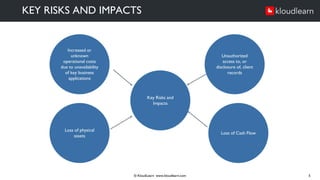
KEY RISKS AND IMPACTS
© KloudLearn www.kloudlearn.com 5
Increased or
unknown
operational costs
due to unavailability
of key business
applications
Unauthorized
access to, or
disclosure of, client
records
Key Risks and
Impacts
Loss of physical
assets
Loss of Cash Flow
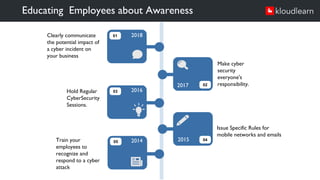
Educating Employees about Awareness
Issue Specific Rules for
mobile networks and emails
2017
2017
2018
2016
2014
Clearly communicate
the potential impact of
a cyber incident on
your business
Make cyber
security
everyone's
responsibility.
Train your
employees to
recognize and
respond to a cyber
attack
Hold Regular
CyberSecurity
Sessions.
01
03
05
02
04
2015
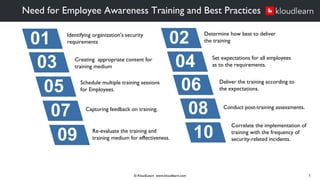
Need for Employee Awareness Training and Best Practices
© KloudLearn www.kloudlearn.com 7
01 02
03 04
05 06
07 08
09 10
Identifying organization's security
requirements
Creating appropriate content for
training medium
Schedule multiple training sessions
for Employees.
Capturing feedback on training.
Re-evaluate the training and
training medium for effectiveness.
Determine how best to deliver
the training
Set expectations for all employees
as to the requirements.
Deliver the training according to
the expectations.
Conduct post-training assessments.
Correlate the implementation of
training with the frequency of
security-related incidents.
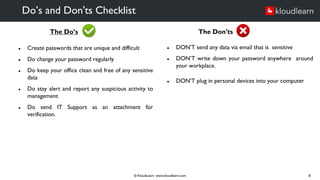
The Do’s
● Create passwords that are unique and difficult
● Do change your password regularly
● Do keep your office clean and free of any sensitive
data
● Do stay alert and report any suspicious activity to
management
● Do send IT Support as an attachment for
verification.
Do’s and Don'ts Checklist
© KloudLearn www.kloudlearn.com 8
The Don'ts
● DON’T send any data via email that is sensitive
● DON’T write down your password anywhere around
your workplace.
● DON’T plug in personal devices into your computer
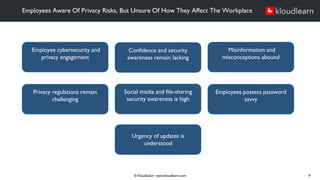
Employees Aware Of Privacy Risks, But Unsure Of How They Affect The Workplace
© KloudLearn www.kloudlearn.com 9
Employee cybersecurity and
privacy engagement
Confidence and security
awareness remain lacking
Misinformation and
misconceptions abound
Privacy regulations remain
challenging
Social media and file-sharing
security awareness is high
Employees possess password
savvy
Urgency of updates is
understood
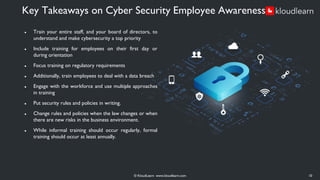
● Train your entire staff, and your board of directors, to
understand and make cybersecurity a top priority
● Include training for employees on their first day or
during orientation
● Focus training on regulatory requirements
● Additionally, train employees to deal with a data breach
● Engage with the workforce and use multiple approaches
in training
● Put security rules and policies in writing.
● Change rules and policies when the law changes or when
there are new risks in the business environment.
● While informal training should occur regularly, formal
training should occur at least annually.
Key Takeaways on Cyber Security Employee Awareness
© KloudLearn www.kloudlearn.com 10
Test your knowledge!
Quiz
© KloudLearn www.kloudlearn.com
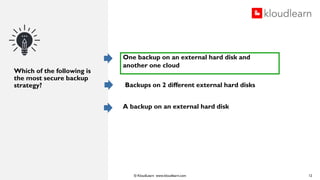
Which of the following is
the most secure backup
strategy?
One backup on an external hard disk and
another one cloud
Backups on 2 different external hard disks
A backup on an external hard disk
12
© KloudLearn www.kloudlearn.com
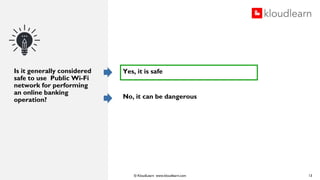
Is it generally considered
safe to use Public Wi-Fi
network for performing
an online banking
operation?
13
Yes, it is safe
No, it can be dangerous
© KloudLearn www.kloudlearn.com
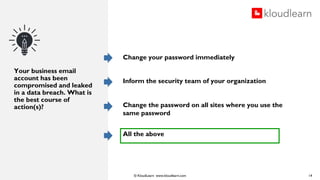
Your business email
account has been
compromised and leaked
in a data breach. What is
the best course of
action(s)?
Change your password immediately
Inform the security team of your organization
Change the password on all sites where you use the
same password
All the above
14
© KloudLearn www.kloudlearn.com
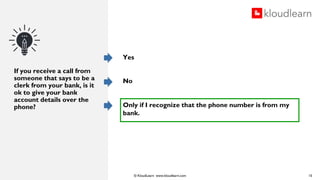
If you receive a call from
someone that says to be a
clerk from your bank, is it
ok to give your bank
account details over the
phone?
Yes
No
Only if I recognize that the phone number is from my
bank.
15
© KloudLearn www.kloudlearn.com
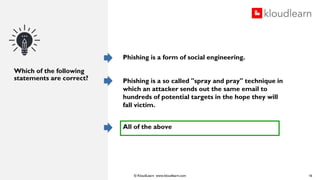
Which of the following
statements are correct?
Phishing is a form of social engineering.
Phishing is a so called "spray and pray" technique in
which an attacker sends out the same email to
hundreds of potential targets in the hope they will
fall victim.
All of the above
16
© KloudLearn www.kloudlearn.com
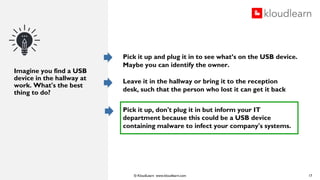
Imagine you find a USB
device in the hallway at
work. What's the best
thing to do?
Pick it up and plug it in to see what’s on the USB device.
Maybe you can identify the owner.
Leave it in the hallway or bring it to the reception
desk, such that the person who lost it can get it back
Pick it up, don't plug it in but inform your IT
department because this could be a USB device
containing malware to infect your company's systems.
17
© KloudLearn www.kloudlearn.com
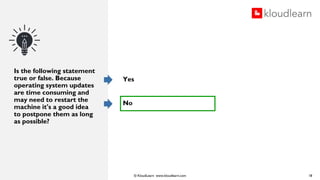
Is the following statement
true or false. Because
operating system updates
are time consuming and
may need to restart the
machine it's a good idea
to postpone them as long
as possible?
Yes
No
18
© KloudLearn www.kloudlearn.com
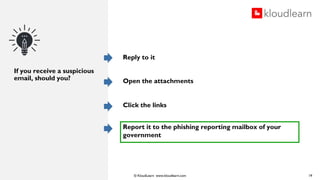
If you receive a suspicious
email, should you?
Reply to it
Open the attachments
Click the links
Report it to the phishing reporting mailbox of your
government
19
© KloudLearn www.kloudlearn.com
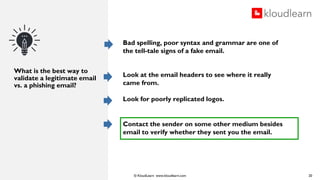
What is the best way to
validate a legitimate email
vs. a phishing email?
20
Bad spelling, poor syntax and grammar are one of
the tell-tale signs of a fake email.
Look at the email headers to see where it really
came from.
Look for poorly replicated logos.
Contact the sender on some other medium besides
email to verify whether they sent you the email.
© KloudLearn www.kloudlearn.com
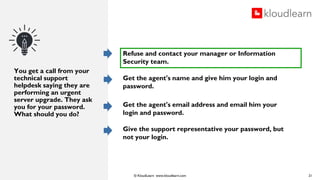
You get a call from your
technical support
helpdesk saying they are
performing an urgent
server upgrade. They ask
you for your password.
What should you do?
21
Refuse and contact your manager or Information
Security team.
Get the agent's name and give him your login and
password.
Get the agent's email address and email him your
login and password.
Give the support representative your password, but
not your login.
Thank You
© KloudLearn www.kloudlearn.com 22
KloudLearn, Inc. is headquartered in Silicon Valley, California. Our mission is to help
enterprises provide an engaging and impactful learning experience that improves
business performance. We provide the industry’s most modern LMS (Learning
Management System). For more information visit us at www.kloudlearn.com or reach
out to us at info@kloudlearn.com

Employee Awareness in Cyber Security - Kloudlearn

  • 1.
    Online course offering EmployeeAwareness in Cyber Security “Suggesting that IT security issues can be dealt with simply by drafting and implementing a security policy is like saying that speeding drivers won’t be a problem if we introduce speed limits” © KloudLearn www.kloudlearn.com
  • 2.
    Learning Objectives Goal Of EmployeeAwareness in Cyber Security Auditing Conclusions in the City of Winnipeg Key Risks and Impacts Educating Cyber Security Awareness among Employees Need For Employee Awareness Training and Best Practices Dos and Don’ts Checklist © KloudLearn www.kloudlearn.com 2 Employees are aware of risks but unsure of how it affects at workplace Key takeaways on Cyber Security Employee Awareness Quiz
  • 3.
    What is thegoal of Corporate security policies? The goal of corporate security policies is to define the procedures, guidelines and practices for configuring and managing security in the environment Goal of Employee Awareness in Cyber Security © KloudLearn www.kloudlearn.com 3 How do we improve Awareness among Employees? In order to improve awareness an understanding on all key systems across the organization, there needs to be an investment in additional time and resources in an awareness and training strategy to reinforce the directives and to improve security efforts across all departments and special operating agencies employees
  • 4.
    ● Responsibility forsecurity has been assigned to the individual and most City staff are aware of the IT Security directives. The directives are accessible online but some need to be updated to reflect the current organizational structure. ● Results of the e-Survey revealed that nearly 30% of all respondents have only a poor or fair level of understanding of the directives. ● Recommendations were made to create new directives. Evolving technology issues such as the use of portable media devices and the performance of vulnerability assessments require administrative directives to provide guidance to City staff. Auditing Conclusions in the City of Winnipeg © KloudLearn www.kloudlearn.com 4
  • 5.
    KEY RISKS ANDIMPACTS © KloudLearn www.kloudlearn.com 5 Increased or unknown operational costs due to unavailability of key business applications Unauthorized access to, or disclosure of, client records Key Risks and Impacts Loss of physical assets Loss of Cash Flow
  • 6.
    Educating Employees aboutAwareness Issue Specific Rules for mobile networks and emails 2017 2017 2018 2016 2014 Clearly communicate the potential impact of a cyber incident on your business Make cyber security everyone's responsibility. Train your employees to recognize and respond to a cyber attack Hold Regular CyberSecurity Sessions. 01 03 05 02 04 2015
  • 7.
    Need for EmployeeAwareness Training and Best Practices © KloudLearn www.kloudlearn.com 7 01 02 03 04 05 06 07 08 09 10 Identifying organization's security requirements Creating appropriate content for training medium Schedule multiple training sessions for Employees. Capturing feedback on training. Re-evaluate the training and training medium for effectiveness. Determine how best to deliver the training Set expectations for all employees as to the requirements. Deliver the training according to the expectations. Conduct post-training assessments. Correlate the implementation of training with the frequency of security-related incidents.
  • 8.
    The Do’s ● Createpasswords that are unique and difficult ● Do change your password regularly ● Do keep your office clean and free of any sensitive data ● Do stay alert and report any suspicious activity to management ● Do send IT Support as an attachment for verification. Do’s and Don'ts Checklist © KloudLearn www.kloudlearn.com 8 The Don'ts ● DON’T send any data via email that is sensitive ● DON’T write down your password anywhere around your workplace. ● DON’T plug in personal devices into your computer
  • 9.
    Employees Aware OfPrivacy Risks, But Unsure Of How They Affect The Workplace © KloudLearn www.kloudlearn.com 9 Employee cybersecurity and privacy engagement Confidence and security awareness remain lacking Misinformation and misconceptions abound Privacy regulations remain challenging Social media and file-sharing security awareness is high Employees possess password savvy Urgency of updates is understood
  • 10.
    ● Train yourentire staff, and your board of directors, to understand and make cybersecurity a top priority ● Include training for employees on their first day or during orientation ● Focus training on regulatory requirements ● Additionally, train employees to deal with a data breach ● Engage with the workforce and use multiple approaches in training ● Put security rules and policies in writing. ● Change rules and policies when the law changes or when there are new risks in the business environment. ● While informal training should occur regularly, formal training should occur at least annually. Key Takeaways on Cyber Security Employee Awareness © KloudLearn www.kloudlearn.com 10
  • 11.
  • 12.
    © KloudLearn www.kloudlearn.com Whichof the following is the most secure backup strategy? One backup on an external hard disk and another one cloud Backups on 2 different external hard disks A backup on an external hard disk 12
  • 13.
    © KloudLearn www.kloudlearn.com Isit generally considered safe to use Public Wi-Fi network for performing an online banking operation? 13 Yes, it is safe No, it can be dangerous
  • 14.
    © KloudLearn www.kloudlearn.com Yourbusiness email account has been compromised and leaked in a data breach. What is the best course of action(s)? Change your password immediately Inform the security team of your organization Change the password on all sites where you use the same password All the above 14
  • 15.
    © KloudLearn www.kloudlearn.com Ifyou receive a call from someone that says to be a clerk from your bank, is it ok to give your bank account details over the phone? Yes No Only if I recognize that the phone number is from my bank. 15
  • 16.
    © KloudLearn www.kloudlearn.com Whichof the following statements are correct? Phishing is a form of social engineering. Phishing is a so called "spray and pray" technique in which an attacker sends out the same email to hundreds of potential targets in the hope they will fall victim. All of the above 16
  • 17.
    © KloudLearn www.kloudlearn.com Imagineyou find a USB device in the hallway at work. What's the best thing to do? Pick it up and plug it in to see what’s on the USB device. Maybe you can identify the owner. Leave it in the hallway or bring it to the reception desk, such that the person who lost it can get it back Pick it up, don't plug it in but inform your IT department because this could be a USB device containing malware to infect your company's systems. 17
  • 18.
    © KloudLearn www.kloudlearn.com Isthe following statement true or false. Because operating system updates are time consuming and may need to restart the machine it's a good idea to postpone them as long as possible? Yes No 18
  • 19.
    © KloudLearn www.kloudlearn.com Ifyou receive a suspicious email, should you? Reply to it Open the attachments Click the links Report it to the phishing reporting mailbox of your government 19
  • 20.
    © KloudLearn www.kloudlearn.com Whatis the best way to validate a legitimate email vs. a phishing email? 20 Bad spelling, poor syntax and grammar are one of the tell-tale signs of a fake email. Look at the email headers to see where it really came from. Look for poorly replicated logos. Contact the sender on some other medium besides email to verify whether they sent you the email.
  • 21.
    © KloudLearn www.kloudlearn.com Youget a call from your technical support helpdesk saying they are performing an urgent server upgrade. They ask you for your password. What should you do? 21 Refuse and contact your manager or Information Security team. Get the agent's name and give him your login and password. Get the agent's email address and email him your login and password. Give the support representative your password, but not your login.
  • 22.
    Thank You © KloudLearnwww.kloudlearn.com 22 KloudLearn, Inc. is headquartered in Silicon Valley, California. Our mission is to help enterprises provide an engaging and impactful learning experience that improves business performance. We provide the industry’s most modern LMS (Learning Management System). For more information visit us at www.kloudlearn.com or reach out to us at info@kloudlearn.com