Informatica Big Data and Social
Media
Ramy Mahrous
About Informatica and Informatica Platform
Informatica Integration with Hadoop and Big Data Integration
Social Media Integration and Telecom Network Streaming
Agenda
About Informatica and
Informatica Platform
Informatica
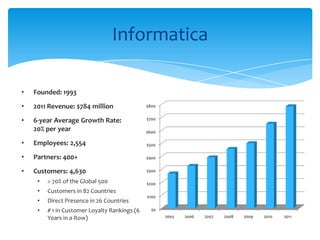
• Founded: 1993
• 2011 Revenue: $784 million
• 6-year Average Growth Rate:
20% per year
• Employees: 2,554
• Partners: 400+
• Customers: 4,630
• > 70% of the Global 500
• Customers in 82 Countries
• Direct Presence in 26 Countries
• # 1 in Customer Loyalty Rankings (6
Years in a Row)
$0
$100
$200
$300
$400
$500
$600
$700
$800
2005 2006 2007 2008 2009 2010 2011
Banking & Finance
Transportation
Telecom
Regional Leaders Rely on Informatica
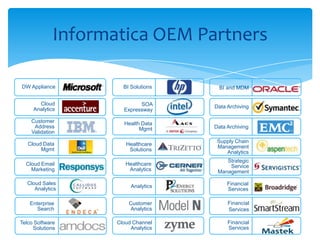
Informatica OEM Partners
Cloud
Analytics
Data Archiving
Financial
Services
Data Archiving
BI Solutions
SOA
Expressway
Cloud Email
Marketing
Financial
Services
Analytics
Customer
Analytics
Cloud Channel
Analytics
Enterprise
Search
Cloud Sales
Analytics
DW Appliance
Financial
Services
Health Data
Mgmt
Strategic
Service
Management
Healthcare
Solutions
BI and MDM
Supply Chain
Management
Analytics
Healthcare
Analytics
Cloud Data
Mgmt
Customer
Address
Validation
Telco Software
Solutions
Informatica Compatibility
OEM Partners Cloud Global SI Partners
Database and Infrastructure
BI OEM Partners Cloud Partners Global SI Partners
Database & Infrastructure
Operating Systems
Platforms & Technologies
INFORM SI Partners
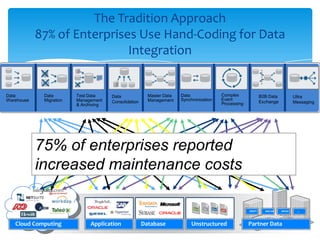
The Tradition Approach
87% of Enterprises Use Hand-Coding for Data
Integration
Application Database Partner Data
SWIFT NACHA HIPAA …
Cloud Computing Unstructured
75% of enterprises reported
increased maintenance costs
Data
Warehouse
Data
Migration
Test Data
Management
& Archiving
Master Data
Management
Data
Synchronization
B2B Data
Exchange
Data
Consolidation
Complex
Event
Processing
Ultra
Messaging
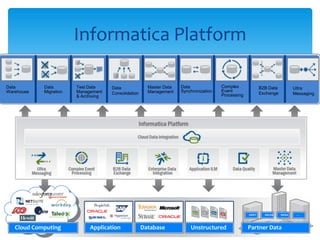
Informatica Platform
Application Partner Data
SWIFT NACHA HIPAA …
Cloud Computing UnstructuredDatabase
Data
Warehouse
Data
Migration
Test Data
Management
& Archiving
Master Data
Management
Data
Synchronization
B2B Data
Exchange
Data
Consolidation
Complex
Event
Processing
Ultra
Messaging
Informatica Integration with
Hadoop and Big Data Integration
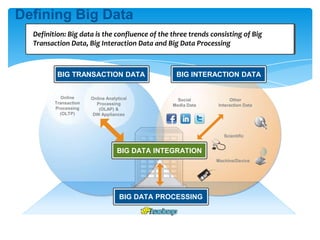
Defining Big Data
Definition: Big data is the confluence of the three trends consisting of Big
Transaction Data, Big Interaction Data and Big Data Processing
Online
Transaction
Processing
(OLTP)
Online Analytical
Processing
(OLAP) &
DW Appliances
Social
Media Data
Other
Interaction Data
Scientific
Machine/Device
BIG TRANSACTION DATA BIG INTERACTION DATA
BIG DATA PROCESSING
BIG DATA INTEGRATION
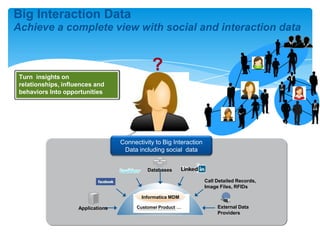
What influence
does she have
with her family
and friends?
How
connected
is she?
What will she
do with this
merchandise?
Any additional
services?
Big Interaction Data
Achieve a complete view with social and interaction data
Turn insights on
relationships, influences and
behaviors Into opportunities
?
Connectivity to Big Interaction
Data including social data
Databases
Call Detailed Records,
Image Files, RFIDs
External Data
Providers
Applications Customer Product …
Informatica MDM
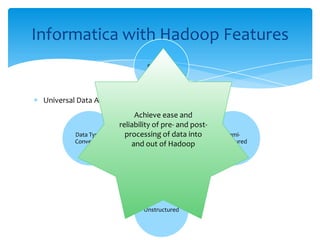
Universal Data Access
Informatica with Hadoop Features
Universal
Data
Access
Structured
Semi-
Structured
Unstructured
Data Types
Conversion
Achieve ease and
reliability of pre- and post-
processing of data into
and out of Hadoop
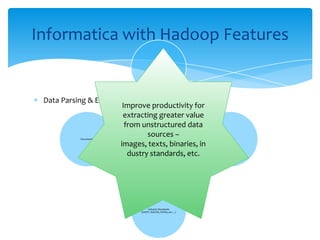
Data Parsing & Exchange
Informatica with Hadoop Features
Data
Parsing &
Exchange
Images
Binaries
Industry Standards
(SWIFT, NACHA, HIPAA, etc…)
Documents
Improve productivity for
extracting greater value
from unstructured data
sources –
images, texts, binaries, in
dustry standards, etc.
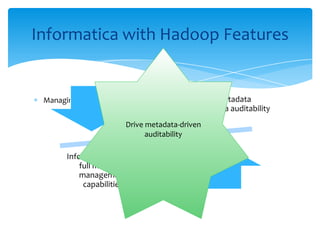
Managing Metadata
Informatica with Hadoop Features
Hadoop lacks metadata
management and data auditability
Informatica supplies
full metadata
management
capabilities
Drive metadata-driven
auditability
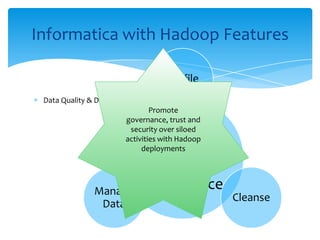
Data Quality & Data Governance
Informatica with Hadoop Features
Data
Quality &
Data
Governance
Profile
Cleanse
Manage
Data
Promote
governance, trust and
security over siloed
activities with Hadoop
deployments
Mixed Workload Management
Informatica with Hadoop Features
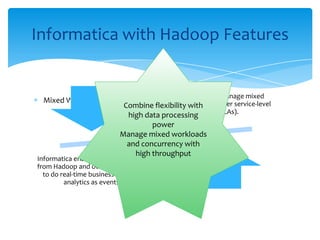
Hadoop is not able to manage mixed
workloads according to user service-level
agreements (SLAs).
Informatica enables integration of data sets
from Hadoop and other transaction sources
to do real-time business intelligence and
analytics as events unfold.
Combine flexibility with
high data processing
power
Manage mixed workloads
and concurrency with
high throughput
Resource Optimization and Reuse
Interoperability With Rest of Architecture
Informatica with Hadoop Features
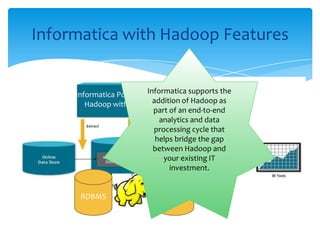
Informatica PowerExchange for
Hadoop with PowerCenter
RDBMSRDBMS
Informatica supports the
addition of Hadoop as
part of an end-to-end
analytics and data
processing cycle that
helps bridge the gap
between Hadoop and
your existing IT
investment.
Informatica with Social Media
Social Media
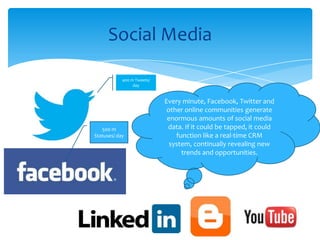
Every minute, Facebook, Twitter and
other online communities generate
enormous amounts of social media
data. If it could be tapped, it could
function like a real-time CRM
system, continually revealing new
trends and opportunities.
400 m Tweets/
day
500 m
Statuses/ day
Billions of social media messages
Extract insights to support CRM and marketing
Monitor reputation and perception
Business Challenges
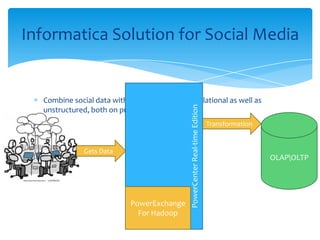
Combine social data with other data sources, relational as well as
unstructured, both on premise and in the cloud
Informatica Solution for Social Media
Transformation
OLAPOLTP
PowerCenterReal-timeEdition
PowerExchange
For Hadoop
Gets Data
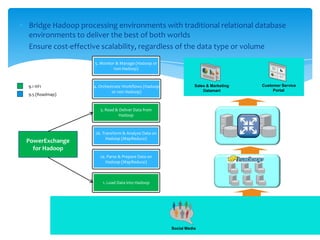
Bridge Hadoop processing environments with traditional relational database
environments to deliver the best of both worlds
Ensure cost-effective scalability, regardless of the data type or volume
Social Media
2a. Parse & Prepare Data on
Hadoop (MapReduce)
1. Load Data into Hadoop
2b. Transform & Analyze Data on
Hadoop (MapReduce)
Sales & Marketing
Datamart
Customer Service
Portal
5. Monitor & Manage (Hadoop or
non Hadoop)
4. Orchestrate Workflows (Hadoop
or non Hadoop)
3. Read & Deliver Data from
Hadoop
PowerExchange
for Hadoop
9.1 HF1
9.5 (Roadmap)
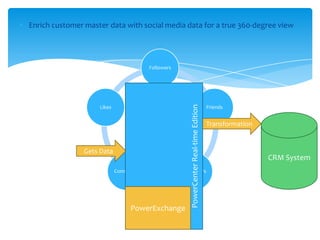
Enrich customer master data with social media data for a true 360-degree view
Customer
Followers
Friends
InfluencersComments
Likes
Transformation
CRM System
PowerCenterReal-timeEdition
PowerExchange
Gets Data
The Next Level of CRM and Marketing: social media data will enable
marketers to take their customer relationships to the next level
Powering CRM with Social Media Data: with Informatica Platform, it
becomes possible to create a single, reliable view of the customer
profile, and enrich it with data from social media interactions to gain
insights
Customer Sentiment Analysis: enables businesses to understand
customer experience and ideates ways to enhance customer
satisfaction
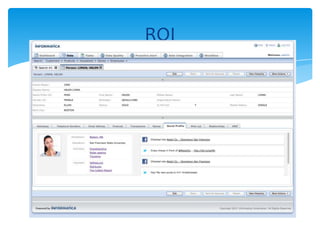
ROI
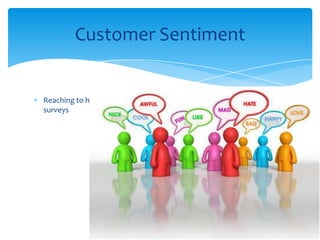
Reaching to honest customer satisfaction about your services without
surveys
Customer Sentiment
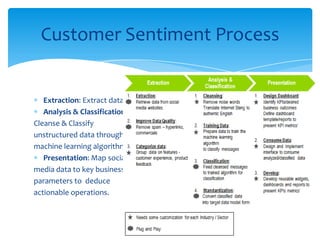
Extraction: Extract data from Social Networking sites
Analysis & Classification:
Cleanse & Classify
unstructured data through
machine learning algorithm
Presentation: Map social
media data to key business
parameters to deduce
actionable operations.
Customer Sentiment Process
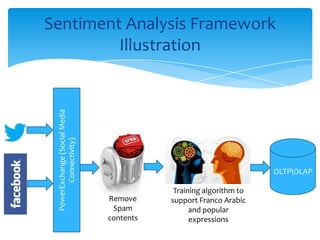
Sentiment Analysis Framework
Illustration
PowerExchange(SocialMedia
Connectivity)
Training algorithm to
support Franco Arabic
and popular
expressions
Remove
Spam
contents
OLTPOLAP
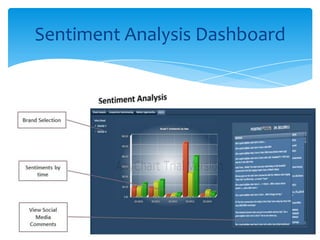
Sentiment Analysis Dashboard
DEMO | Social Media
Connectivity
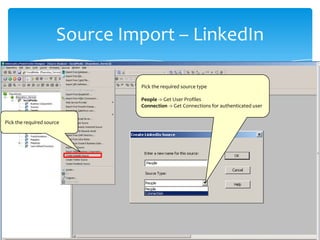
Source Import – LinkedIn
Pick the required source
Pick the required source type
People -> Get User Profiles
Connection -> Get Connections for authenticated user
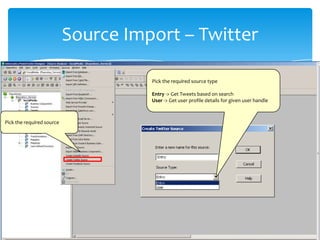
Source Import – Twitter
Pick the required source
Pick the required source type
Entry -> Get Tweets based on search
User -> Get user profile details for given user handle
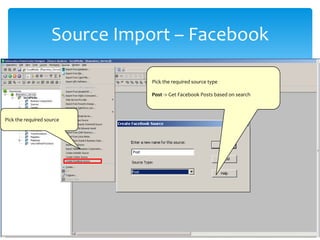
Source Import – Facebook
Pick the required source
Pick the required source type
Post -> Get Facebook Posts based on search
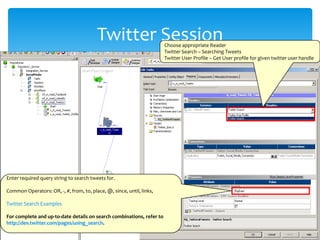
Twitter SessionChoose appropriate Reader
Twitter Search – Searching Tweets
Twitter User Profile – Get User profile for given twitter user handle
Enter required query string to search tweets for.
Common Operators: OR, -, #, from, to, place, @, since, until, links,
Twitter Search Examples
For complete and up-to-date details on search combinations, refer to
http://dev.twitter.com/pages/using_search.
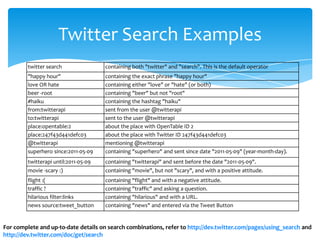
Twitter Search Examples
twitter search containing both "twitter" and "search". This is the default operator
"happy hour" containing the exact phrase "happy hour"
love OR hate containing either "love" or "hate" (or both)
beer -root containing "beer" but not "root"
#haiku containing the hashtag "haiku"
from:twitterapi sent from the user @twitterapi
to:twitterapi sent to the user @twitterapi
place:opentable:2 about the place with OpenTable ID 2
place:247f43d441defc03 about the place with Twitter ID 247f43d441defc03
@twitterapi mentioning @twitterapi
superhero since:2011-05-09 containing "superhero" and sent since date "2011-05-09" (year-month-day).
twitterapi until:2011-05-09 containing "twitterapi" and sent before the date "2011-05-09".
movie -scary :) containing "movie", but not "scary", and with a positive attitude.
flight :( containing "flight" and with a negative attitude.
traffic ? containing "traffic" and asking a question.
hilarious filter:links containing "hilarious" and with a URL.
news source:tweet_button containing "news" and entered via the Tweet Button
For complete and up-to-date details on search combinations, refer to http://dev.twitter.com/pages/using_search and
http://dev.twitter.com/doc/get/search
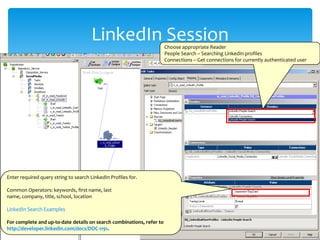
LinkedIn SessionChoose appropriate Reader
People Search – Searching LinkedIn profiles
Connections – Get connections for currently authenticated user
Enter required query string to search LinkedIn Profiles for.
Common Operators: keywords, first name, last
name, company, title, school, location
LinkedIn Search Examples
For complete and up-to-date details on search combinations, refer to
http://developer.linkedin.com/docs/DOC-1191.
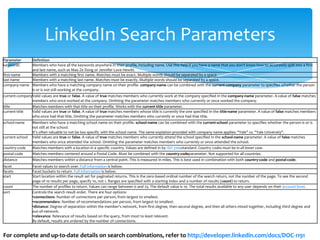
LinkedIn Search Parameters
For complete and up-to-date details on search combinations, refer to http://developer.linkedin.com/docs/DOC-1191
Parameter Definition
keywords Members who have all the keywords anywhere in their profile, including name. Use this field if you have a name that you don't know how to accurately split into a first
and last name, such as Mao Ze Dong or Jennifer Love Hewitt.
first-name Members with a matching first name. Matches must be exact. Multiple words should be separated by a space.
last-name Members with a matching last name. Matches must be exactly. Multiple words should be separated by a space.
company-name Members who have a matching company name on their profile. company-name can be combined with the current-company parameter to specifies whether the person
is or is not still working at the company.
current-companyValid values are true or false. A value of true matches members who currently work at the company specified in the company-name parameter. A value of false matches
members who once worked at the company. Omitting the parameter matches members who currently or once worked the company.
title Matches members with that title on their profile. Works with the current-title parameter.
current-title Valid values are true or false. A value of true matches members whose title is currently the one specified in the title-name parameter. A value of false matches members
who once had that title. Omitting the parameter matches members who currently or once had that title.
school-name Members who have a matching school name on their profile. school-name can be combined with the current-school parameter to specifies whether the person is or is
not still at the school.
It's often valuable to not be too specific with the school name. The same explation provided with company name applies: "Yale" vs. "Yale University".
current-school Valid values are true or false. A value of true matches members who currently attend the school specified in the school-name parameter. A value of false matches
members who once attended the school. Omitting the parameter matches members who currently or once attended the school.
country-code Matches members with a location in a specific country. Values are defined in by ISO 3166standard. Country codes must be in all lower case.
postal-code Matches members centered around a Postal Code. Must be combined with the country-codeparameter. Not supported for all countries.
distance Matches members within a distance from a central point. This is measured in miles. This is best used in combination with both country-code and postal-code.
facet Facet values to search over. Full information is below.
facets Facet buckets to return. Full information is below.
start Start location within the result set for paginated returns. This is the zero-based ordinal number of the search return, not the number of the page. To see the second
page of 10 results per page, specify 10, not 1. Ranges are specified with a starting index and a number of results (count) to return.
count The number of profiles to return. Values can range between 0 and 25. The default value is 10. The total results available to any user depends on their account level.
sort Controls the search result order. There are four options:
•connections: Number of connections per person, from largest to smallest.
•recommenders: Number of recommendations per person, from largest to smallest.
•distance: Degree of separation within the member's network, from first degree, then second degree, and then all others mixed together, including third degree and
out-of-network.
•relevance: Relevance of results based on the query, from most to least relevant.
By default, results are ordered by the number of connections.
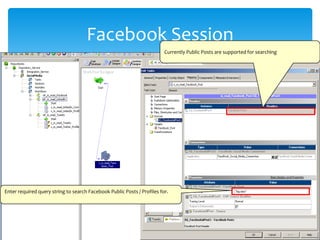
Facebook Session
Currently Public Posts are supported for searching
Enter required query string to search Facebook Public Posts / Profiles for.
Informatica CDR Data
Integration Solution
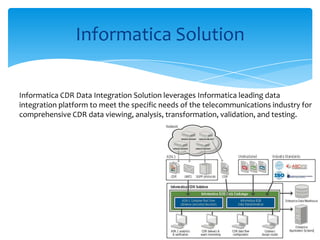
Informatica Solution
Informatica CDR Data Integration Solution leverages Informatica leading data
integration platform to meet the specific needs of the telecommunications industry for
comprehensive CDR data viewing, analysis, transformation, validation, and testing.
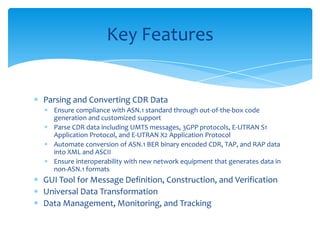
Parsing and Converting CDR Data
Ensure compliance with ASN.1 standard through out-of-the-box code
generation and customized support
Parse CDR data including UMTS messages, 3GPP protocols, E-UTRAN S1
Application Protocol, and E-UTRAN X2 Application Protocol
Automate conversion of ASN.1 BER binary encoded CDR, TAP, and RAP data
into XML and ASCII
Ensure interoperability with new network equipment that generates data in
non-ASN.1 formats
GUI Tool for Message Definition, Construction, and Verification
Universal Data Transformation
Data Management, Monitoring, and Tracking
Key Features
Achieve end-to-end, universal data integration and transformation
Maximize strategic value of CDR data
Decrease revenue leakage from inaccurate billing, data errors, and
network changes
Identify and resolve service quality issues faster and more accurately
Identify new revenue opportunities with deeper insight into customer
behavior and trends
Benefits
Thank You


Informatica big data and social media

  • 1.
    Informatica Big Dataand Social Media Ramy Mahrous
  • 2.
    About Informatica andInformatica Platform Informatica Integration with Hadoop and Big Data Integration Social Media Integration and Telecom Network Streaming Agenda
  • 3.
  • 4.
    Informatica • Founded: 1993 •2011 Revenue: $784 million • 6-year Average Growth Rate: 20% per year • Employees: 2,554 • Partners: 400+ • Customers: 4,630 • > 70% of the Global 500 • Customers in 82 Countries • Direct Presence in 26 Countries • # 1 in Customer Loyalty Rankings (6 Years in a Row) $0 $100 $200 $300 $400 $500 $600 $700 $800 2005 2006 2007 2008 2009 2010 2011
  • 5.
  • 6.
    Informatica OEM Partners Cloud Analytics DataArchiving Financial Services Data Archiving BI Solutions SOA Expressway Cloud Email Marketing Financial Services Analytics Customer Analytics Cloud Channel Analytics Enterprise Search Cloud Sales Analytics DW Appliance Financial Services Health Data Mgmt Strategic Service Management Healthcare Solutions BI and MDM Supply Chain Management Analytics Healthcare Analytics Cloud Data Mgmt Customer Address Validation Telco Software Solutions
  • 7.
    Informatica Compatibility OEM PartnersCloud Global SI Partners Database and Infrastructure BI OEM Partners Cloud Partners Global SI Partners Database & Infrastructure Operating Systems Platforms & Technologies INFORM SI Partners
  • 8.
    The Tradition Approach 87%of Enterprises Use Hand-Coding for Data Integration Application Database Partner Data SWIFT NACHA HIPAA … Cloud Computing Unstructured 75% of enterprises reported increased maintenance costs Data Warehouse Data Migration Test Data Management & Archiving Master Data Management Data Synchronization B2B Data Exchange Data Consolidation Complex Event Processing Ultra Messaging
  • 9.
    Informatica Platform Application PartnerData SWIFT NACHA HIPAA … Cloud Computing UnstructuredDatabase Data Warehouse Data Migration Test Data Management & Archiving Master Data Management Data Synchronization B2B Data Exchange Data Consolidation Complex Event Processing Ultra Messaging
  • 10.
    Informatica Integration with Hadoopand Big Data Integration
  • 11.
    Defining Big Data Definition:Big data is the confluence of the three trends consisting of Big Transaction Data, Big Interaction Data and Big Data Processing Online Transaction Processing (OLTP) Online Analytical Processing (OLAP) & DW Appliances Social Media Data Other Interaction Data Scientific Machine/Device BIG TRANSACTION DATA BIG INTERACTION DATA BIG DATA PROCESSING BIG DATA INTEGRATION
  • 12.
    What influence does shehave with her family and friends? How connected is she? What will she do with this merchandise? Any additional services? Big Interaction Data Achieve a complete view with social and interaction data Turn insights on relationships, influences and behaviors Into opportunities ? Connectivity to Big Interaction Data including social data Databases Call Detailed Records, Image Files, RFIDs External Data Providers Applications Customer Product … Informatica MDM
  • 13.
    Universal Data Access Informaticawith Hadoop Features Universal Data Access Structured Semi- Structured Unstructured Data Types Conversion Achieve ease and reliability of pre- and post- processing of data into and out of Hadoop
  • 14.
    Data Parsing &Exchange Informatica with Hadoop Features Data Parsing & Exchange Images Binaries Industry Standards (SWIFT, NACHA, HIPAA, etc…) Documents Improve productivity for extracting greater value from unstructured data sources – images, texts, binaries, in dustry standards, etc.
  • 15.
    Managing Metadata Informatica withHadoop Features Hadoop lacks metadata management and data auditability Informatica supplies full metadata management capabilities Drive metadata-driven auditability
  • 16.
    Data Quality &Data Governance Informatica with Hadoop Features Data Quality & Data Governance Profile Cleanse Manage Data Promote governance, trust and security over siloed activities with Hadoop deployments
  • 17.
    Mixed Workload Management Informaticawith Hadoop Features Hadoop is not able to manage mixed workloads according to user service-level agreements (SLAs). Informatica enables integration of data sets from Hadoop and other transaction sources to do real-time business intelligence and analytics as events unfold. Combine flexibility with high data processing power Manage mixed workloads and concurrency with high throughput
  • 18.
    Resource Optimization andReuse Interoperability With Rest of Architecture Informatica with Hadoop Features Informatica PowerExchange for Hadoop with PowerCenter RDBMSRDBMS Informatica supports the addition of Hadoop as part of an end-to-end analytics and data processing cycle that helps bridge the gap between Hadoop and your existing IT investment.
  • 19.
  • 20.
    Social Media Every minute,Facebook, Twitter and other online communities generate enormous amounts of social media data. If it could be tapped, it could function like a real-time CRM system, continually revealing new trends and opportunities. 400 m Tweets/ day 500 m Statuses/ day
  • 21.
    Billions of socialmedia messages Extract insights to support CRM and marketing Monitor reputation and perception Business Challenges
  • 22.
    Combine social datawith other data sources, relational as well as unstructured, both on premise and in the cloud Informatica Solution for Social Media Transformation OLAPOLTP PowerCenterReal-timeEdition PowerExchange For Hadoop Gets Data
  • 23.
    Bridge Hadoop processingenvironments with traditional relational database environments to deliver the best of both worlds Ensure cost-effective scalability, regardless of the data type or volume Social Media 2a. Parse & Prepare Data on Hadoop (MapReduce) 1. Load Data into Hadoop 2b. Transform & Analyze Data on Hadoop (MapReduce) Sales & Marketing Datamart Customer Service Portal 5. Monitor & Manage (Hadoop or non Hadoop) 4. Orchestrate Workflows (Hadoop or non Hadoop) 3. Read & Deliver Data from Hadoop PowerExchange for Hadoop 9.1 HF1 9.5 (Roadmap)
  • 24.
    Enrich customer masterdata with social media data for a true 360-degree view Customer Followers Friends InfluencersComments Likes Transformation CRM System PowerCenterReal-timeEdition PowerExchange Gets Data
  • 25.
    The Next Levelof CRM and Marketing: social media data will enable marketers to take their customer relationships to the next level Powering CRM with Social Media Data: with Informatica Platform, it becomes possible to create a single, reliable view of the customer profile, and enrich it with data from social media interactions to gain insights Customer Sentiment Analysis: enables businesses to understand customer experience and ideates ways to enhance customer satisfaction ROI
  • 26.
    Reaching to honestcustomer satisfaction about your services without surveys Customer Sentiment
  • 27.
    Extraction: Extract datafrom Social Networking sites Analysis & Classification: Cleanse & Classify unstructured data through machine learning algorithm Presentation: Map social media data to key business parameters to deduce actionable operations. Customer Sentiment Process
  • 28.
    Sentiment Analysis Framework Illustration PowerExchange(SocialMedia Connectivity) Trainingalgorithm to support Franco Arabic and popular expressions Remove Spam contents OLTPOLAP
  • 29.
  • 30.
    DEMO | SocialMedia Connectivity
  • 31.
    Source Import –LinkedIn Pick the required source Pick the required source type People -> Get User Profiles Connection -> Get Connections for authenticated user
  • 32.
    Source Import –Twitter Pick the required source Pick the required source type Entry -> Get Tweets based on search User -> Get user profile details for given user handle
  • 33.
    Source Import –Facebook Pick the required source Pick the required source type Post -> Get Facebook Posts based on search
  • 34.
    Twitter SessionChoose appropriateReader Twitter Search – Searching Tweets Twitter User Profile – Get User profile for given twitter user handle Enter required query string to search tweets for. Common Operators: OR, -, #, from, to, place, @, since, until, links, Twitter Search Examples For complete and up-to-date details on search combinations, refer to http://dev.twitter.com/pages/using_search.
  • 35.
    Twitter Search Examples twittersearch containing both "twitter" and "search". This is the default operator "happy hour" containing the exact phrase "happy hour" love OR hate containing either "love" or "hate" (or both) beer -root containing "beer" but not "root" #haiku containing the hashtag "haiku" from:twitterapi sent from the user @twitterapi to:twitterapi sent to the user @twitterapi place:opentable:2 about the place with OpenTable ID 2 place:247f43d441defc03 about the place with Twitter ID 247f43d441defc03 @twitterapi mentioning @twitterapi superhero since:2011-05-09 containing "superhero" and sent since date "2011-05-09" (year-month-day). twitterapi until:2011-05-09 containing "twitterapi" and sent before the date "2011-05-09". movie -scary :) containing "movie", but not "scary", and with a positive attitude. flight :( containing "flight" and with a negative attitude. traffic ? containing "traffic" and asking a question. hilarious filter:links containing "hilarious" and with a URL. news source:tweet_button containing "news" and entered via the Tweet Button For complete and up-to-date details on search combinations, refer to http://dev.twitter.com/pages/using_search and http://dev.twitter.com/doc/get/search
  • 36.
    LinkedIn SessionChoose appropriateReader People Search – Searching LinkedIn profiles Connections – Get connections for currently authenticated user Enter required query string to search LinkedIn Profiles for. Common Operators: keywords, first name, last name, company, title, school, location LinkedIn Search Examples For complete and up-to-date details on search combinations, refer to http://developer.linkedin.com/docs/DOC-1191.
  • 37.
    LinkedIn Search Parameters Forcomplete and up-to-date details on search combinations, refer to http://developer.linkedin.com/docs/DOC-1191 Parameter Definition keywords Members who have all the keywords anywhere in their profile, including name. Use this field if you have a name that you don't know how to accurately split into a first and last name, such as Mao Ze Dong or Jennifer Love Hewitt. first-name Members with a matching first name. Matches must be exact. Multiple words should be separated by a space. last-name Members with a matching last name. Matches must be exactly. Multiple words should be separated by a space. company-name Members who have a matching company name on their profile. company-name can be combined with the current-company parameter to specifies whether the person is or is not still working at the company. current-companyValid values are true or false. A value of true matches members who currently work at the company specified in the company-name parameter. A value of false matches members who once worked at the company. Omitting the parameter matches members who currently or once worked the company. title Matches members with that title on their profile. Works with the current-title parameter. current-title Valid values are true or false. A value of true matches members whose title is currently the one specified in the title-name parameter. A value of false matches members who once had that title. Omitting the parameter matches members who currently or once had that title. school-name Members who have a matching school name on their profile. school-name can be combined with the current-school parameter to specifies whether the person is or is not still at the school. It's often valuable to not be too specific with the school name. The same explation provided with company name applies: "Yale" vs. "Yale University". current-school Valid values are true or false. A value of true matches members who currently attend the school specified in the school-name parameter. A value of false matches members who once attended the school. Omitting the parameter matches members who currently or once attended the school. country-code Matches members with a location in a specific country. Values are defined in by ISO 3166standard. Country codes must be in all lower case. postal-code Matches members centered around a Postal Code. Must be combined with the country-codeparameter. Not supported for all countries. distance Matches members within a distance from a central point. This is measured in miles. This is best used in combination with both country-code and postal-code. facet Facet values to search over. Full information is below. facets Facet buckets to return. Full information is below. start Start location within the result set for paginated returns. This is the zero-based ordinal number of the search return, not the number of the page. To see the second page of 10 results per page, specify 10, not 1. Ranges are specified with a starting index and a number of results (count) to return. count The number of profiles to return. Values can range between 0 and 25. The default value is 10. The total results available to any user depends on their account level. sort Controls the search result order. There are four options: •connections: Number of connections per person, from largest to smallest. •recommenders: Number of recommendations per person, from largest to smallest. •distance: Degree of separation within the member's network, from first degree, then second degree, and then all others mixed together, including third degree and out-of-network. •relevance: Relevance of results based on the query, from most to least relevant. By default, results are ordered by the number of connections.
  • 38.
    Facebook Session Currently PublicPosts are supported for searching Enter required query string to search Facebook Public Posts / Profiles for.
  • 39.
  • 40.
    Informatica Solution Informatica CDRData Integration Solution leverages Informatica leading data integration platform to meet the specific needs of the telecommunications industry for comprehensive CDR data viewing, analysis, transformation, validation, and testing.
  • 41.
    Parsing and ConvertingCDR Data Ensure compliance with ASN.1 standard through out-of-the-box code generation and customized support Parse CDR data including UMTS messages, 3GPP protocols, E-UTRAN S1 Application Protocol, and E-UTRAN X2 Application Protocol Automate conversion of ASN.1 BER binary encoded CDR, TAP, and RAP data into XML and ASCII Ensure interoperability with new network equipment that generates data in non-ASN.1 formats GUI Tool for Message Definition, Construction, and Verification Universal Data Transformation Data Management, Monitoring, and Tracking Key Features
  • 42.
    Achieve end-to-end, universaldata integration and transformation Maximize strategic value of CDR data Decrease revenue leakage from inaccurate billing, data errors, and network changes Identify and resolve service quality issues faster and more accurately Identify new revenue opportunities with deeper insight into customer behavior and trends Benefits
  • 43.