Inference
Accelerators
CELLSTRAT AI LAB
DARSHAN C G
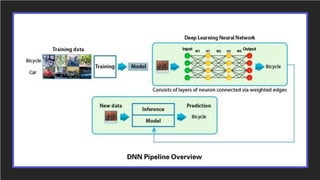
DNN Pipeline Overview
5 critical factors that are used to measure APIs for Inference:
1.Throughput:
The volume of output within a given period. Often measured in inferences/second or samples/second.
2.Efficiency: Amount of throughput delivered per unit-power, often expressed as performance/watt.
3.Latency: Time to execute an inference, usually measured in milliseconds. Low latency is critical to
delivering rapidly growing, real-time inference-based services.
4.Accuracy: A trained neural network’s ability to deliver the correct answer.
5.Memory usage: The host and device memory that need to be reserved to do inference on a network
depends on the algorithms used. This constrains what networks and what combinations of networks can
run on a given inference platform. This is particularly important for systems where multiple networks are
needed and memory resources are limited.
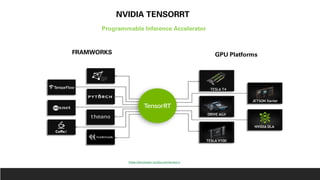
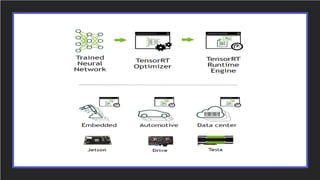
NVIDIA TENSORRT
Programmable Inference Accelerator
FRAMWORKS GPU Platforms
https://developer.nvidia.com/tensorrt
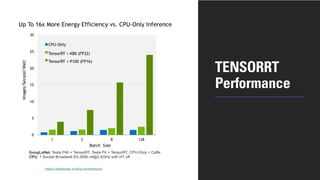
TENSORRT
Performance
https://developer.nvidia.com/tensorrt
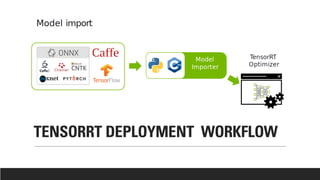
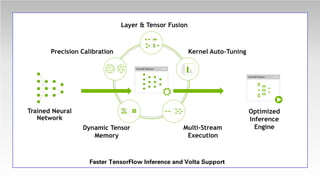
TENSORRT DEPLOYMENT WORKFLOW
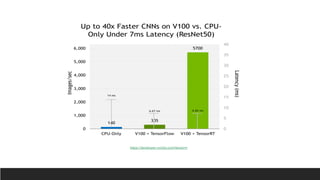
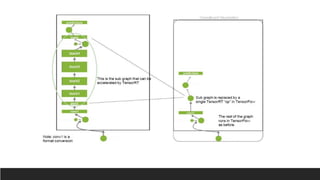
Faster TensorFlow Inference and Volta Support
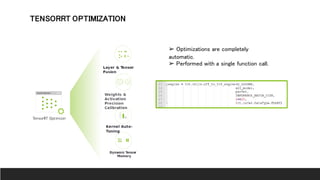
TENSORRT OPTIMIZATION
➢ Optimizations are completely
automatic.
➢ Performed with a single function call.
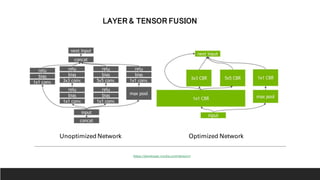
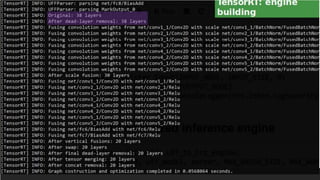
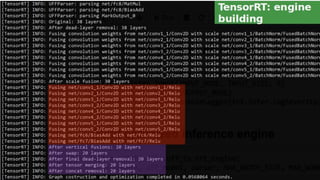
LAYER & TENSOR FUSION
Unoptimized Network Optimized Network
https://developer.nvidia.com/tensorrt
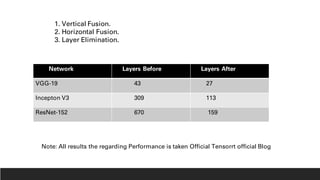
1. Vertical Fusion.
2. Horizontal Fusion.
3. Layer Elimination.
Network Layers Before Layers After
VGG-19 43 27
Incepton V3 309 113
ResNet-152 670 159
Note: All results the regarding Performance is taken Official Tensorrt official Blog
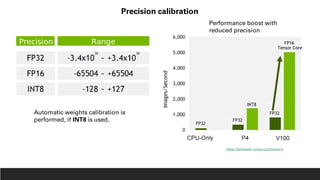
Precision calibration
Automatic weights calibration is
performed, if INT8 is used.
Performance boost with
reduced precision
https://developer.nvidia.com/tensorrt
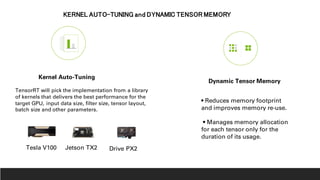
Dynamic Tensor Memory
Kernel Auto-Tuning
• Reduces memory footprint
and improves memory re-use.
• Manages memory allocation
for each tensor only for the
duration of its usage.
Tesla V100 Jetson TX2 Drive PX2
KERNEL AUTO-TUNING and DYNAMIC TENSOR MEMORY
TensorRT will pick the implementation from a library
of kernels that delivers the best performance for the
target GPU, input data size, filter size, tensor layout,
batch size and other parameters.
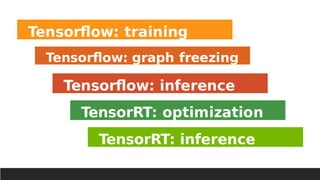
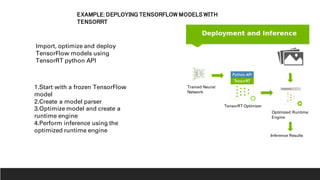
EXAMPLE: DEPLOYING TENSORFLOW MODELS WITH
TENSORRT
Trained Neural
Network
TensorRT Optimizer
Inference Results
Optimized Runtime
Engine
Import, optimize and deploy
TensorFlow models using
TensorRT python API
1.Start with a frozen TensorFlow
model
2.Create a model parser
3.Optimize model and create a
runtime engine
4.Perform inference using the
optimized runtime engine
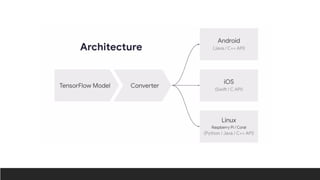
Img Source: https://www.tensorflow.org/lite/convert/index?hl=RU
Features
1. Light Weight.
2. Low-Latency.
3. Privacy.
4. Improves Power Consumption.
5. Efficient Model Format.
6. Pre- trained models.
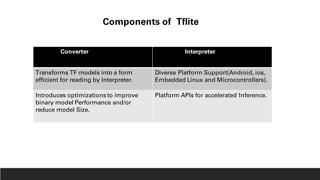
Converter Interpreter
Transforms TF models into a form
efficient for reading by Interpreter.
Diverse Platform Support(Android, ios,
Embedded Linux and Microcontrollers).
Introduces optimizations to improve
binary model Performance and/or
reduce model Size.
Platform APIs for accelerated Inference.
Components of Tflite
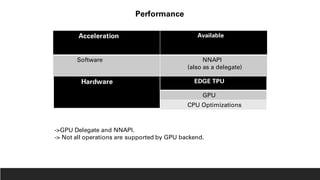
Acceleration Available
Software NNAPI
(also as a delegate)
Hardware EDGE TPU
GPU
CPU Optimizations
Performance
->GPU Delegate and NNAPI.
-> Not all operations are supported by GPU backend.
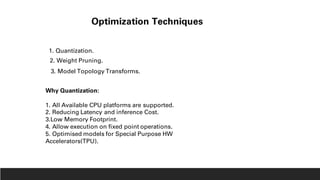
Optimization Techniques
1. Quantization.
2. Weight Pruning.
3. Model Topology Transforms.
Why Quantization:
1. All Available CPU platforms are supported.
2. Reducing Latency and inference Cost.
3.Low Memory Footprint.
4. Allow execution on fixed point operations.
5. Optimised models for Special Purpose HW
Accelerators(TPU).
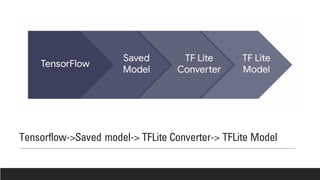
Tensorflow->Saved model-> TFLite Converter-> TFLite Model
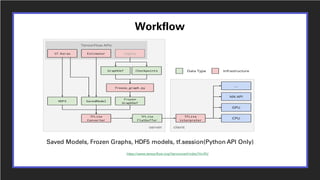
Workflow
Saved Models, Frozen Graphs, HDF5 models, tf.session(Python API Only)
https://www.tensorflow.org/lite/convert/index?hl=RU
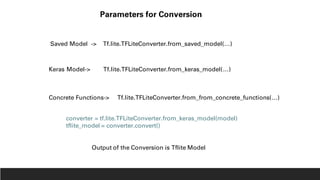
Parameters for Conversion
Saved Model -> Tf.lite.TFLiteConverter.from_saved_model(…)
Keras Model-> Tf.lite.TFLiteConverter.from_keras_model(…)
Concrete Functions-> Tf.lite.TFLiteConverter.from_from_concrete_functions(…)
Output of the Conversion is Tflite Model
converter = tf.lite.TFLiteConverter.from_keras_model(model)
tflite_model = converter.convert()
import tensorflow as tf
# Create a simple Keras model.
x = [-1, 0, 1, 2, 3, 4]
y = [-3, -1, 1, 3, 5, 7]
model = tf.keras.models.Sequential([tf.keras.layers.Dense(units=1, input_shape=[1])])
model.compile(optimizer='sgd',loss='mean_squared_error')
model.fit(x, y, epochs=50)
# Convert the model.
converter = tf.lite.TFLiteConverter.from_keras_model(model)
tflite_model = converter.convert()
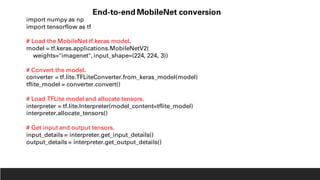
import numpy as np
import tensorflow as tf
# Load the MobileNet tf.keras model.
model = tf.keras.applications.MobileNetV2(
weights="imagenet", input_shape=(224, 224, 3))
# Convert the model.
converter = tf.lite.TFLiteConverter.from_keras_model(model)
tflite_model = converter.convert()
# Load TFLite model and allocate tensors.
interpreter = tf.lite.Interpreter(model_content=tflite_model)
interpreter.allocate_tensors()
# Get input and output tensors.
input_details = interpreter.get_input_details()
output_details = interpreter.get_output_details()
End-to-end MobileNet conversion
# Test the TensorFlow Lite model on random input data.
input_shape = input_details[0]['shape']
input_data = np.array(np.random.random_sample(input_shape), dtype=np.float32)
interpreter.set_tensor(input_details[0]['index'], input_data)
interpreter.invoke()
# The function `get_tensor()` returns a copy of the tensor data.
# Use `tensor()` in order to get a pointer to the tensor.
tflite_results = interpreter.get_tensor(output_details[0]['index'])
# Test the TensorFlow model on random input data.
tf_results = model(tf.constant(input_data))
# Compare the result.
for tf_result, tflite_result in zip(tf_results, tflite_results):
np.testing.assert_almost_equal(tf_result, tflite_result, decimal=5)
#Saving from a SavedModel
tflite_convert --output_file=model.tflite --saved_model_dir=/tmp/saved_model
Command Line
#Saving from a Keras Model
tflite_convert --output_file=model.tflite --Keras_model_file=saved_model.h5
import tensorflow as tf
converter = tf.lite.TFLiteConverter.from_saved_model(saved_model_dir)
converter.optimizations = [tf.lite.Optimize.DEFAULT]
tflite_quant_model = converter.convert()
Quantization
DEFAULT: OPTIMIZE_FOR_SPEED/SIZE
Inference at Edge
Factors driving this trend:
1. Smaller, faster models.
2. on Device Accelerators.
3. Demands move ML Capability from loud to On-device.
4. Smart device Growth demands bring ML to Edge
Benefits of On-deice ML
1. High Performance.
2. Local Data Acceseibility.
3. Better Privacy.
4.Works Offline.
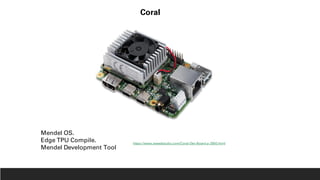
Coral
Mendel OS.
Edge TPU Compile.
Mendel Development Tool
https://www.seeedstudio.com/Coral-Dev-Board-p-2900.html
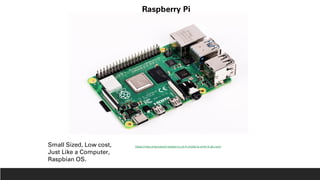
Raspberry Pi
Small Sized, Low cost,
Just Like a Computer,
Raspbian OS.
https://robu.in/product/raspberry-pi-4-model-b-with-4-gb-ram/
Options
1. Compile Tensorflow from Source.
2. Install Tensorflow from Pip.
3. Use Interpreter Directly.
CODE DEMO

Inference accelerators

  • 1.
  • 2.
  • 3.
    5 critical factorsthat are used to measure APIs for Inference: 1.Throughput: The volume of output within a given period. Often measured in inferences/second or samples/second. 2.Efficiency: Amount of throughput delivered per unit-power, often expressed as performance/watt. 3.Latency: Time to execute an inference, usually measured in milliseconds. Low latency is critical to delivering rapidly growing, real-time inference-based services. 4.Accuracy: A trained neural network’s ability to deliver the correct answer. 5.Memory usage: The host and device memory that need to be reserved to do inference on a network depends on the algorithms used. This constrains what networks and what combinations of networks can run on a given inference platform. This is particularly important for systems where multiple networks are needed and memory resources are limited.
  • 4.
    NVIDIA TENSORRT Programmable InferenceAccelerator FRAMWORKS GPU Platforms https://developer.nvidia.com/tensorrt
  • 6.
  • 7.
  • 8.
  • 9.
    Faster TensorFlow Inferenceand Volta Support
  • 10.
    TENSORRT OPTIMIZATION ➢ Optimizationsare completely automatic. ➢ Performed with a single function call.
  • 11.
    LAYER & TENSORFUSION Unoptimized Network Optimized Network https://developer.nvidia.com/tensorrt
  • 12.
    1. Vertical Fusion. 2.Horizontal Fusion. 3. Layer Elimination. Network Layers Before Layers After VGG-19 43 27 Incepton V3 309 113 ResNet-152 670 159 Note: All results the regarding Performance is taken Official Tensorrt official Blog
  • 14.
    Precision calibration Automatic weightscalibration is performed, if INT8 is used. Performance boost with reduced precision https://developer.nvidia.com/tensorrt
  • 15.
    Dynamic Tensor Memory KernelAuto-Tuning • Reduces memory footprint and improves memory re-use. • Manages memory allocation for each tensor only for the duration of its usage. Tesla V100 Jetson TX2 Drive PX2 KERNEL AUTO-TUNING and DYNAMIC TENSOR MEMORY TensorRT will pick the implementation from a library of kernels that delivers the best performance for the target GPU, input data size, filter size, tensor layout, batch size and other parameters.
  • 17.
    EXAMPLE: DEPLOYING TENSORFLOWMODELS WITH TENSORRT Trained Neural Network TensorRT Optimizer Inference Results Optimized Runtime Engine Import, optimize and deploy TensorFlow models using TensorRT python API 1.Start with a frozen TensorFlow model 2.Create a model parser 3.Optimize model and create a runtime engine 4.Perform inference using the optimized runtime engine
  • 20.
  • 21.
    Features 1. Light Weight. 2.Low-Latency. 3. Privacy. 4. Improves Power Consumption. 5. Efficient Model Format. 6. Pre- trained models.
  • 22.
    Converter Interpreter Transforms TFmodels into a form efficient for reading by Interpreter. Diverse Platform Support(Android, ios, Embedded Linux and Microcontrollers). Introduces optimizations to improve binary model Performance and/or reduce model Size. Platform APIs for accelerated Inference. Components of Tflite
  • 24.
    Acceleration Available Software NNAPI (alsoas a delegate) Hardware EDGE TPU GPU CPU Optimizations Performance ->GPU Delegate and NNAPI. -> Not all operations are supported by GPU backend.
  • 25.
    Optimization Techniques 1. Quantization. 2.Weight Pruning. 3. Model Topology Transforms. Why Quantization: 1. All Available CPU platforms are supported. 2. Reducing Latency and inference Cost. 3.Low Memory Footprint. 4. Allow execution on fixed point operations. 5. Optimised models for Special Purpose HW Accelerators(TPU).
  • 26.
    Tensorflow->Saved model-> TFLiteConverter-> TFLite Model
  • 27.
    Workflow Saved Models, FrozenGraphs, HDF5 models, tf.session(Python API Only) https://www.tensorflow.org/lite/convert/index?hl=RU
  • 28.
    Parameters for Conversion SavedModel -> Tf.lite.TFLiteConverter.from_saved_model(…) Keras Model-> Tf.lite.TFLiteConverter.from_keras_model(…) Concrete Functions-> Tf.lite.TFLiteConverter.from_from_concrete_functions(…) Output of the Conversion is Tflite Model converter = tf.lite.TFLiteConverter.from_keras_model(model) tflite_model = converter.convert()
  • 29.
    import tensorflow astf # Create a simple Keras model. x = [-1, 0, 1, 2, 3, 4] y = [-3, -1, 1, 3, 5, 7] model = tf.keras.models.Sequential([tf.keras.layers.Dense(units=1, input_shape=[1])]) model.compile(optimizer='sgd',loss='mean_squared_error') model.fit(x, y, epochs=50) # Convert the model. converter = tf.lite.TFLiteConverter.from_keras_model(model) tflite_model = converter.convert()
  • 30.
    import numpy asnp import tensorflow as tf # Load the MobileNet tf.keras model. model = tf.keras.applications.MobileNetV2( weights="imagenet", input_shape=(224, 224, 3)) # Convert the model. converter = tf.lite.TFLiteConverter.from_keras_model(model) tflite_model = converter.convert() # Load TFLite model and allocate tensors. interpreter = tf.lite.Interpreter(model_content=tflite_model) interpreter.allocate_tensors() # Get input and output tensors. input_details = interpreter.get_input_details() output_details = interpreter.get_output_details() End-to-end MobileNet conversion
  • 31.
    # Test theTensorFlow Lite model on random input data. input_shape = input_details[0]['shape'] input_data = np.array(np.random.random_sample(input_shape), dtype=np.float32) interpreter.set_tensor(input_details[0]['index'], input_data) interpreter.invoke() # The function `get_tensor()` returns a copy of the tensor data. # Use `tensor()` in order to get a pointer to the tensor. tflite_results = interpreter.get_tensor(output_details[0]['index']) # Test the TensorFlow model on random input data. tf_results = model(tf.constant(input_data)) # Compare the result. for tf_result, tflite_result in zip(tf_results, tflite_results): np.testing.assert_almost_equal(tf_result, tflite_result, decimal=5)
  • 32.
    #Saving from aSavedModel tflite_convert --output_file=model.tflite --saved_model_dir=/tmp/saved_model Command Line #Saving from a Keras Model tflite_convert --output_file=model.tflite --Keras_model_file=saved_model.h5
  • 33.
    import tensorflow astf converter = tf.lite.TFLiteConverter.from_saved_model(saved_model_dir) converter.optimizations = [tf.lite.Optimize.DEFAULT] tflite_quant_model = converter.convert() Quantization DEFAULT: OPTIMIZE_FOR_SPEED/SIZE
  • 34.
    Inference at Edge Factorsdriving this trend: 1. Smaller, faster models. 2. on Device Accelerators. 3. Demands move ML Capability from loud to On-device. 4. Smart device Growth demands bring ML to Edge Benefits of On-deice ML 1. High Performance. 2. Local Data Acceseibility. 3. Better Privacy. 4.Works Offline.
  • 35.
    Coral Mendel OS. Edge TPUCompile. Mendel Development Tool https://www.seeedstudio.com/Coral-Dev-Board-p-2900.html
  • 36.
    Raspberry Pi Small Sized,Low cost, Just Like a Computer, Raspbian OS. https://robu.in/product/raspberry-pi-4-model-b-with-4-gb-ram/
  • 37.
    Options 1. Compile Tensorflowfrom Source. 2. Install Tensorflow from Pip. 3. Use Interpreter Directly.
  • 38.