1
applicationNote
Intel Corporation
Intel® Speed Select Technology – Base Frequency -
Enhancing Performance
Authors
John DiGiglio
David Hunt
Ai Bee Lim
Chris Macnamara
Timothy Miskell
1 Introduction
This document provides an overview of a new CPU capability called Intel® Speed Select
Technology – Base Frequency (Intel® SST-BF), which is available on select SKUs of 2nd
generation Intel® Xeon® Scalable processor (formerly codenamed Cascade Lake). The
document also includes benchmarking data and instructions on how to enable the
capability.
Value propositions of this capability include:
• Select SKUs of 2nd
generation Intel® Xeon® Scalable processor (5218N, 6230N, and
6252N) offer a new capability called Intel® SST-BF.
• Intel® SST-BF allows the CPU to be deployed with an asymmetric core frequency
configuration.
• The placement of key workloads on higher frequency Intel® SST-BF enabled cores
can result in an overall system workload increase and potential overall energy
savings when compared to deploying the CPU with symmetric core frequencies.
This document is part of the Network Transformation Experience Kit, which is available
at: https://networkbuilders.intel.com/
1.1 Terminology
Table 1. Terminology
ABBREVIATION DESCRIPTION
DPDK Data Plane Development Kit
NFV Network Functions Virtualization
SST-BF Intel® Speed Select Technology – Base Frequency
VM Virtual Machine
Application Note | Intel® Speed Select Technology – Base Frequency - Enhancing Performance
2
Table of Contents
Figures
Figure 1. Core Freqency Deployment Methods............................................................................................................................................................................................. 3
Figure 2. Test Setup................................................................................................................................................................................................................................................. 4
Figure 3. Test Results .............................................................................................................................................................................................................................................. 5
Figure 4. Intel® SST-BF disabled, deterministic performance ................................................................................................................................................................10
Figure 5. Intel® SST-BF enabled, deterministic performance .................................................................................................................................................................10
Tables
Table 1. Terminology ............................................................................................................................................................................................................................................. 1
Table 2. Intel® SST-BF Enabled CPU SKUs..................................................................................................................................................................................................... 3
Table 3. BIOS Settings ........................................................................................................................................................................................................................................... 6
Application Note | Intel® Speed Select Technology – Base Frequency - Enhancing Performance
3
1.2 Intel® SST-BF Overview
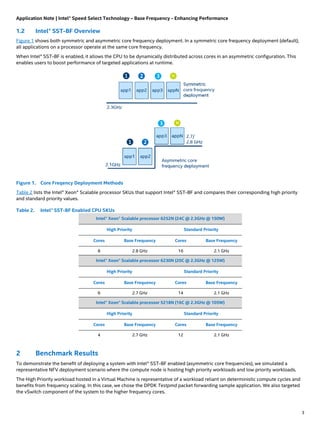
Figure 1 shows both symmetric and asymmetric core frequency deployment. In a symmetric core frequency deployment (default),
all applications on a processor operate at the same core frequency.
When Intel® SST-BF is enabled, it allows the CPU to be dynamically distributed across cores in an asymmetric configuration. This
enables users to boost performance of targeted applications at runtime.
Figure 1. Core Freqency Deployment Methods
Table 2 lists the Intel® Xeon® Scalable processor SKUs that support Intel® SST-BF and compares their corresponding high priority
and standard priority values.
Table 2. Intel® SST-BF Enabled CPU SKUs
Intel® Xeon® Scalable processor 6252N (24C @ 2.3GHz @ 150W)
High Priority Standard Priority
Cores Base Frequency Cores Base Frequency
8 2.8 GHz 16 2.1 GHz
Intel® Xeon® Scalable processor 6230N (20C @ 2.3GHz @ 125W)
High Priority Standard Priority
Cores Base Frequency Cores Base Frequency
6 2.7 GHz 14 2.1 GHz
Intel® Xeon® Scalable processor 5218N (16C @ 2.3GHz @ 105W)
High Priority Standard Priority
Cores Base Frequency Cores Base Frequency
4 2.7 GHz 12 2.1 GHz
2 Benchmark Results
To demonstrate the benefit of deploying a system with Intel® SST-BF enabled (asymmetric core frequencies), we simulated a
representative NFV deployment scenario where the compute node is hosting high priority workloads and low priority workloads.
The High Priority workload hosted in a Virtual Machine is representative of a workload reliant on deterministic compute cycles and
benefits from frequency scaling. In this case, we chose the DPDK Testpmd packet forwarding sample application. We also targeted
the vSwitch component of the system to the higher frequency cores.
Application Note | Intel® Speed Select Technology – Base Frequency - Enhancing Performance
4
We used the stress application to generate background work representative of a low priority workload, that are non-real-time or
performant crucial.
2.1 Test Setup
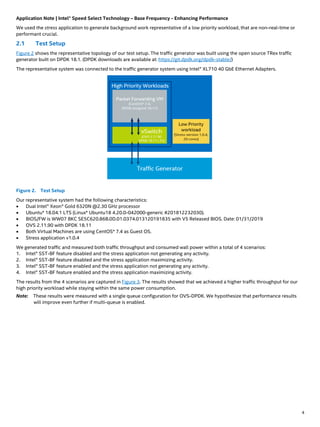
Figure 2 shows the representative topology of our test setup. The traffic generator was built using the open source TRex traffic
generator built on DPDK 18.1. (DPDK downloads are available at: https://git.dpdk.org/dpdk-stable/)
The representative system was connected to the traffic generator system using Intel® XL710 40 GbE Ethernet Adapters.
Figure 2. Test Setup
Our representative system had the following characteristics:
• Dual Intel® Xeon® Gold 6320N @2.30 GHz processor
• Ubuntu* 18.04.1 LTS (Linux* Ubuntu18 4.20.0-042000-generic #201812232030).
• BIOS/FW is WW07 BKC SE5C620.86B.0D.01.0374.013120191835 with V5 Released BIOS. Date: 01/31/2019
• OVS 2.11.90 with DPDK 18.11
• Both Virtual Machines are using CentOS* 7.4 as Guest OS.
• Stress application v1.0.4
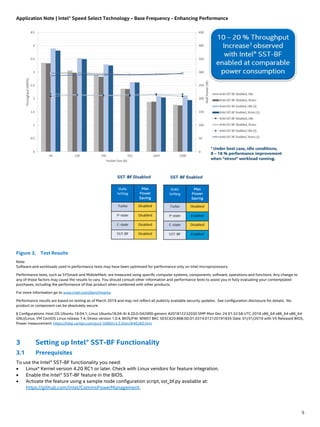
We generated traffic and measured both traffic throughput and consumed wall power within a total of 4 scenarios:
1. Intel® SST-BF feature disabled and the stress application not generating any activity.
2. Intel® SST-BF feature disabled and the stress application maximizing activity.
3. Intel® SST-BF feature enabled and the stress application not generating any activity.
4. Intel® SST-BF feature enabled and the stress application maximizing activity.
The results from the 4 scenarios are captured in Figure 3. The results showed that we achieved a higher traffic throughput for our
high priority workload while staying within the same power consumption.
Note: These results were measured with a single queue configuration for OVS-DPDK. We hypothesize that performance results
will improve even further if multi-queue is enabled.
Application Note | Intel® Speed Select Technology – Base Frequency - Enhancing Performance
5
Figure 3. Test Results
Note:
Software and workloads used in performance tests may have been optimized for performance only on Intel microprocessors.
Performance tests, such as SYSmark and MobileMark, are measured using specific computer systems, components, software, operations and functions. Any change to
any of those factors may cause the results to vary. You should consult other information and performance tests to assist you in fully evaluating your contemplated
purchases, including the performance of that product when combined with other products.
For more information go to www.intel.com/benchmarks.
Performance results are based on testing as of March 2019 and may not reflect all publicly available security updates. See configuration disclosure for details. No
product or component can be absolutely secure.
§ Configurations: Host OS Ubuntu 18.04.1, Linux Ubuntu18.04-AI 4.20.0-042000-generic #201812232030 SMP Mon Dec 24 01:32:58 UTC 2018 x86_64 x86_64 x86_64
GNU/Linux, VM CentOS Linux release 7.4, Stress version 1.0.4, BIOS/FW: WW07 BKC SE5C620.86B.0D.01.0374.013120191835 Date: 01/31/2019 with V5 Released BIOS,
Power measurement: https://help.raritan.com/px3-5000/v3.5.0/en/#46385.htm
3 Setting up Intel® SST-BF Functionality
3.1 Prerequisites
To use the Intel® SST-BF functionality you need:
• Linux* Kernel version 4.20 RC1 or later. Check with Linux vendors for feature integration.
• Enable the Intel® SST-BF feature in the BIOS.
• Activate the feature using a sample node configuration script, sst_bf.py available at:
https://github.com/intel/CommsPowerManagement.
Application Note | Intel® Speed Select Technology – Base Frequency - Enhancing Performance
6
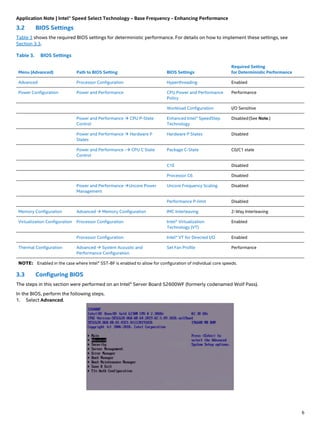
3.2 BIOS Settings
Table 3 shows the required BIOS settings for deterministic performance. For details on how to implement these settings, see
Section 3.3.
Table 3. BIOS Settings
Menu (Advanced) Path to BIOS Setting BIOS Settings
Required Setting
for Deterministic Performance
Advanced Processor Configuration Hyperthreading Enabled
Power Configuration Power and Performance CPU Power and Performance
Policy
Performance
Workload Configuration I/O Sensitive
Power and Performance  CPU P-State
Control
Enhanced Intel® SpeedStep
Technology
Disabled(See Note.)
Power and Performance  Hardware P
States
Hardware P States Disabled
Power and Performance - CPU C State
Control
Package C-State C0/C1 state
C1E Disabled
Processor C6 Disabled
Power and Performance Uncore Power
Management
Uncore Frequency Scaling Disabled
Performance P-limit Disabled
Memory Configuration Advanced  Memory Configuration IMC Interleaving 2-Way Interleaving
Virtualization Configuration Processor Configuration Intel® Virtualization
Technology (VT)
Enabled
Processor Configuration Intel® VT for Directed I/O Enabled
Thermal Configuration Advanced  System Acoustic and
Performance Configuration
Set Fan Profile Performance
NOTE: Enabled in the case where Intel® SST-BF is enabled to allow for configuration of individual core speeds.
3.3 Configuring BIOS
The steps in this section were performed on an Intel® Server Board S2600WF (formerly codenamed Wolf Pass).
In the BIOS, perform the following steps.
1. Select Advanced.
Application Note | Intel® Speed Select Technology – Base Frequency - Enhancing Performance
7
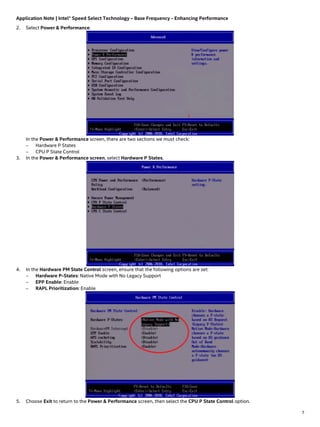
2. Select Power & Performance.
In the Power & Performance screen, there are two sections we must check:
− Hardware P States
− CPU P State Control
3. In the Power & Performance screen, select Hardware P States.
4. In the Hardware PM State Control screen, ensure that the following options are set:
− Hardware P-States: Native Mode with No Legacy Support
− EPP Enable: Enable
− RAPL Prioritization: Enable
5. Choose Exit to return to the Power & Performance screen, then select the CPU P State Control option.
Application Note | Intel® Speed Select Technology – Base Frequency - Enhancing Performance
8
6. In the CPU P State Control screen, configure Intel® SST-BF and Intel® Turbo Boost Technology. The following options should
be set:
− Active Intel(R) SST-BF: Enabled
− Configure Intel(R) SST-BF: Disabled
− Intel Configurable TDP: Disabled
− Intel(R) Turbo Boost Technology: Enabled
− Energy Efficient Turbo: Disabled
Note: Intel® SST-BF can be used with hyper-threading on or off, but you must be sure that both hyper-thread siblings have the
same configuration to get the expected results.
Save your changes and exit BIOS setup.
3.4 Operating System Settings
Intel® SST-BF requires a kernel patch that is available in the upstream Linux kernel version 4.20 and later.
In addition, you must boot with the intel_pstate driver active.
Note: Do not use the intel_pstate=disable or intel_pstate=no_hwp settings. This is necessary to allow
base_frequency to appear in the cpufreq directory in sysfs.
3.5 Setup Script
Use the Intel® SST-BF Python script called sst_bf.py, which is available at: https://github.com/intel/CommsPowerManagement.
The script sets up the desired maximum and maximum frequencies for operation with Intel® SST-BF. The script provides several
options to configure the system and to revert to a state that does not use Intel® SST-BF.
This script can set up multiple configurations, as reflected in the menu options below.
[s] Set SST-BF config (set min/max to 2700/2700 and 2100/2100)
[m] Set P1 on all cores (set min/max to 2300/2300)
[r] Revert cores to Turbo/min (set max/min to 3900/800)
[t] Revert cores to P1/min (set max/min to 2300/800)
[i] Show SST-BF info
[l] List High Priority cores
[v] Show script version
[q] Exit Script
----------------------------------------------------------
Option:
The main setup options are s and m.
• Option s sets the scaling_min_freq and the scaling_min_freq settings according to whether the core is a P1 High or P1
Normal core. The script automatically queries the system for the frequencies that it sets when this option is selected and
displays those frequencies in the menu option.
Application Note | Intel® Speed Select Technology – Base Frequency - Enhancing Performance
9
• Option m sets the scaling_max_freq and scaling_min_freq settings to the SKU P1 frequency. The script automatically
queries the system for the frequencies that it sets when this option is selected and display those frequencies in the menu
option.
Two options are provided to undo Intel® Speed Shift settings, which allows the pstate driver to scale up and down as the pstate
driver algorithm requires.
• Option r sets the scaling_max_freq for all cores to P1.
• Option t enables Intel® Turbo Boost technology on all cores by setting scaling_max_freq to be the same value as
cpuinfo_max_freq.
There is also a command line interface for use with scripts without the need for a menu. Use the sst_bf.py -h command to see
the available options.
Error! Reference source not found. contains sample output of the sst_bf.py script.
4 Summary
Select SKUs of 2nd
generation Intel® Xeon® Scalable processor (5218N, 6230N, and 6252N) offer a new capability called Intel® Speed
Select Technology – Base Frequency (Intel® SST-BF). This document has shown that enabling Intel® SST-BF can result in an overall
system performance increase.
Note: The test results in this document are for the Intel® Xeon® Scalable processor 6252N SKU. We plan to continue our tests on
other SKUs and update this document.
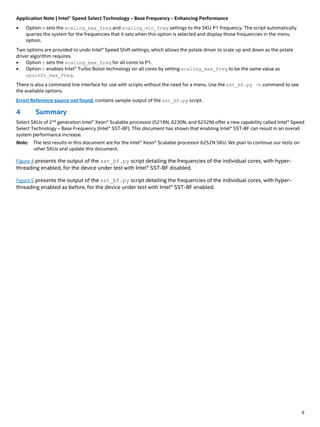
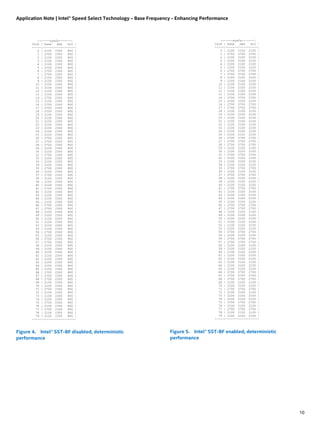
Figure 4 presents the output of the sst_bf.py script detailing the frequencies of the individual cores, with hyper-
threading enabled, for the device under test with Intel® SST-BF disabled.
Figure 5 presents the output of the sst_bf.py script detailing the frequencies of the individual cores, with hyper-
threading enabled as before, for the device under test with Intel® SST-BF enabled.
Application Note | Intel® Speed Select Technology – Base Frequency - Enhancing Performance
10
Figure 4. Intel® SST-BF disabled, deterministic
performance
Figure 5. Intel® SST-BF enabled, deterministic
performance
|------sysfs-------|
Core | base max min |
-----|------------------|
0 | 2100 2300 800 |
1 | 2700 2300 800 |
2 | 2100 2300 800 |
3 | 2100 2300 800 |
4 | 2100 2300 800 |
5 | 2100 2300 800 |
6 | 2700 2300 800 |
7 | 2700 2300 800 |
8 | 2100 2300 800 |
9 | 2100 2300 800 |
10 | 2100 2300 800 |
11 | 2100 2300 800 |
12 | 2100 2300 800 |
13 | 2100 2300 800 |
14 | 2700 2300 800 |
15 | 2100 2300 800 |
16 | 2700 2300 800 |
17 | 2700 2300 800 |
18 | 2100 2300 800 |
19 | 2100 2300 800 |
20 | 2100 2300 800 |
21 | 2100 2300 800 |
22 | 2100 2300 800 |
23 | 2100 2300 800 |
24 | 2100 2300 800 |
25 | 2100 2300 800 |
26 | 2700 2300 800 |
27 | 2700 2300 800 |
28 | 2700 2300 800 |
29 | 2100 2300 800 |
30 | 2100 2300 800 |
31 | 2700 2300 800 |
32 | 2100 2300 800 |
33 | 2100 2300 800 |
34 | 2100 2300 800 |
35 | 2700 2300 800 |
36 | 2100 2300 800 |
37 | 2700 2300 800 |
38 | 2100 2300 800 |
39 | 2100 2300 800 |
40 | 2100 2300 800 |
41 | 2700 2300 800 |
42 | 2100 2300 800 |
43 | 2100 2300 800 |
44 | 2100 2300 800 |
45 | 2100 2300 800 |
46 | 2700 2300 800 |
47 | 2700 2300 800 |
48 | 2100 2300 800 |
49 | 2100 2300 800 |
50 | 2100 2300 800 |
51 | 2100 2300 800 |
52 | 2100 2300 800 |
53 | 2100 2300 800 |
54 | 2700 2300 800 |
55 | 2100 2300 800 |
56 | 2700 2300 800 |
57 | 2700 2300 800 |
58 | 2100 2300 800 |
59 | 2100 2300 800 |
60 | 2100 2300 800 |
61 | 2100 2300 800 |
62 | 2100 2300 800 |
63 | 2100 2300 800 |
64 | 2100 2300 800 |
65 | 2100 2300 800 |
66 | 2700 2300 800 |
67 | 2700 2300 800 |
68 | 2700 2300 800 |
69 | 2100 2300 800 |
70 | 2100 2300 800 |
71 | 2700 2300 800 |
72 | 2100 2300 800 |
73 | 2100 2300 800 |
74 | 2100 2300 800 |
75 | 2700 2300 800 |
76 | 2100 2300 800 |
77 | 2700 2300 800 |
78 | 2100 2300 800 |
79 | 2100 2300 800 |
-----|------------------|
|------sysfs-------|
Core | base max min |
-----|------------------|
0 | 2100 2100 2100 |
1 | 2700 2700 2700 |
2 | 2100 2100 2100 |
3 | 2100 2100 2100 |
4 | 2100 2100 2100 |
5 | 2100 2100 2100 |
6 | 2700 2700 2700 |
7 | 2700 2700 2700 |
8 | 2100 2100 2100 |
9 | 2100 2100 2100 |
10 | 2100 2100 2100 |
11 | 2100 2100 2100 |
12 | 2100 2100 2100 |
13 | 2100 2100 2100 |
14 | 2700 2700 2700 |
15 | 2100 2100 2100 |
16 | 2700 2700 2700 |
17 | 2700 2700 2700 |
18 | 2100 2100 2100 |
19 | 2100 2100 2100 |
20 | 2100 2100 2100 |
21 | 2100 2100 2100 |
22 | 2100 2100 2100 |
23 | 2100 2100 2100 |
24 | 2100 2100 2100 |
25 | 2100 2100 2100 |
26 | 2700 2700 2700 |
27 | 2700 2700 2700 |
28 | 2700 2700 2700 |
29 | 2100 2100 2100 |
30 | 2100 2100 2100 |
31 | 2700 2700 2700 |
32 | 2100 2100 2100 |
33 | 2100 2100 2100 |
34 | 2100 2100 2100 |
35 | 2700 2700 2700 |
36 | 2100 2100 2100 |
37 | 2700 2700 2700 |
38 | 2100 2100 2100 |
39 | 2100 2100 2100 |
40 | 2100 2100 2100 |
41 | 2700 2700 2700 |
42 | 2100 2100 2100 |
43 | 2100 2100 2100 |
44 | 2100 2100 2100 |
45 | 2100 2100 2100 |
46 | 2700 2700 2700 |
47 | 2700 2700 2700 |
48 | 2100 2100 2100 |
49 | 2100 2100 2100 |
50 | 2100 2100 2100 |
51 | 2100 2100 2100 |
52 | 2100 2100 2100 |
53 | 2100 2100 2100 |
54 | 2700 2700 2700 |
55 | 2100 2100 2100 |
56 | 2700 2700 2700 |
57 | 2700 2700 2700 |
58 | 2100 2100 2100 |
59 | 2100 2100 2100 |
60 | 2100 2100 2100 |
61 | 2100 2100 2100 |
62 | 2100 2100 2100 |
63 | 2100 2100 2100 |
64 | 2100 2100 2100 |
65 | 2100 2100 2100 |
66 | 2700 2700 2700 |
67 | 2700 2700 2700 |
68 | 2700 2700 2700 |
69 | 2100 2100 2100 |
70 | 2100 2100 2100 |
71 | 2700 2700 2700 |
72 | 2100 2100 2100 |
73 | 2100 2100 2100 |
74 | 2100 2100 2100 |
75 | 2700 2700 2700 |
76 | 2100 2100 2100 |
77 | 2700 2700 2700 |
78 | 2100 2100 2100 |
79 | 2100 2100 2100 |
-----|------------------|
Application Note | Intel® Speed Select Technology – Base Frequency - Enhancing Performance
11
No license (express or implied, by estoppel or otherwise) to any intellectual property rights is granted by this document.
Intel disclaims all express and implied warranties, including without limitation, the implied warranties of merchantability, fitness for a particular purpose, and non-
infringement, as well as any warranty arising from course of performance, course of dealing, or usage in trade.
This document contains information on products, services and/or processes in development. All information provided here is subject to change without notice. Contact
your Intel representative to obtain the latest forecast, schedule, specifications and roadmaps.
The products and services described may contain defects or errors known as errata which may cause deviations from published specifications. Current characterized
errata are available on request. No product or component can be absolutely secure.
Software and workloads used in performance tests may have been optimized for performance only on Intel microprocessors.
Performance tests, such as SYSmark and MobileMark, are measured using specific computer systems, components, software, operations and functions. Any change to
any of those factors may cause the results to vary. You should consult other information and performance tests to assist you in fully evaluating your contemplated
purchases, including the performance of that product when combined with other products.
For more information go to www.intel.com/benchmarks
Performance results are based on testing as of March 2019 and may not reflect all publicly available security updates. See configuration disclosure for details. No
product or component can be absolutely secure.
§ Configurations: Host OS Ubuntu 18.04.1, Linux Ubuntu18.04-AI 4.20.0-042000-generic #201812232030 SMP Mon Dec 24 01:32:58 UTC 2018 x86_64 x86_64 x86_64
GNU/Linux, VM CentOS Linux release 7.4, Stress version 1.0.4, BIOS/FW: WW07 BKC SE5C620.86B.0D.01.0374.013120191835 Date: 01/31/2019 with V5 Released BIOS,
Power measurement: https://help.raritan.com/px3-5000/v3.5.0/en/#46385.htm
Copies of documents which have an order number and are referenced in this document may be obtained by calling 1-800-548-4725 or by visiting
www.intel.com/design/literature.htm.
Intel, the Intel logo, and Xeon are trademarks of Intel Corporation or its subsidiaries in the U.S. and/or other countries.
* Other names and brands may be claimed as the property of others.
© 2019 Intel Corporation 0619/DN/PTI/PDF 338928-002US

intel speed-select-technology-base-frequency-enhancing-performance

  • 1.
    1 applicationNote Intel Corporation Intel® SpeedSelect Technology – Base Frequency - Enhancing Performance Authors John DiGiglio David Hunt Ai Bee Lim Chris Macnamara Timothy Miskell 1 Introduction This document provides an overview of a new CPU capability called Intel® Speed Select Technology – Base Frequency (Intel® SST-BF), which is available on select SKUs of 2nd generation Intel® Xeon® Scalable processor (formerly codenamed Cascade Lake). The document also includes benchmarking data and instructions on how to enable the capability. Value propositions of this capability include: • Select SKUs of 2nd generation Intel® Xeon® Scalable processor (5218N, 6230N, and 6252N) offer a new capability called Intel® SST-BF. • Intel® SST-BF allows the CPU to be deployed with an asymmetric core frequency configuration. • The placement of key workloads on higher frequency Intel® SST-BF enabled cores can result in an overall system workload increase and potential overall energy savings when compared to deploying the CPU with symmetric core frequencies. This document is part of the Network Transformation Experience Kit, which is available at: https://networkbuilders.intel.com/ 1.1 Terminology Table 1. Terminology ABBREVIATION DESCRIPTION DPDK Data Plane Development Kit NFV Network Functions Virtualization SST-BF Intel® Speed Select Technology – Base Frequency VM Virtual Machine
  • 2.
    Application Note |Intel® Speed Select Technology – Base Frequency - Enhancing Performance 2 Table of Contents Figures Figure 1. Core Freqency Deployment Methods............................................................................................................................................................................................. 3 Figure 2. Test Setup................................................................................................................................................................................................................................................. 4 Figure 3. Test Results .............................................................................................................................................................................................................................................. 5 Figure 4. Intel® SST-BF disabled, deterministic performance ................................................................................................................................................................10 Figure 5. Intel® SST-BF enabled, deterministic performance .................................................................................................................................................................10 Tables Table 1. Terminology ............................................................................................................................................................................................................................................. 1 Table 2. Intel® SST-BF Enabled CPU SKUs..................................................................................................................................................................................................... 3 Table 3. BIOS Settings ........................................................................................................................................................................................................................................... 6
  • 3.
    Application Note |Intel® Speed Select Technology – Base Frequency - Enhancing Performance 3 1.2 Intel® SST-BF Overview Figure 1 shows both symmetric and asymmetric core frequency deployment. In a symmetric core frequency deployment (default), all applications on a processor operate at the same core frequency. When Intel® SST-BF is enabled, it allows the CPU to be dynamically distributed across cores in an asymmetric configuration. This enables users to boost performance of targeted applications at runtime. Figure 1. Core Freqency Deployment Methods Table 2 lists the Intel® Xeon® Scalable processor SKUs that support Intel® SST-BF and compares their corresponding high priority and standard priority values. Table 2. Intel® SST-BF Enabled CPU SKUs Intel® Xeon® Scalable processor 6252N (24C @ 2.3GHz @ 150W) High Priority Standard Priority Cores Base Frequency Cores Base Frequency 8 2.8 GHz 16 2.1 GHz Intel® Xeon® Scalable processor 6230N (20C @ 2.3GHz @ 125W) High Priority Standard Priority Cores Base Frequency Cores Base Frequency 6 2.7 GHz 14 2.1 GHz Intel® Xeon® Scalable processor 5218N (16C @ 2.3GHz @ 105W) High Priority Standard Priority Cores Base Frequency Cores Base Frequency 4 2.7 GHz 12 2.1 GHz 2 Benchmark Results To demonstrate the benefit of deploying a system with Intel® SST-BF enabled (asymmetric core frequencies), we simulated a representative NFV deployment scenario where the compute node is hosting high priority workloads and low priority workloads. The High Priority workload hosted in a Virtual Machine is representative of a workload reliant on deterministic compute cycles and benefits from frequency scaling. In this case, we chose the DPDK Testpmd packet forwarding sample application. We also targeted the vSwitch component of the system to the higher frequency cores.
  • 4.
    Application Note |Intel® Speed Select Technology – Base Frequency - Enhancing Performance 4 We used the stress application to generate background work representative of a low priority workload, that are non-real-time or performant crucial. 2.1 Test Setup Figure 2 shows the representative topology of our test setup. The traffic generator was built using the open source TRex traffic generator built on DPDK 18.1. (DPDK downloads are available at: https://git.dpdk.org/dpdk-stable/) The representative system was connected to the traffic generator system using Intel® XL710 40 GbE Ethernet Adapters. Figure 2. Test Setup Our representative system had the following characteristics: • Dual Intel® Xeon® Gold 6320N @2.30 GHz processor • Ubuntu* 18.04.1 LTS (Linux* Ubuntu18 4.20.0-042000-generic #201812232030). • BIOS/FW is WW07 BKC SE5C620.86B.0D.01.0374.013120191835 with V5 Released BIOS. Date: 01/31/2019 • OVS 2.11.90 with DPDK 18.11 • Both Virtual Machines are using CentOS* 7.4 as Guest OS. • Stress application v1.0.4 We generated traffic and measured both traffic throughput and consumed wall power within a total of 4 scenarios: 1. Intel® SST-BF feature disabled and the stress application not generating any activity. 2. Intel® SST-BF feature disabled and the stress application maximizing activity. 3. Intel® SST-BF feature enabled and the stress application not generating any activity. 4. Intel® SST-BF feature enabled and the stress application maximizing activity. The results from the 4 scenarios are captured in Figure 3. The results showed that we achieved a higher traffic throughput for our high priority workload while staying within the same power consumption. Note: These results were measured with a single queue configuration for OVS-DPDK. We hypothesize that performance results will improve even further if multi-queue is enabled.
  • 5.
    Application Note |Intel® Speed Select Technology – Base Frequency - Enhancing Performance 5 Figure 3. Test Results Note: Software and workloads used in performance tests may have been optimized for performance only on Intel microprocessors. Performance tests, such as SYSmark and MobileMark, are measured using specific computer systems, components, software, operations and functions. Any change to any of those factors may cause the results to vary. You should consult other information and performance tests to assist you in fully evaluating your contemplated purchases, including the performance of that product when combined with other products. For more information go to www.intel.com/benchmarks. Performance results are based on testing as of March 2019 and may not reflect all publicly available security updates. See configuration disclosure for details. No product or component can be absolutely secure. § Configurations: Host OS Ubuntu 18.04.1, Linux Ubuntu18.04-AI 4.20.0-042000-generic #201812232030 SMP Mon Dec 24 01:32:58 UTC 2018 x86_64 x86_64 x86_64 GNU/Linux, VM CentOS Linux release 7.4, Stress version 1.0.4, BIOS/FW: WW07 BKC SE5C620.86B.0D.01.0374.013120191835 Date: 01/31/2019 with V5 Released BIOS, Power measurement: https://help.raritan.com/px3-5000/v3.5.0/en/#46385.htm 3 Setting up Intel® SST-BF Functionality 3.1 Prerequisites To use the Intel® SST-BF functionality you need: • Linux* Kernel version 4.20 RC1 or later. Check with Linux vendors for feature integration. • Enable the Intel® SST-BF feature in the BIOS. • Activate the feature using a sample node configuration script, sst_bf.py available at: https://github.com/intel/CommsPowerManagement.
  • 6.
    Application Note |Intel® Speed Select Technology – Base Frequency - Enhancing Performance 6 3.2 BIOS Settings Table 3 shows the required BIOS settings for deterministic performance. For details on how to implement these settings, see Section 3.3. Table 3. BIOS Settings Menu (Advanced) Path to BIOS Setting BIOS Settings Required Setting for Deterministic Performance Advanced Processor Configuration Hyperthreading Enabled Power Configuration Power and Performance CPU Power and Performance Policy Performance Workload Configuration I/O Sensitive Power and Performance  CPU P-State Control Enhanced Intel® SpeedStep Technology Disabled(See Note.) Power and Performance  Hardware P States Hardware P States Disabled Power and Performance - CPU C State Control Package C-State C0/C1 state C1E Disabled Processor C6 Disabled Power and Performance Uncore Power Management Uncore Frequency Scaling Disabled Performance P-limit Disabled Memory Configuration Advanced  Memory Configuration IMC Interleaving 2-Way Interleaving Virtualization Configuration Processor Configuration Intel® Virtualization Technology (VT) Enabled Processor Configuration Intel® VT for Directed I/O Enabled Thermal Configuration Advanced  System Acoustic and Performance Configuration Set Fan Profile Performance NOTE: Enabled in the case where Intel® SST-BF is enabled to allow for configuration of individual core speeds. 3.3 Configuring BIOS The steps in this section were performed on an Intel® Server Board S2600WF (formerly codenamed Wolf Pass). In the BIOS, perform the following steps. 1. Select Advanced.
  • 7.
    Application Note |Intel® Speed Select Technology – Base Frequency - Enhancing Performance 7 2. Select Power & Performance. In the Power & Performance screen, there are two sections we must check: − Hardware P States − CPU P State Control 3. In the Power & Performance screen, select Hardware P States. 4. In the Hardware PM State Control screen, ensure that the following options are set: − Hardware P-States: Native Mode with No Legacy Support − EPP Enable: Enable − RAPL Prioritization: Enable 5. Choose Exit to return to the Power & Performance screen, then select the CPU P State Control option.
  • 8.
    Application Note |Intel® Speed Select Technology – Base Frequency - Enhancing Performance 8 6. In the CPU P State Control screen, configure Intel® SST-BF and Intel® Turbo Boost Technology. The following options should be set: − Active Intel(R) SST-BF: Enabled − Configure Intel(R) SST-BF: Disabled − Intel Configurable TDP: Disabled − Intel(R) Turbo Boost Technology: Enabled − Energy Efficient Turbo: Disabled Note: Intel® SST-BF can be used with hyper-threading on or off, but you must be sure that both hyper-thread siblings have the same configuration to get the expected results. Save your changes and exit BIOS setup. 3.4 Operating System Settings Intel® SST-BF requires a kernel patch that is available in the upstream Linux kernel version 4.20 and later. In addition, you must boot with the intel_pstate driver active. Note: Do not use the intel_pstate=disable or intel_pstate=no_hwp settings. This is necessary to allow base_frequency to appear in the cpufreq directory in sysfs. 3.5 Setup Script Use the Intel® SST-BF Python script called sst_bf.py, which is available at: https://github.com/intel/CommsPowerManagement. The script sets up the desired maximum and maximum frequencies for operation with Intel® SST-BF. The script provides several options to configure the system and to revert to a state that does not use Intel® SST-BF. This script can set up multiple configurations, as reflected in the menu options below. [s] Set SST-BF config (set min/max to 2700/2700 and 2100/2100) [m] Set P1 on all cores (set min/max to 2300/2300) [r] Revert cores to Turbo/min (set max/min to 3900/800) [t] Revert cores to P1/min (set max/min to 2300/800) [i] Show SST-BF info [l] List High Priority cores [v] Show script version [q] Exit Script ---------------------------------------------------------- Option: The main setup options are s and m. • Option s sets the scaling_min_freq and the scaling_min_freq settings according to whether the core is a P1 High or P1 Normal core. The script automatically queries the system for the frequencies that it sets when this option is selected and displays those frequencies in the menu option.
  • 9.
    Application Note |Intel® Speed Select Technology – Base Frequency - Enhancing Performance 9 • Option m sets the scaling_max_freq and scaling_min_freq settings to the SKU P1 frequency. The script automatically queries the system for the frequencies that it sets when this option is selected and display those frequencies in the menu option. Two options are provided to undo Intel® Speed Shift settings, which allows the pstate driver to scale up and down as the pstate driver algorithm requires. • Option r sets the scaling_max_freq for all cores to P1. • Option t enables Intel® Turbo Boost technology on all cores by setting scaling_max_freq to be the same value as cpuinfo_max_freq. There is also a command line interface for use with scripts without the need for a menu. Use the sst_bf.py -h command to see the available options. Error! Reference source not found. contains sample output of the sst_bf.py script. 4 Summary Select SKUs of 2nd generation Intel® Xeon® Scalable processor (5218N, 6230N, and 6252N) offer a new capability called Intel® Speed Select Technology – Base Frequency (Intel® SST-BF). This document has shown that enabling Intel® SST-BF can result in an overall system performance increase. Note: The test results in this document are for the Intel® Xeon® Scalable processor 6252N SKU. We plan to continue our tests on other SKUs and update this document. Figure 4 presents the output of the sst_bf.py script detailing the frequencies of the individual cores, with hyper- threading enabled, for the device under test with Intel® SST-BF disabled. Figure 5 presents the output of the sst_bf.py script detailing the frequencies of the individual cores, with hyper- threading enabled as before, for the device under test with Intel® SST-BF enabled.
  • 10.
    Application Note |Intel® Speed Select Technology – Base Frequency - Enhancing Performance 10 Figure 4. Intel® SST-BF disabled, deterministic performance Figure 5. Intel® SST-BF enabled, deterministic performance |------sysfs-------| Core | base max min | -----|------------------| 0 | 2100 2300 800 | 1 | 2700 2300 800 | 2 | 2100 2300 800 | 3 | 2100 2300 800 | 4 | 2100 2300 800 | 5 | 2100 2300 800 | 6 | 2700 2300 800 | 7 | 2700 2300 800 | 8 | 2100 2300 800 | 9 | 2100 2300 800 | 10 | 2100 2300 800 | 11 | 2100 2300 800 | 12 | 2100 2300 800 | 13 | 2100 2300 800 | 14 | 2700 2300 800 | 15 | 2100 2300 800 | 16 | 2700 2300 800 | 17 | 2700 2300 800 | 18 | 2100 2300 800 | 19 | 2100 2300 800 | 20 | 2100 2300 800 | 21 | 2100 2300 800 | 22 | 2100 2300 800 | 23 | 2100 2300 800 | 24 | 2100 2300 800 | 25 | 2100 2300 800 | 26 | 2700 2300 800 | 27 | 2700 2300 800 | 28 | 2700 2300 800 | 29 | 2100 2300 800 | 30 | 2100 2300 800 | 31 | 2700 2300 800 | 32 | 2100 2300 800 | 33 | 2100 2300 800 | 34 | 2100 2300 800 | 35 | 2700 2300 800 | 36 | 2100 2300 800 | 37 | 2700 2300 800 | 38 | 2100 2300 800 | 39 | 2100 2300 800 | 40 | 2100 2300 800 | 41 | 2700 2300 800 | 42 | 2100 2300 800 | 43 | 2100 2300 800 | 44 | 2100 2300 800 | 45 | 2100 2300 800 | 46 | 2700 2300 800 | 47 | 2700 2300 800 | 48 | 2100 2300 800 | 49 | 2100 2300 800 | 50 | 2100 2300 800 | 51 | 2100 2300 800 | 52 | 2100 2300 800 | 53 | 2100 2300 800 | 54 | 2700 2300 800 | 55 | 2100 2300 800 | 56 | 2700 2300 800 | 57 | 2700 2300 800 | 58 | 2100 2300 800 | 59 | 2100 2300 800 | 60 | 2100 2300 800 | 61 | 2100 2300 800 | 62 | 2100 2300 800 | 63 | 2100 2300 800 | 64 | 2100 2300 800 | 65 | 2100 2300 800 | 66 | 2700 2300 800 | 67 | 2700 2300 800 | 68 | 2700 2300 800 | 69 | 2100 2300 800 | 70 | 2100 2300 800 | 71 | 2700 2300 800 | 72 | 2100 2300 800 | 73 | 2100 2300 800 | 74 | 2100 2300 800 | 75 | 2700 2300 800 | 76 | 2100 2300 800 | 77 | 2700 2300 800 | 78 | 2100 2300 800 | 79 | 2100 2300 800 | -----|------------------| |------sysfs-------| Core | base max min | -----|------------------| 0 | 2100 2100 2100 | 1 | 2700 2700 2700 | 2 | 2100 2100 2100 | 3 | 2100 2100 2100 | 4 | 2100 2100 2100 | 5 | 2100 2100 2100 | 6 | 2700 2700 2700 | 7 | 2700 2700 2700 | 8 | 2100 2100 2100 | 9 | 2100 2100 2100 | 10 | 2100 2100 2100 | 11 | 2100 2100 2100 | 12 | 2100 2100 2100 | 13 | 2100 2100 2100 | 14 | 2700 2700 2700 | 15 | 2100 2100 2100 | 16 | 2700 2700 2700 | 17 | 2700 2700 2700 | 18 | 2100 2100 2100 | 19 | 2100 2100 2100 | 20 | 2100 2100 2100 | 21 | 2100 2100 2100 | 22 | 2100 2100 2100 | 23 | 2100 2100 2100 | 24 | 2100 2100 2100 | 25 | 2100 2100 2100 | 26 | 2700 2700 2700 | 27 | 2700 2700 2700 | 28 | 2700 2700 2700 | 29 | 2100 2100 2100 | 30 | 2100 2100 2100 | 31 | 2700 2700 2700 | 32 | 2100 2100 2100 | 33 | 2100 2100 2100 | 34 | 2100 2100 2100 | 35 | 2700 2700 2700 | 36 | 2100 2100 2100 | 37 | 2700 2700 2700 | 38 | 2100 2100 2100 | 39 | 2100 2100 2100 | 40 | 2100 2100 2100 | 41 | 2700 2700 2700 | 42 | 2100 2100 2100 | 43 | 2100 2100 2100 | 44 | 2100 2100 2100 | 45 | 2100 2100 2100 | 46 | 2700 2700 2700 | 47 | 2700 2700 2700 | 48 | 2100 2100 2100 | 49 | 2100 2100 2100 | 50 | 2100 2100 2100 | 51 | 2100 2100 2100 | 52 | 2100 2100 2100 | 53 | 2100 2100 2100 | 54 | 2700 2700 2700 | 55 | 2100 2100 2100 | 56 | 2700 2700 2700 | 57 | 2700 2700 2700 | 58 | 2100 2100 2100 | 59 | 2100 2100 2100 | 60 | 2100 2100 2100 | 61 | 2100 2100 2100 | 62 | 2100 2100 2100 | 63 | 2100 2100 2100 | 64 | 2100 2100 2100 | 65 | 2100 2100 2100 | 66 | 2700 2700 2700 | 67 | 2700 2700 2700 | 68 | 2700 2700 2700 | 69 | 2100 2100 2100 | 70 | 2100 2100 2100 | 71 | 2700 2700 2700 | 72 | 2100 2100 2100 | 73 | 2100 2100 2100 | 74 | 2100 2100 2100 | 75 | 2700 2700 2700 | 76 | 2100 2100 2100 | 77 | 2700 2700 2700 | 78 | 2100 2100 2100 | 79 | 2100 2100 2100 | -----|------------------|
  • 11.
    Application Note |Intel® Speed Select Technology – Base Frequency - Enhancing Performance 11 No license (express or implied, by estoppel or otherwise) to any intellectual property rights is granted by this document. Intel disclaims all express and implied warranties, including without limitation, the implied warranties of merchantability, fitness for a particular purpose, and non- infringement, as well as any warranty arising from course of performance, course of dealing, or usage in trade. This document contains information on products, services and/or processes in development. All information provided here is subject to change without notice. Contact your Intel representative to obtain the latest forecast, schedule, specifications and roadmaps. The products and services described may contain defects or errors known as errata which may cause deviations from published specifications. Current characterized errata are available on request. No product or component can be absolutely secure. Software and workloads used in performance tests may have been optimized for performance only on Intel microprocessors. Performance tests, such as SYSmark and MobileMark, are measured using specific computer systems, components, software, operations and functions. Any change to any of those factors may cause the results to vary. You should consult other information and performance tests to assist you in fully evaluating your contemplated purchases, including the performance of that product when combined with other products. For more information go to www.intel.com/benchmarks Performance results are based on testing as of March 2019 and may not reflect all publicly available security updates. See configuration disclosure for details. No product or component can be absolutely secure. § Configurations: Host OS Ubuntu 18.04.1, Linux Ubuntu18.04-AI 4.20.0-042000-generic #201812232030 SMP Mon Dec 24 01:32:58 UTC 2018 x86_64 x86_64 x86_64 GNU/Linux, VM CentOS Linux release 7.4, Stress version 1.0.4, BIOS/FW: WW07 BKC SE5C620.86B.0D.01.0374.013120191835 Date: 01/31/2019 with V5 Released BIOS, Power measurement: https://help.raritan.com/px3-5000/v3.5.0/en/#46385.htm Copies of documents which have an order number and are referenced in this document may be obtained by calling 1-800-548-4725 or by visiting www.intel.com/design/literature.htm. Intel, the Intel logo, and Xeon are trademarks of Intel Corporation or its subsidiaries in the U.S. and/or other countries. * Other names and brands may be claimed as the property of others. © 2019 Intel Corporation 0619/DN/PTI/PDF 338928-002US