Implementation of GUI Framework 
Part3 : Introduction of GUI Components using 
JavaScript 
Masahiro Okubo @ HDE
Table of Contents 
Part1 : Overview of the GUI framework 
Part2 : How to use Bootstrap 
Part3 : Introduction of GUI Components using JavaScript (Today’s session) 
Part4 : Communitation with the server using Ajax and JSON 
Part5 : How to convert a POJO (Plain Old Java Object) JSON 
Part6 : Web application architecture on the server side 
I am glad to see you again to everyone. 
Today, I would like to tell about GUI Components of our 
products.
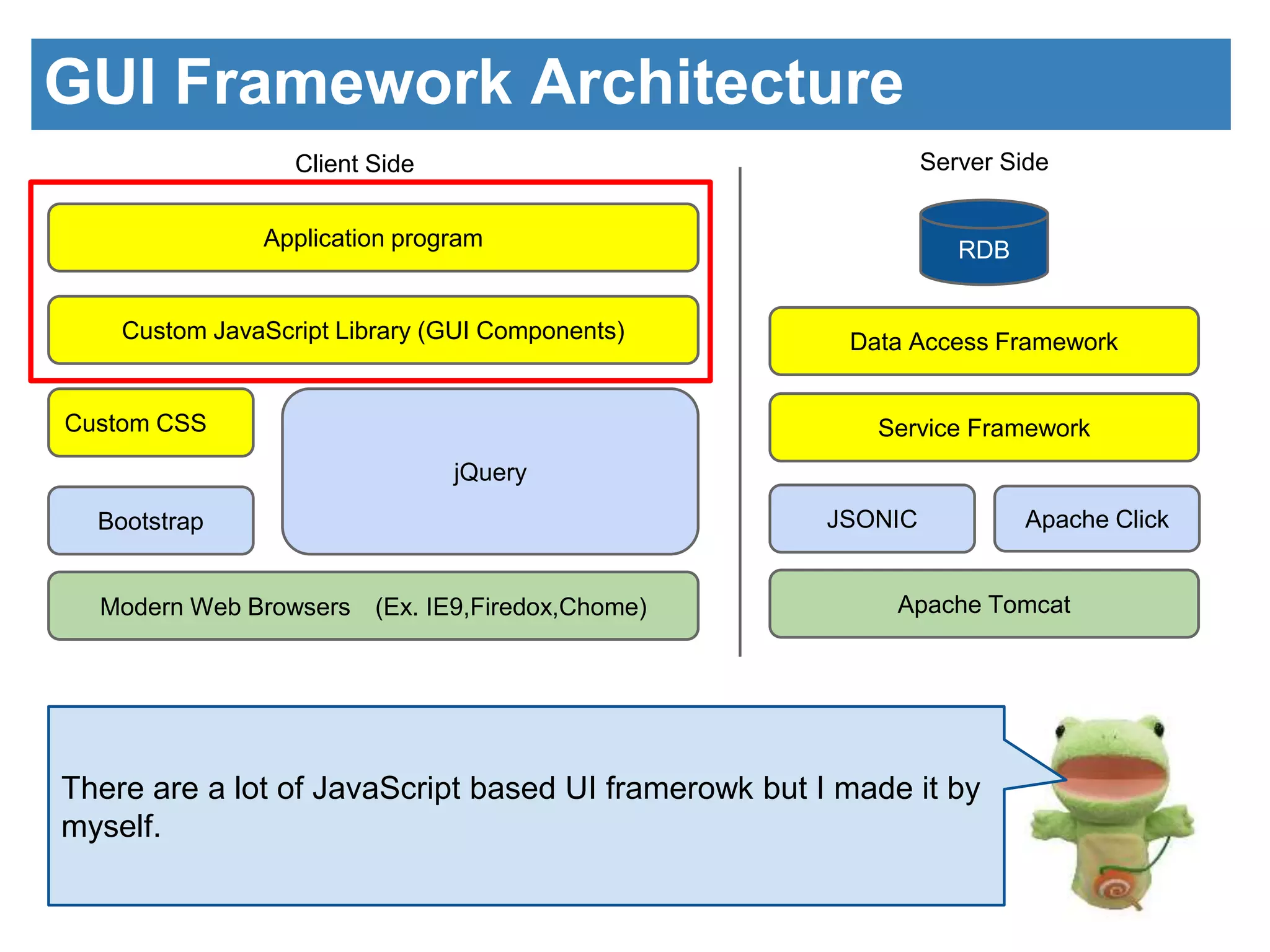
GUI Framework Architecture 
Client Side Server Side 
Application program 
Custom JavaScript Library (GUI Components) 
jQuery 
Custom CSS 
Bootstrap 
Modern Web Browsers (Ex. IE9,Firedox,Chome) 
RDB 
Data Access Framework 
Service Framework 
JSONIC Apache Click 
Apache Tomcat 
There are a lot of JavaScript based UI framerowk but I made it by 
myself.
Look back 
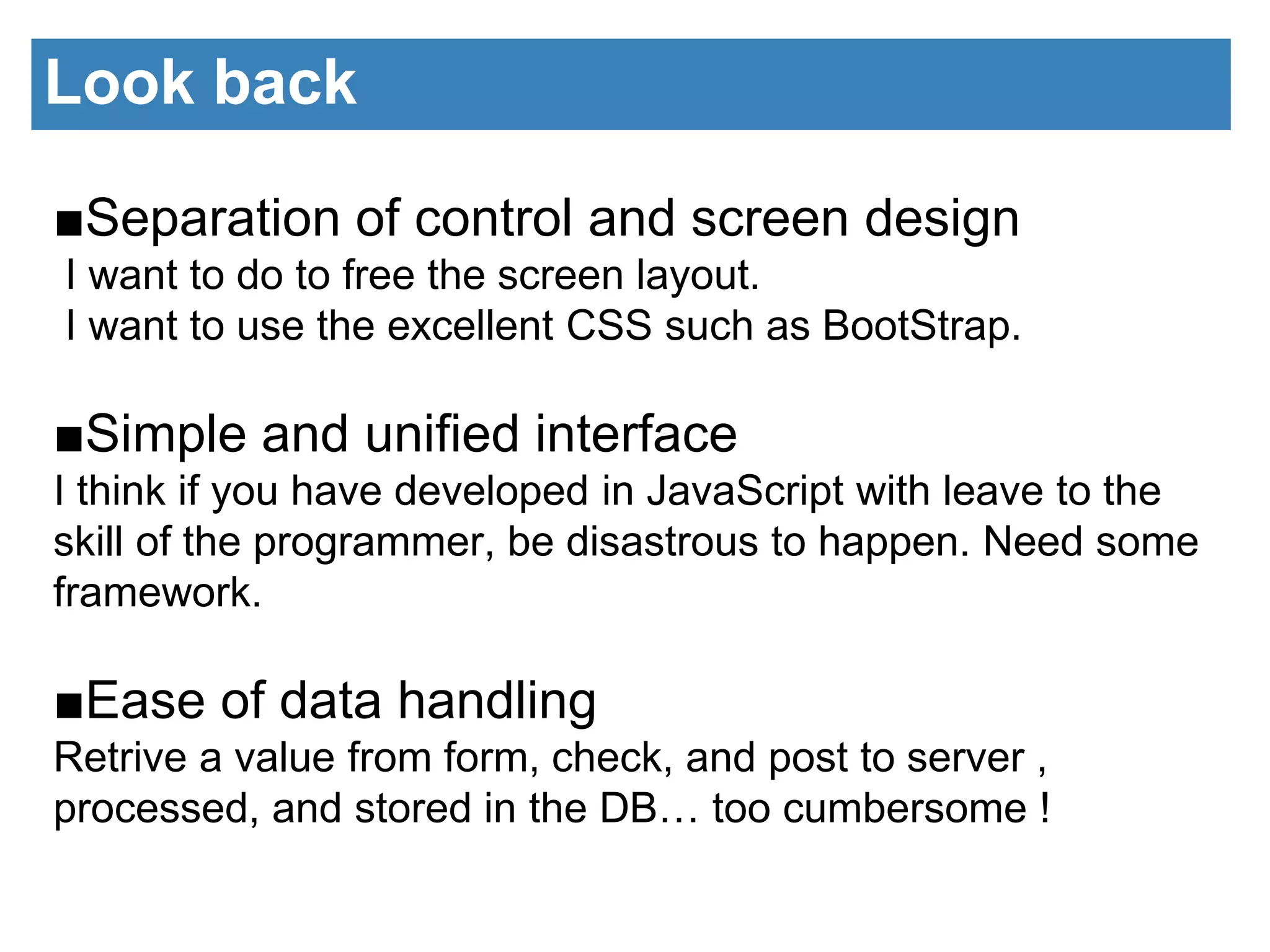
■Separation of control and screen design 
I want to do to free the screen layout. 
I want to use the excellent CSS such as BootStrap. 
■Simple and unified interface 
I think if you have developed in JavaScript with leave to the 
skill of the programmer, be disastrous to happen. Need some 
framework. 
■Ease of data handling 
Retrive a value from form, check, and post to server , 
processed, and stored in the DB… too cumbersome !
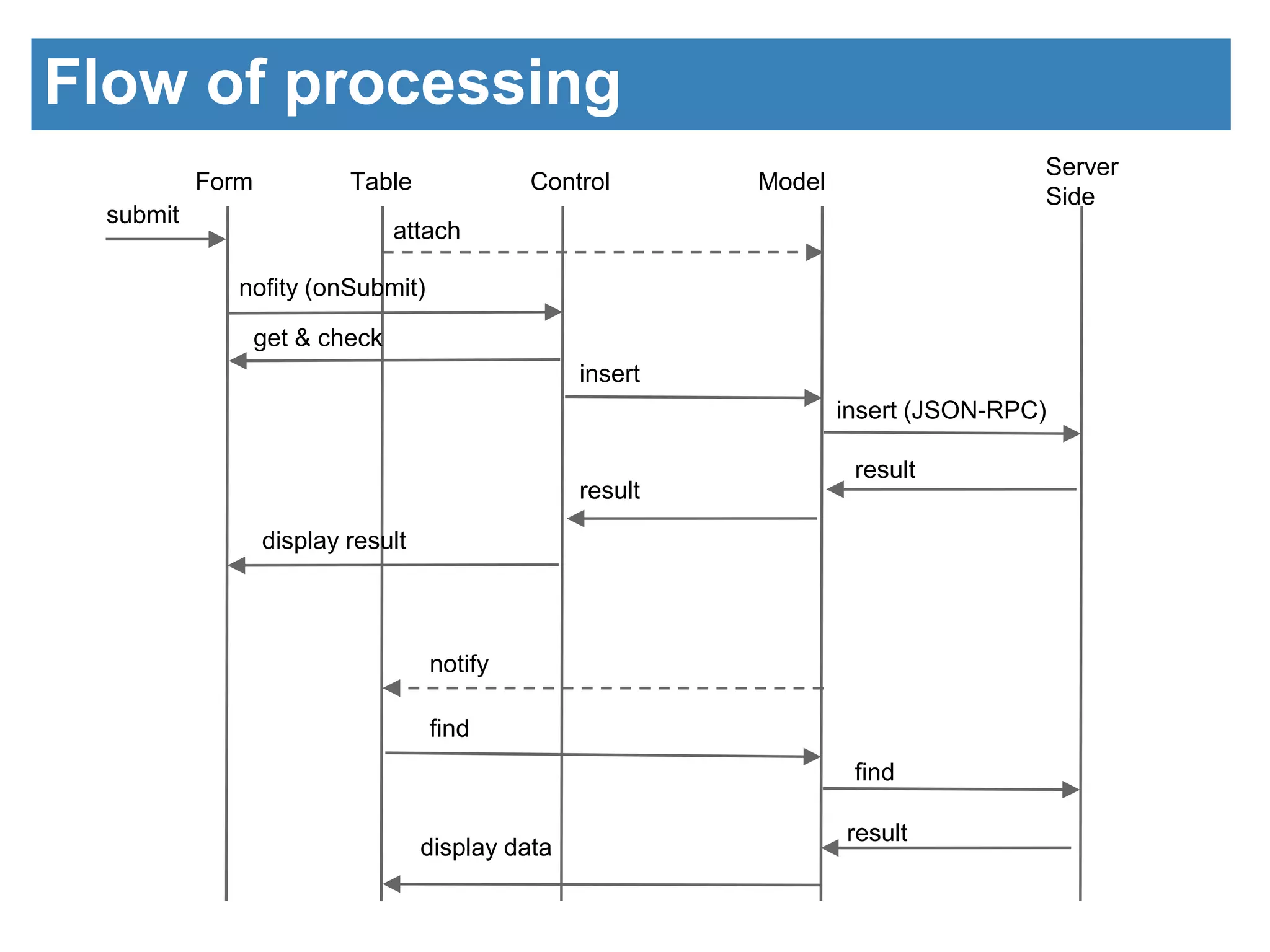
Flow of processing 
Form Table Control Model 
Server 
Side 
submit 
attach 
nofity (onSubmit) 
get & check 
insert 
insert (JSON-RPC) 
result 
result 
display result 
notify 
find 
find 
result 
display data
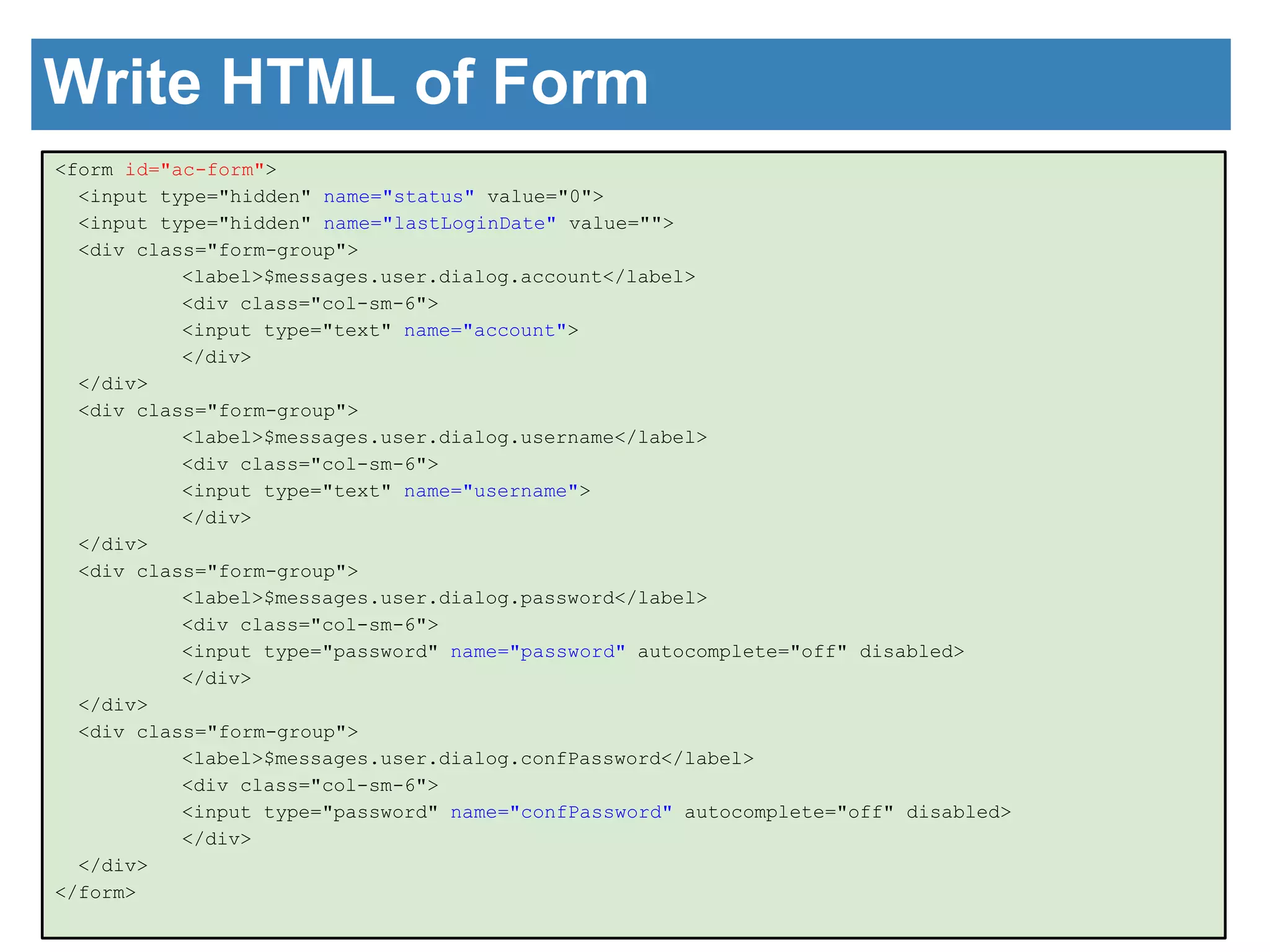
Write HTML of Form 
<form id="ac-form"> 
<input type="hidden" name="status" value="0"> 
<input type="hidden" name="lastLoginDate" value=""> 
<div class="form-group"> 
<label>$messages.user.dialog.account</label> 
<div class="col-sm-6"> 
<input type="text" name="account"> 
</div> 
</div> 
<div class="form-group"> 
<label>$messages.user.dialog.username</label> 
<div class="col-sm-6"> 
<input type="text" name="username"> 
</div> 
</div> 
<div class="form-group"> 
<label>$messages.user.dialog.password</label> 
<div class="col-sm-6"> 
<input type="password" name="password" autocomplete="off" disabled> 
</div> 
</div> 
<div class="form-group"> 
<label>$messages.user.dialog.confPassword</label> 
<div class="col-sm-6"> 
<input type="password" name="confPassword" autocomplete="off" disabled> 
</div> 
</div> 
</form>
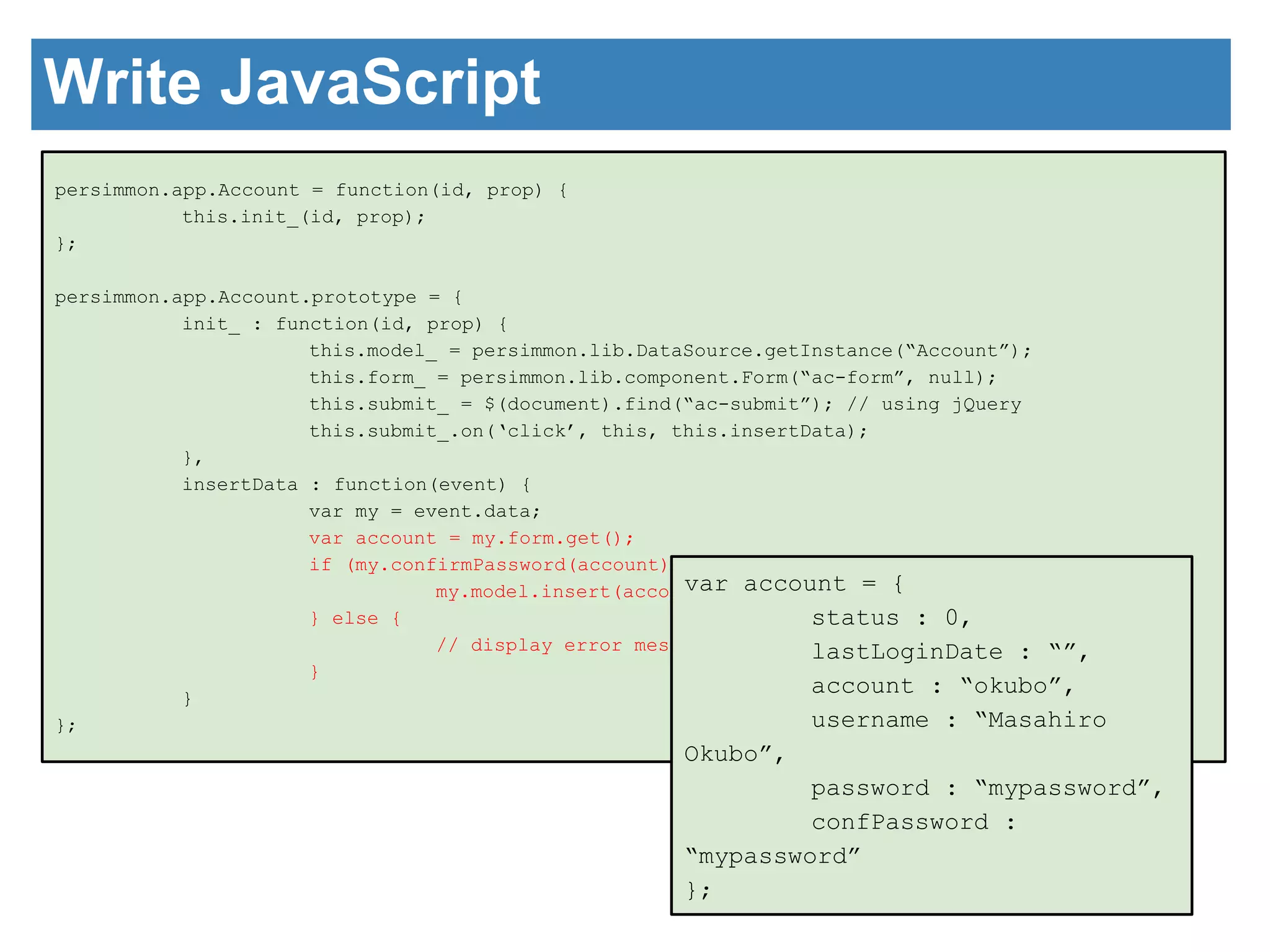
Write JavaScript 
persimmon.app.Account = function(id, prop) { 
this.init_(id, prop); 
}; 
persimmon.app.Account.prototype = { 
init_ : function(id, prop) { 
this.model_ = persimmon.lib.DataSource.getInstance(“Account”); 
this.form_ = persimmon.lib.component.Form(“ac-form”, null); 
this.submit_ = $(document).find(“ac-submit”); // using jQuery 
this.submit_.on(‘click’, this, this.insertData); 
}, 
insertData : function(event) { 
var my = event.data; 
var account = my.form.get(); 
if (my.confirmPassword(account)) { 
my.model.insert(account); 
} else { 
// display error message. 
} 
} 
}; 
var account = { 
status : 0, 
lastLoginDate : “”, 
account : “okubo”, 
username : “Masahiro 
Okubo”, 
password : “mypassword”, 
confPassword : 
“mypassword” 
};
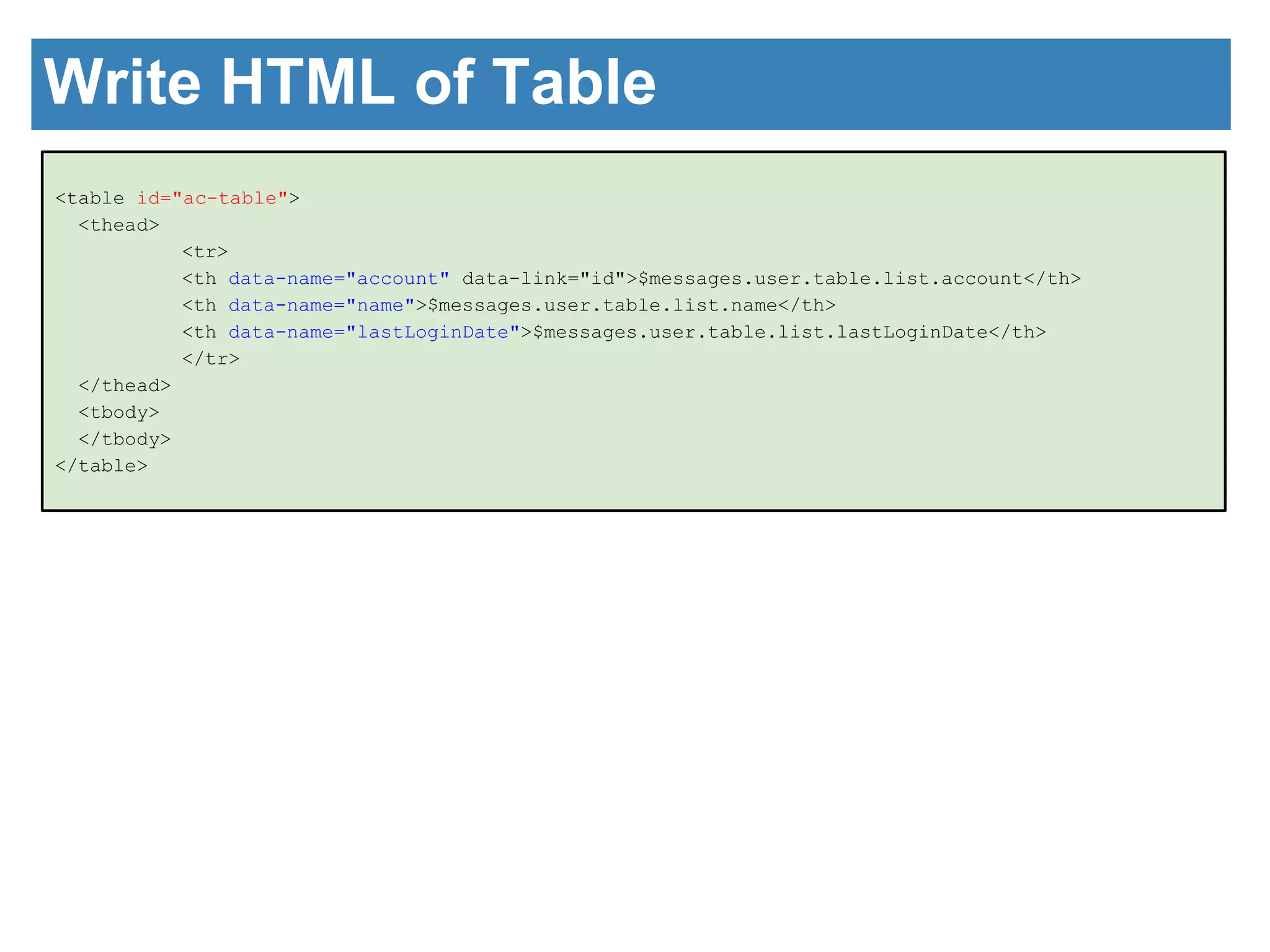
Write HTML of Table 
<table id="ac-table"> 
<thead> 
<tr> 
<th data-name="account" data-link="id">$messages.user.table.list.account</th> 
<th data-name="name">$messages.user.table.list.name</th> 
<th data-name="lastLoginDate">$messages.user.table.list.lastLoginDate</th> 
</tr> 
</thead> 
<tbody> 
</tbody> 
</table>
Write JavaScript 
persimmon.app.Account = function(id, prop) { 
this.init_(id, prop); 
}; 
persimmon.app.Account.prototype = { 
init_ : function(id, prop) { 
this.model_ = persimmon.lib.DataSource.getInstance(“Account”); 
this.form_ = persimmon.lib.component.Form(“ac-form”, null); 
this.submit_ = $(document).find(“ac-submit”); // using jQuery 
this.submit_.on(‘click’, this, this.insertData); 
this.table_ = persimmon.lib.Table(“ac-table”, 
{ 
source : this.model, 
order : [ { name : “account”, ascending : true } ], 
rows : 10 
}); 
this.table_.refresh(); // display data 
}, 
insertData : function(event) { 
var my = event.data; 
var account = my.form.get(); 
if (my.confirmPassword(account)) { 
my.model.insert(account); 
} else { 
// display error message. 
} 
} 
};
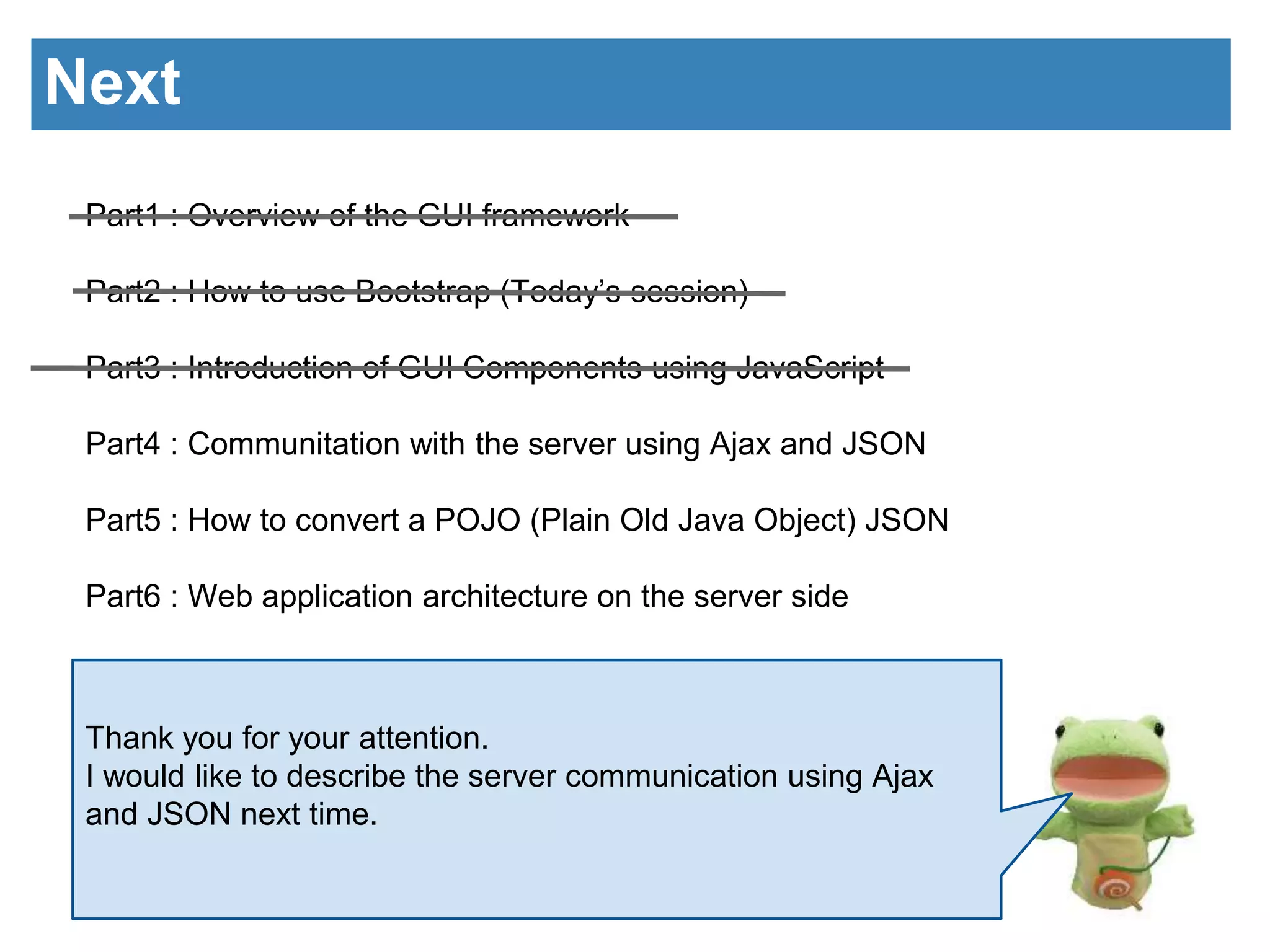
Next 
Part1 : Overview of the GUI framework 
Part2 : How to use Bootstrap (Today’s session) 
Part3 : Introduction of GUI Components using JavaScript 
Part4 : Communitation with the server using Ajax and JSON 
Part5 : How to convert a POJO (Plain Old Java Object) JSON 
Part6 : Web application architecture on the server side 
Thank you for your attention. 
I would like to describe the server communication using Ajax 
and JSON next time.

Implementation of GUI Framework part3

  • 1.
    Implementation of GUIFramework Part3 : Introduction of GUI Components using JavaScript Masahiro Okubo @ HDE
  • 2.
    Table of Contents Part1 : Overview of the GUI framework Part2 : How to use Bootstrap Part3 : Introduction of GUI Components using JavaScript (Today’s session) Part4 : Communitation with the server using Ajax and JSON Part5 : How to convert a POJO (Plain Old Java Object) JSON Part6 : Web application architecture on the server side I am glad to see you again to everyone. Today, I would like to tell about GUI Components of our products.
  • 3.
    GUI Framework Architecture Client Side Server Side Application program Custom JavaScript Library (GUI Components) jQuery Custom CSS Bootstrap Modern Web Browsers (Ex. IE9,Firedox,Chome) RDB Data Access Framework Service Framework JSONIC Apache Click Apache Tomcat There are a lot of JavaScript based UI framerowk but I made it by myself.
  • 4.
    Look back ■Separationof control and screen design I want to do to free the screen layout. I want to use the excellent CSS such as BootStrap. ■Simple and unified interface I think if you have developed in JavaScript with leave to the skill of the programmer, be disastrous to happen. Need some framework. ■Ease of data handling Retrive a value from form, check, and post to server , processed, and stored in the DB… too cumbersome !
  • 5.
    Flow of processing Form Table Control Model Server Side submit attach nofity (onSubmit) get & check insert insert (JSON-RPC) result result display result notify find find result display data
  • 6.
    Write HTML ofForm <form id="ac-form"> <input type="hidden" name="status" value="0"> <input type="hidden" name="lastLoginDate" value=""> <div class="form-group"> <label>$messages.user.dialog.account</label> <div class="col-sm-6"> <input type="text" name="account"> </div> </div> <div class="form-group"> <label>$messages.user.dialog.username</label> <div class="col-sm-6"> <input type="text" name="username"> </div> </div> <div class="form-group"> <label>$messages.user.dialog.password</label> <div class="col-sm-6"> <input type="password" name="password" autocomplete="off" disabled> </div> </div> <div class="form-group"> <label>$messages.user.dialog.confPassword</label> <div class="col-sm-6"> <input type="password" name="confPassword" autocomplete="off" disabled> </div> </div> </form>
  • 7.
    Write JavaScript persimmon.app.Account= function(id, prop) { this.init_(id, prop); }; persimmon.app.Account.prototype = { init_ : function(id, prop) { this.model_ = persimmon.lib.DataSource.getInstance(“Account”); this.form_ = persimmon.lib.component.Form(“ac-form”, null); this.submit_ = $(document).find(“ac-submit”); // using jQuery this.submit_.on(‘click’, this, this.insertData); }, insertData : function(event) { var my = event.data; var account = my.form.get(); if (my.confirmPassword(account)) { my.model.insert(account); } else { // display error message. } } }; var account = { status : 0, lastLoginDate : “”, account : “okubo”, username : “Masahiro Okubo”, password : “mypassword”, confPassword : “mypassword” };
  • 8.
    Write HTML ofTable <table id="ac-table"> <thead> <tr> <th data-name="account" data-link="id">$messages.user.table.list.account</th> <th data-name="name">$messages.user.table.list.name</th> <th data-name="lastLoginDate">$messages.user.table.list.lastLoginDate</th> </tr> </thead> <tbody> </tbody> </table>
  • 9.
    Write JavaScript persimmon.app.Account= function(id, prop) { this.init_(id, prop); }; persimmon.app.Account.prototype = { init_ : function(id, prop) { this.model_ = persimmon.lib.DataSource.getInstance(“Account”); this.form_ = persimmon.lib.component.Form(“ac-form”, null); this.submit_ = $(document).find(“ac-submit”); // using jQuery this.submit_.on(‘click’, this, this.insertData); this.table_ = persimmon.lib.Table(“ac-table”, { source : this.model, order : [ { name : “account”, ascending : true } ], rows : 10 }); this.table_.refresh(); // display data }, insertData : function(event) { var my = event.data; var account = my.form.get(); if (my.confirmPassword(account)) { my.model.insert(account); } else { // display error message. } } };
  • 10.
    Next Part1 :Overview of the GUI framework Part2 : How to use Bootstrap (Today’s session) Part3 : Introduction of GUI Components using JavaScript Part4 : Communitation with the server using Ajax and JSON Part5 : How to convert a POJO (Plain Old Java Object) JSON Part6 : Web application architecture on the server side Thank you for your attention. I would like to describe the server communication using Ajax and JSON next time.