Material Reference
2
Images andMaterial
From
Rafael C. Gonzalez and Richard E. Wood,
Digital Image Processing, 2nd
Edition.& Internet Resources
3.
Contents
Over the nextfew lectures we will look at image
enhancement techniques working in the spatial
domain:
Recap
Different kinds of image enhancement
Histograms
Histogram equalization
3
4.
A Note AboutGrey Levels
So far when we have spoken about image grey level
values, we have said they are in the range [0, 255]
- Where 0 is black and 255 is white
There is no reason why we have to use this range
- The range [0,255] stems from display technologies
For many of the image processing operations in
this lecture grey levels are assumed to be given in
the range [0.0, 1.0]
4
5.
What Is ImageEnhancement?
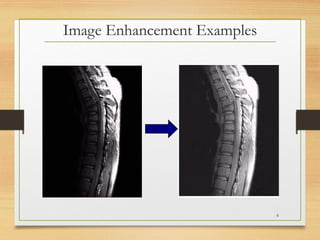
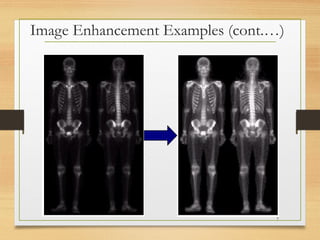
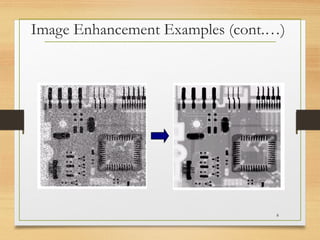
Image enhancement is the process of making
images more useful
The reasons for doing this include:
Highlighting interesting detail in images
Removing noise from images
Making images more visually appealing
5
Spatial & FrequencyDomains
There are two broad categories of image enhancement
techniques
Spatial domain techniques
Direct manipulation of image pixels
Frequency domain techniques
Manipulation of Fourier transform or wavelet
transform of an image
For the moment we will concentrate on techniques that
operate in the spatial domain
9
10.
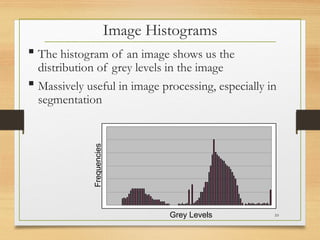
Image Histograms
Thehistogram of an image shows us the
distribution of grey levels in the image
Massively useful in image processing, especially in
segmentation
Grey Levels
Frequencies
10
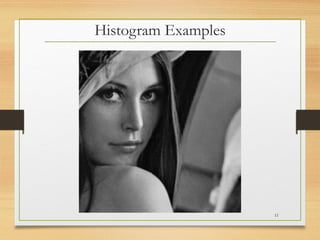
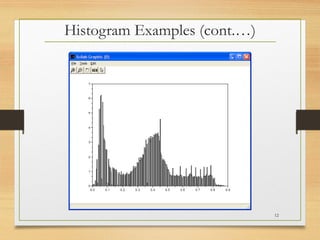
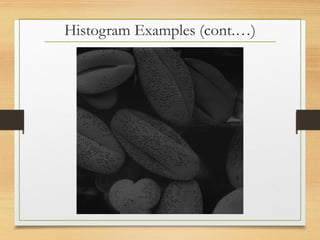
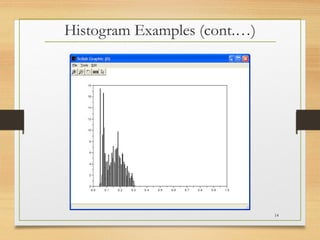
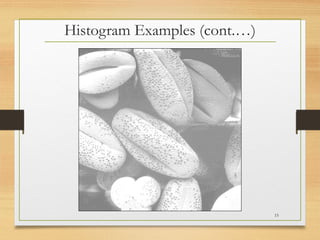
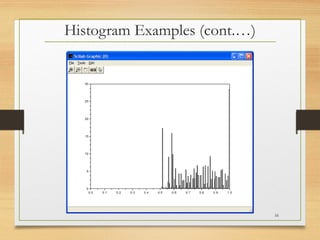
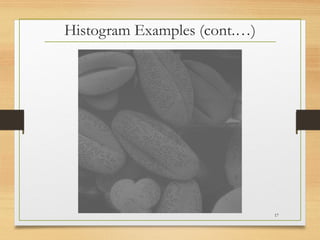
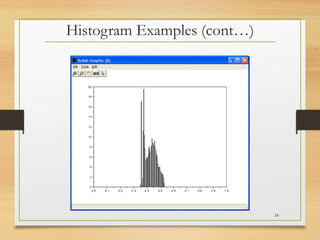
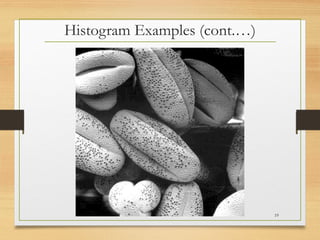
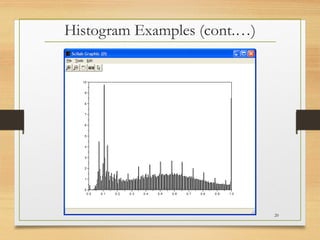
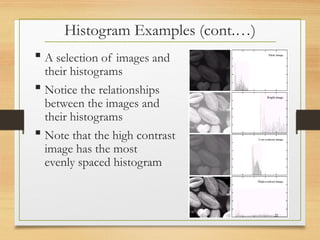
Histogram Examples (cont.…)
A selection of images and
their histograms
Notice the relationships
between the images and
their histograms
Note that the high contrast
image has the most
evenly spaced histogram
21
22.
Contrast Stretching
Wecan fix images that have poor contrast by
applying a pretty simple contrast specification
The interesting part is how do we decide on
this transformation function?
22
23.
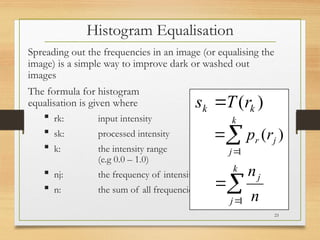
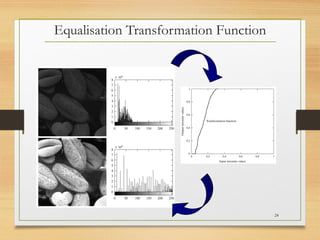
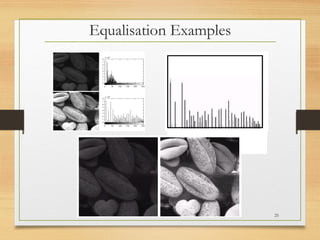
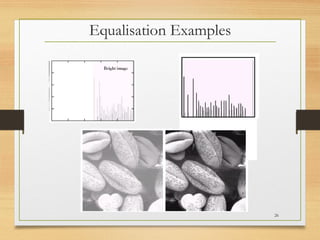
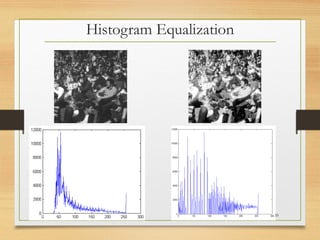
Histogram Equalisation
Spreading outthe frequencies in an image (or equalising the
image) is a simple way to improve dark or washed out
images
The formula for histogram
equalisation is given where
rk: input intensity
sk: processed intensity
k: the intensity range
(e.g 0.0 – 1.0)
nj: the frequency of intensity j
n: the sum of all frequencies
)
( k
k r
T
s
k
j
j
r r
p
1
)
(
k
j
j
n
n
1
23
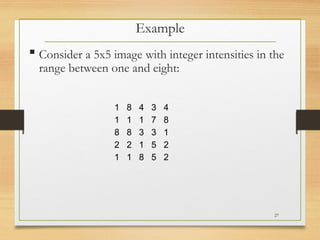
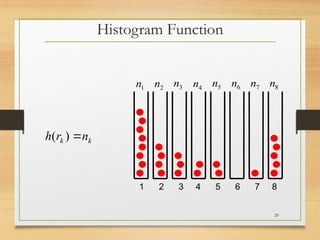
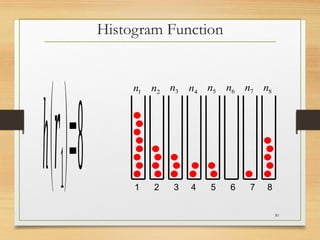
Consider a5x5 image with integer intensities in the
range between one and eight:
Example
1 8 4 3 4
1 1 1 7 8
8 8 3 3 1
2 2 1 5 2
1 1 8 5 2
27
28.
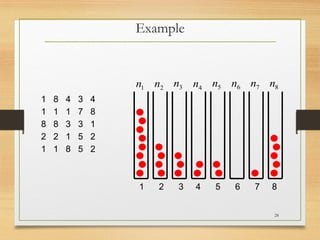
Example
1 8 43 4
1 1 1 7 8
8 8 3 3 1
2 2 1 5 2
1 1 8 5 2
1 2 3 4 5 6 7 8
1
n 2
n 3
n 4
n 5
n 6
n 7
n 8
n
28
29.
1 2 34 5 6 7 8
1
n 2
n 3
n 4
n 5
n 6
n 7
n 8
n
k
k n
r
h
)
(
Histogram Function
29
30.
h(𝑟1)=8 1 23 4 5 6 7 8
1
n 2
n 3
n 4
n 5
n 6
n 7
n 8
n
Histogram Function
30
31.
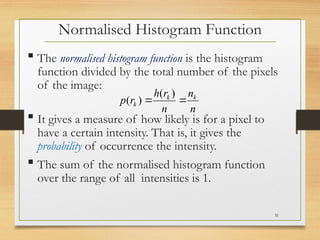
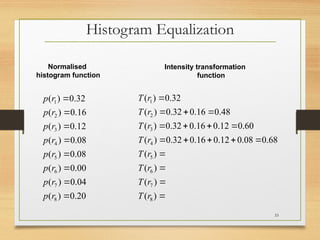
The normalisedhistogram function is the histogram
function divided by the total number of the pixels
of the image:
It gives a measure of how likely is for a pixel to
have a certain intensity. That is, it gives the
probability of occurrence the intensity.
The sum of the normalised histogram function
over the range of all intensities is 1.
n
n
n
r
h
r
p k
k
k
)
(
)
(
Normalised Histogram Function
31
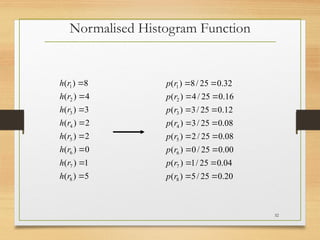
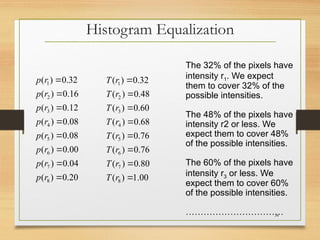
The 32% ofthe pixels have
intensity r1. We expect
them to cover 32% of the
possible intensities.
The 48% of the pixels have
intensity r2 or less. We
expect them to cover 48%
of the possible intensities.
The 60% of the pixels have
intensity r3 or less. We
expect them to cover 60%
of the possible intensities.
……………………………
00
.
1
)
(
80
.
0
)
(
76
.
0
)
(
76
.
0
)
(
68
.
0
)
(
60
.
0
)
(
48
.
0
)
(
32
.
0
)
(
8
7
6
5
4
3
2
1
r
T
r
T
r
T
r
T
r
T
r
T
r
T
r
T
20
.
0
)
(
04
.
0
)
(
00
.
0
)
(
08
.
0
)
(
08
.
0
)
(
12
.
0
)
(
16
.
0
)
(
32
.
0
)
(
8
7
6
5
4
3
2
1
r
p
r
p
r
p
r
p
r
p
r
p
r
p
r
p
Histogram Equalization
34
Summary
We have lookedat:
Different kinds of image enhancement
Histograms
Histogram equalisation
Next time we will start to look at point processing
and some neighbourhood operations
36
37.
What ispoint processing?
Negative images
Thresholding
Logarithmic transformation
Power law transforms
Grey level slicing
Bit plane slicing
Next Lecture
37

![A Note About Grey Levels
So far when we have spoken about image grey level
values, we have said they are in the range [0, 255]
- Where 0 is black and 255 is white
There is no reason why we have to use this range
- The range [0,255] stems from display technologies
For many of the image processing operations in
this lecture grey levels are assumed to be given in
the range [0.0, 1.0]
4](https://image.slidesharecdn.com/lecture-3s-250411142612-c25f2f35/85/Image-Enhacement-for-the-image-improvement-4-320.jpg)