Best Practices in  Using Technology to support  Language Teaching and Learning Dennie Hoopingarner Michigan State University November 7, 2008
Four myths about technology Robert Blake “What Language Professionals Need to Know about Technology” ADFL Bulletin Spring 2001 There is a “technology” Technology = methodology Today’s technology is all you need to know Technology will replace teachers
Myth 1: There is a “technology” What is technology?
What is “technology?” Computer Overhead projector Smartboard DVD player DVR Cell phone Telephone iPod Document camera/ELMO PDA Transporter Replicator Light saber Hyperdrive Cylon brain downloader
Do you have to “know” all these in order to “know” technology?
Lumping all technology together into a monolithic entity  is overly simplistic and discouraging
Different technologies are suitable for different pedagogies
Best Practice: Recognize that “technology” can mean many different things
Myth 2:  Technology = methodology
Technology is not a methodology Saying “I teach with technology” is as meaningless as saying “I cook with heat” That tells me nothing Teaching is teaching, technology is a TOOL Does chalk teach? Does a hammer build a house? Teachers teach with technology, technology doesn’t teach for teachers
Best Practice: Enhance your teaching methods and personal style with technology
Myth 3: Today’s technology  is all you need to know
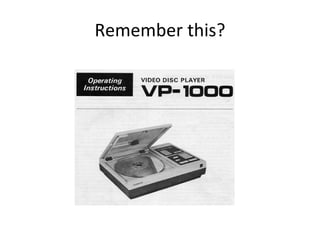
Remember this?
Many innovative applications A La Rencontre de Philippe Destinos Video clips, simulations, language in context Revolutionary multimedia language teaching
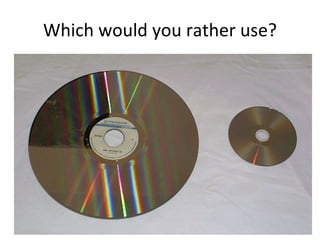
What happened? Innovation New technology that was: Smaller Better Cheaper Portable
Which would you rather use?
What about the investment? Time, Effort, Money Development of content Facilities changes Curriculum Credibility of the technology’s proponents
It wasn’t wasted We learned a LOT about language teaching Technologies of yesterday inform the development of tomorrow’s technologies Similar to language teaching methodologies Grammar-translation Audio-Lingual Communicative Focus on Form Constructivist
Lessons learned: Technology is a moving target There will always be a new technology Next year’s models will be better & cheaper Doing nothing is not an option: If you’re not moving forward, you’re moving backwards
Today’s technologies will seem quaint and old-fashioned  before you know it
Best Practice: Keep current If you aren’t moving forward, you’re moving backward
Myth 4:  Technology will replace teachers
What computers can’t do: Parse spoken language: “Computers can wreck a nice beach.” Process language: "I once shot an elephant in my pajamas. How he got in my pajamas I'll never know"  --Groucho Marx Convince a human being that the computer is human (Turing Test)
What do language teachers do? Listen to students and correct their language (Parse spoken language) Guide the development of students’ interlanguage (Process language) Interact with learners (Have learners communicate with you as if you are human)
It is very difficult for computers to do with language what humans can do very easily
Any teacher that can be  replaced by a computer, should be replaced by a computer
Best Practice: treat technology as a partner, not as a competitor
The four myths: There is a “technology” Technology = methodology Today’s technology is all you need to know Technology will replace teachers
Principles of using Technology
Technology as a RAT R eplace teaching tasks A ugment aspects of teaching T ransform the learning experience
Example: Replace The Oral Interview
The Oral Interview German 101 Interview Mid-point in first semester Diagnostic activity: “touch base” Short, 4-5 question interview Old way: schedule interviews with teachers New way: simulated interview with software program
Technology:  Conversations Record questions for students Simulate an interview Students access the program online Collect students’ responses Replace student-teacher interaction with student-computer-teacher interaction
See it in action: http:// clear.msu.edu/teaching/online/mashup/view.php?ID =MjQ0OA==
Example: Augment Homework as Formative Assessment
Homework as Formative Assessment Speaking assignments: audio cassettes Writing assignments: drafts and red pencils
Technologies:  Audio Dropboxes : tool for online speaking assignments Revisions : tool for process writing
See it in action: http://ria-clear.blogspot.com /
Example: Transform Constructivist Language Learning
Constructivist Language Learning Theory: learn by creating knowledge Research on technology and learning Cf Chomsky’s theory of language acquisition
Technology:  Mashups Authoring Tool Create interactive, multimedia web pages Combine data from many sources Easy to use Students learning by creating teaching materials that help them learn
These tools are free and available:  http://ria.clear.msu.edu/
See it in action: YouTube:  http://clear.msu.edu/teaching/online/mashup/view.php?ID=MTEx Integrated:   http://clear.msu.edu/teaching/online/mashup/view.php?ID=Mzcx
Best Practice: Use technology when  (and only when)  there’s a good reason to use it.

Corrollary:  “Because it’s cool”  is not a good reason.
Technology in the context of standards and skills Its role, functions
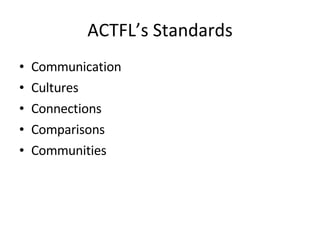
ACTFL’s Standards Communication Cultures Connections Comparisons Communities
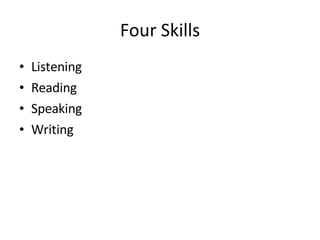
Four Skills Listening Reading Speaking Writing
Technology is neither  a language standard  nor a language skill Where does it fit?
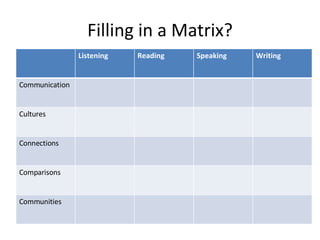
Filling in a Matrix? Listening Reading Speaking Writing Communication Cultures Connections Comparisons Communities
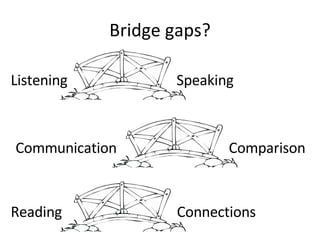
Bridge gaps? Listening Speaking Reading Connections Communication Comparison
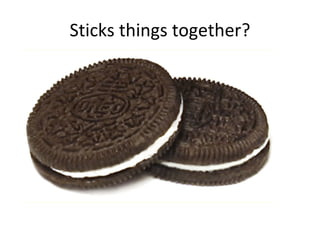
Sticks things together?
Regardless, technology CAN Streamline teaching Individualize learning Allow teachers to do some new things
Sure bets about technology: You will always know less than you want You will always be discovering new things It will always cause problems It will always be changing It will never go away
Best Practices Be open to thinking outside the box Recognize the potential of technology Look for ways to RAT teaching Stay grounded in good pedagogy Don’t get “wow’ed” Include technology when it makes sense to you Treat technology as a means to an end, not as an end in itself Trust your instincts as a teacher
To sum it all up: Good teaching is good teaching Teaching and learning can both benefit from the judicious inclusion of technology How to do that is up to you to decide
Thank you! http://ria.clear.msu.edu/

ILTA 2008

  • 1.
    Best Practices in Using Technology to support Language Teaching and Learning Dennie Hoopingarner Michigan State University November 7, 2008
  • 2.
    Four myths abouttechnology Robert Blake “What Language Professionals Need to Know about Technology” ADFL Bulletin Spring 2001 There is a “technology” Technology = methodology Today’s technology is all you need to know Technology will replace teachers
  • 3.
    Myth 1: Thereis a “technology” What is technology?
  • 4.
    What is “technology?”Computer Overhead projector Smartboard DVD player DVR Cell phone Telephone iPod Document camera/ELMO PDA Transporter Replicator Light saber Hyperdrive Cylon brain downloader
  • 5.
    Do you haveto “know” all these in order to “know” technology?
  • 6.
    Lumping all technologytogether into a monolithic entity is overly simplistic and discouraging
  • 7.
    Different technologies aresuitable for different pedagogies
  • 8.
    Best Practice: Recognizethat “technology” can mean many different things
  • 9.
    Myth 2: Technology = methodology
  • 10.
    Technology is nota methodology Saying “I teach with technology” is as meaningless as saying “I cook with heat” That tells me nothing Teaching is teaching, technology is a TOOL Does chalk teach? Does a hammer build a house? Teachers teach with technology, technology doesn’t teach for teachers
  • 11.
    Best Practice: Enhanceyour teaching methods and personal style with technology
  • 12.
    Myth 3: Today’stechnology is all you need to know
  • 13.
  • 14.
    Many innovative applicationsA La Rencontre de Philippe Destinos Video clips, simulations, language in context Revolutionary multimedia language teaching
  • 15.
    What happened? InnovationNew technology that was: Smaller Better Cheaper Portable
  • 16.
    Which would yourather use?
  • 17.
    What about theinvestment? Time, Effort, Money Development of content Facilities changes Curriculum Credibility of the technology’s proponents
  • 18.
    It wasn’t wastedWe learned a LOT about language teaching Technologies of yesterday inform the development of tomorrow’s technologies Similar to language teaching methodologies Grammar-translation Audio-Lingual Communicative Focus on Form Constructivist
  • 19.
    Lessons learned: Technologyis a moving target There will always be a new technology Next year’s models will be better & cheaper Doing nothing is not an option: If you’re not moving forward, you’re moving backwards
  • 20.
    Today’s technologies willseem quaint and old-fashioned before you know it
  • 21.
    Best Practice: Keepcurrent If you aren’t moving forward, you’re moving backward
  • 22.
    Myth 4: Technology will replace teachers
  • 23.
    What computers can’tdo: Parse spoken language: “Computers can wreck a nice beach.” Process language: "I once shot an elephant in my pajamas. How he got in my pajamas I'll never know" --Groucho Marx Convince a human being that the computer is human (Turing Test)
  • 24.
    What do languageteachers do? Listen to students and correct their language (Parse spoken language) Guide the development of students’ interlanguage (Process language) Interact with learners (Have learners communicate with you as if you are human)
  • 25.
    It is verydifficult for computers to do with language what humans can do very easily
  • 26.
    Any teacher thatcan be replaced by a computer, should be replaced by a computer
  • 27.
    Best Practice: treattechnology as a partner, not as a competitor
  • 28.
    The four myths:There is a “technology” Technology = methodology Today’s technology is all you need to know Technology will replace teachers
  • 29.
  • 30.
    Technology as aRAT R eplace teaching tasks A ugment aspects of teaching T ransform the learning experience
  • 31.
    Example: Replace TheOral Interview
  • 32.
    The Oral InterviewGerman 101 Interview Mid-point in first semester Diagnostic activity: “touch base” Short, 4-5 question interview Old way: schedule interviews with teachers New way: simulated interview with software program
  • 33.
    Technology: ConversationsRecord questions for students Simulate an interview Students access the program online Collect students’ responses Replace student-teacher interaction with student-computer-teacher interaction
  • 34.
    See it inaction: http:// clear.msu.edu/teaching/online/mashup/view.php?ID =MjQ0OA==
  • 35.
    Example: Augment Homeworkas Formative Assessment
  • 36.
    Homework as FormativeAssessment Speaking assignments: audio cassettes Writing assignments: drafts and red pencils
  • 37.
    Technologies: AudioDropboxes : tool for online speaking assignments Revisions : tool for process writing
  • 38.
    See it inaction: http://ria-clear.blogspot.com /
  • 39.
  • 40.
    Constructivist Language LearningTheory: learn by creating knowledge Research on technology and learning Cf Chomsky’s theory of language acquisition
  • 41.
    Technology: MashupsAuthoring Tool Create interactive, multimedia web pages Combine data from many sources Easy to use Students learning by creating teaching materials that help them learn
  • 42.
    These tools arefree and available: http://ria.clear.msu.edu/
  • 43.
    See it inaction: YouTube: http://clear.msu.edu/teaching/online/mashup/view.php?ID=MTEx Integrated: http://clear.msu.edu/teaching/online/mashup/view.php?ID=Mzcx
  • 44.
    Best Practice: Usetechnology when (and only when) there’s a good reason to use it.
  • 45.
    Corrollary: “Becauseit’s cool” is not a good reason.
  • 46.
    Technology in thecontext of standards and skills Its role, functions
  • 47.
    ACTFL’s Standards CommunicationCultures Connections Comparisons Communities
  • 48.
    Four Skills ListeningReading Speaking Writing
  • 49.
    Technology is neither a language standard nor a language skill Where does it fit?
  • 50.
    Filling in aMatrix? Listening Reading Speaking Writing Communication Cultures Connections Comparisons Communities
  • 51.
    Bridge gaps? ListeningSpeaking Reading Connections Communication Comparison
  • 52.
  • 53.
    Regardless, technology CANStreamline teaching Individualize learning Allow teachers to do some new things
  • 54.
    Sure bets abouttechnology: You will always know less than you want You will always be discovering new things It will always cause problems It will always be changing It will never go away
  • 55.
    Best Practices Beopen to thinking outside the box Recognize the potential of technology Look for ways to RAT teaching Stay grounded in good pedagogy Don’t get “wow’ed” Include technology when it makes sense to you Treat technology as a means to an end, not as an end in itself Trust your instincts as a teacher
  • 56.
    To sum itall up: Good teaching is good teaching Teaching and learning can both benefit from the judicious inclusion of technology How to do that is up to you to decide
  • 57.