File
Management
UNIT 11 - IGCSE ICT
Manage files
effectively
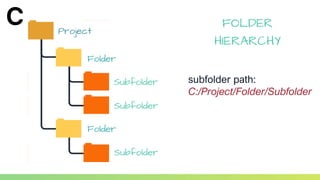
Subfolder
Subfolder
Subfolder
Folder
Folder
Project
FOLDER
HIERARCHY
subfolder path:
C:/Project/Folder/Subfolder
File Format
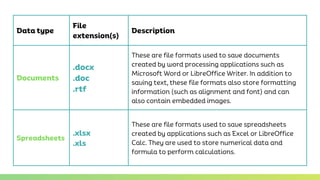
Data type
File
extension(s)
Description
Documents
.docx
.doc
.rtf
These are file formats used to save documents
created by word processing applications such as
Microsoft Word or LibreOffice Writer. In addition to
saving text, these file formats also store formatting
information (such as alignment and font) and can
also contain embedded images.
Spreadsheets
.xlsx
.xls
These are file formats used to save spreadsheets
created by applications such as Excel or LibreOffice
Calc. They are used to store numerical data and
formula to perform calculations.
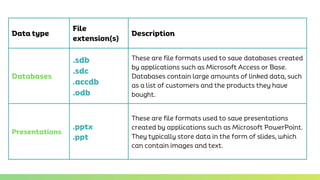
Data type
File
extension(s)
Description
Databases
.sdb
.sdc
.accdb
.odb
These are file formats used to save databases created
by applications such as Microsoft Access or Base.
Databases contain large amounts of linked data, such
as a list of customers and the products they have
bought.
Presentations
.pptx
.ppt
These are file formats used to save presentations
created by applications such as Microsoft PowerPoint.
They typically store data in the form of slides, which
can contain images and text.
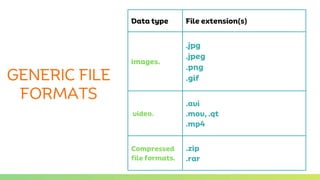
Data type File extension(s)
images.
.jpg
.jpeg
.png
.gif
video.
.avi
.mov, .qt
.mp4
Compressed
file formats.
.zip
.rar
GENERIC FILE
FORMATS
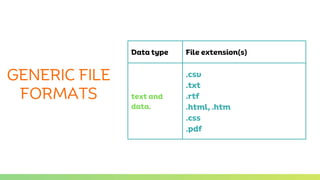
Data type File extension(s)
text and
data.
.csv
.txt
.rtf
.html, .htm
.css
.pdf
GENERIC FILE
FORMATS
Using zip and rar
compression
• All of the files and folders inside the folder you compress are
compressed.
• When files are compressed the size of the file is reduced, so less
time is needed to transmit them across the internet. When files
are decompressed, they will need more disk space again.

Unit 11 File Management.pptx