IEC 60870-5-101 Protocol RTU IED Server Simulator User Manual
Stack Version: 21.05.008
IEC 60870-5-101 Protocol
FreyrSCADA Embedded Solution

No.5, BommaiyaSamy Kovil Street, Annanji, Theni, TamilNadu, India
www.freyrscada.com
CIN: U72900TN2018PTC120601
IEC 60870-5-101 Protocol Server Simulator User Manual 2
Table of Contents
1. Introduction ..............................................................................................................................................................3
2. Add and Delete Server ..............................................................................................................................................4
3. Server Configuration.................................................................................................................................................5
4. Server Data Configuration.........................................................................................................................................8
IEC 60870-5 Group & Typeid to choose........................................................................................................................8
5. Map controling point to Monitoring Point ............................................................................................................12
6. Update Monitoring Information .............................................................................................................................14
7. Traffic window ........................................................................................................................................................15
8. Log Window ............................................................................................................................................................16
Download Free Demo Evaluation Kit - IEC 101
Development Bundle
New updated Version of IEC 101 Simulator & SDK (Software Development Kit) is available now.
In the Development Bundle, We included IEC 104 Server & Client Simulator, Windows and Linux SDK,
C# projects, Doxygen documentation and Raspberry Pi, BeagleBone Demo library.
IEC 60870-5-101 Protocol Server Simulator User Manual 3
1. Introduction
IEC 60870-5-101 (IEC101) is a standard for power system monitoring, control & associated communications for
telecontrol, tele protection, and associated telecommunications for electric power systems. This is completely
compatible with IEC 60870-5-1 to IEC 60870-5-5 standards and uses standard asynchronous serial tele-control
channel interface between DTE and DCE. The standard is suitable for multiple configurations like point-to-point, star,
multidrop etc.
Features
• Supports unbalanced (only master initiated message) & balanced (can be master/slave initiated) modes of
data transfer.
• Link address and ASDU (Application Service Data Unit) addresses are provided for classifying the end station
and different segments under the same.
• Data is classified into different information objects and each information object is provided with a specific
address.
• Facility to classify the data into high priority (class-1) and low priority (class-2) and transfer the same using
separate mechanisms.
• Possibility of classifying the data into different groups (1-16) to get the data according to the group by
issuing specific group interrogation commands from the master & obtaining data under all the groups by
issuing a general interrogation.
• Cyclic & Spontaneous data updating schemes are provided.
• Facility for time synchronization
• Schemes for transfer of files- Example: IED's will store disturbance recorder file in the memory, when
electrical disturbance is occurred in the field. This file can be retrieved through IEC103 protocol for fault
analysis
FreyrSCADA IEC 60870-5-101 Server Simulator was originally developed to test the IEC 60870-5-101 stack.
We tested this simulator with multiple test software available in the market.
The interoperability list focused only for our Stack. If you have any specific requirement to implement new Type id
ASDU, Please contact to us.
Our support team has young, dynamic and professional team of engineers. And they will provide the quick and
accurate solution as per customer requirement.
support@freyrscada.com
Thanks
FreyrSCADA Embedded Solution
IEC 60870-5-101 Protocol Server Simulator User Manual 4
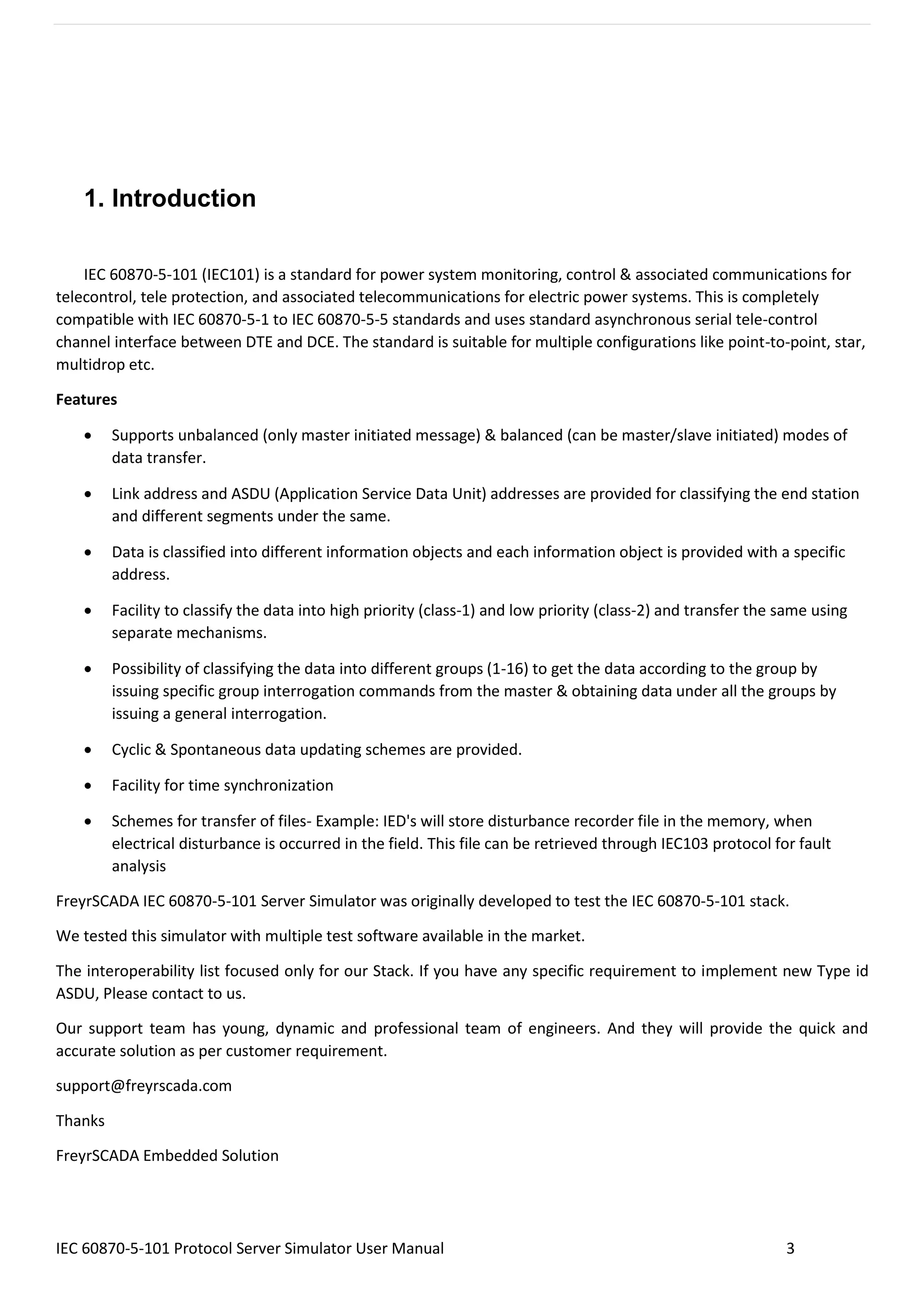
2. Add and Delete Server
We can add upto 50 server node in the simulator. Every server node will work independently.
And also we can delete the server.
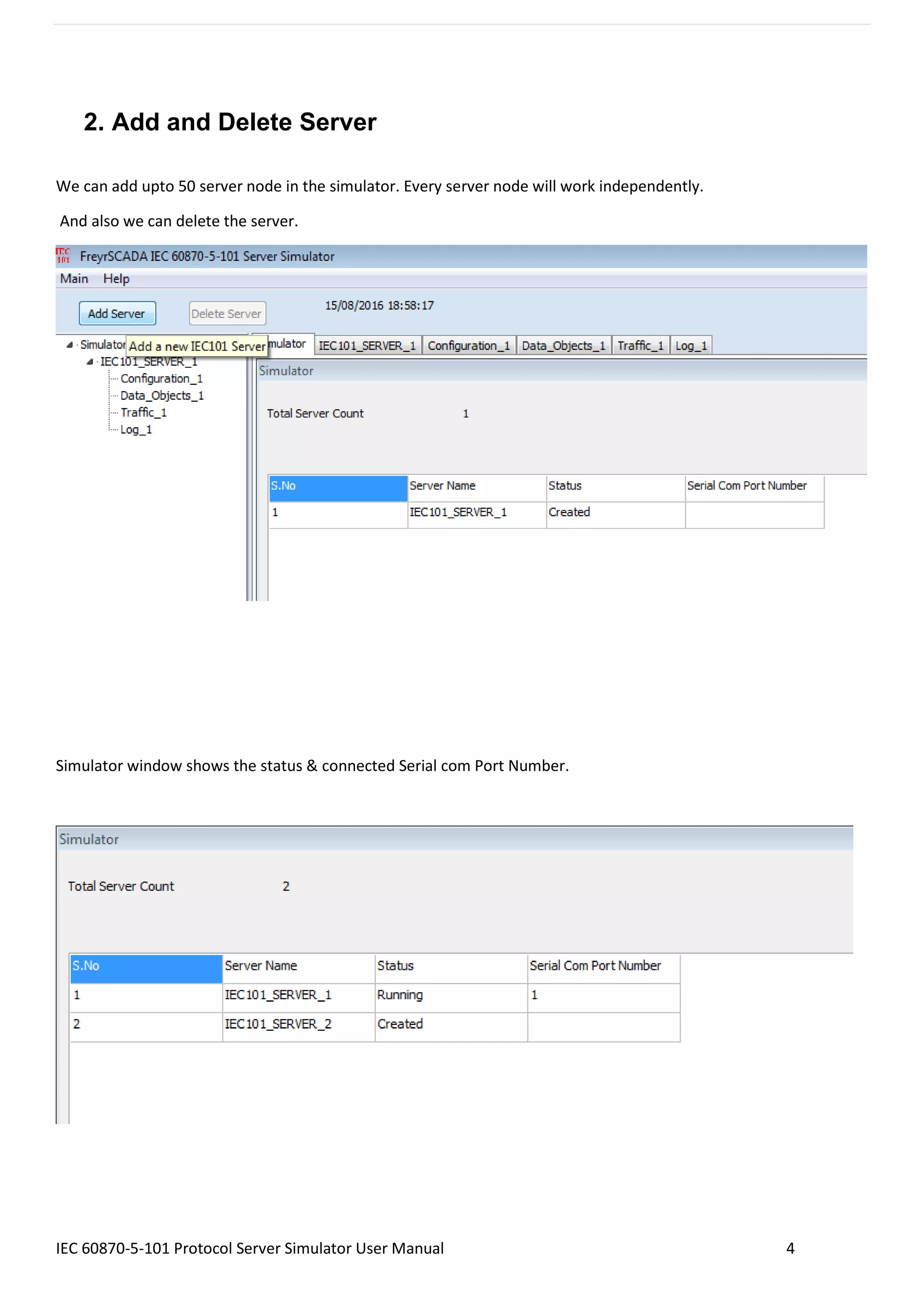
Simulator window shows the status & connected Serial com Port Number.
IEC 60870-5-101 Protocol Server Simulator User Manual 5
3. Server Configuration
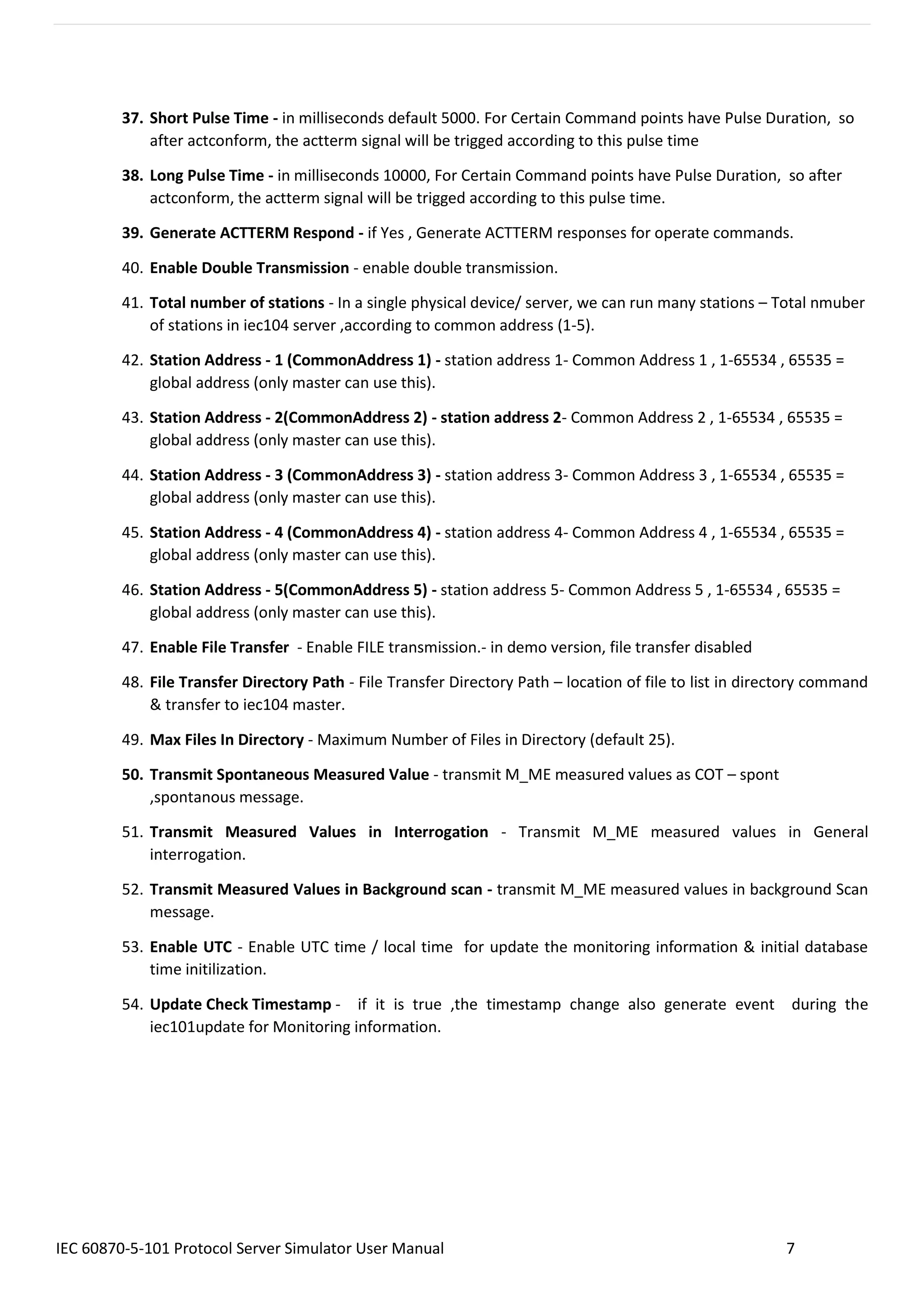
Server Protocol Configuration window shows the actual protocol settings.
Configuration Parameters as follows:
1. Serial Port Number – Serial COM port number
2. Serial Bit Rate - Serial Bit/Baud Rate
3. Word Length - Serial Word Length
4. Stop Bits - Serial Stop Bits
5. Serial Parity - Serial Parity
6. Flow Control - Flow Control
IEC 60870-5-101 Protocol Server Simulator User Manual 6
7. Inter Message Delay - Time between sending and receiving of message only applies after transmitting
the message
8. Transmit PreDelay - Transmit Delay before send
9. Transmit PostDelay - Delay after send
10. Transmit InterCharacterDelay - Delay between characters during send
11. Transmit Character Timeout - Timeout if the character is not being sent
12. Transmit Character Retries - Number of retries to send
13. Transmit Message Timeout - Message Timeout if entire message is not sent
14. Transmit Message Retries - Transmit - Message Retries to retry the entire message
15. Receive PreDelay - Delay before receive
16. Receive PostDelay - Delay after receive
17. Receive Inter Character Delay - Delay between characters during receive
18. Receive Character Timeout - Timeout if the character is not being received
19. Receive Character Retries - Number of retries to receive a character
20. Receive Message Timeout - Message Timeout if entire message is not received
21. Receive Message Retries - Receive - Message Retries to retry the entire message
22. DataLink - Data link transmission - Unbalanced mode , Balanced mode
23. BalancedMode Test Connection Signal Interval - in seconds, in balanced mode , nothing received, after
this interval, server will send the test link function to master 60 seconds to 3600 seconds
24. link Address Size - Data Link address size
25. Data Link Address - Data link address
26. COT Size - Cause of Transmission Size
27. IOA Size - Information Object Address Size
28. Common Address Size - Common Address Size
29. Positve ACK - Positve ACK Format
30. Negative ACK - Negative ACK Format
31. Class 1 Event Buffer Size - High Priority - Class 1 Event Buffer Size
32. Class 2 Event Buffer Size - Class 2 Event Buffer Size
33. Class 1 Buffer OverFlow Percentage - High Priority - Class 1 Buffer OverFlow Percentage
34. Class 2 Buffer OverFlow Percentage - Class 2 Buffer OverFlow Percentage
35. Maximum APDU Size - Monitoring Information - Maximum APDU Size
36. Clock Sync Period - in milliseconds. If 0 than Clock Synchronisation command is not expected from
Master. If the time elapsed, and did not receive the time sync command , in the events, cp56time21
time stamp, the invalid bit will set.
IEC 60870-5-101 Protocol Server Simulator User Manual 7
37. Short Pulse Time - in milliseconds default 5000. For Certain Command points have Pulse Duration, so
after actconform, the actterm signal will be trigged according to this pulse time
38. Long Pulse Time - in milliseconds 10000, For Certain Command points have Pulse Duration, so after
actconform, the actterm signal will be trigged according to this pulse time.
39. Generate ACTTERM Respond - if Yes , Generate ACTTERM responses for operate commands.
40. Enable Double Transmission - enable double transmission.
41. Total number of stations - In a single physical device/ server, we can run many stations – Total nmuber
of stations in iec104 server ,according to common address (1-5).
42. Station Address - 1 (CommonAddress 1) - station address 1- Common Address 1 , 1-65534 , 65535 =
global address (only master can use this).
43. Station Address - 2(CommonAddress 2) - station address 2- Common Address 2 , 1-65534 , 65535 =
global address (only master can use this).
44. Station Address - 3 (CommonAddress 3) - station address 3- Common Address 3 , 1-65534 , 65535 =
global address (only master can use this).
45. Station Address - 4 (CommonAddress 4) - station address 4- Common Address 4 , 1-65534 , 65535 =
global address (only master can use this).
46. Station Address - 5(CommonAddress 5) - station address 5- Common Address 5 , 1-65534 , 65535 =
global address (only master can use this).
47. Enable File Transfer - Enable FILE transmission.- in demo version, file transfer disabled
48. File Transfer Directory Path - File Transfer Directory Path – location of file to list in directory command
& transfer to iec104 master.
49. Max Files In Directory - Maximum Number of Files in Directory (default 25).
50. Transmit Spontaneous Measured Value - transmit M_ME measured values as COT – spont
,spontanous message.
51. Transmit Measured Values in Interrogation - Transmit M_ME measured values in General
interrogation.
52. Transmit Measured Values in Background scan - transmit M_ME measured values in background Scan
message.
53. Enable UTC - Enable UTC time / local time for update the monitoring information & initial database
time initilization.
54. Update Check Timestamp - if it is true ,the timestamp change also generate event during the
iec101update for Monitoring information.
IEC 60870-5-101 Protocol Server Simulator User Manual 8
4. Server Data Configuration
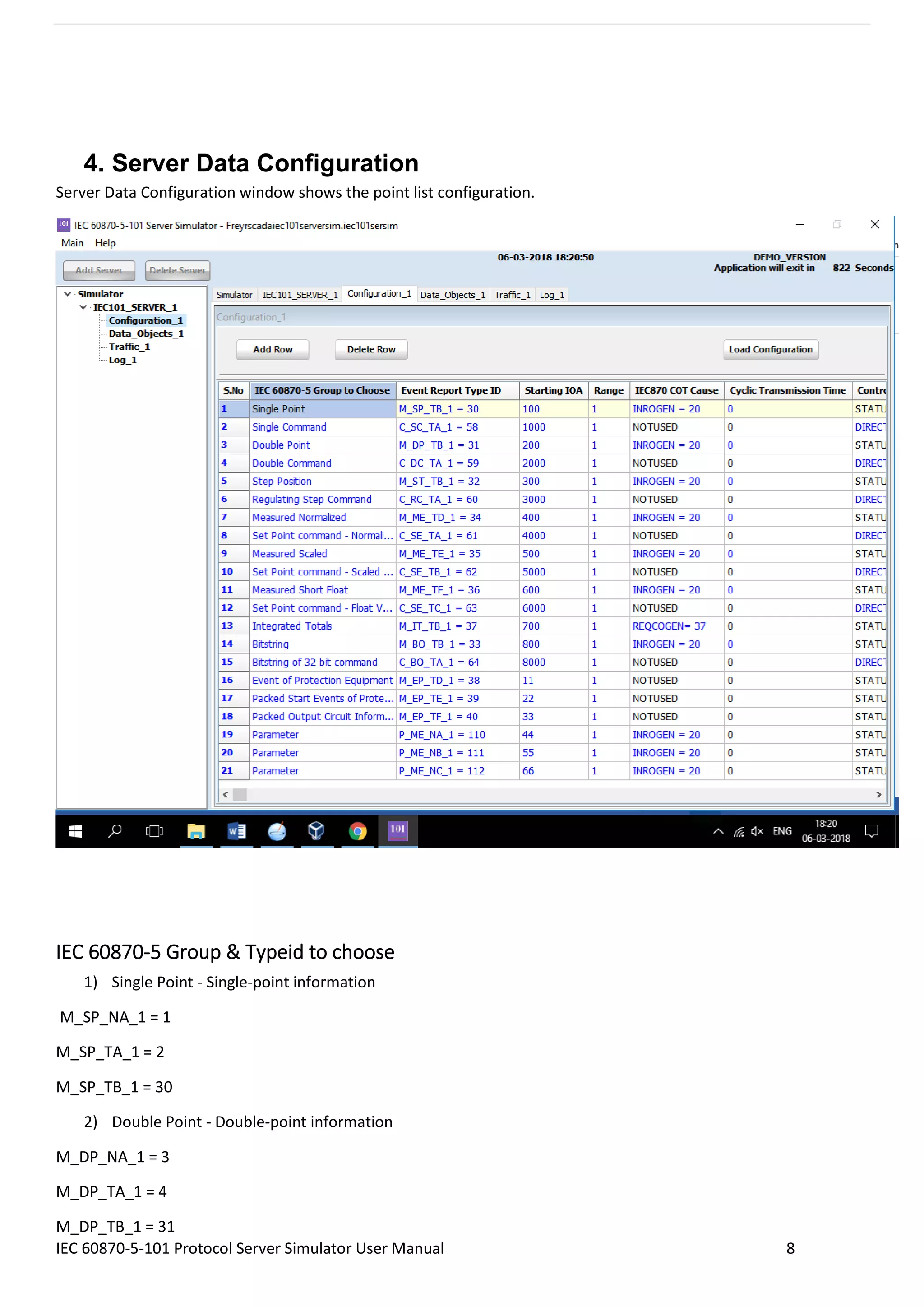
Server Data Configuration window shows the point list configuration.
IEC 60870-5 Group & Typeid to choose
1) Single Point - Single-point information
M_SP_NA_1 = 1
M_SP_TA_1 = 2
M_SP_TB_1 = 30
2) Double Point - Double-point information
M_DP_NA_1 = 3
M_DP_TA_1 = 4
M_DP_TB_1 = 31
IEC 60870-5-101 Protocol Server Simulator User Manual 9
3) Step Position - Step position information
M_ST_NA_1 = 5
M_ST_TA_1 = 6
M_ST_TB_1 = 32
4) Bitstring - Bit string of 32 bit
M_BO_NA_1 = 7
M_BO_TA_1 = 8
M_BO_TB_1 = 33
5) Measured Normalized - Measured normalized value
M_ME_NA_1 = 9
M_ME_TA_1 = 10
M_ME_TD_1 = 34
6) Measured Normalized Without Quality - Measured normalized value without quality descriptor
M_ME_ND_1 = 21
7) Measured Scaled - Measured scaled value
M_ME_NB_1 = 11
M_ME_TB_1 = 12
M_ME_TE_1 = 35
8) Measured Short Float - Measured value, normalized value
M_ME_NC_1 = 13
M_ME_TC_1 = 14
M_ME_TF_1 = 36
9) Integrated Totals - Integrated totals
M_IT_NA_1 = 15
M_IT_TA_1 = 16
M_IT_TB_1 = 37
10) Event of Protection Equipment - Event of protection equipment with time tag CP56Time2a
M_EP_TD_1 = 38, Event of protection equipment with time tag CP56Time2a
11) Packed Start Events of Protection Equipment - Packed start events of protection equipment with time tag
CP56Time2a
M_EP_TE_1 = 39, Packed start events of protection equipment with time tag CP56Time2a
IEC 60870-5-101 Protocol Server Simulator User Manual 10
12) Packed Output Circuit Information of Protection Equipment - Packed output circuit information of
protection equipment with time tag CP56Time2a
M_EP_TF_1 = 40, Packed output circuit information of protection equipment with time tag CP56Time2a
13) Single Command - Single command
C_SC_NA_1 = 45
C_SC_TA_1 = 58
14) Double Command - Double command
C_DC_NA_1 = 46
C_DC_TA_1 = 59
15) Regulating Step Command - Regulating step command
C_RC_NA_1 = 47
C_RC_TA_1 = 60
16) Set Point command - Normalized Value - Set point command, normalized value
C_SE_NA_1 = 48
C_SE_TA_1 = 61
17) Set Point command - Scaled Value - Set point command, scaled value
C_SE_NB_1 = 49
C_SE_TB_1 = 62
18) Set Point command - Float Value - Set point command, short floating point value
C_SE_NC_1 = 50
C_SE_TC_1 = 63
19) Bitstring of 32 bit command - Bitstring of 32 bit command
C_BO_NA_1 = 51
C_BO_TA_1 = 64
20) Parameter - Parameter
P_ME_NA_1 = 110
P_ME_NB_1 = 111
P_ME_NC_1 = 112
IEC 60870-5-101 Protocol Server Simulator User Manual 11
The selection of following parameters based on the typeid selection.
Consider for the following items
Monitoring
information
Control / Command
Point
Parameter Value
IEC 60870-5 Group to
Choose
Single Point Single Command Parameter
Event Report Type Id M_SP_NA_1 = 1 C_SC_NA_1 = 45 P_ME_NA_1 = 110
Starting IOA 10 100 2000
Range 5 5 5
IEC870 COT Cause INROGEN = 20 NOTUSED INROGEN = 20
Cyclic Transmission time 0 0 0
Control Model
Configuration
status only direct operate status only
SBO TimeOut 0 0 0
Kind of Parameter - KPA PARAMETER_NONE PARAMETER_NONE PARAMETER_THRESHOLDVALUE
Common Address 1 1 1
Background Scan time 0 0 0
Event Class to Report IEC_CLASS1 IEC_NO_CLASS IEC_NO_CLASS
IEC 60870-5-101 Protocol Server Simulator User Manual 12
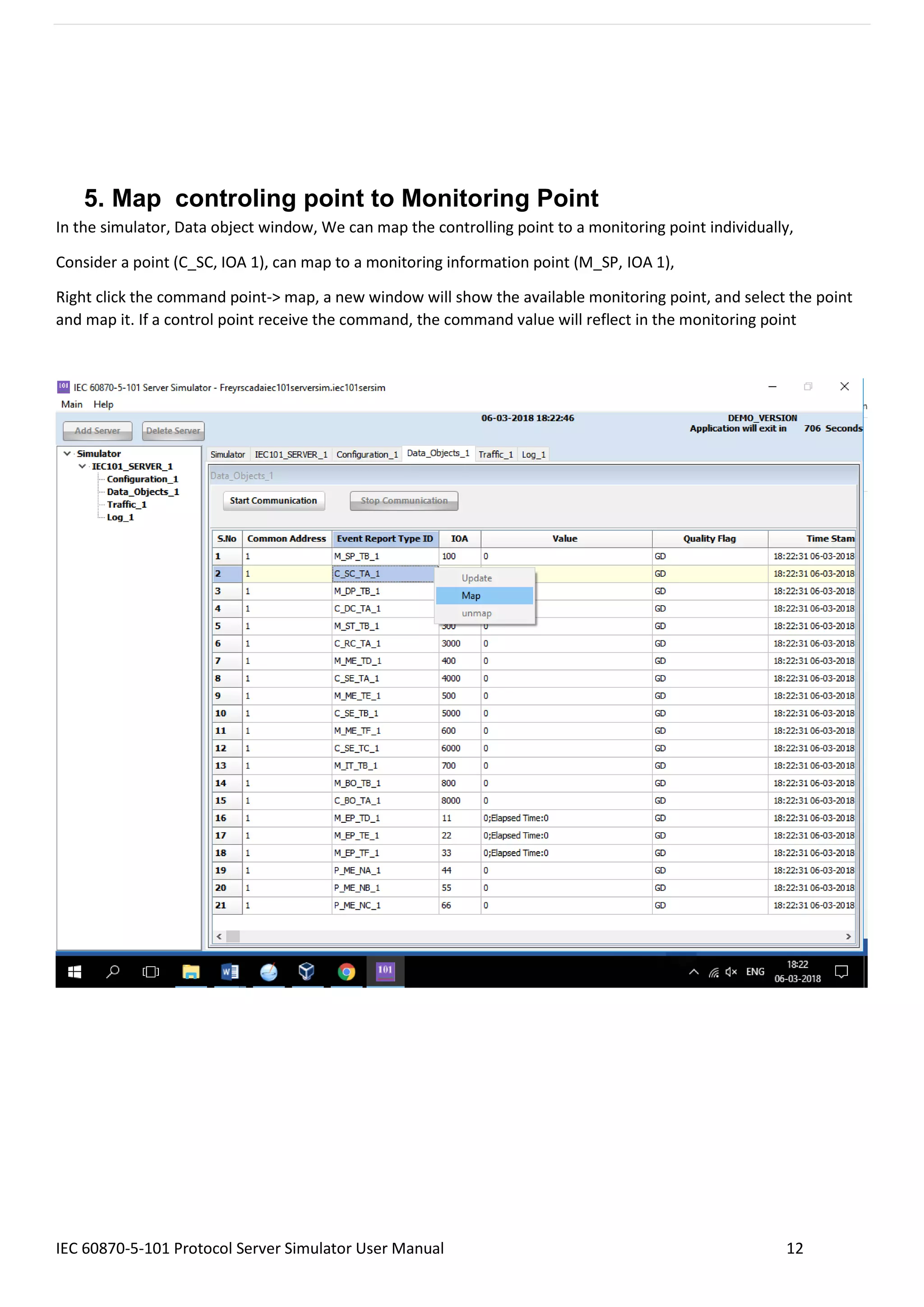
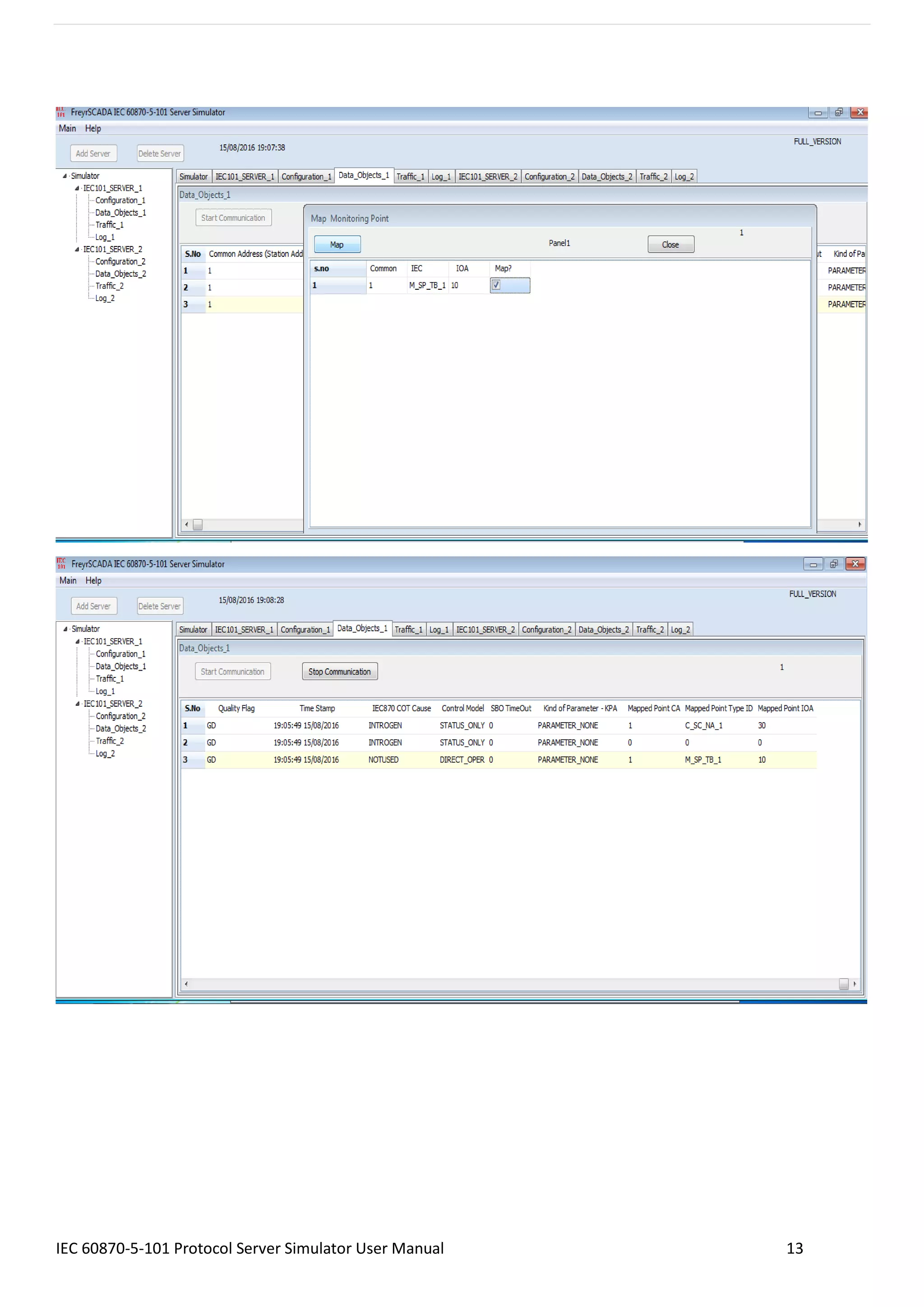
5. Map controling point to Monitoring Point
In the simulator, Data object window, We can map the controlling point to a monitoring point individually,
Consider a point (C_SC, IOA 1), can map to a monitoring information point (M_SP, IOA 1),
Right click the command point-> map, a new window will show the available monitoring point, and select the point
and map it. If a control point receive the command, the command value will reflect in the monitoring point
IEC 60870-5-101 Protocol Server Simulator User Manual 13
IEC 60870-5-101 Protocol Server Simulator User Manual 14
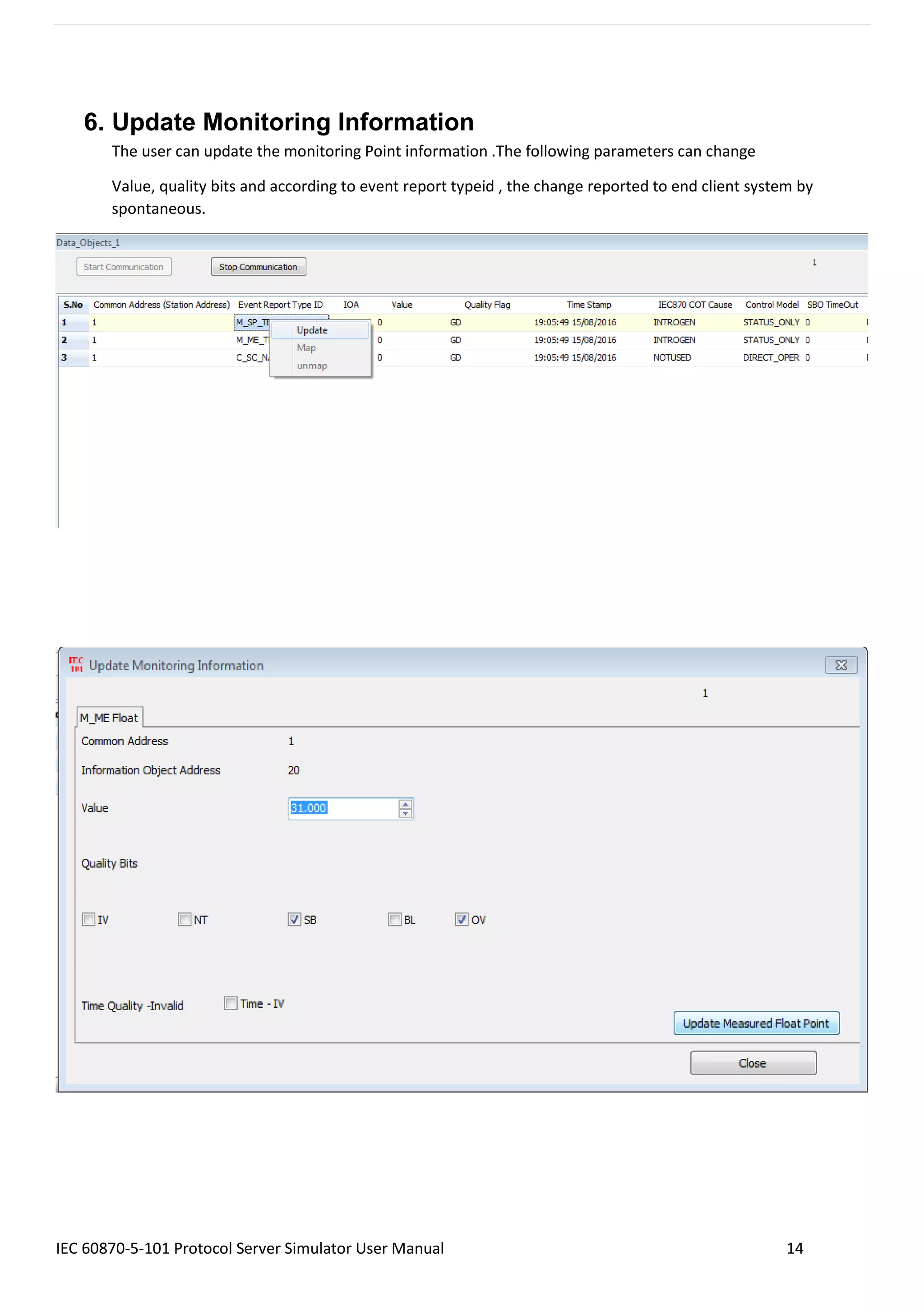
6. Update Monitoring Information
The user can update the monitoring Point information .The following parameters can change
Value, quality bits and according to event report typeid , the change reported to end client system by
spontaneous.
IEC 60870-5-101 Protocol Server Simulator User Manual 15
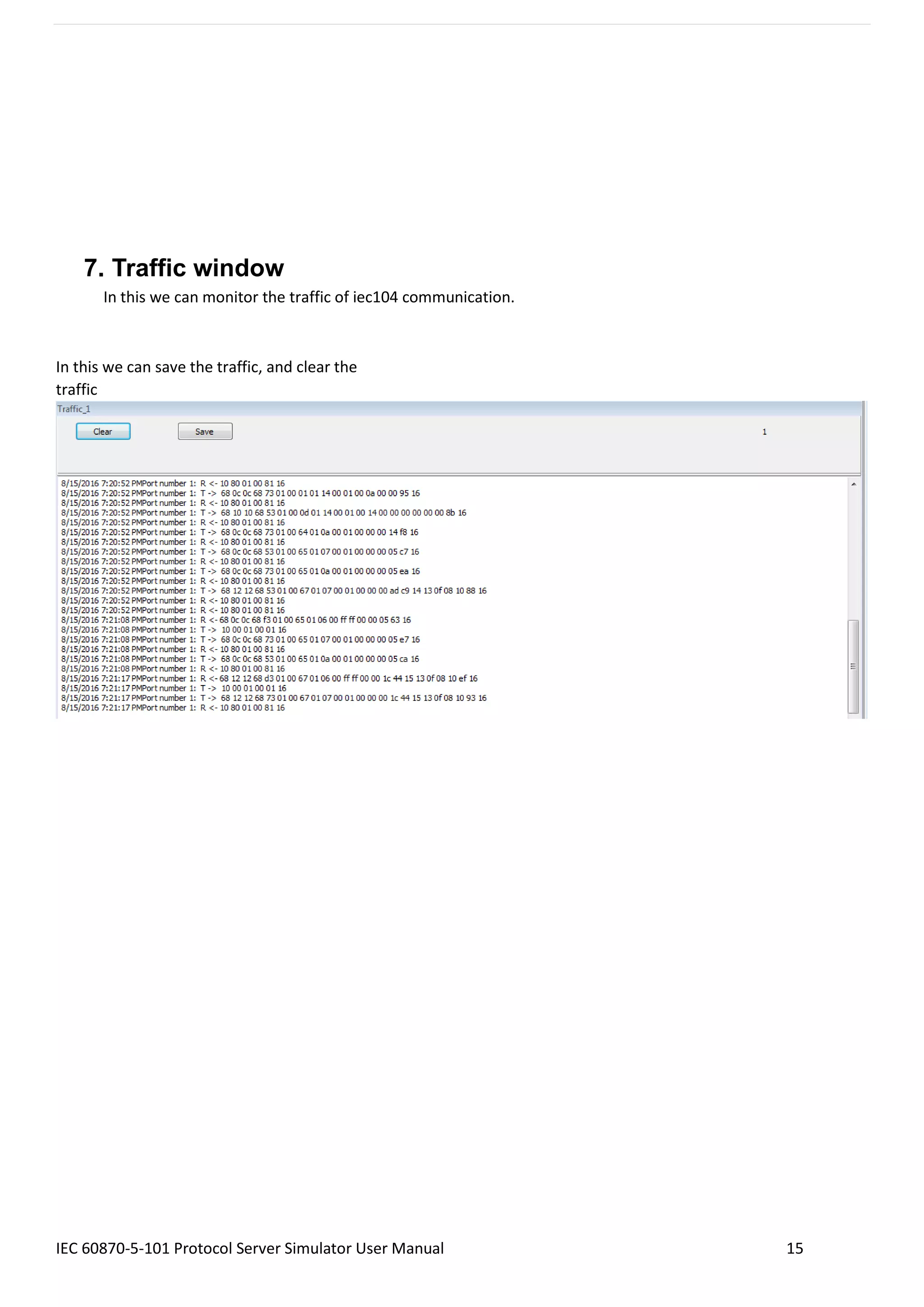
7. Traffic window
In this we can monitor the traffic of iec104 communication.
In this we can save the traffic, and clear the
traffic
IEC 60870-5-101 Protocol Server Simulator User Manual 16
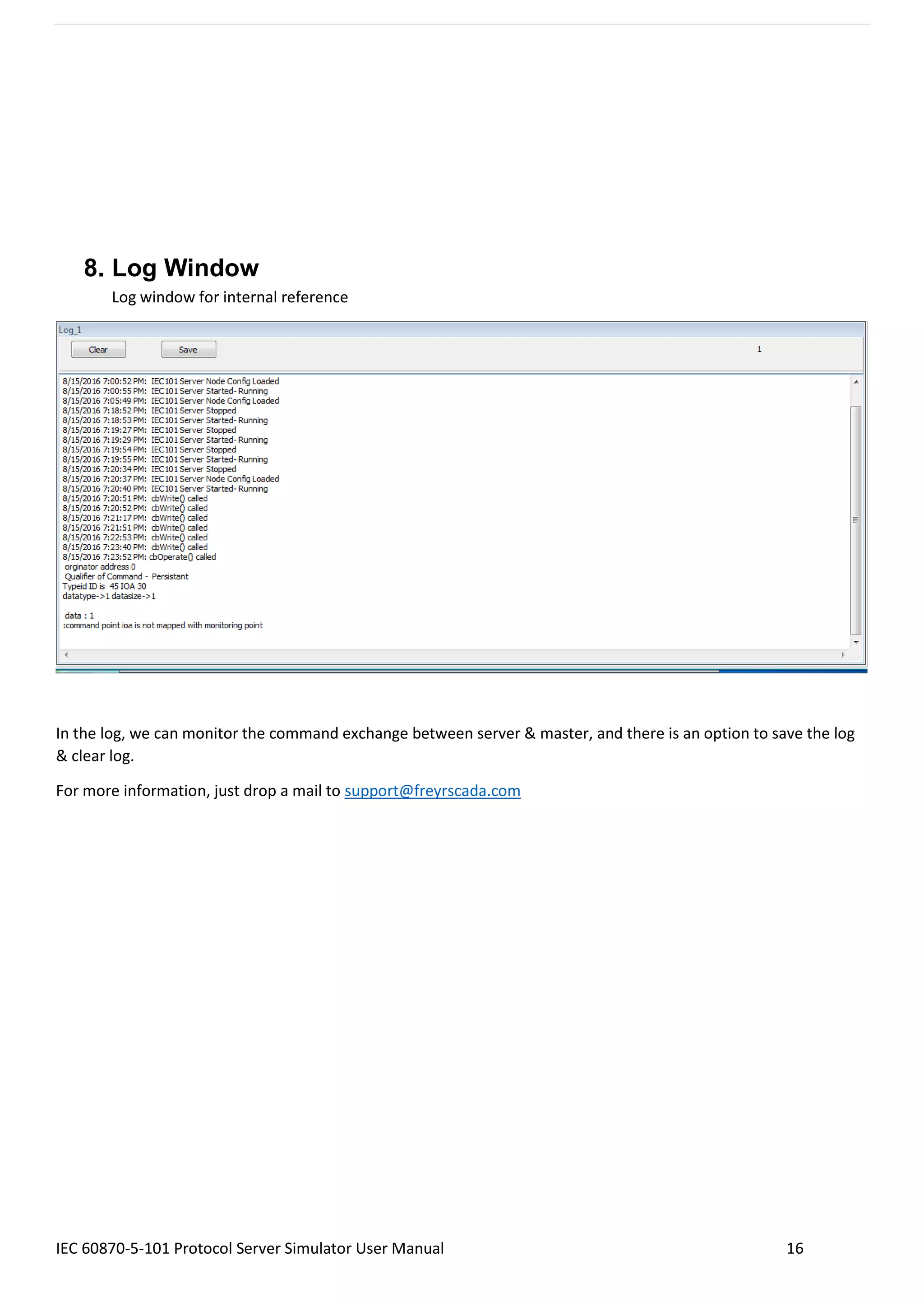
8. Log Window
Log window for internal reference
In the log, we can monitor the command exchange between server & master, and there is an option to save the log
& clear log.
For more information, just drop a mail to support@freyrscada.com

IEC 60870-5 101 Protocol Server Simulator User manual

  • 1.
    IEC 60870-5-101 ProtocolRTU IED Server Simulator User Manual Stack Version: 21.05.008 IEC 60870-5-101 Protocol FreyrSCADA Embedded Solution No.5, BommaiyaSamy Kovil Street, Annanji, Theni, TamilNadu, India www.freyrscada.com CIN: U72900TN2018PTC120601
  • 2.
    IEC 60870-5-101 ProtocolServer Simulator User Manual 2 Table of Contents 1. Introduction ..............................................................................................................................................................3 2. Add and Delete Server ..............................................................................................................................................4 3. Server Configuration.................................................................................................................................................5 4. Server Data Configuration.........................................................................................................................................8 IEC 60870-5 Group & Typeid to choose........................................................................................................................8 5. Map controling point to Monitoring Point ............................................................................................................12 6. Update Monitoring Information .............................................................................................................................14 7. Traffic window ........................................................................................................................................................15 8. Log Window ............................................................................................................................................................16 Download Free Demo Evaluation Kit - IEC 101 Development Bundle New updated Version of IEC 101 Simulator & SDK (Software Development Kit) is available now. In the Development Bundle, We included IEC 104 Server & Client Simulator, Windows and Linux SDK, C# projects, Doxygen documentation and Raspberry Pi, BeagleBone Demo library.
  • 3.
    IEC 60870-5-101 ProtocolServer Simulator User Manual 3 1. Introduction IEC 60870-5-101 (IEC101) is a standard for power system monitoring, control & associated communications for telecontrol, tele protection, and associated telecommunications for electric power systems. This is completely compatible with IEC 60870-5-1 to IEC 60870-5-5 standards and uses standard asynchronous serial tele-control channel interface between DTE and DCE. The standard is suitable for multiple configurations like point-to-point, star, multidrop etc. Features • Supports unbalanced (only master initiated message) & balanced (can be master/slave initiated) modes of data transfer. • Link address and ASDU (Application Service Data Unit) addresses are provided for classifying the end station and different segments under the same. • Data is classified into different information objects and each information object is provided with a specific address. • Facility to classify the data into high priority (class-1) and low priority (class-2) and transfer the same using separate mechanisms. • Possibility of classifying the data into different groups (1-16) to get the data according to the group by issuing specific group interrogation commands from the master & obtaining data under all the groups by issuing a general interrogation. • Cyclic & Spontaneous data updating schemes are provided. • Facility for time synchronization • Schemes for transfer of files- Example: IED's will store disturbance recorder file in the memory, when electrical disturbance is occurred in the field. This file can be retrieved through IEC103 protocol for fault analysis FreyrSCADA IEC 60870-5-101 Server Simulator was originally developed to test the IEC 60870-5-101 stack. We tested this simulator with multiple test software available in the market. The interoperability list focused only for our Stack. If you have any specific requirement to implement new Type id ASDU, Please contact to us. Our support team has young, dynamic and professional team of engineers. And they will provide the quick and accurate solution as per customer requirement. support@freyrscada.com Thanks FreyrSCADA Embedded Solution
  • 4.
    IEC 60870-5-101 ProtocolServer Simulator User Manual 4 2. Add and Delete Server We can add upto 50 server node in the simulator. Every server node will work independently. And also we can delete the server. Simulator window shows the status & connected Serial com Port Number.
  • 5.
    IEC 60870-5-101 ProtocolServer Simulator User Manual 5 3. Server Configuration Server Protocol Configuration window shows the actual protocol settings. Configuration Parameters as follows: 1. Serial Port Number – Serial COM port number 2. Serial Bit Rate - Serial Bit/Baud Rate 3. Word Length - Serial Word Length 4. Stop Bits - Serial Stop Bits 5. Serial Parity - Serial Parity 6. Flow Control - Flow Control
  • 6.
    IEC 60870-5-101 ProtocolServer Simulator User Manual 6 7. Inter Message Delay - Time between sending and receiving of message only applies after transmitting the message 8. Transmit PreDelay - Transmit Delay before send 9. Transmit PostDelay - Delay after send 10. Transmit InterCharacterDelay - Delay between characters during send 11. Transmit Character Timeout - Timeout if the character is not being sent 12. Transmit Character Retries - Number of retries to send 13. Transmit Message Timeout - Message Timeout if entire message is not sent 14. Transmit Message Retries - Transmit - Message Retries to retry the entire message 15. Receive PreDelay - Delay before receive 16. Receive PostDelay - Delay after receive 17. Receive Inter Character Delay - Delay between characters during receive 18. Receive Character Timeout - Timeout if the character is not being received 19. Receive Character Retries - Number of retries to receive a character 20. Receive Message Timeout - Message Timeout if entire message is not received 21. Receive Message Retries - Receive - Message Retries to retry the entire message 22. DataLink - Data link transmission - Unbalanced mode , Balanced mode 23. BalancedMode Test Connection Signal Interval - in seconds, in balanced mode , nothing received, after this interval, server will send the test link function to master 60 seconds to 3600 seconds 24. link Address Size - Data Link address size 25. Data Link Address - Data link address 26. COT Size - Cause of Transmission Size 27. IOA Size - Information Object Address Size 28. Common Address Size - Common Address Size 29. Positve ACK - Positve ACK Format 30. Negative ACK - Negative ACK Format 31. Class 1 Event Buffer Size - High Priority - Class 1 Event Buffer Size 32. Class 2 Event Buffer Size - Class 2 Event Buffer Size 33. Class 1 Buffer OverFlow Percentage - High Priority - Class 1 Buffer OverFlow Percentage 34. Class 2 Buffer OverFlow Percentage - Class 2 Buffer OverFlow Percentage 35. Maximum APDU Size - Monitoring Information - Maximum APDU Size 36. Clock Sync Period - in milliseconds. If 0 than Clock Synchronisation command is not expected from Master. If the time elapsed, and did not receive the time sync command , in the events, cp56time21 time stamp, the invalid bit will set.
  • 7.
    IEC 60870-5-101 ProtocolServer Simulator User Manual 7 37. Short Pulse Time - in milliseconds default 5000. For Certain Command points have Pulse Duration, so after actconform, the actterm signal will be trigged according to this pulse time 38. Long Pulse Time - in milliseconds 10000, For Certain Command points have Pulse Duration, so after actconform, the actterm signal will be trigged according to this pulse time. 39. Generate ACTTERM Respond - if Yes , Generate ACTTERM responses for operate commands. 40. Enable Double Transmission - enable double transmission. 41. Total number of stations - In a single physical device/ server, we can run many stations – Total nmuber of stations in iec104 server ,according to common address (1-5). 42. Station Address - 1 (CommonAddress 1) - station address 1- Common Address 1 , 1-65534 , 65535 = global address (only master can use this). 43. Station Address - 2(CommonAddress 2) - station address 2- Common Address 2 , 1-65534 , 65535 = global address (only master can use this). 44. Station Address - 3 (CommonAddress 3) - station address 3- Common Address 3 , 1-65534 , 65535 = global address (only master can use this). 45. Station Address - 4 (CommonAddress 4) - station address 4- Common Address 4 , 1-65534 , 65535 = global address (only master can use this). 46. Station Address - 5(CommonAddress 5) - station address 5- Common Address 5 , 1-65534 , 65535 = global address (only master can use this). 47. Enable File Transfer - Enable FILE transmission.- in demo version, file transfer disabled 48. File Transfer Directory Path - File Transfer Directory Path – location of file to list in directory command & transfer to iec104 master. 49. Max Files In Directory - Maximum Number of Files in Directory (default 25). 50. Transmit Spontaneous Measured Value - transmit M_ME measured values as COT – spont ,spontanous message. 51. Transmit Measured Values in Interrogation - Transmit M_ME measured values in General interrogation. 52. Transmit Measured Values in Background scan - transmit M_ME measured values in background Scan message. 53. Enable UTC - Enable UTC time / local time for update the monitoring information & initial database time initilization. 54. Update Check Timestamp - if it is true ,the timestamp change also generate event during the iec101update for Monitoring information.
  • 8.
    IEC 60870-5-101 ProtocolServer Simulator User Manual 8 4. Server Data Configuration Server Data Configuration window shows the point list configuration. IEC 60870-5 Group & Typeid to choose 1) Single Point - Single-point information M_SP_NA_1 = 1 M_SP_TA_1 = 2 M_SP_TB_1 = 30 2) Double Point - Double-point information M_DP_NA_1 = 3 M_DP_TA_1 = 4 M_DP_TB_1 = 31
  • 9.
    IEC 60870-5-101 ProtocolServer Simulator User Manual 9 3) Step Position - Step position information M_ST_NA_1 = 5 M_ST_TA_1 = 6 M_ST_TB_1 = 32 4) Bitstring - Bit string of 32 bit M_BO_NA_1 = 7 M_BO_TA_1 = 8 M_BO_TB_1 = 33 5) Measured Normalized - Measured normalized value M_ME_NA_1 = 9 M_ME_TA_1 = 10 M_ME_TD_1 = 34 6) Measured Normalized Without Quality - Measured normalized value without quality descriptor M_ME_ND_1 = 21 7) Measured Scaled - Measured scaled value M_ME_NB_1 = 11 M_ME_TB_1 = 12 M_ME_TE_1 = 35 8) Measured Short Float - Measured value, normalized value M_ME_NC_1 = 13 M_ME_TC_1 = 14 M_ME_TF_1 = 36 9) Integrated Totals - Integrated totals M_IT_NA_1 = 15 M_IT_TA_1 = 16 M_IT_TB_1 = 37 10) Event of Protection Equipment - Event of protection equipment with time tag CP56Time2a M_EP_TD_1 = 38, Event of protection equipment with time tag CP56Time2a 11) Packed Start Events of Protection Equipment - Packed start events of protection equipment with time tag CP56Time2a M_EP_TE_1 = 39, Packed start events of protection equipment with time tag CP56Time2a
  • 10.
    IEC 60870-5-101 ProtocolServer Simulator User Manual 10 12) Packed Output Circuit Information of Protection Equipment - Packed output circuit information of protection equipment with time tag CP56Time2a M_EP_TF_1 = 40, Packed output circuit information of protection equipment with time tag CP56Time2a 13) Single Command - Single command C_SC_NA_1 = 45 C_SC_TA_1 = 58 14) Double Command - Double command C_DC_NA_1 = 46 C_DC_TA_1 = 59 15) Regulating Step Command - Regulating step command C_RC_NA_1 = 47 C_RC_TA_1 = 60 16) Set Point command - Normalized Value - Set point command, normalized value C_SE_NA_1 = 48 C_SE_TA_1 = 61 17) Set Point command - Scaled Value - Set point command, scaled value C_SE_NB_1 = 49 C_SE_TB_1 = 62 18) Set Point command - Float Value - Set point command, short floating point value C_SE_NC_1 = 50 C_SE_TC_1 = 63 19) Bitstring of 32 bit command - Bitstring of 32 bit command C_BO_NA_1 = 51 C_BO_TA_1 = 64 20) Parameter - Parameter P_ME_NA_1 = 110 P_ME_NB_1 = 111 P_ME_NC_1 = 112
  • 11.
    IEC 60870-5-101 ProtocolServer Simulator User Manual 11 The selection of following parameters based on the typeid selection. Consider for the following items Monitoring information Control / Command Point Parameter Value IEC 60870-5 Group to Choose Single Point Single Command Parameter Event Report Type Id M_SP_NA_1 = 1 C_SC_NA_1 = 45 P_ME_NA_1 = 110 Starting IOA 10 100 2000 Range 5 5 5 IEC870 COT Cause INROGEN = 20 NOTUSED INROGEN = 20 Cyclic Transmission time 0 0 0 Control Model Configuration status only direct operate status only SBO TimeOut 0 0 0 Kind of Parameter - KPA PARAMETER_NONE PARAMETER_NONE PARAMETER_THRESHOLDVALUE Common Address 1 1 1 Background Scan time 0 0 0 Event Class to Report IEC_CLASS1 IEC_NO_CLASS IEC_NO_CLASS
  • 12.
    IEC 60870-5-101 ProtocolServer Simulator User Manual 12 5. Map controling point to Monitoring Point In the simulator, Data object window, We can map the controlling point to a monitoring point individually, Consider a point (C_SC, IOA 1), can map to a monitoring information point (M_SP, IOA 1), Right click the command point-> map, a new window will show the available monitoring point, and select the point and map it. If a control point receive the command, the command value will reflect in the monitoring point
  • 13.
    IEC 60870-5-101 ProtocolServer Simulator User Manual 13
  • 14.
    IEC 60870-5-101 ProtocolServer Simulator User Manual 14 6. Update Monitoring Information The user can update the monitoring Point information .The following parameters can change Value, quality bits and according to event report typeid , the change reported to end client system by spontaneous.
  • 15.
    IEC 60870-5-101 ProtocolServer Simulator User Manual 15 7. Traffic window In this we can monitor the traffic of iec104 communication. In this we can save the traffic, and clear the traffic
  • 16.
    IEC 60870-5-101 ProtocolServer Simulator User Manual 16 8. Log Window Log window for internal reference In the log, we can monitor the command exchange between server & master, and there is an option to save the log & clear log. For more information, just drop a mail to support@freyrscada.com