DNP3 Protocol Outstation RTU IED Server Simulator
User Manual
Stack Version: 21.05.008
DNP3 Protocol
FreyrSCADA Embedded Solution
No.5, BommaiyaSamy Kovil Street, Annanji, Theni, TamilNadu, India
www.freyrscada.com
CIN: U72900TN2018PTC120601
DNP3 Outstation RTU IED Server Simulator User Manual 2
Contents
Introduction ......................................................................................................................................................................3
Add and Delete Server ......................................................................................................................................................4
Server Configuration.........................................................................................................................................................5
Server Data Configuration.................................................................................................................................................9
DNP Group to choose........................................................................................................................................................9
Update DNP Datatype Information.................................................................................................................................10
Traffic window ................................................................................................................................................................11
Log Window ....................................................................................................................................................................12
Download Free Demo Evaluation Kit – DNP3
Development Bundle
New updated Version of DNP3 Simulator & SDK (Software Development Kit) is available now.
In the Development Bundle, We included DNP3 Server & Client Simulator, Windows and Linux SDK, C#
projects, Doxygen documentation and Raspberry Pi, BeagleBone Demo library.
DNP3 Outstation RTU IED Server Simulator User Manual 3
Introduction
DNP3 was first developed by Westronic and was released in 1993. This protocol is widely used among the electric, oil
and gas, and wastewater/water utilities.
It is preferred among the electric utilities. All these characteristics that are highly-valued among electric utilities and
the oil and gas industry with widely remote field stations.
DNP3 was based upon the early drafts of IEC 60870-5. DNP3 was extended in 1998 to be encapsulated in either a
TCP or UDP packet (TCP is typically used).
FreyrSCADA DNP3 (IEEE 1815) – Outstation (Server) Simulator was originally developed to test the DNP3(IEEE 1815)
stack.
We developed the stack to run multiple hardware platform (windows, linux, RTLinux, qnx..). So we had to test
multiple platform. At that time, our engineers, developed the test simulation application.
We tested this simulator with multiple test software available in the market.
The interoperability list focused only for our Stack. If you have any specific requirement to implement new Data
type, please contact to us.
Our support team has young, dynamic and professional team of engineers. And they will provide the quick and
accurate solution as per customer requirement.
support@freyrscada.com
Thanks
Management- FreyrSCADA Embedded Solution
DNP3 Outstation RTU IED Server Simulator User Manual 4
Add and Delete Server
We can add up to 50 server node in the simulator. Every server node will work independently.
And also we can delete the server.
Simulator window shows the status & connected Communication channel
TCP – IP Address, Port Number
UDP – IP Address, Port Number
Serial – Com Port Number
DNP3 Outstation RTU IED Server Simulator User Manual 5
Server Configuration
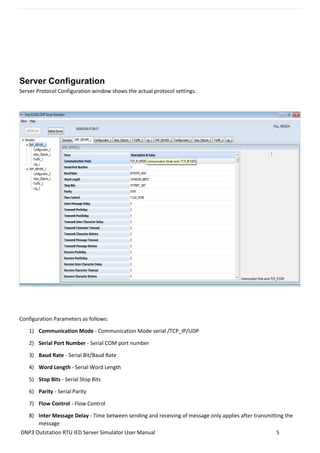
Server Protocol Configuration window shows the actual protocol settings.
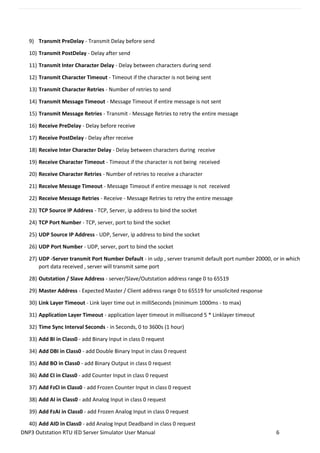
Configuration Parameters as follows:
1) Communication Mode - Communication Mode serial /TCP_IP/UDP
2) Serial Port Number - Serial COM port number
3) Baud Rate - Serial Bit/Baud Rate
4) Word Length - Serial Word Length
5) Stop Bits - Serial Stop Bits
6) Parity - Serial Parity
7) Flow Control - Flow Control
8) Inter Message Delay - Time between sending and receiving of message only applies after transmitting the
message
DNP3 Outstation RTU IED Server Simulator User Manual 6
9) Transmit PreDelay - Transmit Delay before send
10) Transmit PostDelay - Delay after send
11) Transmit Inter Character Delay - Delay between characters during send
12) Transmit Character Timeout - Timeout if the character is not being sent
13) Transmit Character Retries - Number of retries to send
14) Transmit Message Timeout - Message Timeout if entire message is not sent
15) Transmit Message Retries - Transmit - Message Retries to retry the entire message
16) Receive PreDelay - Delay before receive
17) Receive PostDelay - Delay after receive
18) Receive Inter Character Delay - Delay between characters during receive
19) Receive Character Timeout - Timeout if the character is not being received
20) Receive Character Retries - Number of retries to receive a character
21) Receive Message Timeout - Message Timeout if entire message is not received
22) Receive Message Retries - Receive - Message Retries to retry the entire message
23) TCP Source IP Address - TCP, Server, ip address to bind the socket
24) TCP Port Number - TCP, server, port to bind the socket
25) UDP Source IP Address - UDP, Server, ip address to bind the socket
26) UDP Port Number - UDP, server, port to bind the socket
27) UDP -Server transmit Port Number Default - in udp , server transmit default port number 20000, or in which
port data received , server will transmit same port
28) Outstation / Slave Address - server/Slave/Outstation address range 0 to 65519
29) Master Address - Expected Master / Client address range 0 to 65519 for unsolicited response
30) Link Layer Timeout - Link layer time out in milliSeconds (minimum 1000ms - to max)
31) Application Layer Timeout - application layer timeout in millisecond 5 * Linklayer timeout
32) Time Sync Interval Seconds - in Seconds, 0 to 3600s (1 hour)
33) Add BI in Class0 - add Binary Input in class 0 request
34) Add DBI in Class0 - add Double Binary Input in class 0 request
35) Add BO in Class0 - add Binary Output in class 0 request
36) Add CI in Class0 - add Counter Input in class 0 request
37) Add FzCI in Class0 - add Frozen Counter Input in class 0 request
38) Add AI in Class0 - add Analog Input in class 0 request
39) Add FzAI in Class0 - add Frozen Analog Input in class 0 request
40) Add AID in Class0 - add Analog Input Deadband in class 0 request
DNP3 Outstation RTU IED Server Simulator User Manual 7
41) Add AO in Class0 - add Analog Output in class 0 request
42) Add OS in Class0 - add Octect String in class 0 request
43) Add BI Event - add Binary Input Event in class 1,2,3 request
44) Add DBI Event - add Double Bit Binary Input Event in class 1,2,3 request
45) Add BO Event - add Binary Output Event in class 1,2,3 request
46) Add CI Event - add Counter Input Event in class 1,2,3 request
47) Add FzCI Event - add Frozen Counter Input Event in class 1,2,3 request
48) Add AI Event - add Analog Input Event in class 1,2,3 request
49) Add FzAI Event - add Frozen Analog Input Event in class 1,2,3 request
50) Add AID Event - add Analog Input Deadband Event in class 1,2,3 request
51) Add AO Event - add Analog Output Event in class 1,2,3 request
52) Add OS Event - add Octect String Event in class 1,2,3 request
53) Add VTO Event - add Vitual termianal output Event in class 1,2,3 request
54) AI Deadband Method - Analog Input Deadband Calculation method
55) Frozen Analog Input Support - False- stack will not create points for frozen analog input
56) Eanble Unsolicited - enable to server send unsolicited message
57) Unsolicited - Enable Responses on Startup - enable to server send unsolicited message on statup
58) Unsolicited Response Timeout - timeout in milliseconds for unsolicites response from master minimum
1000 max app layer timeout
59) Unsolicited Retries - Unsolicited message retries default 5, min 1, max 10
60) Unsolicited - Max Number of Events - each Unsolicited message contains max no of events minimum 1 -255
61) Unsolicited - Class 1 Trigger Number of Events - Class 1 Number of Class events to trigger the unsolicited
response message , value should be < u16ClassEventBufferSize if it is 0, unsoltiated will not trigger from class
event
62) Unsolicited - Class 1 Hold Time After Response - class 1 after send the class unsoldiated message Hold Time
in ms,
63) Unsolicited - Class 2 Trigger Number of Events - Class 2 Number of Class events to trigger the unsolicited
response message , value should be < u16ClassEventBufferSize if it is 0, unsoltiated will not trigger from class
event
64) Unsolicited - Class 2 Hold Time After Response - class 2 after send the class unsoldiated message Hold Time
in ms, "
65) Unsolicited - Class 3 Trigger Number of Events - Class 3 Number of Class events to trigger the unsolicited
response message , value should be < u16ClassEventBufferSize if it is 0, unsoltiated will not trigger from class
event
66) Unsolicited - Class 3 Hold Time After Response - class 3 after send the class unsoldiated message Hold Time
in ms,
DNP3 Outstation RTU IED Server Simulator User Manual 8
67) Class 1 buffer Size - Class 1 EventBufferSize - no of events to hold minimum 50
68) Class 1 buffer OverFlow Percentage - Class 1 buffer overflow percentage 50 to 95
69) Class 2 buffer Size - Class 2 EventBufferSize - no of events to hold minimum 50
70) Class 2 buffer OverFlow Percentage - Class 2 buffer overflow percentage 50 to 95
71) Class 3 buffer Size - Class 3 EventBufferSize - no of events to hold minimum 50
72) Class 3 buffer OverFlow Percentage - Class 3 buffer overflow percentage 50 to 95
73) Default Static Variation - BinaryInput - Default Static Variation for Binary Input
74) Default Static Variation - DoubleBit BinaryInput - Default Static Variation for DoubleBit BinaryInput
75) Default Static Variation – BinaryOutput - Default Static Variation for Binary Output
76) Default Static Variation – CounterInput - Default Static Variation for Counter Input
77) Default Static Variation – FrozenCounterInput - Default Static Variation for Frozen Counter Input
78) Default Static Variation – AnalogInput - Default Static Variation for Analog Input
79) Default Static Variation – FrozenAnalogInput - Default Static Variation for Frozen Analog Input
80) Default Static Variation – AnalogInputDeadBand - Default Static Variation for Analog Input DeadBand
81) Default Static Variation – AnalogOutput - Default Static Variation for Analog Output
82) Default Event Variation – BinaryInput - Default Event Variation for Binary Input
83) Default Event Variation - DoubleBit BinaryInput - Default Event Variation for DoubleBit Binary Input
84) Default Event Variation – CounterInput - Default Event Variation for Counter Input
85) Default Event Variation – AnalogInput - Default Event Variation for Analog Input
86) Default Event Variation – FrozenCounterInput - Default Event Variation for Frozen Counter Input
87) Default Event Variation – FrozenAnalogInput - Default Event Variation Frozen Analog Input
88) Enable Self Address Support - Enable Self Address Support
89) Enable UTC time - enable utc time/ local time
90) Enable FileTransfer - Enable File Transfr Support
91) Enable Local Mode - If local mode set true, then -all remote command for binary output/ analog output
control statusset to not supported
92) Update Check Time Stamp - if it true ,the timestamp change also generate event during the DNP3update
DNP3 Outstation RTU IED Server Simulator User Manual 9
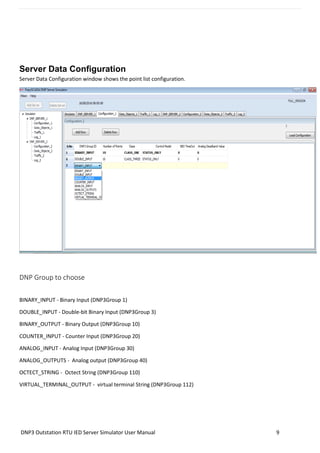
Server Data Configuration
Server Data Configuration window shows the point list configuration.
DNP Group to choose
BINARY_INPUT - Binary Input (DNP3Group 1)
DOUBLE_INPUT - Double-bit Binary Input (DNP3Group 3)
BINARY_OUTPUT - Binary Output (DNP3Group 10)
COUNTER_INPUT - Counter Input (DNP3Group 20)
ANALOG_INPUT - Analog Input (DNP3Group 30)
ANALOG_OUTPUTS - Analog output (DNP3Group 40)
OCTECT_STRING - Octect String (DNP3Group 110)
VIRTUAL_TERMINAL_OUTPUT - virtual terminal String (DNP3Group 112)
DNP3 Outstation RTU IED Server Simulator User Manual 10
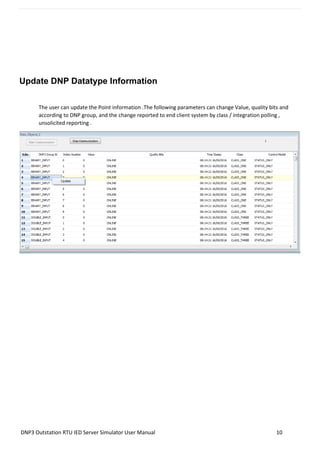
Update DNP Datatype Information
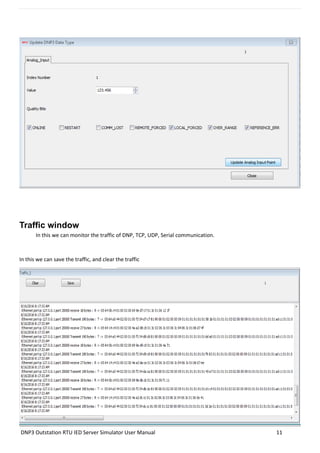
The user can update the Point information .The following parameters can change Value, quality bits and
according to DNP group, and the change reported to end client system by class / integration polling ,
unsolicited reporting .
DNP3 Outstation RTU IED Server Simulator User Manual 11
Traffic window
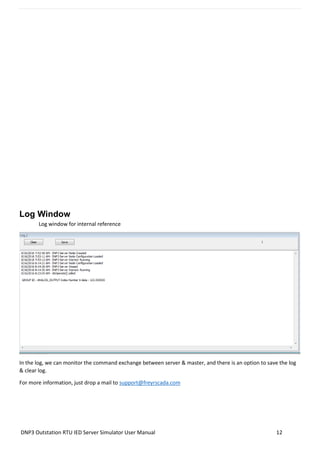
In this we can monitor the traffic of DNP, TCP, UDP, Serial communication.
In this we can save the traffic, and clear the traffic
DNP3 Outstation RTU IED Server Simulator User Manual 12
Log Window
Log window for internal reference
In the log, we can monitor the command exchange between server & master, and there is an option to save the log
& clear log.
For more information, just drop a mail to support@freyrscada.com

dnp3 Protocol Outstation Server IED RTU Simulator user manual

  • 1.
    DNP3 Protocol OutstationRTU IED Server Simulator User Manual Stack Version: 21.05.008 DNP3 Protocol FreyrSCADA Embedded Solution No.5, BommaiyaSamy Kovil Street, Annanji, Theni, TamilNadu, India www.freyrscada.com CIN: U72900TN2018PTC120601
  • 2.
    DNP3 Outstation RTUIED Server Simulator User Manual 2 Contents Introduction ......................................................................................................................................................................3 Add and Delete Server ......................................................................................................................................................4 Server Configuration.........................................................................................................................................................5 Server Data Configuration.................................................................................................................................................9 DNP Group to choose........................................................................................................................................................9 Update DNP Datatype Information.................................................................................................................................10 Traffic window ................................................................................................................................................................11 Log Window ....................................................................................................................................................................12 Download Free Demo Evaluation Kit – DNP3 Development Bundle New updated Version of DNP3 Simulator & SDK (Software Development Kit) is available now. In the Development Bundle, We included DNP3 Server & Client Simulator, Windows and Linux SDK, C# projects, Doxygen documentation and Raspberry Pi, BeagleBone Demo library.
  • 3.
    DNP3 Outstation RTUIED Server Simulator User Manual 3 Introduction DNP3 was first developed by Westronic and was released in 1993. This protocol is widely used among the electric, oil and gas, and wastewater/water utilities. It is preferred among the electric utilities. All these characteristics that are highly-valued among electric utilities and the oil and gas industry with widely remote field stations. DNP3 was based upon the early drafts of IEC 60870-5. DNP3 was extended in 1998 to be encapsulated in either a TCP or UDP packet (TCP is typically used). FreyrSCADA DNP3 (IEEE 1815) – Outstation (Server) Simulator was originally developed to test the DNP3(IEEE 1815) stack. We developed the stack to run multiple hardware platform (windows, linux, RTLinux, qnx..). So we had to test multiple platform. At that time, our engineers, developed the test simulation application. We tested this simulator with multiple test software available in the market. The interoperability list focused only for our Stack. If you have any specific requirement to implement new Data type, please contact to us. Our support team has young, dynamic and professional team of engineers. And they will provide the quick and accurate solution as per customer requirement. support@freyrscada.com Thanks Management- FreyrSCADA Embedded Solution
  • 4.
    DNP3 Outstation RTUIED Server Simulator User Manual 4 Add and Delete Server We can add up to 50 server node in the simulator. Every server node will work independently. And also we can delete the server. Simulator window shows the status & connected Communication channel TCP – IP Address, Port Number UDP – IP Address, Port Number Serial – Com Port Number
  • 5.
    DNP3 Outstation RTUIED Server Simulator User Manual 5 Server Configuration Server Protocol Configuration window shows the actual protocol settings. Configuration Parameters as follows: 1) Communication Mode - Communication Mode serial /TCP_IP/UDP 2) Serial Port Number - Serial COM port number 3) Baud Rate - Serial Bit/Baud Rate 4) Word Length - Serial Word Length 5) Stop Bits - Serial Stop Bits 6) Parity - Serial Parity 7) Flow Control - Flow Control 8) Inter Message Delay - Time between sending and receiving of message only applies after transmitting the message
  • 6.
    DNP3 Outstation RTUIED Server Simulator User Manual 6 9) Transmit PreDelay - Transmit Delay before send 10) Transmit PostDelay - Delay after send 11) Transmit Inter Character Delay - Delay between characters during send 12) Transmit Character Timeout - Timeout if the character is not being sent 13) Transmit Character Retries - Number of retries to send 14) Transmit Message Timeout - Message Timeout if entire message is not sent 15) Transmit Message Retries - Transmit - Message Retries to retry the entire message 16) Receive PreDelay - Delay before receive 17) Receive PostDelay - Delay after receive 18) Receive Inter Character Delay - Delay between characters during receive 19) Receive Character Timeout - Timeout if the character is not being received 20) Receive Character Retries - Number of retries to receive a character 21) Receive Message Timeout - Message Timeout if entire message is not received 22) Receive Message Retries - Receive - Message Retries to retry the entire message 23) TCP Source IP Address - TCP, Server, ip address to bind the socket 24) TCP Port Number - TCP, server, port to bind the socket 25) UDP Source IP Address - UDP, Server, ip address to bind the socket 26) UDP Port Number - UDP, server, port to bind the socket 27) UDP -Server transmit Port Number Default - in udp , server transmit default port number 20000, or in which port data received , server will transmit same port 28) Outstation / Slave Address - server/Slave/Outstation address range 0 to 65519 29) Master Address - Expected Master / Client address range 0 to 65519 for unsolicited response 30) Link Layer Timeout - Link layer time out in milliSeconds (minimum 1000ms - to max) 31) Application Layer Timeout - application layer timeout in millisecond 5 * Linklayer timeout 32) Time Sync Interval Seconds - in Seconds, 0 to 3600s (1 hour) 33) Add BI in Class0 - add Binary Input in class 0 request 34) Add DBI in Class0 - add Double Binary Input in class 0 request 35) Add BO in Class0 - add Binary Output in class 0 request 36) Add CI in Class0 - add Counter Input in class 0 request 37) Add FzCI in Class0 - add Frozen Counter Input in class 0 request 38) Add AI in Class0 - add Analog Input in class 0 request 39) Add FzAI in Class0 - add Frozen Analog Input in class 0 request 40) Add AID in Class0 - add Analog Input Deadband in class 0 request
  • 7.
    DNP3 Outstation RTUIED Server Simulator User Manual 7 41) Add AO in Class0 - add Analog Output in class 0 request 42) Add OS in Class0 - add Octect String in class 0 request 43) Add BI Event - add Binary Input Event in class 1,2,3 request 44) Add DBI Event - add Double Bit Binary Input Event in class 1,2,3 request 45) Add BO Event - add Binary Output Event in class 1,2,3 request 46) Add CI Event - add Counter Input Event in class 1,2,3 request 47) Add FzCI Event - add Frozen Counter Input Event in class 1,2,3 request 48) Add AI Event - add Analog Input Event in class 1,2,3 request 49) Add FzAI Event - add Frozen Analog Input Event in class 1,2,3 request 50) Add AID Event - add Analog Input Deadband Event in class 1,2,3 request 51) Add AO Event - add Analog Output Event in class 1,2,3 request 52) Add OS Event - add Octect String Event in class 1,2,3 request 53) Add VTO Event - add Vitual termianal output Event in class 1,2,3 request 54) AI Deadband Method - Analog Input Deadband Calculation method 55) Frozen Analog Input Support - False- stack will not create points for frozen analog input 56) Eanble Unsolicited - enable to server send unsolicited message 57) Unsolicited - Enable Responses on Startup - enable to server send unsolicited message on statup 58) Unsolicited Response Timeout - timeout in milliseconds for unsolicites response from master minimum 1000 max app layer timeout 59) Unsolicited Retries - Unsolicited message retries default 5, min 1, max 10 60) Unsolicited - Max Number of Events - each Unsolicited message contains max no of events minimum 1 -255 61) Unsolicited - Class 1 Trigger Number of Events - Class 1 Number of Class events to trigger the unsolicited response message , value should be < u16ClassEventBufferSize if it is 0, unsoltiated will not trigger from class event 62) Unsolicited - Class 1 Hold Time After Response - class 1 after send the class unsoldiated message Hold Time in ms, 63) Unsolicited - Class 2 Trigger Number of Events - Class 2 Number of Class events to trigger the unsolicited response message , value should be < u16ClassEventBufferSize if it is 0, unsoltiated will not trigger from class event 64) Unsolicited - Class 2 Hold Time After Response - class 2 after send the class unsoldiated message Hold Time in ms, " 65) Unsolicited - Class 3 Trigger Number of Events - Class 3 Number of Class events to trigger the unsolicited response message , value should be < u16ClassEventBufferSize if it is 0, unsoltiated will not trigger from class event 66) Unsolicited - Class 3 Hold Time After Response - class 3 after send the class unsoldiated message Hold Time in ms,
  • 8.
    DNP3 Outstation RTUIED Server Simulator User Manual 8 67) Class 1 buffer Size - Class 1 EventBufferSize - no of events to hold minimum 50 68) Class 1 buffer OverFlow Percentage - Class 1 buffer overflow percentage 50 to 95 69) Class 2 buffer Size - Class 2 EventBufferSize - no of events to hold minimum 50 70) Class 2 buffer OverFlow Percentage - Class 2 buffer overflow percentage 50 to 95 71) Class 3 buffer Size - Class 3 EventBufferSize - no of events to hold minimum 50 72) Class 3 buffer OverFlow Percentage - Class 3 buffer overflow percentage 50 to 95 73) Default Static Variation - BinaryInput - Default Static Variation for Binary Input 74) Default Static Variation - DoubleBit BinaryInput - Default Static Variation for DoubleBit BinaryInput 75) Default Static Variation – BinaryOutput - Default Static Variation for Binary Output 76) Default Static Variation – CounterInput - Default Static Variation for Counter Input 77) Default Static Variation – FrozenCounterInput - Default Static Variation for Frozen Counter Input 78) Default Static Variation – AnalogInput - Default Static Variation for Analog Input 79) Default Static Variation – FrozenAnalogInput - Default Static Variation for Frozen Analog Input 80) Default Static Variation – AnalogInputDeadBand - Default Static Variation for Analog Input DeadBand 81) Default Static Variation – AnalogOutput - Default Static Variation for Analog Output 82) Default Event Variation – BinaryInput - Default Event Variation for Binary Input 83) Default Event Variation - DoubleBit BinaryInput - Default Event Variation for DoubleBit Binary Input 84) Default Event Variation – CounterInput - Default Event Variation for Counter Input 85) Default Event Variation – AnalogInput - Default Event Variation for Analog Input 86) Default Event Variation – FrozenCounterInput - Default Event Variation for Frozen Counter Input 87) Default Event Variation – FrozenAnalogInput - Default Event Variation Frozen Analog Input 88) Enable Self Address Support - Enable Self Address Support 89) Enable UTC time - enable utc time/ local time 90) Enable FileTransfer - Enable File Transfr Support 91) Enable Local Mode - If local mode set true, then -all remote command for binary output/ analog output control statusset to not supported 92) Update Check Time Stamp - if it true ,the timestamp change also generate event during the DNP3update
  • 9.
    DNP3 Outstation RTUIED Server Simulator User Manual 9 Server Data Configuration Server Data Configuration window shows the point list configuration. DNP Group to choose BINARY_INPUT - Binary Input (DNP3Group 1) DOUBLE_INPUT - Double-bit Binary Input (DNP3Group 3) BINARY_OUTPUT - Binary Output (DNP3Group 10) COUNTER_INPUT - Counter Input (DNP3Group 20) ANALOG_INPUT - Analog Input (DNP3Group 30) ANALOG_OUTPUTS - Analog output (DNP3Group 40) OCTECT_STRING - Octect String (DNP3Group 110) VIRTUAL_TERMINAL_OUTPUT - virtual terminal String (DNP3Group 112)
  • 10.
    DNP3 Outstation RTUIED Server Simulator User Manual 10 Update DNP Datatype Information The user can update the Point information .The following parameters can change Value, quality bits and according to DNP group, and the change reported to end client system by class / integration polling , unsolicited reporting .
  • 11.
    DNP3 Outstation RTUIED Server Simulator User Manual 11 Traffic window In this we can monitor the traffic of DNP, TCP, UDP, Serial communication. In this we can save the traffic, and clear the traffic
  • 12.
    DNP3 Outstation RTUIED Server Simulator User Manual 12 Log Window Log window for internal reference In the log, we can monitor the command exchange between server & master, and there is an option to save the log & clear log. For more information, just drop a mail to support@freyrscada.com