Google Cloud Platform
Data Storage Services
GCP Cloud Storage
Joe Holbrook Cloudbursting Corp
Google Cloud Platform
Cloud Storage Overview
Lecture
Overview
Cloud Storage Intro
Storage Classes
-Terminology to Know
Cloud Storage
Overview
• Google Cloud Storage is unified object storage
for developers and enterprises, from live data
serving to data analytics/ML to data archiving.
• High performance, internet-scale, immutable
BLOB (binary large object) storage
• Simple Abstraction Storage buckets, immutable
objects with mutable metadata and Globally
unique URI identifiers for buckets, objects
• Common storage for Google Cloud Platform
services
Cloud Storage
Overview
Access via
Cloud Storage is Not a file
system. Though Cloud Storage is
not a file system, it can be
accessed as one using third party
tools such as Cloud Storage Fuse.
Simple administration and does
not require capacity
management
Accessed through REST APIs- Client libraries
- REST APIs
- gsutil (CLI)
Cloud Storage
Overview
• Supports Online or offline imports
• All storage classes accessed through the
same APIs
• Simple pricing model
- Network ingress, and data transfer within
a region is free
- Network egress charges apply and vary
by destination
Cloud Storage
Classes
• Supports four storage
classes.
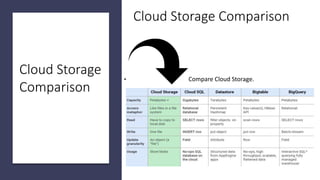
Cloud Storage Comparison
• Compare Cloud Storage.
Cloud Storage
Comparison
Cloud Storage Comparison
• Compare Cloud Storage.
Cloud Storage
Comparison
https://www.networkworld.com/article/3191520/cloud-
computing/deep-dive-on-aws-vs-azure-vs-google-cloud-
storage-options.html
Cloud Storage Terminology
• Project All data in Cloud Storage belongs
inside a project. A project consists of a set of
users, a set of APIs, and billing,
authentication, and monitoring settings for
those APIs.
• Buckets are the basic containers that hold
your data. Everything that you store in Cloud
Storage must be contained in a bucket.
• Objects are the individual pieces of data that
you store in Cloud Storage.
Cloud Storage
Terminology
• Objects have two components:
• object data and object metadata.
• Object data is typically a file that
you want to store in Cloud
Storage.
• Object metadata is a collection of
name-value pairs that describe
various object qualities.
Cloud Storage
Namespace
• Cloud Storage uses a flat
namespace to store objects.
• There is only one Cloud Storage
namespace, which means every
bucket must have a unique name
across the entire Cloud Storage
namespace. Object names must
be unique only within a given
bucket.
Cloud Storage
Lifecycles
Storage Classes
Google Cloud Storage offers four storage classes.
Customers can associate each of their buckets with the
storage class most appropriate for their use cases. All of
the storage classes are accessed in using the Cloud
Storage API, and all offer millisecond access times.
All storage classes incur a cost per gigabyte of data
stored per month, and egress and data transfer charges
may apply.
In addition to those charges, Nearline storage also incurs
an access fee per gigabyte of data read, and Coldline
storage incurs a higher fee per gigabyte of data read
https://cloud.google.com/storage/pricing
GCP Cloud Platform
Google Cloud Platform https://cloud.google.com/
GCP Console https://console.cloud.google.com/
GCP Storage
https://cloud.google.com/products/storage/
Documentation https://cloud.google.com/docs/
Pricing https://cloud.google.com/pricing/
Free Tier https://cloud.google.com/free/
Code Labs
https://codelabs.developers.google.com/
Qwiklabs https://qwiklabs.com/dashboard

Google Cloud Platform Intro to Data and Storage Services

  • 1.
    Google Cloud Platform DataStorage Services GCP Cloud Storage Joe Holbrook Cloudbursting Corp
  • 2.
  • 3.
  • 4.
    Cloud Storage Overview • GoogleCloud Storage is unified object storage for developers and enterprises, from live data serving to data analytics/ML to data archiving. • High performance, internet-scale, immutable BLOB (binary large object) storage • Simple Abstraction Storage buckets, immutable objects with mutable metadata and Globally unique URI identifiers for buckets, objects • Common storage for Google Cloud Platform services
  • 5.
    Cloud Storage Overview Access via CloudStorage is Not a file system. Though Cloud Storage is not a file system, it can be accessed as one using third party tools such as Cloud Storage Fuse. Simple administration and does not require capacity management Accessed through REST APIs- Client libraries - REST APIs - gsutil (CLI)
  • 6.
    Cloud Storage Overview • SupportsOnline or offline imports • All storage classes accessed through the same APIs • Simple pricing model - Network ingress, and data transfer within a region is free - Network egress charges apply and vary by destination
  • 7.
  • 8.
    Cloud Storage Comparison •Compare Cloud Storage. Cloud Storage Comparison
  • 9.
    Cloud Storage Comparison •Compare Cloud Storage. Cloud Storage Comparison https://www.networkworld.com/article/3191520/cloud- computing/deep-dive-on-aws-vs-azure-vs-google-cloud- storage-options.html
  • 10.
    Cloud Storage Terminology •Project All data in Cloud Storage belongs inside a project. A project consists of a set of users, a set of APIs, and billing, authentication, and monitoring settings for those APIs. • Buckets are the basic containers that hold your data. Everything that you store in Cloud Storage must be contained in a bucket. • Objects are the individual pieces of data that you store in Cloud Storage.
  • 11.
    Cloud Storage Terminology • Objectshave two components: • object data and object metadata. • Object data is typically a file that you want to store in Cloud Storage. • Object metadata is a collection of name-value pairs that describe various object qualities.
  • 12.
    Cloud Storage Namespace • CloudStorage uses a flat namespace to store objects. • There is only one Cloud Storage namespace, which means every bucket must have a unique name across the entire Cloud Storage namespace. Object names must be unique only within a given bucket.
  • 13.
    Cloud Storage Lifecycles Storage Classes GoogleCloud Storage offers four storage classes. Customers can associate each of their buckets with the storage class most appropriate for their use cases. All of the storage classes are accessed in using the Cloud Storage API, and all offer millisecond access times. All storage classes incur a cost per gigabyte of data stored per month, and egress and data transfer charges may apply. In addition to those charges, Nearline storage also incurs an access fee per gigabyte of data read, and Coldline storage incurs a higher fee per gigabyte of data read https://cloud.google.com/storage/pricing
  • 14.
    GCP Cloud Platform GoogleCloud Platform https://cloud.google.com/ GCP Console https://console.cloud.google.com/ GCP Storage https://cloud.google.com/products/storage/ Documentation https://cloud.google.com/docs/ Pricing https://cloud.google.com/pricing/ Free Tier https://cloud.google.com/free/ Code Labs https://codelabs.developers.google.com/ Qwiklabs https://qwiklabs.com/dashboard