IF YOU ARE ME…THEN WHO AM I?
THE RISK OF IDENTITY THEFT AND WAYS TO PREVENT IT.
Nick Chandi
Introduction
Welcome Networks
• IT Services and Support to Accounting firms and
Businesses
• Provide Cloud Servers, Virtual Desktops
• Support more than 200 Software. Office 365,
Profile, Caseware, QuickBooks, Sage, Cantax,
TaxPrep, CCH Practice etc.
•
•
Over 17 years of IT experience
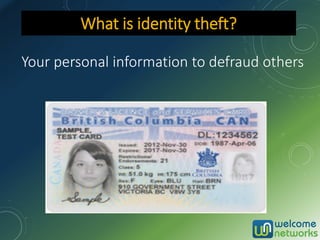
Your personal information to defraud others
What is identity theft?
▫ A criminal misconduct and no one is immune
from this rising tide
▫ Perform due diligence in protecting you and
your clients IDs
▫ Don’t allow yourself, your employees or your
client to become the next victim!
▫ Ways to detect & protect
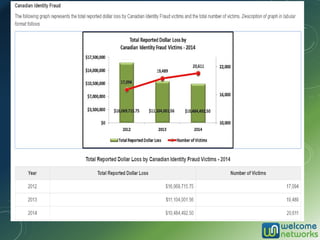
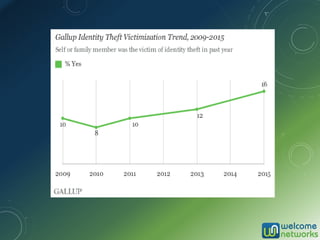
Identity theft
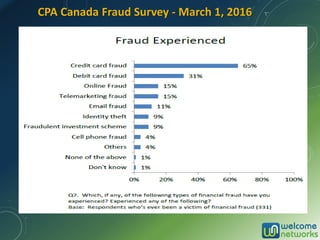
CPA Canada Fraud Survey - March 1, 2016
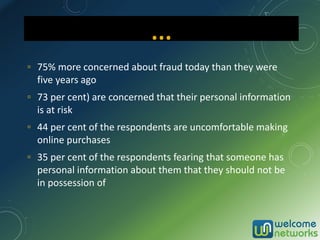
▫ 75% more concerned about fraud today than they were
five years ago
▫ 73 per cent) are concerned that their personal information
is at risk
▫ 44 per cent of the respondents are uncomfortable making
online purchases
▫ 35 per cent of the respondents fearing that someone has
personal information about them that they should not be
in possession of
…
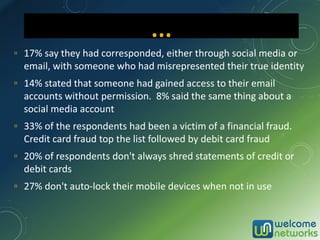
▫ 17% say they had corresponded, either through social media or
email, with someone who had misrepresented their true identity
▫ 14% stated that someone had gained access to their email
accounts without permission. 8% said the same thing about a
social media account
▫ 33% of the respondents had been a victim of a financial fraud.
Credit card fraud top the list followed by debit card fraud
▫ 20% of respondents don't always shred statements of credit or
debit cards
▫ 27% don't auto-lock their mobile devices when not in use
…
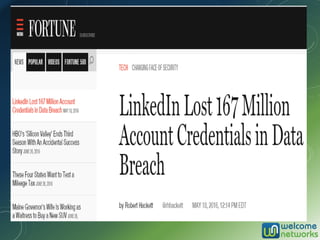
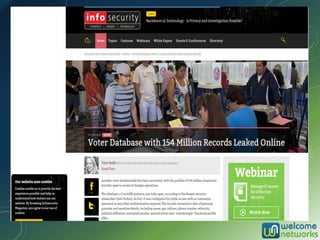
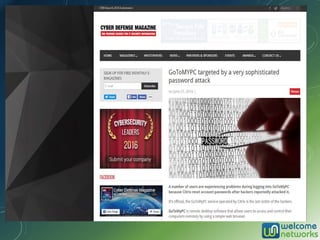
SOME VICTIMS…
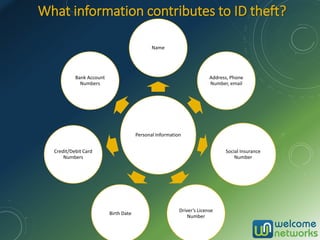
What information contributes to ID theft?
Personal Information
Name
Address, Phone
Number, email
Social Insurance
Number
Driver’s License
Number
Birth Date
Credit/Debit Card
Numbers
Bank Account
Numbers
▫ Driver’s License, BC Services card (Old Medical
CareCard)
▫ SIN card
▫ Credit & debit Cards
▫ Group insurance cards
▫ Checkbooks
▫ Personal information in purses, wallets and backpacks
▫ Patient Records
Sources
▫ Steal Your Identity
▫ Withdraw cash from bank accounts
▫ Open new bank accounts, debit cards
▫ Apply for credit cards or store credit
accounts
▫ Apply for a new driver’s license
▫ Get a job
▫ Rent an apartment
What do they do with the data?
…
▫ Take out student loans
▫ File for bankruptcy
▫ Tarnish your record
▫ Get medical care (treatments, equipment’s, Rx)
▫ Increase your premiums
▫ Forge your tax return and get your refund
▫ Accounts with utility companies, apartment
leases, or even home mortgages
…
▫ Victims spend 600 hours recovering from this crime
▫ Taking far longer than ever before to clear their records
▫ Victims often struggle with the impact for years
▫ Emotional impact on victims is linked to that felt by
victims of more violent crime
▫ Victims spend an average of $2,000.00 in out-of-pocket
expenses
How victims are affected
Recognizing identity theft
!
EARLY DETECTION IS KEY!
Watch for the signs !
▫ Zero balances in your bank accounts
▫ Denied Credit card application for no obvious reason
▫ Denied employment
▫ Denied cell phone service
▫ New accounts or charges on your bank and credit card statements
that you didn’t make
▫ Notification or calls from collection agencies
▫ Incorrect address or other information on your credit report
▫ Sudden stop or missing bills or mailed statements
▫ Notification by police
▫ Receipt of credit cards or bills never ordered
How do victims usually find out
▫ You can only reduce your chances!
▫ Vigilance is the best strategy for ensuring
your identity’s safety
▫ Take prevention strategies to heart – and
encourage others to do so
Preventing identity theft
Your data is at risk if others can access:
▫ Hard copies of documents
▫ Personal records from workplace
▫ Computer (do you have a post-it note with your
password on it?)
▫ Computer screen by looking over your shoulder
▫ Computer screen if not locked
Tax documents are an identity thief’s dream
Shoulder surfing
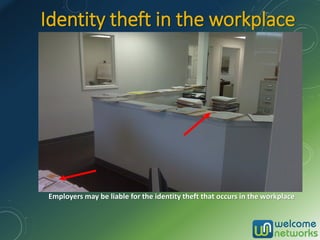
Identity theft in the workplace
Employers may be liable for the identity theft that occurs in the workplace
▫ Only carry identification what is necessary
▫ Do not hang purses at the back of chair in a public
place
▫ Memorize SIN number
▫ Only give SIN number when absolutely necessary-
ask why a SIN number is needed and how the
information will be protected
▫ Do not print a SIN number on blank cheques
Stealing
▫ Shred Bank or credit card statements
▫ Shred pre-approved credit offers received
▫ Close unwanted accounts in writing or by phone and
shred the card
▫ Memorize the PIN number and do not use easily
accessible numbers (date of birth, home address,
phone digits etc.)
▫ Do not give out account numbers unless making a
transaction that is initiated by you rather than
responding to telephone or e-mail solicitations
Credit and debit cards
▫ Watch your utility and other services bills and statements for
unusual transactions
▫ Do not authorize others to use your credit cards. They may
not take the same care that you do
▫ Elect paperless statements for credit cards, investment
statements etc.
▫ Designate a single credit card for all online purchases. Ideally
this card should have a low credit limit and never be a debit
card
... …
▫ Make sure your mailbox is secure
▫ Contact the post office and request a vacation hold
when unable to pick up mail
▫ Thieves can complete a change of address form with
Canada Post
▫ Do not leave mail in an unsecured mailbox overnight or
for a long period of time
▫ Theft of outgoing mail and bill payments that has your
info and signatures
Mail fraud
• Personal information discarded can be recovered by
thieves from the trash*
Inappropriate disposal of data such as:
▫ Paper documents containing sensitive info
▫ Backup disks / tapes / USB flash drives
▫ Hard drives that can be easily restored
▫ Old mobile devices that aren’t protected.
Tip: Smashing hard drives can be a fun way to blow off
steam!
Dumpster diving
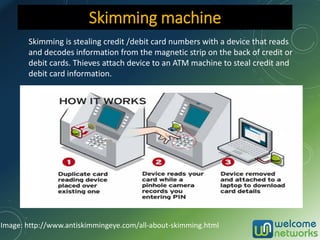
Skimming is stealing credit /debit card numbers with a device that reads
and decodes information from the magnetic strip on the back of credit or
debit cards. Thieves attach device to an ATM machine to steal credit and
debit card information.
Skimming machine
Image: http://www.antiskimmingeye.com/all-about-skimming.html
* A stranger sounding as business associate asking for information
about you or your client by phone or email. *
▫ Telephone calls asking you to “update records” or to steal
employee or clients credentials
▫ Challenge and verify ID of requestor
▫ Unless you have initiated the contact, don’t trust anyone
▫ Remember basic information from you can be used for
Pretexting
▫ Get yourself informed about common online
misinformation and scams
Ask for a written request by email & call back
Bit of social engineering
▫ Sound Official – You have reached Credit Union’s
National Association online banking center.
▫ Create Fear and a Sense of urgency
▫ “Smishing” messages on phone
Resource: http://www.fightidentitytheft.com
“Smishing” scam audio
Most attacks are inside jobs
▫ Have all former employees been removed from your
systems?
▫ What about contractors, vendors, or even customers
who no longer need access?
▫ Follow the principle of least privilege
▫ Establish cyber securities policies for guest internet use
– no local access
▫ Use cloud services like Azure Active Directory to lock
down SAAS access
Technical Challenges
* Computers, tablets and mobile devices are at risk of: *
▫ Malware / viruses that corrupt or spy on data,
pop-up ads, redirect to other websites
▫ Key loggers that track your key strokes, monitor
internet use
▫ Ransomware that holds your data hostage for a fee
▫ Brute forced access to your accounts
Tip: Using a password manager app is a secure and
easy way to create and manage complex passwords.
Spyware, Hacking & Ransomware
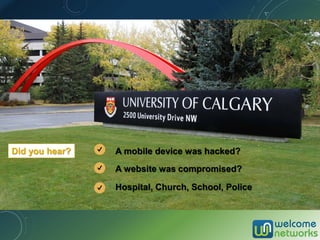
A website was compromised?
A mobile device was hacked?
Hospital, Church, School, Police
Did you hear?
Current major challenge - Ransomware
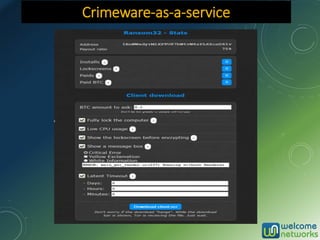
• Ransom note - Pay to regain access or data is permanently
encrypted
• Through e-mails, infected programs and compromised websites
• 93% of the spam or phishing emails have some kind of variant of
a Ransomware
• Can infect PC, Mac, Servers, Network shares, Dropbox, mobile
devices, emails, online accounts, databases and other systems
• Few hundred dollars to over tens of thousands of dollars!
• Use BitCoin or other hard to trace online payment method
• Nothing helps but GOOD backups, may lay dormant for days or
weeks
• Infamous CryptoLocker, Cryptowall, Lockey and KeRanger
• Horror story – Ransomware hit 7 days of productivity, costing
around $300,000
Crimeware-as-a-service
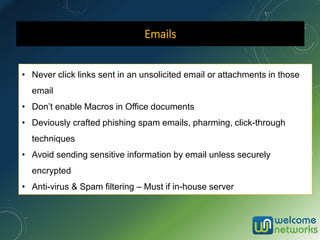
Emails
• Never click links sent in an unsolicited email or attachments in those
email
• Don’t enable Macros in Office documents
• Deviously crafted phishing spam emails, pharming, click-through
techniques
• Avoid sending sensitive information by email unless securely
encrypted
• Anti-virus & Spam filtering – Must if in-house server
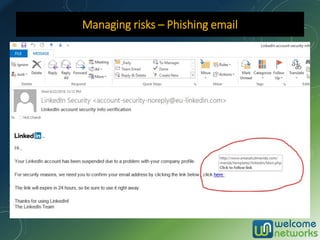
* Could come in the form of an official-looking email asking
for personal info. Trust no one! *
Some of the more common phishing and smishing scams:
▫ You're told there's a problem with your current account
▫ You're threatened with action (i.e. closing your account)
if you don't respond.
▫ Invite to click on a link to a phony site where you’re
asked for username and password
▫ Assume unsolicited email is fraudulent; don’t click or
follow links in email
▫ Look at the URL and verify the certificate is using SSL
Phishing
Managing risks – Phishing email
What’s at Risk?
• Single device or the whole infrastructure
• Data Loss or theft of personal, business or customer
information
• Identity Theft – Extract names, birthdays, medical IDs,
Social Insurance numbers, street addresses, e-mail
addresses and employment information. Employee
Payrolls hijacked.
• Possible intellectual property theft
• Hack into Business Wire, Marketwired, PR Newswire
• Reputation damage
Heavy fines in certain industries
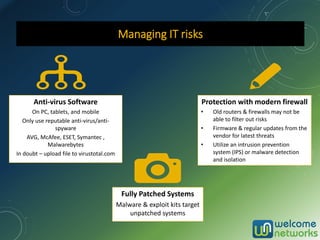
Managing IT risks
Anti-virus Software
On PC, tablets, and mobile
Only use reputable anti-virus/anti-
spyware
AVG, McAfee, ESET, Symantec ,
Malwarebytes
In doubt – upload file to virustotal.com
Fully Patched Systems
Malware & exploit kits target
unpatched systems
Protection with modern firewall
• Old routers & firewalls may not be
able to filter out risks
• Firmware & regular updates from the
vendor for latest threats
• Utilize an intrusion prevention
system (IPS) or malware detection
and isolation
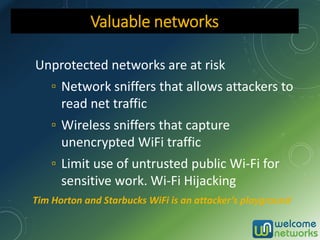
Unprotected networks are at risk
▫ Network sniffers that allows attackers to
read net traffic
▫ Wireless sniffers that capture
unencrypted WiFi traffic
▫ Limit use of untrusted public Wi-Fi for
sensitive work. Wi-Fi Hijacking
Valuable networks
Tim Horton and Starbucks WiFi is an attacker’s playground
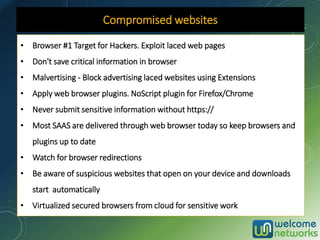
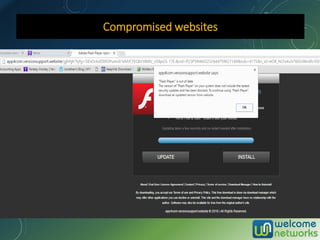
Compromised websites
• Browser #1 Target for Hackers. Exploit laced web pages
• Don't save critical information in browser
• Malvertising - Block advertising laced websites using Extensions
• Apply web browser plugins. NoScript plugin for Firefox/Chrome
• Never submit sensitive information without https://
• Most SAAS are delivered through web browser today so keep browsers and
plugins up to date
• Watch for browser redirections
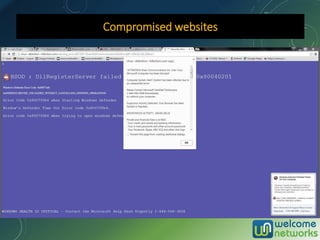
• Be aware of suspicious websites that open on your device and downloads
start automatically
• Virtualized secured browsers from cloud for sensitive work
Compromised websites
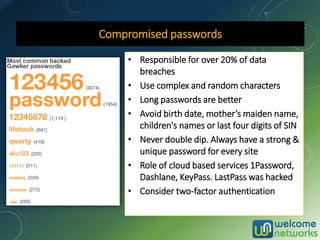
Compromised passwords
• Responsible for over 20% of data
breaches
• Use complex and random characters
• Long passwords are better
• Avoid birth date, mother’s maiden name,
children's names or last four digits of SIN
• Never double dip. Always have a strong &
unique password for every site
• Role of cloud based services 1Password,
Dashlane, KeyPass. LastPass was hacked
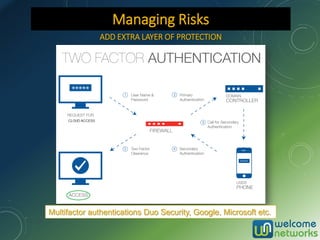
• Consider two-factor authentication
ADD EXTRA LAYER OF PROTECTION
Multifactor authentications Duo Security, Google, Microsoft etc.
Managing Risks
▫ Look for “https” or a picture of a lock after the URL or
in the bottom right hand corner indicating the site is
secure
▫ Do not give any personal information on a site if it is
not secure
▫ Choose security questions with answers only you
would know
▫ Watch for clues that might indicate a computer is
infected with spyware. such as a stream of pop-up
ads, random error messages, and sluggish
performance when opening programs or saving files.
Online Access
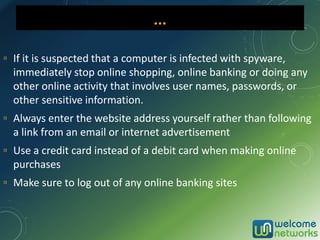
▫ If it is suspected that a computer is infected with spyware,
immediately stop online shopping, online banking or doing any
other online activity that involves user names, passwords, or
other sensitive information.
▫ Always enter the website address yourself rather than following
a link from an email or internet advertisement
▫ Use a credit card instead of a debit card when making online
purchases
▫ Make sure to log out of any online banking sites
…
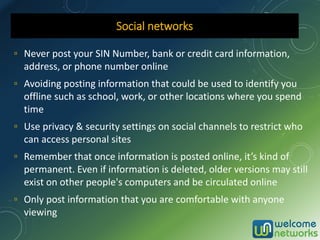
▫ Never post your SIN Number, bank or credit card information,
address, or phone number online
▫ Avoiding posting information that could be used to identify you
offline such as school, work, or other locations where you spend
time
▫ Use privacy & security settings on social channels to restrict who
can access personal sites
▫ Remember that once information is posted online, it’s kind of
permanent. Even if information is deleted, older versions may still
exist on other people's computers and be circulated online
▫ Only post information that you are comfortable with anyone
viewing
Social networks
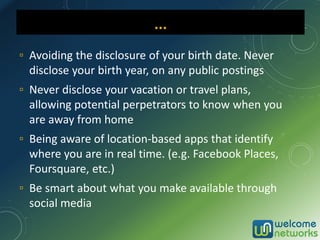
▫ Avoiding the disclosure of your birth date. Never
disclose your birth year, on any public postings
▫ Never disclose your vacation or travel plans,
allowing potential perpetrators to know when you
are away from home
▫ Being aware of location-based apps that identify
where you are in real time. (e.g. Facebook Places,
Foursquare, etc.)
▫ Be smart about what you make available through
social media
… …
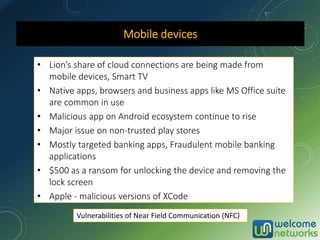
Mobile devices
• Lion’s share of cloud connections are being made from
mobile devices, Smart TV
• Native apps, browsers and business apps like MS Office suite
are common in use
• Malicious app on Android ecosystem continue to rise
• Major issue on non-trusted play stores
• Mostly targeted banking apps, Fraudulent mobile banking
applications
• $500 as a ransom for unlocking the device and removing the
lock screen
• Apple - malicious versions of XCode
Vulnerabilities of Near Field Communication (NFC)
Securing mobile devices
• Install applications only from trusted play stores like Google
Play, Apple Store
• Keep an eye on the permissions requested from untrusted
and unknown applications, and disallow any suspicious
requests
• Update to the latest version of Android or iOS
• Avoid jailbreaking iOS or rooting the Android device, as it
increases the damage caused by possible infection
• Install AV and other mobile security apps for Android devices
Always password protect your mobile device
Enable remote wipe
BE AWARE OF TOP SCAMS
~~~~~~~~~~~~~~~~~~~~~~~~~~~~~~~~~~~~~~~~~~~~~~~~~
1) Extortion scam: CRA income tax scam
In 2015, between 1,000 and 3,000 Canadians received the calls every day
2) Heartbreak scam: cat-phishing
Money request from wonderful love you found on a dating site going
through tough time
3) Prize scam: fake lottery winnings
You need to pay a fee to claim the prize, and then another and another,
but the prize never arrives.
4) Financial scam: investment fraud
Special deal with a fabulous rate of return with little or no risk
5) Employment scam: secret shopper
Fake certified cheques for large amounts
Top 5 scams in Canada
Credit reporting agencies
Equifax Canada Co.
Box 190 Jean Talon Station
Montreal, Quebec H1S 2Z2
How to Order: Online, Mail, Fax
A victim of Fraud/Identity Theft: Call
1-800-465-7166 and press option 3 for
Fraud.
http://www.consumer.equifax.ca/hom
e/en_ca
Credit Monitoring: $16.95 per month,
Up to $25,000 ID Theft insurance
TransUnion Canada
Attention: Consumer Relations
P.O. Box 338, LCD1
Hamilton, ON L8L 7W2
How to Order: Online, Mail, Phone (IVR)
A victim of Fraud/Identity Theft: Call
800-663-9980
Web: https://www.transunion.ca
Credit Reports
▫ IT HAPPENED!
▫ What To Do Right Away
▫ Act quickly to limit the damage
It happened… what to do?
▫ Call TransUnion Canada / Equifax Canada and
inform them you have been compromised
▫ Let them know you have been a victim of identity
fraud
▫ Place a fraud alert on your account
Get your credit report
▫ Call each financial institution, credit card issuer or
company
▫ Review all your debits or charges for each account
▫ Decline any new accounts you didn't request
▫ Close every account that might have been
compromised
Notify financial institutions
▫ Report the crime to the local police
▫ Banks and creditors sometimes need proof
of the crime
File a report
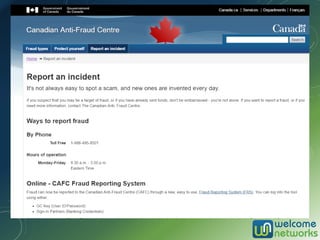
Report to CAFC
▫ www.antifraudcentre-centreantifraude.ca
▫ Phone: 888-495-8501
▫ They work with law enforcement agencies all
over the world
▫ Download “Identity Theft Statement” from
Canadian Anti-Fraud Centre website
▫ Use this form to notify financial institutions,
credit card issuers and other companies
▫ Replace Immigration documents, Passport, Social
Insurance Card, BC Services Card
▫ Contact Service Canada
Notify identity document issuing agencies
▫ Offered by banks and other companies
▫ Closely monitor accounts and personal
information
▫ Alert consumer when there is a change
▫ Help resolve any problems if identity theft does
occur
▫ Cost: $5.00 to $40.00 per month, Depends on
amount of services provided
Can NOT eliminate identity theft but can help prevent
it quickly
Identity Protection Services
▫ Protect your SIN number, date of birth and other info
▫ Select security check questions with answers only you
would know
▫ Check credit reports at least once per year
▫ “Don’t risk it, shred it.”
Final Thoughts
It’s not all gloom and doom
Risk can be managed
▫ Move towards paperless office. Use cloud storage
solutions
▫ Use online mailboxes like epost, Hubdoc, FileThis to
electronically collect your bills, statements and
financial documents (Slide)
▫ Use secure filing sharing services like e-courier and
Citrix file share for sensitive documents
▫ Eliminate cheques – avoid fraud, costs, late
payments. Use Online Payments services offered by
your bank. Businesses should use solutions like
“Business Payments” from PaymentEvolution or
Telpay (Slide)
Final Thoughts
▫ Search your name occasionally on internet to see if any unusual
information appears. Use an alerts service that instantly notifies
you when personal data on yourself is publicly posted. Google
Alerts can email you daily, weekly emails on what get published
about you or use services like http://www.idalerts.ca/ (Identity
Protections Services)
▫ If travelling, never leave your passport, debit cards or personal
information unsecured in hotel rooms or rental cars. Do not pack
your personal documents with your checked luggage — keep them
with you
▫ You may be liable for fraudulent charges if not reported in the time
frame defined by the financial institution
Final Thoughts
Get in touch
Nick Chandi
604-515-1700
http://www.welcomenetworks.com

Identity theft

  • 1.
    IF YOU AREME…THEN WHO AM I? THE RISK OF IDENTITY THEFT AND WAYS TO PREVENT IT. Nick Chandi
  • 2.
    Introduction Welcome Networks • ITServices and Support to Accounting firms and Businesses • Provide Cloud Servers, Virtual Desktops • Support more than 200 Software. Office 365, Profile, Caseware, QuickBooks, Sage, Cantax, TaxPrep, CCH Practice etc. • • Over 17 years of IT experience
  • 3.
    Your personal informationto defraud others What is identity theft?
  • 4.
    ▫ A criminalmisconduct and no one is immune from this rising tide ▫ Perform due diligence in protecting you and your clients IDs ▫ Don’t allow yourself, your employees or your client to become the next victim! ▫ Ways to detect & protect Identity theft
  • 7.
    CPA Canada FraudSurvey - March 1, 2016
  • 8.
    ▫ 75% moreconcerned about fraud today than they were five years ago ▫ 73 per cent) are concerned that their personal information is at risk ▫ 44 per cent of the respondents are uncomfortable making online purchases ▫ 35 per cent of the respondents fearing that someone has personal information about them that they should not be in possession of …
  • 9.
    ▫ 17% saythey had corresponded, either through social media or email, with someone who had misrepresented their true identity ▫ 14% stated that someone had gained access to their email accounts without permission. 8% said the same thing about a social media account ▫ 33% of the respondents had been a victim of a financial fraud. Credit card fraud top the list followed by debit card fraud ▫ 20% of respondents don't always shred statements of credit or debit cards ▫ 27% don't auto-lock their mobile devices when not in use …
  • 13.
  • 14.
    What information contributesto ID theft? Personal Information Name Address, Phone Number, email Social Insurance Number Driver’s License Number Birth Date Credit/Debit Card Numbers Bank Account Numbers
  • 15.
    ▫ Driver’s License,BC Services card (Old Medical CareCard) ▫ SIN card ▫ Credit & debit Cards ▫ Group insurance cards ▫ Checkbooks ▫ Personal information in purses, wallets and backpacks ▫ Patient Records Sources
  • 16.
    ▫ Steal YourIdentity ▫ Withdraw cash from bank accounts ▫ Open new bank accounts, debit cards ▫ Apply for credit cards or store credit accounts ▫ Apply for a new driver’s license ▫ Get a job ▫ Rent an apartment What do they do with the data?
  • 17.
    … ▫ Take outstudent loans ▫ File for bankruptcy ▫ Tarnish your record ▫ Get medical care (treatments, equipment’s, Rx) ▫ Increase your premiums ▫ Forge your tax return and get your refund ▫ Accounts with utility companies, apartment leases, or even home mortgages …
  • 18.
    ▫ Victims spend600 hours recovering from this crime ▫ Taking far longer than ever before to clear their records ▫ Victims often struggle with the impact for years ▫ Emotional impact on victims is linked to that felt by victims of more violent crime ▫ Victims spend an average of $2,000.00 in out-of-pocket expenses How victims are affected
  • 19.
    Recognizing identity theft ! EARLYDETECTION IS KEY! Watch for the signs !
  • 20.
    ▫ Zero balancesin your bank accounts ▫ Denied Credit card application for no obvious reason ▫ Denied employment ▫ Denied cell phone service ▫ New accounts or charges on your bank and credit card statements that you didn’t make ▫ Notification or calls from collection agencies ▫ Incorrect address or other information on your credit report ▫ Sudden stop or missing bills or mailed statements ▫ Notification by police ▫ Receipt of credit cards or bills never ordered How do victims usually find out
  • 21.
    ▫ You canonly reduce your chances! ▫ Vigilance is the best strategy for ensuring your identity’s safety ▫ Take prevention strategies to heart – and encourage others to do so Preventing identity theft
  • 22.
    Your data isat risk if others can access: ▫ Hard copies of documents ▫ Personal records from workplace ▫ Computer (do you have a post-it note with your password on it?) ▫ Computer screen by looking over your shoulder ▫ Computer screen if not locked Tax documents are an identity thief’s dream Shoulder surfing
  • 23.
    Identity theft inthe workplace Employers may be liable for the identity theft that occurs in the workplace
  • 24.
    ▫ Only carryidentification what is necessary ▫ Do not hang purses at the back of chair in a public place ▫ Memorize SIN number ▫ Only give SIN number when absolutely necessary- ask why a SIN number is needed and how the information will be protected ▫ Do not print a SIN number on blank cheques Stealing
  • 25.
    ▫ Shred Bankor credit card statements ▫ Shred pre-approved credit offers received ▫ Close unwanted accounts in writing or by phone and shred the card ▫ Memorize the PIN number and do not use easily accessible numbers (date of birth, home address, phone digits etc.) ▫ Do not give out account numbers unless making a transaction that is initiated by you rather than responding to telephone or e-mail solicitations Credit and debit cards
  • 26.
    ▫ Watch yourutility and other services bills and statements for unusual transactions ▫ Do not authorize others to use your credit cards. They may not take the same care that you do ▫ Elect paperless statements for credit cards, investment statements etc. ▫ Designate a single credit card for all online purchases. Ideally this card should have a low credit limit and never be a debit card ... …
  • 27.
    ▫ Make sureyour mailbox is secure ▫ Contact the post office and request a vacation hold when unable to pick up mail ▫ Thieves can complete a change of address form with Canada Post ▫ Do not leave mail in an unsecured mailbox overnight or for a long period of time ▫ Theft of outgoing mail and bill payments that has your info and signatures Mail fraud
  • 28.
    • Personal informationdiscarded can be recovered by thieves from the trash* Inappropriate disposal of data such as: ▫ Paper documents containing sensitive info ▫ Backup disks / tapes / USB flash drives ▫ Hard drives that can be easily restored ▫ Old mobile devices that aren’t protected. Tip: Smashing hard drives can be a fun way to blow off steam! Dumpster diving
  • 29.
    Skimming is stealingcredit /debit card numbers with a device that reads and decodes information from the magnetic strip on the back of credit or debit cards. Thieves attach device to an ATM machine to steal credit and debit card information. Skimming machine Image: http://www.antiskimmingeye.com/all-about-skimming.html
  • 30.
    * A strangersounding as business associate asking for information about you or your client by phone or email. * ▫ Telephone calls asking you to “update records” or to steal employee or clients credentials ▫ Challenge and verify ID of requestor ▫ Unless you have initiated the contact, don’t trust anyone ▫ Remember basic information from you can be used for Pretexting ▫ Get yourself informed about common online misinformation and scams Ask for a written request by email & call back Bit of social engineering
  • 31.
    ▫ Sound Official– You have reached Credit Union’s National Association online banking center. ▫ Create Fear and a Sense of urgency ▫ “Smishing” messages on phone Resource: http://www.fightidentitytheft.com “Smishing” scam audio
  • 32.
    Most attacks areinside jobs ▫ Have all former employees been removed from your systems? ▫ What about contractors, vendors, or even customers who no longer need access? ▫ Follow the principle of least privilege ▫ Establish cyber securities policies for guest internet use – no local access ▫ Use cloud services like Azure Active Directory to lock down SAAS access Technical Challenges
  • 33.
    * Computers, tabletsand mobile devices are at risk of: * ▫ Malware / viruses that corrupt or spy on data, pop-up ads, redirect to other websites ▫ Key loggers that track your key strokes, monitor internet use ▫ Ransomware that holds your data hostage for a fee ▫ Brute forced access to your accounts Tip: Using a password manager app is a secure and easy way to create and manage complex passwords. Spyware, Hacking & Ransomware
  • 34.
    A website wascompromised? A mobile device was hacked? Hospital, Church, School, Police Did you hear?
  • 35.
    Current major challenge- Ransomware • Ransom note - Pay to regain access or data is permanently encrypted • Through e-mails, infected programs and compromised websites • 93% of the spam or phishing emails have some kind of variant of a Ransomware • Can infect PC, Mac, Servers, Network shares, Dropbox, mobile devices, emails, online accounts, databases and other systems • Few hundred dollars to over tens of thousands of dollars! • Use BitCoin or other hard to trace online payment method • Nothing helps but GOOD backups, may lay dormant for days or weeks • Infamous CryptoLocker, Cryptowall, Lockey and KeRanger • Horror story – Ransomware hit 7 days of productivity, costing around $300,000
  • 36.
  • 37.
    Emails • Never clicklinks sent in an unsolicited email or attachments in those email • Don’t enable Macros in Office documents • Deviously crafted phishing spam emails, pharming, click-through techniques • Avoid sending sensitive information by email unless securely encrypted • Anti-virus & Spam filtering – Must if in-house server
  • 38.
    * Could comein the form of an official-looking email asking for personal info. Trust no one! * Some of the more common phishing and smishing scams: ▫ You're told there's a problem with your current account ▫ You're threatened with action (i.e. closing your account) if you don't respond. ▫ Invite to click on a link to a phony site where you’re asked for username and password ▫ Assume unsolicited email is fraudulent; don’t click or follow links in email ▫ Look at the URL and verify the certificate is using SSL Phishing
  • 39.
    Managing risks –Phishing email
  • 40.
    What’s at Risk? •Single device or the whole infrastructure • Data Loss or theft of personal, business or customer information • Identity Theft – Extract names, birthdays, medical IDs, Social Insurance numbers, street addresses, e-mail addresses and employment information. Employee Payrolls hijacked. • Possible intellectual property theft • Hack into Business Wire, Marketwired, PR Newswire • Reputation damage Heavy fines in certain industries
  • 41.
    Managing IT risks Anti-virusSoftware On PC, tablets, and mobile Only use reputable anti-virus/anti- spyware AVG, McAfee, ESET, Symantec , Malwarebytes In doubt – upload file to virustotal.com Fully Patched Systems Malware & exploit kits target unpatched systems Protection with modern firewall • Old routers & firewalls may not be able to filter out risks • Firmware & regular updates from the vendor for latest threats • Utilize an intrusion prevention system (IPS) or malware detection and isolation
  • 42.
    Unprotected networks areat risk ▫ Network sniffers that allows attackers to read net traffic ▫ Wireless sniffers that capture unencrypted WiFi traffic ▫ Limit use of untrusted public Wi-Fi for sensitive work. Wi-Fi Hijacking Valuable networks Tim Horton and Starbucks WiFi is an attacker’s playground
  • 43.
    Compromised websites • Browser#1 Target for Hackers. Exploit laced web pages • Don't save critical information in browser • Malvertising - Block advertising laced websites using Extensions • Apply web browser plugins. NoScript plugin for Firefox/Chrome • Never submit sensitive information without https:// • Most SAAS are delivered through web browser today so keep browsers and plugins up to date • Watch for browser redirections • Be aware of suspicious websites that open on your device and downloads start automatically • Virtualized secured browsers from cloud for sensitive work
  • 44.
  • 45.
  • 46.
    Compromised passwords • Responsiblefor over 20% of data breaches • Use complex and random characters • Long passwords are better • Avoid birth date, mother’s maiden name, children's names or last four digits of SIN • Never double dip. Always have a strong & unique password for every site • Role of cloud based services 1Password, Dashlane, KeyPass. LastPass was hacked • Consider two-factor authentication
  • 47.
    ADD EXTRA LAYEROF PROTECTION Multifactor authentications Duo Security, Google, Microsoft etc. Managing Risks
  • 48.
    ▫ Look for“https” or a picture of a lock after the URL or in the bottom right hand corner indicating the site is secure ▫ Do not give any personal information on a site if it is not secure ▫ Choose security questions with answers only you would know ▫ Watch for clues that might indicate a computer is infected with spyware. such as a stream of pop-up ads, random error messages, and sluggish performance when opening programs or saving files. Online Access
  • 49.
    ▫ If itis suspected that a computer is infected with spyware, immediately stop online shopping, online banking or doing any other online activity that involves user names, passwords, or other sensitive information. ▫ Always enter the website address yourself rather than following a link from an email or internet advertisement ▫ Use a credit card instead of a debit card when making online purchases ▫ Make sure to log out of any online banking sites …
  • 50.
    ▫ Never postyour SIN Number, bank or credit card information, address, or phone number online ▫ Avoiding posting information that could be used to identify you offline such as school, work, or other locations where you spend time ▫ Use privacy & security settings on social channels to restrict who can access personal sites ▫ Remember that once information is posted online, it’s kind of permanent. Even if information is deleted, older versions may still exist on other people's computers and be circulated online ▫ Only post information that you are comfortable with anyone viewing Social networks
  • 51.
    ▫ Avoiding thedisclosure of your birth date. Never disclose your birth year, on any public postings ▫ Never disclose your vacation or travel plans, allowing potential perpetrators to know when you are away from home ▫ Being aware of location-based apps that identify where you are in real time. (e.g. Facebook Places, Foursquare, etc.) ▫ Be smart about what you make available through social media … …
  • 52.
    Mobile devices • Lion’sshare of cloud connections are being made from mobile devices, Smart TV • Native apps, browsers and business apps like MS Office suite are common in use • Malicious app on Android ecosystem continue to rise • Major issue on non-trusted play stores • Mostly targeted banking apps, Fraudulent mobile banking applications • $500 as a ransom for unlocking the device and removing the lock screen • Apple - malicious versions of XCode Vulnerabilities of Near Field Communication (NFC)
  • 53.
    Securing mobile devices •Install applications only from trusted play stores like Google Play, Apple Store • Keep an eye on the permissions requested from untrusted and unknown applications, and disallow any suspicious requests • Update to the latest version of Android or iOS • Avoid jailbreaking iOS or rooting the Android device, as it increases the damage caused by possible infection • Install AV and other mobile security apps for Android devices Always password protect your mobile device Enable remote wipe
  • 54.
    BE AWARE OFTOP SCAMS ~~~~~~~~~~~~~~~~~~~~~~~~~~~~~~~~~~~~~~~~~~~~~~~~~ 1) Extortion scam: CRA income tax scam In 2015, between 1,000 and 3,000 Canadians received the calls every day 2) Heartbreak scam: cat-phishing Money request from wonderful love you found on a dating site going through tough time 3) Prize scam: fake lottery winnings You need to pay a fee to claim the prize, and then another and another, but the prize never arrives. 4) Financial scam: investment fraud Special deal with a fabulous rate of return with little or no risk 5) Employment scam: secret shopper Fake certified cheques for large amounts Top 5 scams in Canada
  • 55.
    Credit reporting agencies EquifaxCanada Co. Box 190 Jean Talon Station Montreal, Quebec H1S 2Z2 How to Order: Online, Mail, Fax A victim of Fraud/Identity Theft: Call 1-800-465-7166 and press option 3 for Fraud. http://www.consumer.equifax.ca/hom e/en_ca Credit Monitoring: $16.95 per month, Up to $25,000 ID Theft insurance TransUnion Canada Attention: Consumer Relations P.O. Box 338, LCD1 Hamilton, ON L8L 7W2 How to Order: Online, Mail, Phone (IVR) A victim of Fraud/Identity Theft: Call 800-663-9980 Web: https://www.transunion.ca Credit Reports
  • 56.
    ▫ IT HAPPENED! ▫What To Do Right Away ▫ Act quickly to limit the damage It happened… what to do?
  • 57.
    ▫ Call TransUnionCanada / Equifax Canada and inform them you have been compromised ▫ Let them know you have been a victim of identity fraud ▫ Place a fraud alert on your account Get your credit report
  • 58.
    ▫ Call eachfinancial institution, credit card issuer or company ▫ Review all your debits or charges for each account ▫ Decline any new accounts you didn't request ▫ Close every account that might have been compromised Notify financial institutions
  • 59.
    ▫ Report thecrime to the local police ▫ Banks and creditors sometimes need proof of the crime File a report
  • 60.
    Report to CAFC ▫www.antifraudcentre-centreantifraude.ca ▫ Phone: 888-495-8501 ▫ They work with law enforcement agencies all over the world ▫ Download “Identity Theft Statement” from Canadian Anti-Fraud Centre website ▫ Use this form to notify financial institutions, credit card issuers and other companies
  • 62.
    ▫ Replace Immigrationdocuments, Passport, Social Insurance Card, BC Services Card ▫ Contact Service Canada Notify identity document issuing agencies
  • 63.
    ▫ Offered bybanks and other companies ▫ Closely monitor accounts and personal information ▫ Alert consumer when there is a change ▫ Help resolve any problems if identity theft does occur ▫ Cost: $5.00 to $40.00 per month, Depends on amount of services provided Can NOT eliminate identity theft but can help prevent it quickly Identity Protection Services
  • 64.
    ▫ Protect yourSIN number, date of birth and other info ▫ Select security check questions with answers only you would know ▫ Check credit reports at least once per year ▫ “Don’t risk it, shred it.” Final Thoughts It’s not all gloom and doom Risk can be managed
  • 65.
    ▫ Move towardspaperless office. Use cloud storage solutions ▫ Use online mailboxes like epost, Hubdoc, FileThis to electronically collect your bills, statements and financial documents (Slide) ▫ Use secure filing sharing services like e-courier and Citrix file share for sensitive documents ▫ Eliminate cheques – avoid fraud, costs, late payments. Use Online Payments services offered by your bank. Businesses should use solutions like “Business Payments” from PaymentEvolution or Telpay (Slide) Final Thoughts
  • 66.
    ▫ Search yourname occasionally on internet to see if any unusual information appears. Use an alerts service that instantly notifies you when personal data on yourself is publicly posted. Google Alerts can email you daily, weekly emails on what get published about you or use services like http://www.idalerts.ca/ (Identity Protections Services) ▫ If travelling, never leave your passport, debit cards or personal information unsecured in hotel rooms or rental cars. Do not pack your personal documents with your checked luggage — keep them with you ▫ You may be liable for fraudulent charges if not reported in the time frame defined by the financial institution Final Thoughts
  • 67.
    Get in touch NickChandi 604-515-1700 http://www.welcomenetworks.com