Searching the Web
Conducting Accurate Research on
          the Internet
Searching the Web


This presentation will teach you about:


    1. Different Types of Search Engines

    2. How to Search on the Internet
Searching the Web

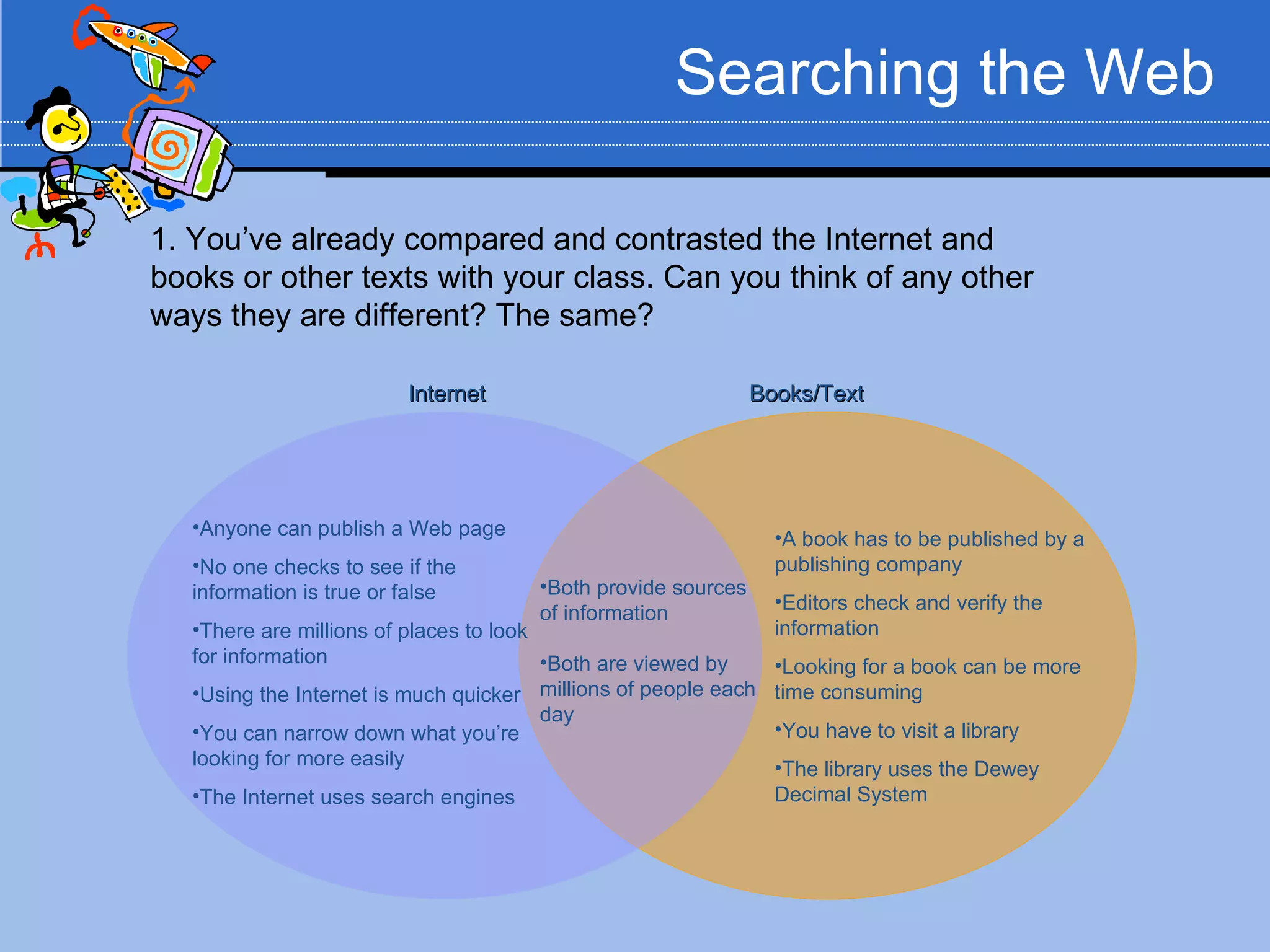
1. You’ve already compared and contrasted the Internet and
books or other texts with your class. Can you think of any other
ways they are different? The same?

                         Internet                              Books/Text


   •Anyone can publish a Web page                                •A book has to be published by a
   •No one checks to see if the                                  publishing company
   information is true or false        •Both provide sources
                                                                 •Editors check and verify the
                                       of information
   •There are millions of places to look                         information
   for information                       •Both are viewed by     •Looking for a book can be more
   •Using the Internet is much quicker millions of people each   time consuming
                                         day
   •You can narrow down what you’re                              •You have to visit a library
   looking for more easily                                       •The library uses the Dewey
   •The Internet uses search engines                             Decimal System
Searching the Web

When might using the Internet be better
than using a traditional text?
•Topics that are contemporary (modern topics) – The Internet
has more up-to-date information on current events.
•Topics that are controversial – The Internet can give you a lot of
different opinions on one topic. It can help you research a topic
from different perspectives.
Session 1: Different Types
   of Search Engines
Searching the Web
                                                       Different Types of Search Engines


   A Search Engine is a program that allows you to search the Internet for
    information. There are many search engines on the World Wide Web.

   You might have heard of search engines like Google, Yahoo!, or MSN. These
    are the most popular search engines.

   There are lots of other excellent search engines on the Internet that you may
    never have heard of!

   Let’s look at the different types of search engines available on the Internet.
Searching the Web
                                                     Different Types of Search Engines


 Regular Search Engines vs. Metasearch Engines
     A regular search engine, like Google or Yahoo!,
      searches the Internet based on a given search term.
        For example, typing “Ned Kelly” into Google will give
         you 7,610,000 “hits” or sites to visit for information.
        Type the same term into Yahoo!, and you come up
         with 36,100,000 hits.

   1. TRY IT: Go to Google (www.google.com) and type in “Ned
   Kelly” Look at the sites that come up. Click on the first two or
   three sites. Do they look like they have good information? Now
   do the same in Yahoo! (www.yahoo.com). What differences do
   you notice?
Searching the Web
                                              Different Types of Search Engines


   Why do Google and Yahoo! display different sites for
    the same word?
      This is because of the way the engine searches!
           Google and Yahoo! use different search methods. While
            many of the sites they show you are the same, some are
            different.

   A Metasearch can streamline your search.
      A Metasearch has the ability to search several search engines.
Searching the Web
                                                  Different Types of Search Engines


     Let’s try using a metasearch engine to search
      information on “Ned Kelly”
     dogpile (www.dogpile.com) is a metasearch engine that
      will search Google, Yahoo! and bing all at once!

2. TRY IT: Go to www.dogpile.com and type in “Ned Kelly”
The results are sorted by search engine. You can look at all
major search engines combined, or narrow your search to
Google, Yahoo!, etc.
How might a metasearch engine like dogpile be more helpful
than a regular search engine?
Searching the Web
                                               Different Types of Search Engines


   Answers (www.answers.com) is a search engine that
    allows you to type in a question rather than a search
    term. For example, if you wanted to know when Ned
    Kelly died, you could ask a specific question and get
    more detailed information.

     3. TRY IT: Go to www.answers.com and type in “When did Ned
     Kelly die?”
Searching the Web
                                         Different Types of Search Engines


          Other Helpful Resources
•Online encyclopedias are a great resource for
research. Try the encyclopedias listed below and see
what you think.
   •Encyclopedia Britannica – www.britannica.com
   •Encarta – www.encarta.msn.com
Searching the Web


       Other Helpful Resources
•Libraries are another place to find lots of useful
information. Take a look at these sites!
    •National Library of Australia’s database –
    http://www.nla.gov.au
    •Public Libraries of Australia website -
    http://www.pla.org.au/
    •Also check the webpage of your local
    library.
Session 2: How to Search
     on the Internet
Searching the Web
                                     2. How to Search on the Internet


 Now that we have looked at different types of
  search engines, we need to learn how to
  make the most of your search!
     Most search engines have something called an
      Advanced Search. An advanced search allows you
      to be more specific about what type of information
      you are looking for.
     When you visit a search engine, the Advanced
      Search page is a great place to start!
Searching the Web
                                                       2. How to Search on the Internet


  Let’s see how the Advanced Search option
   works!
7. TRY IT: Go to www.google.com and click on Advanced Search
to the right of the search box.
-Let’s say you discover that some of your results are about the
Ned Kelly movie. You want to find out about the life of Ned Kelly,
but not about the movie. In the Advanced Search menu, put Ned
Kelly in the box that says “all of these words” and movie in the
box that says “without the words.”
This will filter out the information you don’t want!
Wading Through the Web
                                           2. How to Search on the Internet


       “Smarter” searching on the Internet
   Most Internet search engines also allow you to use a set
    of words or symbols to narrow your search.
      AND – use this word when you want to find two words
       together. For example “Ned Kelly AND bushranger”
      OR – use this when you can accept a couple of words. For
       example, “Ned Kelly OR Australian outlaw”
      Words such as AND, OR & NOT are defined as Boolean
       operators which assist finding relevant information
      “quotations” – use quotation marks when you are searching
       for an exact phrase. For example, if you were searching for
       a book title, you could type “The True History of the Kelly
       Gang” in quotations and the search engine will look for that
       exact phrase.
Wading Through the Web
                                          2. How to Search on the Internet


       “Smarter” searching on the Internet
   Most Internet search engines also allow you to use a set
    of words or symbols to narrow your search.
      Make your keywords as precise as possible ( if you looking
       for information on Ned Kelly, don’t type in bushrangers )
      Use two or more keywords in your search
      Make sure you spell your keywords correctly
      Always try more than one search engine!
Wading Through the Web
                                                     2. How to Search on the Internet


          “Smarter” searching on the Internet
8. TRY IT: Go to www.dogpile.com
What would I type into the search box if I wanted to find out
about a Ned Kelly Museum?
What would I type into the search box if I wanted to find out
about Ned Kelly or any other members of the Kelly Gang?
What would I type into the search box if I wanted to find out
about where Ned Kelly was born and where he is buried?
Wading Through the Web
                                                       2. How to Search on the Internet


How can you tell if an Internet site is
reliable?
   •REMEMBER: Anyone can post information on the Internet!
       •Make sure the information you are using comes from a person or
       organization that can be trusted.
       •One simple way to tell if a site is reliable is to look at who runs
       the site. Usually, looking at the first section of a web address will
       tell you where it came from. If it came from a museum, university,
       or some other place you’ve heard of, chances are that it can be
       trusted.
       •Check website credentials and if you are unsure of it’s accuracy,
       double check information or an alternative website.
Wading Through the Web
                                                         2. How to Search on the Internet


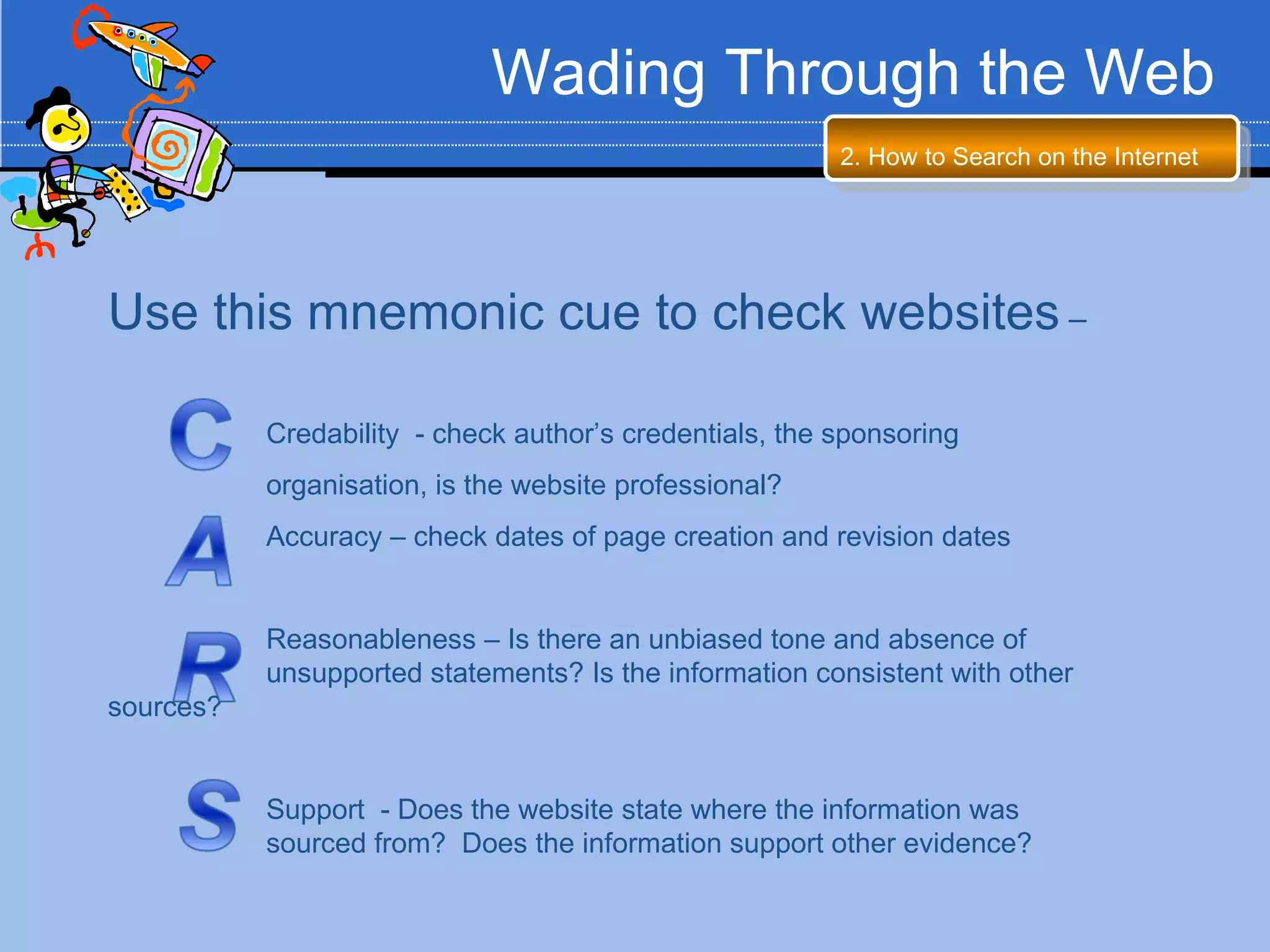
Use this mnemonic cue to check websites –

           Credability - check author’s credentials, the sponsoring
           organisation, is the website professional?
           Accuracy – check dates of page creation and revision dates


           Reasonableness – Is there an unbiased tone and absence of
           unsupported statements? Is the information consistent with other
sources?


           Support - Does the website state where the information was
           sourced from? Does the information support other evidence?
Review

Search Engines                Internet Searching


•Regular search engines vs.    •Using Advanced Search
Metasearch engines
                               •Using words and symbols to
•Search engines that will      narrow your search
categorize the information

•Search engines that will
allow you to ask a question
Internet Scavenger Hunt Skills Test

Ict research presentation updated

  • 1.
    Searching the Web ConductingAccurate Research on the Internet
  • 2.
    Searching the Web Thispresentation will teach you about: 1. Different Types of Search Engines 2. How to Search on the Internet
  • 3.
    Searching the Web 1.You’ve already compared and contrasted the Internet and books or other texts with your class. Can you think of any other ways they are different? The same? Internet Books/Text •Anyone can publish a Web page •A book has to be published by a •No one checks to see if the publishing company information is true or false •Both provide sources •Editors check and verify the of information •There are millions of places to look information for information •Both are viewed by •Looking for a book can be more •Using the Internet is much quicker millions of people each time consuming day •You can narrow down what you’re •You have to visit a library looking for more easily •The library uses the Dewey •The Internet uses search engines Decimal System
  • 4.
    Searching the Web Whenmight using the Internet be better than using a traditional text? •Topics that are contemporary (modern topics) – The Internet has more up-to-date information on current events. •Topics that are controversial – The Internet can give you a lot of different opinions on one topic. It can help you research a topic from different perspectives.
  • 5.
    Session 1: DifferentTypes of Search Engines
  • 6.
    Searching the Web Different Types of Search Engines  A Search Engine is a program that allows you to search the Internet for information. There are many search engines on the World Wide Web.  You might have heard of search engines like Google, Yahoo!, or MSN. These are the most popular search engines.  There are lots of other excellent search engines on the Internet that you may never have heard of!  Let’s look at the different types of search engines available on the Internet.
  • 7.
    Searching the Web Different Types of Search Engines  Regular Search Engines vs. Metasearch Engines  A regular search engine, like Google or Yahoo!, searches the Internet based on a given search term.  For example, typing “Ned Kelly” into Google will give you 7,610,000 “hits” or sites to visit for information.  Type the same term into Yahoo!, and you come up with 36,100,000 hits. 1. TRY IT: Go to Google (www.google.com) and type in “Ned Kelly” Look at the sites that come up. Click on the first two or three sites. Do they look like they have good information? Now do the same in Yahoo! (www.yahoo.com). What differences do you notice?
  • 8.
    Searching the Web Different Types of Search Engines  Why do Google and Yahoo! display different sites for the same word?  This is because of the way the engine searches!  Google and Yahoo! use different search methods. While many of the sites they show you are the same, some are different.  A Metasearch can streamline your search.  A Metasearch has the ability to search several search engines.
  • 9.
    Searching the Web Different Types of Search Engines  Let’s try using a metasearch engine to search information on “Ned Kelly”  dogpile (www.dogpile.com) is a metasearch engine that will search Google, Yahoo! and bing all at once! 2. TRY IT: Go to www.dogpile.com and type in “Ned Kelly” The results are sorted by search engine. You can look at all major search engines combined, or narrow your search to Google, Yahoo!, etc. How might a metasearch engine like dogpile be more helpful than a regular search engine?
  • 10.
    Searching the Web Different Types of Search Engines  Answers (www.answers.com) is a search engine that allows you to type in a question rather than a search term. For example, if you wanted to know when Ned Kelly died, you could ask a specific question and get more detailed information. 3. TRY IT: Go to www.answers.com and type in “When did Ned Kelly die?”
  • 11.
    Searching the Web Different Types of Search Engines Other Helpful Resources •Online encyclopedias are a great resource for research. Try the encyclopedias listed below and see what you think. •Encyclopedia Britannica – www.britannica.com •Encarta – www.encarta.msn.com
  • 12.
    Searching the Web Other Helpful Resources •Libraries are another place to find lots of useful information. Take a look at these sites! •National Library of Australia’s database – http://www.nla.gov.au •Public Libraries of Australia website - http://www.pla.org.au/ •Also check the webpage of your local library.
  • 13.
    Session 2: Howto Search on the Internet
  • 14.
    Searching the Web 2. How to Search on the Internet  Now that we have looked at different types of search engines, we need to learn how to make the most of your search!  Most search engines have something called an Advanced Search. An advanced search allows you to be more specific about what type of information you are looking for.  When you visit a search engine, the Advanced Search page is a great place to start!
  • 15.
    Searching the Web 2. How to Search on the Internet  Let’s see how the Advanced Search option works! 7. TRY IT: Go to www.google.com and click on Advanced Search to the right of the search box. -Let’s say you discover that some of your results are about the Ned Kelly movie. You want to find out about the life of Ned Kelly, but not about the movie. In the Advanced Search menu, put Ned Kelly in the box that says “all of these words” and movie in the box that says “without the words.” This will filter out the information you don’t want!
  • 16.
    Wading Through theWeb 2. How to Search on the Internet “Smarter” searching on the Internet  Most Internet search engines also allow you to use a set of words or symbols to narrow your search.  AND – use this word when you want to find two words together. For example “Ned Kelly AND bushranger”  OR – use this when you can accept a couple of words. For example, “Ned Kelly OR Australian outlaw”  Words such as AND, OR & NOT are defined as Boolean operators which assist finding relevant information  “quotations” – use quotation marks when you are searching for an exact phrase. For example, if you were searching for a book title, you could type “The True History of the Kelly Gang” in quotations and the search engine will look for that exact phrase.
  • 17.
    Wading Through theWeb 2. How to Search on the Internet “Smarter” searching on the Internet  Most Internet search engines also allow you to use a set of words or symbols to narrow your search.  Make your keywords as precise as possible ( if you looking for information on Ned Kelly, don’t type in bushrangers )  Use two or more keywords in your search  Make sure you spell your keywords correctly  Always try more than one search engine!
  • 18.
    Wading Through theWeb 2. How to Search on the Internet “Smarter” searching on the Internet 8. TRY IT: Go to www.dogpile.com What would I type into the search box if I wanted to find out about a Ned Kelly Museum? What would I type into the search box if I wanted to find out about Ned Kelly or any other members of the Kelly Gang? What would I type into the search box if I wanted to find out about where Ned Kelly was born and where he is buried?
  • 19.
    Wading Through theWeb 2. How to Search on the Internet How can you tell if an Internet site is reliable? •REMEMBER: Anyone can post information on the Internet! •Make sure the information you are using comes from a person or organization that can be trusted. •One simple way to tell if a site is reliable is to look at who runs the site. Usually, looking at the first section of a web address will tell you where it came from. If it came from a museum, university, or some other place you’ve heard of, chances are that it can be trusted. •Check website credentials and if you are unsure of it’s accuracy, double check information or an alternative website.
  • 20.
    Wading Through theWeb 2. How to Search on the Internet Use this mnemonic cue to check websites – Credability - check author’s credentials, the sponsoring organisation, is the website professional? Accuracy – check dates of page creation and revision dates Reasonableness – Is there an unbiased tone and absence of unsupported statements? Is the information consistent with other sources? Support - Does the website state where the information was sourced from? Does the information support other evidence?
  • 21.
    Review Search Engines Internet Searching •Regular search engines vs. •Using Advanced Search Metasearch engines •Using words and symbols to •Search engines that will narrow your search categorize the information •Search engines that will allow you to ask a question
  • 22.