H O W
Google
SEARCH
W O R K S
Presentation by : Hardik B. Mahant
CONTENTS
• Overview about Google
• What actually happens when we
Google
• How Google search works
• Crawling
• Indexing
• Processing
• Calculate relevancy
• Fighting spam
• Retrieving results
• References
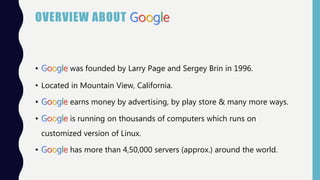
OVERVIEW ABOUT Google
• Google was founded by Larry Page and Sergey Brin in 1996.
• Located in Mountain View, California.
• Google earns money by advertising, by play store & many more ways.
• Google is running on thousands of computers which runs on
customized version of Linux.
• Google has more than 4,50,000 servers (approx.) around the world.
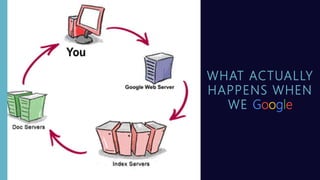
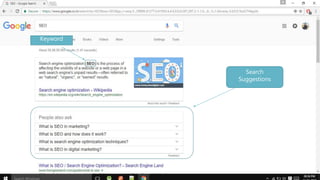
WHAT ACTUALLY
HAPPENS WHEN
WE Google
Keyword
Search
Suggestions
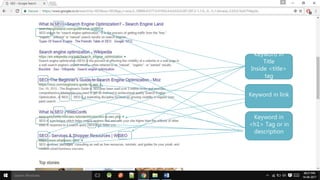
Keyword in
Title
Inside <title>
tag
Keyword in link
Keyword in
<h1> Tag or in
description
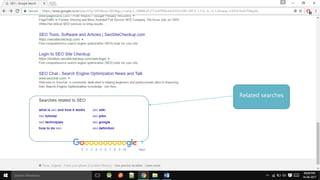
Related searches
HOW GOOGLE SEARCH WORKS
• Crawling
• Indexing
• Processing
• Calculate relevancy
• Fighting spam
• Retrieving results
CRAWLING : FINDING INFORMATION
• Process of fetching all the web pages linked to a website.
• Performed by software, called crawler OR spider OR googlebot.
• The crawl process begins with a list of web addresses from past crawls
& sitemaps provided by website owners.
CRAWLING:
FINDING
INFORMATION
Crawlers /
Spiders
Links
INDEXING : ORGANIZING INFORMATION
• Google uses the INDEX databases; after every search, the result will be
stored in this DB.
• Process of creating “index” for all the fetched web pages and keeping
them into a giant database from where it can later be retrieved.
• By this, if the another user searches the same keyword, which had
searched before, results for that will be retrieved more faster.
NEED OF INDEXING
PROCESSING : BY ALGORITHMS
• We want the answer, not trillions of webpages.
• Algorithms are computer programs that look for clues to give you
back exactly what you want.
• Algorithms are the computer processes and formulas that take your
questions and turn them into answers.
PROCESSING : BY ALGORITHMS
• For example they have algorithms for reliability & closer results,
-Autocomplete
-Freshness
-Site & page quality
-Safe search
-Synonyms
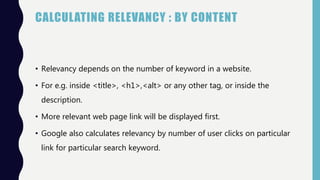
CALCULATING RELEVANCY : BY CONTENT
• Relevancy depends on the number of keyword in a website.
• For e.g. inside <title>, <h1>,<alt> or any other tag, or inside the
description.
• More relevant web page link will be displayed first.
• Google also calculates relevancy by number of user clicks on particular
link for particular search keyword.
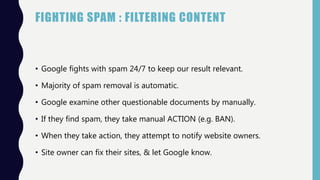
FIGHTING SPAM : FILTERING CONTENT
• Google fights with spam 24/7 to keep our result relevant.
• Majority of spam removal is automatic.
• Google examine other questionable documents by manually.
• If they find spam, they take manual ACTION (e.g. BAN).
• When they take action, they attempt to notify website owners.
• Site owner can fix their sites, & let Google know.
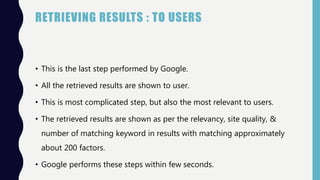
RETRIEVING RESULTS : TO USERS
• This is the last step performed by Google.
• All the retrieved results are shown to user.
• This is most complicated step, but also the most relevant to users.
• The retrieved results are shown as per the relevancy, site quality, &
number of matching keyword in results with matching approximately
about 200 factors.
• Google performs these steps within few seconds.
REFERENCES
• https://www.google.co.in/insidesearch/howsearchworks/index.html
• https://www.youtube.com/watch?v=BNHR6IQJGZs
• https://en.wikipedia.org/wiki/Google
How Google search works ppt

How Google search works ppt

  • 1.
    H O W Google SEARCH WO R K S Presentation by : Hardik B. Mahant
  • 2.
    CONTENTS • Overview aboutGoogle • What actually happens when we Google • How Google search works • Crawling • Indexing • Processing • Calculate relevancy • Fighting spam • Retrieving results • References
  • 3.
    OVERVIEW ABOUT Google •Google was founded by Larry Page and Sergey Brin in 1996. • Located in Mountain View, California. • Google earns money by advertising, by play store & many more ways. • Google is running on thousands of computers which runs on customized version of Linux. • Google has more than 4,50,000 servers (approx.) around the world.
  • 4.
  • 5.
  • 6.
    Keyword in Title Inside <title> tag Keywordin link Keyword in <h1> Tag or in description
  • 7.
  • 8.
    HOW GOOGLE SEARCHWORKS • Crawling • Indexing • Processing • Calculate relevancy • Fighting spam • Retrieving results
  • 9.
    CRAWLING : FINDINGINFORMATION • Process of fetching all the web pages linked to a website. • Performed by software, called crawler OR spider OR googlebot. • The crawl process begins with a list of web addresses from past crawls & sitemaps provided by website owners.
  • 10.
  • 11.
    INDEXING : ORGANIZINGINFORMATION • Google uses the INDEX databases; after every search, the result will be stored in this DB. • Process of creating “index” for all the fetched web pages and keeping them into a giant database from where it can later be retrieved. • By this, if the another user searches the same keyword, which had searched before, results for that will be retrieved more faster.
  • 12.
  • 13.
    PROCESSING : BYALGORITHMS • We want the answer, not trillions of webpages. • Algorithms are computer programs that look for clues to give you back exactly what you want. • Algorithms are the computer processes and formulas that take your questions and turn them into answers.
  • 14.
    PROCESSING : BYALGORITHMS • For example they have algorithms for reliability & closer results, -Autocomplete -Freshness -Site & page quality -Safe search -Synonyms
  • 15.
    CALCULATING RELEVANCY :BY CONTENT • Relevancy depends on the number of keyword in a website. • For e.g. inside <title>, <h1>,<alt> or any other tag, or inside the description. • More relevant web page link will be displayed first. • Google also calculates relevancy by number of user clicks on particular link for particular search keyword.
  • 16.
    FIGHTING SPAM :FILTERING CONTENT • Google fights with spam 24/7 to keep our result relevant. • Majority of spam removal is automatic. • Google examine other questionable documents by manually. • If they find spam, they take manual ACTION (e.g. BAN). • When they take action, they attempt to notify website owners. • Site owner can fix their sites, & let Google know.
  • 17.
    RETRIEVING RESULTS :TO USERS • This is the last step performed by Google. • All the retrieved results are shown to user. • This is most complicated step, but also the most relevant to users. • The retrieved results are shown as per the relevancy, site quality, & number of matching keyword in results with matching approximately about 200 factors. • Google performs these steps within few seconds.
  • 18.