











ICT IN LEARNING
DEBABRATA GIRI
TE , DIET , MAYURBHANJ ,BARIPADA
UNIT-11
ICT IN LEARNING
 Information Communication Technology (ICT)
 Tools of ICT
 Classification of Tools
 Uses in the Classroom
 Integration of ICT
 In the Learning Process
 In Assessment
ICT
 Information and Communication Technology(ICT) is
defined as a diverse set of technological tools and
resources used to Communicate, and to create ,
disseminate, store, and manage information (UNDP, 2000;
UNESCO 2002).
 i. Information and Communication Infrastructure (ICI)
 ii. Information Technology (IT)
 iii. Communication Technology (CT)
TOOLS OF ICT
i) Informative Tools
(ii) Situating Tools
(iii) Constructive Tools
(iv) Communicative tools
Use of ICT Tools
In Pedagogies
 In collaboration
In Assessment
In the context of learning process
1. Individual learning
2. Group learning and teaching
Collaborative learning
INTEGRATION OF ICT
 Problem Statement
 Learning Objectives
 Technology Required
 Rationale for using the Technology
 Strategies for Implementation
 Reflection and Further Suggestion
Integration of ICT in the Assessment
Process
CCA
ICT-based assessment
Non-ICT based assessment
ICT Integration and Assessment
Principle
 Flexibility
 Assessment as a tool for learning
 Responsibility of students for their learning
 Product and process assessment
 A variety of assessment instruments
 Authenticity of assessment
 The student as an active participant in the assessment
process
UNIT-12 COMPUTER ASSISTED LEARNING
 The Computer
 12.2.1 What is Computer?
 12.2.2 Functional Units
 12.2.3 Major Components
 12.2.4 Types of Computer
 12.2.5 Using the Computer
 12.3 Computer as a source of Learning
 12.3.1 The Internet and the Web
 12.3.2 Internet-based Learning
 12.4 Computer Assisted Learning
 12.4.1 Modes of Computer Assisted Learning
 12.4.2 Planning for Computer Assisted Learning
What is a Computer ?
A Computer is an electronic device that takes raw data
as inputs from the user,processes these data under the
control of a set of instruction (called programme),gives the
result (output) and saves output for future purposes
(storage). It can process both numerical and non-numerical
(arithmetic and logical) calculations
From the Definition ;
1) It accepts data or instructions by way of input,
2) It stores data,
3) It can process data as required by the user,
4) It gives results in the form of output, and
5) It controls all operations inside a computer.
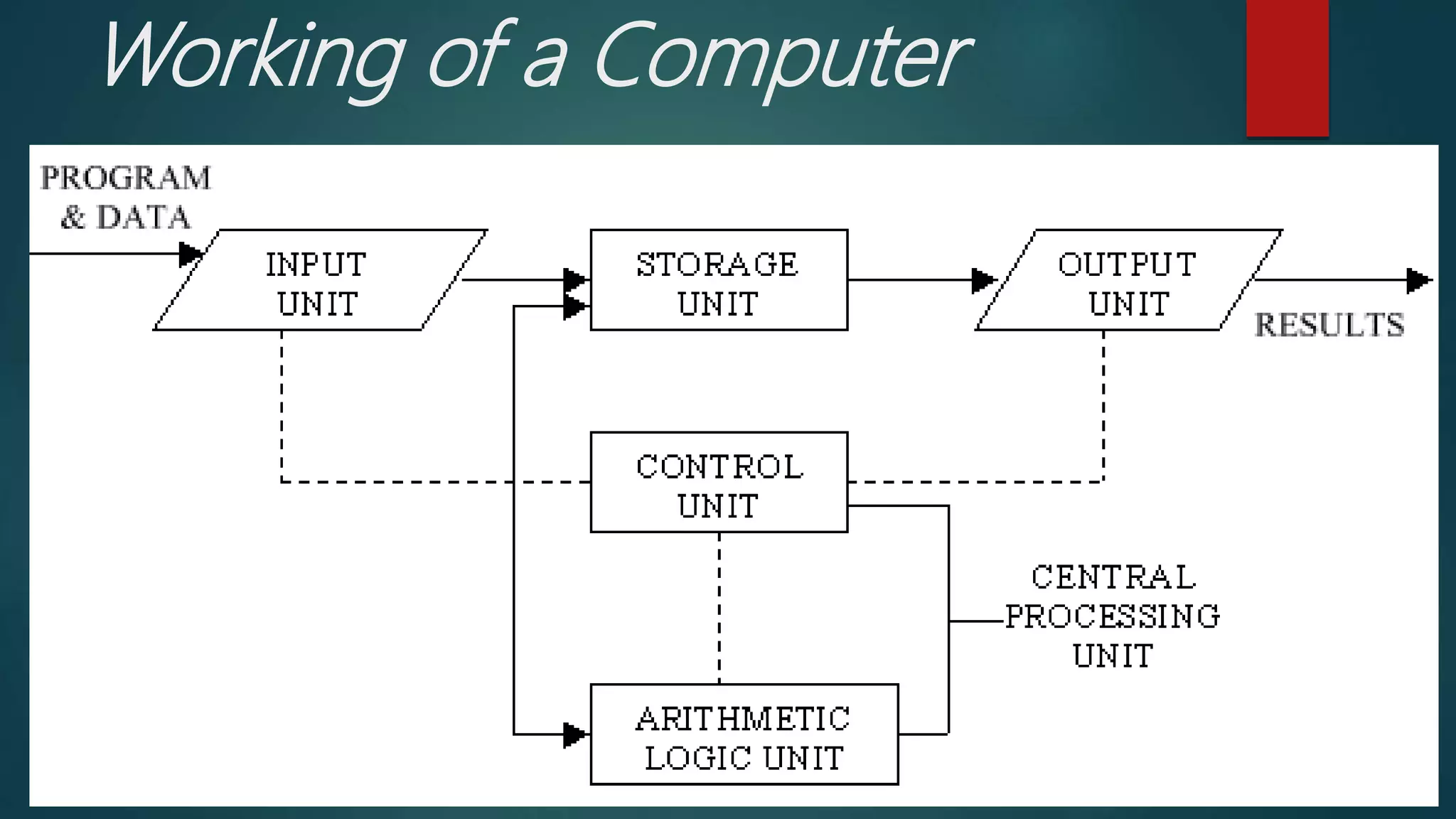
Working of a Computer
5 MAJOR OPERATIONS OF COMPUTER
1. Input
2. Storage
3. Processing
4. Output
5. Control
Functional Units
i) Arithmetic Logical Unit (ALU)
ii) Control Unit (CU)
iii) Central Processing Unit (CPU)
Anatomy of computer and its working
 Hardware – physical aspects of computers, telecommunications,
and other information technology devices
 Example: Keyboard, monitor
 Software is the set of instructions that lets you “talk” to your
computer. Software translates commands into bits and bytes.
Different types of software have different functions:
 It is a general term for the various kinds of programs used to
operate computers and related devices
 Example: Microsoft Excel
Contd……..
Contd….
Operating system (OS) software - makes your
computer work
Application software - lets you do different tasks
on your computer
Utility software - helps you maintain your
computer and keep it in good running condition
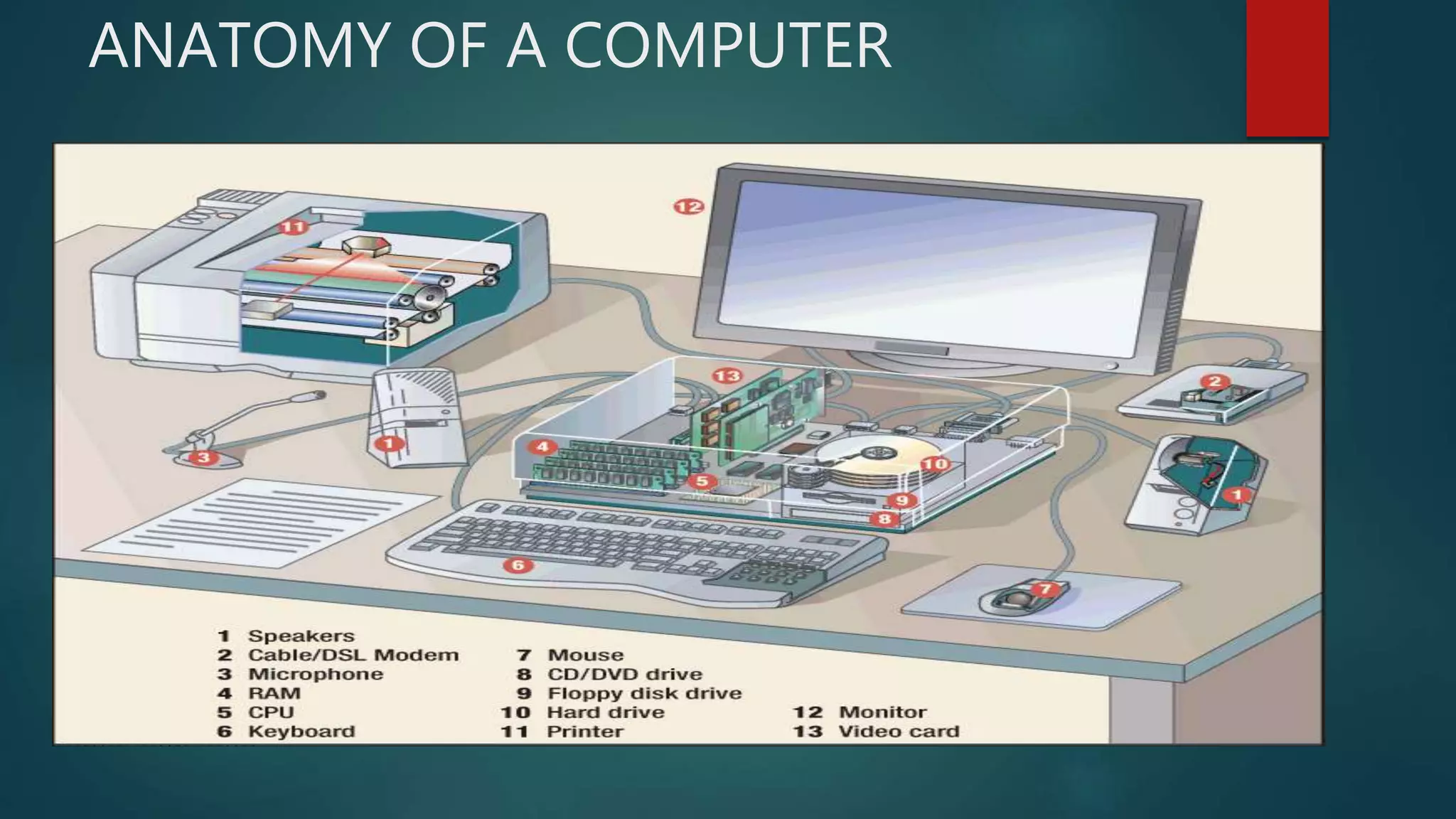
ANATOMY OF A COMPUTER
Major Components of The Computer
1. Input Devices
2. Central Processing Unit (CPU
3. Storage Devices
4. Out put Devices
Types of Computer
a) Microcomputer
b) Mini Computer
c) Main frames
d) Super Computer
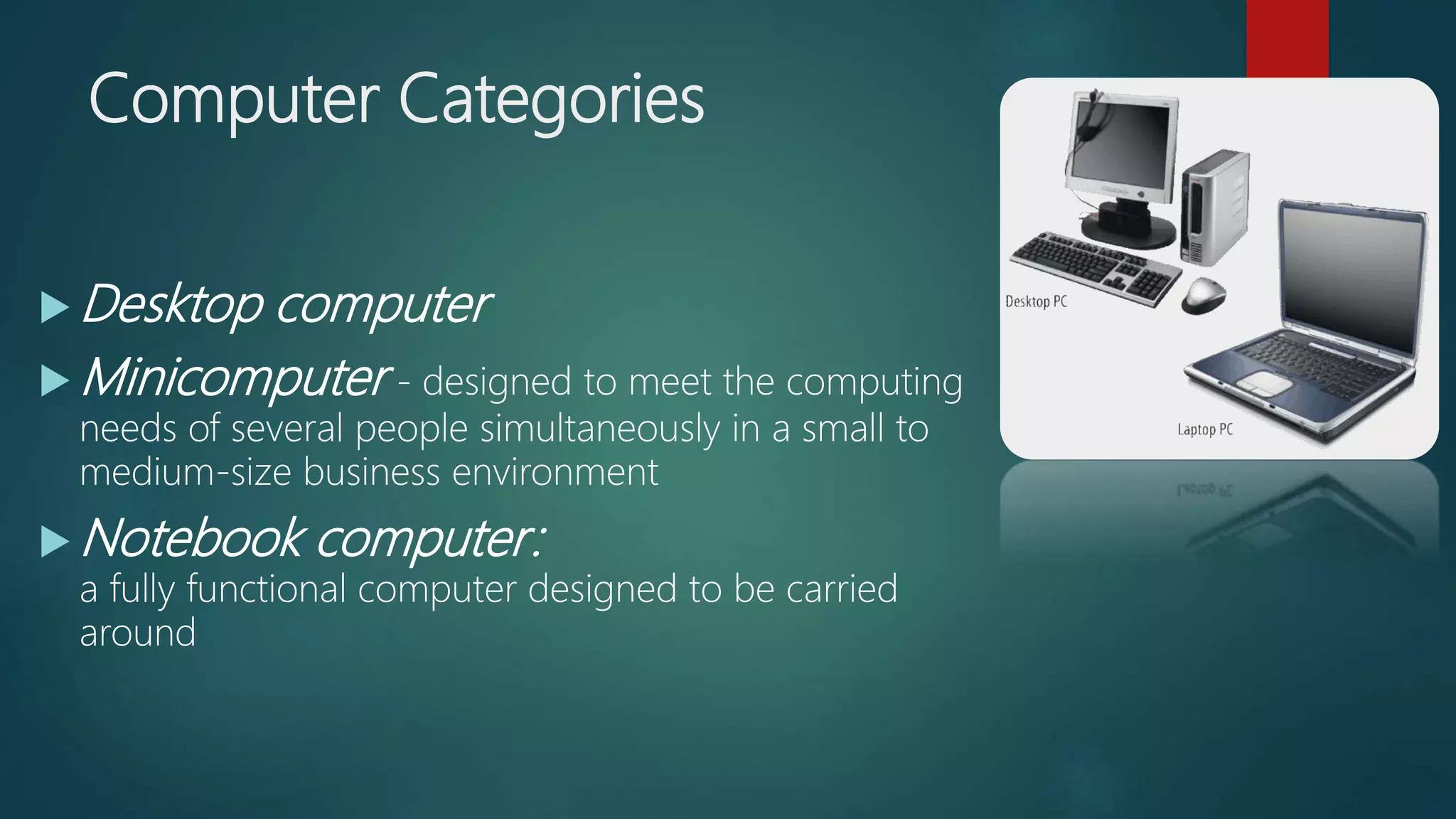
Computer Categories
 Desktop computer
 Minicomputer - designed to meet the computing
needs of several people simultaneously in a small to
medium-size business environment
 Notebook computer:
a fully functional computer designed to be carried
around
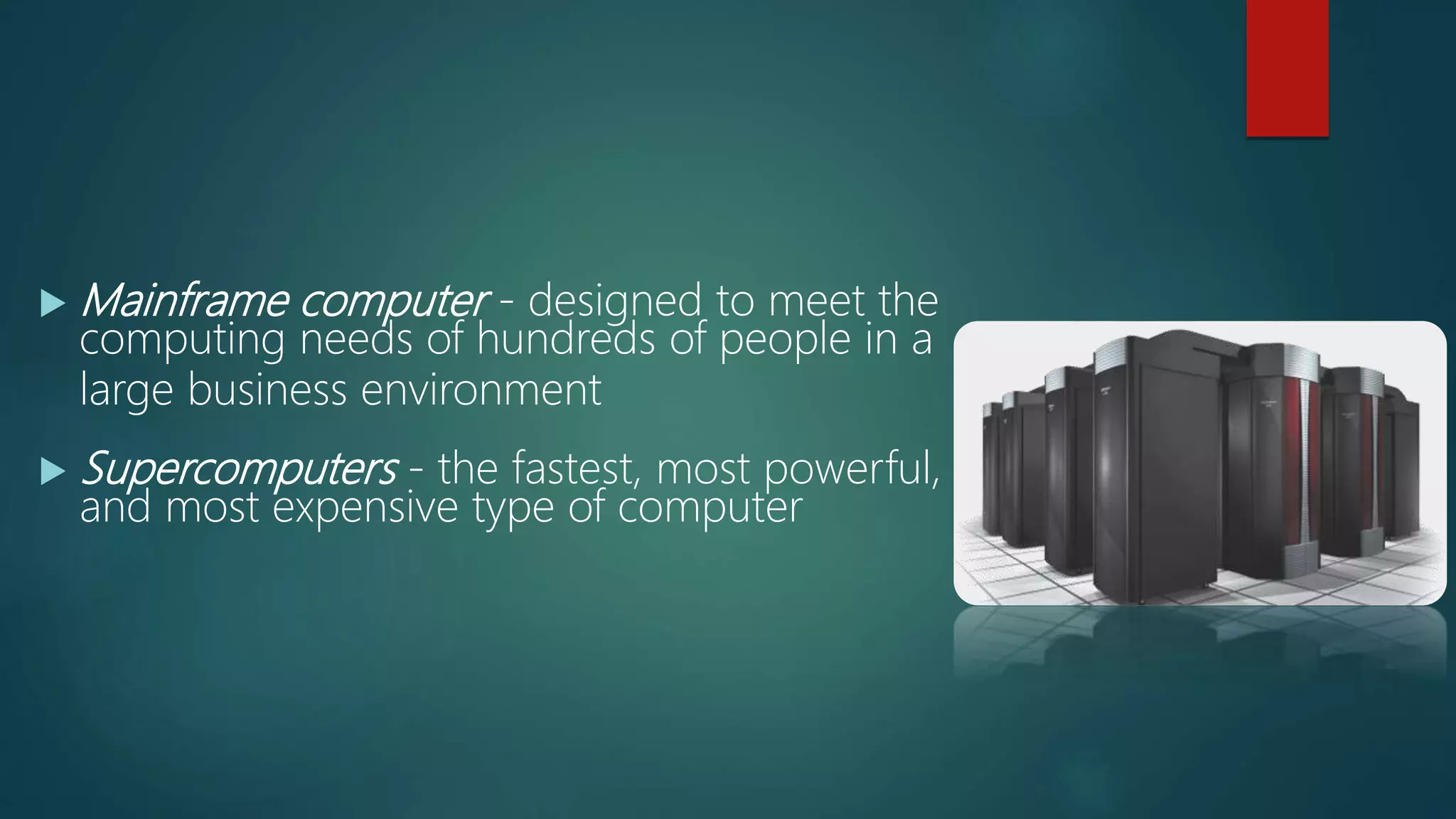
 Mainframe computer - designed to meet the
computing needs of hundreds of people in a
large business environment
 Supercomputers - the fastest, most powerful,
and most expensive type of computer
Characteristics of a Computer
Speed
Accuracy
Storage
Versatility
Diligence
Using the Computer
Starting the computer
Shutting down (Turning off) the Computer
Working with Microsoft Word:
Working with Power Point Presentation(PPT)
COMPUTERS AS A SOURCE OF LEARNING
The Internet and the Web
Internet based learning
 The internet as a technology of information;
 The internet as a technology of interaction;
 The internet as a technology of sociability.
COMPUTER ASSISTED LEARNING
Modes of Computer Assisted Learning
1. Drill and Practice Session
2. Tutorial Mode
3. Data Analysis
4. Simulation
5. Modelling
6. Information Storage and Retrieval
Planning for Computer Assisted Learning
 Stating the objectives
 Identifying the space and availability of computer
 Selecting the modes of computer assisted learning
 Strategies for Implementation
1. Lecture strategy
2. Collaborative strategy
3. Self-regulatory strategy
Thank You
Biju Pattanaik Computer Education
Programme
 Computer Aided Learning Programme (CALP)
2004
Objectives of CAL
Quality Education
Upgrading Efficiency of Teachers
Increasing Enrolment and Retention
Learning to be Meaningful and Interesting
ICT Tools in Education
 Radio and TV Broadcasting
 Educational Movie and CD
 Web Source
1. Internet and Web
2. Internet and Learning
 Web Resources ( Web 2.0 , Web 3.0 )
ICT Tools
1. OER
2. WIKI
3. CURRIKI
4. YOUTUBE
5. Google
6. Teacher Tube
7. Blog
8. Slide Share
9. Dynamath
10. Geogebra
11. Google Maps
12. BYJU’S
13. Padlet Wall
Integration of ICT in Classroom
Activities
 Emerging Stage
 Infusion Stage
 Application Stage
 Transformation Stage
Suggested Models
ASSURE
ICARE
ASSURE MODEL
Sharon Smaldino
 Analyse the Learner
 State standards & objectives
 Select strategies, technology, media & materials
 Utilize technology, media & materials
 Require learner participation
 Evaluate & revise
ICARE MODEL
Integration of ICT in Assessment
 ASSESSMENT
 Continuous and Comprehensive Assessment (CCA)
 Self Assessment
 Peer Assessment
 Individual Assessment
 Group Assessment
ICT Based Assessment Tools and Techniques
FGD
Interview
Performance Test
Spread Sheets
Google Forms
Ict in learning
Ict in learning
Ict in learning
Ict in learning
Ict in learning
Ict in learning
Ict in learning
Ict in learning
Ict in learning
Ict in learning
Ict in learning
Ict in learning
Ict in learning
Ict in learning
Ict in learning
Ict in learning
Ict in learning

Ict in learning

  • 1.
    ICT IN LEARNING DEBABRATAGIRI TE , DIET , MAYURBHANJ ,BARIPADA
  • 2.
    UNIT-11 ICT IN LEARNING Information Communication Technology (ICT)  Tools of ICT  Classification of Tools  Uses in the Classroom  Integration of ICT  In the Learning Process  In Assessment
  • 3.
    ICT  Information andCommunication Technology(ICT) is defined as a diverse set of technological tools and resources used to Communicate, and to create , disseminate, store, and manage information (UNDP, 2000; UNESCO 2002).  i. Information and Communication Infrastructure (ICI)  ii. Information Technology (IT)  iii. Communication Technology (CT)
  • 4.
    TOOLS OF ICT i)Informative Tools (ii) Situating Tools (iii) Constructive Tools (iv) Communicative tools
  • 5.
    Use of ICTTools In Pedagogies  In collaboration In Assessment In the context of learning process 1. Individual learning 2. Group learning and teaching Collaborative learning
  • 6.
    INTEGRATION OF ICT Problem Statement  Learning Objectives  Technology Required  Rationale for using the Technology  Strategies for Implementation  Reflection and Further Suggestion
  • 7.
    Integration of ICTin the Assessment Process CCA ICT-based assessment Non-ICT based assessment
  • 8.
    ICT Integration andAssessment Principle  Flexibility  Assessment as a tool for learning  Responsibility of students for their learning  Product and process assessment  A variety of assessment instruments  Authenticity of assessment  The student as an active participant in the assessment process
  • 9.
    UNIT-12 COMPUTER ASSISTEDLEARNING  The Computer  12.2.1 What is Computer?  12.2.2 Functional Units  12.2.3 Major Components  12.2.4 Types of Computer  12.2.5 Using the Computer  12.3 Computer as a source of Learning  12.3.1 The Internet and the Web  12.3.2 Internet-based Learning  12.4 Computer Assisted Learning  12.4.1 Modes of Computer Assisted Learning  12.4.2 Planning for Computer Assisted Learning
  • 10.
    What is aComputer ? A Computer is an electronic device that takes raw data as inputs from the user,processes these data under the control of a set of instruction (called programme),gives the result (output) and saves output for future purposes (storage). It can process both numerical and non-numerical (arithmetic and logical) calculations
  • 11.
    From the Definition; 1) It accepts data or instructions by way of input, 2) It stores data, 3) It can process data as required by the user, 4) It gives results in the form of output, and 5) It controls all operations inside a computer.
  • 12.
    Working of aComputer
  • 13.
    5 MAJOR OPERATIONSOF COMPUTER 1. Input 2. Storage 3. Processing 4. Output 5. Control
  • 14.
    Functional Units i) ArithmeticLogical Unit (ALU) ii) Control Unit (CU) iii) Central Processing Unit (CPU)
  • 15.
    Anatomy of computerand its working  Hardware – physical aspects of computers, telecommunications, and other information technology devices  Example: Keyboard, monitor  Software is the set of instructions that lets you “talk” to your computer. Software translates commands into bits and bytes. Different types of software have different functions:  It is a general term for the various kinds of programs used to operate computers and related devices  Example: Microsoft Excel Contd……..
  • 16.
    Contd…. Operating system (OS)software - makes your computer work Application software - lets you do different tasks on your computer Utility software - helps you maintain your computer and keep it in good running condition
  • 17.
    ANATOMY OF ACOMPUTER
  • 18.
    Major Components ofThe Computer 1. Input Devices 2. Central Processing Unit (CPU 3. Storage Devices 4. Out put Devices
  • 19.
    Types of Computer a)Microcomputer b) Mini Computer c) Main frames d) Super Computer
  • 20.
    Computer Categories  Desktopcomputer  Minicomputer - designed to meet the computing needs of several people simultaneously in a small to medium-size business environment  Notebook computer: a fully functional computer designed to be carried around
  • 21.
     Mainframe computer- designed to meet the computing needs of hundreds of people in a large business environment  Supercomputers - the fastest, most powerful, and most expensive type of computer
  • 22.
    Characteristics of aComputer Speed Accuracy Storage Versatility Diligence
  • 23.
    Using the Computer Startingthe computer Shutting down (Turning off) the Computer Working with Microsoft Word: Working with Power Point Presentation(PPT)
  • 24.
    COMPUTERS AS ASOURCE OF LEARNING The Internet and the Web
  • 25.
    Internet based learning The internet as a technology of information;  The internet as a technology of interaction;  The internet as a technology of sociability.
  • 26.
    COMPUTER ASSISTED LEARNING Modesof Computer Assisted Learning 1. Drill and Practice Session 2. Tutorial Mode 3. Data Analysis 4. Simulation 5. Modelling 6. Information Storage and Retrieval
  • 27.
    Planning for ComputerAssisted Learning  Stating the objectives  Identifying the space and availability of computer  Selecting the modes of computer assisted learning  Strategies for Implementation 1. Lecture strategy 2. Collaborative strategy 3. Self-regulatory strategy
  • 28.
  • 29.
    Biju Pattanaik ComputerEducation Programme  Computer Aided Learning Programme (CALP) 2004
  • 30.
    Objectives of CAL QualityEducation Upgrading Efficiency of Teachers Increasing Enrolment and Retention Learning to be Meaningful and Interesting
  • 31.
    ICT Tools inEducation  Radio and TV Broadcasting  Educational Movie and CD  Web Source 1. Internet and Web 2. Internet and Learning  Web Resources ( Web 2.0 , Web 3.0 )
  • 32.
    ICT Tools 1. OER 2.WIKI 3. CURRIKI 4. YOUTUBE 5. Google 6. Teacher Tube 7. Blog 8. Slide Share 9. Dynamath 10. Geogebra 11. Google Maps 12. BYJU’S 13. Padlet Wall
  • 33.
    Integration of ICTin Classroom Activities  Emerging Stage  Infusion Stage  Application Stage  Transformation Stage
  • 34.
  • 35.
    ASSURE MODEL Sharon Smaldino Analyse the Learner  State standards & objectives  Select strategies, technology, media & materials  Utilize technology, media & materials  Require learner participation  Evaluate & revise
  • 36.
  • 37.
    Integration of ICTin Assessment  ASSESSMENT  Continuous and Comprehensive Assessment (CCA)  Self Assessment  Peer Assessment  Individual Assessment  Group Assessment
  • 38.
    ICT Based AssessmentTools and Techniques FGD Interview Performance Test Spread Sheets Google Forms

Editor's Notes

  • #5 Therefore, ICT can be understood as integration of information technology with different kinds of communication technology with the help of appropriate infrastructure. It can be said that there is major role of information technology in enhancement of communication. Given below are examples of such technologies
  • #21 The First Computer The first computer, the ENIAC machine (John W. Mauchly and J. Presper Eckert at the University of Pennsylvania) used 18,000 vacuum tubes and trequired 167 square meters (1800 square feet) of floor space
  • #25 Uniform Resource Locator (URL)
  • #27 Repeatation of exercise