Spring Boot
Code with 0% Configuration
Gyenendra Yadav
Jindal InfoSolutions
Introduction – pivotal Say…
 Spring Boot makes it easy to create stand-alone,
production-grade Spring based Applications that you can
“just run”. We take an opinionated view of the Spring
platform and third-party libraries so you can get started
with minimum fuss. Most Spring Boot applications need
very little Spring configuration.
 You can use Spring Boot to create Java applications that
can be started using java -jar or more traditional war
deployments. We also provide a command line tool that
runs “spring scripts”.
WHY We Need Spring Boot?
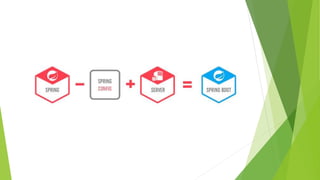
 Spring Boot is next generation attempt to easy spring setup.
 Spring Boot’s main benefit is configuring the resources based on
what it finds in the classpath.
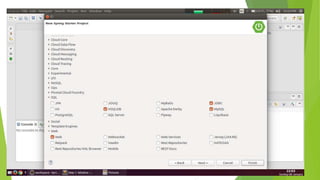
 If your Maven POM includes JPA dependencies and a MYSQL
driver, then Spring Boot will setup a persistence unit based on
MySQL. If you’ve added a web dependency, then you will get
Spring MVC configured with defaults.
 When we talk about defaults, Spring Boot has its own opinions.
If you are not specifying the details, it will use its own default
configurations. If you want persistence, but don’t specify
anything else in your POM file, then Spring Boot configures
Hibernate as a JPA provider with an HSQLDB database.
primary goals
 To provide a radically faster and widely accessible getting
started development experience for all Spring
development. Since spring community has evolved so big,
it is time to re-invent the way how spring applications are
deployed in much quicker turn around time.
 To be get started so quickely using the default values
which are supported out of the box in the Spring Boot
configurations.
 To provide bunch of non-functional features/solutions that
are very much common to large scale projects (e.g.
embedded servers, security, metrics, health checks,
externalized configuration).
What Spring Boot brings to the table ?
 Convention over configuration
 Standardization for Microservices
 Integrated Server for Development
 Cloud Support
 Adapt & Support for 3rd Party Library
Spring Boot Components
Spring Boot Auto Configure
 Module to auto configure a wide range of Spring projects.
 It will detect availability of certain frameworks (Spring
Batch, Spring Data JPA, Hibernate, JDBC).
 When detected it will try to auto configure that
framework with some sensible defaults, which in general
can be overridden by configuration in an
application.properties/yml(yaml-data serialization
language) file.
Spring Boot Core
The base for other modules, but it also provides
some functionality that can be used on its own, eg.
using command line arguments and YAML files as
Spring Environment property sources and
automatically binding environment properties to
Spring bean properties (with validation).
Spring Boot CLI
A command line interface, based on ruby, to
start/stop spring boot created applications.
Spring Boot Actuator
 This project, when added, will enable certain
enterprise features (Security, Metrics, Default
Error pages) to your application.
 As the auto configure module it uses auto
detection to detect certain frameworks/features
of your application. For an example, you can see
all the REST Services defined in a web application
using Actuator.
Spring Boot Starters
 Different quick start projects to include as a
dependency in your maven or gradle build file.
 It will have the needed dependencies for that
type of application.
 Currently there are many starter projects and
many more are expected to be added.
Spring Boot Tools
 The Maven and Gradle build tool as well as the
custom Spring Boot Loader (used in the single
executable jar/war) is included in this project.
How to use Spring Boot
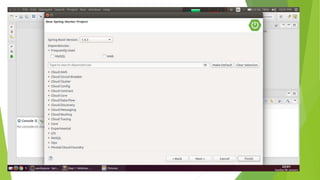
 You can use spring initialize to create the initial setup. You can visit
either start.spring.io or use STS (Spring Tool Suite) Support available
in IDEA or Eclipse to choose all the Spring Boot Starters
 You need to also choose whether to use Maven or Gradle as the build
tool.
 If you are using start.spring.io, you need to then download the zip and
configure your workspace. Otherwise using your preferred IDE will
automatically create the required file in the workspace.
 Add your code as required
 You can either use mvn clean package or use IDEA or Eclipse to build
and create the jar file.
 By default the JAR would include integrated Tomcat server, so just by
executing the JAR you should be able to use your program.
Environment Setup for Eclipse
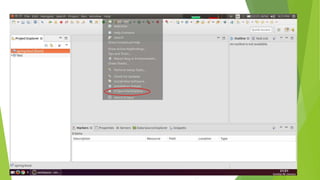
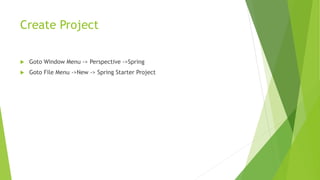
Create Project
 Goto Window Menu -> Perspective ->Spring
 Goto File Menu ->New -> Spring Starter Project
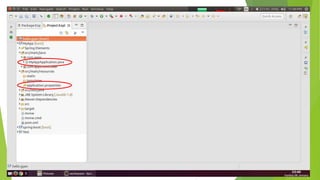
MyAppApplication Class
package com.apps;
import org.springframework.boot.SpringApplication;
import org.springframework.boot.autoconfigure.SpringBootApplication;
@SpringBootApplication
public class MyAppApplication {
public static void main(String[] args) {
SpringApplication.run(MyAppApplication.class, args);
}
}
@SpringBootApplication annotation
 @SpringBootApplication annotation
 Many Spring Boot developers always have their main class
annotated with @Configuration, @EnableAutoConfiguration and
@ComponentScan. Since these annotations are so frequently
used together (especially if you follow the best practices
above), Spring Boot provides a convenient
@SpringBootApplication alternative.
 The @SpringBootApplication annotation is equivalent to using
@Configuration, @EnableAutoConfiguration and
@ComponentScan with their default attributes:
SpringApplication.run()
 You need to run Application.run() because this method starts whole Spring
Framework. Code below integrates your main() with Spring Boot.
 public class SpringApplication extends Object
 Classes that can be used to bootstrap and launch a Spring application from a Java
main method. By default class will perform the following steps to bootstrap your
application:
 Create an appropriate ApplicationContext instance (depending on your classpath)
 Register a CommandLinePropertySource to expose command line arguments as Spring
properties
 Refresh the application context, loading all singleton beans
 Trigger any CommandLineRunner beans
 In most circumstances the static run(Object, String[]) method can be called
directly from your main method to bootstrap your application:
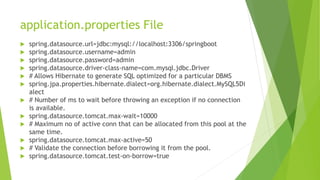
application.properties File
 spring.datasource.url=jdbc:mysql://localhost:3306/springboot
 spring.datasource.username=admin
 spring.datasource.password=admin
 spring.datasource.driver-class-name=com.mysql.jdbc.Driver
 # Allows Hibernate to generate SQL optimized for a particular DBMS
 spring.jpa.properties.hibernate.dialect=org.hibernate.dialect.MySQL5Di
alect
 # Number of ms to wait before throwing an exception if no connection
is available.
 spring.datasource.tomcat.max-wait=10000
 # Maximum no of active conn that can be allocated from this pool at the
same time.
 spring.datasource.tomcat.max-active=50
 # Validate the connection before borrowing it from the pool.
 spring.datasource.tomcat.test-on-borrow=true
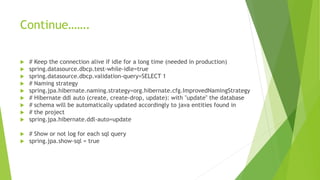
Continue…….
 # Keep the connection alive if idle for a long time (needed in production)
 spring.datasource.dbcp.test-while-idle=true
 spring.datasource.dbcp.validation-query=SELECT 1
 # Naming strategy
 spring.jpa.hibernate.naming.strategy=org.hibernate.cfg.ImprovedNamingStrategy
 # Hibernate ddl auto (create, create-drop, update): with "update" the database
 # schema will be automatically updated accordingly to java entities found in
 # the project
 spring.jpa.hibernate.ddl-auto=update
 # Show or not log for each sql query
 spring.jpa.show-sql = true
Load Custom Application Context
package com.apps;
import org.springframework.boot.SpringApplication;
import org.springframework.boot.autoconfigure.SpringBootApplication;
@SpringBootApplication
@ImportResource("applicationContext.xml")
public class MyAppApplication {
public static void main(String[] args) {
SpringApplication.run(MyAppApplication.class, args);
}
}
Thank you
 References
 http://docs.spring.io/spring-boot/docs/2.0.x-SNAPSHOT/reference/html/
 http://www.adeveloperdiary.com/java/spring-boot/an-introduction-to-spring-
boot/
 Assignment For you
 Configure yourself
 How to create jar for deployment on production server

Spring boot

  • 1.
    Spring Boot Code with0% Configuration Gyenendra Yadav Jindal InfoSolutions
  • 2.
    Introduction – pivotalSay…  Spring Boot makes it easy to create stand-alone, production-grade Spring based Applications that you can “just run”. We take an opinionated view of the Spring platform and third-party libraries so you can get started with minimum fuss. Most Spring Boot applications need very little Spring configuration.  You can use Spring Boot to create Java applications that can be started using java -jar or more traditional war deployments. We also provide a command line tool that runs “spring scripts”.
  • 4.
    WHY We NeedSpring Boot?  Spring Boot is next generation attempt to easy spring setup.  Spring Boot’s main benefit is configuring the resources based on what it finds in the classpath.  If your Maven POM includes JPA dependencies and a MYSQL driver, then Spring Boot will setup a persistence unit based on MySQL. If you’ve added a web dependency, then you will get Spring MVC configured with defaults.  When we talk about defaults, Spring Boot has its own opinions. If you are not specifying the details, it will use its own default configurations. If you want persistence, but don’t specify anything else in your POM file, then Spring Boot configures Hibernate as a JPA provider with an HSQLDB database.
  • 5.
    primary goals  Toprovide a radically faster and widely accessible getting started development experience for all Spring development. Since spring community has evolved so big, it is time to re-invent the way how spring applications are deployed in much quicker turn around time.  To be get started so quickely using the default values which are supported out of the box in the Spring Boot configurations.  To provide bunch of non-functional features/solutions that are very much common to large scale projects (e.g. embedded servers, security, metrics, health checks, externalized configuration).
  • 6.
    What Spring Bootbrings to the table ?  Convention over configuration  Standardization for Microservices  Integrated Server for Development  Cloud Support  Adapt & Support for 3rd Party Library
  • 7.
  • 8.
    Spring Boot AutoConfigure  Module to auto configure a wide range of Spring projects.  It will detect availability of certain frameworks (Spring Batch, Spring Data JPA, Hibernate, JDBC).  When detected it will try to auto configure that framework with some sensible defaults, which in general can be overridden by configuration in an application.properties/yml(yaml-data serialization language) file.
  • 9.
    Spring Boot Core Thebase for other modules, but it also provides some functionality that can be used on its own, eg. using command line arguments and YAML files as Spring Environment property sources and automatically binding environment properties to Spring bean properties (with validation).
  • 10.
    Spring Boot CLI Acommand line interface, based on ruby, to start/stop spring boot created applications.
  • 11.
    Spring Boot Actuator This project, when added, will enable certain enterprise features (Security, Metrics, Default Error pages) to your application.  As the auto configure module it uses auto detection to detect certain frameworks/features of your application. For an example, you can see all the REST Services defined in a web application using Actuator.
  • 12.
    Spring Boot Starters Different quick start projects to include as a dependency in your maven or gradle build file.  It will have the needed dependencies for that type of application.  Currently there are many starter projects and many more are expected to be added.
  • 13.
    Spring Boot Tools The Maven and Gradle build tool as well as the custom Spring Boot Loader (used in the single executable jar/war) is included in this project.
  • 14.
    How to useSpring Boot  You can use spring initialize to create the initial setup. You can visit either start.spring.io or use STS (Spring Tool Suite) Support available in IDEA or Eclipse to choose all the Spring Boot Starters  You need to also choose whether to use Maven or Gradle as the build tool.  If you are using start.spring.io, you need to then download the zip and configure your workspace. Otherwise using your preferred IDE will automatically create the required file in the workspace.  Add your code as required  You can either use mvn clean package or use IDEA or Eclipse to build and create the jar file.  By default the JAR would include integrated Tomcat server, so just by executing the JAR you should be able to use your program.
  • 16.
  • 19.
    Create Project  GotoWindow Menu -> Perspective ->Spring  Goto File Menu ->New -> Spring Starter Project
  • 25.
    MyAppApplication Class package com.apps; importorg.springframework.boot.SpringApplication; import org.springframework.boot.autoconfigure.SpringBootApplication; @SpringBootApplication public class MyAppApplication { public static void main(String[] args) { SpringApplication.run(MyAppApplication.class, args); } }
  • 26.
    @SpringBootApplication annotation  @SpringBootApplicationannotation  Many Spring Boot developers always have their main class annotated with @Configuration, @EnableAutoConfiguration and @ComponentScan. Since these annotations are so frequently used together (especially if you follow the best practices above), Spring Boot provides a convenient @SpringBootApplication alternative.  The @SpringBootApplication annotation is equivalent to using @Configuration, @EnableAutoConfiguration and @ComponentScan with their default attributes:
  • 27.
    SpringApplication.run()  You needto run Application.run() because this method starts whole Spring Framework. Code below integrates your main() with Spring Boot.  public class SpringApplication extends Object  Classes that can be used to bootstrap and launch a Spring application from a Java main method. By default class will perform the following steps to bootstrap your application:  Create an appropriate ApplicationContext instance (depending on your classpath)  Register a CommandLinePropertySource to expose command line arguments as Spring properties  Refresh the application context, loading all singleton beans  Trigger any CommandLineRunner beans  In most circumstances the static run(Object, String[]) method can be called directly from your main method to bootstrap your application:
  • 28.
    application.properties File  spring.datasource.url=jdbc:mysql://localhost:3306/springboot spring.datasource.username=admin  spring.datasource.password=admin  spring.datasource.driver-class-name=com.mysql.jdbc.Driver  # Allows Hibernate to generate SQL optimized for a particular DBMS  spring.jpa.properties.hibernate.dialect=org.hibernate.dialect.MySQL5Di alect  # Number of ms to wait before throwing an exception if no connection is available.  spring.datasource.tomcat.max-wait=10000  # Maximum no of active conn that can be allocated from this pool at the same time.  spring.datasource.tomcat.max-active=50  # Validate the connection before borrowing it from the pool.  spring.datasource.tomcat.test-on-borrow=true
  • 29.
    Continue…….  # Keepthe connection alive if idle for a long time (needed in production)  spring.datasource.dbcp.test-while-idle=true  spring.datasource.dbcp.validation-query=SELECT 1  # Naming strategy  spring.jpa.hibernate.naming.strategy=org.hibernate.cfg.ImprovedNamingStrategy  # Hibernate ddl auto (create, create-drop, update): with "update" the database  # schema will be automatically updated accordingly to java entities found in  # the project  spring.jpa.hibernate.ddl-auto=update  # Show or not log for each sql query  spring.jpa.show-sql = true
  • 30.
    Load Custom ApplicationContext package com.apps; import org.springframework.boot.SpringApplication; import org.springframework.boot.autoconfigure.SpringBootApplication; @SpringBootApplication @ImportResource("applicationContext.xml") public class MyAppApplication { public static void main(String[] args) { SpringApplication.run(MyAppApplication.class, args); } }
  • 32.
    Thank you  References http://docs.spring.io/spring-boot/docs/2.0.x-SNAPSHOT/reference/html/  http://www.adeveloperdiary.com/java/spring-boot/an-introduction-to-spring- boot/  Assignment For you  Configure yourself  How to create jar for deployment on production server