CSS-Tricks
A Web Design Community curated by Chris Coyier
Search... Go!
Search... Go!
Search... Go!
Search... Go!
Search: All Articles Forums Snippets
Or... browse the archives
Home•
Forums•
Videos•
Downloads•
Snippets•
•
Using CSS for Image Borders
By: Guest Author on 3/20/2008
The following is a Guest Post written by Volkan Görgülü. Thanks Volkan!
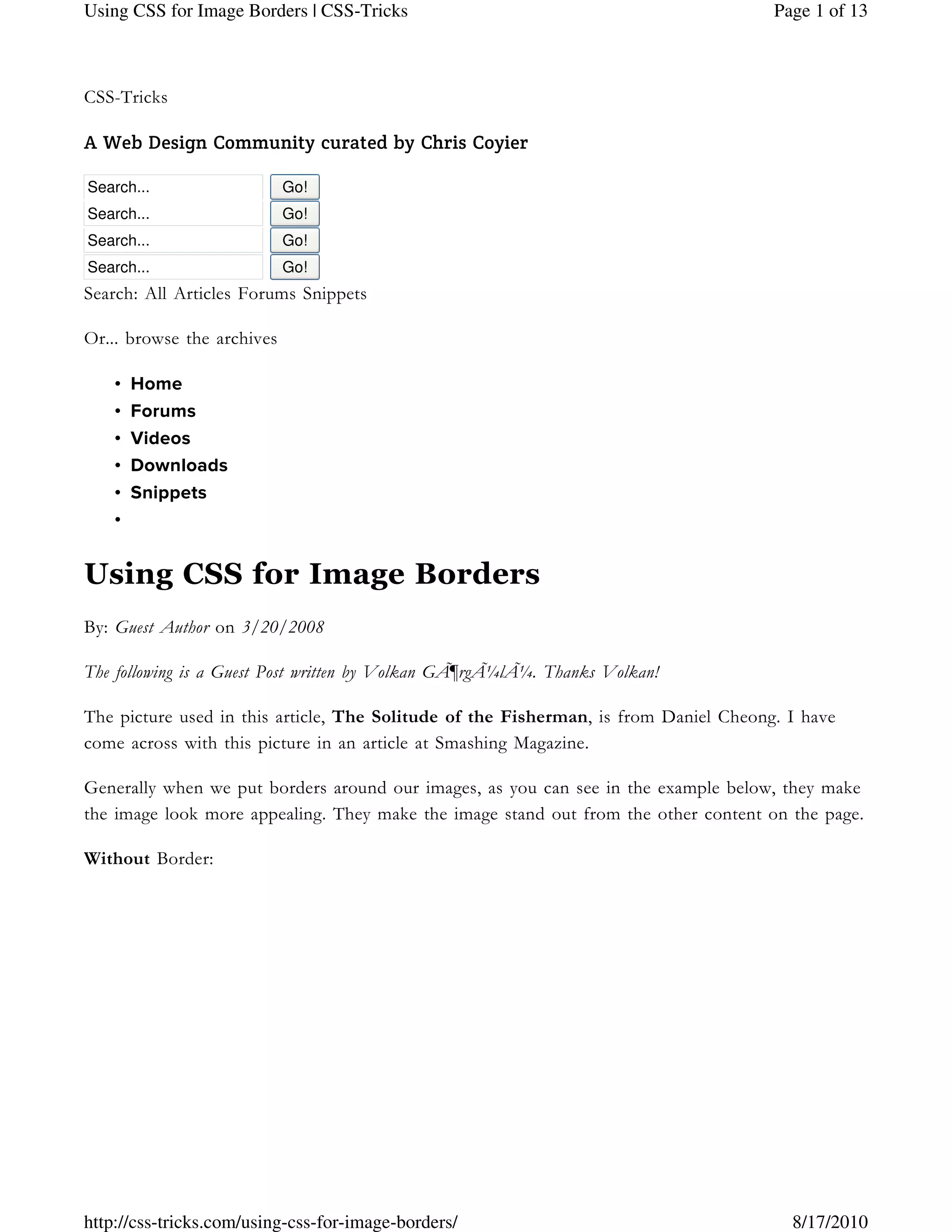
The picture used in this article, The Solitude of the Fisherman, is from Daniel Cheong. I have
come across with this picture in an article at Smashing Magazine.
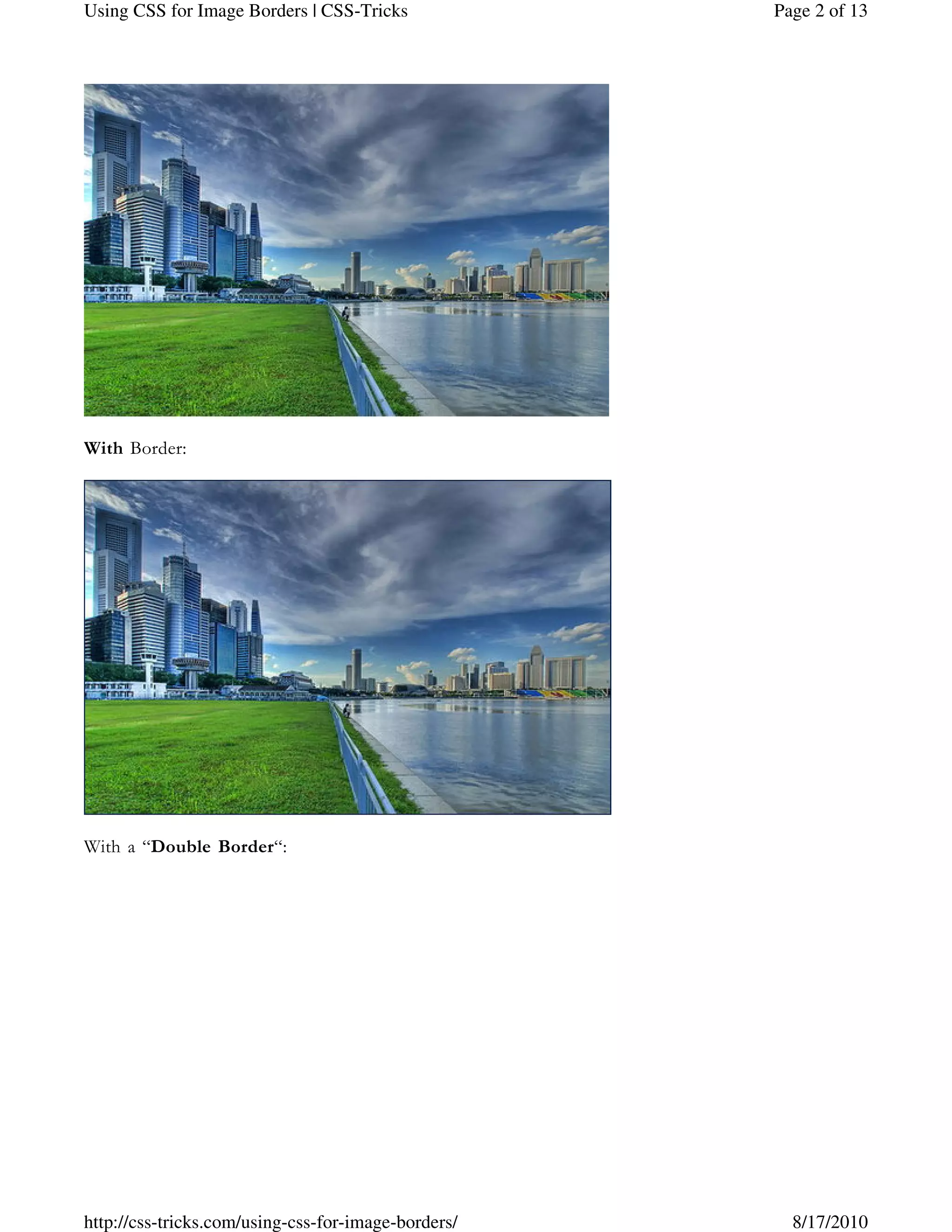
Generally when we put borders around our images, as you can see in the example below, they make
the image look more appealing. They make the image stand out from the other content on the page.
Without Border:
Page 1 of 13Using CSS for Image Borders | CSS-Tricks
8/17/2010http://css-tricks.com/using-css-for-image-borders/
With Border:
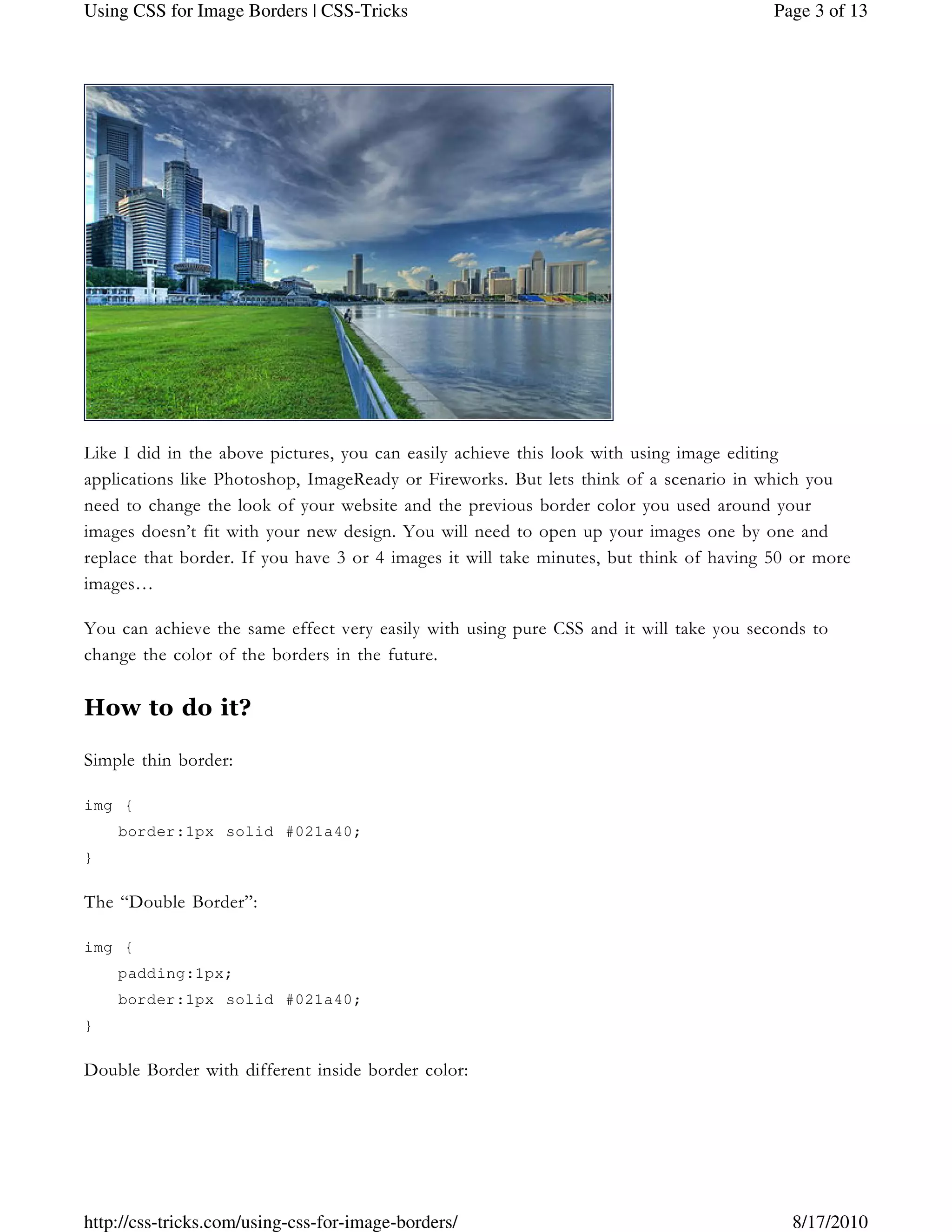
With a “Double Border“:
Page 2 of 13Using CSS for Image Borders | CSS-Tricks
8/17/2010http://css-tricks.com/using-css-for-image-borders/
Like I did in the above pictures, you can easily achieve this look with using image editing
applications like Photoshop, ImageReady or Fireworks. But lets think of a scenario in which you
need to change the look of your website and the previous border color you used around your
images doesn’t fit with your new design. You will need to open up your images one by one and
replace that border. If you have 3 or 4 images it will take minutes, but think of having 50 or more
images…
You can achieve the same effect very easily with using pure CSS and it will take you seconds to
change the color of the borders in the future.
How to do it?
Simple thin border:
img {
border:1px solid #021a40;
}
The “Double Border”:
img {
padding:1px;
border:1px solid #021a40;
}
Double Border with different inside border color:
Page 3 of 13Using CSS for Image Borders | CSS-Tricks
8/17/2010http://css-tricks.com/using-css-for-image-borders/
img {
padding:1px;
border:1px solid #021a40;
background-color:#ff0;
}
Another advantage of this technique
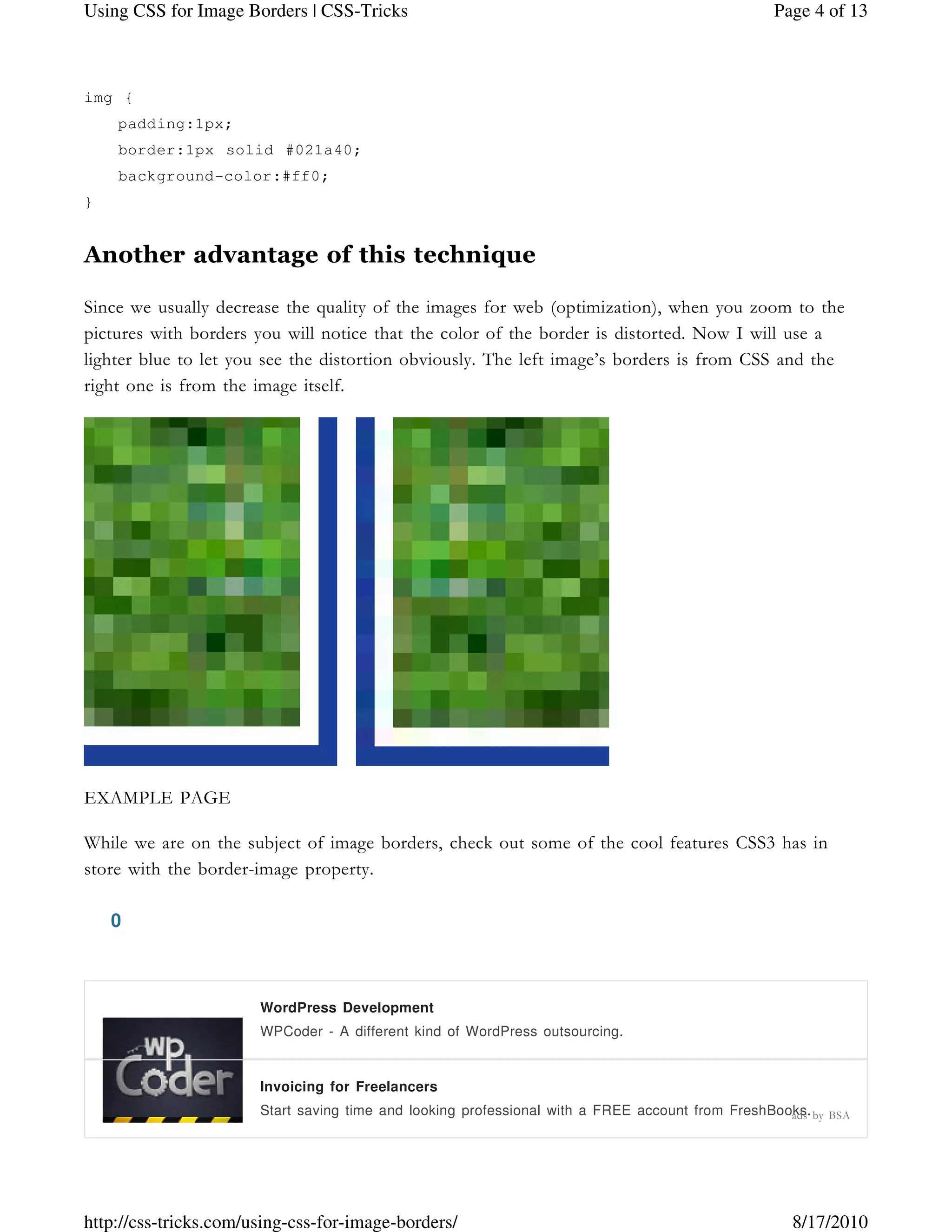
Since we usually decrease the quality of the images for web (optimization), when you zoom to the
pictures with borders you will notice that the color of the border is distorted. Now I will use a
lighter blue to let you see the distortion obviously. The left image’s borders is from CSS and the
right one is from the image itself.
EXAMPLE PAGE
While we are on the subject of image borders, check out some of the cool features CSS3 has in
store with the border-image property.
0
WordPress Development
WPCoder - A different kind of WordPress outsourcing.
Invoicing for Freelancers
Start saving time and looking professional with a FREE account from FreshBooks.ads by BSA
Page 4 of 13Using CSS for Image Borders | CSS-Tricks
8/17/2010http://css-tricks.com/using-css-for-image-borders/
Page 5 of 13Using CSS for Image Borders | CSS-Tricks
8/17/2010http://css-tricks.com/using-css-for-image-borders/
0 featured!9 Responses0 buried (show)
1.
Expertsforge says:
03/23/2008 at 11:22 pm
So far, I used to achieve the double borders using photoshop editing.. Now it is easier with
CSS. Good article.
2.
Volkan Görgülü says:
03/24/2008 at 3:27 pm
I’m glad, it helped.
3.
Jermayn says:
03/24/2008 at 9:04 pm
CSS is easier than psd editing. I like adding a background to the image so you get a double
border effect. (more hear)
4.
Joe says:
10/03/2008 at 4:59 pm
Page 6 of 13Using CSS for Image Borders | CSS-Tricks
8/17/2010http://css-tricks.com/using-css-for-image-borders/
Chris – thanks for your website. I enjoy reading it! I have a question though on img borders.
if you see my webpage i am trying to put an rss image to my flickr rss feed but it keeps
coming up with the stinking border around it. How do i fix this? I dont know how to have
text and img on the same line so i put it in a table. Anyway – what div class or css command
do i need to input to get rid of the border?
flickrss a img {
border:0px solid #fff;
color:#fff;
text-decoration:none;
margin:6px;
float:right;
But the flickrss div is inside the flickr div. Im not too sure how to do a subdiv.
thanks!
-Joe!
5.
RocknMetal says:
10/03/2008 at 9:03 pm
Hi, I can’t seem to get this code to work in IE7 (or 6 for that matter) but works great in FF.
There must be a required IE switch missing. Any ideas?
.imageBorder {
padding:7px;
background-color:#F5F4F2;
border:1px solid #c8c8c7;
float:middle;
margin: 5px;
}
6.
Page 7 of 13Using CSS for Image Borders | CSS-Tricks
8/17/2010http://css-tricks.com/using-css-for-image-borders/
Lia Moretti says:
10/16/2008 at 7:12 am
I ran into this page while trying to fix the same problem as RocknMetal, above. It just doesn’t
work in IE. Do you have a trick for that? Thanks anyway.
7.
Guest says:
11/11/2008 at 2:26 pm
Indeed I used to do this with photoshop too. Great article Volkan, thanks.
This comment thread is closed. If you have important information to share, you can always
contact me.
Explore
Have you your
sharp-edged axes?
Featured•
Core Concepts•
jQuery Tutorials•
Classics•
Creating a Web App from Scratch•
Full Page Background Images•
Designing for WordPress•
Build Your Own Social Home!•
Absolute Positioning Inside Relative Positioning•
PSD to HTML from p2h.com
Hot offer: Start at $99, through August 31, 2010 ads by BSA
Page 8 of 13Using CSS for Image Borders | CSS-Tricks
8/17/2010http://css-tricks.com/using-css-for-image-borders/
IE CSS Bugs That'll Get You Every Time•
404 Best Practices•
Date Display with Sprites•
The VERY Basics of HTML & CSS•
Classes and IDs•
The CSS Box Model•
All About Floats•
CSS Overflow Property•
CSS Font Size - (px - em - % - pt - keyword)•
CSS Transparency / Opacity•
CSS Sprites•
CSS Image Replacement•
CSS Vertial Align•
Basic Explanations of Positioning•
Anything Slider jQuery Plugin•
Moving Boxes•
Simple jQuery Dropdowns•
Featured Content Slider•
Start/Stop Slider•
Banner Code Displayer Thing•
Highlight Certain Number of Characters•
Auto-Moving Parallax Background•
Top Designers CSS Wishlist•
What Beautiful HTML Code Looks Like•
Easily Password Protect a Website or Subdirectory•
IE-Only Stylesheets•
eCommerce Considerations•
PHP: Build Your First CMS•
BuySellAds.com Online
Advertising
Join over 1,000 high quality advertisers
who advertise across 750 successful
websites, and take control of your ad
space!
BuySellAds.com Online
Advertising
Join over 1,000 high quality advertisers
who advertise across 750 successful
websites, and take control of your ad
space!
ads by BSA
Page 9 of 13Using CSS for Image Borders | CSS-Tricks
8/17/2010http://css-tricks.com/using-css-for-image-borders/
Vote
Question Contention Query Debate Quandry Dispute
Let's say you were writing some text-only documentation. Which sentence is
clearest?
• Select a user and then click the Update button.
• Select a user and then press the Update button.
• Select a user and then choose the Update button.
• Select a user and then click Update.
• Select a user and then press Update.
• Select a user and then choose Update.
• Select a user and Update.
Vote View Results
 Loading ...
Frequently Asked Questions
So impatient, full of action, full of manly pride and friendship
Where can I learn the very basics?•
What books do you recommend?•
How do you run IE on Mac?•
Why is the text selection background color orange on this site?•
How do you get those spaces in your Dock?•
Page 10 of 13Using CSS for Image Borders | CSS-Tricks
8/17/2010http://css-tricks.com/using-css-for-image-borders/
Blog Roll
All the hands of comrades clasping, all the Southern, all the Northern
Smashing Network•
Digging Into WP•
Quotes on Design•
Smashing Network
Useful and Free Pictogram Dingbat Fonts1.
speckyboy.com
Color Stream: a Free iPhone App For Web Designers2.
smashingmagazine.com
An Introduction to Split Testing in WordPress3.
net.tutsplus.com
Recession Survival Tips For Online Businesses4.
smashingmagazine.com
Advantages Of Collective Collaboration in Online Art Collectives5.
psd.tutsplus.com
Gestalt Principles Applied in Design6.
sixrevisions.com
User Experience Books for Beginners7.
uxbooth.com
Show Markup in CSS Comments8.
css-tricks.com
What’s the Single Best Thing You’ve Ever Done for Your Freelancing Biz?9.
freelancefolder.com
Giving Users Credit10.
designinformer.com
•
Terry Acker•
Douglas Adams•
Peter Gabriel•
Oscar Wilde•
Jeff Atwood•
William Childs•
Salvador Dali•
Page 11 of 13Using CSS for Image Borders | CSS-Tricks
8/17/2010http://css-tricks.com/using-css-for-image-borders/
Shane Meendering•
John Carmack•
Melinda Santillian•
Delay Loading of Print CSS•
Digg Technical Talks – Rasmus Lerdorf•
Randomized Grid of Posts•
Easy Comment Management via SQL•
Using Menus in WordPress 3.0•
WordPress Update: 3.0.1•
WordPress E-Junkie Plugin•
DiW v3.0 Book News•
Thumbnail Based Archives•
Optimizing WordPress Permalinks•
Mad Props
All the forms and shows, all the workmen at their work
•
Fonts by Typekit
•
Hosting by Media Temple
•
CDN by NetDNA
•
CMS by WordPress
* This website may or may notThis website may or may notThis website may or may notThis website may or may not contain any actual CSS or Tricks.contain any actual CSS or Tricks.contain any actual CSS or Tricks.contain any actual CSS or Tricks.  
I work for...
Wufoo is an online form builder that makes building even the most complex forms so easy, it's fun!
Book I co-authored...
Digging Into WordPress is a book and blog I co-author with Jeff Starr about the world's #1
publishing platform.
Page 12 of 13Using CSS for Image Borders | CSS-Tricks
8/17/2010http://css-tricks.com/using-css-for-image-borders/
Words I collect...
Quotes on Design is a collection of design related quotes. With an API for your integration ideas!
About the Author
Chris Coyier is a web designer living in Tampa, FL. He loves old time fiddle music, episodic
television, building little useful websites, and tech books. You may contact him.
Delicious Twitter Flickr Forrst Facebook Grooveshark
Subscribe!
Articles Feed•
Snippets Feed•
Posts by Email•
Forums Feed•
iTunes Large•
iTunes Mobile•
Screencast Large•
Screencast Mobile•
Page 13 of 13Using CSS for Image Borders | CSS-Tricks
8/17/2010http://css-tricks.com/using-css-for-image-borders/

Http _css-tricks

  • 1.
    CSS-Tricks A Web DesignCommunity curated by Chris Coyier Search... Go! Search... Go! Search... Go! Search... Go! Search: All Articles Forums Snippets Or... browse the archives Home• Forums• Videos• Downloads• Snippets• • Using CSS for Image Borders By: Guest Author on 3/20/2008 The following is a Guest Post written by Volkan Görgülü. Thanks Volkan! The picture used in this article, The Solitude of the Fisherman, is from Daniel Cheong. I have come across with this picture in an article at Smashing Magazine. Generally when we put borders around our images, as you can see in the example below, they make the image look more appealing. They make the image stand out from the other content on the page. Without Border: Page 1 of 13Using CSS for Image Borders | CSS-Tricks 8/17/2010http://css-tricks.com/using-css-for-image-borders/
  • 2.
    With Border: With a“Double Border“: Page 2 of 13Using CSS for Image Borders | CSS-Tricks 8/17/2010http://css-tricks.com/using-css-for-image-borders/
  • 3.
    Like I didin the above pictures, you can easily achieve this look with using image editing applications like Photoshop, ImageReady or Fireworks. But lets think of a scenario in which you need to change the look of your website and the previous border color you used around your images doesn’t fit with your new design. You will need to open up your images one by one and replace that border. If you have 3 or 4 images it will take minutes, but think of having 50 or more images… You can achieve the same effect very easily with using pure CSS and it will take you seconds to change the color of the borders in the future. How to do it? Simple thin border: img { border:1px solid #021a40; } The “Double Border”: img { padding:1px; border:1px solid #021a40; } Double Border with different inside border color: Page 3 of 13Using CSS for Image Borders | CSS-Tricks 8/17/2010http://css-tricks.com/using-css-for-image-borders/
  • 4.
    img { padding:1px; border:1px solid#021a40; background-color:#ff0; } Another advantage of this technique Since we usually decrease the quality of the images for web (optimization), when you zoom to the pictures with borders you will notice that the color of the border is distorted. Now I will use a lighter blue to let you see the distortion obviously. The left image’s borders is from CSS and the right one is from the image itself. EXAMPLE PAGE While we are on the subject of image borders, check out some of the cool features CSS3 has in store with the border-image property. 0 WordPress Development WPCoder - A different kind of WordPress outsourcing. Invoicing for Freelancers Start saving time and looking professional with a FREE account from FreshBooks.ads by BSA Page 4 of 13Using CSS for Image Borders | CSS-Tricks 8/17/2010http://css-tricks.com/using-css-for-image-borders/
  • 5.
    Page 5 of13Using CSS for Image Borders | CSS-Tricks 8/17/2010http://css-tricks.com/using-css-for-image-borders/
  • 6.
    0 featured!9 Responses0buried (show) 1. Expertsforge says: 03/23/2008 at 11:22 pm So far, I used to achieve the double borders using photoshop editing.. Now it is easier with CSS. Good article. 2. Volkan Görgülü says: 03/24/2008 at 3:27 pm I’m glad, it helped. 3. Jermayn says: 03/24/2008 at 9:04 pm CSS is easier than psd editing. I like adding a background to the image so you get a double border effect. (more hear) 4. Joe says: 10/03/2008 at 4:59 pm Page 6 of 13Using CSS for Image Borders | CSS-Tricks 8/17/2010http://css-tricks.com/using-css-for-image-borders/
  • 7.
    Chris – thanksfor your website. I enjoy reading it! I have a question though on img borders. if you see my webpage i am trying to put an rss image to my flickr rss feed but it keeps coming up with the stinking border around it. How do i fix this? I dont know how to have text and img on the same line so i put it in a table. Anyway – what div class or css command do i need to input to get rid of the border? flickrss a img { border:0px solid #fff; color:#fff; text-decoration:none; margin:6px; float:right; But the flickrss div is inside the flickr div. Im not too sure how to do a subdiv. thanks! -Joe! 5. RocknMetal says: 10/03/2008 at 9:03 pm Hi, I can’t seem to get this code to work in IE7 (or 6 for that matter) but works great in FF. There must be a required IE switch missing. Any ideas? .imageBorder { padding:7px; background-color:#F5F4F2; border:1px solid #c8c8c7; float:middle; margin: 5px; } 6. Page 7 of 13Using CSS for Image Borders | CSS-Tricks 8/17/2010http://css-tricks.com/using-css-for-image-borders/
  • 8.
    Lia Moretti says: 10/16/2008at 7:12 am I ran into this page while trying to fix the same problem as RocknMetal, above. It just doesn’t work in IE. Do you have a trick for that? Thanks anyway. 7. Guest says: 11/11/2008 at 2:26 pm Indeed I used to do this with photoshop too. Great article Volkan, thanks. This comment thread is closed. If you have important information to share, you can always contact me. Explore Have you your sharp-edged axes? Featured• Core Concepts• jQuery Tutorials• Classics• Creating a Web App from Scratch• Full Page Background Images• Designing for WordPress• Build Your Own Social Home!• Absolute Positioning Inside Relative Positioning• PSD to HTML from p2h.com Hot offer: Start at $99, through August 31, 2010 ads by BSA Page 8 of 13Using CSS for Image Borders | CSS-Tricks 8/17/2010http://css-tricks.com/using-css-for-image-borders/
  • 9.
    IE CSS BugsThat'll Get You Every Time• 404 Best Practices• Date Display with Sprites• The VERY Basics of HTML & CSS• Classes and IDs• The CSS Box Model• All About Floats• CSS Overflow Property• CSS Font Size - (px - em - % - pt - keyword)• CSS Transparency / Opacity• CSS Sprites• CSS Image Replacement• CSS Vertial Align• Basic Explanations of Positioning• Anything Slider jQuery Plugin• Moving Boxes• Simple jQuery Dropdowns• Featured Content Slider• Start/Stop Slider• Banner Code Displayer Thing• Highlight Certain Number of Characters• Auto-Moving Parallax Background• Top Designers CSS Wishlist• What Beautiful HTML Code Looks Like• Easily Password Protect a Website or Subdirectory• IE-Only Stylesheets• eCommerce Considerations• PHP: Build Your First CMS• BuySellAds.com Online Advertising Join over 1,000 high quality advertisers who advertise across 750 successful websites, and take control of your ad space! BuySellAds.com Online Advertising Join over 1,000 high quality advertisers who advertise across 750 successful websites, and take control of your ad space! ads by BSA Page 9 of 13Using CSS for Image Borders | CSS-Tricks 8/17/2010http://css-tricks.com/using-css-for-image-borders/
  • 10.
    Vote Question Contention QueryDebate Quandry Dispute Let's say you were writing some text-only documentation. Which sentence is clearest? • Select a user and then click the Update button. • Select a user and then press the Update button. • Select a user and then choose the Update button. • Select a user and then click Update. • Select a user and then press Update. • Select a user and then choose Update. • Select a user and Update. Vote View Results  Loading ... Frequently Asked Questions So impatient, full of action, full of manly pride and friendship Where can I learn the very basics?• What books do you recommend?• How do you run IE on Mac?• Why is the text selection background color orange on this site?• How do you get those spaces in your Dock?• Page 10 of 13Using CSS for Image Borders | CSS-Tricks 8/17/2010http://css-tricks.com/using-css-for-image-borders/
  • 11.
    Blog Roll All thehands of comrades clasping, all the Southern, all the Northern Smashing Network• Digging Into WP• Quotes on Design• Smashing Network Useful and Free Pictogram Dingbat Fonts1. speckyboy.com Color Stream: a Free iPhone App For Web Designers2. smashingmagazine.com An Introduction to Split Testing in WordPress3. net.tutsplus.com Recession Survival Tips For Online Businesses4. smashingmagazine.com Advantages Of Collective Collaboration in Online Art Collectives5. psd.tutsplus.com Gestalt Principles Applied in Design6. sixrevisions.com User Experience Books for Beginners7. uxbooth.com Show Markup in CSS Comments8. css-tricks.com What’s the Single Best Thing You’ve Ever Done for Your Freelancing Biz?9. freelancefolder.com Giving Users Credit10. designinformer.com • Terry Acker• Douglas Adams• Peter Gabriel• Oscar Wilde• Jeff Atwood• William Childs• Salvador Dali• Page 11 of 13Using CSS for Image Borders | CSS-Tricks 8/17/2010http://css-tricks.com/using-css-for-image-borders/
  • 12.
    Shane Meendering• John Carmack• MelindaSantillian• Delay Loading of Print CSS• Digg Technical Talks – Rasmus Lerdorf• Randomized Grid of Posts• Easy Comment Management via SQL• Using Menus in WordPress 3.0• WordPress Update: 3.0.1• WordPress E-Junkie Plugin• DiW v3.0 Book News• Thumbnail Based Archives• Optimizing WordPress Permalinks• Mad Props All the forms and shows, all the workmen at their work • Fonts by Typekit • Hosting by Media Temple • CDN by NetDNA • CMS by WordPress * This website may or may notThis website may or may notThis website may or may notThis website may or may not contain any actual CSS or Tricks.contain any actual CSS or Tricks.contain any actual CSS or Tricks.contain any actual CSS or Tricks.   I work for... Wufoo is an online form builder that makes building even the most complex forms so easy, it's fun! Book I co-authored... Digging Into WordPress is a book and blog I co-author with Jeff Starr about the world's #1 publishing platform. Page 12 of 13Using CSS for Image Borders | CSS-Tricks 8/17/2010http://css-tricks.com/using-css-for-image-borders/
  • 13.
    Words I collect... Quoteson Design is a collection of design related quotes. With an API for your integration ideas! About the Author Chris Coyier is a web designer living in Tampa, FL. He loves old time fiddle music, episodic television, building little useful websites, and tech books. You may contact him. Delicious Twitter Flickr Forrst Facebook Grooveshark Subscribe! Articles Feed• Snippets Feed• Posts by Email• Forums Feed• iTunes Large• iTunes Mobile• Screencast Large• Screencast Mobile• Page 13 of 13Using CSS for Image Borders | CSS-Tricks 8/17/2010http://css-tricks.com/using-css-for-image-borders/